# Overview
The OCAP Client is a powerful and versatile JavaScript library designed to connect your applications to an OCAP-powered blockchain. It provides a streamlined, developer-friendly interface for reading and writing data, managing digital assets, and listening for on-chain events. The client can be used in any Node.js or browser-based environment, offering a single solution for both backend services and frontend applications.
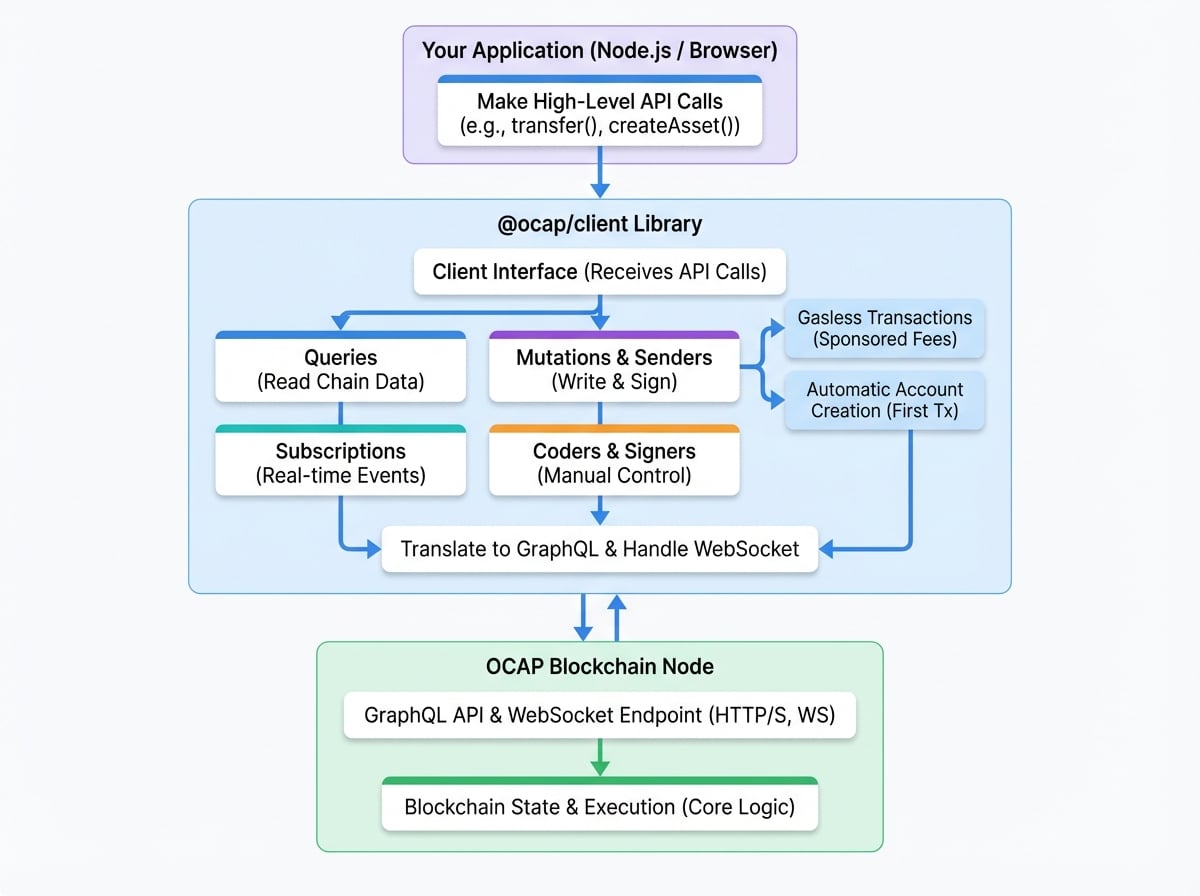
At its core, the client simplifies blockchain interaction by abstracting away the complexities of transaction encoding and signing. It uses a GraphQL API for all communication with the blockchain node over HTTP/S, making it easy to query chain data and submit transactions.
### Key Features
The OCAP Client is organized into several distinct groups of methods to handle different aspects of blockchain communication:
Read any data from the blockchain, including blocks, transactions, account states, asset details, and general chain information.
Write data to the blockchain. Use high-level helper methods like `transfer` or `createAsset` to easily prepare, sign, and send transactions.
Listen for real-time on-chain events. Subscribe to topics and receive updates as they happen via a WebSocket connection.
For advanced use cases, you can encode and sign transactions manually, giving you full control over the transaction lifecycle.
### Important Concepts
* **Automatic Account Creation**: On an OCAP-powered chain, a new account is automatically created on-chain when it receives its first incoming transaction (e.g., receiving tokens). You don't need a separate transaction to initialize an account.
* **Gasless Transactions**: The client supports a gas payment mechanism where a designated "gas payer" wallet can sponsor transaction fees for other users. This enables you to create seamless, gas-free experiences for your application's users.
### Where to Go Next
Ready to start building? Here are some helpful links to get you moving:
Install the client, connect to the Beta chain, and make your first query in under 30 minutes.
Follow step-by-step tutorials for common tasks like creating NFTs, transferring tokens, and staking.
Dive into the complete API documentation for detailed information on every method, parameter, and data type.