# Quill Emoji Mart Picker
Module and Blot for [Quill.js](https://quilljs.com) that supports Emoji Mart Picker and Emoji Mart.
With this plugin emojis within your Quill Editor become consistent among all devices and browsers.
This extension converts unicode emojis, emoticons and emoji names into emoji images from Apple, Google, Twitter, EmojiOne, Facebook Messenger or Facebook.
[Demo](https://quill-emoji-mart-picker.netlify.com/)
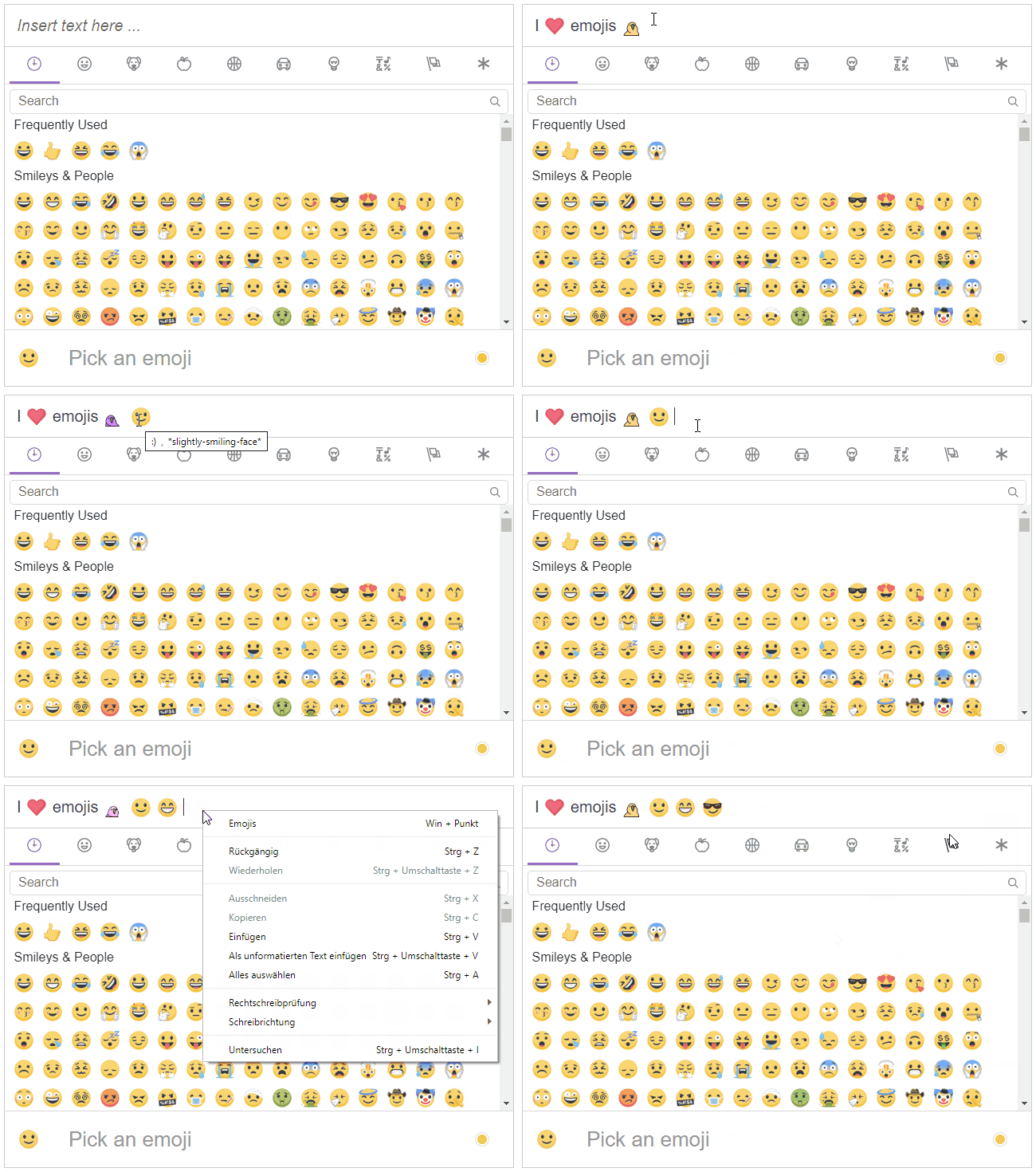
Custom emojis in the form of "Emoji Mart emojis" are also supported.
In comparison to other modules it also features copy & pasting and replacement as you type of emojis, custom emojis and emoticons from within and outside the editor.
The emoji's image URL is the same as Emoji Mart's to not send unnecessary requests.
**Although the plugin should be used with Emoji Mart Picker, it can also be used with Emoji Mart or as a standalone without the picker.**
**You can not use a suitable picker (Emoji Mart Picker / Emoji Mart) if you are not using Angular, React or Vue which is required for Emoji Mart.**
 ##
## Installation
### Minimal Install
This package requires Quill
```sh
npm install quill @nutrify/quill-emoji-mart-picker --save
```
For styling import @nutrify/quill-emoji-mart-picker/emoji.quill.css
### Installing with a Picker
#### Angular
On Angular you should install Emoji Mart Picker instead of Emoji Mart to be able to use the replacement of emoji short names at the same time as emoticons.
Emoji Mart Picker also has a few bug fixes.
```sh
npm install quill @nutrify/quill-emoji-mart-picker @nutrify/ngx-emoji-mart-picker --save
```
Additionally install a Quill wrapper ([ngx-quill](https://www.npmjs.com/package/ngx-quill) or [ngx-quill-wrapper](https://www.npmjs.com/package/ngx-quill-wrapper)) for Angular:
```
npm install ngx-quill --save
```
#### React & Vue
Additionally install Emoji Mart according to your platform.
Any Quill wrapper should work.
## Usage
### Webpack/ES6
```javascript
this.set = 'apple';
// Optional custom emojis
this.customEmojis = [
{
name: 'Party Parrot',
shortNames: ['parrot'],
keywords: ['party'],
imageUrl: './assets/images/parrot.gif',
},
{
name: 'Test Flag',
shortNames: ['test'],
keywords: ['test', 'flag'],
spriteUrl: 'https://unpkg.com/emoji-datasource-twitter@4.0.4/img/twitter/sheets-256/64.png',
sheet_x: 1,
sheet_y: 1,
size: 64,
sheetColumns: 52,
sheetRows: 52,
},
];
const quill = new Quill(editor, {
// ...
modules: {
// ...
'emoji-module': {
emojiData: emojis,
customEmojiData: this.customEmojis,
preventDrag: true,
showTitle: true,
indicator: '*',
convertEmoticons: true,
convertShortNames: true,
set: () => this.set
},
toolbar: false
},
formats: ['emoji'] // Use formats with toolbar: false, if you want to allow text and emojis only
});
```
### Angular
This example is using [ngx-quill](https://www.npmjs.com/package/ngx-quill), other wrappers also work.
**app.module.ts:**
```typescript
import '@nutrify/quill-emoji-mart-picker';
import { QuillModule } from 'ngx-quill';
import { NgModule } from '@angular/core';
import { BrowserModule } from '@angular/platform-browser';
import { PickerModule } from '@nutrify/ngx-emoji-mart-picker';
import { AppComponent } from './app.component';
@NgModule({
declarations: [
AppComponent
],
imports: [
BrowserModule,
QuillModule.forRoot(),
PickerModule
],
providers: [],
bootstrap: [AppComponent]
})
export class AppModule { }
```
**component.ts:**
```typescript
import { Component, VERSION } from '@angular/core';
import { emojis } from '@nutrify/ngx-emoji-mart-picker/ngx-emoji/esm5/data/emojis';
import { EmojiEvent } from '@nutrify/ngx-emoji-mart-picker/ngx-emoji/public_api';
import { Emoji } from '@nutrify/quill-emoji-mart-picker';
@Component({
selector: 'app-root',
templateUrl: './app.component.html',
styleUrls: ['./app.component.scss']
})
export class AppComponent {
set = 'apple';
modules = {};
formats: string[] = [];
quill = null;
customEmojis = [
{
name: 'Party Parrot',
shortNames: ['parrot'],
keywords: ['party'],
imageUrl: './assets/images/parrot.gif',
},
{
name: 'Test Flag',
shortNames: ['test'],
keywords: ['test', 'flag'],
spriteUrl: 'https://unpkg.com/emoji-datasource-twitter@4.0.4/img/twitter/sheets-256/64.png',
sheet_x: 1,
sheet_y: 1,
size: 64,
sheetColumns: 52,
sheetRows: 52,
},
];
created(quill: any) {
this.quill = quill;
}
insertEmoji(event: EmojiEvent) {
Emoji.insertEmoji(this.quill, event);
}
constructor() {
this.modules = {
'emoji-module': {
emojiData: emojis,
customEmojiData: this.customEmojis,
preventDrag: true,
showTitle: true,
indicator: '*',
convertEmoticons: true,
convertShortNames: true,
set: () => this.set
},
toolbar: false
};
this.formats = ['emoji'];
}
}
```
**component.html:**
```html
##
## Installation
### Minimal Install
This package requires Quill
```sh
npm install quill @nutrify/quill-emoji-mart-picker --save
```
For styling import @nutrify/quill-emoji-mart-picker/emoji.quill.css
### Installing with a Picker
#### Angular
On Angular you should install Emoji Mart Picker instead of Emoji Mart to be able to use the replacement of emoji short names at the same time as emoticons.
Emoji Mart Picker also has a few bug fixes.
```sh
npm install quill @nutrify/quill-emoji-mart-picker @nutrify/ngx-emoji-mart-picker --save
```
Additionally install a Quill wrapper ([ngx-quill](https://www.npmjs.com/package/ngx-quill) or [ngx-quill-wrapper](https://www.npmjs.com/package/ngx-quill-wrapper)) for Angular:
```
npm install ngx-quill --save
```
#### React & Vue
Additionally install Emoji Mart according to your platform.
Any Quill wrapper should work.
## Usage
### Webpack/ES6
```javascript
this.set = 'apple';
// Optional custom emojis
this.customEmojis = [
{
name: 'Party Parrot',
shortNames: ['parrot'],
keywords: ['party'],
imageUrl: './assets/images/parrot.gif',
},
{
name: 'Test Flag',
shortNames: ['test'],
keywords: ['test', 'flag'],
spriteUrl: 'https://unpkg.com/emoji-datasource-twitter@4.0.4/img/twitter/sheets-256/64.png',
sheet_x: 1,
sheet_y: 1,
size: 64,
sheetColumns: 52,
sheetRows: 52,
},
];
const quill = new Quill(editor, {
// ...
modules: {
// ...
'emoji-module': {
emojiData: emojis,
customEmojiData: this.customEmojis,
preventDrag: true,
showTitle: true,
indicator: '*',
convertEmoticons: true,
convertShortNames: true,
set: () => this.set
},
toolbar: false
},
formats: ['emoji'] // Use formats with toolbar: false, if you want to allow text and emojis only
});
```
### Angular
This example is using [ngx-quill](https://www.npmjs.com/package/ngx-quill), other wrappers also work.
**app.module.ts:**
```typescript
import '@nutrify/quill-emoji-mart-picker';
import { QuillModule } from 'ngx-quill';
import { NgModule } from '@angular/core';
import { BrowserModule } from '@angular/platform-browser';
import { PickerModule } from '@nutrify/ngx-emoji-mart-picker';
import { AppComponent } from './app.component';
@NgModule({
declarations: [
AppComponent
],
imports: [
BrowserModule,
QuillModule.forRoot(),
PickerModule
],
providers: [],
bootstrap: [AppComponent]
})
export class AppModule { }
```
**component.ts:**
```typescript
import { Component, VERSION } from '@angular/core';
import { emojis } from '@nutrify/ngx-emoji-mart-picker/ngx-emoji/esm5/data/emojis';
import { EmojiEvent } from '@nutrify/ngx-emoji-mart-picker/ngx-emoji/public_api';
import { Emoji } from '@nutrify/quill-emoji-mart-picker';
@Component({
selector: 'app-root',
templateUrl: './app.component.html',
styleUrls: ['./app.component.scss']
})
export class AppComponent {
set = 'apple';
modules = {};
formats: string[] = [];
quill = null;
customEmojis = [
{
name: 'Party Parrot',
shortNames: ['parrot'],
keywords: ['party'],
imageUrl: './assets/images/parrot.gif',
},
{
name: 'Test Flag',
shortNames: ['test'],
keywords: ['test', 'flag'],
spriteUrl: 'https://unpkg.com/emoji-datasource-twitter@4.0.4/img/twitter/sheets-256/64.png',
sheet_x: 1,
sheet_y: 1,
size: 64,
sheetColumns: 52,
sheetRows: 52,
},
];
created(quill: any) {
this.quill = quill;
}
insertEmoji(event: EmojiEvent) {
Emoji.insertEmoji(this.quill, event);
}
constructor() {
this.modules = {
'emoji-module': {
emojiData: emojis,
customEmojiData: this.customEmojis,
preventDrag: true,
showTitle: true,
indicator: '*',
convertEmoticons: true,
convertShortNames: true,
set: () => this.set
},
toolbar: false
};
this.formats = ['emoji'];
}
}
```
**component.html:**
```html
```
Check out the [source code](https://github.com/raphaelM-sudo/quill-emoji-mart-picker/blob/master/src) for further informations.
### React & Vue
Make sure to include @nutrify/quill-emoji-mart-picker and use following Quill modules inside your Quill wrapper:
```javascript
modules: {
// ...
'emoji-module': {
emojiData: emojis,
customEmojiData: this.customEmojis,
preventDrag: true,
showTitle: true,
indicator: '*',
convertEmoticons: true,
convertShortNames: true,
set: () => this.set
},
toolbar: false
}
```
Quill Emoji Mart Picker exports insertEmoji, if you want to use it with Emoji Mart:
```javascript
import { Emoji } from '@nutrify/quill-emoji-mart-picker';
insertEmoji(emojiClickEvent) {
// It expects the Quill instance and Emoji Mart's click event
Emoji.insertEmoji(quillInstance, emojiClickEvent);
}
```
## Import Emoji Data
The emoji data needs to be hand over to the quill module.
### Angular
#### Using Emoji Mart Picker (recommended)
**component.ts:**
```typescript
import { emojis } from '@nutrify/ngx-emoji-mart-picker/ngx-emoji/esm5/data/emojis';
// ...
this.modules = {
'emoji-module': {
emojiData: emojis,
// ...
}
};
// ...
```
#### Using Emoji Mart
**component.ts:**
```typescript
import { emojis } from '@ctrl/ngx-emoji-mart/ngx-emoji/esm5/data/emojis';
// ...
this.modules = {
'emoji-module': {
emojiData: emojis,
// ...
}
};
// ...
```
#### Other
Check if your Emoji Mart wrapper exports `CompressedEmojiData[]`, else
use Quill Emoji Mart Picker's emoji data:
```javascript
import { emojis } from '@nutrify/quill-emoji-mart-picker';
// ...
modules: {
// ...
'emoji-module': {
emojiData: emojis,
customEmojiData: this.customEmojis,
preventDrag: true,
showTitle: true,
indicator: '*',
convertEmoticons: true,
convertShortNames: true,
set: () => this.set
},
toolbar: false
}
// ...
```
## Options
| Property | Default | Description |
| ----------------- | -------------------- | ---------------------------------------------------------------------------------------------------------------------------------------------------------------------------- |
| emojiData | | Exported `CompressedEmojiData[]` of either Emoji Mart or Emoji Mart Picker. If you are not using any of these, use: import { emojis } from '@nutrify/ngx-emoji-mart-picker'; |
| customEmojiData | `undefined` | `ICustomEmoji[]``in the form of Emoji Mart's custom emoji Data |
| showTitle | `true` | Shows a title when hovering over the emoji |
| preventDrag | `true` | Prevents emoji images from dragging |
| indicator | ':' | Specifies the pre- and postfix of emoji short names e.g. `:grin:`. For Emoji Mart Picker choose: `*` |
| convertEmoticons | `true` | Converts emoticons into emoji images as well * |
| convertShortNames | `true` | Converts short names into emoji images as well * |
| set | `() => 'apple'` | Function that returns what set of emojis should be used. The return values may be: `'apple' \| 'google' \| 'twitter' \| 'emojione' \| 'messenger' \| 'facebook'` |
| backgroundImageFn | DEFAULT_BACKGROUNDFN | Function that returns the emoji sheet image. It uses the standard Emoji Mart image by default. The format has to match Emoji Mart's expected layout |
* Can not use convertEmoticons and convertShortNames at the same time if not using Emoji Mart Picker
## Blot
If you need more functionality than the insertEmoji method, the emoji blot accepts a unicode emoji character or an [emojiData object](https://www.npmjs.com/package/emoji-mart#examples-of-emoji-object).
It can be used this way:
```javascript
// myEmoji may be a unicode character or an object
new Delta().insert({ emoji: myEmoji });
```
## Styling
The plugin uses CSS for styling.
Just import the stylesheet and apply changes to it.
### CSS / SASS
```scss
@import '~@nutrify/quill-emoji-mart-picker/emoji.quill';
```
### Angular
**angular-cli.json:**
```json
"styles": [
"styles.css",
"../node_modules/@nutrify/quill-emoji-mart-picker/emoji.quill.css"
]
```