[](https://github.com/npv12/opencode-quota)
---
## Install
```bash
npx @npv12/opencode-quota init
```
> [!IMPORTANT]
> OpenCode `>= 1.4.3` and Node.js `>= 18` are required.
The installer adds missing plugin/config entries and keeps your unrelated settings. Re-running it updates only installer-owned Quota UI choices.
### What the installer asks
| Question | Pick this when you want... |
| --- | --- |
| Install scope | This repo/worktree only, or your global OpenCode config. |
| Quota UI | Sidebar panel, toasts, compact status line, terminal/slash-command only, or a mix. |
| Provider mode | Auto-detect providers, or choose a provider list yourself. |
| Quota reset periods | Show one reset period per provider, or all known reset periods. |
| Quota percentage meaning | Show quota remaining, or quota already used. |
### After install
1. Restart OpenCode.
2. Run `/quota_status` to verify things are working.
3. If you enabled the Sidebar panel, open the session sidebar and look for `Quota`.
4. If you enabled Compact status line, look for the home-bottom quota line and the chat/session prompt quota line.
### Terminal-only check
Run without installing the binary first:
```bash
npx @npv12/opencode-quota show
```
Or, if `opencode-quota` is already on your `PATH`:
```bash
opencode-quota show --provider copilot
```
## What you get
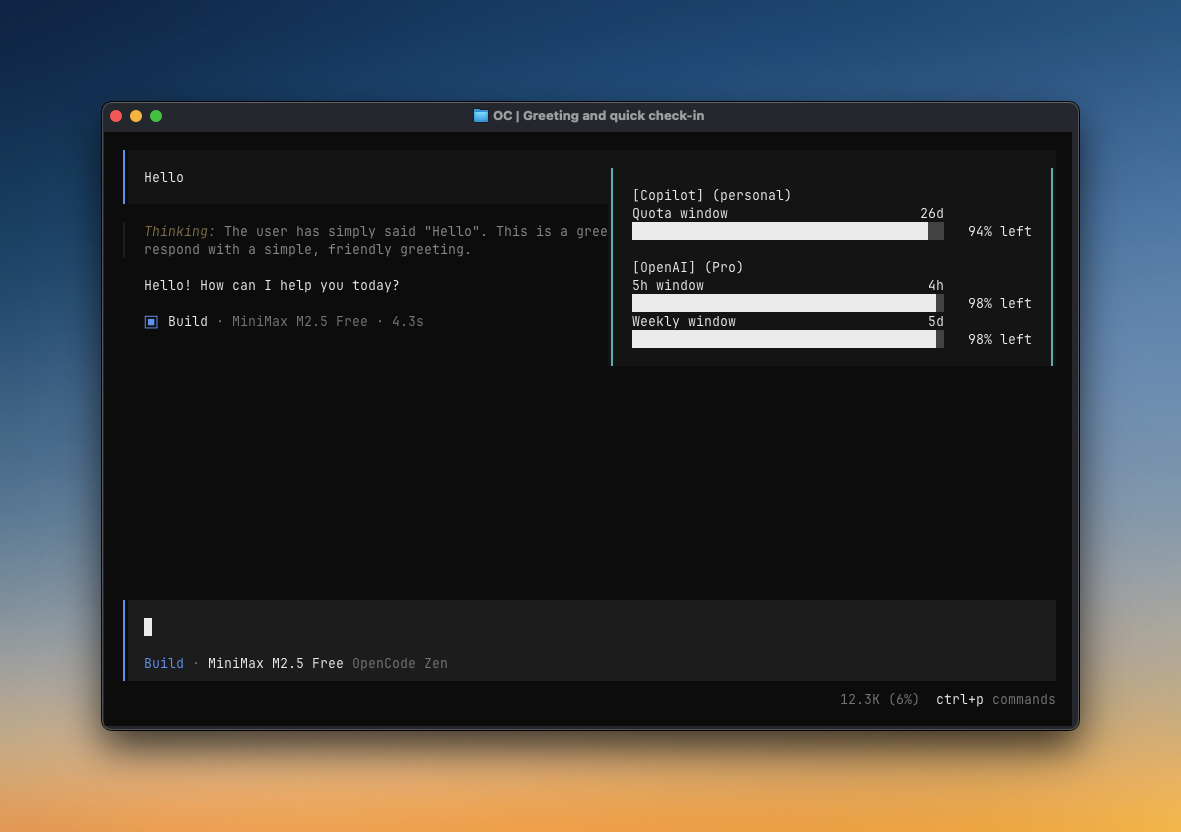
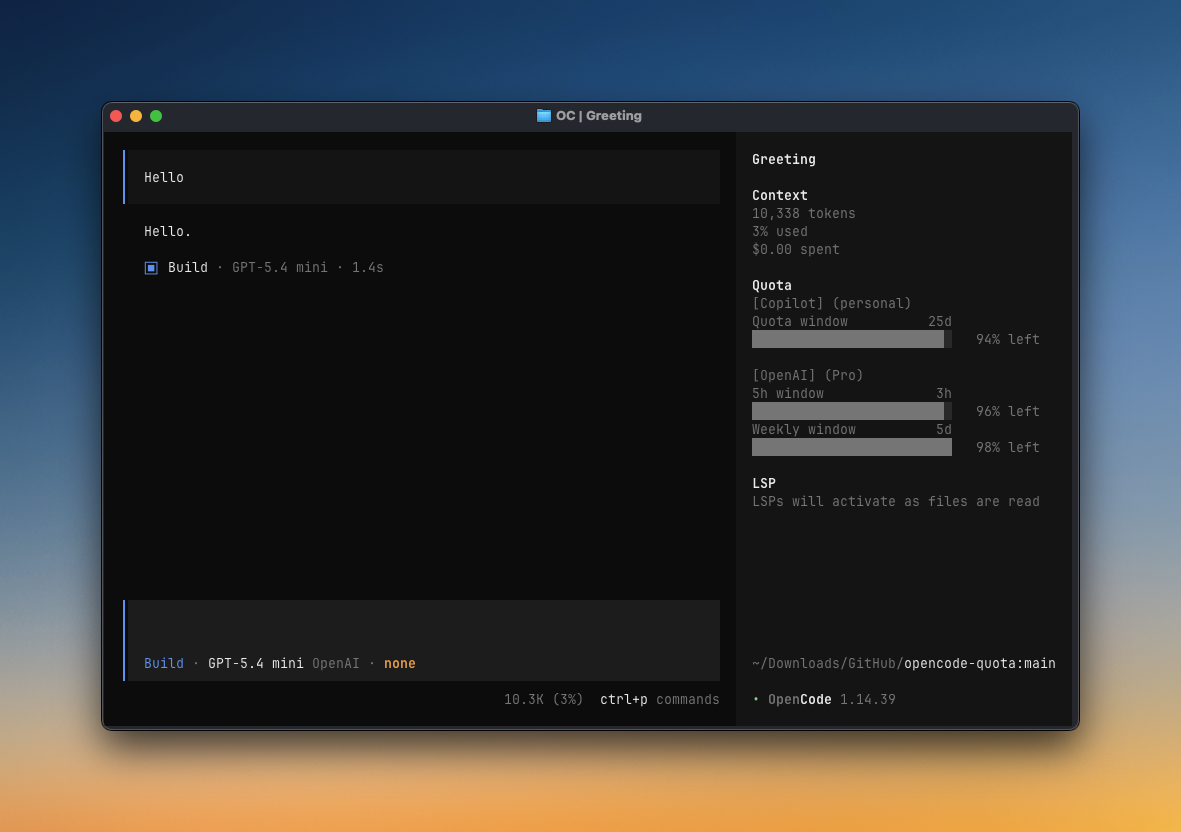
- A `Quota` Sidebar panel in the TUI
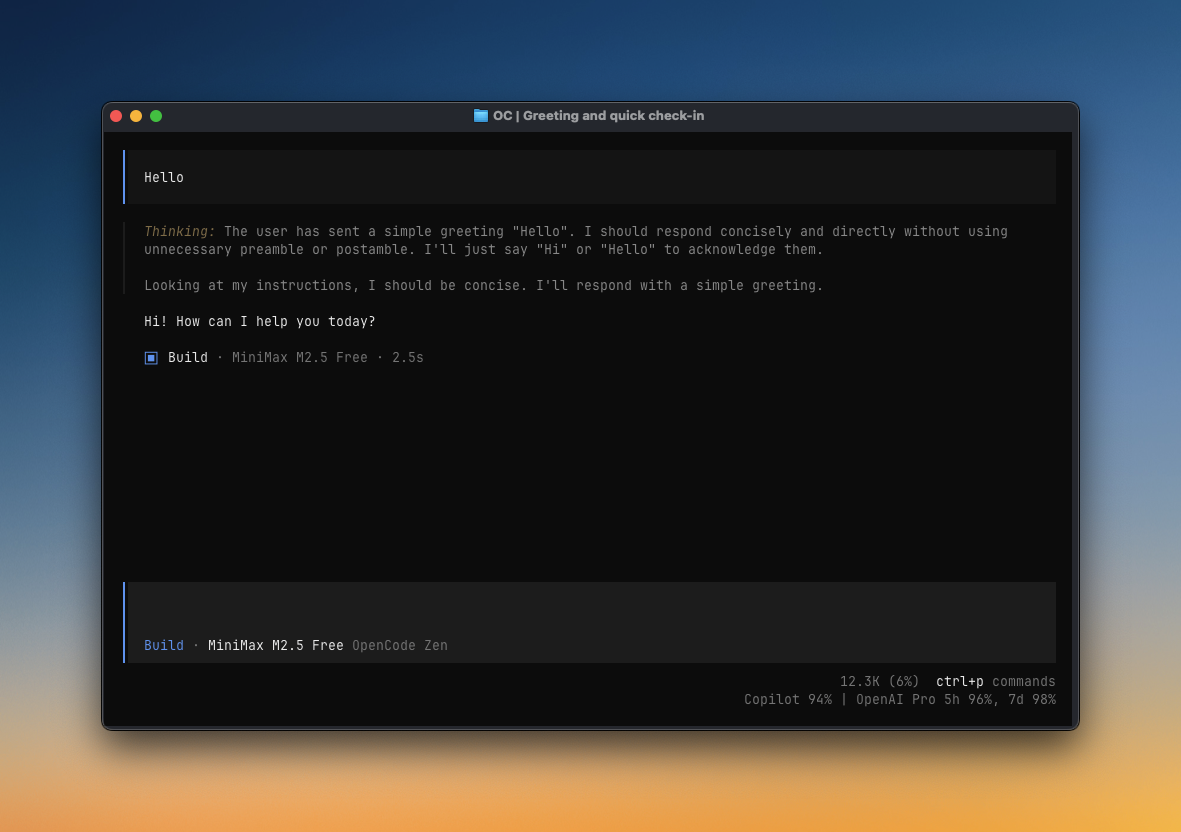
- A Compact status line in the TUI
- `/quota_status` slash command
- Popup quota toasts in OpenCode (opt-in)
- Provider diagnostics for auth, quota sources, and pricing
Sidebar panel
Toast
Compact status line
## Manual setup
Use the installer when possible. For manual setup, use the same OpenCode config location you would pick in the installer:
- **Project install:** files live in your repo/worktree.
- **Global install:** files live in your OpenCode config directory, usually `~/.config/opencode`.
- If you set `OPENCODE_CONFIG_DIR`, use that directory instead.
### 1. Add the server plugin (required)
This enables providers, terminal checks, and popup toasts. Add this to `opencode.json` or `opencode.jsonc`:
```jsonc
{
"$schema": "https://opencode.ai/config.json",
"plugin": ["@npv12/opencode-quota"],
}
```
### 2. Add the TUI plugin (for Sidebar panel or Compact status line)
If you want the Sidebar panel or Compact status line, also add this to `tui.json` or `tui.jsonc`:
```jsonc
{
"$schema": "https://opencode.ai/tui.json",
"plugin": ["@npv12/opencode-quota"],
}
```
### 3. Add quota settings
Create or edit `opencode-quota/quota-toast.json` **next to the `opencode.json` / `tui.json` file above**. For a project install, that means:
```text
/opencode-quota/quota-toast.json
```
Start with this, then adjust the UI choices in the next section:
```jsonc
{
"enabledProviders": "auto",
"enableToast": false,
"tuiSidebarPanel": {
"enabled": false,
},
"tuiCompactStatus": {
"enabled": true,
},
}
```
> [!TIP]
> Run `/quota_status` to see the exact config paths OpenCode Quota loaded.
## Choose your UI surfaces
All UI surfaces use the same quota data. Put these settings in `opencode-quota/quota-toast.json`, not `tui.json`.
| UI surface | Config | Notes |
| --- | --- | --- |
| Sidebar panel | `tuiSidebarPanel.enabled: true` | Full `Quota` panel in OpenCode's session sidebar. Requires the TUI plugin entry above. |
| Toast | `enableToast: true` | Popup toast after idle/question/compact events. Requires the server plugin entry above. |
| Compact status line | `tuiCompactStatus.enabled: true` | Short text-only quota line at the home bottom and chat/session prompt locations, for example `Copilot 94% | OpenAI Pro 5h 100%, 7d 100%`. Requires the TUI plugin entry above. |
Selecting Compact status line in the installer enables both compact surfaces by default. To keep compact status home-only, set `tuiCompactStatus.sessionPrompt: false`.
In the sidebar panel, click the `Quota` header to switch between the compact summary (`▶ Quota`) and the detailed all-windows view (`▼ Quota`). OpenCode remembers the last sidebar state for the plugin.
For more examples, see [Common configuration](#common-configuration). For every option, see [Full configuration reference](#full-configuration-reference).
## Commands
| Command | What it shows |
| --- | --- |
| `opencode-quota show` | Terminal quota-only quick glance |
| `/quota_status` | Config, provider, auth, and pricing diagnostics |
## Providers
Most providers work automatically. If a provider has a “Needs setup” link, open that setup note only if you use that provider.
| Provider | Setup | Quota source |
| --- | --- | --- |
| Anthropic (Claude) | [Needs setup](#anthropic-claude) | Local CLI or OAuth usage |
| GitHub Copilot | Usually automatic | Remote API |
| OpenAI | Automatic | Remote API |
| Cursor | [Needs setup](#cursor) | Local estimation |
| Qwen Code | [Needs setup](#qwen-code) | Local estimation |
| Alibaba Coding Plan | Automatic | Local estimation |
| MiniMax Coding Plan | Automatic | Remote API |
| MiniMax Coding Plan (CN) | Automatic | Remote API |
| Kimi Code | Automatic | Remote API |
| Chutes AI | Usually automatic | Remote API |
| Crof.ai | Manual env/config/auth | Remote API |
| Synthetic | Automatic | Remote API |
| Google Antigravity | [Needs setup](#google-antigravity) | Remote API |
| Gemini CLI | [Needs setup](#gemini-cli) | Remote API |
| Z.ai Coding Plan | Automatic | Remote API |
| Zhipu Coding Plan | Automatic | Remote API |
| NanoGPT | Usually automatic | Remote API |
| DeepSeek | Usually automatic | Remote API balance |
| OpenCode Go | [Needs setup](#opencode-go) | Dashboard scraping |
## Common configuration
Customize these settings in `opencode-quota/quota-toast.json`, next to the OpenCode config for your install scope.
Common locations:
- Project install: `/opencode-quota/quota-toast.json`
- Global install: usually `~/.config/opencode/opencode-quota/quota-toast.json`
- Custom config dir: `$OPENCODE_CONFIG_DIR/opencode-quota/quota-toast.json`
If you are unsure, run `/quota_status`; it prints the config path it loaded.
Choose providers explicitly
```jsonc
{
"enabledProviders": ["copilot", "openai", "google-gemini-cli"],
}
```
Show all quota reset periods
```jsonc
{
"formatStyle": "allWindows",
}
```
Show used percentages
```jsonc
{
"percentDisplayMode": "used",
}
```
Turn off popup toasts
Keeps `/quota_status`, terminal checks, and any enabled UI surfaces.
```jsonc
{
"enableToast": false,
}
```
Turn off the Sidebar panel
Useful when you want Compact status line only, or toasts only.
```jsonc
{
"tuiSidebarPanel": {
"enabled": false,
},
}
```
Keep Compact status line on home only
Useful when you want the compact line on the home screen but not in the chat/session prompt area.
```jsonc
{
"tuiCompactStatus": {
"enabled": true,
"homeBottom": true,
"sessionPrompt": false,
},
}
```
Increase provider request timeout
```jsonc
{
"requestTimeoutMs": 12000,
}
```
Advanced: legacy config sync
By default, the installer writes quota settings only to `opencode-quota/quota-toast.json`. If you also want it to write the legacy OpenCode block, run:
```bash
npx @npv12/opencode-quota init --sync-legacy-config
```
This is only for users who intentionally want `experimental.quotaToast` mirrored into `opencode.json` / `opencode.jsonc`.
## Full configuration reference
Settings go in the same `opencode-quota/quota-toast.json` sidecar described above.
Existing `experimental.quotaToast` settings still work when no sidecar file exists. Quota settings do not live in `tui.json`.
All settings
### Core/shared settings
| Option | Default | Meaning |
| --- | --- | --- |
| `enabled` | `true` | Master switch for quota collection. When `false`, `/quota_status` is handled as a no-op. |
| `enabledProviders` | `"auto"` | Auto-detect providers, or set an explicit provider list. |
| `minIntervalMs` | `300000` | Minimum fetch interval between provider updates. |
| `requestTimeoutMs` | `5000` | Remote provider request timeout in milliseconds. |
| `formatStyle` | `singleWindow` | Shared quota reset-period display for popup toasts and the Sidebar panel: `singleWindow` shows one reset period per provider; `allWindows` shows all reset periods per provider. Legacy `classic`/`grouped` aliases are still accepted. |
| `percentDisplayMode` | `remaining` | Shared quota percentage meaning for popup toasts and the Sidebar panel: `remaining` shows quota left; `used` shows quota consumed. The terminal `show` command keeps its existing remaining-percent output. |
| `onlyCurrentModel` | `false` | Filter quota rows to the current model/provider when that session selection can be resolved. |
| `pricingSnapshot.source` | `"auto"` | Token pricing snapshot selection: `auto`, `bundled`, or `runtime`. |
| `pricingSnapshot.autoRefresh` | `7` | Refresh stale local pricing data after this many days. |
### Toast settings
| Option | Default | Meaning |
| --- | --- | --- |
| `enableToast` | `false` | Show popup toasts. Disabling this does not disable `/quota_status` or UI surfaces. |
| `toastDurationMs` | `9000` | Toast duration in milliseconds. |
| `showOnIdle` | `true` | Show a toast on the idle trigger. |
| `showOnQuestion` | `true` | Show a toast after a question/assistant response. |
| `showOnCompact` | `true` | Show a toast after session compaction. |
| `showOnBothFail` | `true` | Show a fallback toast when providers attempted quota reads and all failed. |
| `layout.maxWidth` | `50` | Toast formatting width target. |
| `layout.narrowAt` | `42` | Toast compact-layout breakpoint. |
| `layout.tinyAt` | `32` | Toast tiny-layout breakpoint. |
| `debug` | `false` | Append toast debug context when troubleshooting. |
### TUI settings
| Option | Default | Meaning |
| --- | --- | --- |
| `tuiSidebarPanel.enabled` | `false` | Show the Sidebar `Quota` panel when the TUI plugin is installed. Click the panel header to toggle between compact summary and detailed all-windows views; OpenCode remembers the last state. |
| `tuiCompactStatus.enabled` | `true` | Opt in to Compact status line UI surfaces. |
| `tuiCompactStatus.homeBottom` | `true` | Show the Compact status line at the home bottom location. |
| `tuiCompactStatus.sessionPrompt` | `true` | Show the Compact status line by wrapping the TUI session prompt. Disable this if you only want the home-bottom line. |
| `tuiCompactStatus.suppressWhenNativeProviderQuota` | `true` | Hide the Compact status line when OpenCode exposes native provider-quota support. |
| `tuiCompactStatus.maxWidth` | `96` | Maximum Compact status line text width. |
### Provider-specific settings
| Option | Default | Meaning |
| --- | --- | --- |
| `anthropicBinaryPath` | `"claude"` | Command/path used for local Claude CLI probing. |
| `googleModels` | `["CLAUDE"]` | Google model keys to query: `CLAUDE`, `G3PRO`, `G3FLASH`, `G3IMAGE`. |
| `opencodeGoWindows` | `["rolling", "weekly", "monthly"]` | OpenCode Go usage windows to display. |
| `alibabaCodingPlanTier` | `"lite"` | Fallback Alibaba Coding Plan tier when auth does not include `tier`. |
| `cursorPlan` | `"none"` | Cursor included API budget preset: `none`, `pro`, `pro-plus`, `ultra`. |
| `cursorIncludedApiUsd` | unset | Override Cursor monthly included API budget in USD. |
| `cursorBillingCycleStartDay` | unset | Local billing-cycle anchor day `1..28`; when unset, Cursor usage resets on the local calendar month. |
## Provider setup notes
Anthropic (Claude)
Install Claude Code, authenticate it, and make sure `claude` is on your `PATH`:
```bash
claude auth login
claude auth status
```
If Claude lives at a custom path, set `anthropicBinaryPath` in `opencode-quota/quota-toast.json`.
Cursor
Use companion plugin [`@playwo/opencode-cursor-oauth`](https://github.com/PoolPirate/opencode-cursor#readme). Add it before `@npv12/opencode-quota` in `opencode.json`, then authenticate once:
```bash
opencode auth login --provider cursor
```
Qwen Code
Use companion plugin [`opencode-qwencode-auth`](https://github.com/gustavodiasdev/opencode-qwencode-auth#readme). Add it before `@npv12/opencode-quota` in `opencode.json`.
Google Antigravity
Use companion plugin [`opencode-antigravity-auth`](https://github.com/NoeFabris/opencode-antigravity-auth#readme). Add it before `@npv12/opencode-quota` in `opencode.json`.
Gemini CLI
Use companion plugin [`opencode-gemini-auth`](https://github.com/jenslys/opencode-gemini-auth#readme). Add it before `@npv12/opencode-quota` in `opencode.json`, then authenticate Google once:
```bash
opencode auth login --provider google
```
If you use manual provider selection, include `google-gemini-cli` in `enabledProviders`.
DeepSeek
DeepSeek shows the current on-demand account balance from `GET https://api.deepseek.com/user/balance`.
Use one of these trusted API-key sources:
```bash
export DEEPSEEK_API_KEY="your-api-key"
```
Or put the key in trusted user/global OpenCode config, not repo-local config:
```jsonc
{
"provider": {
"deepseek": {
"options": { "apiKey": "{env:DEEPSEEK_API_KEY}" },
},
},
}
```
If you use manual provider selection, include `deepseek` in `enabledProviders`.
OpenCode Go
OpenCode Go quota scrapes the dashboard and needs a workspace ID plus an `auth` cookie:
```bash
export OPENCODE_GO_WORKSPACE_ID="your-workspace-id"
export OPENCODE_GO_AUTH_COOKIE="your-auth-cookie"
```
Use `opencodeGoWindows` to choose **5h**, **Weekly**, and/or **Monthly** windows. Environment variables take precedence over the optional `opencode-go.json` file.
## Troubleshooting
Start here when quota or token data looks wrong.
1. Run `/quota_status`.
2. Confirm the expected provider appears in the detected provider list.
3. Confirm companion auth plugins are before `@npv12/opencode-quota` in `opencode.json`.
4. Use the provider-specific table below for the failing provider.
### Common symptoms
| Symptom | Try this |
| --- | --- |
| Sidebar panel does not appear | Confirm `tui.json` includes `@npv12/opencode-quota`, restart OpenCode, and check `tuiSidebarPanel.enabled`. |
| Compact status line does not appear anywhere | Confirm `tui.json` includes `@npv12/opencode-quota`, restart OpenCode, check `tuiCompactStatus.enabled`, and check whether `tuiCompactStatus.suppressWhenNativeProviderQuota` is hiding it because OpenCode exposes native provider-quota support. |
| Compact status appears on home but not in chat/session | Check `tuiCompactStatus.sessionPrompt`; set it to `true` to show the chat/session prompt line. |
| Popup toasts do not appear | Check `enableToast`, `showOnIdle`, `showOnQuestion`, and `showOnCompact`. |
### Provider troubleshooting
Anthropic (Claude)
Run `/quota_status` and check the Anthropic section.
| Symptom | Fix |
| --- | --- |
| `claude` not found | Install Claude Code and make sure `claude` is on your `PATH`. |
| Claude is installed at a custom path | Set `anthropicBinaryPath` in `opencode-quota/quota-toast.json`. |
| Not authenticated | Run `claude auth login`, then confirm `claude auth status` works. |
| Auth works but no quota rows appear | Check `quota_source` and `message` in `/quota_status`; re-authenticate Claude if the OAuth credential fallback is missing or stale. |
| Provider not detected | Confirm OpenCode is configured to use the `anthropic` provider. |
GitHub Copilot
Run `/quota_status` and check `copilot_quota_auth`, `billing_mode`, `billing_scope`, and `quota_api`.
| Symptom | Fix |
| --- | --- |
| Personal quota missing | Confirm OpenCode Copilot auth works. The plugin can read OpenCode's Copilot OAuth token. |
| Business or Enterprise quota missing | Add `copilot-quota-token.json` in the OpenCode runtime config directory shown by `opencode debug paths`. |
| PAT config exists but quota fails | Fix `copilot-quota-token.json`; when present, it takes precedence over OAuth and does not silently fall back. |
| Enterprise usage missing | Use a classic PAT with the required billing access. Fine-grained PATs and GitHub App tokens are not supported for Enterprise premium usage. |
OpenAI
Run `/quota_status` and check the OpenAI auth source and token status.
| Symptom | Fix |
| --- | --- |
| OpenAI quota missing | Confirm OpenCode native OpenAI OAuth is present in `auth.json`. |
| Token expired | Re-run OpenCode's OpenAI auth flow. |
| Provider not detected | Confirm your OpenCode config uses the `openai` provider or a compatible OpenAI auth entry. |
Cursor
Run `/quota_status` and check the Cursor section.
| Symptom | Fix |
| --- | --- |
| Cursor not detected | Put `@playwo/opencode-cursor-oauth` before `@npv12/opencode-quota` in `opencode.json`. |
| Cursor auth missing | Run `opencode auth login --provider cursor`. |
| Quota appears but no remaining percentage | Set `cursorPlan` or `cursorIncludedApiUsd` in `opencode-quota/quota-toast.json`. |
| Billing cycle looks wrong | Set `cursorBillingCycleStartDay` in `opencode-quota/quota-toast.json` to your local billing anchor day. |
| Unknown Cursor pricing | Check `/quota_status` for unknown model ids. |
Qwen Code
Run `/quota_status` and check `qwen_oauth_source`, `qwen_local_plan`, and the `qwen_code` live probe section.
| Symptom | Fix |
| --- | --- |
| Qwen not detected | Put `opencode-qwencode-auth` before `@npv12/opencode-quota` in `opencode.json`. |
| Auth missing | Complete the Qwen companion plugin auth flow. |
| Counters do not move | Confirm the current model is `qwen-code/*`; Qwen quota is local request estimation for matching model usage. |
| Usage looks stale | Check the local state file path shown by `/quota_status`. |
Alibaba Coding Plan
Run `/quota_status` and check the Alibaba auth, resolved tier, state-file path, and `alibaba_coding_plan` live probe section.
| Symptom | Fix |
| --- | --- |
| API key not detected | Use `ALIBABA_CODING_PLAN_API_KEY`, `ALIBABA_API_KEY`, trusted user/global OpenCode config, or OpenCode auth. Repo-local provider secrets are ignored. |
| Wrong tier | Set `alibabaCodingPlanTier` to `lite` or `pro` in `opencode-quota/quota-toast.json`. |
| Counters do not move | Confirm the current model is `alibaba/*` or `alibaba-cn/*`. |
| Quota seems stale | Check the state-file path shown in `/quota_status`. |
MiniMax, Kimi, Chutes AI, Crof.ai, Synthetic, Z.ai, Zhipu, NanoGPT, and DeepSeek
These providers use trusted env vars, trusted user/global OpenCode config, or native OpenCode auth. Run `/quota_status` and check the provider-specific API-key diagnostics.
| Provider | Useful checks |
| --- | --- |
| MiniMax Coding Plan | Use `MINIMAX_CODING_PLAN_API_KEY` or `MINIMAX_API_KEY` for the international endpoint. Runtime/config ids like `minimax` and `minimax-coding-plan` use this provider. Repo-local provider secrets are ignored. |
| MiniMax Coding Plan (CN) | Use `MINIMAX_CHINA_CODING_PLAN_API_KEY` or trusted user/global OpenCode config under `minimax-china-coding-plan`, `minimax-cn-coding-plan`, `minimax-cn`, or `minimax-china`. Runtime id `minimax-cn-coding-plan` uses this provider. |
| Kimi Code | Use `KIMI_API_KEY` or `KIMI_CODE_API_KEY`; repo-local provider secrets are ignored. |
| Chutes AI | Use `CHUTES_API_KEY`, trusted user/global config, or OpenCode auth. |
| Crof.ai | Use `CROF_API_KEY`, `CROFAI_API_KEY`, trusted user/global config, or OpenCode auth. |
| Synthetic | Use `SYNTHETIC_API_KEY`, trusted user/global config, or OpenCode auth. |
| Z.ai Coding Plan | Use `ZAI_API_KEY` or `ZAI_CODING_PLAN_API_KEY`; malformed fallback auth is surfaced as an auth error. |
| Zhipu Coding Plan | Use `ZHIPU_API_KEY` or `ZHIPU_CODING_PLAN_API_KEY`; malformed fallback auth is surfaced as an auth error. |
| NanoGPT | Use `NANOGPT_API_KEY`, `NANO_GPT_API_KEY`, trusted user/global config, or OpenCode auth. |
| DeepSeek | Use `DEEPSEEK_API_KEY`, trusted user/global config under `provider.deepseek.options.apiKey`, or OpenCode auth. This provider shows balance only because DeepSeek does not expose a quota reset window. |
For security, repo-local `opencode.json` / `opencode.jsonc` is ignored for provider secrets in these integrations. Put secrets in environment variables or trusted user/global config. OpenCode auth fallbacks for API-key providers require `{ "type": "api", "key": "..." }` entries.
Google Antigravity
Run `/quota_status` and check the `google_antigravity` section.
| Symptom | Fix |
| --- | --- |
| Companion missing | Put `opencode-antigravity-auth` before `@npv12/opencode-quota` in `opencode.json`. |
| Accounts not found | Check the selected `antigravity-accounts.json` path shown by `/quota_status`. |
| Refresh tokens invalid | Re-authenticate with the companion plugin. |
| Provider returns no rows | Check `live_probe`, `live_entry_*`, and `live_error_*` in `/quota_status`. |
Gemini CLI
Run `/quota_status` and check the Gemini CLI live probe rows.
| Symptom | Fix |
| --- | --- |
| Companion missing | Put `opencode-gemini-auth` before `@npv12/opencode-quota` in `opencode.json`. |
| Provider not enabled in manual mode | Include `google-gemini-cli` in `enabledProviders` in `opencode-quota/quota-toast.json`. |
| Auth missing | Run `opencode auth login --provider google`. |
| Project missing | Set `provider.google.options.projectId`, `OPENCODE_GEMINI_PROJECT_ID`, `GOOGLE_CLOUD_PROJECT`, or `GOOGLE_CLOUD_PROJECT_ID`. |
OpenCode Go
Run `/quota_status` and check the `opencode_go` section.
| Symptom | Fix |
| --- | --- |
| Config not detected | Set both `OPENCODE_GO_WORKSPACE_ID` and `OPENCODE_GO_AUTH_COOKIE`, then rerun `/quota_status`. |
| Incomplete config | `workspaceId` and `authCookie` must come from the same source. |
| Scrape returns no data | Refresh the browser `auth` cookie from `opencode.ai`. |
| Selected window missing | Check `/quota_status` for `selected_windows` and `live_fetch_error`; remove unavailable windows from `opencodeGoWindows` in `opencode-quota/quota-toast.json` or refresh the dashboard cookie. |
| Dashboard format changed | This integration scrapes the dashboard, so it can break if the dashboard markup changes. |
## Contributors
Thanks to everyone who has contributed to OpenCode Quota.
## License
MIT
## Remarks
OpenCode Quota is not built by the OpenCode team and is not affiliated with OpenCode or any provider listed above.
## Star history
[](https://www.star-history.com/?repos=npv12%2Fopencode-quota&type=date&legend=bottom-right)