


 # vue-hotel-datepicker
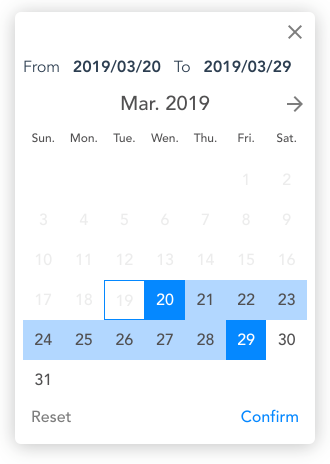
A pure [Vue.js](https://vuejs.org/) date range picker component without any other dependencies, for hotels date range selection and multi-purpose. Vue hotel datepicker provide date range selecting, minimum and maximum night limitation, custom methods for date restriction, custom date formating and localization support.
## Demo
### Live demo(Github page)
[https://northwalker.github.io/vue-hotel-datepicker/](https://northwalker.github.io/vue-hotel-datepicker/)
### Desktop capture preview
# vue-hotel-datepicker
A pure [Vue.js](https://vuejs.org/) date range picker component without any other dependencies, for hotels date range selection and multi-purpose. Vue hotel datepicker provide date range selecting, minimum and maximum night limitation, custom methods for date restriction, custom date formating and localization support.
## Demo
### Live demo(Github page)
[https://northwalker.github.io/vue-hotel-datepicker/](https://northwalker.github.io/vue-hotel-datepicker/)
### Desktop capture preview
 ### Mobile capture preview
 ### Previous version
v1.0.0: [Document](https://github.com/northwalker/vue-hotel-datepicker/tree/v1.0.0)
## Installation
Use ```npm``` or ```yarn``` for installation
```bash
$ npm install @northwalker/vue-hotel-datepicker
# OR
$ yarn add @northwalker/vue-hotel-datepicker
```
## Usage
Method 1: Import component in `.vue` file
```vue
```
Method 2: Via static javascript in `html` file
Download this repo and copy file ```/lib/vue-hotel-datepicker.umd.min.js``` to ```//```, and add below code to your html file.
```html
```
## Props/Options
### placeholder
- Type: `String`
- Default: `'Select a date range'`
The input placeholder text
### format
- Type: `String`
- Default: `'YYYY-MM-DD'`
The date format string.
### separator
- Type: `String`
- Default: `' ~ '`
The separator string used between date strings.
### startDate
- Type: `Date` or `String`
- Default: `undefined`
The start date of given date range.
### endDate
- Type: `Date` or `String`
- Default: `undefined`
The end date of given date range.
### minDate
- Type: `Date` or `String`
- Default: today midnight.
The start view date. All the dates before this date will be disabled.
If preset `startDate` less than `minDate`, `minDate` will reset to preset `startDate`.
### maxDate
- Type: `Date` or `String` or `Boolean`
- Default: `false`
The end view date. All the dates after this date will be disabled.
### minNight
- Type: `Number`
- Default: `0`
Minimum nights required to select a range of dates.
### maxNight
- Type: `Number`
- Default: `0`
Maximum nights required to select a range of dates.
### selectForward
- Type: `Boolean`
- Default: `false`
If `true`, The selection of the second date must be after the first date.
If `false`, you can select a range of dates in both directions.
### disabledDates
- Type: `Array`
- Default: `[]`
An array of strings by props format value, default `'YYYY-MM-DD'` (as same as default `format`). All the dates passed to the list can not be selected as a start and end date.
### weekList
- Type: `Array`
- Default: `['Sun.', 'Mon.', 'Tue.', 'Wen.', 'Thu.', 'Fri.', 'Sat.']`
- Example with i18n `zh-tw`: `['週一', '週二', '週三', '週四', '週五', '週六', '週日']`
A array of strings for week text.
### monthList
- Type: `Array`
- Default: `['Jan.', 'Feb.', 'Mar.', 'Apr.', 'May.', 'Jun.', 'Jul.', 'Aug.', 'Sep.', 'Oct', 'Nov.', 'Dec.']`
- Example with i18n `zh-tw`: `['一月', '二月', '三月', '四月', '五月', '六月', '七月', '八月', '九月', '十月', '十一月', '十二月']`
A array of strings for month text.
### fromText
- Type: `String`
- Default: `'From'`
- Example with i18n `zh-tw`: `'從'`
Text of label "From".
### toText
- Type: `String`
- Default: `'To'`
- Example with i18n `zh-tw`: `'到'`
Text of label "To".
### resetText
- Type: `String`
- Default: `'Reset'`
- Example with i18n `zh-tw`: `'重設'`
Text of button "Reset"
### confirmText
- Type: `String`
- Default: `'Confirm'`
- Example with i18n `zh-tw`: `'確認'`
Text of button "Confirm"
### mobile
- Type: `String`
- Default: `''`
- value: `'mobile'` or `'desktop'` or `''`
Display in mobile or desktop date picker style version, default will depend on common brower's width.
## Events
### update
When a new date is selected, ```VueHotelDatepicker``` will emit an event ```update```, passing the new date range object to parent component.
Date range Object:
```javacript
{
start: 'YYYY-MM-DD',
end: 'YYYY-MM-DD'
}
```
### confirm
When a confirm button click, passing the new date range object to parent component (as same as event `'update'`).
### close
when a cancellation button click or occurred, ```VueHotelDatepicker``` will emit an event ```close``` to notify parent component.
### reset
when a reset button click or occurred, ```VueHotelDatepicker``` will emit an event ```reset``` to notify parent component.
## License
[MIT License](http://opensource.org/licenses/MIT)
Copyright © 2019 [Northwalker](https://northwalker.github.io)
### Previous version
v1.0.0: [Document](https://github.com/northwalker/vue-hotel-datepicker/tree/v1.0.0)
## Installation
Use ```npm``` or ```yarn``` for installation
```bash
$ npm install @northwalker/vue-hotel-datepicker
# OR
$ yarn add @northwalker/vue-hotel-datepicker
```
## Usage
Method 1: Import component in `.vue` file
```vue
```
Method 2: Via static javascript in `html` file
Download this repo and copy file ```/lib/vue-hotel-datepicker.umd.min.js``` to ```//```, and add below code to your html file.
```html
```
## Props/Options
### placeholder
- Type: `String`
- Default: `'Select a date range'`
The input placeholder text
### format
- Type: `String`
- Default: `'YYYY-MM-DD'`
The date format string.
### separator
- Type: `String`
- Default: `' ~ '`
The separator string used between date strings.
### startDate
- Type: `Date` or `String`
- Default: `undefined`
The start date of given date range.
### endDate
- Type: `Date` or `String`
- Default: `undefined`
The end date of given date range.
### minDate
- Type: `Date` or `String`
- Default: today midnight.
The start view date. All the dates before this date will be disabled.
If preset `startDate` less than `minDate`, `minDate` will reset to preset `startDate`.
### maxDate
- Type: `Date` or `String` or `Boolean`
- Default: `false`
The end view date. All the dates after this date will be disabled.
### minNight
- Type: `Number`
- Default: `0`
Minimum nights required to select a range of dates.
### maxNight
- Type: `Number`
- Default: `0`
Maximum nights required to select a range of dates.
### selectForward
- Type: `Boolean`
- Default: `false`
If `true`, The selection of the second date must be after the first date.
If `false`, you can select a range of dates in both directions.
### disabledDates
- Type: `Array`
- Default: `[]`
An array of strings by props format value, default `'YYYY-MM-DD'` (as same as default `format`). All the dates passed to the list can not be selected as a start and end date.
### weekList
- Type: `Array`
- Default: `['Sun.', 'Mon.', 'Tue.', 'Wen.', 'Thu.', 'Fri.', 'Sat.']`
- Example with i18n `zh-tw`: `['週一', '週二', '週三', '週四', '週五', '週六', '週日']`
A array of strings for week text.
### monthList
- Type: `Array`
- Default: `['Jan.', 'Feb.', 'Mar.', 'Apr.', 'May.', 'Jun.', 'Jul.', 'Aug.', 'Sep.', 'Oct', 'Nov.', 'Dec.']`
- Example with i18n `zh-tw`: `['一月', '二月', '三月', '四月', '五月', '六月', '七月', '八月', '九月', '十月', '十一月', '十二月']`
A array of strings for month text.
### fromText
- Type: `String`
- Default: `'From'`
- Example with i18n `zh-tw`: `'從'`
Text of label "From".
### toText
- Type: `String`
- Default: `'To'`
- Example with i18n `zh-tw`: `'到'`
Text of label "To".
### resetText
- Type: `String`
- Default: `'Reset'`
- Example with i18n `zh-tw`: `'重設'`
Text of button "Reset"
### confirmText
- Type: `String`
- Default: `'Confirm'`
- Example with i18n `zh-tw`: `'確認'`
Text of button "Confirm"
### mobile
- Type: `String`
- Default: `''`
- value: `'mobile'` or `'desktop'` or `''`
Display in mobile or desktop date picker style version, default will depend on common brower's width.
## Events
### update
When a new date is selected, ```VueHotelDatepicker``` will emit an event ```update```, passing the new date range object to parent component.
Date range Object:
```javacript
{
start: 'YYYY-MM-DD',
end: 'YYYY-MM-DD'
}
```
### confirm
When a confirm button click, passing the new date range object to parent component (as same as event `'update'`).
### close
when a cancellation button click or occurred, ```VueHotelDatepicker``` will emit an event ```close``` to notify parent component.
### reset
when a reset button click or occurred, ```VueHotelDatepicker``` will emit an event ```reset``` to notify parent component.
## License
[MIT License](http://opensource.org/licenses/MIT)
Copyright © 2019 [Northwalker](https://northwalker.github.io)