




**English** | [中文](README.md)
> A theme & glassmorphism plugin for [DeepSeek Harness](https://github.com/deepseek-ai/deepseek-harness) — Catppuccin flavours for the **Web GUI**, **DSH Desktop** and **dsh-TUI**, plus a switchable frosted-glass skin. Listed on [Awesome DSH Plugin](https://awesome-dsh-plugin.com/p/NoNameLeGo__dsh-catppuccin-theme/).
## Contents
Introduction ·
Features ·
Previews ·
Installation ·
Usage ·
Glassmorphism ·
Compatibility ·
Development ·
🙋 FAQ ·
💝 Credits
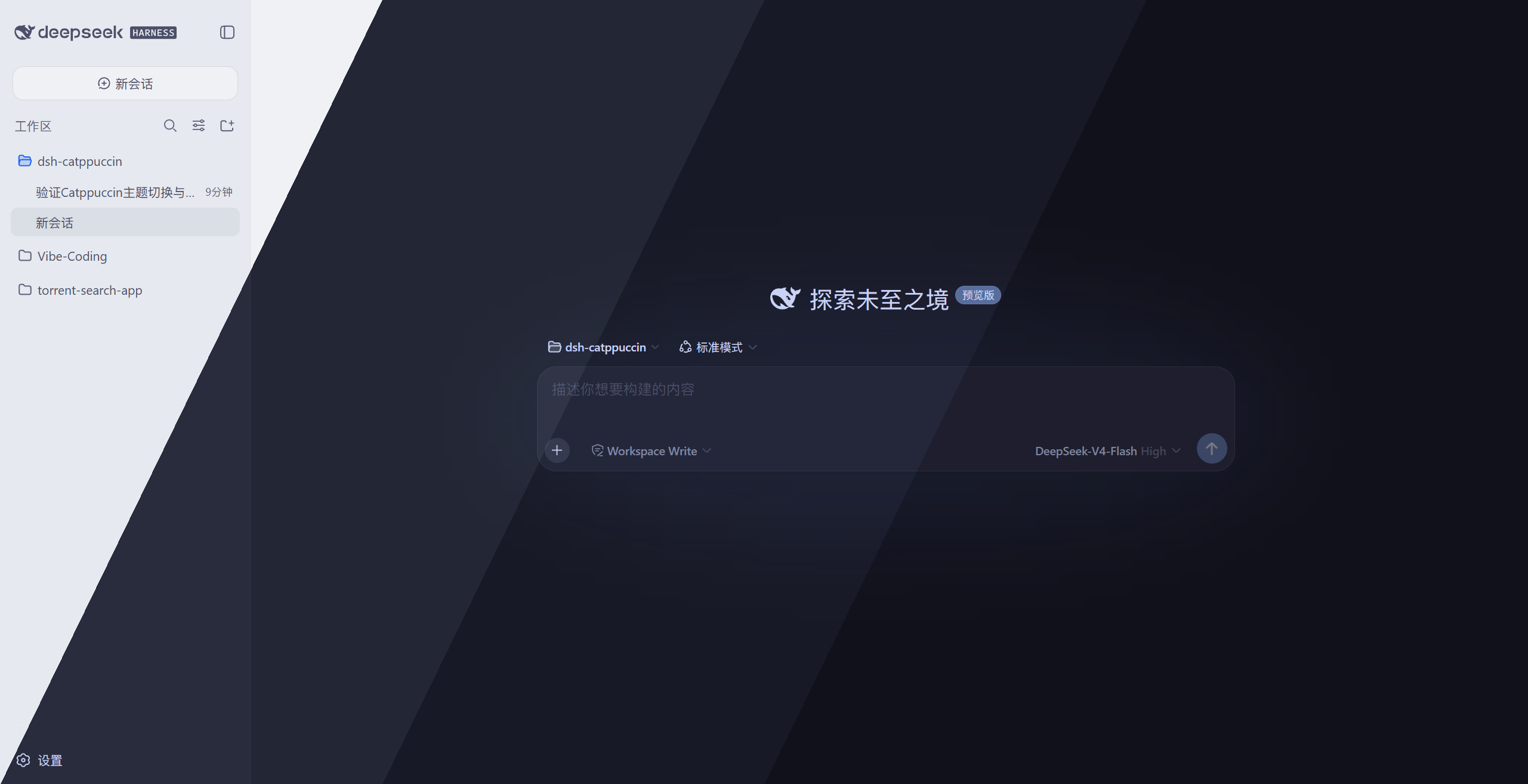
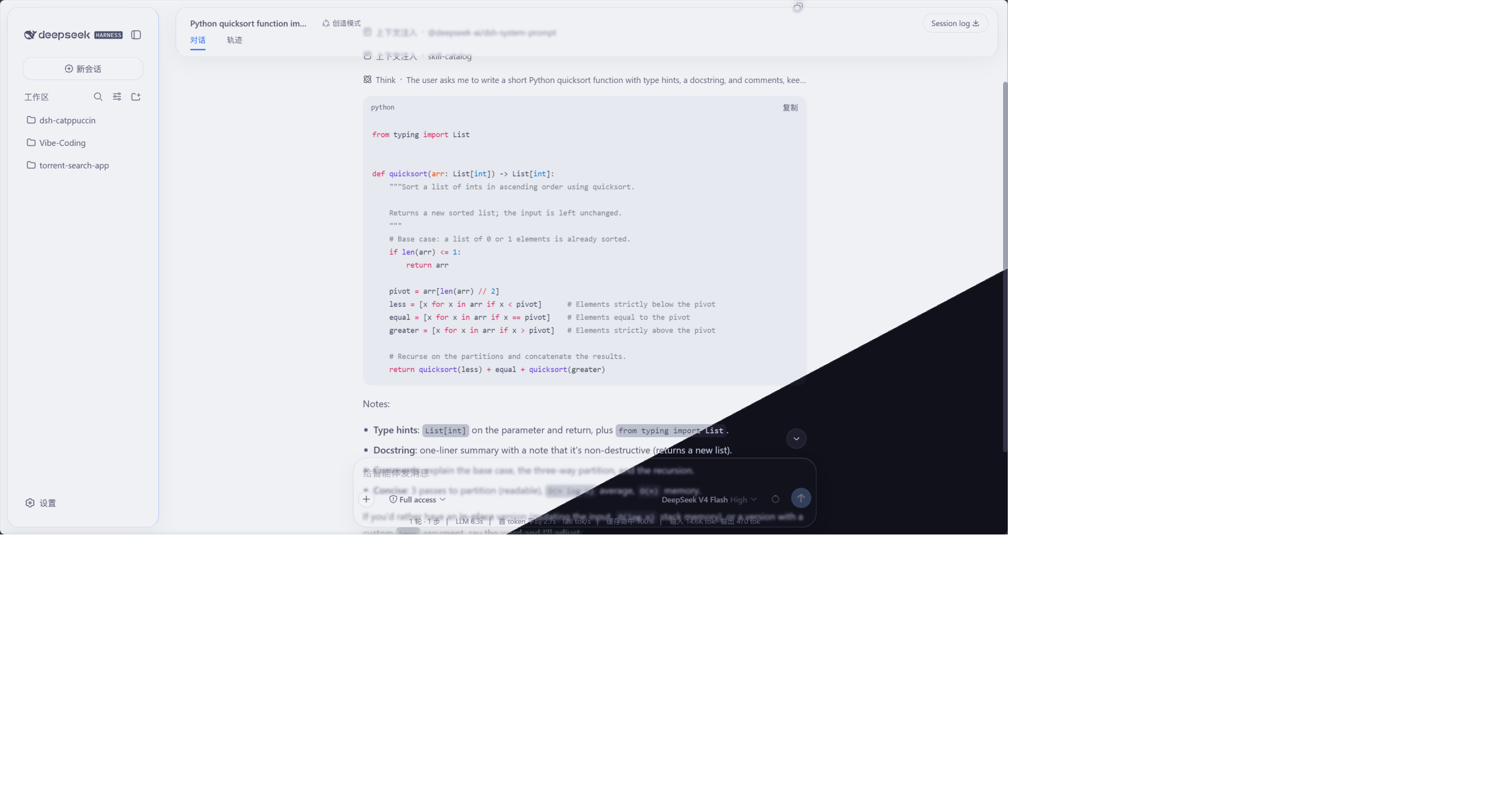
🪟 Glass skin (Mica mode) · Latte & Mocha
## Introduction
A [Catppuccin](https://github.com/catppuccin/catppuccin) theme plugin for
[DeepSeek Harness](https://github.com/deepseek-ai/deepseek-harness) — one package that fits
the **Web GUI** (`dsh web`), the **desktop shells** (the official Electron `apps/desktop` and the
community DSH Desktop — both on the same `desktop` profile) and
**[dsh-TUI](https://github.com/ccch1mneyyy/dsh-TUI)** alike: full recolouring plus a
glass skin on Web / Desktop, and the four official theme palettes auto-synced to the TUI.
It ships all four Catppuccin flavours — **Latte**, **Frappé**, **Macchiato**, **Mocha** —
remapping the whole interface to the matching palette, with a **settings section of its own**
(**Settings → Catppuccin**: flavour, code highlighting, token overrides, glass, update check, feedback).
Your choice is persisted and restored after restarts.
It also includes an optional **glassmorphism** skin: the top bar, sidebar, composer,
trajectory view, chat bubbles and the new-session button become frosted-glass
cards, with adjustable blur, frost and backdrop brightness. Glass colours follow the active
Catppuccin theme automatically.
## Features
- 🎨 Four themes: Latte (light), Frappé / Macchiato / Mocha (dark)
- 🧩 Registered into the official theme system, on a par with the built-in light / dark / system themes
- 🎯 Full-UI colour coverage — not just one or two accent colours
- ⚙️ One-click switch on its own Settings section, persisted and restored across restarts
- 🔧 **Custom token overrides**: override individual colour tokens with `--dsw-* var: value` pairs (e.g. turn comments blue); persisted alongside the selected flavour
- 🖍️ **Code-block highlight style**: default / italic-comments shiki themes
- 🌐 Seven UI languages (Chinese / English / Japanese / Korean / Spanish / French / German, follows the system language)
- 🪟 **Glass skin** (Mica mode): frosted glass for the top bar / sidebar / composer /
trajectory view / chat bubbles / new-session button, one-click toggle in Settings;
mica & compatibility modes (Compatibility keeps the stock layout and only frosts the composer
card and floating layers), adjustable blur, frost and backdrop brightness
(interaction reference: [DSH-Transparent-UI-Plugin](https://github.com/WYH66666666/DSH-Transparent-UI-Plugin))
- 🌫️ **Glass details**: gradient blur bands at the top/bottom page edges, a floating glass
rail when the sidebar is collapsed, an ambient theme-following ground (a same-family
wash; the two soft glows are an **opt-in switch, off by default**) — content softens as it scrolls under the panes
- 🎨 Glass colours follow the current Catppuccin theme
- 🔄 **Update check**: one-click "Check for updates" in Settings compares the latest npm
version and gives you a copyable upgrade command; **auto-check is on by default** (once at
startup, then every 6 hours) and the release channel switches between stable and beta
- 💬 **Feedback & support**: GitHub links at the bottom of the settings section and the
plugin's detail page — open an issue when something breaks, star the repo if you like it
- 💻 **[dsh-TUI](https://github.com/ccch1mneyyy/dsh-TUI) terminal themes**: one command installs into
dsh-TUI; the four themes sync to `~/.dsh-tui/themes/` automatically
(see [Installation · dsh-TUI](#dsh-tui-terminal-themes))
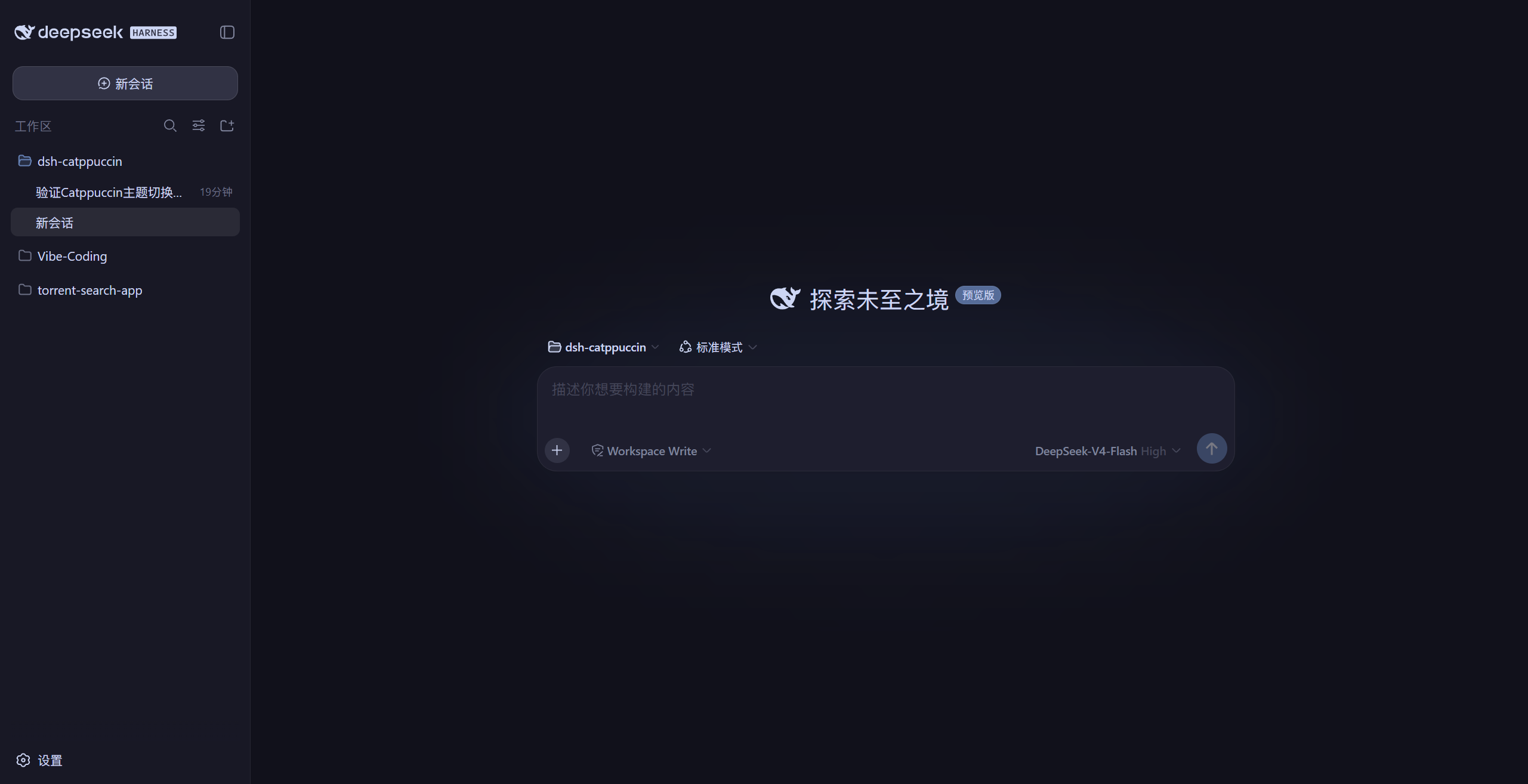
## Previews
Actual screenshots from a local GUI (the header image is a diagonal blend of the four):
🌻 Latte (light)
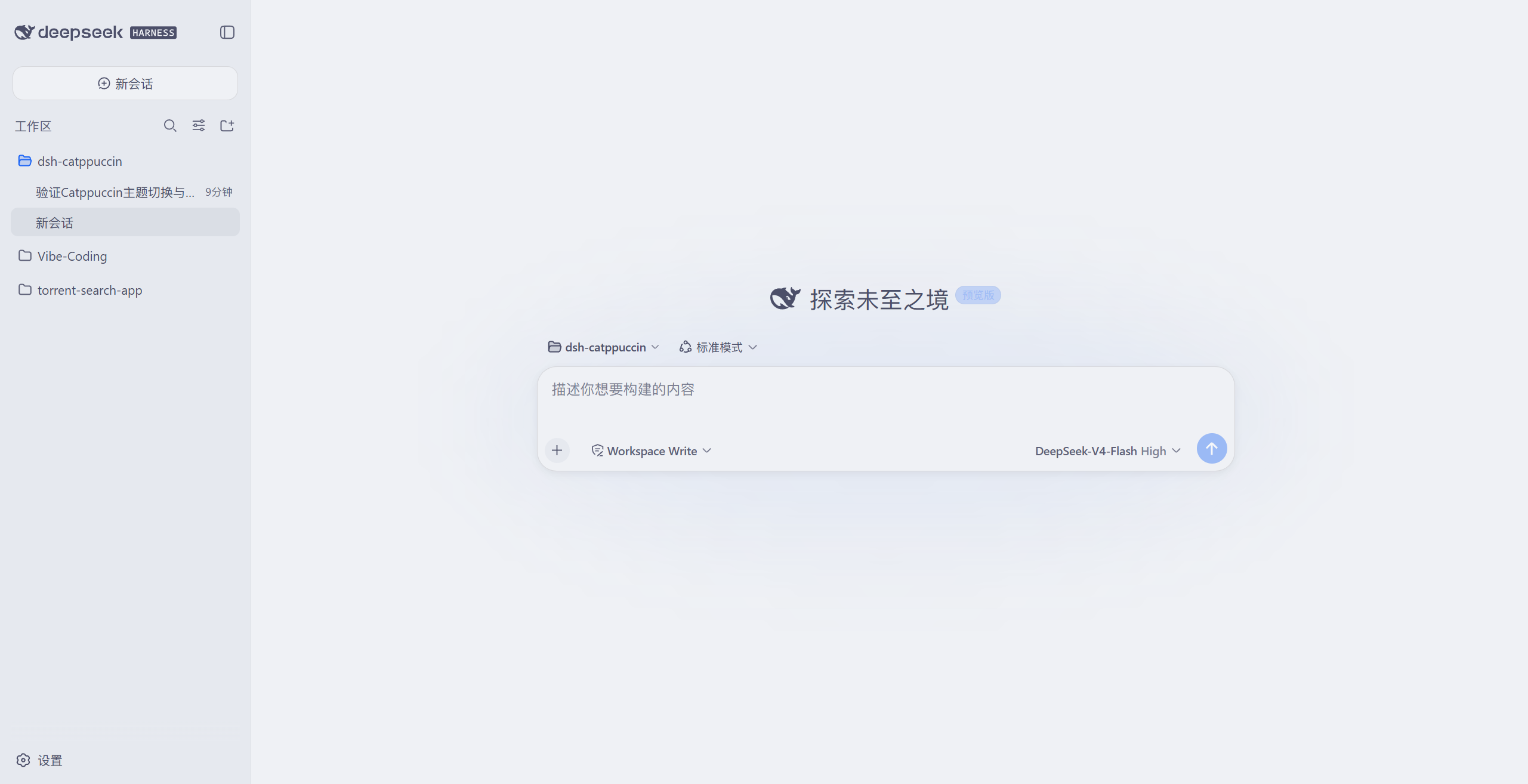
🪴 Frappé (dark)
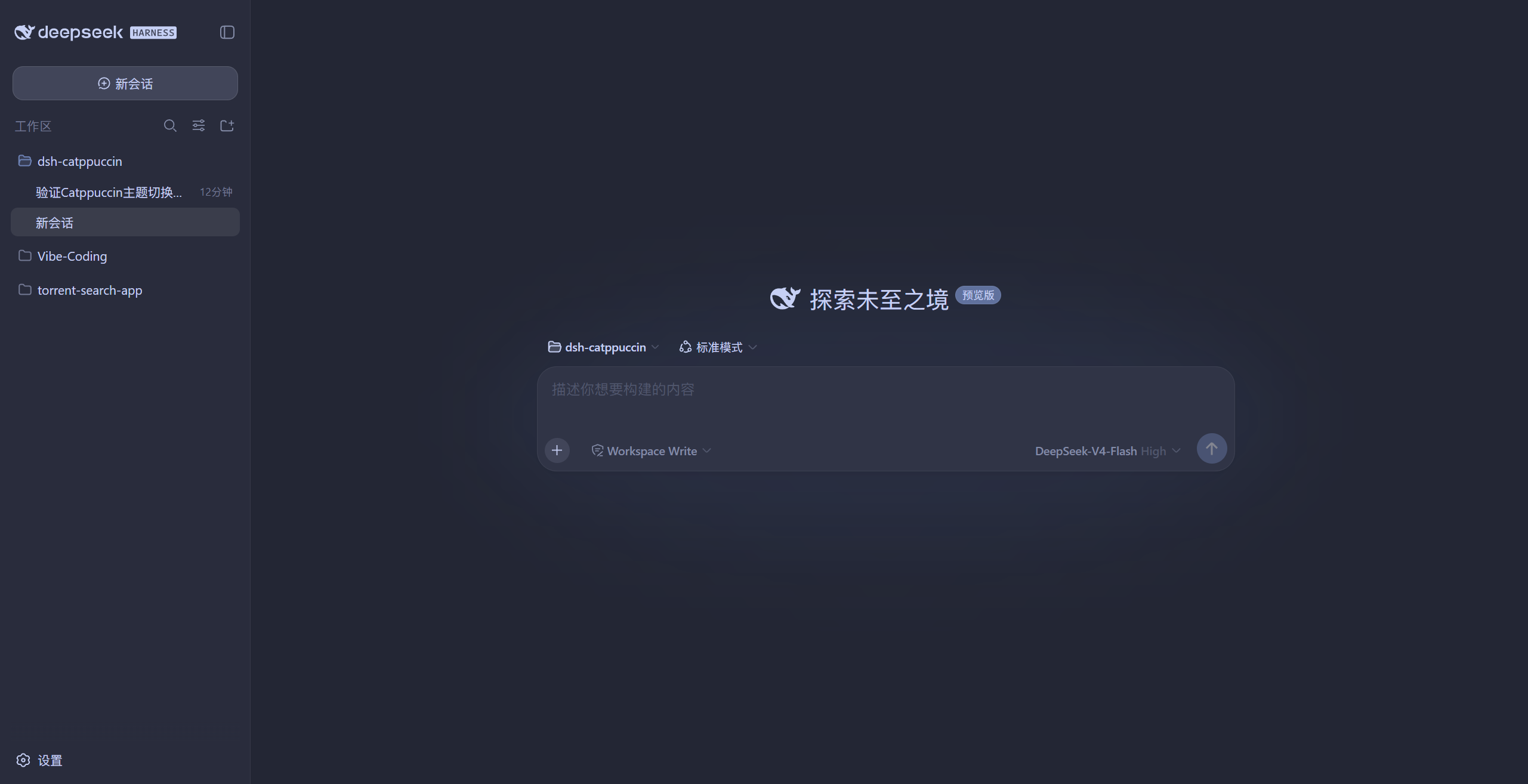
🌺 Macchiato (dark)
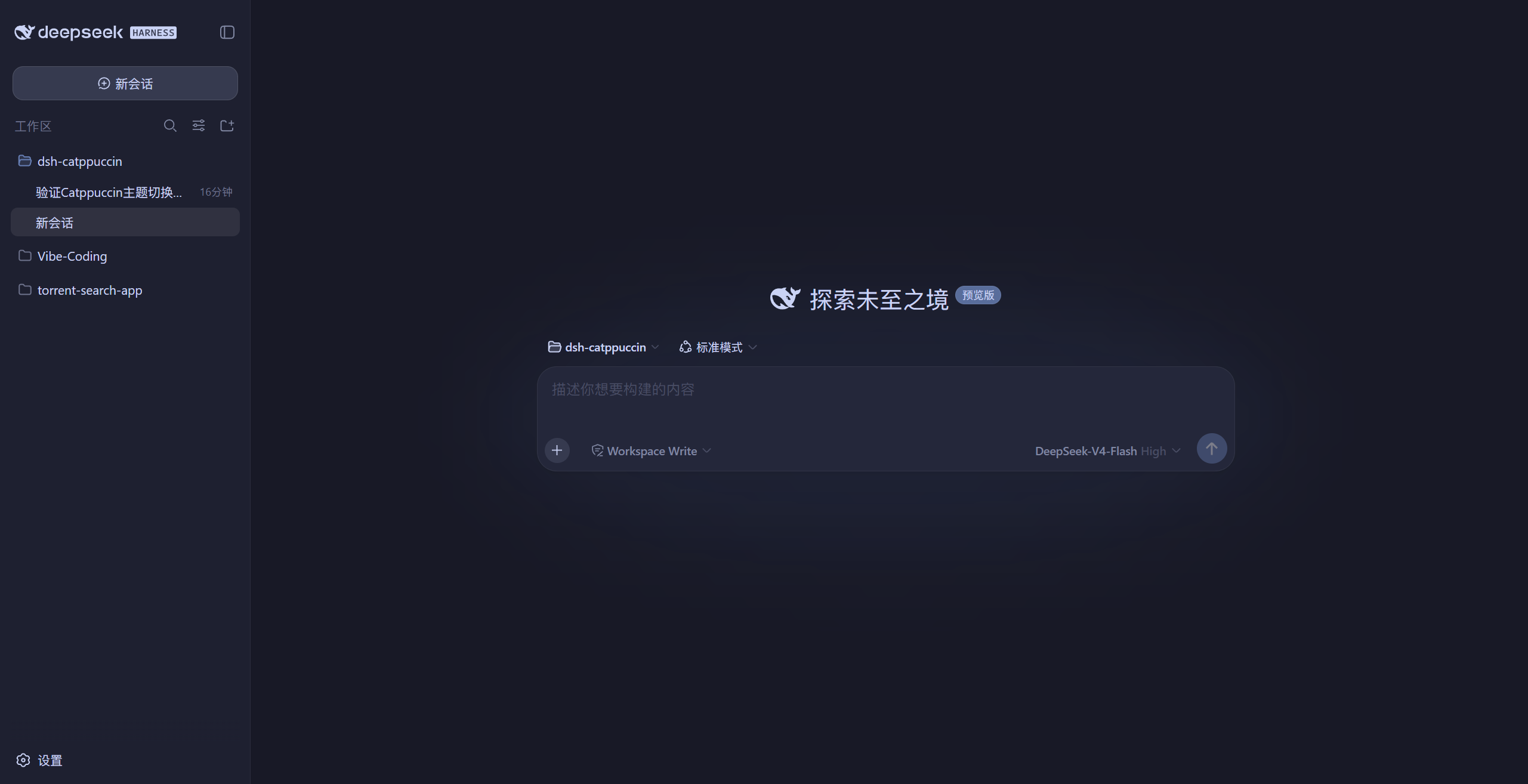
🌿 Mocha (dark)
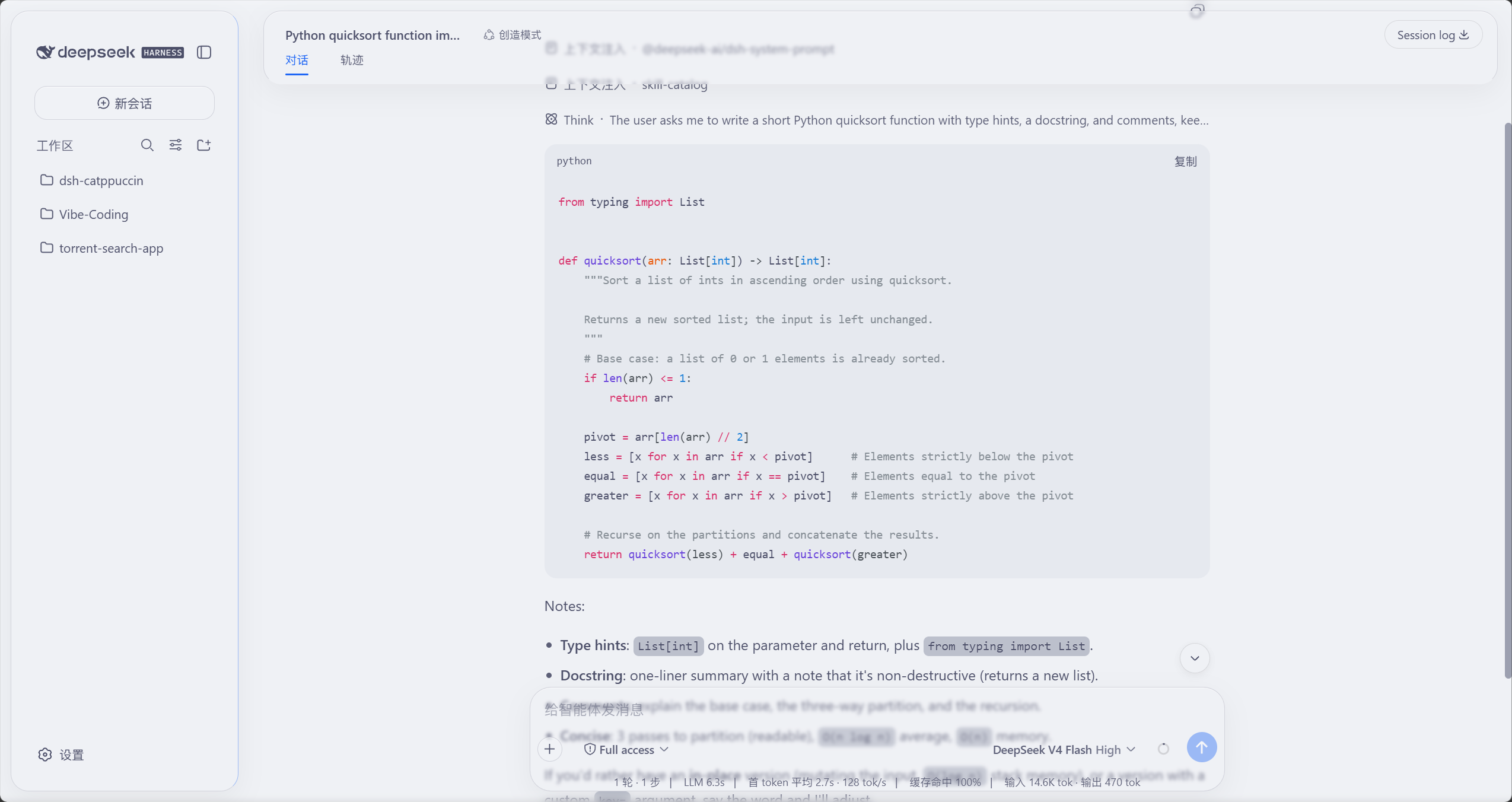
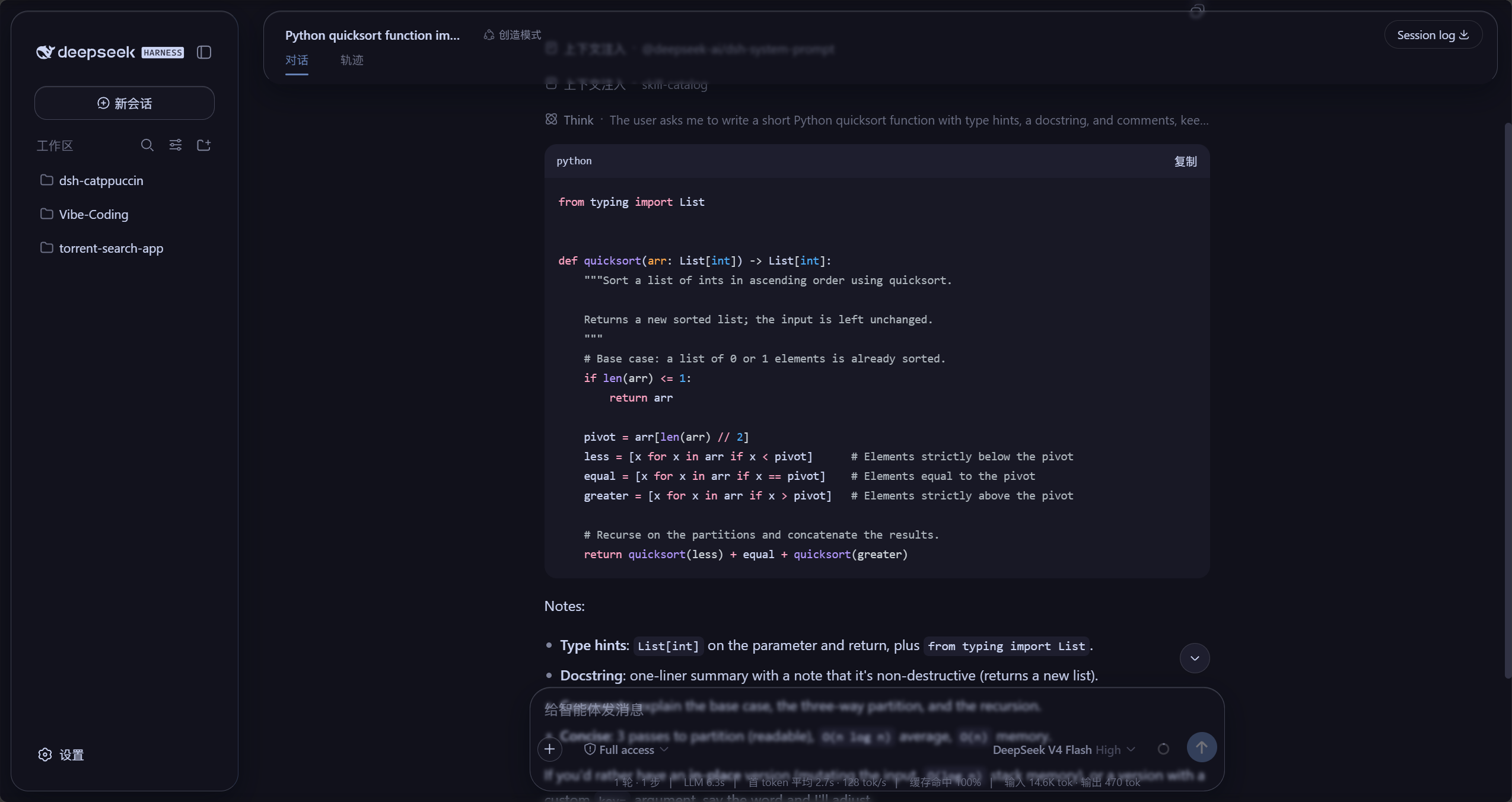
### Glass skin (Mica mode)
The frosted-glass effect in light (Latte) and dark (Mocha): the top bar, sidebar,
chat bubbles and composer are all glass cards; messages soften as they scroll
past the page edges (screenshots from the local GUI):
🌻 Latte (light glass)
🌿 Mocha (dark glass)
## Installation
### Option 1: from npm (recommended)
```sh
dsh plugin --profile web add @nonamelego/dsh-catppuccin
```
Restart `dsh web` after installing — `dsh plugin` adds it to the profile's bundles.
Use the profile name of your choice in place of `web` (e.g. `headless`).
**Desktop**: the official desktop shell and the community desktop shell both read the **same profile**
`$DSH_HOME/profiles/desktop`, but **they install/upgrade plugins in completely different, non-interchangeable
ways** — pick the column that matches your shell:
| | Official desktop shell ([DeepSeek Harness](https://github.com/deepseek-ai/deepseek-harness) app) | Community shell ([DSH Desktop](https://github.com/anywhere-labs/dsh-desktop)) |
|---|---|---|
| **Install** | Its **plugin UI** → add plugin → enter the package name `@nonamelego/dsh-catppuccin` (Git URLs / tarballs / local paths are accepted too) | In the app's own **DSH terminal**:
`dsh plugin --profile desktop add @nonamelego/dsh-catppuccin` |
| **Upgrade** | **Remove the plugin in the plugin UI, then enter the same package name again to reinstall it** (v0.2.0 has no upgrade entry point and no version picker) | The same `update` command as web:
`dsh plugin --profile desktop update @nonamelego/dsh-catppuccin` |
| Runs pnpm | The app's bundled pnpm | The app's bundled pnpm |
Either way, **restart the desktop app** to load the new version.
> ⚠️ **Do not mix the columns**: the official shell's plugin UI does not run commands, and the community
> shell's `update` command does not apply to the official shell. Also, **the plain `dsh` on your system PATH
> cannot manage `desktop` in either shell** — upstream reserves that profile name and rejects it with
> `error: profile "desktop" is managed exclusively by the Electron application`. To use the CLI, use another
> profile name (`web`, `headless`, `dsh-tui`).
> **Two desktop shells, one profile**: the official
> [DeepSeek Harness](https://github.com/deepseek-ai/deepseek-harness) monorepo ships
> `apps/desktop` / `apps/desktop-host` (Electron), and the community
> [DSH Desktop](https://github.com/anywhere-labs/dsh-desktop) does the same — both boot
> `$DSH_HOME/profiles/desktop`, so a plugin installed once works in either. This plugin's desktop support
> targets the **official web + desktop** builds; the community shell's `desktopProfiles` service probe
> is kept. The official shell's profile process carries **no** dedicated env marker (its
> `DSH_DESKTOP_NODE_EXECUTABLE` is injected only into its package-install children), so the plugin
> detects that shell through the **Electron-as-node runtime** (`process.versions.electron`) instead —
> the profile name shown in the upgrade copy is therefore correct, and settings reads/writes are
> unaffected (see the comment in `src/profile-detect.ts`).
### Option 2: from the repository
```sh
dsh plugin --profile web add https://github.com/NoNameLeGo/dsh-catppuccin-theme
```
When installing from git, pnpm may ask you to allow build scripts — follow pnpm's prompt
and add the package to the profile's `pnpm-workspace.yaml` `allowBuilds`, then run it again.
On desktop, follow the table above instead: the **official shell** takes the Git URL directly in its
plugin UI, while the **community shell** runs the same command with
`dsh plugin --profile desktop add …`.
### dsh-TUI (terminal) themes
This section covers **[dsh-TUI](https://github.com/ccch1mneyyy/dsh-TUI)**, a third-party terminal
front end (install it first). The same package covers the TUI — install it into the dsh-tui profile:
```sh
dsh plugin --profile dsh-tui add @nonamelego/dsh-catppuccin
```
Installing from the repository works the same way:
```sh
dsh plugin --profile dsh-tui add https://github.com/NoNameLeGo/dsh-catppuccin-theme
```
The package ships a tiny theme-sync plugin row
(`dsh-catppuccin-tui-themes`, no service dependencies): on every dsh-TUI start it syncs the
four theme JSONs to `~/.dsh-tui/themes/`, so upgrades pick up the new palettes. After
installing, launch `dsh --profile dsh-tui` and pick the theme with `/theme` —
**Catppuccin Latte / Frappé / Macchiato / Mocha**, or jump straight to it with
`/theme catppuccin-mocha` (your choice persists across restarts).
> 💡 Already installed the plugin for the Web GUI and also use dsh-TUI? No need to install
> it twice: every Web start auto-syncs the themes to `~/.dsh-tui/themes/` (only when the
> directory already exists).
> 📁 Prefer not to install the package? Copy `themes/*.json` into
> `~/.dsh-tui/themes/` (Windows: `%USERPROFILE%\.dsh-tui\themes\`) by hand — you just won't
> get updates automatically.
> ⚠️ `catppuccin-*.json` belongs to this plugin and is overwritten on sync; rename the files
> if you want custom themes.
> 💡 TUI themes only style the TUI itself — the terminal background is up to your terminal.
> Pairing it with the matching Catppuccin flavour (see the
> [Catppuccin ports list](https://github.com/catppuccin/catppuccin#-ports)) looks best.
## Usage
1. Open the Web GUI (default `http://127.0.0.1:3080`), or the DSH Desktop app.
2. Open **Settings** and pick **Catppuccin** in the left nav (its own section, after the official ones).
3. Under **Theme**, pick a flavour:
**Latte** (light), **Frappé**, **Macchiato** or **Mocha** (dark).
4. Turn on **Follow system light/dark**: Latte on light, your chosen flavour (Mocha by default)
on dark, switching with the Windows light/dark setting — the native title bar and window
buttons follow too. The dark end is picked separately (Frappé / Macchiato / Mocha).
5. Choosing **Turn off (official theme)** reverts to the official theme — it restores the preference
you had before enabling Catppuccin (light / dark / follow system) instead of forcing a reset.
> "Follow system" used to name step 5; since 0.7.0 the two are separate controls, as above.
> **Second entrance**: open this plugin's own card on the **Plugins** page and the middle of
> its detail page shows the **same settings** (Catppuccin theme / Glass / Check for updates /
> Feedback & support) — both read and write one set of preferences, so either place works.
> That area comes from the host's plugin detail page (`0.2.0-rc.2` and later); older versions do not have it.
### Other options in the Catppuccin row
- **Code highlight style**: default / **italic comments** — affects only the shiki colours used
in code blocks and diffs.
- **Custom overrides** (collapsible; the button shows the entry count): override individual tokens
with `--dsw-* var: value` pairs, e.g. `--dsw-static-blue-500` → `#89b4fa`. The **key** commits on
blur and must start with `--` (otherwise the entry is dropped); the **value** also commits on blur,
and an **empty value deletes the entry**; ✕ removes the row. Overrides persist with the flavour.
### Glass skin
The **Glass** section lives on the **Settings → Catppuccin** page:
- **Master switch**: on — the top bar, sidebar, composer and trajectory view
become frosted glass; off — the UI reverts to stock instantly (no refresh needed).
- **Mode**: **Mica** turns the interface into floating frosted cards; **Compatibility** keeps
the stock layout and swaps only the material.
- **Performance**: Mica blurs **large areas** (top bar, composer, sidebar), which shows up as
GPU load while output streams (measured ~80% peak in one conversation, under 30% for
Compatibility); the blur radius is not the driver — anything but `none` re-reads the backdrop
every frame, `0 px` included. Prefer **Compatibility** if that matters: it only frosts the
composer card and floating layers, a much smaller footprint.
- **Presets**: **Clear / Standard / Frosted** one-click presets; fine-tune with the sliders
afterwards (a preset lights up when the current knob values match it).
- **Blur** (0–40 px) and **Frost** (0–100%): the blur radius and opacity of the glass.
- **Backdrop brightness**: dark mode darkens 0–50, light mode brightens 50–100 (50 = as-is),
mixed straight into the ground; at the extremes the ambience fades out and the ground
collapses back to pure white / pure black.
- **Ground glows**: adds two screen-pinned soft glows on top of the ground (the `0.6.3` look),
**off by default** — they do not follow the panes, so each pane transmits a different slice
of them and the top-left corner brightens visibly when on. Once on, a **glow strength** knob
(0–200%, `100%` = that look and the default; the ceiling is a conservative
contrast budget on Latte, see `docs/issue-32-glow-tuning.md`) and a **glow spread**
knob (100–250%, `100%` = the shipped radii; it only enlarges, so the light stops
piling up in one corner) scale the two glows only — the wash is never touched, and at either end of the
brightness knob the ambience collapses and the glows fade out with it.
- **In-place previews**: a **ground sample strip** in the glass section (drag brightness or
toggle the glows and it changes on the spot — it is painted by the page ground's own rule);
a **code sample** under the highlight picker (reads `--shiki-token-*`, so switching to
italic-comments recolours it immediately); and **Show the UI** next to the mode picker,
which closes Settings so you can look at the real layout.
Glass colours follow the active theme live; all settings persist across restarts.
### Check for plugin updates
On the **Settings → Catppuccin** page, below **Glass**:
- Clicking **Check for updates** compares the latest npm version with the installed one:
up to date → shows the current version; newer → shows the new version plus a copyable
upgrade command (the profile name is detected automatically, falling back to `web`).
- **Auto-check**: on by default — once after startup, then every 6 hours (switch it off on this row);
the **Channel** picks **Stable** (follows `latest` only) or **Beta** (prereleases too).
- Locally linked / source installs (`link:` / `file:` / git) don't show an npm upgrade
command — you'll be told to `git pull` or rebuild instead.
- Channel policy: stable builds follow the `latest` tag; prereleases follow both `latest`
and `beta` (the upgrade command automatically carries `@beta`). Offline or network
failures show the reason and offer a retry.
- The upgrade path follows the **host**: the **official desktop build** (DeepSeek Harness
client) gets no command line — it has no reachable terminal — so this row shows the
**`package@channel`** spec and tells you to delete the plugin on the **Plugins** page and
reinstall it (the same path as the desktop section above). The **community desktop shell**
and **web** keep the copyable `dsh plugin …` command. The host classifies itself
(`web` / `community-desktop` / `official-desktop`); you do not pick.
## Glassmorphism
**Glassmorphism** is a visual style in which panels look like frosted glass — translucent
fills, backdrop blur (`backdrop-filter: blur()`), and glass details (rim, inner highlight,
soft shadow) — letting the content behind show through, softened.
What this plugin does:
- **Six glass areas**: top bar, sidebar, composer, trajectory view, chat
bubbles and the new-session button; in Mica mode they become rounded floating cards and
chat content scrolls *under* the glass, blurred; the collapsed sidebar becomes a
floating rail at the edge of the chat area (the "performance & usage" stats line is
*not* a glass card and stays outside it, but since `0.6.4` it sits on a **frosted
ground-coloured strip** so the scrolling transcript cannot read through the readouts —
see the `0.6.2` "fused band removed" entry and issue #29 in `0.6.4`);
- **Page-edge gradient blur**: a blur band at the top and bottom of the viewport so
messages are softened as they melt past the edges (borrowed from
[DSH-Transparent-UI-Plugin](https://github.com/WYH66666666/DSH-Transparent-UI-Plugin)'s
Aqua skin);
- **Theme-following colours**: Latte is light glass, Mocha dark glass — switching flavours
recolours instantly. The page ground rides the theme's own tokens plus a same-family
wash and two soft glows (see `docs/issue-25-ambient-ground.md`); the brightness knob
mixes white/black straight into its base stop;
- **One-click toggle**: off restores the stock UI exactly; uninstalling the plugin leaves
nothing behind.
### When Compatibility mode matches the wrong surface
Compatibility mode frosts host and third-party floating surfaces through **class substrings and
semantic attributes**, needing no cooperation from other plugins — the price is that a substring
cannot tell a *surface* from a *row-level container inside one*. Since `0.5.8` the families it
matches are exactly these:
| Family | Anchor |
|---|---|
| Composer card | `[data-composer-card]` (the material is painted on its `::before`, see issue #19) |
| Menus | `[data-menu-material='translucent']` (the host MenuSurface's own material hook — the recipe overrides the `--dsw-menu-surface-fill` / `--dsw-menu-backdrop-filter` its material plane reads) plus the hand-rolled-menu fallback `[role='menu']:not([data-menu-material]):not([data-menu-material] *)` |
| Popovers | `[class*='popover']` / `[class*='dropdown']` (still substrings) |
| Modal dialogs | `[role='presentation'] > [role='dialog'][aria-modal='true']` (**seat guard**: only a panel seated under `[role='presentation']`; a body-level full-screen layer is not one — see issue #34) |
| Host right sidebar (open state only) | `[data-sidebar-right-panel][data-sidebar-right-open]` |
**A new class name in a third-party plugin can still be misread.** When you hit one, work through three
steps: **① collect evidence** (a probe snippet you paste into the console, listing every matched element
and rule) → **② temporary relief** (inject an `!important` override from outside; this plugin
deliberately ships **no** "custom CSS" option) → **③ report** (attach the evidence plus your DSH and
plugin versions to [issues](https://github.com/NoNameLeGo/dsh-catppuccin-theme/issues)).
The full write-up, the probe snippet and the history (#16 / #17 / #19) live in
[docs/glass-mis-hits.md](docs/glass-mis-hits.md).
### Environment limit: glass needs a see-through base from the host
The glass layer reads, via `backdrop-filter`, **the pixels actually painted behind it**. The plugin
only adds material to a surface — it does **not** create a transparent base for the host. If the host
paints the window and its own containers opaque, there is nothing behind the glass to soften and the
effect degrades to a **translucent tint**: you see the hue, but no floating/frosted depth.
| Host | Result | Cause |
|---|---|---|
| Official Web GUI / official desktop shell | normal | window and containers provide a see-through base |
| Third-party DSH Desktop (`dsh-plugin-desktop` `2.0.17`) | translucent tint only | on Windows it silently forces window material to `off` (the Mica / solid-colour setting has no effect), and paints the sidebar surface and its self-drawn containers with an opaque panel colour (`--dsh-desktop-frame-fill` / `.dshDesktopSidebarSurface`, both sourced from `--dsw-alias-bg-layer-1`) |
**The plugin will not add `!important` overrides for this**: that would make the plugin responsible for
the host's container structure, break whenever the host changes, and step outside its "material only"
scope. If a host later exposes native window material on Windows (`backgroundMaterial: mica/acrylic`),
this implementation benefits with no changes.
Self-check (computed values may be **identical** between a "working" and a "flat" environment — the only
difference is whether the host provides a transparent base):
```js
const s = document.querySelector('[data-dsh-glass-surface]'), cs = getComputedStyle(s)
console.table({ backdropFilter: cs.backdropFilter, background: cs.backgroundColor,
radius: cs.borderRadius, roots: [...document.documentElement.attributes]
.map(a => a.name).filter(n => n.includes('glass')).join(', ') })
```
Earlier versions of the third-party shell have no reliable comparison yet (we could not confirm the
theme/glass actually reached the sidebar in that run), so no conclusion is drawn for them.
## Compatibility, permissions and failure bounds
### Compatibility
| Item | Declaration |
|---|---|
| DSH | `>=0.1.7-rc.1` (the settings page consumes the official `dsh-client-ui-primitives` `SegmentedControl`, which only exists from `0.1.7-alpha.1`; the legacy `settingsScope` code path is kept, but 0.1.5 / 0.1.6 hosts are no longer declared supported) |
| Node.js | `>=20` |
| Profile | `web` (the Web GUI and both desktop shells run the web UI and share this plugin); desktop profiles are named `desktop` |
| Verified exact version | `0.2.1-rc.2`: real-device acceptance on the official desktop shell — plugin boots, tokens apply, glass recipe intact, **settings writes really reach `cordis.patch.yml`** (they did not before the fix) and are adopted back after a restart ([audit](docs/desktop-0.2.1-adaptation-audit.md)); `0.2.0-rc.2`: boot-level e2e on the official shell's bundled runtime (19/19), real desktop-window pixels and the title-bar colour chain, `configForms` persistence ([audit](docs/desktop-0.2.0-adaptation-audit.md)); `0.1.7-rc.1`: installed, started, persisted a setting to disk and restored it across a restart in a real profile ([evidence](docs/issue-15-settings-seam-0.1.7.md)); `0.1.7-rc.2`: boot-level e2e and live-page sampling of the glass layer (issues #16 / #17); `0.1.5-rc.1`: boot-level e2e rerun under the CI recipe (**historical**, below the current floor) |
`dsh.compatibility` (`dsh` / `dshReleases` / `dshOperations`) in `package.json` **declares only the
three currently supported lines**: `0.1.7-rc.1` / `0.2.0-rc.2` / `0.2.1-rc.2` (floor `>=0.1.7-rc.1`).
Earlier `0.1.5-rc.*` / `0.1.7-alpha.*` runs are records of what was verified **at the time** and are no
longer declared.
Colour coverage is based on `dsh-v0.2.0-rc.2`'s `design-platform.css`: all 190 `--dsw-*` tokens per
scheme (static 77 / alias 101 / specific 11 / non-family 1), including the 17 aliases added in 0.2.0.
### Permissions and external access
| Category | Purpose | Bound |
|---|---|---|
| File reads | Identify the active profile and install source (directory names under `$DSH_HOME/profiles/`); one-off read of the legacy state file `~/.dsh/catppuccin-state.json` for migration | Read-only. `DSH_HOME` comes from `process.env.DSH_HOME`, defaulting to `~/.dsh` |
| File writes | Sync the four TUI theme JSONs into `~/.dsh-tui/themes/` (dsh-TUI reads themes only from there; no registration API) | That one directory only; a strict no-op when `~/.dsh-tui` does not exist. Settings themselves are written by DSH's settings service, through its official services |
| Network | The "check for updates" row reads npm registry metadata for `@nonamelego/dsh-catppuccin`; the page then fetches the result from this plugin's own host route | `registry.npmjs.org` and the same-origin plugin route only. **No telemetry, no reporting.** Offline, the row errors and nothing else is affected |
| Commands | None | No subprocesses, no shell |
| Credentials | None | No tokens, keys or passwords; only `DSH_HOME` and desktop-shell marker environment variables are read |
### Failure bounds
- A failed update check (offline, registry error, rate limit) affects only that settings
row — it never blocks startup, themes or glass;
- If theme registration fails, DSH's own themes keep working;
- The only install-time script is `prepare` (used locally to build `lib/`). The repository's
`scripts/` (screenshots, E2E, changelog generation) are **not published** to npm
(`files` excludes them) and never run on install.
## Development
```sh
pnpm install # install dependencies
pnpm typecheck # tsc --noEmit for src
pnpm typecheck:tests # tsc --noEmit for tests
pnpm test # vitest
pnpm build # tsdown -> lib/index.js (host) + lib/client.js (browser)
```
The palette table is generated by `scripts/generate-palettes.mjs` — **never hand-edit**
`src/client/palettes.ts`; CHANGELOG drafts come from `pnpm changelog:gen`.
See [CONTRIBUTING.md](CONTRIBUTING.md) for the full command list, the generators, typedoc and local
link debugging; state-contract migration rules are in
[docs/state-migrations.md](docs/state-migrations.md).
## 🙋 FAQ
- **Q: "Why don't I see the Catppuccin themes in the Appearance row?"**\
A: The stock Appearance row only lists the built-in light / dark / follow-system
preferences. The four flavours live in the **Catppuccin** row right below it.
- **Q: "How is my theme choice remembered?"**
A: The choice persists in DSH's official settings document (the `catppuccin` namespace,
stored under the DSH home, shared across every DSH instance on the machine), with
localStorage as an in-browser cache and cross-tab sync. So switching browser,
clearing site data, a custom port (`dsh web --port `) or a second desktop
instance never loses the preference; **DSH Desktop** (the official shell and
`anywhere-labs/dsh-desktop`) restores it across restarts too. The glass switch and every
knob persist the same way. Since 0.5.0, a legacy `catppuccin-state.json` is migrated
into the official settings once on first launch (the file is kept as a rollback copy).
- **Q: "How do I know if this plugin has a new version?"**
A: Settings → Catppuccin → **Check for updates** compares against npm in one
click and gives a copyable upgrade command; or run
`dsh plugin --profile web update @nonamelego/dsh-catppuccin` manually (re-`add` the
latest version works too). **Desktop depends on which shell you use**: the community
[DSH Desktop](https://github.com/anywhere-labs/dsh-desktop) runs that same command in the app's own
DSH terminal (with `desktop` as the profile name), while the **official shell has no upgrade entry
point** — **remove the plugin in its plugin UI, then enter the package name
`@nonamelego/dsh-catppuccin` again to reinstall**, and restart the app. The two routes are not
interchangeable; see the table under Install → Desktop.
- **Q: "I ran the upgrade but the version did not change (the desktop app still shows the old one)?"**
A: Most likely pnpm 11's built-in **minimum release age** (`minimumReleaseAge`, default **24 hours**)
silently filtered the fresh release out: `pnpm add` resolves to the **previous** version inside the
window (installing `@beta` on release day lands on the previous beta) while the UI keeps showing the
target version. Three ways out, pick one:
① **name the exact version** (easiest) — `@nonamelego/dsh-catppuccin@0.5.10-beta.0`; pnpm then records
that version in the profile's `minimumReleaseAgeExclude` automatically;
② give this package a **whole-package exemption** in the profile's `pnpm-workspace.yaml` (configure once,
every future beta installs immediately): `minimumReleaseAgeExclude:` then a new line with
` - '@nonamelego/dsh-catppuccin'`; ③ wait until the release is 24 hours old.
To confirm: check `version` in the profile's
`node_modules/@nonamelego/dsh-catppuccin/package.json` and the `specifier:` for that package in
`pnpm-lock.yaml`.
## 💝 Credits
- [Catppuccin](https://github.com/catppuccin/catppuccin) for the palettes and port templates
- [DeepSeek Harness](https://github.com/deepseek-ai/deepseek-harness) for the plugin system
- [DSH-Transparent-UI-Plugin](https://github.com/WYH66666666/DSH-Transparent-UI-Plugin)
for the glass-skin interaction and implementation reference (mica / compatibility modes,
blur / frost / brightness knobs)

Copyright © 2021-present Catppuccin Org


 Catppuccin for DeepSeek Harness