




**English** | [中文](README.md)
> A theme & glassmorphism plugin for [DeepSeek Harness](https://github.com/deepseek-ai/deepseek-harness) — Catppuccin flavours for the **Web GUI**, **DSH Desktop** and **dsh-TUI**, plus a switchable frosted-glass skin. Listed on [Awesome DSH Plugin](https://awesome-dsh-plugin.com/p/NoNameLeGo__dsh-catppuccin-theme/).
## Contents
- [Introduction](#introduction)
- [Features](#features)
- [Previews](#previews)
- [Installation](#installation)
- [Usage](#usage)
- [Glassmorphism](#glassmorphism)
- [Development](#development)
- [🙋 FAQ](#-faq)
- [💝 Credits](#-credits)
## Introduction
A [Catppuccin](https://github.com/catppuccin/catppuccin) theme plugin for
[DeepSeek Harness](https://github.com/deepseek-ai/deepseek-harness) — one package that fits
the **Web GUI** (`dsh web`), **DSH Desktop** and **dsh-TUI** alike: full recolouring plus a
glass skin on Web / Desktop, and the four official theme palettes auto-synced to the TUI.
It ships all four Catppuccin flavours — **Latte**, **Frappé**, **Macchiato**, **Mocha** —
remapping the whole interface to the matching palette, with a **Catppuccin** row right below
**Settings → General → Appearance** for one-click switching. Your choice is persisted and
restored after restarts.
It also includes an optional **glassmorphism** skin: the top bar, sidebar, composer,
stats line, trajectory view, chat bubbles and the new-session button become frosted-glass
cards, with adjustable blur, frost and backdrop brightness. Glass colours follow the active
Catppuccin theme automatically.
## Features
- 🎨 Four themes: Latte (light), Frappé / Macchiato / Mocha (dark)
- 🧩 Registered into the official theme system, on a par with the built-in light / dark / system themes
- 🎯 Full-UI colour coverage — not just one or two accent colours
- ⚙️ One-click switch in Settings, persisted and restored across restarts
- 🔧 **Custom token overrides**: override individual colour tokens with `--dsw-* var: value` pairs (e.g. turn comments blue); persisted alongside the selected flavour
- 🖍️ **Code-block highlight style**: default / italic-comments shiki themes
- 🌐 Seven UI languages (Chinese / English / Japanese / Korean / Spanish / French / German, follows the system language)
- 🪟 **Glass skin**: frosted glass for the top bar / sidebar / composer / stats line /
trajectory view / chat bubbles / new-session button, one-click toggle in Settings;
mica & compatibility modes, adjustable blur, frost and backdrop brightness
(interaction reference: [DSH-Transparent-UI-Plugin](https://github.com/WYH66666666/DSH-Transparent-UI-Plugin))
- 🌫️ **Glass details**: gradient blur bands at the top/bottom page edges, a floating glass
rail when the sidebar is collapsed, a solid background in the theme's own base colour —
content softens as it scrolls under the panes
- 🎨 Glass colours follow the current Catppuccin theme
- 🔄 **Update check**: one-click "Check for updates" in Settings compares the latest npm
version and gives you a copyable upgrade command; **auto-check is on by default** (once at
startup, then every 6 hours) and the release channel switches between stable and beta
- 💻 **dsh-TUI terminal themes**: one command installs into dsh-TUI; the four themes sync to
`~/.dsh-tui/themes/` automatically (see [Installation · dsh-TUI](#dsh-tui-terminal-themes))
## Previews
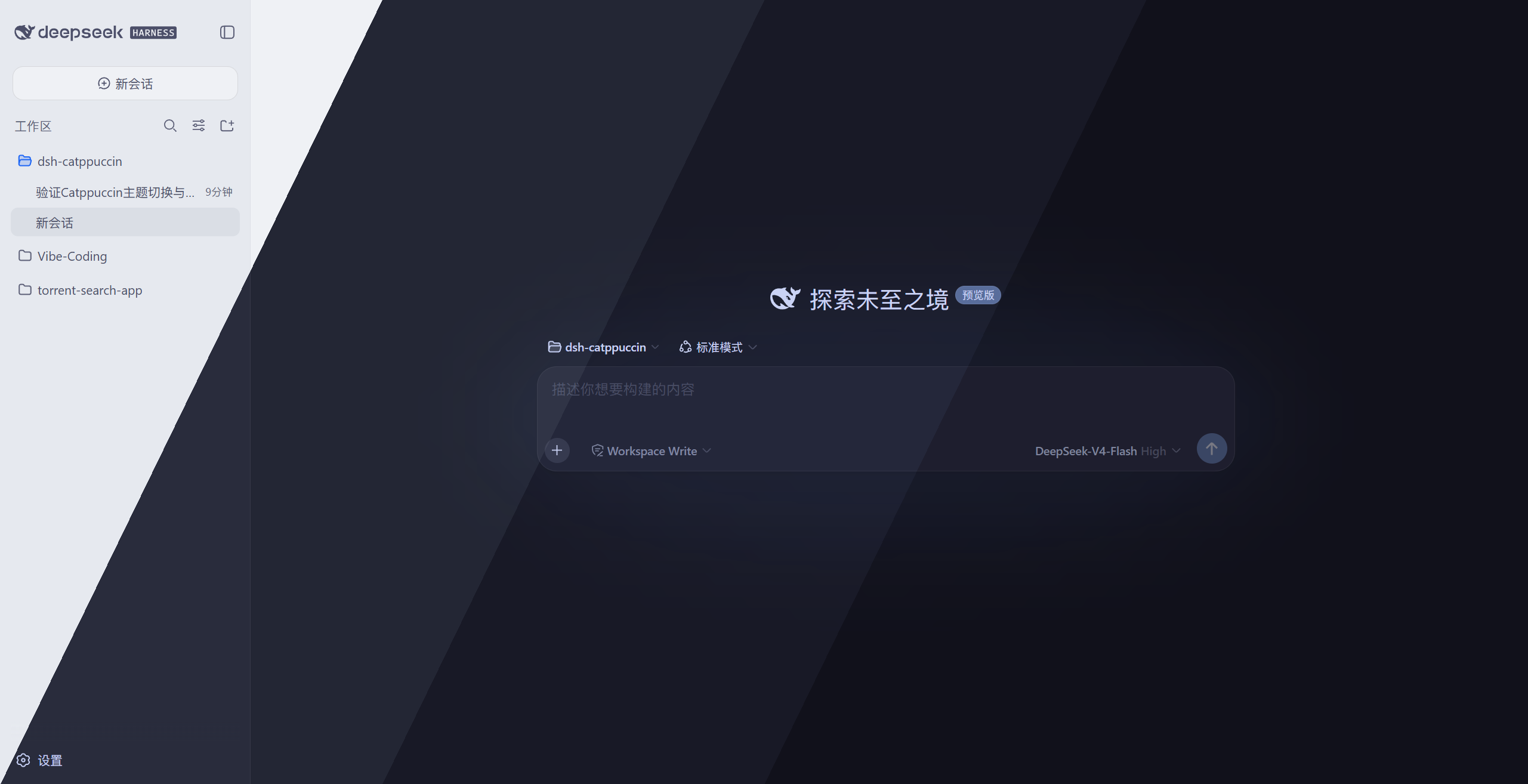
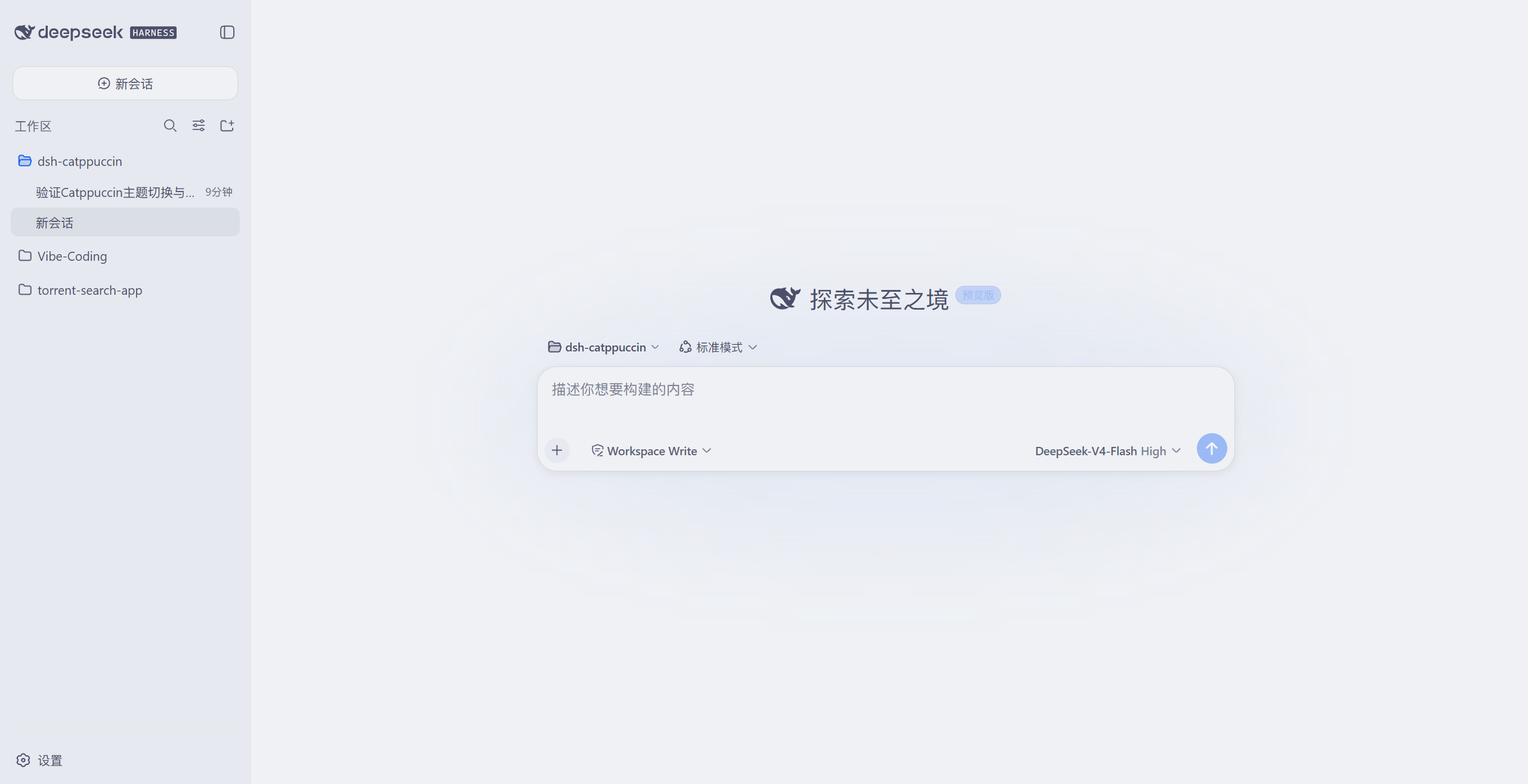
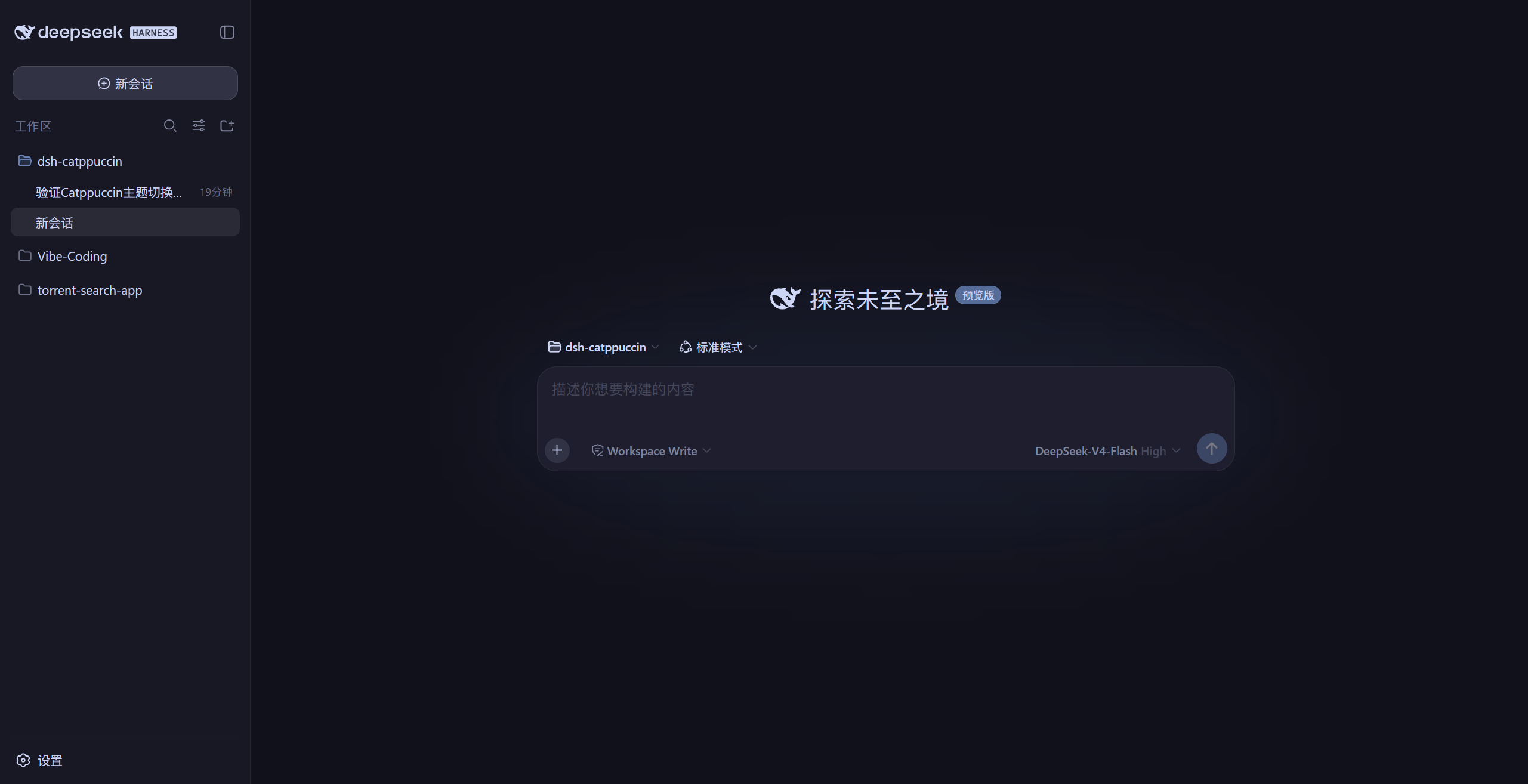
Actual screenshots from a local GUI (the header image is a diagonal blend of the four):
🌻 Latte (light)
🪴 Frappé (dark)
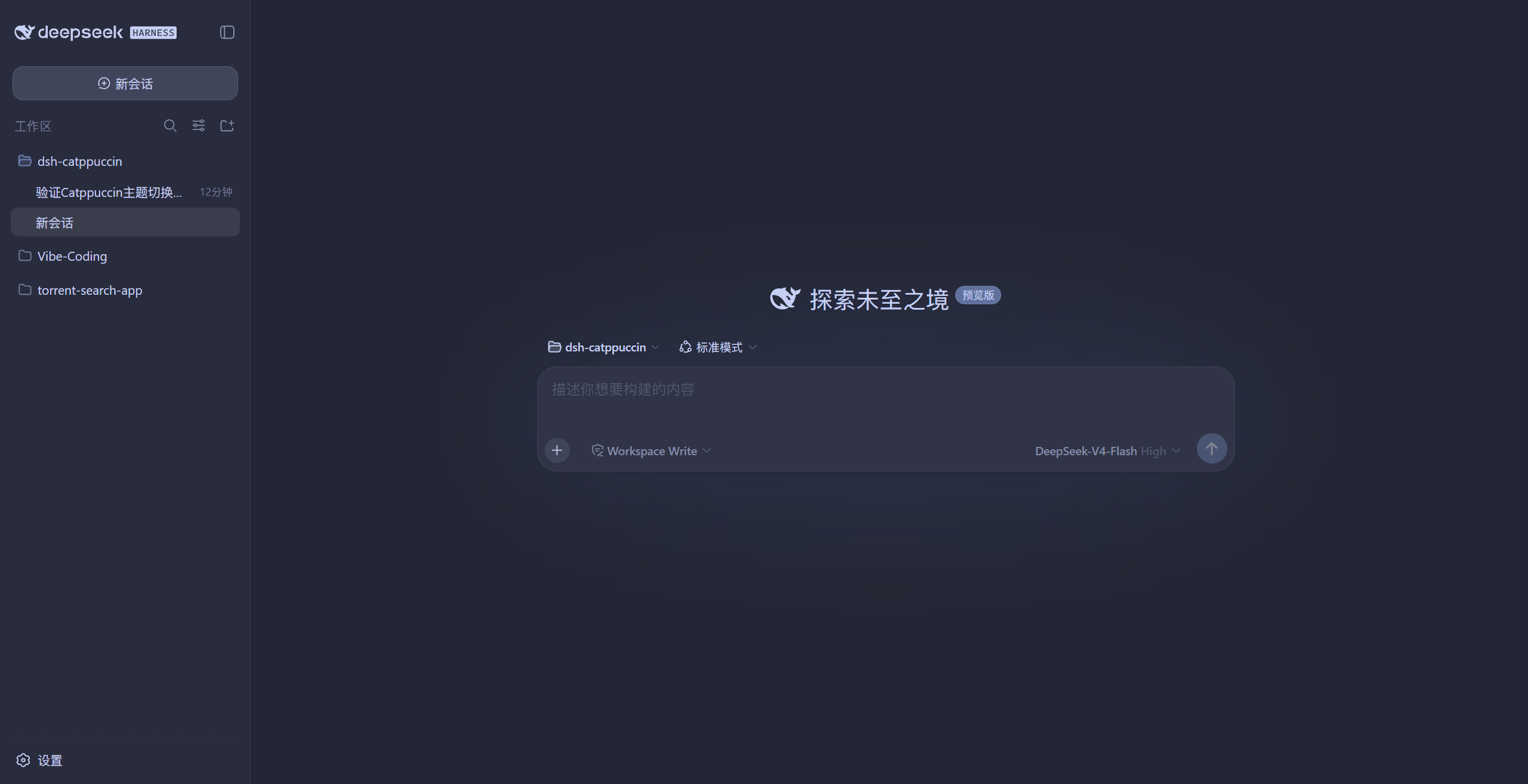
🌺 Macchiato (dark)
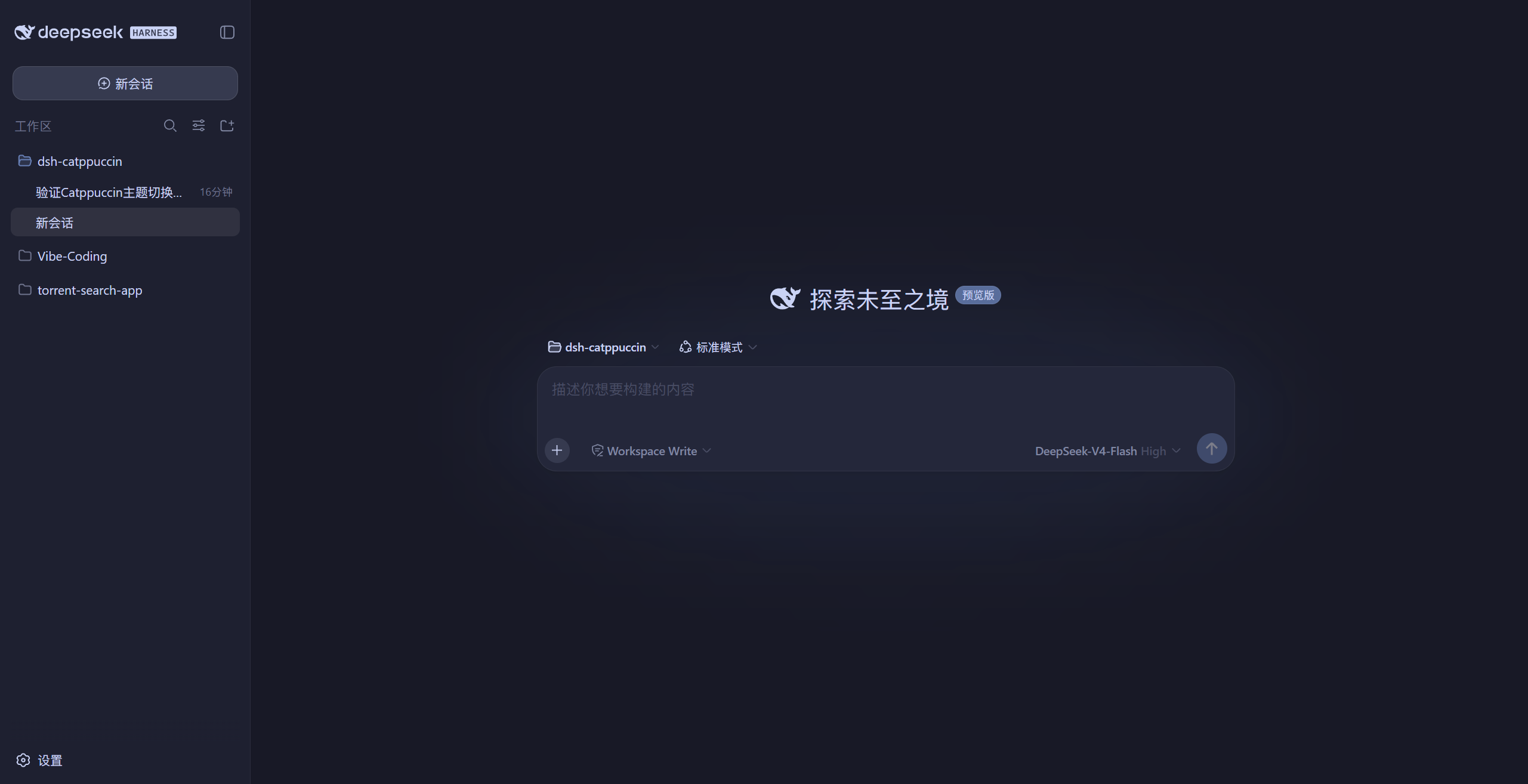
🌿 Mocha (dark)
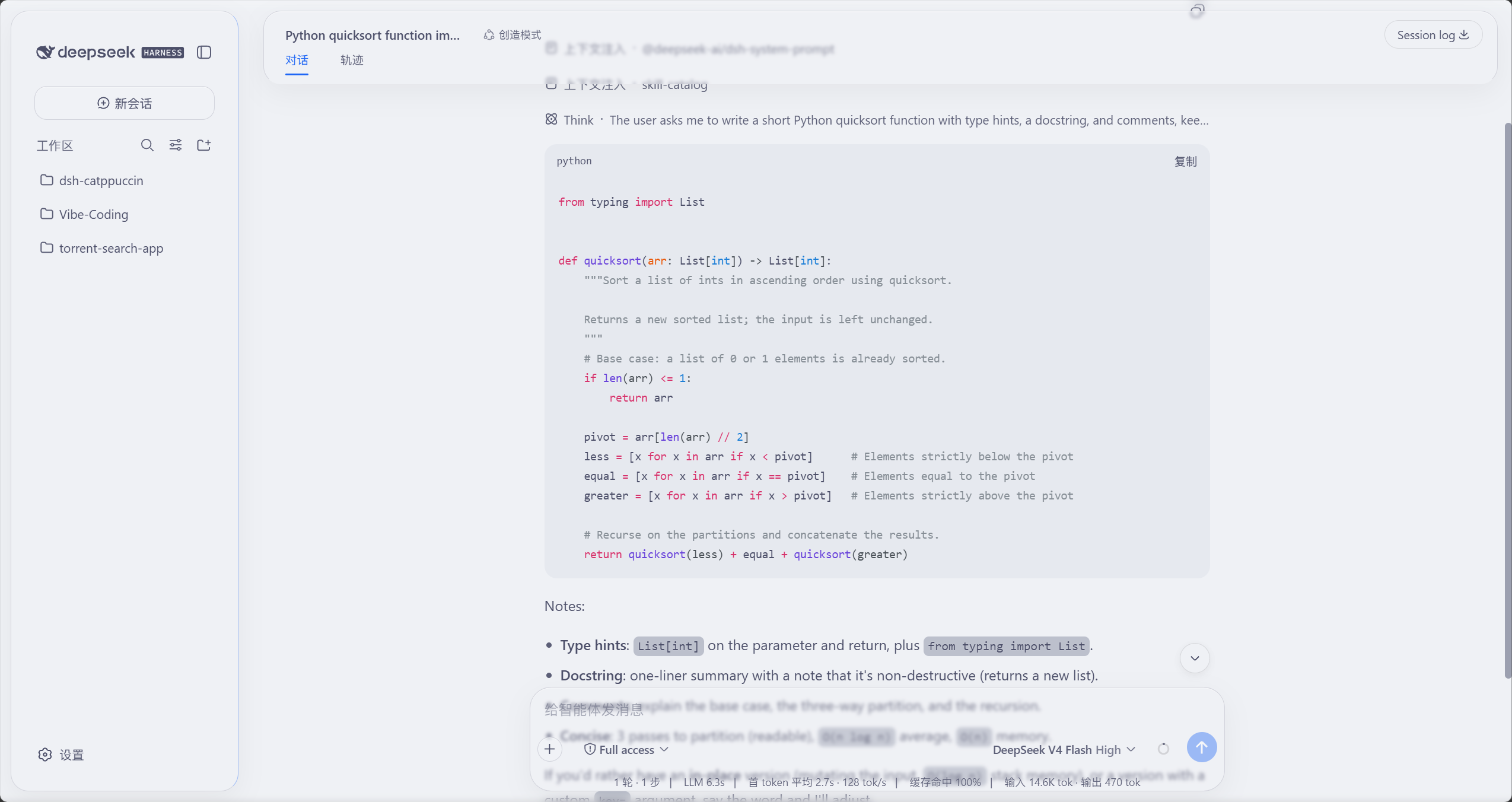
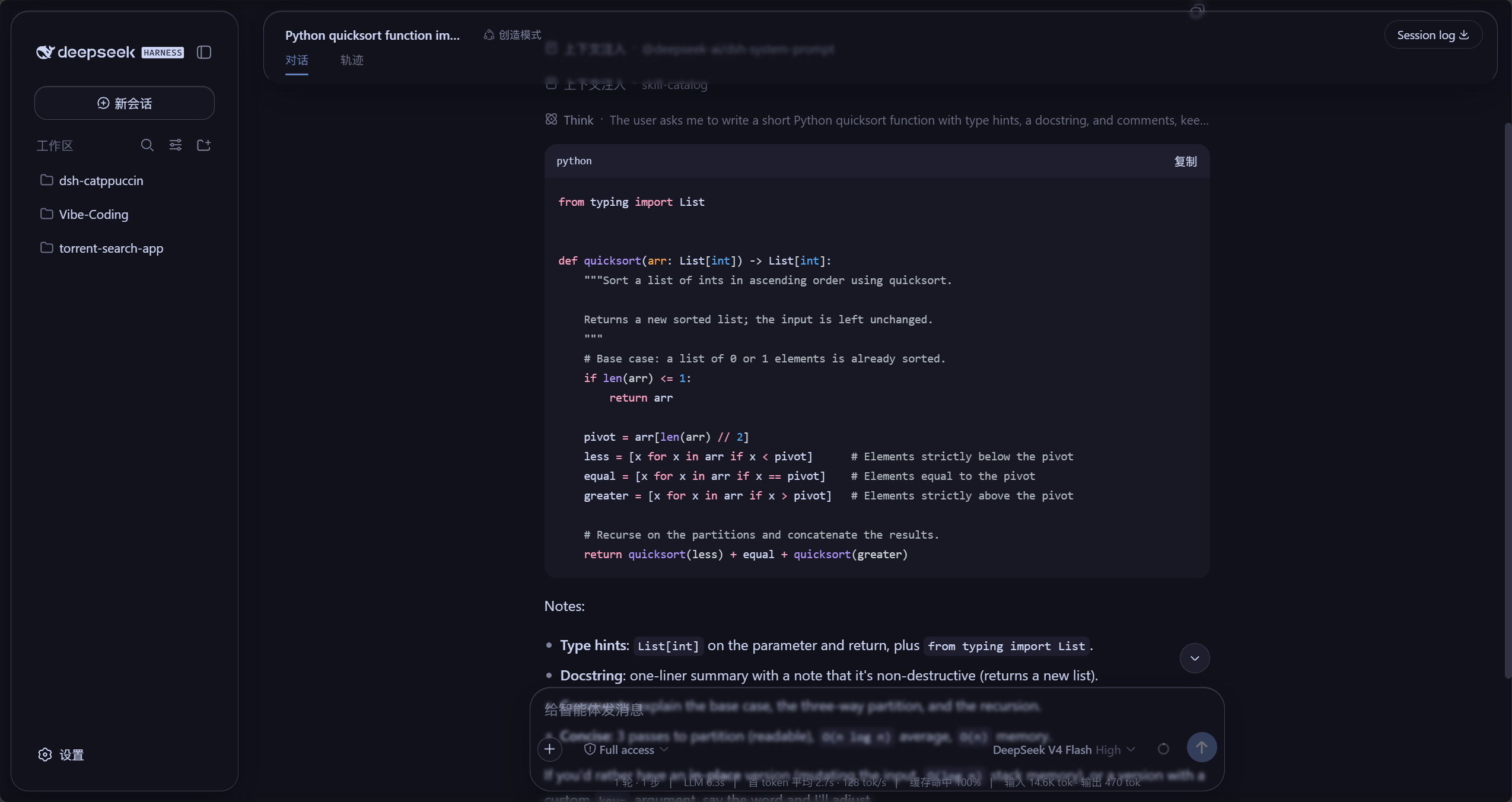
### Glass skin (Mica mode)
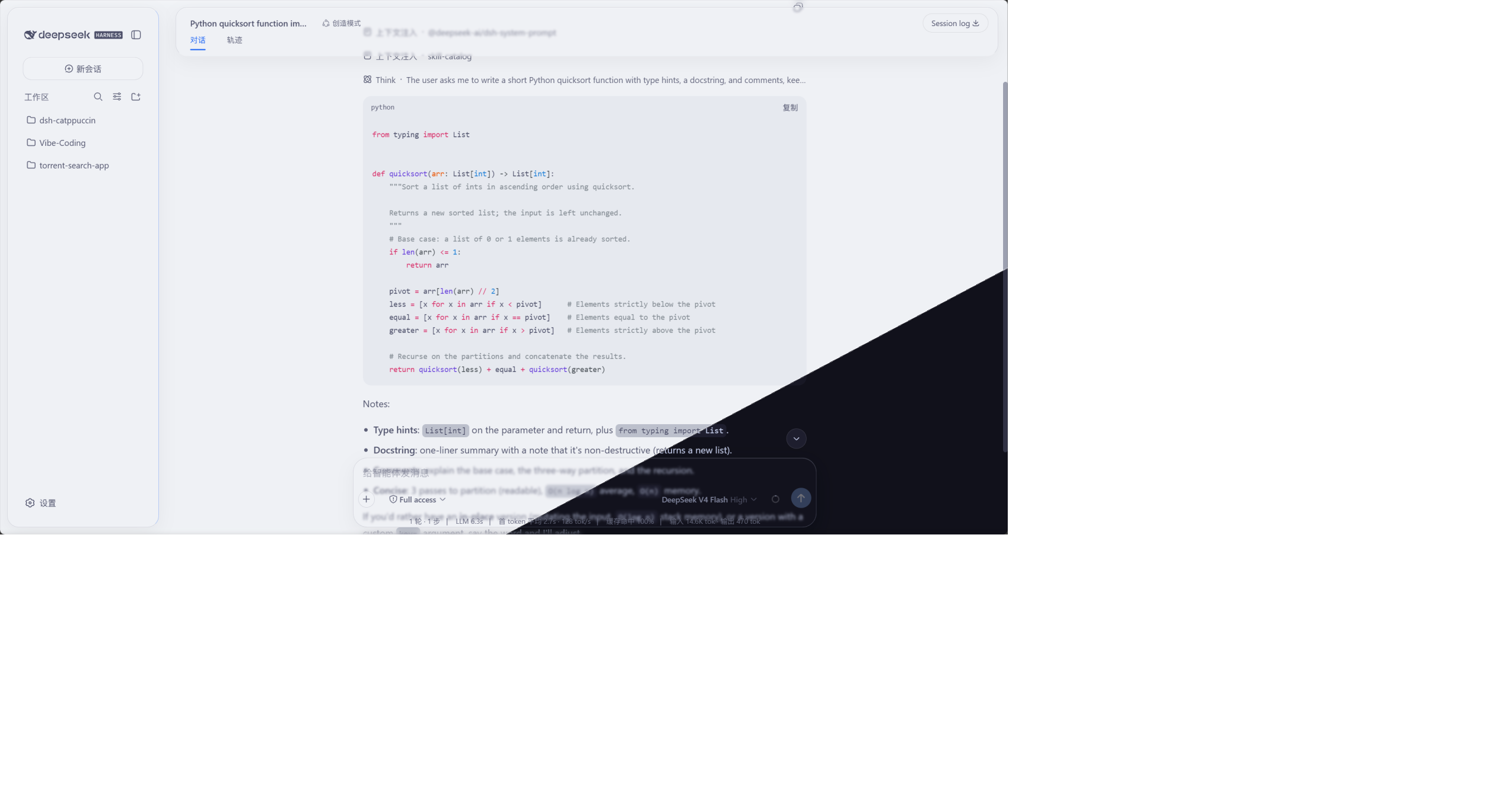
The frosted-glass effect in light (Latte) and dark (Mocha): the top bar, sidebar,
chat bubbles, composer and stats line are all glass cards; messages soften as they scroll
past the page edges; the background is the theme's solid base colour:
🌻 Latte (light glass)
🌿 Mocha (dark glass)
## Installation
### Option 1: from npm (recommended)
```sh
dsh plugin --profile web add @nonamelego/dsh-catppuccin
```
Restart `dsh web` after installing — `dsh plugin` adds it to the profile's bundles.
Use the profile name of your choice in place of `web` (e.g. `headless`).
**[DSH Desktop](https://github.com/anywhere-labs/deepseek-harness-desktop)**: the desktop build's
active profile is named `desktop`, so run:
```sh
dsh plugin --profile desktop add @nonamelego/dsh-catppuccin
```
Run it in the DSH terminal of the desktop app (`dsh plugin` defaults to the active profile).
Installing from the repo works the same way: `dsh plugin --profile desktop add https://github.com/NoNameLeGo/dsh-catppuccin-theme`.
### Option 2: from the repository
```sh
dsh plugin --profile web add https://github.com/NoNameLeGo/dsh-catppuccin-theme
```
When installing from git, pnpm may ask you to allow build scripts — follow pnpm's prompt
and add the package to the profile's `pnpm-workspace.yaml` `allowBuilds`, then run it again.
### dsh-TUI (terminal) themes
The same package covers the TUI. Install it into the dsh-tui profile:
```sh
dsh plugin --profile dsh-tui add @nonamelego/dsh-catppuccin
```
Installing from the repository works the same way:
```sh
dsh plugin --profile dsh-tui add https://github.com/NoNameLeGo/dsh-catppuccin-theme
```
The package ships a tiny theme-sync plugin row
(`dsh-catppuccin-tui-themes`, no service dependencies): on every dsh-TUI start it syncs the
four theme JSONs to `~/.dsh-tui/themes/`, so upgrades pick up the new palettes. After
installing, launch `dsh --profile dsh-tui` and pick the theme with `/theme` —
**Catppuccin Latte / Frappé / Macchiato / Mocha**, or jump straight to it with
`/theme catppuccin-mocha` (your choice persists across restarts).
> 💡 Already installed the plugin for the Web GUI and also use dsh-TUI? No need to install
> it twice: every Web start auto-syncs the themes to `~/.dsh-tui/themes/` (only when the
> directory already exists).
> 📁 Prefer not to install the package? Copy `themes/*.json` into
> `~/.dsh-tui/themes/` (Windows: `%USERPROFILE%\.dsh-tui\themes\`) by hand — you just won't
> get updates automatically.
> ⚠️ `catppuccin-*.json` belongs to this plugin and is overwritten on sync; rename the files
> if you want custom themes.
> 💡 TUI themes only style the TUI itself — the terminal background is up to your terminal.
> Pairing it with the matching Catppuccin flavour (see the
> [Catppuccin ports list](https://github.com/catppuccin/catppuccin#-ports)) looks best.
## Usage
1. Open the Web GUI (default `http://127.0.0.1:3080`), or the DSH Desktop app.
2. Go to **Settings → General**.
3. Find the **Catppuccin** row below **Appearance** and pick a flavour:
**Latte** (light), **Frappé**, **Macchiato** or **Mocha** (dark).
4. Choosing **Follow system** reverts to the official theme — it restores the preference
you had before enabling Catppuccin (light / dark / follow system) instead of forcing a reset.
### Other options in the Catppuccin row
- **Code highlight style**: default / **italic comments** — affects only the shiki colours used
in code blocks and diffs.
- **Custom overrides** (collapsible; the button shows the entry count): override individual tokens
with `--dsw-* var: value` pairs, e.g. `--dsw-static-blue-500` → `#89b4fa`. The **key** commits on
blur and must start with `--` (otherwise the entry is dropped); the **value** also commits on blur,
and an **empty value deletes the entry**; ✕ removes the row. Overrides persist with the flavour.
### Glass skin
Right below the **Catppuccin theme** row in **Settings → General** you'll find the **Glass** row:
- **Master switch**: on — the top bar, sidebar, composer, stats line and trajectory view
become frosted glass; off — the UI reverts to stock instantly (no refresh needed).
- **Mode**: **Mica** turns the interface into floating frosted cards; **Compatibility** keeps
the stock layout and swaps only the material.
- **Performance**: Mica blurs **large areas** (top bar, composer, sidebar), which shows up as
GPU load while output streams; the blur radius is not the driver (0 px is billed the same).
Prefer **Compatibility** (no large-area blur) or the **Clear** preset if that matters.
- **Presets**: **Clear / Standard / Frosted** one-click presets; fine-tune with the sliders
afterwards (a preset lights up when the current knob values match it).
- **Blur** (0–40 px) and **Frost** (0–100%): the blur radius and opacity of the glass.
- **Backdrop brightness**: dark mode darkens 0–50, light mode brightens 50–100 (50 = as-is),
mixed straight into the solid background.
Glass colours follow the active theme live; all settings persist across restarts.
### Check for plugin updates
In **Settings → General**, right below the **Glass** row:
- Clicking **Check for updates** compares the latest npm version with the installed one:
up to date → shows the current version; newer → shows the new version plus a copyable
upgrade command (the profile name is detected automatically, falling back to `web`).
- **Auto-check**: on by default — once after startup, then every 6 hours (switch it off on this row);
the **Channel** picks **Stable** (follows `latest` only) or **Beta** (prereleases too).
- Locally linked / source installs (`link:` / `file:` / git) don't show an npm upgrade
command — you'll be told to `git pull` or rebuild instead.
- Channel policy: stable builds follow the `latest` tag; prereleases follow both `latest`
and `beta` (the upgrade command automatically carries `@beta`). Offline or network
failures show the reason and offer a retry.
## Glassmorphism
**Glassmorphism** is a visual style in which panels look like frosted glass — translucent
fills, backdrop blur (`backdrop-filter: blur()`), and glass details (rim, inner highlight,
soft shadow) — letting the content behind show through, softened.
What this plugin does:
- **Seven glass areas**: top bar, sidebar, composer, stats line, trajectory view, chat
bubbles and the new-session button; in Mica mode they become rounded floating cards and
chat content scrolls *under* the glass, blurred; the collapsed sidebar becomes a
floating rail at the edge of the chat area;
- **Page-edge gradient blur**: a blur band at the top and bottom of the viewport so
messages are softened as they melt past the edges (borrowed from
[DSH-Transparent-UI-Plugin](https://github.com/WYH66666666/DSH-Transparent-UI-Plugin)'s
Aqua skin);
- **Theme-following colours**: Latte is light glass, Mocha dark glass — switching flavours
recolours instantly. The page ground is the theme's solid colour; the brightness knob
mixes white/black straight into it;
- **One-click toggle**: off restores the stock UI exactly; uninstalling the plugin leaves
nothing behind.
## Development
```sh
pnpm install
pnpm typecheck # tsc --noEmit: type check for src
pnpm typecheck:tests # tsc --noEmit: type check for the specs (vitest transpiles, it never type checks)
pnpm test # vitest palette-coverage tests
pnpm build # tsdown build -> lib/index.js (host) + lib/client.js (browser)
```
Palettes are produced by a generator script — after editing
`scripts/generate-palettes.mjs`, rerun:
```sh
node scripts/generate-palettes.mjs
```
The changelog draft is generated from your conventional commits (bilingual `EN:` support
in commit bodies):
```sh
pnpm changelog:gen # print the draft since the last tag
pnpm changelog:gen -- --write # write it into the [Unreleased] section
```
TypeDoc docs for the public API (`./client`, `./tui-themes` subpath exports) are generated
locally on demand into `docs/api/` (that directory is **not** committed — it's in
`.gitignore`; wire up CI Pages publishing later if an online copy is ever wanted):
```sh
pnpm docs:api
```
See [CONTRIBUTING.md](CONTRIBUTING.md) for the contribution guide and
[docs/state-migrations.md](docs/state-migrations.md) for the state versioning contract.
### Local link debugging
Clone the repo, link it into a profile and add it to the bundles (use your own paths):
```sh
pnpm --dir C:\Users\LeGo\.dsh\profiles\web add link:D:\Vibe-Coding\dsh-catppuccin
```
Then add `@nonamelego/dsh-catppuccin` to the profile's `package.json`
`dsh.profile.bundles` and restart `dsh web`. For DSH Desktop use
`~/.dsh/profiles/desktop` instead.
## 🙋 FAQ
- **Q: "Why don't I see the Catppuccin themes in the Appearance row?"**\
A: The stock Appearance row only lists the built-in light / dark / follow-system
preferences. The four flavours live in the **Catppuccin** row right below it.
- **Q: "How is my theme choice remembered?"**
A: The choice persists in DSH's official settings document (the `catppuccin` namespace,
stored under the DSH home, shared across every DSH instance on the machine), with
localStorage as an in-browser cache and cross-tab sync. So plain `dsh web`,
`dsh web --port `, and **DSH Desktop** (which boots on a fresh random loopback
port every launch) all restore the preference automatically. The glass switch and every
knob persist the same way. Since 0.5.0, a legacy `catppuccin-state.json` is migrated
into the settings document once on first launch (the file is kept as a rollback copy).
- **Q: "How do I know if this plugin has a new version?"**
A: Settings → General → **Check Catppuccin plugin updates** compares against npm in one
click and gives a copyable upgrade command; or run
`dsh plugin --profile web update @nonamelego/dsh-catppuccin` manually (re-`add` the
latest version works too). In [DSH Desktop](https://github.com/anywhere-labs/deepseek-harness-desktop),
use `desktop` as the profile name, or just run `dsh plugin update` in the app's DSH terminal.
## 💝 Credits
- [Catppuccin](https://github.com/catppuccin/catppuccin) for the palettes and port templates
- [DeepSeek Harness](https://github.com/deepseek-ai/deepseek-harness) for the plugin system
- [DSH-Transparent-UI-Plugin](https://github.com/WYH66666666/DSH-Transparent-UI-Plugin)
for the glass-skin interaction and implementation reference (mica / compatibility modes,
blur / frost / brightness knobs)

Copyright © 2021-present Catppuccin Org


 Catppuccin for DeepSeek Harness