# React Native Picker Module
With this package you can easily use picker with onPress function.
Also this package is workaround for Android Picker problem (https://github.com/facebook/react-native/issues/15556).
Using `Modal` and `Picker` component for IOS and using `RecyclerView` and `AlertDialog` for Android as `NativeModule`.
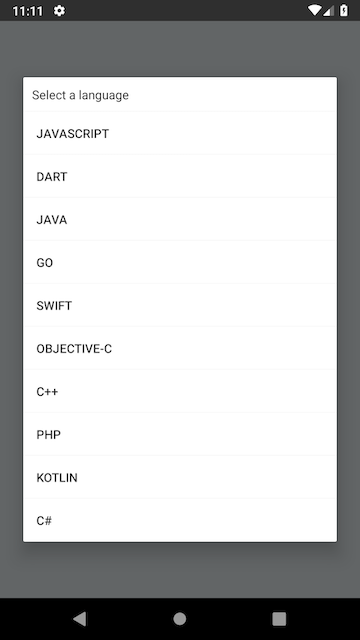
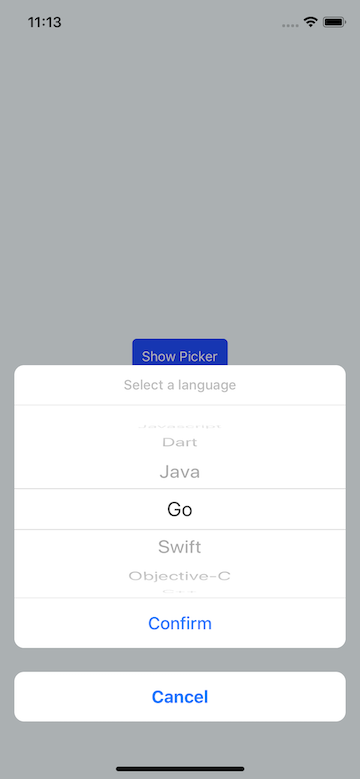 ### Version 1.1.1
- [https://github.com/talut/react-native-picker-module/issues/7](https://github.com/talut/react-native-picker-module/issues/7) this feature request added.
### Version 1.0.1
- [https://github.com/talut/react-native-picker-module/issues/1](https://github.com/talut/react-native-picker-module/issues/1) this feature request added.
- Typescript definitions added.
- Undefined value props at **IOS** issue solved.
## Getting Started
**With NPM**
```
npm install --save react-native-picker-module
```
**With YARN**
```
yarn add react-native-picker-module
```
**Automatic linking**
```
react-native link react-native-picker-module
```
**Manual Linking**
**[Manual Installation](/docs/manual-installation.md)** (If something went wrong with react-native link)
## Props
| Props | Type | Default | Required | OS |
|-------------|------|--------------------------------------------------|----------|------------|
|value |number|- |No |Android, IOS|
|items |array |- |**Yes** |Android, IOS|
|title |string|- |No |Android, IOS|
|ios |object|`{duration: 330, overlayColor: 'rgba(0,0,0,0.3)'}`|No |IOS |
|pickerRef |func |- |**Yes** |Android, IOS|
|onValueChange|func |- |**Yes** |Android, IOS|
|onCancel |func |- |**No** |Android, IOS|
|cancelButton |string|`Cancel` |No |IOS |
|confirmButton|string|`Confirm` |No |IOS |
## Usage
```javascript
import ReactNativePickerModule from 'react-native-picker-module'
state = {
selectedValue: null,
data: [
"Javascript",
"Go",
"Java",
"Kotlin",
"C++",
"C#",
"PHP"
]
};
{this.pickerRef.show()}}>
Show Language Picker
this.pickerRef = e}
value={this.state.selectedValue}
title={"Select a language"}
items={this.state.data}
onCancel={()=>{console.log('Cancelled')}}
onValueChange={(value, index ) => {
console.log("value: ",value)
console.log("index: ",index)
this.setState({
selectedValue: value,
selectedIndex: index,
})
}}/>
```
## FYI
You can use more than one picker in same screen. You just need to set different pickerRef.
```javascript
this.languagePicker.show();
this.languagePicker = e}
value={this.state.selectedValue}
title={"Select a language"}
items={this.state.data}
onValueChange={(value,index) => {
console.log("value: ",value)
console.log("index: ",index)
this.setState({
selectedValue: value,
selectedIndex: index,
})
}}/>
```
p.s : If you want to get country list from native device you can use this package: https://github.com/talut/react-native-countries
```javascript
this.countryPicker.show();
this.countryPicker = e}
value={this.state.selectedValue}
title={"Select a country"}
items={this.state.data}
onValueChange={(value,index) => {
console.log("value: ",value)
console.log("index: ",index)
this.setState({
selectedValue: value,
selectedIndex: index,
})
}}/>
```
## License
This project is licensed under the MIT License - see the LICENSE.md file for details
### Version 1.1.1
- [https://github.com/talut/react-native-picker-module/issues/7](https://github.com/talut/react-native-picker-module/issues/7) this feature request added.
### Version 1.0.1
- [https://github.com/talut/react-native-picker-module/issues/1](https://github.com/talut/react-native-picker-module/issues/1) this feature request added.
- Typescript definitions added.
- Undefined value props at **IOS** issue solved.
## Getting Started
**With NPM**
```
npm install --save react-native-picker-module
```
**With YARN**
```
yarn add react-native-picker-module
```
**Automatic linking**
```
react-native link react-native-picker-module
```
**Manual Linking**
**[Manual Installation](/docs/manual-installation.md)** (If something went wrong with react-native link)
## Props
| Props | Type | Default | Required | OS |
|-------------|------|--------------------------------------------------|----------|------------|
|value |number|- |No |Android, IOS|
|items |array |- |**Yes** |Android, IOS|
|title |string|- |No |Android, IOS|
|ios |object|`{duration: 330, overlayColor: 'rgba(0,0,0,0.3)'}`|No |IOS |
|pickerRef |func |- |**Yes** |Android, IOS|
|onValueChange|func |- |**Yes** |Android, IOS|
|onCancel |func |- |**No** |Android, IOS|
|cancelButton |string|`Cancel` |No |IOS |
|confirmButton|string|`Confirm` |No |IOS |
## Usage
```javascript
import ReactNativePickerModule from 'react-native-picker-module'
state = {
selectedValue: null,
data: [
"Javascript",
"Go",
"Java",
"Kotlin",
"C++",
"C#",
"PHP"
]
};
{this.pickerRef.show()}}>
Show Language Picker
this.pickerRef = e}
value={this.state.selectedValue}
title={"Select a language"}
items={this.state.data}
onCancel={()=>{console.log('Cancelled')}}
onValueChange={(value, index ) => {
console.log("value: ",value)
console.log("index: ",index)
this.setState({
selectedValue: value,
selectedIndex: index,
})
}}/>
```
## FYI
You can use more than one picker in same screen. You just need to set different pickerRef.
```javascript
this.languagePicker.show();
this.languagePicker = e}
value={this.state.selectedValue}
title={"Select a language"}
items={this.state.data}
onValueChange={(value,index) => {
console.log("value: ",value)
console.log("index: ",index)
this.setState({
selectedValue: value,
selectedIndex: index,
})
}}/>
```
p.s : If you want to get country list from native device you can use this package: https://github.com/talut/react-native-countries
```javascript
this.countryPicker.show();
this.countryPicker = e}
value={this.state.selectedValue}
title={"Select a country"}
items={this.state.data}
onValueChange={(value,index) => {
console.log("value: ",value)
console.log("index: ",index)
this.setState({
selectedValue: value,
selectedIndex: index,
})
}}/>
```
## License
This project is licensed under the MIT License - see the LICENSE.md file for details