# OIDC
提供标准Open ConnectID接入登录功能。
本插件登录流程使用**授权码模式 (Authorization Code Flow)**.
## 依赖
- `@nocobase/plugin-auth` 提供表,模型函数复用等
## 使用方法
> 以Sign in with Google为例
> https://developers.google.com/identity/openid-connect/openid-connect
### 获取Google OAuth 2.0凭据
[Google Cloud控制台](https://console.cloud.google.com/apis/credentials) - 创建凭据 - OAuth客户端ID
 进入到配置界面,填写**授权重定向URL**. 重定向URL可以在Nocobase,新增认证器时获取,通常情况下为`http(s)://host:port/api/oidc:redirect`.
 完成后复制**客户端ID**和**客户端密钥**。
### 在NocoBase上新增认证器
插件设置 - 认证 - 新增 - OIDC
完成后复制**客户端ID**和**客户端密钥**。
### 在NocoBase上新增认证器
插件设置 - 认证 - 新增 - OIDC
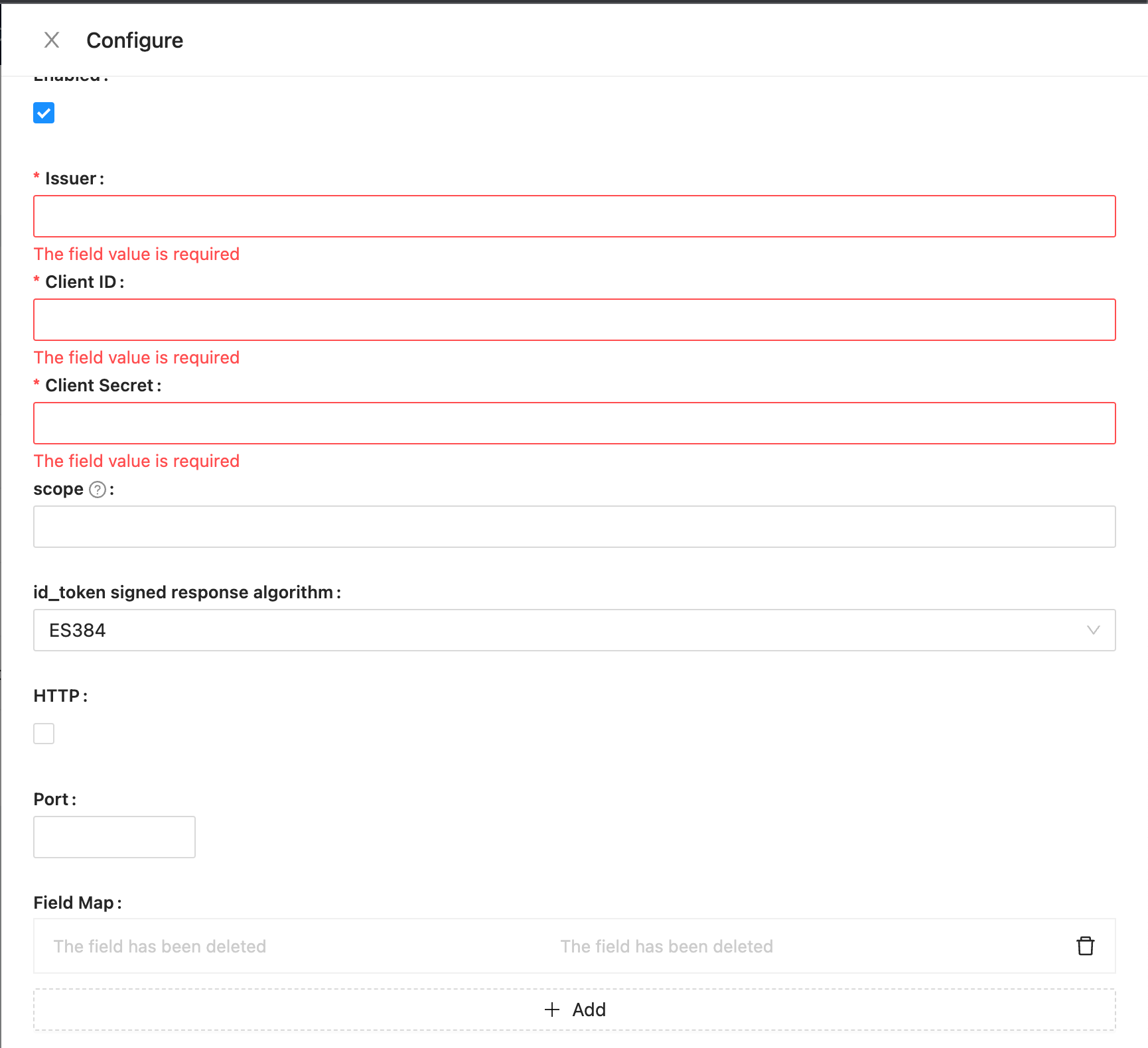 依次填写
- Issuer - issuer由IdP提供,通常以`/.well-known/openid-configuration`结尾,Google的为[https://accounts.google.com/.well-known/openid-configuration](https://accounts.google.com/.well-known/openid-configuration)
- Client ID - 客户端ID
- Client Secret - 客户端密钥
- scope - 选填,默认为openid email profile
- id_token signed response algorithm - id_token的签名方法,默认为RS256
- HTTP - 回调地址是否为http协议,默认https
- Port - 回调地址端口,默认为443/80
- Field Map - 如果需要将用户相关字段映射,可以在这里配置,默认昵称为openid.
在有email的情况下,登录时将尝试匹配已有用户,否则创建新用户。
依次填写
- Issuer - issuer由IdP提供,通常以`/.well-known/openid-configuration`结尾,Google的为[https://accounts.google.com/.well-known/openid-configuration](https://accounts.google.com/.well-known/openid-configuration)
- Client ID - 客户端ID
- Client Secret - 客户端密钥
- scope - 选填,默认为openid email profile
- id_token signed response algorithm - id_token的签名方法,默认为RS256
- HTTP - 回调地址是否为http协议,默认https
- Port - 回调地址端口,默认为443/80
- Field Map - 如果需要将用户相关字段映射,可以在这里配置,默认昵称为openid.
在有email的情况下,登录时将尝试匹配已有用户,否则创建新用户。