# Angular GitHub Calendar Component
[](https://github.com/NgGithubContribCalendar/ng-github-contrib-calendar/releases)
[](https://nggithubcontribcalendar.github.io/ng-github-contrib-calendar/)
[](https://coveralls.io/github/NgGithubContribCalendar/ng-github-contrib-calendar?branch=master)
[](https://travis-ci.org/NgGithubContribCalendar/ng-github-contrib-calendar)
[](https://greenkeeper.io/)


-----
# Table of Contents
- [Installation](#installation)
- [Frontend](#frontend)
- [Backend](#backend)
- [Theming](#theming)
- [Built-in themes](#built-in-themes)
- [Building your own](#building-your-own)
- [Types and Polyfills](#types-and-polyfills)
- [Importing the Module](#importing-the-module)
- [Usage](#usage)
- [The bare minimum](#the-bare-minimum)
- [With a Prebuilt Locale](#with-a-prebuilt-locale)
- [Showing or Hiding Date Controls](#showing-or-hiding-date-controls)
- [Specifying the Cutoff Date](#specifying-the-cutoff-date)
- [Via the `to` Parameter](#via-the-to-parameter)
- [Via the `y`, `m` and `d` Parameters](#via-the-y-m-and-d-parameters)
- [Localisation](#localisation)
- [Using Your Own Server](#using-your-own-server)
- [Error Handling](#error-handling)
# Installation
## Frontend
The metadata version for Angular's AOT compiler differs between Angular 4.x and Angular 5.x, therefore two flavours of this library are released:
| *Flavour* | **Angular 4** | **Angular 5** |
|-----------|--------------------------------------------------------------------------------------------|--------------------------------------------------------------------------------------------|
| **Local** | npm install [@ng-github-contrib-calendar/calendar-ng4](https://www.npmjs.com/package/@ng-github-contrib-calendar/calendar-ng4) | npm install [@ng-github-contrib-calendar/calendar-ng5](https://www.npmjs.com/package/@ng-github-contrib-calendar/calendar-ng5) |
| **CDN** | [Package](https://www.jsdelivr.com/package/npm/@ng-github-contrib-calendar/calendar-ng4) | [Package](https://www.jsdelivr.com/package/npm/@ng-github-contrib-calendar/calendar-ng5) |
The UMD global name is `ghContribCalendar`.
## Backend
A CORS-enabled server is required to retrieve and format GitHub data. A public one is configured for the module, but is provided without any guarantees. You can get your own server [here](https://github.com/NgGithubContribCalendar/server) - it's ready to deploy to Heroku for free with one click.
# Theming
## Built-in themes
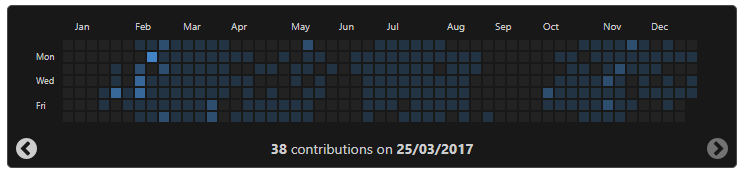
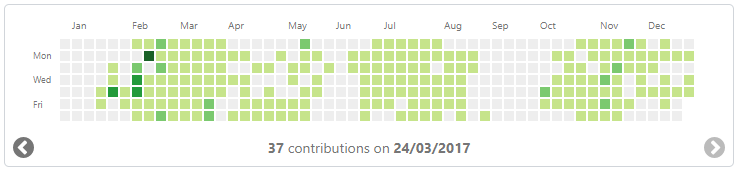
The library comes with two built-in themes: `light`, which mimics the default GitHub calendar skin, and `dark`, which mimics the [dark GitHub userstyle](https://userstyles.org/styles/37035/github-dark). Once installed, these themes are available under `dist/styling`; alternatively, you can use a CDN version from one of the links in the installation section.
## Building your own
It's easy to build your own theme - simply import the style builder from `dist/styling/_style-builder.scss` and include the `gh-contrib-calendar-skin` mixin:
```scss
@mixin gh-contrib-calendar-skin(
$noContributionsColour,
$level1Colour,
$level2Colour,
$level3Colour,
$level4Colour,
$backgroundColour,
$borderColour,
$textColour
);
```
For example, here is the light theme's definition:
```scss
@import "style-builder";
@include gh-contrib-calendar-skin(
#eee, // Colour for days without any contributions
#c6e48b, // Colour for days with very few contributions
#7bc96f, // Colour for days with few contributions
#239a3b, // Colour for days with a decent number of contributions
#196127, // Colour for days with a lot of contributions
#fff, // The component's background colour
#d1d5da, // The component's border colour
#767676 // The component's text colour
);
```
# Types and Polyfills
Ensure that the following is available globally:
* `Promise`
* `Object.freeze`
# Importing the Module
```typescript
import {NgModule} from "@angular/core";
import {GhContribCalendarModule} from "@ng-github-contrib-calendar/calendar-ng5"; // replace with @ng-github-contrib-calendar/calendar-ng4 if using Angular 4
@NgModule({
imports: [
GhContribCalendarModule
]
})
export class MyModule {
}
```
# Usage
## The bare minimum
This will use the English locale
```html
```
## With a Prebuilt Locale
The component comes with three prebuilt locales:
- **en** for English (default)
- **ru** for Russian
- **lt** for Lithuanian
```html
```
## Showing or Hiding Date Controls
Date controls allow the user to move a year into the future or the past on the calendar. You can hide them as such:
```html
```
## Specifying the Cutoff Date
You can specify the last day shown on the calendar, which can be equal to or less than the current date.
### Via the `to` Parameter
If specified via the `to` parameter, the full date must be used:
```html
```
Alternatively, a `Date` object can be used:
```html
```
### Via the `y`, `m` and `d` Parameters
The cutoff date may also be provided with each unit separately. The year must be a `number` whereas the month and date can be a `number` or a `string`, with or without the leading zero:
```html
```
# Localisation
Custom localisation can be provided via the `translations` input parameter using a Partial of the `TranslationSpec` interface (see API docs). Any string that does not have a translation will default to the one provided by the locale.
```html
```
# Using Your Own Server
The component supports custom fetch servers with the use of the `ProxyURLFormatterFunction` interface (see API docs). The default function takes a username and, optionally, a cutoff date and formats it into a URL that will be AJAX'd to retrieve the data:
```typescript
function fn(username: string, toYear?: string | number, toMonth?: string, toDay?: string): string {
let url = `${StaticConf.DEFAULT_PUBLIC_HOST}/${username}`;
if (toYear && toMonth && toDay) {
url += `?to=${toYear}-${toMonth}-${toDay}`;
}
return url;
}
console.log(fn('Alorel', 2018, '01', '05'));
// https://gh-contrib-parser-public.herokuapp.com/fetch/Alorel?to=2018-01-05
```
You can supply your own function via the `formatter-fn` parameter:
```html
```
# Error Handling
The component has an `error` output with Angular's `HttpErrorResponse` objects:
```html
```