# 框架


## 开发规范

### 文件组织结构
Nbjump 框架中 App、Page、Component 使用 vue 单文件组件规范，定义在 `.vue` 文件中，其中 `<script>` 区块需使用 ES module 模式导出（即 `export default {}`）

目录结构如下，其中 `app.vue` 为 APP 入口文件（不支持其他文件名），入口文件无需包含 `<template>` 区块：

```
├── src                    源码目录
|   ├── components         组件目录
|   ├── pages              页面目录
|   |   └── index          index 页面目录
|   |       ├── banner     index 页面私有组件或其他资源文件等
|   |       └── index.vue  index 页面
|   ├── common             公共资源目录
|   ├── app.vue            APP 入口文件
|   └── project.swan.json  小程序 project 文件
├── package.json
└── nbjump.config.js         编译配置文件, 参考【编译配置】
```

## App

App 是小程序的入口文件，约定其文件名为 `app.vue`。可以在 App 上定义一些全局的配置，绑定 App 生命周期方法或定义自定义属性，以及定义全局样式。

Nbjump 中 App、Page、Component 的相关配置，需要配置到 Vue 文件 script 部分导出对象的 `config` 字段中。


::: warning
`build@0.2.52` 起支持用单独的 `<script type="config"></script>` 区块配置 `config`，且支持区块级条件编译，即：

```html
<script type="config" target="h5">
{
   config: {
        pages: [
            'pages/home/index'
        ]
    }
}
</script>

<script type="config">
{
   config: {
        pages: [
            'pages/home/index',
            'pages/example/index'
        ]
    }
}
</script>
```

详见 [[FEATURE]优化 SFC config 配置条件编译能力](https://github.com/MengFangui/Nbjump/issues/35)
:::


App 示例代码: `app.vue`

```html
<script>
export default {
    // ...
    config: {
        pages: [
            'pages/home/index',
            'pages/example/index'
        ]
    },
    onLanuch() {},
    onShow() {},
    onHide() {},
    globalData: {}
    // ...
}
</script>
<style lang="less">
.page {
    padding: 30px;
}
</style>
```

## Page

Page 是一个定义为页面的 Vue 文件，在 App 的 `config.pages` 里声明后可以使用，Page 加载(`onLoad`)的时候会创建一个对应的 Vue 根实例（Page 中 `this` 指向此 Vue 实例）。

Page 示例代码: `pages/home/index.vue`

```html
<template>
    <view class="page">
        <c-hello :helloText="helloText">
            <text>Nbjump!</text>
        </c-hello>
    </view>
</template>
<script>
// 注意：vue 文件中使用组件按照 vue 规范的 components 字段配置即可，无需在 config 中配置 usingComponents
import Hello from '../../components/Hello/Hello.vue';

export default {
    // ...
    config: {
        navigationBarTitleText: 'Examples'
    },
    components: {
        'c-hello': Hello
    },
    data() {
        helloText: 'welcome!'
    },
    onLoad(options) {},
    onReady() {},
    onUnload() {},
    onShow() {},
    onHide() {},
    onForceReLaunch() {},
    onPullDownRefresh() {},
    onReachBottom() {},
    onShareAppMessage() {},
    onPageScroll() {},
    onTabItemTap() {},
    // ...
}

</script>
<style lang="less">
</style>
```

::: warning
`build@0.2.52` 起支持定义组件时使用 PascalCase 并支持 ES6 对象属性简写，在模板里需要用对应的 kebab-case 引用，即：

```html
<template>
    <my-hello :helloText="helloText">
        <text>Nbjump!</text>
    </my-hello>
</template>

<script type="config">
{
    config: {
        navigationBarTitleText: 'Examples'
    }
}
</script>

<script>
import MyHello from '../../components/Hello/Hello.vue';

export default {
    components: {
        MyHello
    }
};
</script>
<style lang="less">
</style>
```

:::


## Component

Component 是定义为组件的 Vue 文件，必须在其 config 中设置 `component: true`。Component 被 Page 或 Component 引用并渲染后，会生成对应的 Vue 实例（Component 中 `this` 指向此 Vue 实例）。

Component 示例代码: `components/Hello/Hello.vue`

```html
<template>
    <view>
        {{helloText}}: <slot />
    </view>
</template>
<script>
// 注意：组件需在 config 中配置 component: true
export default {
    // ...
    config: {
        component: true
    },
    props: {
        helloText: {
            type: String,
            default: 'hello'
        }
    },
    lifetimes: {
        created() {},
        attached() {},
        ready() {},
        detached() {}
    },
    pageLifetimes: {
        show() {},
        hide() {}
    },
    // ...
}
</script>
<style lang="less">
</style>
```


## 实例扩展 API

### $mpUpdated( [callback, context] )

在 App、Page、Component 实例上新增扩展 `$mpUpdated` API，来注册小程序数据更新视图渲染完成后的回调。

在下次小程序渲染结束之后执行延迟回调，在修改数据之后立即使用这个方法，可以获取数据修改到渲染结束的时间。

- 参数：

    - {Function} [callback]
    - {Object} [context]

- 用法：


```javascript
// 在实例内使用
// 修改数据
this.msg = 'Hello';
// 小程序内容还没有更新
this.$mpUpdated(function () {
    // 小程序视图更新完成
});

// 作为一个 Promise 使用
this.$mpUpdated()
    .then(function () {
        // DOM 更新了
    });

// 在其他位置使用
const app = getApp();
app.$mpUpdated(...);
```


## 小程序特性支持

### 自定义组件特性

在组件导出对象上配置。

- 支持 `externalClasses` （调用组件传入外部样式类属性时暂不支持动态绑定）
- 支持 `options`
- 不支持 behaviors 和自定义扩展

### 获取小程序实例和 Page options
使用框架开发的页面和组件中，`this` 指向的是 Vue 实例，通过下面的方法可以获取到小程序实例。

- 在页面或组件实例中获取对应小程序实例: `this.$mp.scope`
- 在页面实例中获取小程序 Page options: `this.$mp.options`

::: tip
框架会通过 Vue 运行时将数据更新同步到小程序，不能直接通过小程序实例调用 `setData`，会导致数据不一致。
:::

## 使用小程序组件和页面

支持在 nbjump 项目中使用小程序的组件和页面，具体方法为：

### 使用小程序组件

直接在 config 中配置 usingComponents 来使用,**不需要加文件名后缀**：

```html
<script>
export default {
    config: {
        usingComponents: {
            'a-comp': '../../path/to/components'
        }
    }
};

</script>
```

### 使用小程序页面

在 app.vue 中引入时，需要添加 .swan、.mp 后缀：

```html
<script>
export default {
    config: {
        pages: [
            'pages/home/index',
            'pages/land/index',
            'pages/swan/index.swan'
        ],
        tabBar: {
            list: [{
                pagePath: 'pages/home/index',
                text: 'TabA'
            }, {
                pagePath: 'pages/land/index',
                text: 'TabB'
            }, {
                pagePath: 'pages/swan/index.swan',
                text: 'Swan'
            }]
        }
    }
};
</script>
```
::: tip
当生成 H5 项目时，这些组件和页面会被忽略，需要自行在业务中进行处理。
:::

## 生命周期和事件方法

Nbjump 支持完整的 Vue 生命周期和小程序生命周期及事件方法（部分在 H5 暂未支持）详见 [多端适配 - 生命周期](./platforms.html#生命周期和事件方法)。

生命周期图示及顺序
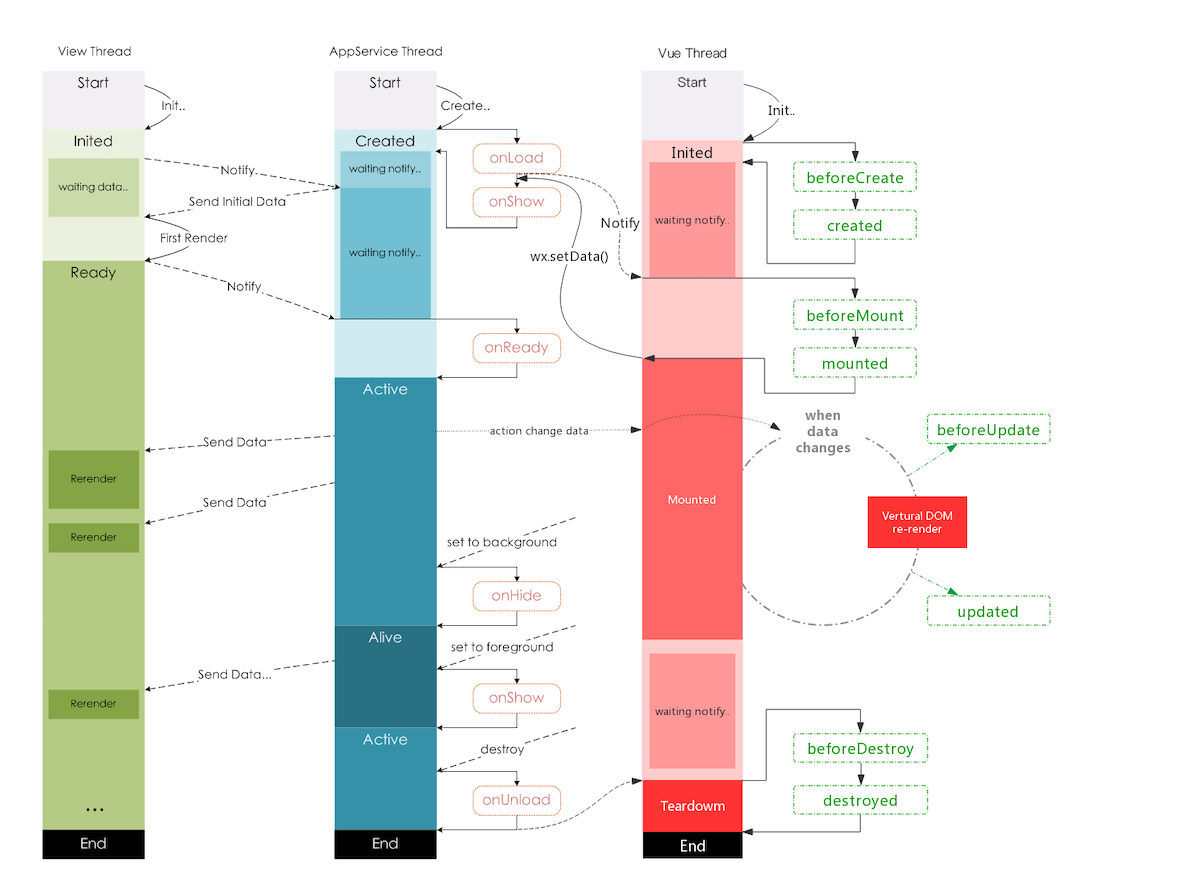

![生命周期图示](../assets/framework-lifecycle.png)

如图示，Vue 生命周期与 swan 生命周期触发顺序为：

- [lifetimes Vue:Page] created
- [lifetimes swan:Page] onLoad
- [lifetimes Vue:Page] mounted
- [lifetimes swan:Page] onShow
- [lifetimes swan:Page] onReady

注意：swan 的视图在 Page onReady 时或 Component (lifetimes) ready 时才创建完成，使用视图相关 API 时要注意。


## 小程序内置组件
框架的组件规范使用百度智能小程序和微信小程序组件规范，使用时按照小程序的组件名、属性名和事件名使用，属性和事件绑定使用 vue 语法，如：`<input :value="value" @input="onInput" />`

## 小程序内置 API
Nbjump 的 API 规范使用百度智能小程序和微信小程序 API 规范，为了实现多端兼容，框架会在 App 实例及 Page/Component 实例上通过 `$api` 字段来挂载原生 API，即可以在实例上通过 `this.$api` 或者在其他 js 文件中通过 `app.$api` (`app = getApp()`) 来访问小程序 API。

另外，为了开发方便，通过上述方式调用 API 时框架会自动将原生的异步 API 转换为 Promise API，可以直接用 Promise 方式使用，如

```javascript
// 在组件或页面实例中
this.$api.request({
    url: 'https://m.baidu.com/', 
    data: {
        from: 'nbjump' 
    }
}).then(res => {
    console.log(res.data);
}).catch(err => {
    console.log('错误码：' + err.errCode);
    console.log('错误信息：' + err.errMsg);
});

// 在其他 js 文件中
const app = getApp();
app.$api.request().then();

```

## @nbjump/core

运行时可以从 `@nbjump/core` 引入以下模块

### `Vue`

运行时使用的 Vue，用于使用 `vuex` 或定义全局过滤器等。

### `config`
Since：`@nbjump/core@0.3.0`

运行时配置接口

#### `config.router.base`

设置 H5 router 的 base 选项。

#### `config.router.mode`

Type: enum('history', 'hash')

设置 H5 router 的 mode 选项，优先级高于 `nbjump.config.js` 中的配置。