import { ComponentType } from 'react';
import { StyleProp, ViewStyle } from 'react-native';
import { RenderersProps } from 'react-native-render-html';
/**
* An object describing how to generate styles. See {@link cssRulesFromSpecs}.
*
* 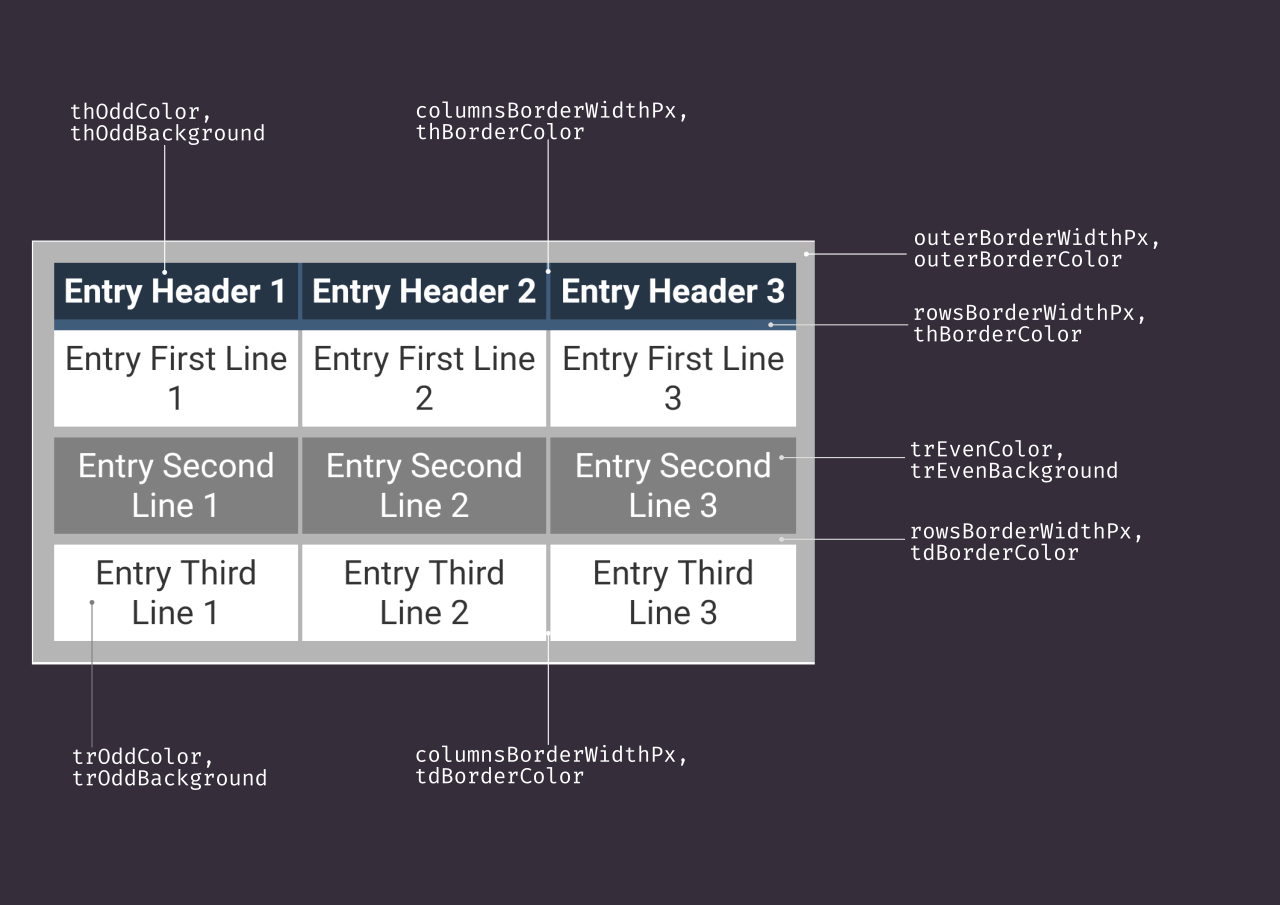 *
* @public
*/
export interface TableStyleSpecs {
/**
* Will text be selectable.
*/
selectableText: boolean;
/**
* Expand table to HTML width.
*/
fitContainerWidth: boolean;
/**
* Expand table to HTML height.
* **You must une unconstrained height for this to work!**
* See {@link TableConfig.computeContainerHeight}.
*/
fitContainerHeight: boolean;
/**
* Spacing between cells, in em.
*/
cellPaddingEm: number;
/**
* Font size, in pixels.
*
* @remarks This value being applied to root, it will affect rem and em.
*/
fontSizePx: number | null;
/**
* The width of the border between rows.
*/
rowsBorderWidthPx: number;
/**
* The width of the border between columns.
*/
columnsBorderWidthPx: number;
/**
* The border color of the table frame.
*/
outerBorderColor: string;
/**
* The border width for the table frame.
*/
outerBorderWidthPx: number;
/**
* Link of anchors.
*/
linkColor: string;
/**
* Font family.
*
* @remarks
* You will need to do additional work to support non-native fonts.
*/
fontFamily: string;
/**
* Table cell border color.
*/
tdBorderColor: string;
/**
* Table header cell border color.
*/
thBorderColor: string;
/**
* Table even header cell background color.
*/
thOddBackground: string;
/**
* Table odd header cell text color.
*/
thOddColor: string;
/**
* Table even header cell background color.
*/
thEvenBackground: string;
/**
* Table even header cell text color.
*/
thEvenColor: string;
/**
* Table odd row background color.
*/
trOddBackground: string;
/**
* Table odd row text color.
*/
trOddColor: string;
/**
* Table even row background color.
*/
trEvenBackground: string;
/**
* Table even row text color.
*/
trEvenColor: string;
}
/**
* This content height state is available on mount, before the real height is
* known from the DOM.
*
* @remarks
* `heuristicHeight` is an approximated height used to minimize the “flash”
* effect of height transitions, see
* {@link TableConfig.computeHeuristicContentHeight}.
*
* @public
*/
export interface TableHeuristicContentHeightState {
type: 'heuristic';
contentHeight: number;
}
/**
*
* This content height state appears when the real table height is available,
* after the DOM has been mounted in the `WebView`.
*
* @public
*/
export interface TableAccurateContentHeightState {
type: 'accurate';
contentHeight: number;
}
/**
* An object describing the present knowledge of content height.
*
* @public
*/
export type TableContentHeightState =
| TableHeuristicContentHeightState
| TableAccurateContentHeightState;
/**
* This object defines how the table component can be customized.
*
* @public
*/
export interface TableConfig {
/**
* What kind of animation should be used when height is changed?
*
*
* @public
*/
export interface TableStyleSpecs {
/**
* Will text be selectable.
*/
selectableText: boolean;
/**
* Expand table to HTML width.
*/
fitContainerWidth: boolean;
/**
* Expand table to HTML height.
* **You must une unconstrained height for this to work!**
* See {@link TableConfig.computeContainerHeight}.
*/
fitContainerHeight: boolean;
/**
* Spacing between cells, in em.
*/
cellPaddingEm: number;
/**
* Font size, in pixels.
*
* @remarks This value being applied to root, it will affect rem and em.
*/
fontSizePx: number | null;
/**
* The width of the border between rows.
*/
rowsBorderWidthPx: number;
/**
* The width of the border between columns.
*/
columnsBorderWidthPx: number;
/**
* The border color of the table frame.
*/
outerBorderColor: string;
/**
* The border width for the table frame.
*/
outerBorderWidthPx: number;
/**
* Link of anchors.
*/
linkColor: string;
/**
* Font family.
*
* @remarks
* You will need to do additional work to support non-native fonts.
*/
fontFamily: string;
/**
* Table cell border color.
*/
tdBorderColor: string;
/**
* Table header cell border color.
*/
thBorderColor: string;
/**
* Table even header cell background color.
*/
thOddBackground: string;
/**
* Table odd header cell text color.
*/
thOddColor: string;
/**
* Table even header cell background color.
*/
thEvenBackground: string;
/**
* Table even header cell text color.
*/
thEvenColor: string;
/**
* Table odd row background color.
*/
trOddBackground: string;
/**
* Table odd row text color.
*/
trOddColor: string;
/**
* Table even row background color.
*/
trEvenBackground: string;
/**
* Table even row text color.
*/
trEvenColor: string;
}
/**
* This content height state is available on mount, before the real height is
* known from the DOM.
*
* @remarks
* `heuristicHeight` is an approximated height used to minimize the “flash”
* effect of height transitions, see
* {@link TableConfig.computeHeuristicContentHeight}.
*
* @public
*/
export interface TableHeuristicContentHeightState {
type: 'heuristic';
contentHeight: number;
}
/**
*
* This content height state appears when the real table height is available,
* after the DOM has been mounted in the `WebView`.
*
* @public
*/
export interface TableAccurateContentHeightState {
type: 'accurate';
contentHeight: number;
}
/**
* An object describing the present knowledge of content height.
*
* @public
*/
export type TableContentHeightState =
| TableHeuristicContentHeightState
| TableAccurateContentHeightState;
/**
* This object defines how the table component can be customized.
*
* @public
*/
export interface TableConfig {
/**
* What kind of animation should be used when height is changed?
*
* -
* layout: use native `LayoutAnimation`. This is the best option
* performance-wise, but requires some setup. See
* https://facebook.github.io/react-native/docs/layoutanimation.
*
* -
* animated: use `Animated` module from react-native.
*
* -
* none: no animations are performed.
*
*
*
* @defaultValue `'animated'`
*/
animationType?: 'none' | 'layout' | 'animated';
/**
* The animation duration in milliseconds when infered height value changes.
* See {@link TableConfig.computeContainerHeight}.
*
* @defaultValue 120
*/
animationDuration?: number;
/**
* A function which will compute container's height given the table content
* height.
*
* @remarks
* For each instance, this function will be called twice. First time on
* container mount, and second time when the DOM has been mounted inside of
* `WebView`. At that moment, the state will hold the real content height.
* See {@link TableContentHeightState}.
*
* @defaultValue A function which will use heuristics to guess content height
* before DOM loaded, and real content height after DOM loaded. You can change
* those heuristics with {@link TableConfig.computeHeuristicContentHeight}.
*
* @returns The container height, or `null` for unconstrained height. In that
* case, it is advised that you provide a fixed height through `style` prop,
* otherwise React Native won't be able to figure out the container height
* and it will not be visible.
*/
computeContainerHeight?: (state: TableContentHeightState) => number | null;
/**
* A function to compute approximate content height before the real content
* height has been fetched on DOM mount.
*
* @defaultValue A simple implementation which looks at the number of
* characters and screen width.
*/
computeHeuristicContentHeight?: (state: HTMLTableStats) => number;
/**
* Override default CSS rules with this prop.
*
* @remarks
* You should at least set a rule which adds a 0-margin to `body` and `html`,
* otherwise the table will look truncated.
* When set, `tableStyleSpecs` is ignored. If you want to extend default
* instead of override CSS styles, look at example bellow.
*
* @example
* ```
* const cssRules = cssRulesFromSpecs(defaultTableStylesSpecs) + `
* a {
* text-transform: uppercase;
* }
* `;
*
* const config = {
* cssRules,
* // Other config options
* };
* ```
*/
cssRules?: string;
/**
* Max zoom scale (must be greater than 1).
*
* @defaultValue 1
*/
maxScale?: boolean;
/**
* Container style.
*/
style?: StyleProp;
/**
* Specs to generate css rules.
*
*
*
* @remarks
* This prop will be ignored when `cssRules` are provided.
*/
tableStyleSpecs?: TableStyleSpecs;
/**
* Any props you'd like to pass to the `WebView` component.
*
* @remarks
* `source` and `javascriptEnabled` will be ignored and overriden.
*/
webViewProps?: any;
/**
* Determine how the width of the table is constrained (or not).
*
*
* -
* normal: the table will have no peculiar constrain on
width or maxWidth.
*
* -
* embedded: the table acts like a width-constrained embedded (React Native Render HTML RFC001), with
*
maxWidth determined by contentWidth and computeEmbeddedMaxWidth.
*
* -
* expand: like embedded, but with
width set to maxWidth. This can
* be useful to have a center-aligned table on wide screens.
*
*
*
* @defaultvalue 'normal'
*/
displayMode?: 'normal' | 'embedded' | 'expand';
}
/**
* An object holding information on the table shape.
*
* @public
*/
export interface HTMLTableStats {
/**
* Number of rows, header included
*/
numOfRows: number;
/**
* Number of columns.
*/
numOfColumns: number;
/**
* Number of text characters.
*/
numOfChars: number;
}
/**
* Base props for HTMLTable original and custom components.
*
* @public
*/
export interface HTMLTableBaseProps extends HTMLTableStats {
/**
* The outerHtml of tag.
*/
html: string;
/**
* The base to resolve relative URLs.
*/
sourceBaseUrl?: string;
/**
* Intercept links press.
*/
onLinkPress?: RenderersProps['a']['onPress'];
/**
* Html attributes for this table node.
*/
htmlAttribs?: Record;
/**
* The `WebView` Component you wish to use.
*/
WebView: ComponentType;
}
/**
* Props for HTMLTable component.
*
* @public
*/
export interface HTMLTableProps extends TableConfig, HTMLTableBaseProps {}