[Home](./index.md) > [@native-html/table-plugin](./table-plugin.md) > [TableConfig](./table-plugin.tableconfig.md)
## TableConfig interface
This object defines how the table component can be customized.
Signature:
```typescript
export interface TableConfig
```
## Properties
| Property | Type | Description |
| --- | --- | --- |
| [animationDuration?](./table-plugin.tableconfig.animationduration.md) | number | (Optional) The animation duration in milliseconds when infered height value changes. See [TableConfig.computeContainerHeight](./table-plugin.tableconfig.computecontainerheight.md). |
| [animationType?](./table-plugin.tableconfig.animationtype.md) | 'none' \| 'layout' \| 'animated' | (Optional) What kind of animation should be used when height is changed? - layout: use native
LayoutAnimation. This is the best option performance-wise, but requires some setup. See https://facebook.github.io/react-native/docs/layoutanimation. - animated: use
Animated module from react-native. - none: no animations are performed.
|
| [computeContainerHeight?](./table-plugin.tableconfig.computecontainerheight.md) | (state: [TableContentHeightState](./table-plugin.tablecontentheightstate.md)) => number \| null | (Optional) A function which will compute container's height given the table content height. |
| [computeHeuristicContentHeight?](./table-plugin.tableconfig.computeheuristiccontentheight.md) | (state: [HTMLTableStats](./table-plugin.htmltablestats.md)) => number | (Optional) A function to compute approximate content height before the real content height has been fetched on DOM mount. |
| [cssRules?](./table-plugin.tableconfig.cssrules.md) | string | (Optional) Override default CSS rules with this prop. |
| [displayMode?](./table-plugin.tableconfig.displaymode.md) | 'normal' \| 'embedded' \| 'expand' | (Optional) Determine how the width of the table is constrained (or not). - normal: the table will have no peculiar constrain on
width or maxWidth. - embedded: the table acts like a width-constrained embedded (React Native Render HTML RFC001), with
maxWidth determined by contentWidth and computeEmbeddedMaxWidth. - expand: like embedded, but with
width set to maxWidth. This can be useful to have a center-aligned table on wide screens.
|
| [maxScale?](./table-plugin.tableconfig.maxscale.md) | boolean | (Optional) Max zoom scale (must be greater than 1). |
| [style?](./table-plugin.tableconfig.style.md) | StyleProp<ViewStyle> | (Optional) Container style. |
| [tableStyleSpecs?](./table-plugin.tableconfig.tablestylespecs.md) | [TableStyleSpecs](./table-plugin.tablestylespecs.md) | (Optional) Specs to generate css rules.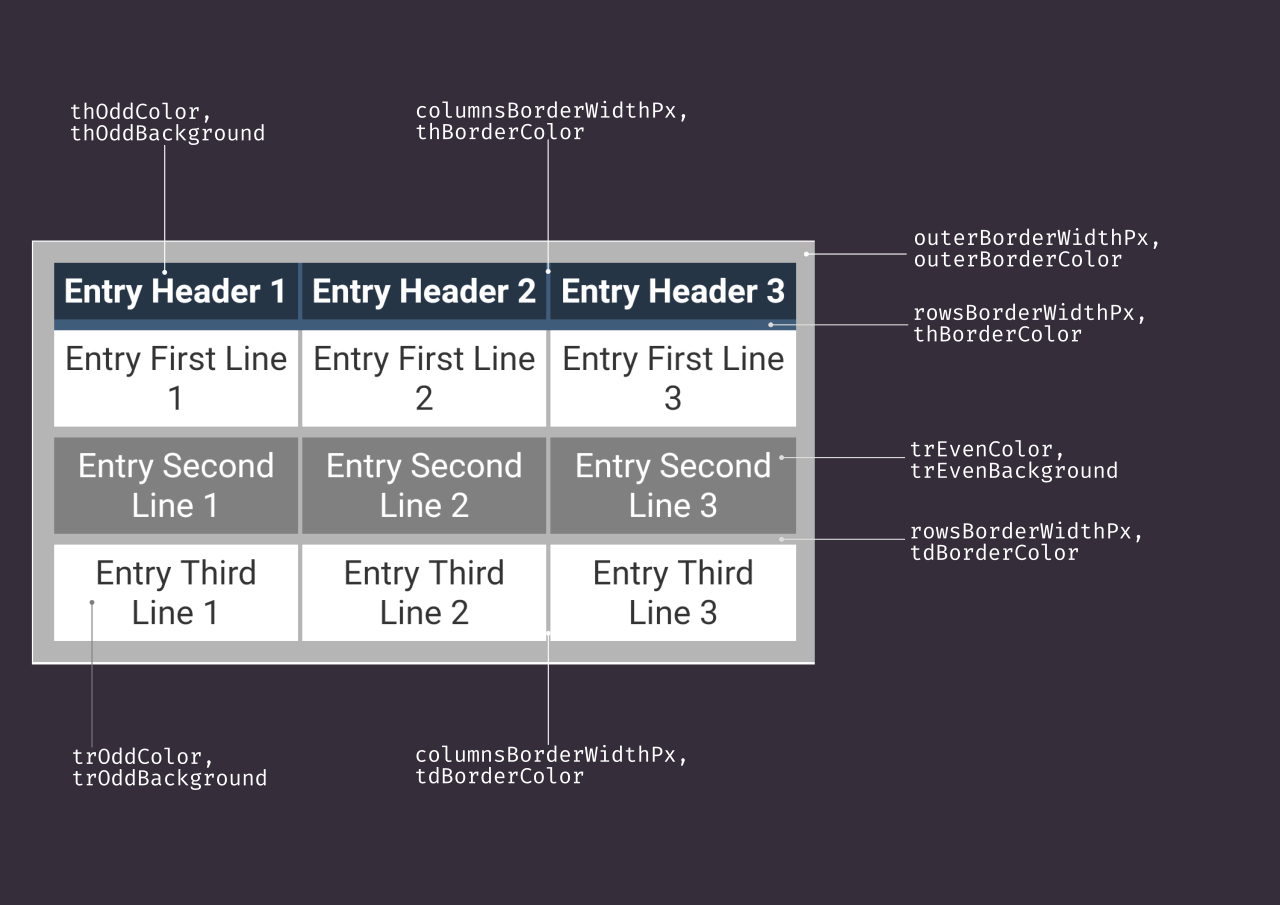 |
| [webViewProps?](./table-plugin.tableconfig.webviewprops.md) | any | (Optional) Any props you'd like to pass to the
|
| [webViewProps?](./table-plugin.tableconfig.webviewprops.md) | any | (Optional) Any props you'd like to pass to the WebView component. |