# Graph Memory

Bound the context. Keep the memory.
A native DeepSeek Harness memory plugin that keeps recent conversation turns, archives older history, and recalls exact source-backed knowledge when it matters.
中文 ·
dsh.so ·
20-turn benchmark ·
Upgrade guide


## The problem it solves
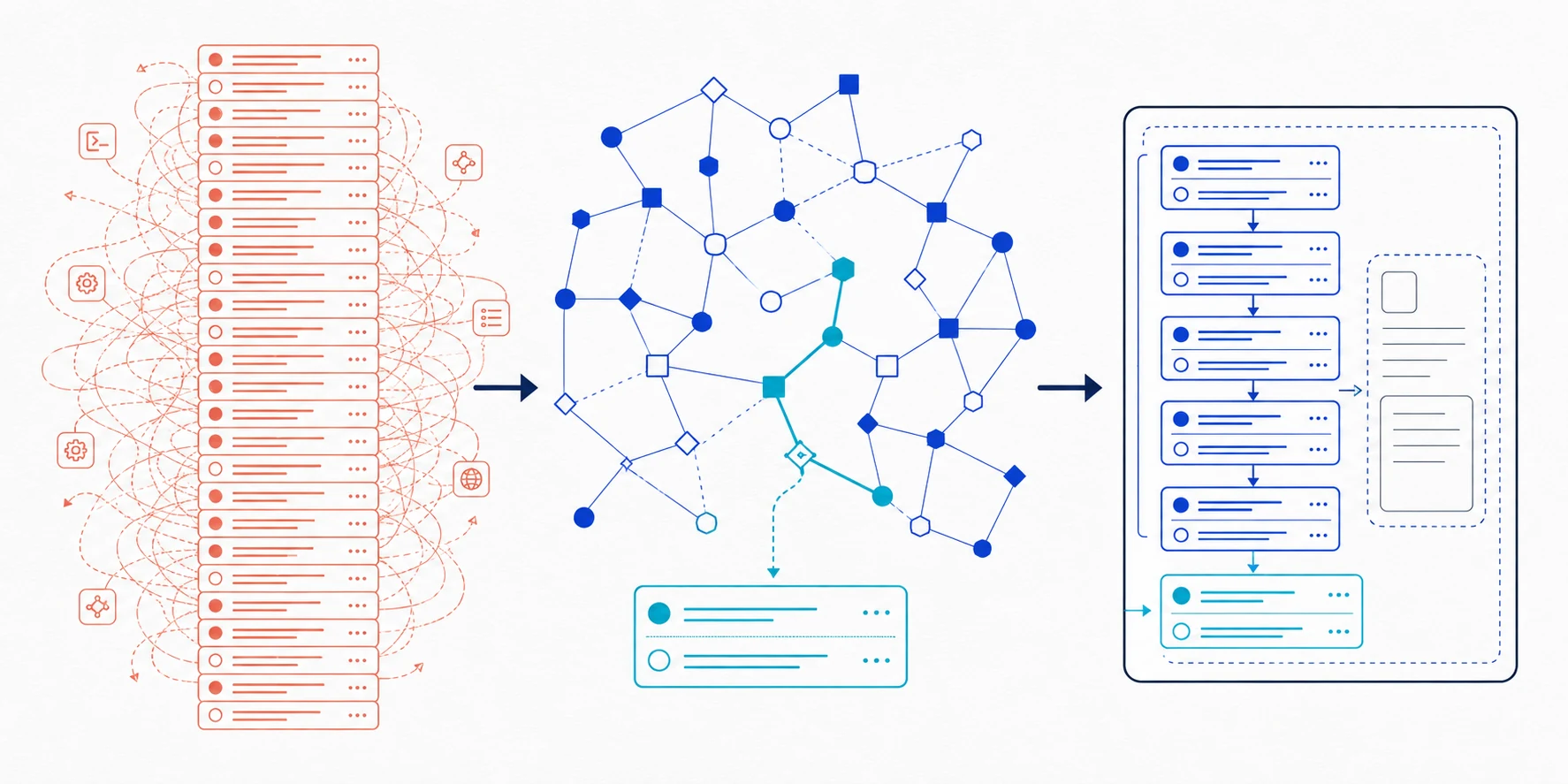
Graph Memory owns the **model-visible historical surface** without deleting DSH's event log. By default it keeps the newest five completed user turns, removes completed reasoning/tool traces from future requests, and recalls relevant older or cross-session source Q/A automatically.
## The 1.6 turn-memory navigation upgrade
| Before | Now |
|---|---|
| Extract TASK / SKILL / EVENT directly from messages | Create one self-contained turn summary, then derive SPO from that same sentence |
| Graph nodes could become the factual payload | Summary, SPO, and communities only navigate; original question and final answer remain the evidence |
| Old memories from the active session could be filtered wholesale | Exclude only sources still visible in the fresh window; archived same-session and cross-session recall share one path |
| Community expansion could pull a whole neighborhood | Local LPA narrows candidates, query-time PPR ranks them, and only matched Q/A is recovered |
| DSH retained complete tool and reasoning traces | Completed turns retain question + final answer; older prefixes collapse to one fixed marker |
Writing one completed turn costs exactly **one auxiliary LLM call**. Community detection and PPR are local. There are no hard-coded node/edge counts, semantic direction gates, or JSON repair that turns invalid output into accepted data. [Read the complete design, source map, and porting sequence →](docs/TURN_MEMORY_NAVIGATION_UPGRADE_CN.md)
## Upgrading to the on-by-default decay curve
Decay maintenance is **on by default**: the engine auto-deprecates silent peripheral nodes after `autoDeprecateAfterDays` (30d, disconnect-only) and hard-deletes decay-deprecated nodes after `purgeAfterDays` (60d). Unlike `messageRetention` (which never deletes), this is the one surface that removes data. If you are upgrading from a build before decay and want no auto-disconnect or hard-delete, set any of:
```jsonc
{ "decay": { "purgeAfterDays": 0 } } // never hard-delete (escape hatch; deprecate still runs)
{ "decay": { "autoDeprecate": false } } // no silent auto-disconnect
{ "decay": { "enabled": false } } // disable decay entirely (hard-delete still runs independently)
```
Only nodes deprecated by `deprecated_by='decay'` are ever hard-deleted; manually deprecated or freshly merged nodes are untouched, and the revive path re-activates a decayed node once it is referenced again. A non-zero tick logs decay activity to `info`. [Full decay design and knobs →](docs/decay.md)
## Measured first
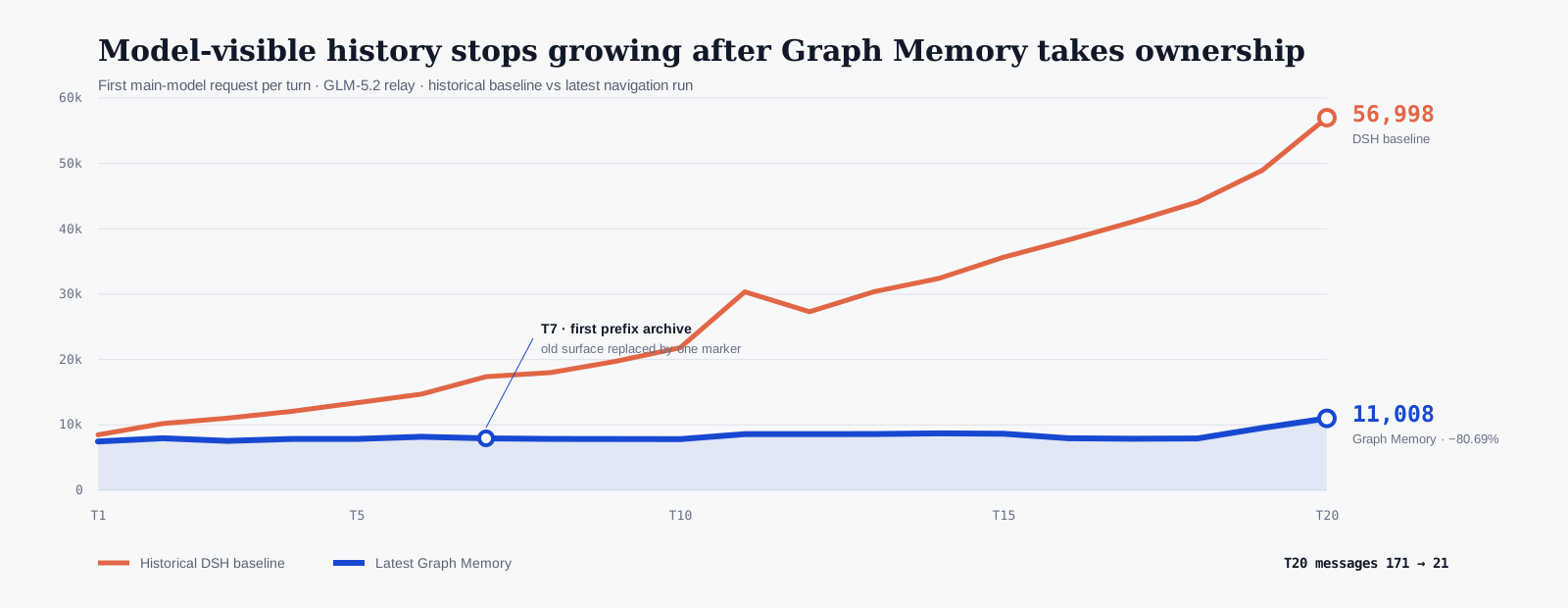
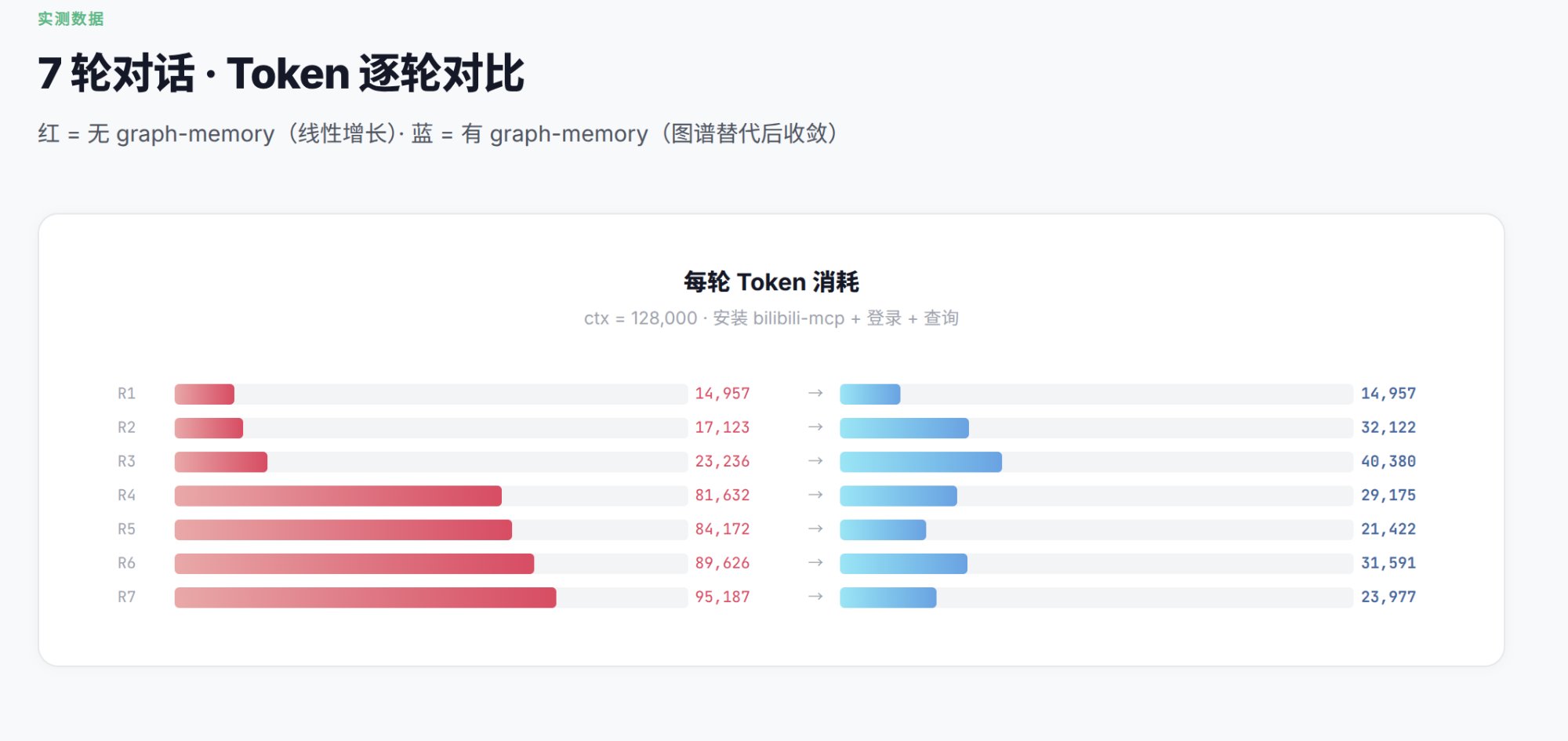
| Real 20-turn GLM-5.2 run | Historical native DSH baseline | Latest Graph Memory | Change |
|---|---:|---:|---:|
| T20 first request | 56,998 tokens | **11,008 tokens** | **−80.69%** |
| T20 model-visible messages | 171 | **21** | **−87.72%** |
| T01–T20 first-request context | 532,451 tokens | **165,896 tokens** | **−68.84%** |
| All measured tokens¹ | 2,487,776 | **2,327,728** | **−6.43%** |
¹ The latest candidate includes 166 main-agent requests, 20 turn extractions, and 41 embedding requests; the historical baseline made 77 main requests. DSH commits and nondeterministic tool loops differ, so this is not a simultaneous strict A/B. First-request context is the direct takeover metric; the full bill remains visible.
**20/20** scenario turns passed · **20/20** structured extractions succeeded · **0** quarantined · **20** turn summaries · **92** SPO triples · **30** communities · **20** summary vectors. T11, T19, and T20 automatically recalled out-of-window memory with exact source question and final answer.
[Read the Markdown benchmark, per-turn data, method, and limits →](benchmarks/dsh-context-takeover/README.md)
## Memory survives the context window
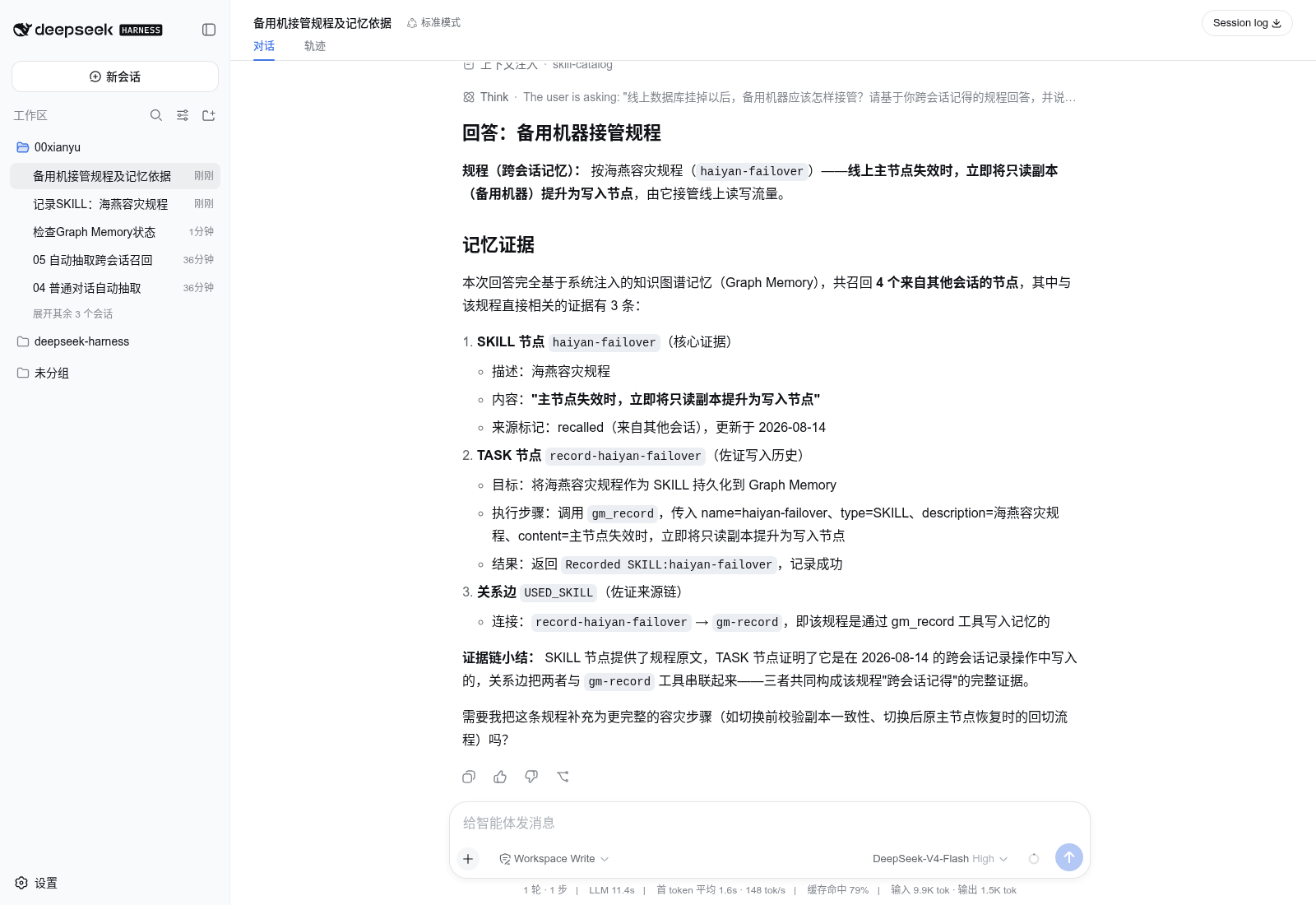
The graph is a **navigation layer**, not a replacement for evidence. `TASK`, `SKILL`, and `EVENT` nodes point back to the original user question and final visible answer; recalled context includes those exact source messages.
## Install on DeepSeek Harness
Node.js `22.13+` · no DSH fork · the npm registry already serves `@multilab/graph-memory` (`npm view` currently reports `2.0.4`), so install from npm:
```bash
npx @deepseek-ai/dsh plugin --profile web add @multilab/graph-memory
npx @deepseek-ai/dsh --profile web --dump-config
npx @deepseek-ai/dsh web
```
To pin a GitHub release instead, use the upstream tag `v1.6.0-beta.17` — a real tag on `github.com/adoresever/graph-memory` (verified via `git ls-remote`; upstream tags end at `v2.0.0`, the `2.0.x` npm line is not re-tagged there):
```bash
npx @deepseek-ai/dsh plugin --profile web add github:adoresever/graph-memory#v1.6.0-beta.17
```
`1.6.0-beta.17` adds DSH `0.1.7-rc.2` (session format V4) compatibility: every durable Graph Memory surface write now uses the producer-owned source kind `plugin:graph-memory` that V4 admission requires ([#113](https://github.com/adoresever/graph-memory/issues/113)). Older DSH releases accept the same shape.
The npm registry also still serves the old unscoped `graph-memory@1.5.8`; do not use it to validate DSH — the scoped `@multilab/graph-memory` package above is the maintained release line.
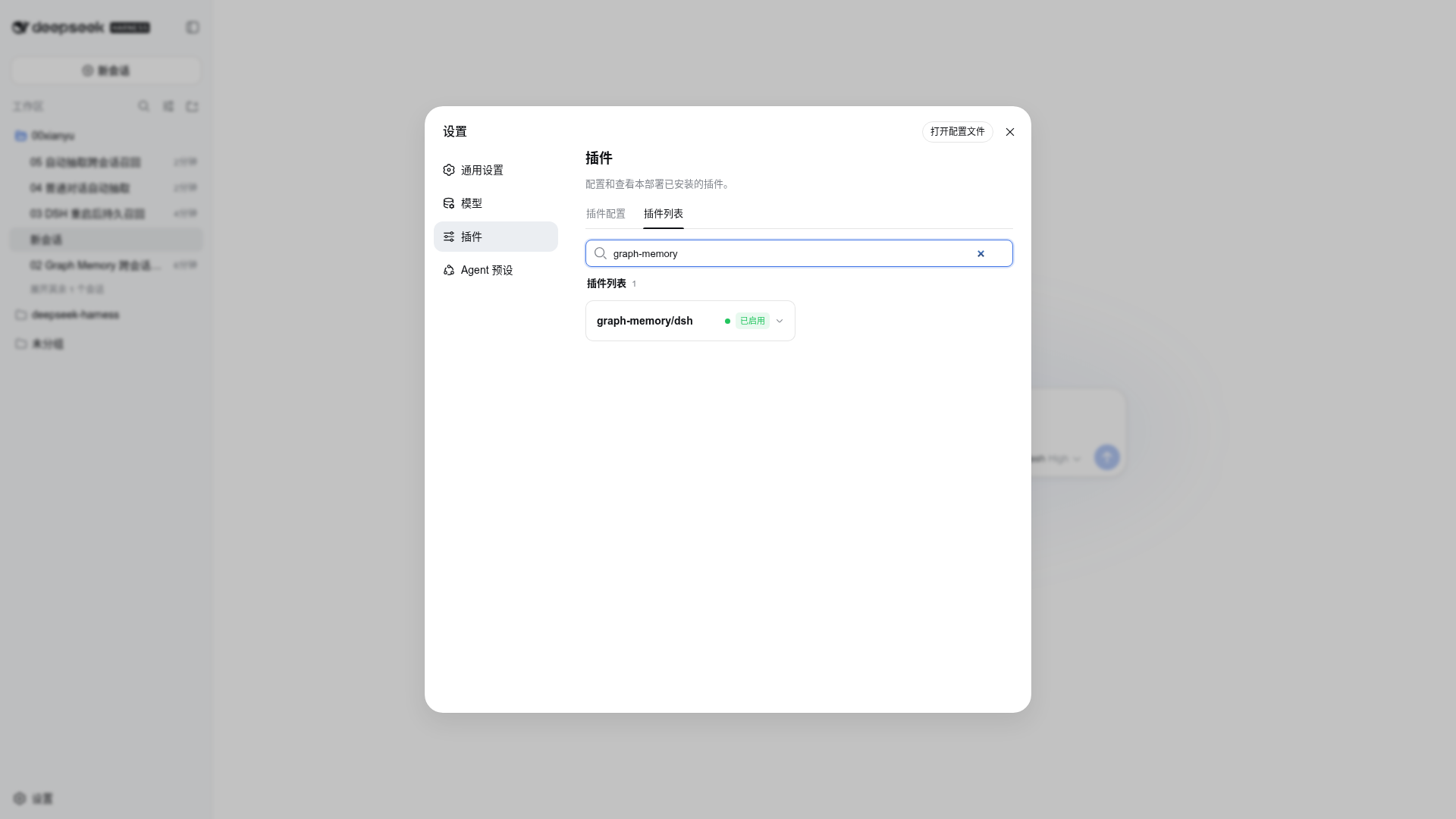
Confirm that `@multilab/graph-memory/dsh` is active under **Settings → Plugins**. The default database is `$DSH_HOME/graph-memory/graph-memory.db`, normally `~/.dsh/graph-memory/graph-memory.db`.
> **Entry points.** The package ships two host-specific defaults: `exports["."]` / `./dsh` resolve to `dist/dsh.js` (the native DSH/Cordis adapter), while the legacy `main` points to `dist/index.js` (the OpenClaw plugin). These are intentionally different hosts: DSH consumers use the `@multilab/graph-memory` export, OpenClaw loads `index` via its declarative manifest. Do not change `main` to `dsh.js` — it would break legacy resolvers that import the package by name.
> **Version numbers.** `package.json` (`2.0.4`) is the npm release line, and `openclaw.plugin.json` mirrors it exactly — one package, one version. The `1.6.0-beta.x` strings in this file refer to the upstream GitHub tag line (`v1.6.0-beta.15` through `beta.17` exist as real upstream tags, verified via `git ls-remote`); they are inherited release docs, not this package's version.
## DSH Settings Panel
Graph Memory ships a settings UI for DSH: open **Settings → Plugins → graph-memory** in the DSH web panel. The panel is driven by a schemastery `Config` schema, so invalid values are rejected inline instead of at runtime.
### Hot-effective vs restart-effective
Most fields apply immediately — the plugin listens for DSH's `loader/volatile-update` event and re-reads the current effective config without a restart:
| Applies immediately | Restart required |
|---|---|
| `extractionEnabled`, `recallEnabled`, `recallMaxNodes`, `semanticScoreThreshold` | `dbPath` (reopens the database) |
| `maintenanceInterval`, `freshTurnCount`, `assistantTools`, `messageRetention`, `decay` | `embedding.baseURL` / `model` / `dimensions` (rebuilds the embedding function and vector fingerprints) |
| `extract.*`, `llmReasoningEffort`, `contextCompactionEnabled`, `projectCompletedTurnTools` | `llmMaxTokens` (startup snapshot) |
| `extractionSource`, `llmProvider`, `llmModel`, `extractionModels` | |
### Extraction model sources
| Source | Meaning |
|---|---|
| `session` (default) | Follow the current session's provider/model route (zero-config fallback) |
| `preset` | Explicit `llmProvider` / `llmModel` pair (backward compatible with the old env config) |
| `pool` | `extractionModels` list tried in order; a failed model falls through to the next; empty pool cascades to `preset`, then `session` |
### Embedding API key (credential-store-first)
The embedding API key is **never stored in plugin config**. The only channel is the **`apiKeyEnv`** credential reference (default `GRAPH_MEMORY_EMBEDDING_API_KEY`, provider-neutral): put the key under that reference name in the DSH credential store (`.credentials.yaml` `refs`) or the environment, and the plugin resolves it at connect time through `ctx.credentials.resolve`. Switching embedding providers changes only the stored value — the reference name stays.
The schema-injected default reference alone does not count as "configured" (no probe noise for unconfigured users); set `baseURL` (or a custom reference name) to enable vector recall — setting only `model` does **not** enable it.
The config panel's Embedding section includes a **Test button**: it fires one real `/embeddings` call with the current form values (including unsaved drafts), reporting dimensions, latency, and credential source. The key is resolved host-side via `ctx.credentials.resolve` — never echoed, never sent to the browser. The per-request timeout is the panel-adjustable `embedding.testTimeoutMs` (1000–300000, default 30000); slow cross-border endpoints that previously tripped a hardcoded timeout can raise it in the same form, and the credential save's post-save key probes share the same value. Production embedding calls have their own panel-adjustable baseline, `embedding.requestTimeoutMs` (1000–300000, default 10000, restart to apply): single-text calls use it directly, and batch calls use `max(requestTimeoutMs, 2s×texts)` so an explicitly raised baseline only lifts the adaptive floor.
### Multi-key failover & panel-managed credentials (2.0.14)
**Multi-key format.** Store several keys under one reference as a comma-separated string — `"k1,k2,k3"` — in the credential store (`.credentials.yaml` `refs`) or the environment variable. The host splits on comma, trims each segment, and drops empty segments, so `" k1 , , k2 "` resolves to `[k1, k2]`. A single key (or none) needs no comma and behaves exactly as before. After a save, **all keys are probed in parallel** so each key's validity, dimensions, and latency show up individually in the panel's report rows.
**Failover semantics.** When two or more keys are configured, any failure rotates to the next key **immediately** — no retry within a single key when ≥2 keys are present (a 429/5xx does not back off; it rotates at once). A sticky pointer remembers the last key that succeeded and starts the next call there, wrapping around the ring. When only one key (or none) is configured, the original retry-with-backoff path applies unchanged (single-key zero regression).
**Panel management.** Settings → Plugins → graph-memory → credential section offers a password input plus **Save** and **Clear** buttons. Save writes the whole comma-separated string to `.credentials.yaml` through the host credential service under the configured reference name; Clear removes the ref. The input value **never enters plugin config, never echoes to the client, never enters logs** — it travels only to the host credential service.
**Effective boundary.** Key-value changes take effect **without a restart** (the credential is resolved per batch and the host watches the credential store), so rotating to a new key or adding/removing keys is hot-effective. `baseURL`, `model`, and `dimensions` remain restart-effective — they are connection-period parameters that rebuild the embedding function and vector fingerprints.
**Env-masked references.** If the reference name is supplied by a startup environment variable, the credential service reports `writable: false`; the panel then shows a read-only hint and disables Save, because the key is owned by the shell/environment rather than the credential store. Manage such keys in your shell/environment instead.
**All-fail error.** When every configured key fails, the embedding engine reports `[graph-memory] Embedding API: all N API keys failed (last: )`; the per-key breakdown (status, dimensions, latency, error) is shown in the panel's report rows. On startup, an all-fail probe degrades to FTS5 full-text recall without crashing.
### Migration
Existing `GRAPH_MEMORY_*` environment-variable users need **zero changes** — the env fallback still applies inside `apply()`, and the default `apiKeyEnv` reference already points at `GRAPH_MEMORY_EMBEDDING_API_KEY`. If you previously filled the panel's `embedding.apiKey` field (≤ 2.0.7, stored plaintext in the profile patch), move the key into the credential store under the default reference name, restart, and **delete the leftover `embedding.apiKey` line from your profile patch** — the stale value stays in that file until you remove it. From 2.0.13 onward the plugin rebuilds the embedding section from a field whitelist at the `apply()` entry, so the legacy `apiKey` (and any other unknown leftover) is never read into memory; the schema itself does not strip unknown keys. The shipped `cordis.patch.yml` is slimmed to `dbPath` only.
> **Behavior change for existing users**: with the default `extractionSource: "session"`, extraction now follows the current session's provider/model route, and a configured `llmProvider`/`llmModel` pair is only a *fallback* when no session route exists. Previously the dedicated pair took priority. If you rely on extraction always using your dedicated model, set `extractionSource` to `preset` in the panel (or `GRAPH_MEMORY_LLM_PROVIDER`/`GRAPH_MEMORY_LLM_MODEL` behavior is preserved only via the `preset` source). `gm_status` now reports the active source.
Troubleshooting: corrupt database quarantine
On startup (and only then), Graph Memory opens its SQLite store; if the file is page-level corrupt (`SQLITE_CORRUPT`, classic message `database disk image is malformed` — typically after an abnormal shutdown or disk error), the plugin does **not** crash. Instead it:
1. Renames the corrupt file — plus its `-wal`/`-shm` sidecars — to `.corrupt-` next to the database (**never deletes**; the original is preserved for recovery tools).
2. Creates a fresh empty database at the original path and keeps running, so the plugin stays active (extraction/recall continue) but **memories start over from an empty store**.
How you notice: the host log gets one `console.warn` line at quarantine time, and `gm_status` reports `DB quarantine: N isolated corrupt file(s) …` whenever quarantined leftovers exist next to the store.
Recovery: the quarantined files stay untouched until you delete them. Try `sqlite3 .corrupt- ".recover" | sqlite3 recovered.db`, then point `dbPath` at `recovered.db` (or move it back) and restart. Deliberately narrow detection: other damage shapes (for example `SQLITE_NOTADB`, "file is not a database") are not auto-quarantined and still raise normally.
## What ships
| Capability | Implementation |
|---|---|
| Context takeover | Configurable newest-N completed turns; one archive marker replaces the older model surface |
| Lightweight extraction | Only the user question and final answer; strict structured tool contract; no reasoning/tool transcript ingestion |
| Query-first recall | Vector Top-K with FTS5 fallback; exact source Q/A travels with graph hits |
| Durable memory | Local SQLite, stable provenance, cross-session and cross-project recall |
| Failure behavior | Invalid extraction is quarantined; foreground conversation continues; bad data is not repaired or persisted |
| Host support | Native DSH/Cordis adapter; maintained OpenClaw Context Engine adapter |
Optional embeddings
Graph Memory supports OpenAI-compatible embedding endpoints. Without embeddings it falls back to FTS5 and does not block conversation.
```bash
export GRAPH_MEMORY_EMBEDDING_API_KEY='replace-with-your-key'
export GRAPH_MEMORY_EMBEDDING_BASE_URL='https://dashscope.aliyuncs.com/compatible-mode/v1'
export GRAPH_MEMORY_EMBEDDING_MODEL='text-embedding-v4'
export GRAPH_MEMORY_EMBEDDING_DIMENSIONS='1024'
dsh web
```
DSH tools and extraction route
| Tool | Purpose |
|---|---|
| `gm_status` | Store, extraction, recall, vector, and retention state |
| `gm_search` | Explicit graph-memory search |
| `gm_record` | Deterministically persist a `TASK`, `SKILL`, or `EVENT` |
| `gm_stats` | Graph and retention receipts |
| `gm_maintain` | One bounded maintenance tick |
| `gm_retry_extraction` | Explicitly retry quarantined extraction |
Automatic recall needs no tool call. Extraction may use a dedicated model via `GRAPH_MEMORY_LLM_PROVIDER` and `GRAPH_MEMORY_LLM_MODEL`; optional reasoning and output controls are `GRAPH_MEMORY_LLM_REASONING_EFFORT` and `GRAPH_MEMORY_LLM_MAX_TOKENS`.
OpenClaw compatibility
```bash
openclaw plugins install graph-memory
openclaw plugins enable graph-memory
openclaw gateway restart
```
Activate the Context Engine slot in `~/.openclaw/openclaw.json`:
```json
{
"plugins": {
"slots": { "contextEngine": "graph-memory" },
"entries": { "graph-memory": { "enabled": true } }
}
}
```
Graph Memory Pro
The repository also contains an experimental read-only DSH Pro Lite Host + Client plugin backed by Community SQLite. The 2D/3D graph workbench, split view, and controlled drag-to-context remain planned. See [`dsh-pro/README_CN.md`](dsh-pro/README_CN.md).
## Verification and limits
Current release `2.0.4` passes **491/498 automated tests (7 skipped)**, both TypeScript builds, npm package verification, and a live compatibility harness against the installed DSH `0.1.7-rc.2` runtime (session format V4 admission over every durable surface write).
- DSH `0.1.7` compatibility: durable surface writes use the producer-owned source kind `plugin:graph-memory`; the retired V3 wrapper `{ kind: "plugin", plugin: "graph-memory" }` is rejected by V4 persistence admission and fails the whole turn once rolling compaction or tool-trace projection triggers ([#113](https://github.com/adoresever/graph-memory/issues/113)).
- DSH `0.2` line host support (`0.2.0-rc.2` and `0.2.1-rc.2`): `package.json` declares `engines.dsh` `>=0.1.7-rc.2 <0.3.0` (per app-boot, once `engines.dsh` is present it alone gates DSH compatibility and peer ranges are ignored), and the `@deepseek-ai/dsh-typert-protocol` peer is capped at the same `<0.3.0` (`>=0.1.0-rc.5 <0.3.0`). The `0.2` line ships the same core host deps Graph Memory is validated against (cordis `~4.0.4`/`~4.0.5`, schemastery `~3.18.4`/`~3.18.5`) and session format stays V4 (the 0.2.1 "V4.1" refers to the DeepSeek-V4.1-Flash-1017 model, not the message format). Surface checks against `0.2.1-rc.2` found: `dsh-client-ui-primitives` still exports the `SettingsForm`/`SegmentedControl`/`Switch` the client uses; `dsh-typert-protocol@0.2.1-rc.2` still exports `Remote`/`TypertRemoteService`; and none of the 0.2.1 breaking changes (`./invariant` export removal, composer `stats` split into `activity`/`usage`, `webRuntime→webStartup` rename, Agent Team inbox reroute, `both` tool display-mode removal, `azure-openai-responses→azure` rename) touch this plugin's surface. `0.2.0-rc.2` predates every one of those breaking changes.
- Structured extraction still depends on model contract compliance: the latest run succeeded 20/20 times; any future failure stays quarantined and never blocks the foreground conversation.
- Recall is bounded by configurable Top-K. Focused probes succeeded; one broad multi-topic query can require a larger Top-K or separate questions.
- The published run is an engineering workload, not a universal LoCoMo/LongMemEval score.
- The design, source-code map, and porting sequence for the summary + SPO navigation + exact-Q/A upgrade are documented in the [Chinese upgrade guide](docs/TURN_MEMORY_NAVIGATION_UPGRADE_CN.md).
Reproduce it from [`benchmarks/dsh-context-takeover/`](benchmarks/dsh-context-takeover/). Raw conversations, provider responses, local paths, and credentials are excluded.
## Development
```bash
npm install
npm test
npm run build
npm run verify:package
```
[MIT](LICENSE) © 2026 adoresever · [Asset and trademark notes](docs/ATTRIBUTIONS.md)