
# Skills Console · dsh-skills-console
[简体中文](README.md) · **English**
[](https://www.npmjs.com/package/@morehao/dsh-skills-console) [](https://github.com/morehao/dsh-skills-console/actions/workflows/check.yml) [](LICENSE)
The skills console for DSH (DeepSeek Harness): **install, update, remove, toggle and share skills with other agents — plus a subscription list**.
It gathers the skills on your machine into one list: what you have, where it came from, who can use it, and whether it is up to date. Turn on what you use, turn off what you don't; when another agent needs one, link it over with a click — the skill itself always stays in one place.
## Why you need it
- **One place for every skill**: installed skills and skills already on the machine live in the same list — source, version, shared agents and update time at a glance, no digging through directories.
- **Toggle on demand, save context**: disable a skill you don't need for now and DSH's model invocations and `/` manual invocations stop seeing it; turn it back on and it is back. Skills on disk, sharing, and other agents are untouched.
- **One skill, many agents**: most agents (OpenCode, Cursor, Gemini CLI, …) read the shared skills directory directly and work as soon as a skill is installed; ones that only read their own directory (such as Claude Code) can be linked with a single checkbox in the panel.
- **Installing is not the end**: upstream repos keep moving. The console checks for new commits, first tells you which skills are affected, and then you decide whether to update.
- **A wrong delete is recoverable**: removals go to the trash for 7 days; a failed update rolls back to the previous version.
## Features
| Capability | Description |
| --- | --- |
| Inventory | Collects the skills on this machine — source, version, visibility and shared agents in one view; skills already in the shared directory are adopted automatically the first time you open it |
| Install | Enter `owner/repo` or a GitHub URL; first detects which skills the repo has and what each does; install everything or pick a few |
| Update | Checks upstream commits, lists the commit range and affected skills, updates in one click after you confirm; skills with local edits ask for confirmation first |
| Remove | Pre-flight check (never touches what others created), then a snapshot into the trash (kept 7 days) |
| Toggle | One-click on/off; once disabled, neither DSH's model invocations nor `/` manual invocations see it; other agents and files on disk are unaffected |
| Share | Links only agents that read their own directory; nothing is shared by default; agents that read the shared directory directly are not listed |
| View | Open a skill's body and files read-only: rendered / raw toggle, directory tree, single-file preview, plus source, hash and sharing info |
| AI intro | A ✨ per row opens a model-written summary of what the skill does and when to use it; only `SKILL.md` and the file-name list are sent, results are cached locally, and unchanged content is not regenerated |
| Subscriptions | Follow upstream changes of an `owner/repo`; snapshots only, no skill download. Expand an entry to see the author's own description, or let the model write an AI intro before deciding. ref / subdirectory optional; an empty ref follows the default branch |
| Scope | Manages user-level shared skills; per-project toggling is not supported yet. When a same-named copy exists in a project or user directory, that copy still wins visibility |
## Screenshots
Screenshots are from a real DSH Web session on v0.5.2 (dark theme). All assets live in [`assets/`](https://github.com/morehao/dsh-skills-console/tree/main/assets) (bitmap icons and UI screenshots) and are not published to npm, so they are referenced by absolute URL and render on both GitHub and the npm page.
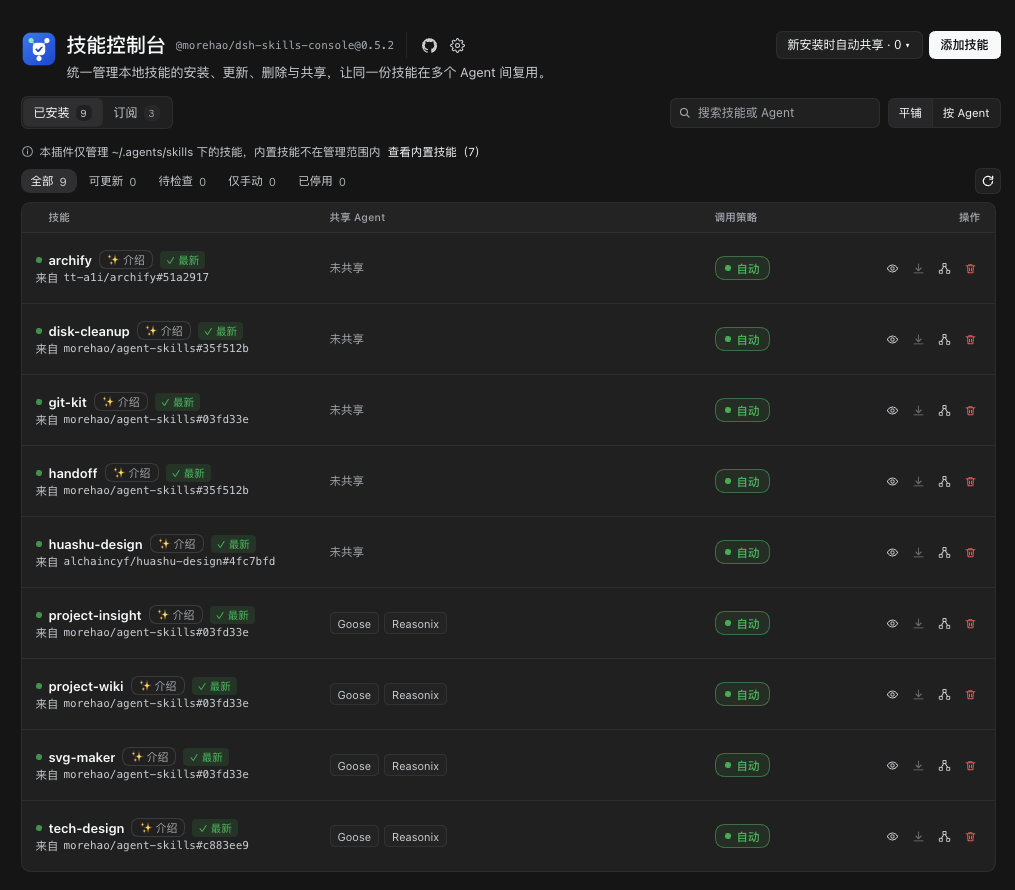
**Installed list**: source, invocation policy, shared agents and update status in one screen; the top switches between "Installed" and "Subscriptions".
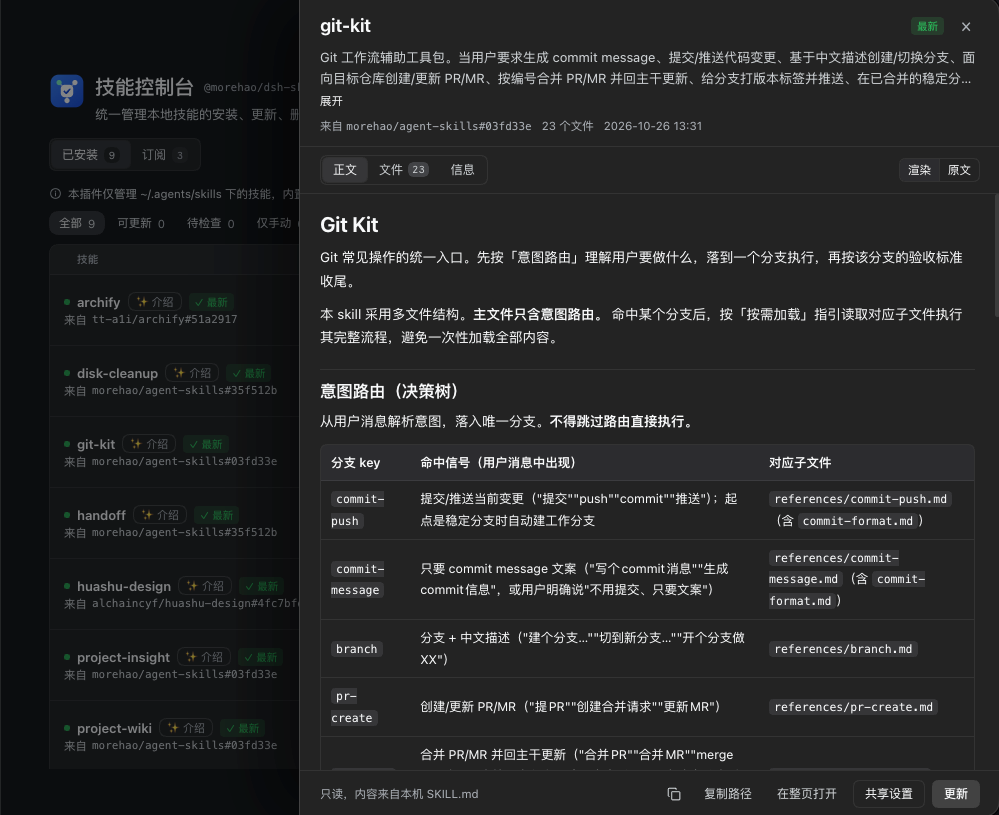
**Read-only viewer**: the list stays put while the right-hand drawer renders `SKILL.md`; switch to raw, browse the file tree and info, or open a full page.
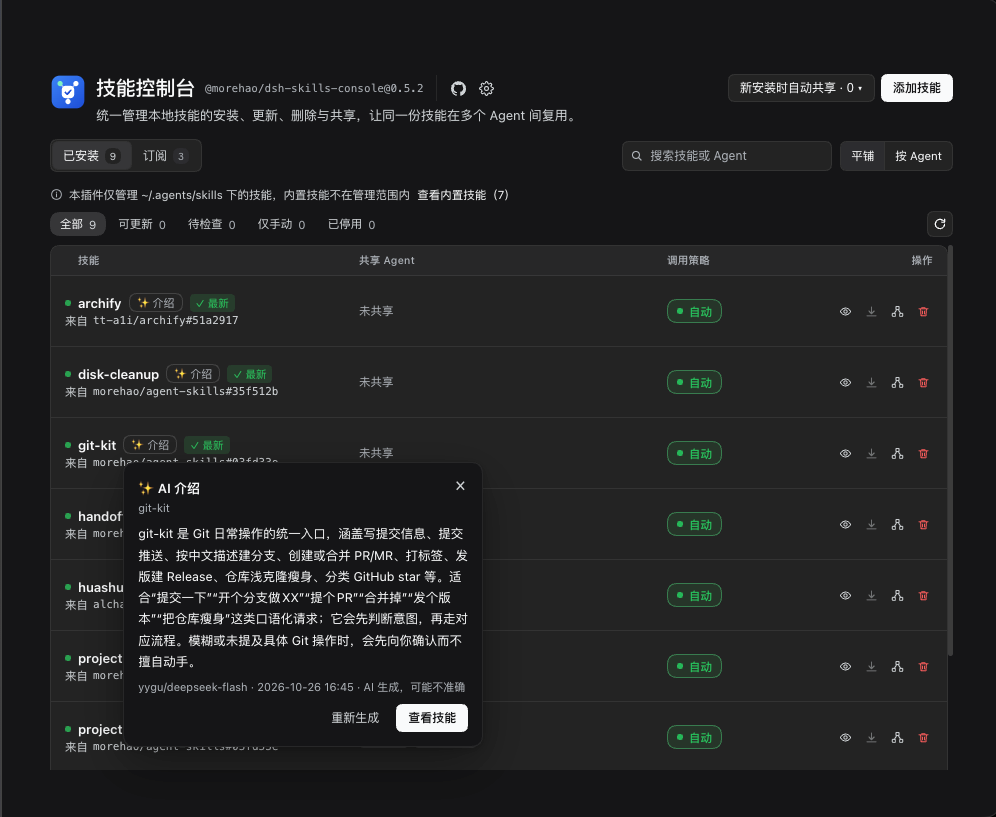
**AI intro**: click the ✨ in a row for a model summary of what the skill can do and when to use it; it opens as a centered dialog like the other modals, and once generated it reads from the local cache.
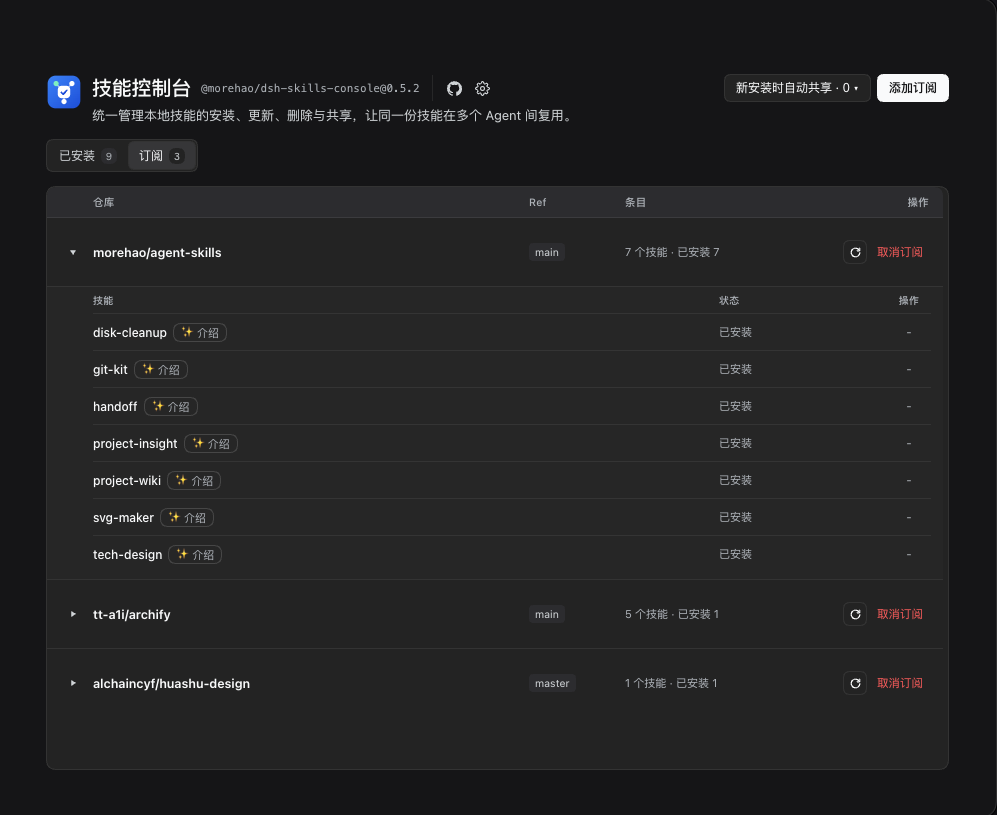
**Subscriptions**: only upstream snapshots of `owner/repo`; expand an entry to see how many skills the repo has, which are installed and their status.
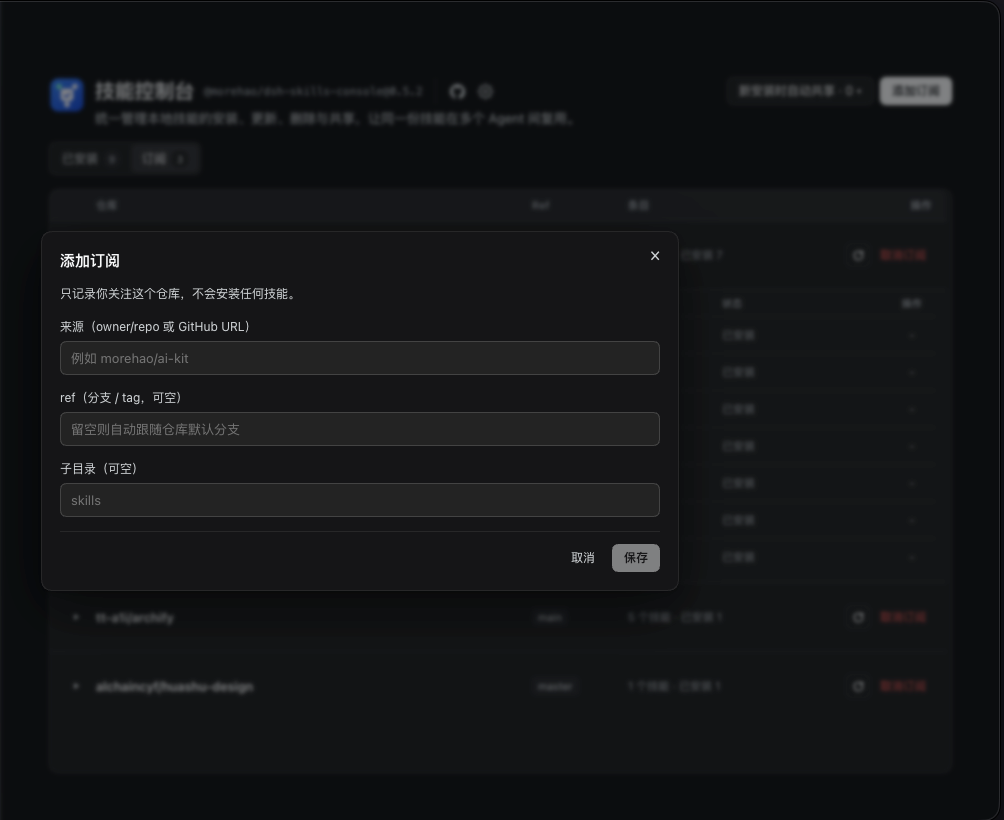
**Add subscription**: enter `owner/repo` or a GitHub URL; ref and subdirectory are optional; follow only, no skill download.
## Interface
- **Two entry points**: by default it lives in the "Skills Console" section of DSH settings; turn on "Sidebar entry" in the header ⚙ and a standalone panel appears in the left sidebar, effective immediately.
- **One page, two tabs**: Installed / Subscriptions. The header holds "Auto-share on install" and "Add skill / Add subscription" on the right.
- **Five actions per row**: toggle, view, update, share settings, delete; the ✨ next to a skill name opens the AI intro; "View" is hidden on narrow panels, and the skill name itself remains the entry point. Status labels cover up to date / update available / changed since install / removed upstream / broken link / no upstream.
- **No layout jumps on narrow panels**: the action group wraps naturally with panel width and the plugin name always stays whole; the list switches to two columns by width; scrolling happens only in the list area, so switching tabs or resizing never flips the whole page.
- **Many agents don't crowd**: at most 3 are shown per row and the rest fold into `+n`; hover or focus reveals all.
- **Findable**: search by name / source / agent, filter by "updates / not checked / disabled", view flat or grouped by agent.
- **Not checked vs. no upstream**: "Not checked" only means no upstream verdict was obtained this time (rate limit, network, repo 404, etc.) and will be retried next time; skills without a usable source are marked "No upstream" and skipped in update checks.
## Viewing skill content
While managing skills you may want to know "what does this skill say, and is it worth keeping" — click the skill name or "View" on the row:
- **Drawer quick look**: the list stays put and a read-only drawer slides in from the right; close it with Esc / the overlay / ×, and you return to the previous filter and scroll position.
- **Full page for a deep read**: "Open as page" at the bottom of the drawer switches to a full page (body + contents on the left), with a top bar to go back to the list.
- **Three tabs**: Content (rendered / raw toggle; raw keeps the frontmatter), Files (directory tree + single-file preview; `.md` renders by default and can switch to raw, other text shows its source directly), Info (source, ref, commit, skillPath, content hash, install / update time, shared agents, enabled state, changes since install).
- **Read-only**: no inputs and no save button. Update / share settings are enabled depending on writability; when the state file is corrupt you can still view, but management actions are disabled.
- **What can be previewed**: text files that decode as UTF-8 (`.md` / `.html` / `.jsx` / `.css` / `.sh` / extension-less scripts…) show their source directly; the per-file cap is 256 KB (longer content is truncated with a notice); images, audio/video, archives and other binaries show "Preview not supported" with the file name / size.
## AI intros (model-generated)
Some skills only have an English description, and some titles alone don't tell you what they do. Every installed row has a `✨ Intro` next to the skill name:
- **Open and read**: generated intros load from the local cache and open instantly; only when there is none does a "Generate intro" button appear, and only clicking it calls the model.
- **What it writes**: a 2–3 sentence capability summary — what it does, when to use it, and **how to trigger it**: trigger words / example requests copied from the `SKILL.md` when present, otherwise 2–4 keywords (or one example request) users can literally say, or the invocation itself (skill name / slash command); key limitations when needed; in the model's own words, not a word-for-word translation.
- **What it sends**: the `SKILL.md` body (truncated beyond `maxInputBytes`) and the list of file names in the skill directory (up to 30); **no other file contents are read**; the language follows the UI (Chinese / English).
- **Cached locally**: `$DSH_HOME/cache/skills-console/intros.json`, keyed by **identity** (`owner/repo/skill-name`, or `local/skill-name` when there is no source) + language; when the `SKILL.md` content hash changes it warns "may be out of date" and only regenerating overwrites it. Failures are not cached. Cache written by older versions at `$DSH_HOME/skills-console/intros.json` is still read once; the next generation writes to the new location.
- **Shared between subscriptions and installed**: once a skill's intro is generated on the subscription page, opening ✨ after installing it hits the same entry (aligned by `owner/repo/skill-name`) with no extra model call; skills with the same name from different repos never collide. Older cache (v4 and earlier, keyed by `skill-name` / `remote:`) is treated as a cold start and rebuilt after upgrade.
- **Default model**: `config.intro.provider/model` when configured, otherwise DSH's current default model; only one manual generation runs at a time, and repeated clicks return "already generating".
- **Batch generation**: the installed list toolbar has "Batch intros". You only pick the **scope** (missing only / regenerate all); everything else (concurrency, error handling, timing) uses plugin defaults. The job runs on the **backend** item by item; the UI polls progress and can cancel anytime. Closing the page keeps the job running, and after reopening you can watch progress or "Continue" an unfinished job from last time (it never auto-resumes, to avoid burning quota). Only one batch job runs at a time.
- **Subscription candidates too**: expanded subscriptions have `✨ Intro` on each entry; it fetches the remote `SKILL.md` at the snapshot `commit` and generates from that, and the result shares the same cache with the installed side (keyed by `owner/repo/skill-name`), so it hits directly after install and never blocks "Install". Expanding also shows the author's own frontmatter description for free.
- **How to turn it off**: `config.intro.enabled = false` (hides the ✨ entry). Other knobs are under "Data and configuration".
## Check and update the plugin itself
An **inline update capsule** next to the identity capsule in the page header checks and updates *Skills Console itself*. This is a different axis from skill updates — it checks this plugin's own npm releases:
- **How it checks**: follows the registry plan from the host's `pluginManager.registries()` (inheriting the profile's mirror / private source / token config) and asks `//latest` in turn (8s timeout, version only; falls back to the official `registry.npmjs.org` only if none answer), then compares with the installed version; the host caches for 5 minutes so repeated opens don't hit the network. About 20 seconds after startup it warms the cache once, silently.
- **Check and update in place**: the capsule shows the current state (up to date / update available / updating / updated-restart-pending / check failed), and its button offers "Check / Update / Retry" right there. When a new version exists, click "Update" then "Confirm" to reinstall to the latest (a **two-step confirmation** to prevent misclicks). On desktop with the `pluginManager` service it does a one-click update: with HMR the host refuses to overwrite an installed package by name with `already-installed`, so the plugin follows the official update path (`removeBundle` then `installBundle`).
- **A full quit is required afterwards**: **fully quit DSH (⌘Q) and reopen** to load the new version; closing the window or refreshing the page is not enough (the host half runs in the Electron main process — a refresh only reloads client bundles). A host `restart-required` result means the same thing. The version check treats the **on-disk installed version** as the single source of truth (`@morehao/dsh-plugin-kit@^0.5.0`): once the update is written to disk the capsule switches to "updated · restart to apply" and no longer keeps reporting "new version available" just because the running process still has old code.
- **The panel vanishing is expected**: a one-click update uninstalls the old version first, so the panel and capsule disappearing is a normal step of the host flow. To keep the "please restart" message from being lost with the panel it lives in, the plugin records "you just clicked update" in browser `localStorage` (via the shared `@morehao/dsh-plugin-kit/update/restore`). After you reopen (a new process) and the panel is back, a centered **restore notice** modal appears (explaining the disappearance is normal and ⌘Q is required, showing the from → to versions), dismissed with "Close" — it does not auto-dismiss, and Esc also closes it. Every client load also unconditionally registers the Settings section (`settings.section`) as a safety entry, so you can always find it under Settings. When "Sidebar entry" is on, it appears only in the sidebar and no longer lingers under Settings; the two entries are mutually exclusive and never register the same slot twice.
- **The process is logged**: `plugin.update.check` / `plugin.update.apply.start` / `plugin.update.apply` (with `restartReason`) / `plugin.update.apply.failed` go to `$DSH_HOME/skills-console/dsh-skills-console.log`, so you can still tell how far an update got after the panel disappears.
- **Details dialog**: click the capsule text to open a **read-only details dialog** showing the current / latest version plus the release's **GitHub Release notes** body pulled for that version (if unavailable, a "view release notes on GitHub" link instead). Update actions live only in the capsule.
- **When one-click update is unavailable**: for e.g. a local `link:` install, the capsule and dialog only show a one-line note (reinstall the latest version yourself); the manual command is no longer shown or copyable.
- **Boundaries**: it only queries registries and only (re)installs this plugin itself, touching no other plugin's state directory; failures degrade silently to "could not reach the registry" and never affect any skill-management feature.
## About dialog
Click the **identity chip** in the header (the install spec `@scope/name@version`) to open the About dialog — a read-only info page:
- **Identity**: logo / name / version;
- **Package**: the whole row is clickable — one click copies the full install spec (`@scope/name@version`), and the row briefly shows "Copied" (or "Copy failed" when clipboard access is denied);
- **GitHub repository**: opens in a new tab (`rel=noreferrer`); when `package.json` has no resolvable repository URL, no link is built — just a short hint;
- **License**: MIT.
The dialog is read-only and does not host check/update actions (those live only in the header's update capsule).
## Installation
The plugin ships its own download and extraction code: **no Node / npm / npx / git required beforehand**; the first install needs network access to fetch dependencies.
Install a local link inside Harness:
```bash
plugin_manager install_bundle(target = )
```
Or add it to the profile's `cordis.patch.yml`:
```yaml
- insert:
- id: dsh-skills-console
name: '@morehao/dsh-skills-console'
```
The panel shows up in DSH Web's settings page / sidebar.
## Quick start
1. **Add skill**: click "Add skill" in the top right, enter `owner/repo` or a GitHub URL, then click "Detect"; when the repo has several skills, tick the ones to install (multi-select, all selected by default, each with its description), and a single skill is selected automatically. If nothing is detected you can type skill names by hand; leaving them empty installs everything in the repo.
2. **Share with other agents**: only needed for agents that read their own directory (for example Claude Code). Click "Share settings" on a row and tick the target agents; agents that already read the shared directory are not listed. To choose which agents new installs are shared with by default, use "Auto-share on install" in the header (nothing is ticked by default).
3. **Check for updates**: manual checks and the background auto-check are **complementary** paths sharing the same verdict — both land in the installed view's update status. Click the refresh icon in the list header to check now, light up "Update", or "Update all"; the background also runs a check every 6 hours (reusing DSH's timer service, which is silently skipped when unavailable — manual checks are unaffected), so the panel is usually already current when you open it. Skills with local edits ask for confirmation before updating.
4. **Invocation policy**: click the "Auto / Manual only / Fully disabled" status button on a row and switch in the centered invocation-policy dialog. Auto = both the model and `/` can invoke it; Manual only = only the `disable-model-invocation` frontmatter key in `SKILL.md` changes and `/` still works; Fully disabled = `SKILL.md` is renamed to `SKILL.md.disabled` with a marker left behind, and restoring returns to the mode from before. When the author already declared manual-only in `SKILL.md`, the chip is read-only and is never overridden. While parked, install and update are rejected so the file cannot be silently written back.
## Safety and reliability
- **Only touch what is ours**: the plugin maintains only the links it created; it runs a pre-flight check before deleting and aborts if a link to remove has become a real directory or a foreign link; same-named links created by others are never touched or removed.
- **Where file changes stop**: Auto only writes plugin state; Manual only changes one frontmatter line, with a backup first; Fully disabled only renames + writes a marker, leaving the content byte-for-byte identical. The v3 lock, shared links and the body are never touched; updates replay the invocation policy and still ask for confirmation for other local changes.
- **Rollback included**: removals go to the trash (7 days); every update is backed up first, restores the previous version on failure, and can be rolled back manually when needed.
- **Read-only when state is bad**: if the state file is corrupt or its version is unknown, the plugin degrades to read-only, management actions are disabled, and it neither guesses the structure nor auto-repairs.
- **No arbitrary paths**: targets in requests are always resolved through the registry; shared links only ever point to the same-named skill under the shared directory.
- **Big repos still update**: large repos with design assets (50 MB+ archives) are not blocked by the size cap.
- **"Manual only" has a real entry point**: it can be switched in the console, or declared by the skill author in `SKILL.md`; an author declaration is shown read-only, never overridden, and never treated as an error.
- **Same-named copies are called out**: when a project or user directory holds another copy of a skill, the UI says outright that "the model sees a different copy" instead of pretending the visible one is the shared-directory copy.
- **Rate limits have a fallback**: public repos work anonymously; when the GitHub quota runs out it switches channels automatically to keep checking, and you can set `GITHUB_TOKEN` to raise the quota from 60 to 5000 requests per hour — private repo installs rely on it too.
## Data and configuration
| Item | Location |
| --- | --- |
| Skill itself | `~/.agents/skills` (the skills directory shared by DSH and most agents) |
| Plugin state | `$DSH_HOME/skills-console/state.json` (`DSH_SKILLS_CONSOLE_HOME` changes the root) |
| Backups / trash | `$DSH_HOME/skills-console/{backups,trash}`; originals rewritten by Manual only are kept separately in `backups/invocation/` |
| AI intro cache | `$DSH_HOME/cache/skills-console/intros.json` (disposable cache; `DSH_SKILLS_CONSOLE_CACHE_HOME` changes the root; installed skills by name, subscription candidates by `source@commit:path`; only the generated text and metadata, never the `SKILL.md` body) |
| Event log | `$DSH_HOME/skills-console/dsh-skills-console.log` (JSONL, rotates at 1 MB) |
The skill itself stays in the shared directory; sharing only creates links and never moves files.
AI intro settings (in the plugin `config` of the profile / `cordis.patch.yml`):
| Key | Default | Description |
| --- | --- | --- |
| `intro.enabled` | `true` | `false` hides the ✨ entry and the API returns 501 |
| `intro.provider` / `intro.model` | empty | empty uses DSH's current default model; both must be set together |
| `intro.maxInputBytes` | `24576` | cap on the `SKILL.md` sent to the model (8–48 KB); longer input is truncated and marked in the prompt |
| `intro.maxOutputTokens` | `4096` | output ceiling (96–8192). This is a runaway guard, not a length target; reasoning tokens count toward it, and the effective floor is raised per model |
| `intro.timeoutMs` | `60000` | per-generation timeout (5–60 s); timeouts return 504 |
The intro length is controlled by the 160-character prompt target. Do not treat `maxOutputTokens` as a length target; lowering it does not save cost, it only leaves a reasoning model no room for visible text.
## For other plugins (public API)
Skill install / update is exposed as a stable package API that other dsh plugins or scripts can
`import` and reuse — **without enabling the Skills Console plugin**, and without HTTP:
```js
import { createSkillsConsole } from '@morehao/dsh-skills-console/api';
const api = createSkillsConsole(); // reuses the plugin instance when enabled; otherwise a headless writer
const installed = await api.list({ names: ['git-kit', 'handoff', 'disk-cleanup'] });
const missing = ['git-kit', 'handoff', 'disk-cleanup'].filter((n) => !installed.some((i) => i.name === n));
if (missing.length > 0) await api.install({ source: 'morehao/agent-skills', skills: missing });
```
`@morehao/dsh-commands` 1.0 uses this entry for `/skill-init`. See [docs/api.md](docs/api.md) for
methods and error codes, the single-writer registry, the optional `skillsConsole` cordis service, and
versioning boundaries.
## Development and publishing
Source layout, test strategy and local `link:` verification are in [docs/development.md](docs/development.md); visibility, data placement and implementation boundaries in [docs/internals.md](docs/internals.md); the release process and troubleshooting checklist in [docs/publishing.md](docs/publishing.md). AI agents working in this repo should read [AGENTS.md](AGENTS.md) first.
## Boundaries (explicitly out of scope)
- No skill marketplace / search, and no taking over or rewriting other tools' own agent distribution.
- No editing skill bodies: the viewer is read-only; only "Manual only" touches the `disable-model-invocation` frontmatter key, and "Fully disabled" only renames files — nothing else.
- No file-level diff preview: only commit ranges and affected skills; to inspect individual lines, run `git diff .. -- ` in a terminal.
- No image / binary preview.
- No cross-machine sync, and no token is ever written to disk.
- No process-level hiding: toggling in Auto only affects DSH; Fully disabled renames `SKILL.md`, so other agents that read that directory can't see it either, but it does not prevent external writes from putting the file back.
- No project-level toggling: same-named skills in projects stay visible per DSH's precedence.
- No taking over the host preset layer or skill sources bundled with other plugins; diagnostics mark them as blind spots rather than pretending to support them.
## License
MIT