# @mordn/chat-widget
**The open-source AI chat layer for Next.js: your model and tools run on your server while mordn hosts the production infrastructure around them.**
[](https://www.npmjs.com/package/@mordn/chat-widget)
[](https://www.npmjs.com/package/@mordn/chat-widget)
[](https://unpkg.com/@mordn/chat-widget@0.25.1/LICENSE)
[Start building](https://mordn.com/sign-up) · [Quickstart](https://mordn.com/docs/quickstart) · [Documentation](https://mordn.com/docs)
## The split
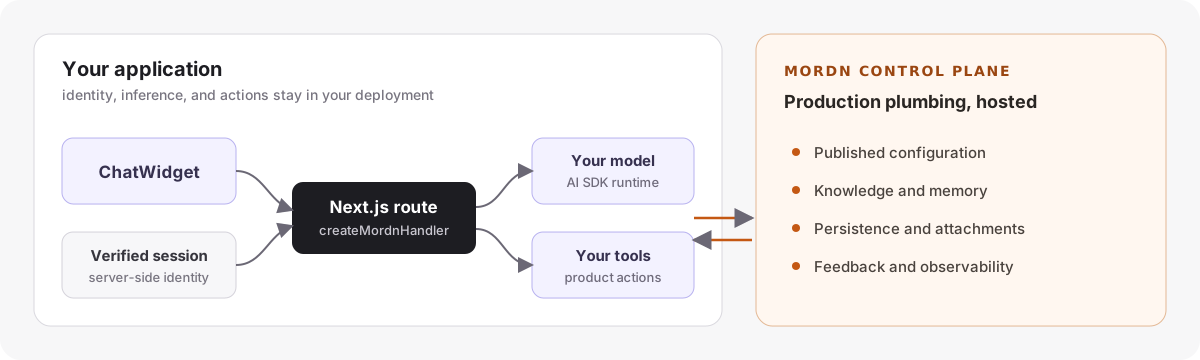
The browser never asserts a user id, model, prompt, or agent configuration. Your route resolves identity from a verified server session and runs inference and tool calls in your deployment. mordn supplies the published configuration and the operational plumbing around each conversation.
## Hosted quickstart
Add a production chat agent to a Next.js App Router application. No database, object store, migration, or model-provider package is required.
### 1. Create and publish an agent
[Create an account](https://mordn.com/sign-up), publish an agent, and copy its server key.
```env
MORDN_CHAT_KEY="mck_live_..."
```
### 2. Install
```bash
npm install @mordn/chat-widget ai @ai-sdk/react
```
### 3. Add one server route
**Recommended CLI setup:** from your existing Next.js App Router project root, run:
```bash
npx @mordn/chat-widget init --hosted
```
This generates the `createMordnHandler` route, a fail-closed server auth stub, a `MordnChat` client component, and `.env.mordn.example`. It does **not** install dependencies, create a database/storage scaffold, run migrations, or edit existing layouts or secrets. Existing chat routes or output conflicts are refused; merge manually rather than replacing them. `--mode hosted` is equivalent; bare `init` retains the legacy self-managed default. See [CLI setup and prerequisites](https://unpkg.com/@mordn/chat-widget@0.25.1/docs/cli-hosted-setup.md).
Before chat can work, implement the generated session verifier (it returns `null` / 401 by default), set `MORDN_CHAT_KEY` **server-side**, configure gateway/model authentication in your deployment, and render ``. The mordn key authenticates hosted infrastructure, **not model calls**; inference and tools still run on your server.
Or add the route manually using an authentication provider you already configured:
```ts
// app/api/chat/[[...chat]]/route.ts
import { createMordnHandler } from '@mordn/chat-widget/server';
import { auth } from '@clerk/nextjs/server';
export const { GET, POST, DELETE, OPTIONS } = createMordnHandler({
apiKey: process.env.MORDN_CHAT_KEY!,
getUserId: async () => (await auth()).userId,
});
```
Use the authentication system you already trust—Clerk, Auth.js, Supabase Auth, or your own sessions. `getUserId` must return a stable id from a **verified server session**, or `null`.
> `getUserId` is the authorization boundary. Never derive it from a header, query parameter, or request body controlled by the browser. See the [security model](https://mordn.com/docs/security).
### 4. Mount the widget
```tsx
'use client';
import { ChatWidget } from '@mordn/chat-widget';
import '@mordn/chat-widget/styles.css';
export function Assistant() {
return ;
}
```
Render ``, sign in, and send a message. The published agent config supplies the model, system prompt, theme, knowledge, memory, and enabled features. Conversations and attachments persist automatically.
Follow the [complete quickstart](https://mordn.com/docs/quickstart) for Auth.js examples, deployment notes, and a production verification checklist.
## Opening the widget from your site
Set `client.display.keyboardShortcut` to `"mod+i"` in your agent config to enable Cmd+I on Mac / Ctrl+I elsewhere (off by default). The shortcut toggles the popup. Static page chrome can also open, toggle, or close it without a React ref:
```html
```
Shortcuts and attribute clicks are explicit user actions: they can reopen a dismissed panel even with `client.allowAutoReopen: false`, just like the launcher. All keyboard combos now yield inside inputs, textareas, selects, and contenteditable surfaces—including modifier shortcuts such as Cmd/Ctrl+I for italic. Repeated/composing keydowns and already-prevented events are ignored. This intentionally replaces the older modifier-shortcuts-fire-while-typing behavior.
For programmatic control, use a `ChatWidget` ref or the document event API:
```js
document.dispatchEvent(new CustomEvent('mordn-chat:open'));
// Also supported: 'mordn-chat:toggle' and 'mordn-chat:close'.
```
Compatibility: ref and CustomEvent opens still require `client.allowAutoReopen: true`; automatic reopen suppression is unchanged. Closing remains allowed. Every route uses the same persistence and controlled-mode `onOpenChange` behavior. Triggers are page-wide: with multiple mounted widgets, all matching instances respond.
## Why mordn
### Your model and tools stay on your server
Inference and tool execution happen inside your Next.js route on your gateway or provider credentials. mordn does not proxy the model call or bill you for tokens. Pin models and register tools in code whenever the host application needs control.
### User identity is server-verified
The widget sends no client-controlled `userId`. The handler binds stores and storage to the identity returned by your verified session, making cross-user conversation access unrepresentable through the public contracts.
### Production infrastructure without rebuilding the plumbing
Published configuration, conversation history, private attachments, knowledge retrieval, memory, feedback, and observability are wired through one server key. You keep the application-specific runtime; mordn operates the reusable control plane.
### Managed document workspaces
The optional **Enable sandboxes** feature gives each verified user a Mordn-managed workspace within your tenant/agent, shared across their conversations. Analyze supported documents and publish private file downloads through curated tools. Off by default; requires published configuration, a compatible API and operator enablement. No provider key or scope selector reaches the browser. See [managed sandbox integration and release gates](https://unpkg.com/@mordn/chat-widget@0.25.1/docs/managed-sandboxes.md).
## Prefer to manage the data plane yourself?
Use `createChatHandler` with the included Drizzle, Supabase, or custom `ChatStore` and `StorageAdapter` implementations. The widget and server-side identity boundary stay the same; you supply the model, database, storage, prompt, and tools.
[Bring your own database](https://mordn.com/docs/quickstart/self-host) · [Backend guide](https://mordn.com/docs/backends/overview) · [Self-hosted schema and migration notes](https://unpkg.com/@mordn/chat-widget@0.25.1/docs/self-hosted-migrations.md)
## Documentation
Using the direct hosted runtime with `publishableKey` and `getUserToken`? See the [hosted auth lifecycle contract](https://unpkg.com/@mordn/chat-widget@0.25.1/docs/hosted-auth-lifecycle.md) for login, logout, and account-switch handling.
| Build | Operate | Reference |
| --- | --- | --- |
| [Quickstart](https://mordn.com/docs/quickstart) | [Production readiness](https://mordn.com/docs/guides/production-readiness) | [ChatWidget API](https://mordn.com/docs/api/chat-widget) |
| [Models and tools](https://mordn.com/docs/guides/models-and-tools) | [Security](https://mordn.com/docs/security) | [Handler API](https://mordn.com/docs/api/create-chat-handler) |
| [Actions](https://mordn.com/docs/guides/build-actions) | [Knowledge](https://mordn.com/docs/guides/knowledge) | [Package exports and CLI](https://unpkg.com/@mordn/chat-widget@0.25.1/docs/package-reference.md) |
| [Theming](https://mordn.com/docs/guides/theming) | [Persistence and memory](https://mordn.com/docs/guides/persistence) | [Full documentation](https://mordn.com/docs) |
## License
MIT