# kbar
kbar is a simple plug-n-play React component to add a fast, portable, and extensible command + k (command palette) interface to your site.
## Background
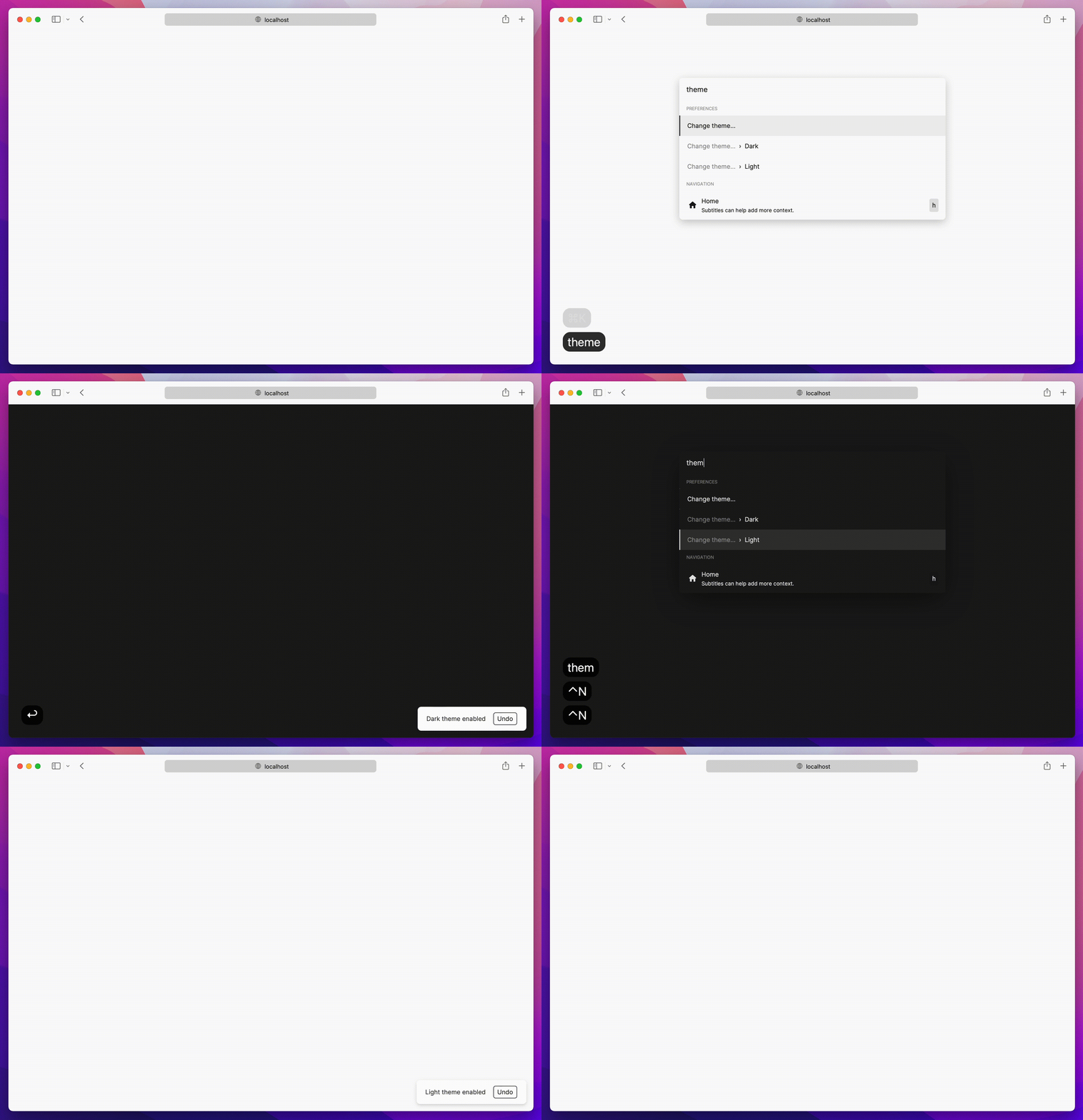
Command + k interfaces are used to create a web experience where any type of action users would be able to do via clicking can be done through a command menu.
With macOS's Spotlight and Linear's command + k experience in mind, kbar aims to be a simple
abstraction to add a fast and extensible command + k menu to your site.
## Features
- Built in animations and fully customizable components
- Keyboard navigation support; e.g. control + n or control + p for the navigation wizards
- Keyboard shortcuts support for registering keystrokes to specific actions; e.g. hit t
for Twitter, hit ? to immediate bring up documentation search
- Nested actions enable creation of rich navigation experiences; e.g. hit backspace to navigate to
the previous action
- Performance as a first class priority; tens of thousands of actions? No problem.
- History management; easily add undo and redo to each action
- Built in screen reader support
- A simple data structure which enables anyone to easily build their own custom components
### Usage
Have a fully functioning command menu for your site in minutes. First, install kbar.
```
npm install kbar
```
There is a single provider which you will wrap your app around; you do not have to wrap your
_entire_ app; however, there are no performance implications by doing so.
```tsx
// app.tsx
import { KBarProvider } from "kbar";
function MyApp() {
return (
// ...
);
}
```
Let's add a few default actions. Actions are the core of kbar – an action define what to execute
when a user selects it.
```tsx
const actions = [
{
id: "blog",
name: "Blog",
shortcut: ["b"],
keywords: "writing words",
perform: () => (window.location.pathname = "blog"),
},
{
id: "contact",
name: "Contact",
shortcut: ["c"],
keywords: "email",
perform: () => (window.location.pathname = "contact"),
},
]
return (
// ...
);
}
```
Next, we will pull in the provided UI components from kbar:
```tsx
// app.tsx
import {
KBarProvider,
KBarPortal,
KBarPositioner,
KBarAnimator,
KBarSearch,
useMatches,
NO_GROUP
} from "kbar";
// ...
return (
// Renders the content outside the root node
// Centers the content
// Handles the show/hide and height animations
// Search input
;
);
}
```
At this point hitting cmd+k (macOS) or ctrl+k (Linux/Windows) will animate in a search input and nothing more.
kbar provides a few utilities to render a performant list of search results.
- `useMatches` at its core returns a flattened list of results and group name based on the current
search query; i.e. `["Section name", Action, Action, "Another section name", Action, Action]`
- `KBarResults` renders a performant virtualized list of these results
Combine the two utilities to create a powerful search interface:
```tsx
import {
// ...
KBarResults,
useMatches,
NO_GROUP,
} from "kbar";
// ...
//
//
;
// ...
function RenderResults() {
const { results } = useMatches();
return (
typeof item === "string" ? (
{item}
) : (
{item.name}
)
}
/>
);
}
```
Hit cmd+k (macOS) or ctrl+k (Linux/Windows) and you should see a primitive command menu. kbar allows you to have full control over all
aspects of your command menu – refer to the docs to get
an understanding of further capabilities. Looking forward to see what you build.
## Used by
Listed are some of the various usages of kbar in the wild – check them out! Create a PR to add your
site below.
- [Outline](https://www.getoutline.com/)
- [zenorocha.com](https://zenorocha.com/)
- [griko.id](https://griko.id/)
- [lavya.me](https://www.lavya.me/)
- [OlivierAlexander.com](https://olivier-alexander-com-git-master-olivierdijkstra.vercel.app/)
- [dhritigabani.me](https://dhritigabani.me/)
- [jpedromagalhaes](https://jpedromagalhaes.vercel.app/)
- [animo](https://demo.animo.id/)
- [tobyb.xyz](https://www.tobyb.xyz/)
- [higoralves.dev](https://www.higoralves.dev/)
- [coderdiaz.dev](https://coderdiaz.dev/)
- [NextUI](https://nextui.org/)
- [evm.codes](https://www.evm.codes/)
- [filiphalas.com](https://filiphalas.com/)
- [benslv.dev](https://benslv.dev/)
- [vortex](https://hydralite.io/vortex)
- [ladislavprix](https://ladislavprix.cz/)
- [pixiebrix](https://www.pixiebrix.com/)
- [nfaustino.com](https://nfaustino-com.vercel.app/)
- [bradleyyeo.com](https://bradleyyeo-com.vercel.app/)
- [andredevries.dev](https://www.andredevries.dev/)
- [about-ebon](https://about-ebon.vercel.app/)
- [frankrocha.dev](https://www.frankrocha.dev/)
- [cameronbrill.me](https://www.cameronbrill.me/)
- [codaxx.ml](https://codaxx.ml/)
- [jeremytenjo.com](https://jeremytenjo.com/)
- [villivald.com](https://villivald.com/)
- [maxthestranger](https://code.maxthestranger.com/)
- [koripallopaikat](https://koripallopaikat.com/)
- [alexcarpenter.me](https://alexcarpenter.me/)
- [hackbar](https://github.com/Uier/hackbar)
- [web3kbar](https://web3kbar.vercel.app/)
- [burakgur](https://burakgur-com.vercel.app/)
- [ademilter.com](https://ademilter.com/)
- [anasaraid.me](https://anasaraid.me/)
- [daniloleal.co](https://daniloleal.co/)
- [hyperround](https://github.com/heyAyushh/hyperound)
- [Omnivore](https://omnivore.app)
- [tiagohermano.dev](https://tiagohermano.dev/)
## Contributing to kbar
Contributions are welcome!
### New features
Please [open a new issue](https://github.com/timc1/kbar/issues) so we can discuss prior to moving
forward.
### Bug fixes
Please [open a new Pull Request](https://github.com/timc1/kbar/pulls) for the given bug fix.
### Nits and spelling mistakes
Please [open a new issue](https://github.com/timc1/kbar/issues) for things like spelling mistakes
and README tweaks – we will group the issues together and tackle them as a group. Please do not
create a PR for it!