# Keyboard
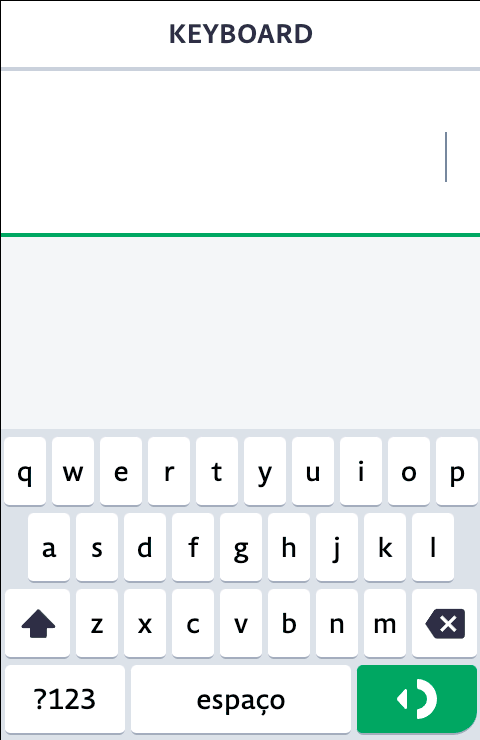
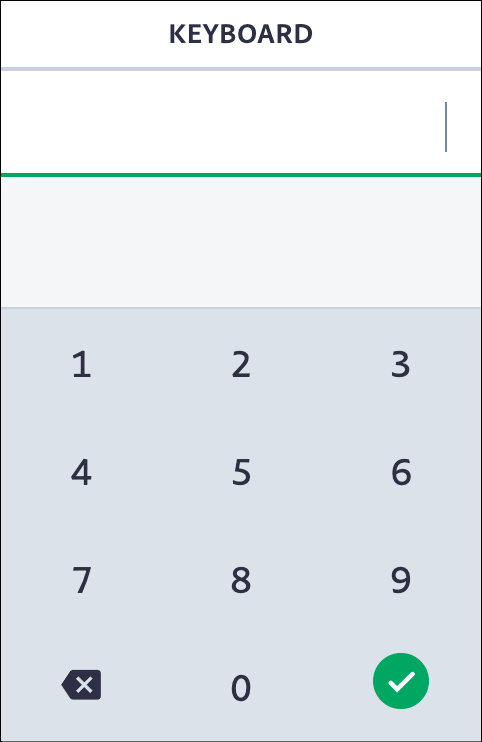
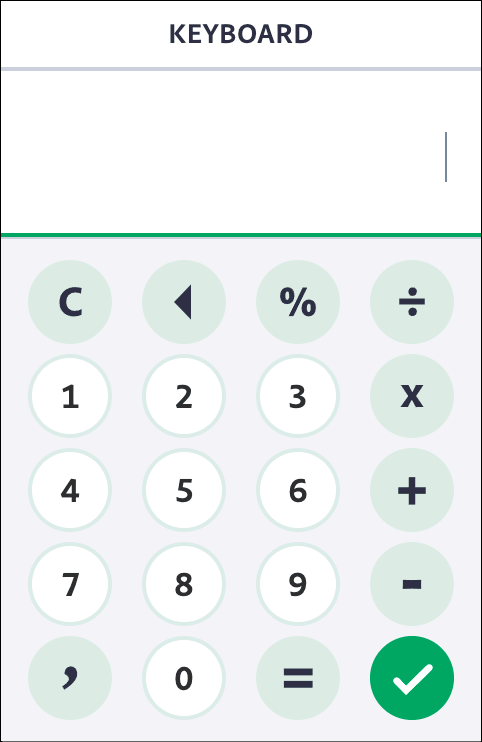
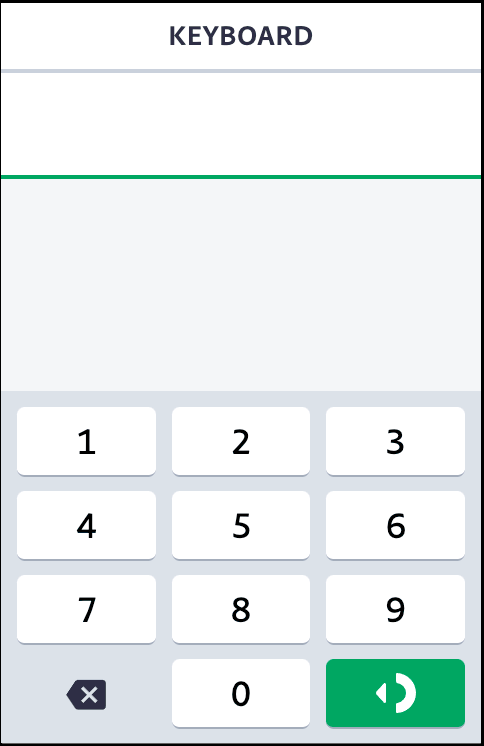
Este módulo oferece uma série de funcionalidades referente ao telcado físico, virtual, mapeamento de teclas, e controle de input do teclado físico do seu POS.
## Teclado Virtual - Como usar
#### ◼︎ Adicine o componente `` na raiz do seu projeto.
```html
```
#### ◼︎ Ou adicine o componente `` em uma rota específica, podendo assimm passar alguma de suas propriedades pelo HTML.
```html
```
As propriedades declaradas no elemento HTML, serão usadas no inicializador do teclado virtual, podendo também serem sobrescritas por seus métodos(ex.: [Keyboard.setOptions](#setoptionsoptions--void)) mais tarde. Essas propriedades são salvas como ponto de partida, caso use o método [Keyboard.reset](#reset-void) ou [Keyboard.resetOptions](#resetoptions-void)
## Examplo de uso da API
```js
import { KEYBOARD } from '@mamba/core';
import Keyboard from '@mamba/keyboard/api/index.js';
import { KeyboardType, KeyboardUpdateMode } from '@mamba/keyboard/lib/index.js';
Keyboard.isBackspaceEnabled(); // true
/** Disables the physical backspace button */
Keyboard.disableBackspace();
Keyboard.isBackspaceEnabled(); // false
/** Enables the physical backspace button */
Keyboard.enableBackspace();
/** Set virtual keyboard options */
Keyboard.setOptions({
keyboardType: KeyboardType.Math,
updateMode: KeyboardUpdateMode.Manual,
maxLength: String(999.99).length - 1,
onKeyPress: (button) => {
if (button === KEYBOARD.ENTER) {
// pay
} else {
// add input
}
},
});
/** Hide virtual keyboard */
Keyboard.hide();
```
### Boas Práticas e Dicas
- Por hora, o teclado virtual nunca será iniciado em POS's menores, então não é necessário iniciar seu componente para esses casos, para não usar processamento e memória desnecessariamente
```xml
{#if !$POS.CAPABILITIES.IS_SMALL_SCREEN}
{/if}
```
```js
// svelte.js
import { Device } from '@mamba/utils/index.js';
// ...
export const INITIAL_DATA = {
POS: {
CAPABILITIES: {
IS_SMALL_SCREEN: Device.hasSmallScreen(),
},
},
};
const store = new Store(INITIAL_DATA);
// ...
```
- Como saber se o teclado virtual existe ou foi inicializado?
A api do teclado exporta uma propriedade em sua [Interface](#interface), que se chama `virtualKeyboard: Keyboard`, onde ela consulta e retorna se existe o teclado virtual ou não. Exemplo:
> No console do seu app:
```js
window.$Keyboard.virtualKeyboard; // `undefined` quer dizer não existe enhuma instância do teclado virtual
// ...
window.$Keyboard.virtualKeyboard; // `Keyboard {...}` quer dizer que existe uma instância do teclado virtual
```
> No código do seu app:
```diff
+ import Keyboard from '@mamba/keyboard/api/index.js';
# Pode quebrar:
- Keyboard.setOptions({
- keyboardType: KeyboardType.Numeric,
- )}
# Ao invés, verifique se ele existe antes:
+ if (Keyboard.virtualKeyboard) {
+ Keyboard.setOptions({
+ keyboardType: KeyboardType.Numeric,
+ )}
+ }
```
Isso se faz útil para casos onde seu fluxo precisa fazer algum tratamento em sua rota, mas não sabe se o teclado virtual existe.
### Exemplos
Para exemplos de uso, [veja aqui](./EXAMPLES.md).
---
# API
## Opções do teclado virtual
Tenha cuidado se tiver mais de um campo de entrada na mesma página, pois essas são propriedades globais do teclado (O que se aplicar para um ``, será aplicado para todos) no modo `KeyboardUpdateMode.Auto`. Se precisar trabalhar com mais de um campo por página, utilize a propriedade `input` e/ou `updadeMode = KeyboardUpdateMode.Manual`.
````ts
interface KeyboardOptions {
/**
* Specifies which keyboard type should be used out of the box.
* @defaultValue {@link KeyboardType.Default}
*/
keyboardType?: KeyboardType;
/**
* Specifies a custom keyboard layout to be used. This should be used in addition to {@link KeyboardType} setted to {@link KeyboardType.Custom}
*/
layout?: KeyboardLayoutObject;
/**
* Specifies which layout should be used inside the "layout" option, useful to handle function keys (e.g. "{shift}")". This should be used in addition to {@link KeyboardType} setted to {@link KeyboardType.Custom}. Initial layout also can be defined here.
*/
layoutName?: string;
/**
* Specifies which direction layout should render. Horizontaly, Verticaly or Fixed.
* - {@link LayoutDirection.Horizontal}, layout will render from left to right axis (row flow)
* - {@link LayoutDirection.Vertical}, layout will render from top to bottom axis (column flow)
* - {@link LayoutDirection.Fixed}, layout will render in fixed grid mode. This mode helps draw layout like `space-evenly` on POS. But not support flexible arrange.
* @defaultValue {LayoutDirection.Horizontal}
*/
layoutDirection?: LayoutDirection;
/**
* A prop to add your own css classes to the keyboard wrapper.
* You can add multiple classes separated by a space.
* Prefab keyboards have their own themes... set this property will remove its theme..
*/
theme?: string;
/**
* Defines a class modifier to work with theme variations.
* You can use some pre-variations of {@link KeyboardThemeVariation} or add your own css class, that can have multiple classes separated by space. Strings will be transformed to kebab-case automatically.
*
* The class its self will be the concatenation of keyboard slug with two dashes. eg.: `mb-variation--small`, `mb-variation--my-class`
*/
themeVariation?: KeyboardThemeVariation | string;
/**
* Replaces variable buttons (such as `{backspace}`) with a human-friendly name (e.g.: `backspace`).
*/
labels?: { [button: string]: string };
/**
* Converts button output value (such as `{check}`) to standard keyboard output (e.g.: `enter`).
*/
outputs?: { [button: string]: string };
/**
* Change the CSS class to add to the button when it gets active by click.
*/
activeButtonClass?: string;
/**
* Customize the CSS class to handle keyboard hidden events.
*
*/
hiddenKeyboardClass?: string;
/**
* Shows aditional debug information.
* Runs a `console.log` every time a key is pressed.
* Shows the buttons pressed and the current input.
* Add `debug` class to main keyboard wrapper
*/
debug?: boolean;
/**
* `number`: Restrains mamba keyboard input to a certain length.
*/
maxLength?: any;
/**
* If input is readonly(or static `div` element as input), keyboard will disable cursor event handlers since it won't be necessary.
*
* This property do not change or include readonly attribute
*/
readonly?: boolean;
/**
* Tells keyboard which value it should use at input start position after key press input change. Like a currency placeholder.
* Only works if the {@link updateMode} are on mode {@link KeyboardUpdateMode.Auto}.
*/
lastValue?: string;
/**
* Tells keyboard if it should get or set number values only.
* If some cases you dont want capture formatted values to internal keyboard virtual input, this props cleans the input work to number, to able to be formatted back again.
* Useful for fields with formatting that happen after key events.
*/
filtersNumbersOnly?: boolean;
/**
* Optionally set a condition for the virtual keyboard to render or work.
* Its instance will be destroyed if exist.
* Can be a Boolean or a function that do something and return a boolean.
*/
renderCondition?: boolean | (() => boolean);
/**
* Enabled or disables keyboard events and actions.
* This property do not change keybpard visibility.
* It also adds a class name to the keyboard element, but the disabled style is up to you using :global css.
*/
disabled?: boolean;
/**
* Controls keyboard visibility.
* Setting this propertie with `renderCondition: false` has no effect.
*/
visibility?: KeyboardVisibility | string;
/**
* A prop to ensure characters are always be added/removed at the end of the string.
*/
disableCursorPositioning?: boolean;
/**
* Restrains input(s) change to the defined regular expression pattern.
*/
inputPattern?: RegExp;
/**
* Exclude specific buttons from each layout
* @example
*
* ```js
* excludeFromLayout: {
* default: ['a'],
* shift: ['B'],
* }
* ```
*/
excludeFromLayout?: { [layoutName: string]: string[] };
/**
* Include specific function buttons to go through synthetic event dispatch.
* This is useful to send key press of function keys to the input event handler, like math keys.
*
* The key code will be resolved by String.charcode if it's not already mapped. (only for single char)
* @example
* ```js
* {
* ...
* // These keys will not display on input but send input events without braces
* // (e.g. KeyboardEvent({ key: "+", code: 107 }))
* allowKeySyntheticEvent: ['{+}', '{-}', '{*}', '{≠}'],
* }
* ```
*/
allowKeySyntheticEvent?: string[];
/**
* Points key events to a customizable input element, instead of using document active element.
* You can type and directly display the value in a `div` element setted with `data-keyboard="true" property`, so keyboard will insert its value to the element `innerText`.
*/
input?: KeyboardInputOption;
/**
* Specifies if keyboard should operate automatic or manually.
* - In automatic({@link KeyboardUpdateMode.Auto}) mode, it will try handle input key press value on focused elements.
*
* - In manually({@link KeyboardUpdateMode.Manual}) mode, it will leave the changes to you handle outside, using {@link KeyboardTypeEvents.onChange} event along with `oninput` DOM event.
* @example
* ```js
* function onChange(input, e) {
* inputComponent.set({ value: input });
* }
*
* const keyboard = new Keyboard({
* onChange: input => this.onChange(input),
* });
* // Update virtual keyboard input when the real one updates directly
* inputDOMElement.addEventListener('input', event => {
* keyboard.setInput(event.target.value);
* });
*
* ```
*
* @defaultValue {@link KeyboardUpdateMode.Auto}
*/
updateMode?: KeyboardUpdateMode;
/**
* Keep keyboard visible (dont hide when input loose focus)
*
* @defaultValue `false`
*/
keepVisible?: boolean;
/**
* Keep input cursor at its ends
*
* @defaultValue `false`
*/
lockCursor?: boolean;
/**
* If should render keyboard when it's instance creates
* Call `render()` method to show the keyboard
* @defaultValue `true`
*/
autoRender?: boolean;
/**
* Make beep sound for every key press.
* ! If set to `false`, you'll do not disable POS sound entirely. Only for this Keyboard instance.
* If set to `true`, system sound preference will prevail(can be enabled or disable).
* Other value different from boolean, will use system sound preference.
* In other words, you can only disable sound of virtual keyboard but not force enable it.
* @defaultValue System sound preference.
*/
soundEnabled?: boolean;
/**
* Define keyboard beep tone
*
* @defaultValue {@link BeepTone.TONE_3}
*/
beepTone?: BeepTone;
/**
* Define keyboard beep time
*
* @defaultValue `90`
*/
beepTime?: number;
/**
* Enable or disables key suggestions
* @defaultValue `true`
*/
enableLayoutSuggestions?: boolean;
/**
* Character suggestions for especial and exotic keys
* Define it was tuple it max of four optional words
* Some prefab keyboard already have some latin words
* @see [Default Suggestions](./mappings/defaultSuggestions.ts)
*/
layoutSuggestions?: { [key: string]: [string?, string?, string?, string?] };
/**
* Other options can exist
*/
[name: string]: any;
}
````
## Eventos do teclado virtual
```ts
type FunctionKeyPressCallback = (
button: string,
instance: Keyboard,
e?: KeyboardHandlerEvent,
) => void;
interface KeyboardTypeEvents {
/**
* Executes thae callback function when virtual keyboard rendered by the first time.
* @event
*/
beforeFirstRender?: (instance: Keyboard) => void;
/**
* Executes a callback function before a virtual keyboard render.
* @event
*/
beforeRender?: (instance: Keyboard) => void;
/**
* Executes a callback function every time virtual keyboard is rendered (e.g: when you change layouts).
* @event
*/
onRender?: (instance: Keyboard) => void;
/**
* Executes a callback function once virtual keyboard is rendered for the first time (on initialization).
* @event
*/
onInit?: (instance: Keyboard) => void;
/**
* Retrieves the current input
* @event
*/
onChange?: (input: string, e?: KeyboardHandlerEvent) => void;
/**
* Executes a callback function on any key press of virtual keyboard. Returns button layout name (i.e.: “{enter}”, "b", "c", "2" ).
* @event
*/
onKeyPress?: (button: string, e?: KeyboardHandlerEvent) => void;
/**
* Execute a callback function on keypress of non-standard type only (functionality type i.e.: “{alt}”) of virtual keyboard.
* @event
*/
onFunctionKeyPress?: FunctionKeyPressCallback;
/**
* Execute a callback function on keypress of standard type only (type i.e.: “a”, “k”, “5”) of virtual keyboard.
* @event
*/
onStandardKeyPress?: FunctionKeyPressCallback;
}
```
### Passando opções pelo ``
Você pode passar opções simples, compatíveis com **JSON** _(não aceita funções/eventos do teclado)_, pelo elemento HTML input:
```html
```
Caso você utilize o `@mamba/input`, é mais permissivo:
```html
```
---
# API
Responsável por expor métodos de controle sobre o teclado físico e virutal, bem como métodos de ajuda auxiliares do POS, e acesso aos métodos do teclado virtual e derivados.
## Interface
```ts
interface Keyboard {
virtualKeyboard: Keyboard;
visibility: KeyboardVisibility;
setKeyboardInputAsNumeric: () => void;
setKeyboardInputAsAlphanumeric: () => void;
getKeyCode: (keyName: string) => number;
getKeyName: (keyCode: number) => string;
isNumericKey: (keyCode: number) => boolean;
isActionKey: (keyCode: number) => boolean;
isBackspaceEnabled: () => boolean;
disableBackspace: () => void;
enableBackspace: () => void;
setKeyboardType(type: KeyboardType): void;
setOptions(options?: {}): void;
setInput(input: string): void;
getInput(): string;
clearInput(): void;
replaceInput(keyboardInput: { default: string }): void;
render(): void;
show(): void;
hide(): void;
unmount(): void;
resetOptions(): void;
reset(): void;
currentInputPatternIsValid(): boolean;
getButtonElement(button: string): undefined | KeyboardElement | KeyboardElement[];
setKeyboardAsCustomType(options: KeyboardOptions = {}): void;
setKeyboardAsDefaultType(): void;
setKeyboardAsMathType(): void;
setKeyboardAsNumericType(): void;
setKeyboardAsPhoneType(): void;
destroy(): void;
}
```
## Métodos
### `setKeyboardInputAsNumeric()`
Define que a máquina irá digitar apenas números.
```js
import Keyboard from '@mamba/keyboard/api/index.js';
Keyboard.setKeyboardInputAsNumeric();
```
### `setKeyboardInputAsAlphanumeric()`
Define que a máquina irá digitar caracteres alfanuméricos.
```js
import Keyboard from '@mamba/keyboard/api/index.js';
Keyboard.setKeyboardInputAsAlphanumeric();
```
### `getKeyCode(keyName: string)`
Retorna o `código da tecla` referente a uma tecla da máquina.
```js
import Keyboard from '@mamba/keyboard/api/index.js'
Keyboard.getKeyCode('Enter'); // 13
Keyboard.getKeyCode('enter'); // 13
Keyboard.getKeyCode('Back'); // 8
Keyboard.getKeyCode('Close'); // 27
Keyboard.getKeyCode('Help'); // 17
Keyboard.getKeyCode('Shortcuts'); // 16
Keyboard.getKeyCode('0'); // 48
...
Keyboard.getKeyCode('9'); // 57
```
### `parseEventKeys(event: KeyboardEvent) `
Obtem o código e nome da tecla normalizado de acordo com a tabela de teclas do POS através de um evento de entrada de teclado.
Retorna uma tupla de tamanho 2, onde o índice 0 é o código encontrado, e o de índice 1, o nome da tecla.
```js
import Keyboard from '@mamba/keyboard/api/index.js';
/**
* @param {KeyboardEvent} event
*/
function onKeydown(event) {
const [keyCode, keyName] = Keyboard.parseEventKeys(event);
}
```
### `parseEventKeyName(event: KeyboardEvent) `
Obtem o nome da tecla normalizado de acordo com a tabela de teclas do POS através de um evento de entrada de teclado.
Retorna o nome da tecla.
```js
import Keyboard from '@mamba/keyboard/api/index.js';
/**
* @param {KeyboardEvent} event
*/
function onKeydown(event) {
const keyName = Keyboard.parseEventKeyName(event);
}
```
### `parseEventKeyCode(event: KeyboardEvent) `
Obtem o código da telca compatível com o ecosistema do simulador, teclado virtual e POS físico.
Retorna o código da tecla do hardware.
```js
import Keyboard from '@mamba/keyboard/api/index.js';
/**
* @param {KeyboardEvent} event
*/
function onKeydown(event) {
const keyCode = Keyboard.parseEventKeyCode(event);
}
```
### `getKeyName(keyCode: number)`
Retorna o `nome da tecla` referente ao código de uma tecla da máquina.
```js
import Keyboard from '@mamba/keyboard/api/index.js'
Keyboard.getKeyName(13); // 'enter'
Keyboard.getKeyName(8); // 'back'
Keyboard.getKeyName(27); // 'close'
Keyboard.getKeyName(17); // 'help'
Keyboard.getKeyName(16); // 'shortcuts'
Keyboard.getKeyName(48); // '0'
...
Keyboard.getKeyName(57); // '9'
```
### `isNumericKey(keyCode: number): void`
Retorna se uma tecla representa um número.
```js
import Keyboard from '@mamba/keyboard/api/index.js';
/** 13 = 'enter' */
Keyboard.isNumericKey(13); // false
/** 57 = '9' */
Keyboard.isNumericKey(57); // true
```
### `isActionKey(keyCode: number): void`
(_Obsoleto_, usar `isFunctionKey()`)
Retorna se uma tecla representa uma ação.
```js
import Keyboard from '@mamba/keyboard/api/index.js';
/** 13 = 'enter' */
Keyboard.isActionKey(13); // true
/** 57 = '9' */
Keyboard.isActionKey(57); // false
```
### `isFunctionKey(keyCode: number): void`
Retorna se uma tecla representa uma ação.
```js
import Keyboard from '@mamba/keyboard/api/index.js';
/** 13 = 'enter' */
Keyboard.isFunctionKey(13); // true
/** 57 = '9' */
Keyboard.isFunctionKey(57); // false
```
### `isBackspaceEnabled(): void`
Retorna se o uso do botão físico de `voltar`/`backspace` está habilitado ou não no aplicativo.
### `disableBackspace(): void`
Desabilita o uso do botão físico de `voltar`/`backspace` no aplicativo em questão.
### `enableBackspace(): void`
Habilita o uso do botão físico de `voltar`/`backspace` no aplicativo em questão.
### `setKeyboardType(type: KeyboardType): void`
Altere o tipo de teclado passando um dos tipos do `KeyboardType`.
### `setOptions(options?: {}): void`
Define uma nova opção ou modifica as existentes após a inicialização.
### `setInput(input: string): void`
Defina a entrada virtual do teclado virtual. Este método não altera o valores de elementos ``
### `getInput(): string`
Obtenha a entrada virtual do teclado virtual (você também pode obtê-la pela propriedade `onChange`).
### `clearInput(): void`
Limpa a entrada virtual do teclado virtual.
### `replaceInput(keyboardInput: { default: string }): void`
Substitui o valor de entrada virtual do teclado virtual.
### `render(): void`
Renderiza ou atualiza os botões do teclado.
Pode ser chamado direto se `autoRender` estiver desativado.
> `@throws LAYOUT_NOT_FOUND_ERROR` - layout não encontrado.
>
> `@throws LAYOUT_NAME_NOT_FOUND_ERROR` - nome do layout não encontrado no objeto de layout
### `show(): void`
Mostra o teclado e montá-lo se já não estiver.
### `hide(): void`
Oculta o teclado. Esse método faz menos processamento do que a propriedade `visibility`.
### `unmount(): void`
Remove todas as linhas do teclado e define a visibilidade como oculta.
### `resetOptions(): void`
Redefine as propriedades do teclado.
### `reset(): void`
Redefine as propriedades do teclado e os elementos do teclado.
### `currentInputPatternIsValid(): boolean`
Retorna se a entrada atual é válida com a propriedade `pattern` configurada.
### `getButtonElement(button: string): undefined | KeyboardElement | KeyboardElement[]`
Obtém o elemento DOM de um botão. Se houver vários botões com o mesmo nome, será retornado um array dos Elementos DOM.
### `setKeyboardAsCustomType(options: KeyboardOptions = {}): void`
Defina o teclado virtual como tipo personalizado.
Esse método ja define por si só, o tipo do teclado para o tipo customizado(`KeyboardType.Custom`)
### `setKeyboardAsDefaultType(): void`
Defina o teclado virtual do tipo alfanumérico padrão.
### `setKeyboardAsMathType(): void`
Defina o teclado virtual do tipo calculadora.
### `setKeyboardAsNumericType(): void`
Defina o teclado virtual como tipo numérico.
### `setKeyboardAsPhoneType(): void`
Defina o teclado virtual como tipo de telefone.
### `destroy(): void`
Destroi o teclado virtual, remove seus ouvintes e elementos do DOM. Este método não deve ser usado se você estiver usando o componente ``.
### `shouldUpdateKeyboardView(): void`
Atualiza os estilos automáticos do teclado virtual. Normalmente posicionamento na tela.
### `updateSoundEnabledState(): void`
Atualiza o estado do som do teclado virtual com base nas configurações do POS.
## Enumeradores
```ts
/**
* Keyboard update mode
*/
enum KeyboardUpdateMode {
Auto = 'auto',
Manual = 'manual',
}
/**
* Keyboard visibility
*/
enum KeyboardVisibility {
Hidden = 'hidden',
Visible = 'visible',
}
/**
* Layout row direction
*/
enum LayoutDirection {
Horizontal = 'horizontal',
Vertical = 'vertical',
Fixed = 'fixed',
}
/**
* Keyboard enum
*/
enum KeyboardType {
Default = 'default',
Numeric = 'numeric',
Phone = 'phone',
Math = 'math',
Custom = 'custom',
}
/**
* Keyboard theme variation
*/
export enum KeyboardThemeVariation {
Large = 'large', // For large screens and high DPI without zoom
Default = 'default', // Default variation for general purpose
Compact = 'compact', // Reduced spaces and height
UltraSmall = 'ultra-small', // For very small screens
}
/**
* Beep tone
*/
enum BeepTone {
TONE_1 = 'TONE1',
TONE_2 = 'TONE2',
TONE_3 = 'TONE3',
TONE_4 = 'TONE4',
TONE_5 = 'TONE5',
TONE_6 = 'TONE6',
TONE_7 = 'TONE7',
}
```
# Teclados pré-disponíveis
São teclados com temas e já configurado para uso.
```js
import Keyboard from '@mamba/keyboard/api/index.js';
import { KeyboardType } from '@mamba/keyboard/lib/index.js';
Keyboard.setOptions({
keyboardType: KeyboardType.Numeric,
});
```
## Ou use um dos métodos prontos:
### ◼︎ Default _(alfanumérico)_
```js
import Keyboard from '@mamba/keyboard/api/index.js';
Keyboard.setKeyboardAsDefaultType();
```
### ◼︎ Numérico
```js
import Keyboard from '@mamba/keyboard/api/index.js';
Keyboard.setKeyboardAsNumericType();
```
### ◼︎ Calculadora
```js
import Keyboard from '@mamba/keyboard/api/index.js';
Keyboard.setKeyboardAsPhoneType();
```
## Keyboard native key map
Para usar as teclas nativas do teclado (teclado físico POS), você precisa instalar `@mamba/core`.
O objeto `KEYBOARD` fornece os mapas de teclas e nomes de teclas específicos do POS.
```js
import { KEYBOARD } from '@mamba/core';
```
See [@mamba/core Docs](../../core/README.md) for more info.
## Migração para v8.x.x
- As propriedades iniciais do componente `@mamba/keyboard/Keyboard.html`, deixaram de ser feitas pela propriedade `keyboardOptions`, e sendo usadas/lidas diretamente:
```diff
-
+
```
- Use o método `Keyboard.parseEventKeyCode(event: KeyboardEvent )` para parsear corretamente o código da telca de entrada e descobrir qual o `keyCode` (código da tecla) ou `keyName` (nome da tecla):
```diff
+ import Keyboard from '@mamba/keyboard/api/keyboard.js';
- const keyCode = event.code && event.code !== 0 ? event.code : event.charCode || event.which || event.keyCode;
- const keyName = Keyboard.getKeyName(keyCode);
+ const [keyCode, keyName] = Keyboard.parseEventKeys(event);
```