BPMN (Business Process Model and Notation) is a specification defined by OMG, widely used for enterprise-level process modeling, that describes business process execution logic in a standardized way.
## Introduction
LogicFlow provides a BPMN plugin to build a BPMN-compliant modeling experience on the canvas. With this plugin, users can:
- Visually design process diagrams compliant with the BPMN specification
- Export to BPMN 2.0-compliant XML
- Run or further configure them in BPMN engines such as Activiti, Flowable, and Camunda
LogicFlow currently provides two versions of the BPMN plugin to meet scenarios with varying complexity and customization needs:
| Version | Target scenarios | Corresponding plugins and feature descriptions |
| -------- | ------------------------------- | ---------------------------------------------------------------------------------------------------------------------------------------------------------------------------------------------------------------------------------------------------------------- |
| Basic | Quick delivery of simple flows | `bpmnElement`: Registers basic BPMN nodes for drawing simple flows; `bpmnAdapter`: Provides basic BPMN data import/export, supporting fundamental mapping and conversion between LogicFlow data and BPMN XML |
| Extended | Customization for complex flows | `BPMNElements`: Adds 6 node types, further extending BPMN element support; `bpmnElementsAdapter`: Offers more configurable options for finer-grained customization during import, export, and data mapping to meet different engine or business requirements |
:::info{title=Tip}
The built-in BPMN plugin in LogicFlow is mainly for basic capability demonstration and quick start. It covers only a small set of commonly used BPMN elements and does not support complex BPMN extension elements or custom attribute configuration.
In production projects, we recommend defining the node types and data structures required by your business, and implementing the corresponding data import, export, and transformation logic, rather than directly and fully adopting the built-in bpmnElement and bpmnAdapter plugins.
For scenarios with higher process complexity or customized BPMN semantics or XML structure, use the official bpmnElement and bpmnAdapter as references and re-implement, locally, a set of node systems and data format conversion plugins that better fit your product needs.
One of LogicFlow’s original intentions is to enable the frontend to express business logic completely and clearly in code, rather than encapsulating critical business rules in uncontrollable third-party implementations. This brings frontend development closer to the business itself while leaving sufficient room for flexible extension in complex scenarios.
:::
## bpmnElement Plugin
The bpmnElement plugin provides basic BPMN element registration for drawing BPMN-compliant nodes on the LogicFlow canvas.
### Node Description
During mounting, the bpmnElement plugin registers the following six BPMN elements:
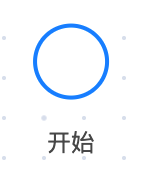
Start Event (bpmn:startEvent)
**Visual Style**
- Inherits the circle from the built-in CircleNode
- Text: when initialized with `text`, defaults to 40px below the node
- Overrides setAttributes to fix the radius at 18
**Other Details**
- Default ID generation rule: Event_${random}
- Overrides getConnectedTargetRules: cannot be a connection target, only a source
- Implementation: [StartEvent](https://github.com/didi/LogicFlow/blob/master/packages/extension/src/bpmn/events/StartEvent.ts)
End Event (bpmn:endEvent)
**Visual Style**
- Inherits the circle from the built-in CircleNode
- Text: when initialized with `text`, defaults to 40px below the node
- Overrides setAttributes to fix the radius at 18
**Other Details**
- Default ID generation rule: Event_${random}
- Overrides getConnectedSourceRules: cannot be a connection source
- Overrides getShape to draw concentric double circles
- Implementation: [EndEvent](https://github.com/didi/LogicFlow/blob/master/packages/extension/src/bpmn/events/EndEvent.ts)
User Task (bpmn:userTask)
**Visual Style**
- Inherits the rounded rectangle from the built-in RectNode
- Overrides getShape to overlay a user icon drawn with an SVG path
- Icon is positioned with a 5px inner offset from the top-left corner
- Icon color follows the node’s `stroke` style
**Other Details**
- Default ID generation rule: Activity_${random}
- Implementation: [UserTask](https://github.com/didi/LogicFlow/blob/master/packages/extension/src/bpmn/tasks/UserTask.ts)
Service Task (bpmn:serviceTask)
**Visual Style**
- Inherits the rounded rectangle from the built-in RectNode
- Overrides getShape to overlay a service icon drawn with an SVG path
- Icon is positioned with a 5px inner offset from the top-left corner
- Icon color follows the node’s `stroke` style
**Other Details**
- Default ID generation rule: Activity_${random}
- Implementation: [ServiceTask](https://github.com/didi/LogicFlow/blob/master/packages/extension/src/bpmn/tasks/ServiceTask.ts)
Exclusive Gateway (bpmn:exclusiveGateway)
**Visual Style**
- Inherits the diamond from the built-in PolygonNode
- When initialized with `text`, the label defaults to 40px below the node
- Default points are set to `[25,0] [50,25] [25,50] [0,25]`
- Overrides `getShape` to draw the internal exclusive routing marker
**Other Details**
- Default ID generation rule: Gateway_${random}
- Implementation: [ExclusiveGateway](https://github.com/didi/LogicFlow/blob/master/packages/extension/src/bpmn/gateways/ExclusiveGateway.ts)
Sequence Flow (bpmn:sequenceFlow)
**Visual Style**
- Inherits the polyline from the built-in PolylineEdge
**Other Details**
- Default ID generation rule: Flow_${random}
- After the plugin is introduced, it is set as the default edge type. You can disable this by passing `customBpmnEdge: true` when initializing the LogicFlow instance.
- Implementation: [SequenceFlow](https://github.com/didi/LogicFlow/blob/master/packages/extension/src/bpmn/flow/SequenceFlow.ts)
### Usage Guide
1. Import the plugin
:::code-group
```tsx [npm]
import { BpmnElement } from '@logicflow/extension'
// Global usage
LogicFlow.use(BpmnElement)
// Per-instance usage
const lf = new LogicFlow({
// ... // other options
plugins: [BpmnElement],
})
```
```html [CDN]
```
:::
2. Render BPMN elements
```js
// ... plugin import logic
lf.render({
nodes: [
{ id: 'Event_1234567', type: 'bpmn:startEvent', x: 100, y: 100, },
{ id: 'Task_123ac56', type: 'bpmn:userTask', x: 300, y: 100, },
{ id: 'Event_fa4c699', type: 'bpmn:endEvent', x: 500, y: 100, },
],
edges: [
{ id: 'Flow_12ac567', sourceNodeId: 'Event_1234567', targetNodeId: 'Task_123ac56', type: 'bpmn:sequenceFlow', },
{ id: 'Flow_fa4c689', sourceNodeId: 'Task_123ac56', targetNodeId: 'Event_fa4c699', type: 'bpmn:sequenceFlow', },
],
})
```
Simply include this plugin in a LogicFlow instance to use its built-in BPMN elements.
During mounting, the plugin automatically calls `register` to add BPMN elements to LogicFlow and sets `bpmn:sequenceFlow` as the default edge type on the canvas.
Whether to use `bpmn:sequenceFlow` as the default edge type can be controlled by configuration. If you do not want BPMN edges as the default, set `customBpmnEdge: true` when instantiating LogicFlow to disable this behavior.
## bpmnAdapter Plugin
This plugin provides conversion capabilities between BPMN data format and LogicFlow data format, including adapters for different scenarios: `BpmnAdapter`, `BpmnXmlAdapter`, and helper functions `toNormalJson` and `toXmlJson` to convert between standard JSON and XML-style JSON structures.
### BpmnAdapter
Performs bidirectional conversion between LogicFlow graph data and BPMN graph data; includes `adapterIn` and `adapterOut` methods:
adapterIn(bpmnData)
Convert BPMN graph data to LogicFlow graph data.
**Parameters**
- bpmnData *(Object)*: BPMN data to convert
**Returns**
- data *([GraphConfigData](../../api/type/MainTypes.en.md#graphconfigdata))*: Converted LogicFlow graph data
**Data conversion example**
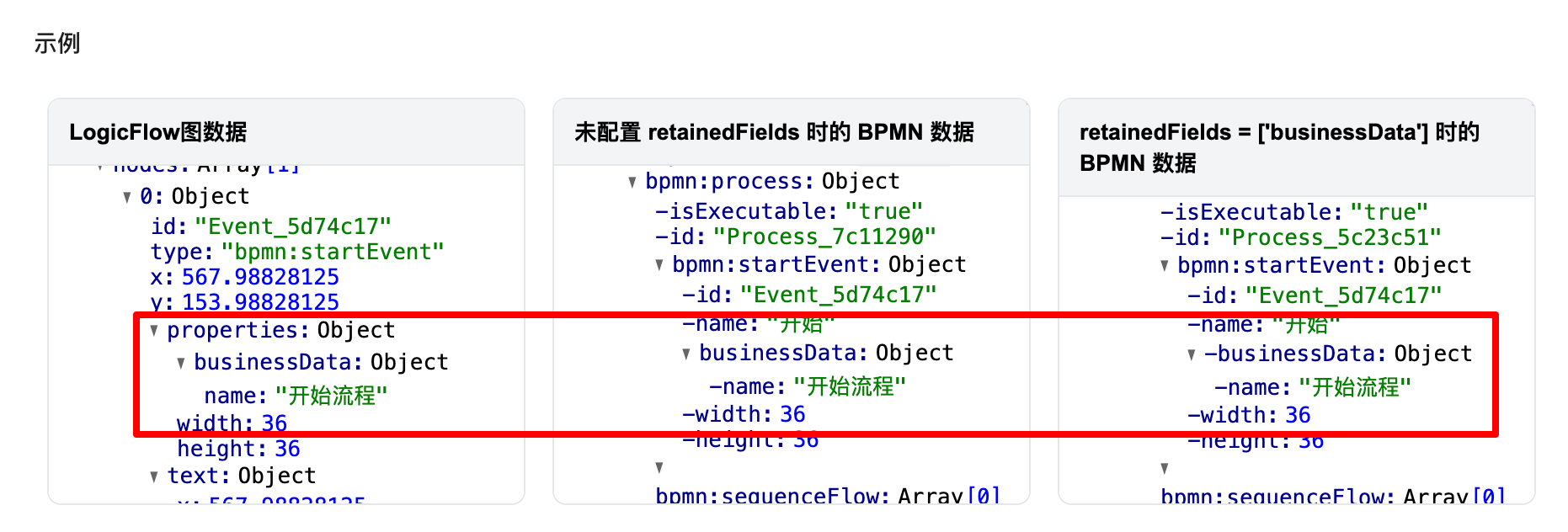
adapterOut(data, retainedFields?)
Convert LogicFlow graph data to BPMN graph data.
**Parameters**
- data *([GraphConfigData](../../api/type/MainTypes.en.md#graphconfigdata))*: LogicFlow data to convert
- retainedFields *(string[])*: Optional; list of field names to retain and write as BPMN attributes during conversion. Effective only when the corresponding field in `node.properties` is of type `object`.
**Returns**
- bpmnData *(Object)*: Converted BPMN graph data
**Data conversion example**
:::info{title=Differences}
As shown by the red box below, if an attribute is in `retainedFields`, it will have the `-` prefix and exist as a property of the startEvent; otherwise, it will exist as a child node.
:::
### BpmnXmlAdapter
Extends BpmnAdapter and overrides `adapterIn` and `adapterOut` with the same overall logic. The difference is: `adapterOut` converts LogicFlow graph data to BPMN graph data in XML format; `adapterIn` converts BPMN XML JSON data to LogicFlow graph data.
adapterIn(bpmnData)
Convert BPMN graph data to LogicFlow graph data.
**Parameters**
- bpmnData *(Object)*: BPMN data to convert
**Returns**
- data *([GraphConfigData](../../api/type/MainTypes.en.md#graphconfigdata))*: Converted LogicFlow graph data
**Data conversion example**
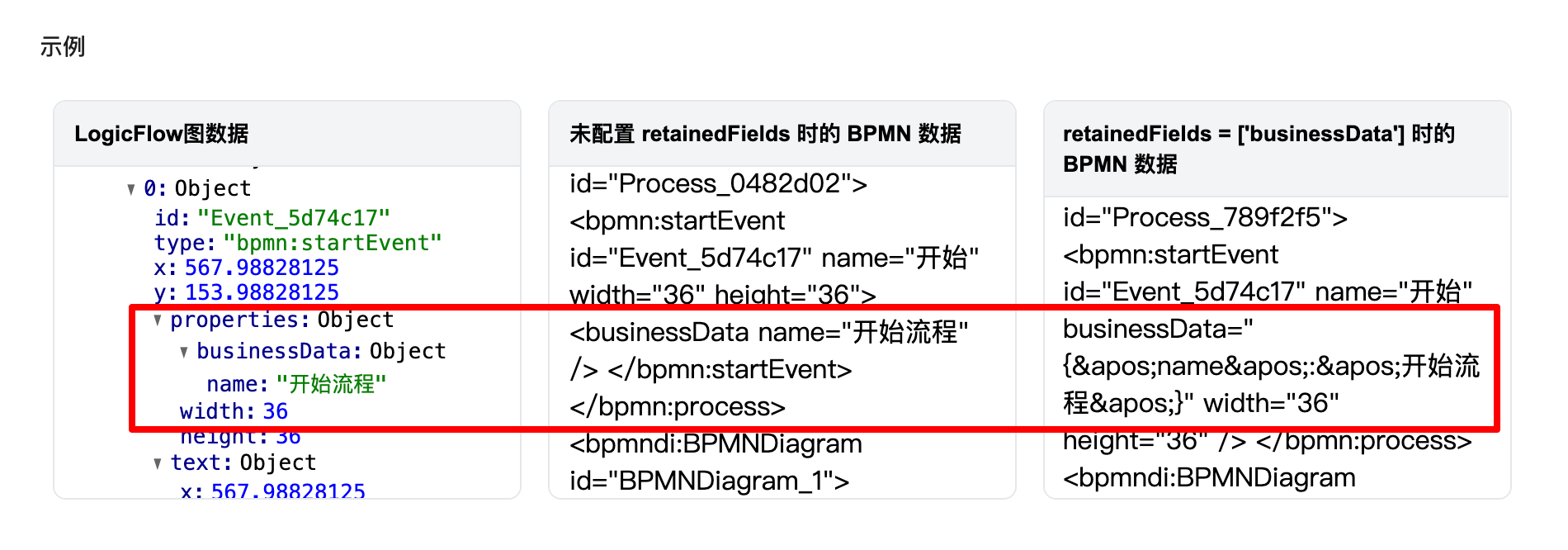
adapterOut(data)
Convert LogicFlow graph data to BPMN graph data.
**Parameters**
- data *([GraphConfigData](../../api/type/MainTypes.en.md#graphconfigdata))*: LogicFlow data to convert
- retainedFields *(string[])*: List of field names to retain and write as BPMN attributes during conversion. Effective only when the corresponding field in `node.properties` is of type `object`.
**Returns**
- bpmnData *(Object)*: Converted BPMN graph data
**Data conversion example**
:::info{title=Differences}
As shown by the red box below, if a field is in `retainedFields`, it will be rendered as a node attribute; otherwise, it will be rendered as node data.
:::
### Other Exports
`toNormalJson` and `toXmlJson` are the core conversion methods of bpmnAdapter, used by `adapterIn` and `adapterOut` respectively.
You can wrap customized conversion logic based on these methods as needed.
toNormalJson(xmlJson)
将 XML 风格 JSON(属性键以 `-` 前缀)转换为普通 JSON;移除 `-` 前缀并递归处理对象/数组,保留文本与属性结构。
**Parameters**
- xmlJson *(Object)*: XML-style JSON data (attribute keys start with `-`)
**Returns**
- json *(Object)*: Converted normal JSON data
**Parameters**
- retainedFields *(string[])*: Optional; list of fields to retain and write as attributes during conversion (effective only when the corresponding field is of type `object`)
**Returns**
- convert *(Function)*: Returns a conversion function used as `convert(json)`, where `json` is normal JSON; the return value is XML-style JSON (attribute keys start with `-`)
### Usage Guide
Similar to the bpmnElement plugin above, simply include this plugin in a LogicFlow instance to use its built-in BPMN data conversion capabilities. Without additional customization, this conversion process is transparent to users.
Just call `getGraphData` to obtain the BPMN data for the current canvas, and call `render` to render BPMN data onto the canvas.
:::warning{title=Note}
1. To use the conversion capabilities provided by the bpmnAdapter plugin, ensure BPMN-related nodes have been registered within the LogicFlow instance (either via the bpmnElement plugin or custom BPMN nodes), otherwise a node type not found exception will be thrown.
2. Both `BpmnAdapter` and `BpmnXmlAdapter` override `lf.adapterIn` and `lf.adapterOut`. When multiple adapters exist, the later one will override the earlier implementation and take effect. Therefore, if you need to customize `lf.adapterIn` or `lf.adapterOut`, assign them after introducing the Adapter to avoid your custom logic being overwritten.
:::
1. Import the plugin
:::code-group
```tsx [npm]
// Note: The following example assumes no custom BPMN nodes are registered;
// if custom BPMN nodes are already registered, you do not need to include the bpmnElement plugin
import { BpmnElement, BpmnAdapter, BpmnXmlAdapter, toNormalJson, toXmlJson } from '@logicflow/extension'
// Global usage
LogicFlow.use(BpmnElement)
// Include BpmnAdapter or BpmnXmlAdapter as needed
// LogicFlow.use(BpmnAdapter)
LogicFlow.use(BpmnXmlAdapter)
// Per-instance usage
const lf = new LogicFlow({
// ... // other options
plugins: [
BpmnElement,
// Include BpmnAdapter or BpmnXmlAdapter as needed
// BpmnAdapter,
BpmnXmlAdapter
],
})
```
```html [CDN]
```
:::
2. Use the plugin for data conversion
```js
// Render data
lf.render({
nodes: [
{ id: 'Event_1234567', type: 'bpmn:startEvent', x: 100, y: 100, },
{ id: 'Task_123ac56', type: 'bpmn:userTask', x: 300, y: 100, },
{ id: 'Event_fa4c699', type: 'bpmn:endEvent', x: 500, y: 100, },
],
edges: [
{ id: 'Flow_12ac567', sourceNodeId: 'Event_1234567', targetNodeId: 'Task_123ac56', type: 'bpmn:sequenceFlow', },
{ id: 'Flow_fa4c689', sourceNodeId: 'Task_123ac56', targetNodeId: 'Event_fa4c699', type: 'bpmn:sequenceFlow', },
],
})
// Generate BPMN XML data and download locally
const handleDownloadData = () => {
const retainedFields = ['width', 'height']
const data = lfRef.current?.getGraphData(retainedFields)
download('logicflow.xml', data)
}
// Upload an XML file and render it into the LogicFlow instance
const handleUploadData = (e) => {
const file = e.target.files?.[0]
const reader = new FileReader()
reader.onload = (event) => {
const xml = event.target?.result
// Render XML data into the LogicFlow instance
lf.render(xml)
}
reader.onerror = (error) => console.log(error)
file && reader.readAsText(file)
}
```
3. Customize adapter logic
``` js
// ... preceding plugin import logic
// Custom adapter logic
const customAdapterIn = (xmlJson) => {
// ... // preprocessing data construction logic
const json = toNormalJson(xmlJson)
// Apply custom processing to json
return json
}
const customAdapterOut = (json) => {
// ... // preprocessing data construction logic
const xmlJson = toXmlJson(json)
// Apply custom processing to xmlJson
return xmlJson
}
lf.adapterIn = customAdapterIn
lf.adapterOut = customAdapterOut
// ... subsequent data rendering and import/export logic
```
## Preview
## BPMNElements Plugin
:::
The BPMNElements plugin extends capabilities based on the bpmnElement plugin:
### Event Definition Support
In BPMN, event nodes indicate changes in a moment or state during a process; event definitions describe the cause of the event.
In the extended BPMNElements plugin, all event nodes support event definitions. Users can add event definitions to nodes via `lf.useDefinition()`.
lf.useDefinition()
Provides mapping and configuration between nodes and event definitions
**Returns**
- Returns a parameterless function whose result is a tuple `[definition, setDefinition]`.
- Where:
- definition: `Map`, an event definition mapping for storing node definition configurations
- setDefinition: `(config: [DefinitionConfigType](../../api/type/MainTypes.en.md#definitionconfigtype)[]) => void`, used to set node definition configurations
:::info{title=Default Event Definitions}
When initialized, the BPMNElements plugin calls `setDefinition(definitionConfig)` once to generate a default set of event definitions:
```ts
// Add a timer event definition for the three nodes: startEvent, intermediateCatchEvent, boundaryEvent
const definitionConfig: DefinitionConfigType[] = [
{
nodes: ['startEvent', 'intermediateCatchEvent', 'boundaryEvent'],
definition: [
{
// The 'type' property of the definition corresponds to the XML node name
type: 'bpmn:timerEventDefinition',
// The icon can be an SVG path 'd', or an SVG generated via the 'h' function exported by @logicflow/core; here it's generated via 'h'
icon: timerIcon,
/**
* 'properties' are attributes required by the definition, e.g. timerType and timerValue here
* timerType can be "timeCycle", "timerDate", "timeDuration", distinguishing , ,
* timerValue is the cron-like expression corresponding to timerType
* This ultimately generates `${timerValue}`
*/
properties: {
definitionType: 'bpmn:timerEventDefinition',
timerType: 'timeDuration',
timerValue: 'PT5M',
},
},
],
},
]
```
When using, simply include the plugin and set `definitionType` in the node `properties` when rendering:
```ts
lf.render({
nodes: [
{
id: 1,
type: 'bpmn:startEvent',
text: '5 min timed start',
properties: {
definitionType: 'bpmn:timerEventDefinition',
},
}
]
})
```
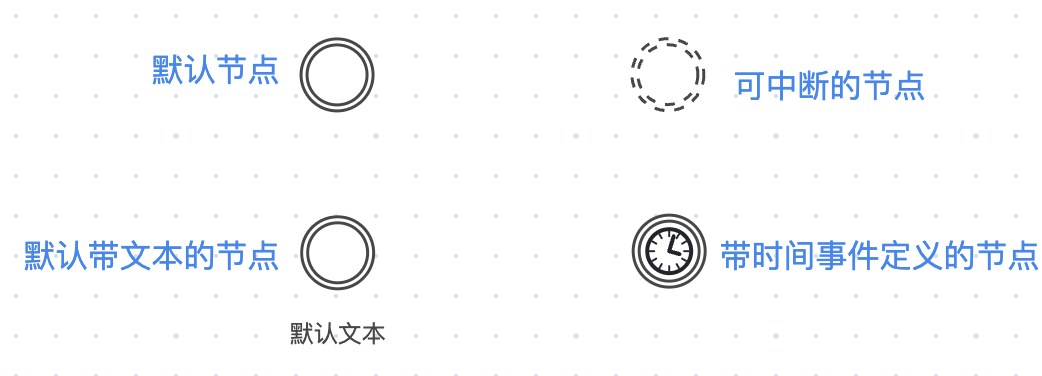
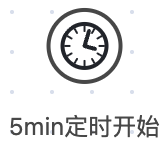
This renders a start event with a clock icon , and the corresponding BPMN node structure is:
```xml
PT5M
```
:::
### Node Type Expansion
Compared to bpmnElement, the BPMNElements plugin adds six node types:
First, three event nodes:
- Shape: double concentric circles (outer radius 18 by default, inner radius 15, border width 1.5), render icon per definition configuration (supports a single `path d` or multiple child elements `g`)
- Text: when initialized with `text`, defaults to 40px below the node
- Specific to throw events: when the icon is a single `path`, use black fill (`style: 'fill: black'`) to indicate the “throw” semantics
- Specific to boundary events: set `autoToFront=false` and `zIndex=99999` in `initNodeData` so the node stays on top; when `properties.cancelActivity === false`, show a dashed border (`5,5`), interrupting type (`true`) uses a solid border
- Anchors: hide anchors (`getAnchorStyle` returns `visibility: hidden`) to avoid unnecessary anchor interactions
**Unique Attributes**
- `definitionType`: definition type identifier used to select specific icons and default attributes from the definition repository
- `definitionId`: when `definitionType` exists, generate `Definition_${random}` for subsequent association
- Boundary event-specific attributes: `attachedToRef` is the ID of the task node it attaches to (user/system task); `cancelActivity` determines whether the process is interrupted (default `true`), affecting border style (solid/dashed)
- Others: merge default attributes from the definition based on `properties.definitionType`
**Other Details**
- ID generation: defaults to `Event_${random}` when absent
- Grouping rules: call `groupRule.call(this)` during initialization to keep grouping interactions consistent
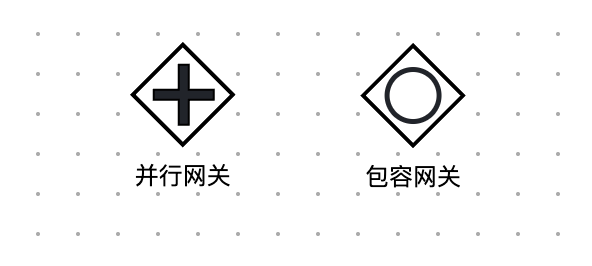
Next, two gateway nodes:
In the BPMNElements plugin, gateway node implementations are unified: exclusive, parallel, and inclusive gateways are constructed via the same factory method. They differ only by node type and icon, so they are described together.
**Visual Style**
- Custom nodes inheriting the diamond shape, initializing the four vertices as: `[25,0] [50,25] [25,50] [0,25]`; override `getShape` to overlay the gateway icon at the diamond’s center
- Icons may be a single `path d` (default fill `rgb(34, 36, 42)`, `strokeWidth: 1`), or complex SVG generated via the h function
- When `text` is provided as a string, format it as `{ value, x, y }` and move it 40px downward
**Other Details**
- ID generation: defaults to `Gateway_${random}` when absent
- Grouping rules: call `groupRule.call(this)` during initialization to keep grouping interactions consistent
Finally, a process node:
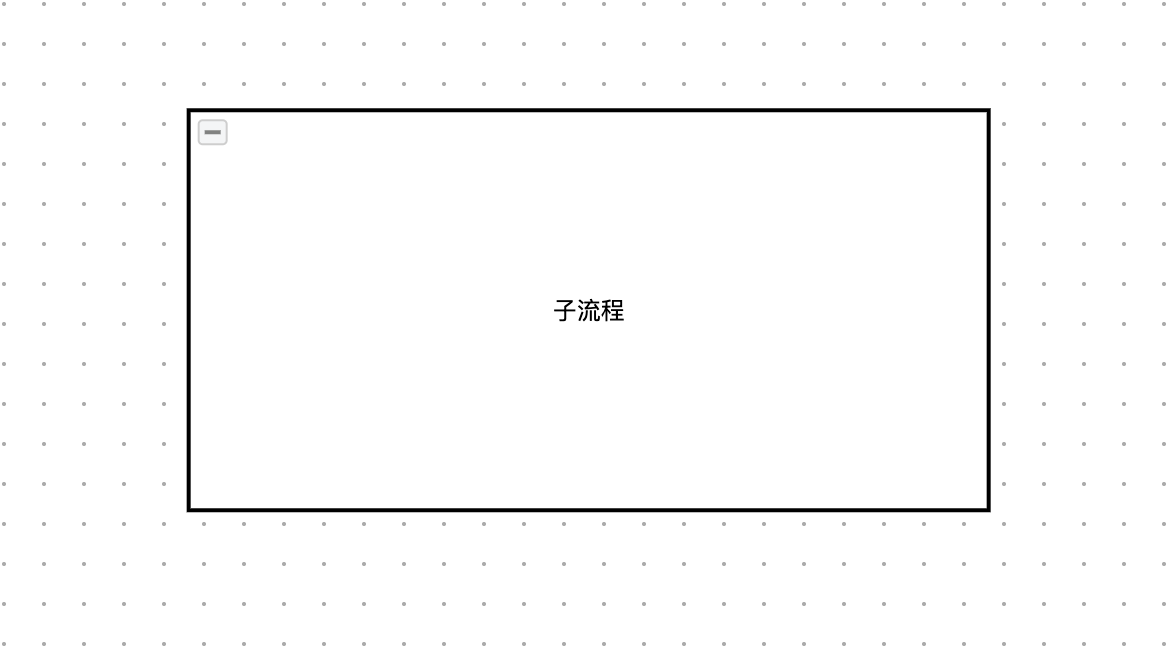
SubProcess Node (bpmn:subProcess)
**Visual Style**
- Custom rectangle inheriting the grouping node `GroupNode`; supports collapse/expand interaction: draw a collapse button at the top-left (gray small rectangle + plus sign horizontal/vertical lines) and toggle `properties.isFolded` on click
- Main render is a rectangular border (`stroke: black`, `strokeWidth: 2`, `strokeDasharray: '0 0'`)
- Hide anchor hover outlines (`getAnchorStyle`, `getOutlineStyle` set hover/outline to transparent)
**Unique Attributes and Behaviors**
- `foldable`: whether collapsible, default `true`; clicking the top-left collapse button triggers `foldGroup`
- `resizable`: whether resizable, default `true`
- `iniProp`: initialization properties to customize initial width/height (`iniProp.width/iniProp.height` override defaults)
- `isTaskNode`: marks the node as a task node to support attached boundary events (see boundary event description)
- `boundaryEvents`: records the list of attached boundary event IDs
**Methods**
- `setTouching(flag)`: set the proximity state when dragging a boundary event, used for highlight indication
- `addBoundaryEvent(nodeId)`: attach a boundary event (write `attachedToRef` and add to the list), and cancel the proximity highlight
- `deleteBoundaryEvent(nodeId)`: remove the record of an attached boundary event
- `addChild(id)`: set the child node’s `parent` attribute and add it to the group, aiding group management and collapse semantics
**Other Details**
- Default size: `width=400`, `height=200` (can be reset via `iniProp`)
- Interaction consistency: enable grouping rules during initialization (`groupRule.call(this)`) to keep grouping interactions consistent
### Usage Guide
1. Import the plugin
:::code-group
```tsx [npm]
import { BPMNElements } from '@logicflow/extension'
// Global usage
LogicFlow.use(BPMNElements)
// Per-instance usage
const lf = new LogicFlow({
// ... // other options
plugins: [BPMNElements],
})
```
```html [CDN]
```
:::
2. Render BPMN elements
```js
// ... plugin import logic
lf.render({
nodes: [
{
id: '1',
type: 'bpmn:userTask',
x: 531,
y: 199,
properties: {
isBoundaryEventTouchingTask: false,
width: 100,
height: 80,
},
},
{
id: 'Event_1230439',
type: 'bpmn:startEvent',
x: 369,
y: 199,
properties: {
definitionType: 'bpmn:timerEventDefinition',
timerValue: 'PT5M',
timerType: 'timeDuration',
definitionId: 'Definition_1ee1ad3',
width: 36,
height: 36,
},
text: '5 min timed start',
},
{
id: 'Event_551491b',
type: 'bpmn:boundaryEvent',
x: 575,
y: 235,
properties: {
attachedToRef: '1',
cancelActivity: true,
definitionType: 'bpmn:timerEventDefinition',
timerValue: 'boundaryEvent',
timerType: '222',
definitionId: 'Definition_7f7779a',
width: 36,
height: 36,
},
text: 'Boundary Event',
},
{
id: 'Gateway_3e3764d',
type: 'bpmn:parallelGateway',
x: 707,
y: 199,
properties: {
width: 50,
height: 50,
},
text: 'Parallel Gateway',
},
{
id: 'Activity_3d69f0c',
type: 'bpmn:serviceTask',
x: 880,
y: 144,
properties: {
width: 100,
height: 80,
},
text: 'Service Task',
},
{
id: 'Activity_6e5fe39',
type: 'bpmn:serviceTask',
x: 879,
y: 285,
properties: {
width: 100,
height: 80,
},
text: 'Service Task',
},
{
id: 'Event_be840c3',
type: 'bpmn:endEvent',
x: 1041,
y: 198,
properties: {
width: 36,
height: 36,
},
text: 'End',
},
],
edges: [
{
id: 'Flow_059933a',
type: 'bpmn:sequenceFlow',
properties: {
isDefaultFlow: false,
},
sourceNodeId: 'Event_1230439',
targetNodeId: '1',
sourceAnchorId: 'Event_1230439_1',
targetAnchorId: '1_3',
},
],
})
```
Like BpmnElement, BPMNElements only needs to be included in a LogicFlow instance to use its built-in BPMN elements.
During mounting, the plugin automatically calls `register` to add relevant BPMN elements to LogicFlow and sets `bpmn:sequenceFlow` as the default edge type on the canvas.
Whether to use `bpmn:sequenceFlow` as the default edge type can be controlled via configuration. If you do not want BPMN edges as the default, set `customBpmnEdge: true` when instantiating LogicFlow to disable this behavior.
## bpmnElementsAdapter Plugin
:::info{title=Tip}
Before reading this section, it is recommended to read the [BPMN adapter](adapter.en.md) section to understand the basic features and usage of the bpmnAdapter plugin.
:::
Similar to bpmnAdapter, bpmnElementsAdapter exposes two adapters: `BPMNBaseAdapter` and `BPMNAdapter`, and two data conversion helper functions: `convertNormalToXml` and `convertXmlToNormal`.
### BPMNBaseAdapter
**Core Capabilities**
Performs bidirectional conversion between BPMN JSON and LogicFlow, supporting synchronization of graphical information (coordinates/size/text); controls field retention, field exclusion, type mapping, and semantic conversion via the `extraProps` parameter.
**Feature Comparison with BpmnAdapter**
| Dimension | BpmnAdapter (basic) | BPMNBaseAdapter (enhanced) | Notes |
| ----------- | ----------------------------------------------------------- | -------------------------------------------------------------------- | ------------------------------------------------------ |
| I/O | adapterIn(bpmnJson), adapterOut(graphData, retainedFields?) | adapterIn(bpmnJson, extraProps?), adapterOut(graphData, extraProps?) | Adds extraProps for finer-grained conversion |
| Elements | Supports all nodes from the BpmnElement plugin | Supports all nodes from the BPMNElements plugin | More comprehensive shape mapping |
| Event Def. | No built-in handling | Built-in timerEventDefinition in/out hooks | Auto generate/parse via definitionType/timerType/value |
| Condition | No built-in handling | Built-in conditionExpression in/out hooks | Supports both cdata and plain text expressions |
| Params | Retained fields only on export | Provides extraProps: retain/exclude fields; custom node conversion | Finer customization capability |
| Field Excl. | None | excludeFields (in/out) | Path Set, recursively filter object levels |
| Type Map | None | mapping (in/out) | Rewrite key/type names, applied recursively |
**API Differences**
- BpmnAdapter
- adapterIn(bpmnJson)
- adapterOut(graphData, retainedFields?)
- BPMNBaseAdapter
- adapterIn(bpmnJson, extraProps?)
- adapterOut(graphData, extraProps?)
- setCustomShape(type, { width, height })
### BPMNAdapter
**Core Capabilities**
Builds on BPMNBaseAdapter to provide bidirectional XML ↔ LogicFlow conversion, also controlled via `extraProps` for field retention/exclusion, type mapping, and semantic conversion.
**Feature Comparison with BpmnXmlAdapter**
| Dimension | BpmnXmlAdapter (basic XML) | BPMNAdapter (enhanced XML) | Notes |
| --------------------------- | -------------------------------- | ---------------------------------- | ------------------------------ |
| Inheritance | Extends BpmnAdapter (basic JSON) | Extends BPMNBaseAdapter (enhanced) | Different wrapper sources |
| Illegal char pre-processing | Yes (only escapes < > & in name) | No (direct parsing) | Basic XML is more conservative |
**API Differences**
- BpmnXmlAdapter
- adapterXmlIn(bpmnData)
- If input is a string, first escape illegal characters in the name attribute (handle only <, >, &; does not affect already valid entities)
- Use lfXml2Json to convert XML to BPMN JSON
- Call base adapterIn(json) to produce GraphData (does not support extraProps; retainedFields does not apply during import)
- adapterXmlOut(data, retainedFields?)
- Call base adapterOut(data, retainedFields) to produce BPMN JSON (supports retained fields strategy only)
- Use lfJson2Xml to output an XML string (includes attribute and text escaping)
- Does not support semantic/structural customization via transformer/mapping/excludeFields
- BPMNAdapter
- adapterXmlIn(bpmnData)
- Directly use lfXml2Json to convert XML to BPMN JSON (no name attribute pre-escaping)
- Call enhanced adapterIn(json, props) to produce GraphData
- Apply extraProps configuration for attribute retention, exclusion, and transformation
- adapterXmlOut(data)
- Call enhanced adapterOut(data, props) to produce BPMN JSON
- Use lfJson2Xml to output an XML string
- Apply extraProps configuration for attribute retention, exclusion, and transformation
### extraProps
Compared to bpmnAdapter, bpmnElementsAdapter further enhances data conversion capabilities, primarily by supporting finer-grained control via `extraProps`, including:
**Enhanced attribute backfill**
When `retainedAttrsFields` is configured, during export and subsequent import, the specified fields’ data will be backfilled into node `properties`, preventing loss of key information across conversions.
**Configurable attribute ignore mechanism**
Supports customizing which attribute fields to ignore during import and export, reducing redundancy and avoiding unnecessary fields being converted.
**Multi-granularity conversion customization**
Allows customizing node data conversion rules at different levels, for example:
- Use `mapping` to customize mapping between BPMN element types and LogicFlow node types
- Use `transformer` to deeply customize structure/format conversion between BPMN and LogicFlow
#### Configuration
retainedAttrsFields
- Type: `string[]`
- Required: No
- Default:
```js
["properties", "startPoint", "endPoint", "pointsList"]
```
- Description: Specifies fields to retain as “attributes” during import/export. Even if the matched field value is an object or array, it will be retained as an attribute (key prefixed with `-`) rather than converted into child nodes.
excludeFields
- Type: `{ in?: Set; out?: Set }`
- Required: No
- Default:
```js
{
in: [],
out: [
'properties.panels',
'properties.nodeSize',
'properties.definitionId',
'properties.timerValue',
'properties.timerType',
'properties.definitionType',
'properties.parent',
'properties.isBoundaryEventTouchingTask',
],
}
```
- Description: Ignore fields by path during conversion
- `in`: Set of field paths to ignore on import (BPMN → LogicFlow)
- `out`: Set of field paths to ignore on export (LogicFlow → BPMN)
- Paths use dot notation (e.g., `properties.definitionId`) and match recursively through object levels
transformer
- Type:
```js
{
[type: string]: {
in?: (key: string, data: any) => any;
out?: (data: any) => any;
}
}
```
- Required: No
- Built-in defaults: `bpmn:startEvent`, `bpmn:intermediateCatchEvent`, `bpmn:intermediateThrowEvent`, `bpmn:boundaryEvent`, `bpmn:sequenceFlow`, `bpmn:timerEventDefinition`, `bpmn:conditionExpression`
- Description: Define conversion hooks for child content by element type
- `in(key, data)`: Import (BPMN → LogicFlow) parses nested child elements into flattened attributes
- `out(data)`: Export (LogicFlow → BPMN) generates nested structures or serialized fragments
- Used for semantic conversion like `timerEventDefinition` and `conditionExpression`
mapping
- Type: `{ in?: { [key: string]: string }; out?: { [key: string]: string } }`
- Required: No
- Description: Rewrite mappings for key/type names on both ends
- `in`: Type name mapping for import (BPMN → LogicFlow); `key` is the BPMN type name, `value` is the target LF type name
- `out`: Key name mapping for export (LogicFlow → BPMN); recursively rename keys in output JSON (including type names/field names, etc.)
Order of application:
Traverse all elements, retain/exclude attributes per retainedAttrsFields and excludeFields,
then apply transformer conversions, and finally rewrite keys via mapping.
#### Usage Guide
Simply pass the `extraProps` configuration when instantiating LogicFlow.
``` js
const lf = new LogicFlow({
plugins: [BPMNAdapter],
pluginsOptions: {
BPMNAdapter: {
extraProps: {
// Retain the customProps attribute inside properties
retainedAttrsFields: ['customProps'],
// Ignore properties.customId on import; ignore properties.definitionId on export
excludeFields: {
in: ['properties.customId'],
out: [
'properties.definitionId',
],
},
// Conversion rules for bpmn:sequenceFlow
transformer: {
'bpmn:sequenceFlow': {
in: (key, data) => {
if (key === 'conditionExpression') {
return data.expression;
}
return data;
},
out: (data) => ({
conditionExpression: {
expression: data,
},
}),
},
},
mapping: {
// Import: map bpmn:startEvent to StartEvent
in: {
'bpmn:startEvent': 'StartEvent',
},
// Export: map StartEvent to bpmn:startEvent
out: {
'StartEvent': 'bpmn:startEvent',
},
},
},
},
},
})
```
**A practical conversion example**
Suppose there is a sequence flow element (bpmn:sequenceFlow) on the canvas with a conditional expression:
```json
{
"id": "sequenceFlow_1",
"type": "bpmn:sequenceFlow",
"sourceRef": "task_1",
"targetRef": "task_2",
"properties": {
"expressionType": "cdata",
"condition": "foo > bar" // pre-escape > to ensure XML validity
}
}
```
Now we want to configure extraProps so that on export to BPMN XML, the condition is emitted using cdata and wrapped in a bpmn:conditionExpression element, and on import it correctly parses back to expressionType and condition. How to achieve this?
This involves complex data conversion, so we implement custom logic in transformer.
First, scaffold the structure. Because this conversion involves both bpmn:sequenceFlow and bpmn:conditionExpression, define conversion rules for these two types:
```js
extraProps.transformer = {
'bpmn:sequenceFlow': {},
'bpmn:conditionExpression': {}
}
```
On export, convert expressionType and condition into child content of a bpmn:conditionExpression element, which itself is a child of bpmn:sequenceFlow. Define the out method for bpmn:sequenceFlow as follows:
```js
extraProps.transformer = {
'bpmn:sequenceFlow': {
out(data) { // 'data' is the bpmn:sequenceFlow element data in LogicFlow
const { properties: { expressionType, condition } } = data;
// Check if 'condition' exists
if (condition) {
// Then check whether format is cdata
if (expressionType === 'cdata') {
// For cdata format, wrap with CDATA
return {
json:
``,
};
}
// Otherwise, wrap as plain string
return {
json: `${condition}`,
};
}
// If no 'condition', return empty string
return {
json: '',
};
},
},
'bpmn:conditionExpression': {}
}
```
Executing this conversion logic produces BPMN JSON like:
```js
{
"-id": "sequenceFlow_1",
"-sourceRef": "Event_5d74c17",
"-targetRef": "task_2",
"-json": "",
"-expressionType": "cdata",
"-condition": "foo > bar",
"-isDefaultFlow": false
}
```
Finally convert to XML:
```xml
```
On import, convert `bpmn:conditionExpression` into `condition` and `expressionType` and backfill into the `properties` of the `bpmn:sequenceFlow` element. Define the transformer in method for bpmn:conditionExpression as follows:
```js
extraProps.transformer = {
// ... bpmn:sequenceFlow conversion rules
'bpmn:conditionExpression': {
in(_key: string, data: any) {
let condition = '';
let expressionType = '';
if (data['#cdata-section']) {
expressionType = 'cdata';
condition = /^\$\{(.*)\}$/g.exec(data['#cdata-section'])?.[1] || '';
} else if (data['#text']) {
expressionType = 'normal';
condition = data['#text'];
}
return {
'-condition': condition,
'-expressionType': expressionType,
};
},
},
}
```
First, the Adapter converts XML to BPMN JSON like:
```js
{
"bpmn:sequenceFlow": {
"-id": "Flow_X",
"-sourceRef": "Node_A",
"-targetRef": "Node_B",
"-expressionType": "cdata",
"-condition": "foo > bar",
"-isDefaultFlow": false,
"bpmn:conditionExpression": {
"-xsi:type": "bpmn2:tFormalExpression",
"#cdata-section": "${foo > bar}"
}
}
}
```
Then the transformer in method for bpmn:conditionExpression parses expressionType and condition and injects them into the properties of the bpmn:sequenceFlow element:
```json
{
"id": "sequenceFlow_1",
"type": "bpmn:sequenceFlow",
"sourceRef": "task_1",
"targetRef": "task_2",
"properties": {
"expressionType": "cdata",
"condition": "foo > bar" // pre-escape > to ensure XML validity
}
}
```
:::warning{title=Note}
The transformer in method is only invoked when the imported node has attributes containing bpmn:, so it currently applies only to scenarios of converting child nodes to attributes.
:::
### Other Exports
convertNormalToXml(other?)
Convert normal JSON (GraphData) to XML-style JSON; supports retained fields, ignored fields, type mapping, and semantic hooks; handles arrays and #text/#cdata-section/#comment.
**Parameters**
- other *(ExtraProps)*: Optional configuration object to extend conversion behavior
- retainedAttrsFields *(string[])*: Merged with default retained fields (default ["properties","startPoint","endPoint","pointsList"]); matched paths retained as attributes (prefix -)
- excludeFields *({ in?: Set; out?: Set })*: Merged with default ignore sets; matched paths on export (out) are ignored
- transformer *({ [type: string]: { in?: (key, data) => any; out?: (data) => any } })*: Define in/out hooks for child content by element type; keys returned by out hooks are merged into the current object
- mapping *({ in?: { [key: string]: string }; out?: { [key: string]: string } })*: Rewrite key/type names (this function itself uses transformer; mapping is applied in adapterOut final rewrite)
**Returns**
- convert *(Function)*: Returns a conversion function convert(object), where object is normal JSON containing nodes/edges; the return value is XML-style JSON (attribute keys prefixed with -)
**Processing rules summary**
- Scalars and text: convert normal keys to attribute keys (prefix -); preserve #text/#cdata-section/#comment as-is
- Retained fields: paths matching retainedAttrsFields are retained as attributes even if values are objects/arrays (prefix -)
- Ignored fields: paths matching excludeFields.out are skipped
- Semantic hooks: if the current object's type matches transformer[type].out, returned keys (e.g., json) are merged as sibling attributes (later written as -json and serialized as embedded fragments)
- children handling: replace children id list with actual child node objects (lookup in nodes/edges)
convertXmlToNormal(xmlJson)
Convert XML-style JSON to normal JSON; remove attribute prefix - and recursively process objects, arrays, and text nodes; used for flattening and backfilling attributes during import.
**Parameters**
- xmlJson *(Object)*: XML-style JSON data (attribute keys start with -; child elements are normal keys)
**Returns**
- json *(Object)*: Converted normal JSON; attribute prefixes removed (applying handleAttributes), arrays/objects converted recursively
**Usage together**
- The result of convertNormalToXml flows into adapterOut, then is serialized to XML by lfJson2Xml
- convertXmlToNormal is used in adapterIn: parse XML to normal JSON, apply transformer[type].in flattening, and finally write into node/edge properties
### Usage Guide
1. Include BPMNAdapter / BPMNBaseAdapter
:::code-group
```tsx [npm]
// Note: The following example assumes no custom BPMN nodes are registered;
// if custom BPMN nodes are already registered, you do not need to include the bpmnElement plugin.
import { BPMNElements, BPMNBaseAdapter, BPMNAdapter } from '@logicflow/extension'
LogicFlow.use(BPMNElements)
// Choose to include BPMNAdapter or BPMNBaseAdapter as needed
// Global usage
LogicFlow.use(BPMNAdapter)
// LogicFlow.use(BPMNBaseAdapter)
// Per-instance usage
const lf = new LogicFlow({
// ... // other options
plugins: [
BPMNElements,
// Choose to include BpmnAdapter or BpmnXmlAdapter as needed
BPMNAdapter,
// BPMNBaseAdapter
],
})
```
```html [CDN]
```
:::
2. Use the plugin for data conversion
```js
// Render data
lf.render({
nodes: [
{ id: 'Event_1234567', type: 'bpmn:startEvent', x: 100, y: 100, },
{ id: 'Task_123ac56', type: 'bpmn:userTask', x: 300, y: 100, },
{ id: 'Event_fa4c699', type: 'bpmn:endEvent', x: 500, y: 100, },
],
edges: [
{ id: 'Flow_12ac567', sourceNodeId: 'Event_1234567', targetNodeId: 'Task_123ac56', type: 'bpmn:sequenceFlow', },
{ id: 'Flow_fa4c689', sourceNodeId: 'Task_123ac56', targetNodeId: 'Event_fa4c699', type: 'bpmn:sequenceFlow', },
],
})
// Generate BPMN XML data and download locally
const handleDownloadData = () => {
const retainedFields = ['width', 'height']
const data = lfRef.current?.getGraphData(retainedFields)
download('logicflow.xml', data)
}
// Upload an XML file and render it into the LogicFlow instance
const handleUploadData = (e) => {
const file = e.target.files?.[0]
const reader = new FileReader()
reader.onload = (event) => {
const xml = event.target?.result
// Render XML data into the LogicFlow instance
lf.render(xml)
}
reader.onerror = (error) => console.log(error)
file && reader.readAsText(file)
}
```
1. Add custom conversion rules
:::code-group
```tsx [npm]
// Note: The following example assumes no custom BPMN nodes are registered;
// if custom BPMN nodes are already registered, you do not need to include the bpmnElement plugin.
import { BPMNElements, BPMNBaseAdapter, BPMNAdapter } from '@logicflow/extension'
const extraProps = {
// ... custom conversion rules
};
LogicFlow.use(BPMNElements)
// Choose to include BPMNAdapter or BPMNBaseAdapter as needed
// Global usage
LogicFlow.use(BPMNAdapter, extraProps)
// LogicFlow.use(BPMNBaseAdapter, extraProps)
// Per-instance usage
const lf = new LogicFlow({
// ... // other options
plugins: [
BPMNElements,
// Choose to include BpmnAdapter or BpmnXmlAdapter as needed
BPMNAdapter,
// BPMNBaseAdapter
],
pluginsOptions: {
BPMNAdapter: extraProps,
// BPMNBaseAdapter: extraProps,
},
})
```
```html [CDN]
```
:::
### Migration Guide
> Switch from BpmnAdapter / BpmnXmlAdapter to BPMNBaseAdapter / BPMNAdapter
1. Dependency replacement
- `BpmnAdapter` → `BPMNBaseAdapter`
- `BpmnXmlAdapter` → `BPMNAdapter`
2. Extra parameter variable name and passing method changes
- Variable name change: `retainedFields` → `retainedAttrsFields`
- Passing method change
- Old:
```js
// Pass where conversion is needed
const data = lfRef.current?.getGraphData(retainedFields)
```
- New:
```js
// Pass during plugin registration
// Global inclusion
LogicFlow.use(BPMNBaseAdapter, {
retainedAttrsFields,
// Other configuration; see extraProps details below
})
// Per-instance inclusion
const lf = new LogicFlow({
plugins: [BPMNBaseAdapter],
pluginsOptions: {
BPMNBaseAdapter: {
retainedAttrsFields,
// Other configuration; see extraProps details below
},
},
})
```




 :::
### BpmnXmlAdapter
Extends BpmnAdapter and overrides `adapterIn` and `adapterOut` with the same overall logic. The difference is: `adapterOut` converts LogicFlow graph data to BPMN graph data in XML format; `adapterIn` converts BPMN XML JSON data to LogicFlow graph data.
:::
### BpmnXmlAdapter
Extends BpmnAdapter and overrides `adapterIn` and `adapterOut` with the same overall logic. The difference is: `adapterOut` converts LogicFlow graph data to BPMN graph data in XML format; `adapterIn` converts BPMN XML JSON data to LogicFlow graph data.
 :::
### Other Exports
`toNormalJson` and `toXmlJson` are the core conversion methods of bpmnAdapter, used by `adapterIn` and `adapterOut` respectively.
You can wrap customized conversion logic based on these methods as needed.
:::
### Other Exports
`toNormalJson` and `toXmlJson` are the core conversion methods of bpmnAdapter, used by `adapterIn` and `adapterOut` respectively.
You can wrap customized conversion logic based on these methods as needed.
 , and the corresponding BPMN node structure is:
```xml
, and the corresponding BPMN node structure is:
```xml