# Rendering system architecture
**Document status:** draft
The architecture of the rendering system contains many abstractions that help to solve complex problems. In particular, customizing the layout of pages in different views. The central place in the rendering system is occupied by the [Layout](API/layout.md) class, which provides the basic infrastructure for performing derivative calculations. Below is the graph of dependencies on the **layout** object.
```mermaid
graph LR
A(rendition)
B(layout)
C(viewport)
D(manager)
E(mapping)
F(views)
G(view)
H(contents)
A --> B
A --> C
A --> D
C --> B
C --> F
D --> B
D --> C
D --> E
D --> F
E --> B
F --> B
F --> G
G --> B
G --> H
H --> B
```
Most of the dependent objects rely on the `layout.updated` event to finish synchronizing with the current state of the `layout` object. The `layout` object itself depends on the `viewport.resized` event. This happens every time the **viewport-container** is resized. However, the `layout` object knows nothing about containers, since it is only intended for calculations. Containers are created and configured by the [Viewport](API/viewport.md) class. The following image should clarify the technical details.
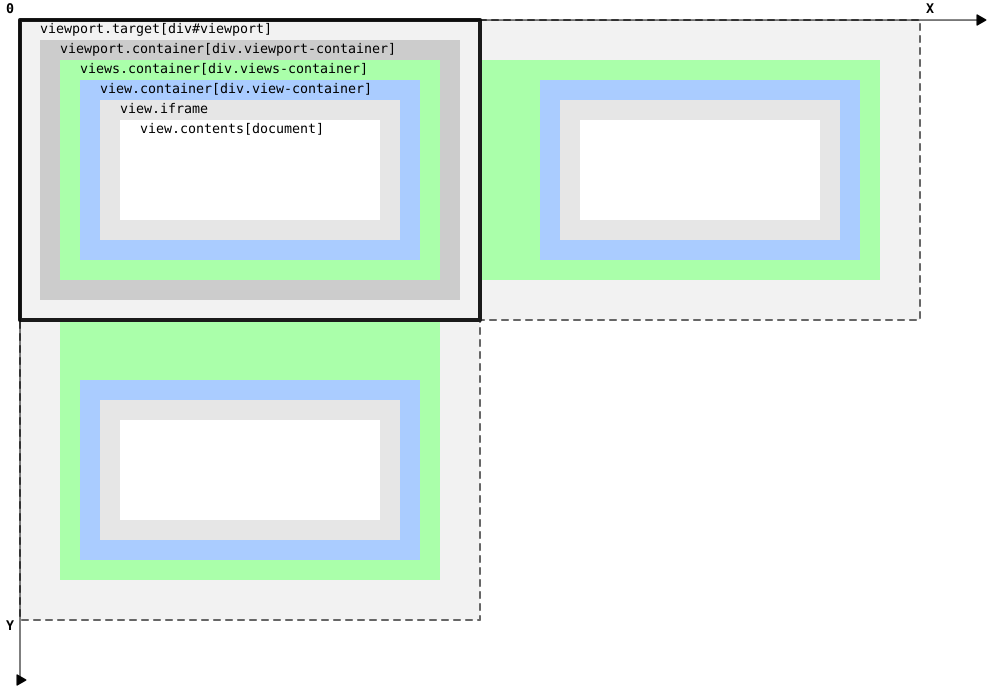 First of all, this class must attach to the `div#viewport` element, in order to then wrap the `div.viewport-container` inside it. This, in turn, will run the `viewport.resized` event, which will change the state of the `layout` object. Finally, the rendering process at the `manager` object level must be triggered.
## Horizontal axis
### rendition-flow-paginated
Configuration
```js
var rendition = book.renderTo("viewport", {
axis: "horizontal", // default
flow: "paginated", // default
layout: "reflowable", // default
spread: "none",
width: "100%", // default
height: "100%", // default
manager: "default"
})
```
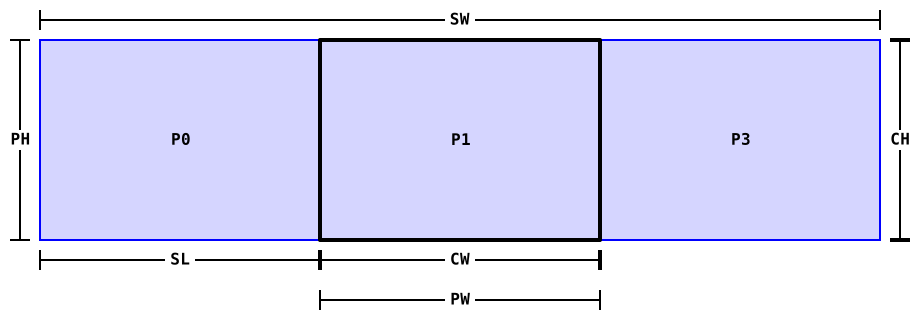
Designations
```
SW:viewport.container.scrollWidth
SL:viewport.container.scrollLeft
CW:layout.width = viewport.container.clientWidth
CH:layout.height = viewport.container.clientHeight
PW:layout.pageWidth = CW
PH:layout.pageHeight = CH
```
First of all, this class must attach to the `div#viewport` element, in order to then wrap the `div.viewport-container` inside it. This, in turn, will run the `viewport.resized` event, which will change the state of the `layout` object. Finally, the rendering process at the `manager` object level must be triggered.
## Horizontal axis
### rendition-flow-paginated
Configuration
```js
var rendition = book.renderTo("viewport", {
axis: "horizontal", // default
flow: "paginated", // default
layout: "reflowable", // default
spread: "none",
width: "100%", // default
height: "100%", // default
manager: "default"
})
```
Designations
```
SW:viewport.container.scrollWidth
SL:viewport.container.scrollLeft
CW:layout.width = viewport.container.clientWidth
CH:layout.height = viewport.container.clientHeight
PW:layout.pageWidth = CW
PH:layout.pageHeight = CH
```
 ## Vertical axis
### rendotion-flow-scrolled-doc
Configuration
```js
var rendition = book.renderTo("viewport", {
axis: "vertical", // autocomplete
flow: "scrolled-doc",
layout: "reflowable", // default
spread: "none", // autocomplete
width: "100%", // default
height: "100%", // default
manager: "continuous",
pageWidth: 800
})
```
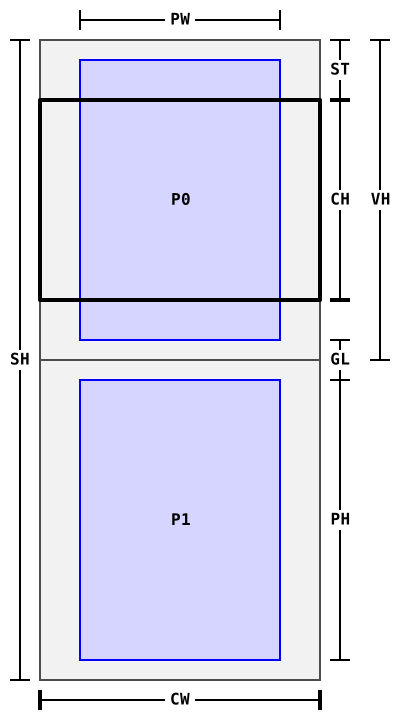
Designations
```
SH:viewport.container.scrollHeight
ST:viewport.container.scrollTop
CW:layout.width = viewport.container.clientWidth
CH:layout.height = viewport.container.clientHeight
PW:layout.pageWidth = 800
PH:layout.pageHeight = 0
GL:layout.gap
VH:view.contents.content.clientHeight
```
## Vertical axis
### rendotion-flow-scrolled-doc
Configuration
```js
var rendition = book.renderTo("viewport", {
axis: "vertical", // autocomplete
flow: "scrolled-doc",
layout: "reflowable", // default
spread: "none", // autocomplete
width: "100%", // default
height: "100%", // default
manager: "continuous",
pageWidth: 800
})
```
Designations
```
SH:viewport.container.scrollHeight
ST:viewport.container.scrollTop
CW:layout.width = viewport.container.clientWidth
CH:layout.height = viewport.container.clientHeight
PW:layout.pageWidth = 800
PH:layout.pageHeight = 0
GL:layout.gap
VH:view.contents.content.clientHeight
```
 ### rendition-flow-scrolled-continuous
Configuration
```js
var rendition = book.renderTo("viewport", {
axis: "vertical", // autocomplete
flow: "scrolled-continuous",
layout: "reflowable", // default
spread: "none", // autocomplete
manager: "continuous",
width: "100%", // default
height: "100%" // default
})
```
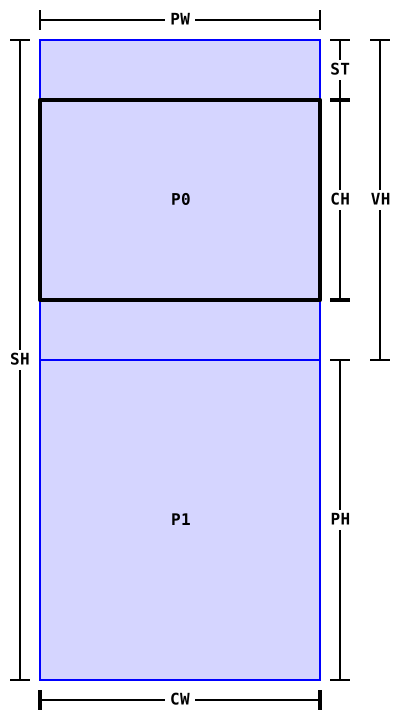
Designations
```
SH:viewport.container.scrollHeight
ST:viewport.container.scrollTop
CW:layout.width = viewport.container.clientWidth
CH:layout.height = viewport.container.clientHeight
PW:layout.pageWidth = CW
PH:layout.pageHeight = CH
VH:view.contents.content.clientHeight
```
### rendition-flow-scrolled-continuous
Configuration
```js
var rendition = book.renderTo("viewport", {
axis: "vertical", // autocomplete
flow: "scrolled-continuous",
layout: "reflowable", // default
spread: "none", // autocomplete
manager: "continuous",
width: "100%", // default
height: "100%" // default
})
```
Designations
```
SH:viewport.container.scrollHeight
ST:viewport.container.scrollTop
CW:layout.width = viewport.container.clientWidth
CH:layout.height = viewport.container.clientHeight
PW:layout.pageWidth = CW
PH:layout.pageHeight = CH
VH:view.contents.content.clientHeight
```