What is fTable
==============
FTable is a clean, vanilla JavaScript rewrite of the popular `jTable` plugin, designed for modern web apps.
✅ No dependencies
✅ Dynamic forms & async fields
✅ Localization
✅ Responsive
✅ MIT Licensed
## Screenshots
[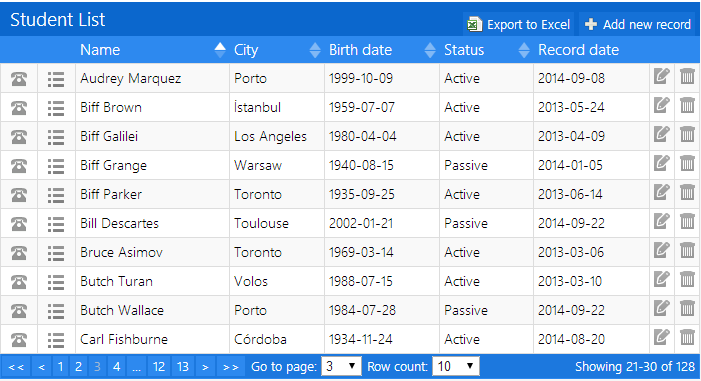](https://github.com/liedekef/ftable/)
[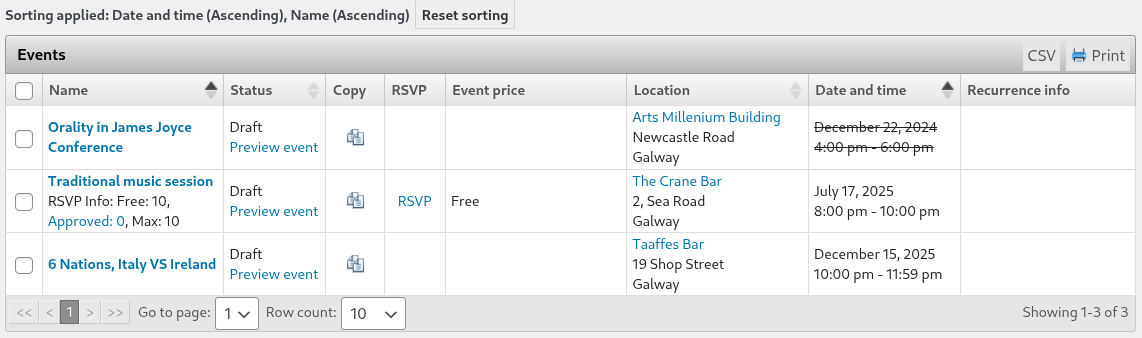](https://github.com/liedekef/ftable/)
FTable is a clean, vanilla JavaScript rewrite of the popular `jTable` plugin, designed for modern web apps.
### Features
✅ Create, Read, Update, Delete
✅ Sorting, Paging, Filtering
✅ Dynamic dependent fields
✅ Ajax loading for data and options
✅ Localization via JTable.setMessages(...)
✅ Modal forms
✅ CSV export, Print
✅ User preferences (localStorage)
## Install
Use one of the releases on github or download the files [directly](https://github.com/liedekef/ftable/tree/main)
Or use npm:
```bash
npm install @liedekef/ftable
```
## Usage
As a standalone script:
```JS
const table = new FTable('#table', {
actions: {
listAction: '/api/users',
createAction: '/api/users/add',
updateAction: '/api/users/update',
deleteAction: '/api/users/delete'
},
fields: {
id: { key: true, list: false },
name: { title: 'Name' },
email: { title: 'Email', type: 'email' }
}
});
```
As a module:
```JS
import '@liedekef/ftable/ftable.css';
import FTable from '@liedekef/ftable';
const table = new FTable('#table', {
actions: {
listAction: '/api/users',
createAction: '/api/users/add',
updateAction: '/api/users/update',
deleteAction: '/api/users/delete'
},
fields: {
id: { key: true, list: false },
name: { title: 'Name' },
email: { title: 'Email', type: 'email' }
}
});
```
## Notes
See the wiki for documentation, demos, themes and more...