# Phone number input

Simple Phone Number Input for VueJs
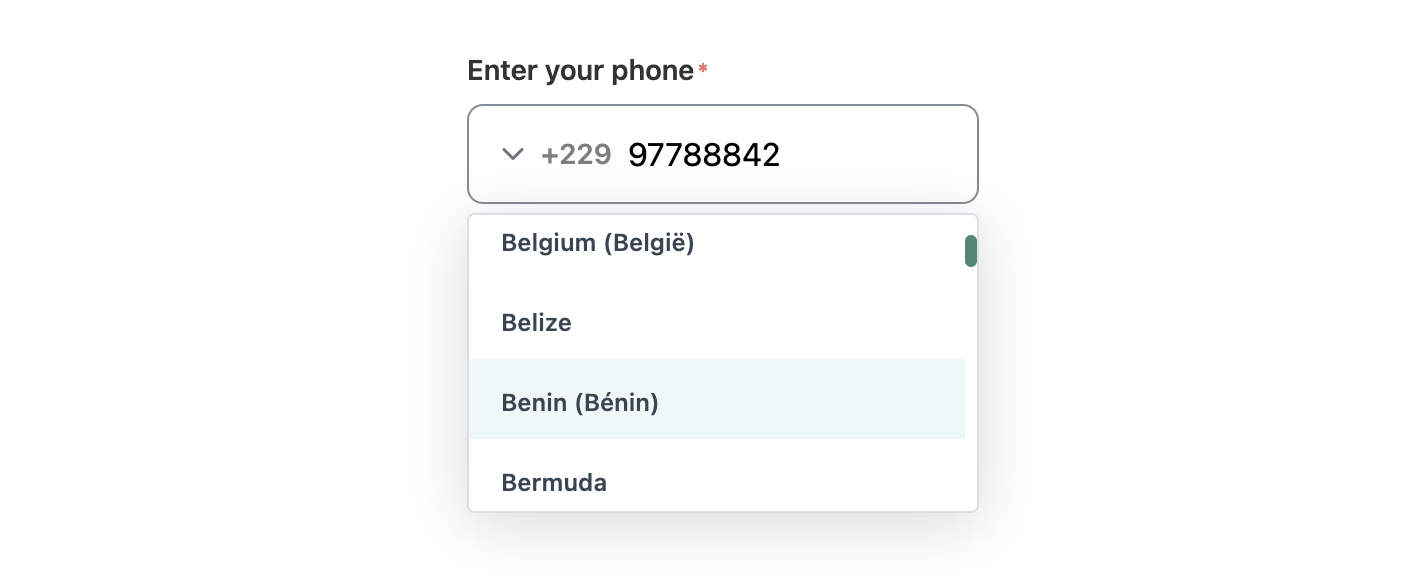
![Screenshot](https://user-images.githubusercontent.com/92580505/232254767-9fbea1cc-5a68-490d-ba66-9a1303a2840b.png)

## install

```sh
npm i @lbgm/phone-number-input
```

## Props & Types

```ts
interface PhoneDATA {
  country?: string;
  dialCode?: string | number;
  nationalNumber?: string | number;
  number?: string | number;
  isValid?: boolean;
}

interface Props {
  value?: string;
  label?: string;
  hasError?: boolean;
  hasSuccess?: boolean;
  successMessage?: string;
  errorMessage?: string;
  placeholder?: string;
  name?: string;
  required?: boolean;
  defaultCountry?: string;
  arrow?: boolean;
  listHeight?: number;
  allowed?: string[];
}

// default props values

{
  value: "", // like '22997000000',
  label: "",
  hasError: false,
  hasSuccess: false,
  successMessage: "",
  errorMessage: "",
  placeholder: "",
  name: "",
  required: false,
  defaultCountry: "BJ",
  arrow: true, // show or hide arrow
  listHeight: 150,
  allowed: () => [],
}
```

- pass `value` on this format: `${dialCode}${nationalNumber}`
- `allowed` is an array of country iso2 (string).

## Slots

### arrow

 ```html
 <!-- to change arrow icon-->
 <phone-input>
  <template #arrow><icon /><template>
 </phone-input>
 ```

 use global slot to append content at the end of the component.

 ```html
 <phone-input>
   <div>Hello</div>
 </phone-input>
 ```

## Use

 main.ts :

 ```js
  import { PhoneInput } from '@lbgm/phone-number-input';

  // register as global component
  app.component('PhoneInput', PhoneInput);
 ```

 App.vue :

 ```js
 // import component style
 import '@lbgm/phone-number-input/style';
 ```

 use component:

 ```html
    <phone-input
      @phone="phone = $event"
      @country="country = $event"
      @phoneData="phoneData = $event"
      name="phone-number-input"
      label="Enter your phone"
      required
      :value="'22997788842'"
    />
 ```

- `phone` is string
- `country` is string
- `phoneData` is type [PhoneDATA](#props--types)

## Use it with Vee-validate

 Sample wrapper code:

 ```html
 <template>
  <phone-input
    :has-error="hasError"
    :errorMessage="errorMessage"
    @phoneData="validatePhone"
    ref="phoneInput"
  />
</template>
```

```ts
<script setup lang="ts">
import { useField } from 'vee-validate';
import { computed, onMounted, useAttrs, getCurrentInstance, type ComponentInternalInstance } from 'vue';
import { PhoneInput, type PhoneDATA } from '@lbgm/phone-number-input';

type T_PhoneInput = typeof PhoneInput;

const that: ComponentInternalInstance | null = getCurrentInstance();
const attrs = useAttrs();
const emit = defineEmits(['inputData']);

const {
  value: inputValue,
  errorMessage,
  handleBlur,
  handleChange,
  meta,
} = useField(attrs.name, undefined, {
  initialValue: attrs.value ? attrs.value : '',
  validateOnValueUpdate: false,
});

// compute error from vee-validate
const hasError = computed((): boolean => {
  return errorMessage.value !== undefined;
});

const validatePhone = (data: PhoneDATA) => {
  handleChange(data.nationalNumber, false);
  emit('inputData', data);
};

onMounted(() => {
  if ((that?.refs?.phoneInput as T_PhoneInput).phone) {
    handleChange((that?.refs.phoneInput as T_PhoneInput).phone);
  }
});
</script>
```
