[English](../README.md) · [العربية](README.ar.md) · [Español](README.es.md) · [Français](README.fr.md) · [日本語](README.ja.md) · [한국어](README.ko.md) · [Tiếng Việt](README.vi.md) · [中文 (简体)](README.zh-Hans.md) · [中文(繁體)](README.zh-Hant.md) · [Deutsch](README.de.md) · [Русский](README.ru.md)

# AgInTiFlow







**실제 문제를 위한 저비용, 프로젝트 인식 에이전트.**
AgInTiFlow는 hybrid wet-dry R&D, hardware-aware intelligence, software automation, industrial workflow를 위한 project-aware agent workspace입니다. 실험 계획부터 데이터 분석까지, 하드웨어 제어부터 production script까지, microscopy, drone, robot부터 report까지, SCS supervision, AAPS workflow, guarded execution, durable evidence와 함께 API, Web, CLI로 에이전트가 작업하게 합니다.
짧게 말하면, 프로젝트 안에서 `aginti`를 실행하고 작업을 맡긴 뒤 계획과 모든 도구 호출을 확인하며, 나중에 다시 이어서 실행하고 결과물을 작업공간에 남길 수 있습니다.
> **번역 최신성 안내:** 이 번역은 [최신 영문 README](../README.md)와 [local-first runtime 문서](../docs/local-first-agent-runtime.md)의 일부 세부사항보다 늦을 수 있습니다. 기본값은 `http://127.0.0.1:8008/v1`의 LocalLLM이며 `localllm-fast`와 `localllm-deep`을 사용합니다. Hosted provider는 사용자가 명시적으로 고르는 선택적 upgrade입니다. 환경에 key가 있다는 이유로 선택되거나 자동 fallback되지 않습니다. 보조 이미지 생성도 명시적으로 켤 때까지 꺼져 있습니다.
**링크**
| 리소스 | URL |
| --- | --- |
| Website | [https://flow.lazying.art](https://flow.lazying.art) |
| GitHub | [https://github.com/lazyingart/AgInTiFlow](https://github.com/lazyingart/AgInTiFlow) |
| npm | [https://www.npmjs.com/package/@lazyingart/agintiflow](https://www.npmjs.com/package/@lazyingart/agintiflow) |
| AAPS npm | [https://www.npmjs.com/package/@lazyingart/aaps](https://www.npmjs.com/package/@lazyingart/aaps) |
| 제품 포지셔닝 | [../references/agintiflow-product-positioning.md](../references/agintiflow-product-positioning.md) |
| 전체 README 아카이브 | [../references/notes/readme-full-reference-2026-05-05.md](../references/notes/readme-full-reference-2026-05-05.md) |
## 왜 필요한가
많은 에이전트 도구는 숨겨진 상태를 가진 채팅창이거나 비싼 단일 모델 루프입니다. AgInTiFlow는 다른 철학으로 설계되었습니다.
| 원칙 | 실제 의미 |
| --- | --- |
| 로컬 지능은 구조를 바꿉니다 | 기본 경로는 인접한 LocalLLM gateway를 사용해 route와 main을 로컬·비공개로 실행하며, Hosted model은 명시적인 upgrade로 남습니다. |
| 불투명함보다 검사 가능성 | 계획, 도구 호출, 파일 diff, 명령 출력, canvas artifact, session event가 저장되고 다시 이어갈 수 있습니다. |
| 역할 기반 모델 | route, main, spare, wrapper, auxiliary image 역할이 분리됩니다. LocalLLM Fast/Deep이 기본이며 DeepSeek, OpenAI, OpenRouter, Qwen, Venice는 명시적으로 선택합니다. |
| 큰 작업 전 scouts | 병렬 scouts가 아키텍처, 테스트, 위험, 심볼, 통합 지점을 저렴하게 파악한 뒤 main executor가 편집합니다. |
| 고위험 작업에는 SCS | Student-Committee-Supervisor 모드는 typed gate를 추가합니다. committee가 초안을 만들고, student가 승인/감시하며, supervisor가 실행합니다. `/scs` 또는 `--scs auto`를 사용합니다. |
| 대형 워크플로에는 AAPS | AAPS는 top-down agentic pipeline script를 설명합니다. AgInTiFlow는 이를 검증, 컴파일, 실행하는 interactive backend가 될 수 있습니다. |
| 로컬 안전 기본값 | Docker workspace, path guardrail, secret redaction, npm publish/token 명령 차단, 가시 로그로 실용성과 투명성을 유지합니다. |
## 빠른 시작
설치하고 프로젝트를 엽니다.
```bash
npm install -g @lazyingart/agintiflow
cd /path/to/your-project
aginti init
aginti
```
AgInTiFlow는 기본적으로 Hosted key 없이 `http://127.0.0.1:8008/v1`의 인접 LocalLLM service에 연결합니다. route는 `localllm-fast`, main은 `localllm-deep`입니다. DeepSeek, OpenAI, OpenRouter, Qwen, Venice를 사용할 때만 provider를 명시적으로 선택하고 auth wizard를 실행합니다. LocalLLM 실패는 명확한 오류로 중단되며 작업을 자동으로 cloud에 보내지 않습니다.
```bash
aginti auth
aginti auth deepseek
aginti auth openrouter
aginti auth venice
aginti login grsai
```
저장된 Hosted key는 인증에만 사용되며 active provider를 바꾸지 않습니다. 보조 이미지 도구는 `/auxiliary on`, `/auxiliary image` 또는 동등한 toggle을 명시적으로 사용할 때까지 꺼져 있습니다.
같은 프로젝트에서 Web UI를 실행합니다.
```bash
aginti web --port 3210
# open http://127.0.0.1:3210
```
실제 모델 인증 정보 없이 smoke test를 실행합니다.
```bash
aginti --provider mock --routing manual --allow-file-tools "Create notes/hello.md with a smoke-test note"
```
언어를 명시하거나 생략해서 system locale을 따릅니다.
```bash
aginti --language ja
aginti --language zh-Hans
aginti --language de
```
## 일상 명령
| 목적 | 명령 |
| --- | --- |
| 대화형 채팅 시작 | `aginti` 또는 `aginti chat` |
| 로컬 Web 앱 시작 | `aginti web --port 3210` |
| provider key 저장 | `aginti auth`, `/auth`, `/login` |
| 현재 repo 리뷰 | `/review [focus]` |
| SCS 품질 gate 토글 | `/scs` |
| 복잡한 작업에만 SCS 사용 | `/scs auto` 또는 `aginti --scs auto "task"` |
| AAPS workflow 사용 | `aginti aaps status`, `/aaps validate` |
| 모델 선택 | `/route`, `/model`, `/spare`, `/wrapper`, `/auxiliary model` |
| Venice shortcut 활성화 | `/venice` |
| 이미지 생성 | `/auxiliary image` 후 이미지 요청 |
| 현재 프로젝트 재개 | `aginti resume` |
| 모든 session 탐색 | `aginti resume --all-sessions` |
| 실행 중 session에 queue | `aginti queue "extra instruction"` |
| 빈 session 정리 | `aginti --remove-empty-sessions` |
| capability 확인 | `aginti capabilities`, `aginti doctor --capabilities` |
| 검토된 skill 동기화 | `aginti skillmesh status`, `aginti skillmesh sync` |
| CLI 업데이트 | `aginti update` |
대화형 채팅은 slash completion, Up/Down selector, `Ctrl+J` multiline input, 전체 resume history, Markdown rendering, 보이는 run status, 실행 중 ASAP pipe message, `Ctrl+C`로 안전한 interrupt/resume을 지원합니다. 설치된 interactive command는 npm의 새 AgInTiFlow 버전도 확인하고 update/skip selector를 보여줍니다. source checkout과 non-TTY automation은 방해하지 않습니다.
완전히 제어되는 one-shot resume은 명시적인 session id와 task profile을 사용합니다. 일반 라우팅에는 `auto`, Android/emulator 작업에는 `android`를 사용합니다.
```bash
PROFILE=android # or auto
aginti --resume \
--profile "$PROFILE" \
--sandbox-mode host \
--package-install-policy allow \
--approve-package-installs \
--allow-shell \
--allow-file-tools \
--allow-destructive \
"Take a fresh screenshot of the running app in the emulator, save it with a durable filename in this project, and keep git status clean."
```
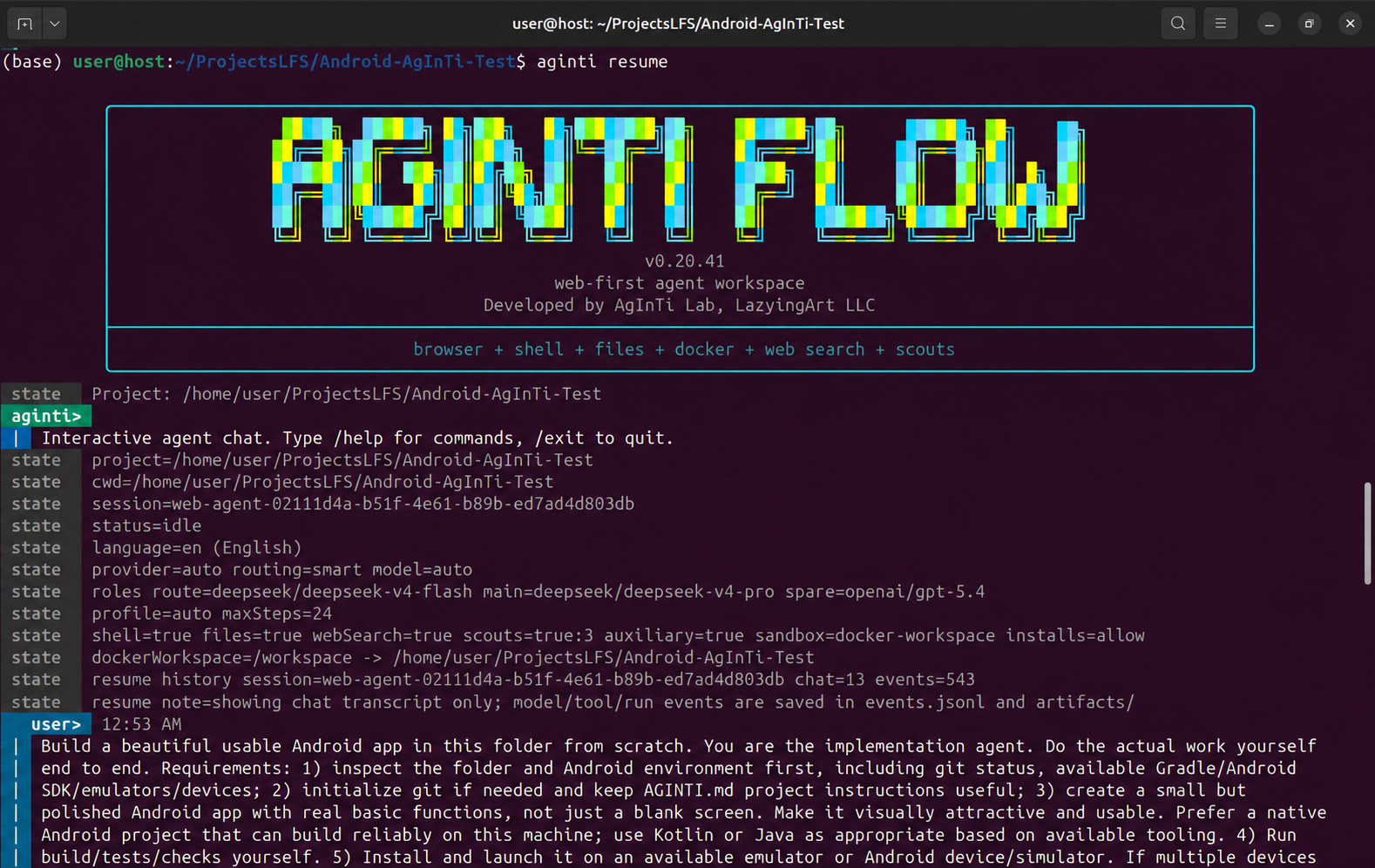
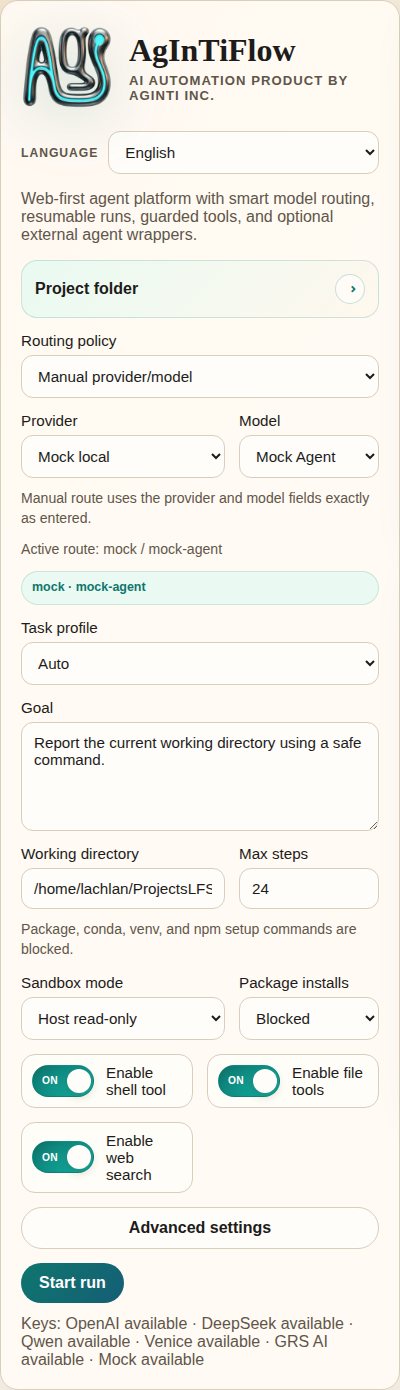
## 실제 스크린샷
| CLI launch | Web app overview |
| --- | --- |
| |  |
| Task controls | Runtime output |
| --- | --- |
|
|
| Task controls | Runtime output |
| --- | --- |
|  |
|  |
| Conversation history | Sandbox status |
| --- | --- |
|
|
| Conversation history | Sandbox status |
| --- | --- |
|  |
|  |
| Mobile overview |
| --- |
|
|
| Mobile overview |
| --- |
|  |
이전 launch screenshot은 source repository의 [demos/archive/](https://github.com/lazyingart/AgInTiFlow/tree/main/demos/archive)에 보관됩니다.
## 핵심 기능
| 기능 | AgInTiFlow 제공 내용 |
| --- | --- |
| CLI agent workspace | 프로젝트 cwd, session resume, 보이는 model/tool state, 명확한 command hint를 가진 영구 terminal chat. |
| Local web workspace | session, runtime log, artifact, model setting, project control, canvas preview, sandbox status를 위한 browser UI. |
| File tools | `inspect_project`, `list_files`, `read_file`, `search_files`, `write_file`, `apply_patch`, `open_workspace_file`, `preview_workspace`. |
| Shell tools | package install policy와 command safety check가 있는 host 또는 Docker workspace shell 실행. |
| Browser tools | lazy startup과 optional domain allowlist를 가진 Playwright browser action. |
| Model routing | LocalLLM Fast/Deep이 기본입니다. DeepSeek, OpenAI, OpenRouter, Qwen, Venice, mock은 명시적 route이며 환경 key로 Hosted fallback되지 않습니다. |
| Patch workflow | Codex-style patch envelope, unified diff, exact replacement, hash, compact diff, path guardrail. |
| Parallel scouts | architecture, implementation, review, test, git flow, research, symbol tracing, dependency risk를 위한 optional scout call. |
| SCS mode | 복잡하거나 위험한 task를 위한 optional Student-Committee-Supervisor quality gate. |
| AAPS adapter | `.aaps` workflow init, validate, parse, compile, dry-run, run을 위한 optional `@lazyingart/aaps` integration. |
| Image generation | GRS AI와 Venice는 기본적으로 꺼져 있고 명시적인 활성화가 필요합니다. key를 저장하는 것만으로 활성화하거나 대체 provider를 고르지 않습니다. |
| Skill library | code, website, Android/iOS, Python, Rust, Java, LaTeX, writing, review, GitHub, AAPS 등을 위한 built-in Markdown skills. |
| Skill Mesh | 검토된 reusable skill pack의 optional strict skill recording/sharing. 사용하지 않으면 background sharing 없이 정상 동작합니다. |
| Multilingual UI | CLI와 docs는 English, Japanese, Simplified/Traditional Chinese, Korean, French, Spanish, Arabic, Vietnamese, German, Russian를 지원합니다. |
## 모델과 역할
AgInTiFlow는 “모델”을 하나의 전역 설정으로 보지 않습니다. 역할이 있습니다.
| 역할 | 기본값 | 목적 |
| --- | --- | --- |
| Route | `localllm/localllm-fast` | 로컬 planning, triage, short task, routing decision. |
| Main | `localllm/localllm-deep` | 복잡한 coding, debugging, writing, research, long task의 로컬 executor. |
| Spare | `localllm/localllm-deep` medium | 로컬 cross-check lane이며 Hosted spare는 명시적으로 선택해야 합니다. |
| Wrapper | `codex/gpt-5.5` medium | optional external coding-agent advisor. |
| Auxiliary | `grsai/nano-banana-2` (off) | 명시적으로 활성화한 image generation과 non-text tools만 사용하며 key 기반 provider failover는 없습니다. |
자주 쓰는 selector:
```text
/models
/route
/model
/spare
/wrapper
/auxiliary model
/venice
```
Venice는 optional uncensored 또는 덜 제한적인 creative work에 사용할 수 있습니다. LocalLLM이 로컬 기본값이며 DeepSeek 등 Hosted provider는 명시적 upgrade로만 사용됩니다. [../docs/model-selection.md](../docs/model-selection.md), [../docs/local-first-agent-runtime.md](../docs/local-first-agent-runtime.md), [../references/venice-model-reference.md](../references/venice-model-reference.md)를 참고하세요.
## AAPS와 대형 워크플로
AAPS는 pipeline-script layer이고, AgInTiFlow는 interactive agent/tool backend입니다.
```bash
aginti aaps status
aginti aaps init "Project Workflow"
aginti aaps validate
aginti aaps compile check
```
채팅 안에서:
```text
/aaps on
/aaps validate
/aaps dry-run workflows/main.aaps
```
하나의 채팅보다 큰 task에 AAPS를 사용합니다. 단계가 있는 app development, paper/book workflow, validation gate, recovery step, artifact production, top-down agentic script에 적합합니다. [../docs/aaps.md](../docs/aaps.md) 및 package [https://www.npmjs.com/package/@lazyingart/aaps](https://www.npmjs.com/package/@lazyingart/aaps)를 참고하세요.
## Local API 빠른 참조
Web app은 UI와 automation을 위한 local API를 제공합니다. 이 endpoint들은 상태를 보고하지만 raw API key나 npm token을 노출하지 않습니다.
```bash
curl http://127.0.0.1:3210/api/config
curl http://127.0.0.1:3210/api/capabilities
curl http://127.0.0.1:3210/api/sandbox/status
curl -X POST http://127.0.0.1:3210/api/sandbox/preflight \
-H 'Content-Type: application/json' \
-d '{"sandboxMode":"docker-workspace","buildImage":true}'
curl http://127.0.0.1:3210/api/workspace/changes
curl "http://127.0.0.1:3210/api/sessions//artifacts"
curl "http://127.0.0.1:3210/api/sessions//inbox"
```
credential-free API smoke test:
```bash
npm run smoke:web-api
```
## Storage, Safety, Resume
AgInTiFlow는 canonical session을 중앙에 저장하고 project-local pointer만 유지합니다.
| 위치 | 목적 |
| --- | --- |
| `~/.agintiflow/sessions//` | canonical state, event, browser state, artifact, snapshot, canvas file. |
| `/.aginti-sessions/` | project-local session pointer와 Web UI database. git ignored. |
| `/.aginti/.env` | optional project-local API key. 제한 권한. git ignored. |
| `/AGINTI.md` | 편집 가능한 project instruction과 durable local preference. secret이 없으면 commit해도 됩니다. |
안전 기본값:
- Docker workspace mode는 일반 CLI/Web coding과 artifact generation의 기본값입니다.
- File tool은 secret-like path, `.env`, `.git`, `node_modules` writes, absolute escape, huge file, binary edit를 차단합니다.
- Shell command는 policy check를 거칩니다. npm publish, npm token command, sudo, destructive git, credential read는 차단됩니다.
- File write는 hash와 compact diff를 기록합니다.
- Tool call과 result는 structured session events에 기록됩니다.
- Web과 CLI는 같은 session store를 사용하므로 나중에 inspect/resume할 수 있습니다.
자세한 runtime notes는 [../docs/runtime-modes-and-autonomy.md](../docs/runtime-modes-and-autonomy.md), [../docs/patch-tools.md](../docs/patch-tools.md), [../docs/agent-runtime-pipe.md](../docs/agent-runtime-pipe.md)를 참고하세요.
## 설정
주요 환경 변수:
```bash
AGENT_PROVIDER=localllm
LOCALLLM_BASE_URL=http://127.0.0.1:8008/v1
LOCALLLM_API_KEY=local-dev-key
AGINTI_LOCALLLM_ROUTE_MODEL=localllm-fast
AGINTI_LOCALLLM_MAIN_MODEL=localllm-deep
# 선택적으로 명시한 hosted upgrade이며 LocalLLM의 자동 fallback이 아닙니다.
DEEPSEEK_API_KEY=...
OPENAI_API_KEY=...
OPENROUTER_API_KEY=...
QWEN_API_KEY=...
VENICE_API_KEY=...
GRSAI_API_KEY=...
AGENT_ROUTING_MODE=smart
AGINTI_TASK_PROFILE=auto
AGINTI_LANGUAGE=en
SANDBOX_MODE=docker-workspace
PACKAGE_INSTALL_POLICY=allow
COMMAND_CWD=/path/to/project
```
Project-local keys:
```bash
aginti init
printf '%s' "$DEEPSEEK_API_KEY" | aginti keys set deepseek --stdin
printf '%s' "$VENICE_API_KEY" | aginti keys set venice --stdin
```
자세히:
- [../docs/model-selection.md](../docs/model-selection.md)
- [../docs/auxiliary-image-generation.md](../docs/auxiliary-image-generation.md)
- [../docs/cli-i18n.md](../docs/cli-i18n.md)
- [../docs/skillmesh.md](../docs/skillmesh.md)
## 문서 지도
| 주제 | 링크 |
| --- | --- |
| AAPS adapter | [../docs/aaps.md](../docs/aaps.md) |
| Model selection and roles | [../docs/model-selection.md](../docs/model-selection.md) |
| SCS mode | [../docs/student-committee-supervisor.md](../docs/student-committee-supervisor.md) |
| Large-codebase engineering | [../docs/large-codebase-engineering.md](../docs/large-codebase-engineering.md) |
| Runtime modes and autonomy | [../docs/runtime-modes-and-autonomy.md](../docs/runtime-modes-and-autonomy.md) |
| Skills and tools | [../docs/skills-and-tools.md](../docs/skills-and-tools.md) |
| Skill Mesh | [../docs/skillmesh.md](../docs/skillmesh.md) |
| Housekeeping logs | [../docs/housekeeping.md](../docs/housekeeping.md) |
| npm publishing | [../docs/npm-publishing.md](../docs/npm-publishing.md) |
| Product roadmap | [../docs/productive-agent-roadmap.md](../docs/productive-agent-roadmap.md) |
| Supervised capability curriculum | [../docs/supervised-capability-curriculum.md](../docs/supervised-capability-curriculum.md) |
| Full older README reference | [../references/notes/readme-full-reference-2026-05-05.md](../references/notes/readme-full-reference-2026-05-05.md) |
## 개발
소스에서 실행:
```bash
git clone https://github.com/lazyingart/AgInTiFlow.git
cd AgInTiFlow
npm install
npx playwright install chromium
npm run check
npm test
```
소스에서 local web 실행:
```bash
npm run web
# open http://127.0.0.1:3210
```
유용한 smoke checks:
```bash
npm run smoke:web-api
npm run smoke:coding-tools
npm run smoke:aaps-adapter
npm run smoke:cli-chat
npm run smoke:toolchain-docker
```
smoke scripts는 명시적으로 real-provider test로 표시되지 않는 한 local mock provider를 사용합니다.
## 릴리스 노트
AgInTiFlow는 `@lazyingart/agintiflow`로 배포됩니다. 권장 release path는 npm provenance가 있는 GitHub Actions Trusted Publishing입니다. local token publishing은 bootstrap fallback으로만 사용해야 하며 `.env`, `.npmrc`, npm token, OTP, debug logs를 절대 commit하면 안 됩니다.
전체 release workflow는 [../docs/npm-publishing.md](../docs/npm-publishing.md)를 참고하세요.
## 지원
이 프로젝트가 유용하다면 아래에서 개발을 지원할 수 있습니다.
| Support | URL |
| --- | --- |
| GitHub Sponsors: LazyingArt | [https://github.com/sponsors/lazyingart](https://github.com/sponsors/lazyingart) |
| GitHub Sponsors: Lachlan Chen | [https://github.com/sponsors/lachlanchen](https://github.com/sponsors/lachlanchen) |
| LazyingArt | [https://lazying.art](https://lazying.art) |
| Chat | [https://chat.lazying.art](https://chat.lazying.art) |
| OnlyIdeas | [https://onlyideas.art](https://onlyideas.art) |
AgInTiFlow는 AgInTi Lab, LazyingArt LLC에서 개발합니다.
|
이전 launch screenshot은 source repository의 [demos/archive/](https://github.com/lazyingart/AgInTiFlow/tree/main/demos/archive)에 보관됩니다.
## 핵심 기능
| 기능 | AgInTiFlow 제공 내용 |
| --- | --- |
| CLI agent workspace | 프로젝트 cwd, session resume, 보이는 model/tool state, 명확한 command hint를 가진 영구 terminal chat. |
| Local web workspace | session, runtime log, artifact, model setting, project control, canvas preview, sandbox status를 위한 browser UI. |
| File tools | `inspect_project`, `list_files`, `read_file`, `search_files`, `write_file`, `apply_patch`, `open_workspace_file`, `preview_workspace`. |
| Shell tools | package install policy와 command safety check가 있는 host 또는 Docker workspace shell 실행. |
| Browser tools | lazy startup과 optional domain allowlist를 가진 Playwright browser action. |
| Model routing | LocalLLM Fast/Deep이 기본입니다. DeepSeek, OpenAI, OpenRouter, Qwen, Venice, mock은 명시적 route이며 환경 key로 Hosted fallback되지 않습니다. |
| Patch workflow | Codex-style patch envelope, unified diff, exact replacement, hash, compact diff, path guardrail. |
| Parallel scouts | architecture, implementation, review, test, git flow, research, symbol tracing, dependency risk를 위한 optional scout call. |
| SCS mode | 복잡하거나 위험한 task를 위한 optional Student-Committee-Supervisor quality gate. |
| AAPS adapter | `.aaps` workflow init, validate, parse, compile, dry-run, run을 위한 optional `@lazyingart/aaps` integration. |
| Image generation | GRS AI와 Venice는 기본적으로 꺼져 있고 명시적인 활성화가 필요합니다. key를 저장하는 것만으로 활성화하거나 대체 provider를 고르지 않습니다. |
| Skill library | code, website, Android/iOS, Python, Rust, Java, LaTeX, writing, review, GitHub, AAPS 등을 위한 built-in Markdown skills. |
| Skill Mesh | 검토된 reusable skill pack의 optional strict skill recording/sharing. 사용하지 않으면 background sharing 없이 정상 동작합니다. |
| Multilingual UI | CLI와 docs는 English, Japanese, Simplified/Traditional Chinese, Korean, French, Spanish, Arabic, Vietnamese, German, Russian를 지원합니다. |
## 모델과 역할
AgInTiFlow는 “모델”을 하나의 전역 설정으로 보지 않습니다. 역할이 있습니다.
| 역할 | 기본값 | 목적 |
| --- | --- | --- |
| Route | `localllm/localllm-fast` | 로컬 planning, triage, short task, routing decision. |
| Main | `localllm/localllm-deep` | 복잡한 coding, debugging, writing, research, long task의 로컬 executor. |
| Spare | `localllm/localllm-deep` medium | 로컬 cross-check lane이며 Hosted spare는 명시적으로 선택해야 합니다. |
| Wrapper | `codex/gpt-5.5` medium | optional external coding-agent advisor. |
| Auxiliary | `grsai/nano-banana-2` (off) | 명시적으로 활성화한 image generation과 non-text tools만 사용하며 key 기반 provider failover는 없습니다. |
자주 쓰는 selector:
```text
/models
/route
/model
/spare
/wrapper
/auxiliary model
/venice
```
Venice는 optional uncensored 또는 덜 제한적인 creative work에 사용할 수 있습니다. LocalLLM이 로컬 기본값이며 DeepSeek 등 Hosted provider는 명시적 upgrade로만 사용됩니다. [../docs/model-selection.md](../docs/model-selection.md), [../docs/local-first-agent-runtime.md](../docs/local-first-agent-runtime.md), [../references/venice-model-reference.md](../references/venice-model-reference.md)를 참고하세요.
## AAPS와 대형 워크플로
AAPS는 pipeline-script layer이고, AgInTiFlow는 interactive agent/tool backend입니다.
```bash
aginti aaps status
aginti aaps init "Project Workflow"
aginti aaps validate
aginti aaps compile check
```
채팅 안에서:
```text
/aaps on
/aaps validate
/aaps dry-run workflows/main.aaps
```
하나의 채팅보다 큰 task에 AAPS를 사용합니다. 단계가 있는 app development, paper/book workflow, validation gate, recovery step, artifact production, top-down agentic script에 적합합니다. [../docs/aaps.md](../docs/aaps.md) 및 package [https://www.npmjs.com/package/@lazyingart/aaps](https://www.npmjs.com/package/@lazyingart/aaps)를 참고하세요.
## Local API 빠른 참조
Web app은 UI와 automation을 위한 local API를 제공합니다. 이 endpoint들은 상태를 보고하지만 raw API key나 npm token을 노출하지 않습니다.
```bash
curl http://127.0.0.1:3210/api/config
curl http://127.0.0.1:3210/api/capabilities
curl http://127.0.0.1:3210/api/sandbox/status
curl -X POST http://127.0.0.1:3210/api/sandbox/preflight \
-H 'Content-Type: application/json' \
-d '{"sandboxMode":"docker-workspace","buildImage":true}'
curl http://127.0.0.1:3210/api/workspace/changes
curl "http://127.0.0.1:3210/api/sessions//artifacts"
curl "http://127.0.0.1:3210/api/sessions//inbox"
```
credential-free API smoke test:
```bash
npm run smoke:web-api
```
## Storage, Safety, Resume
AgInTiFlow는 canonical session을 중앙에 저장하고 project-local pointer만 유지합니다.
| 위치 | 목적 |
| --- | --- |
| `~/.agintiflow/sessions//` | canonical state, event, browser state, artifact, snapshot, canvas file. |
| `/.aginti-sessions/` | project-local session pointer와 Web UI database. git ignored. |
| `/.aginti/.env` | optional project-local API key. 제한 권한. git ignored. |
| `/AGINTI.md` | 편집 가능한 project instruction과 durable local preference. secret이 없으면 commit해도 됩니다. |
안전 기본값:
- Docker workspace mode는 일반 CLI/Web coding과 artifact generation의 기본값입니다.
- File tool은 secret-like path, `.env`, `.git`, `node_modules` writes, absolute escape, huge file, binary edit를 차단합니다.
- Shell command는 policy check를 거칩니다. npm publish, npm token command, sudo, destructive git, credential read는 차단됩니다.
- File write는 hash와 compact diff를 기록합니다.
- Tool call과 result는 structured session events에 기록됩니다.
- Web과 CLI는 같은 session store를 사용하므로 나중에 inspect/resume할 수 있습니다.
자세한 runtime notes는 [../docs/runtime-modes-and-autonomy.md](../docs/runtime-modes-and-autonomy.md), [../docs/patch-tools.md](../docs/patch-tools.md), [../docs/agent-runtime-pipe.md](../docs/agent-runtime-pipe.md)를 참고하세요.
## 설정
주요 환경 변수:
```bash
AGENT_PROVIDER=localllm
LOCALLLM_BASE_URL=http://127.0.0.1:8008/v1
LOCALLLM_API_KEY=local-dev-key
AGINTI_LOCALLLM_ROUTE_MODEL=localllm-fast
AGINTI_LOCALLLM_MAIN_MODEL=localllm-deep
# 선택적으로 명시한 hosted upgrade이며 LocalLLM의 자동 fallback이 아닙니다.
DEEPSEEK_API_KEY=...
OPENAI_API_KEY=...
OPENROUTER_API_KEY=...
QWEN_API_KEY=...
VENICE_API_KEY=...
GRSAI_API_KEY=...
AGENT_ROUTING_MODE=smart
AGINTI_TASK_PROFILE=auto
AGINTI_LANGUAGE=en
SANDBOX_MODE=docker-workspace
PACKAGE_INSTALL_POLICY=allow
COMMAND_CWD=/path/to/project
```
Project-local keys:
```bash
aginti init
printf '%s' "$DEEPSEEK_API_KEY" | aginti keys set deepseek --stdin
printf '%s' "$VENICE_API_KEY" | aginti keys set venice --stdin
```
자세히:
- [../docs/model-selection.md](../docs/model-selection.md)
- [../docs/auxiliary-image-generation.md](../docs/auxiliary-image-generation.md)
- [../docs/cli-i18n.md](../docs/cli-i18n.md)
- [../docs/skillmesh.md](../docs/skillmesh.md)
## 문서 지도
| 주제 | 링크 |
| --- | --- |
| AAPS adapter | [../docs/aaps.md](../docs/aaps.md) |
| Model selection and roles | [../docs/model-selection.md](../docs/model-selection.md) |
| SCS mode | [../docs/student-committee-supervisor.md](../docs/student-committee-supervisor.md) |
| Large-codebase engineering | [../docs/large-codebase-engineering.md](../docs/large-codebase-engineering.md) |
| Runtime modes and autonomy | [../docs/runtime-modes-and-autonomy.md](../docs/runtime-modes-and-autonomy.md) |
| Skills and tools | [../docs/skills-and-tools.md](../docs/skills-and-tools.md) |
| Skill Mesh | [../docs/skillmesh.md](../docs/skillmesh.md) |
| Housekeeping logs | [../docs/housekeeping.md](../docs/housekeeping.md) |
| npm publishing | [../docs/npm-publishing.md](../docs/npm-publishing.md) |
| Product roadmap | [../docs/productive-agent-roadmap.md](../docs/productive-agent-roadmap.md) |
| Supervised capability curriculum | [../docs/supervised-capability-curriculum.md](../docs/supervised-capability-curriculum.md) |
| Full older README reference | [../references/notes/readme-full-reference-2026-05-05.md](../references/notes/readme-full-reference-2026-05-05.md) |
## 개발
소스에서 실행:
```bash
git clone https://github.com/lazyingart/AgInTiFlow.git
cd AgInTiFlow
npm install
npx playwright install chromium
npm run check
npm test
```
소스에서 local web 실행:
```bash
npm run web
# open http://127.0.0.1:3210
```
유용한 smoke checks:
```bash
npm run smoke:web-api
npm run smoke:coding-tools
npm run smoke:aaps-adapter
npm run smoke:cli-chat
npm run smoke:toolchain-docker
```
smoke scripts는 명시적으로 real-provider test로 표시되지 않는 한 local mock provider를 사용합니다.
## 릴리스 노트
AgInTiFlow는 `@lazyingart/agintiflow`로 배포됩니다. 권장 release path는 npm provenance가 있는 GitHub Actions Trusted Publishing입니다. local token publishing은 bootstrap fallback으로만 사용해야 하며 `.env`, `.npmrc`, npm token, OTP, debug logs를 절대 commit하면 안 됩니다.
전체 release workflow는 [../docs/npm-publishing.md](../docs/npm-publishing.md)를 참고하세요.
## 지원
이 프로젝트가 유용하다면 아래에서 개발을 지원할 수 있습니다.
| Support | URL |
| --- | --- |
| GitHub Sponsors: LazyingArt | [https://github.com/sponsors/lazyingart](https://github.com/sponsors/lazyingart) |
| GitHub Sponsors: Lachlan Chen | [https://github.com/sponsors/lachlanchen](https://github.com/sponsors/lachlanchen) |
| LazyingArt | [https://lazying.art](https://lazying.art) |
| Chat | [https://chat.lazying.art](https://chat.lazying.art) |
| OnlyIdeas | [https://onlyideas.art](https://onlyideas.art) |
AgInTiFlow는 AgInTi Lab, LazyingArt LLC에서 개발합니다.