[English](../README.md) · [العربية](README.ar.md) · [Español](README.es.md) · [Français](README.fr.md) · [日本語](README.ja.md) · [한국어](README.ko.md) · [Tiếng Việt](README.vi.md) · [中文 (简体)](README.zh-Hans.md) · [中文(繁體)](README.zh-Hant.md) · [Deutsch](README.de.md) · [Русский](README.ru.md)

# AgInTiFlow







**Günstige, projektbewusste Agenten für reale Probleme.**
AgInTiFlow ist ein project-aware Agent-Workspace für hybride Wet-Dry-R&D, hardware-aware Intelligence, Software-Automatisierung und industrielle Workflows. Von Laborplanung zu Datenanalyse, von Hardwaresteuerung zu Produktionsskripten und von Mikroskopie, Drohnen und Robotern zu Berichten hilft es Agenten, über API, Web oder CLI mit SCS-Supervision, AAPS-Workflows, geschützter Ausführung und dauerhafter Evidenz zu arbeiten.
Kurz gesagt: Führe `aginti` in einem Projekt aus, gib eine Aufgabe vor, prüfe den Plan, sieh jeden Tool-Call, setze später fort und behalte die Ergebnisse im Workspace.
> **Aktualitätshinweis:** Diese Übersetzung kann einzelnen Details der [aktuellen englischen README](../README.md) und der [Local-first-Laufzeitreferenz](../docs/local-first-agent-runtime.md) hinterherhinken. Standard ist LocalLLM unter `http://127.0.0.1:8008/v1` mit `localllm-fast` und `localllm-deep`. Hosted Provider sind ausschließlich explizite Upgrades; Umgebungs-Keys wählen sie nicht aus und lösen keinen automatischen Fallback aus. Auxiliary Image Generation bleibt aus, bis sie ausdrücklich aktiviert wird.
**Links**
| Ressource | URL |
| --- | --- |
| Website | [https://flow.lazying.art](https://flow.lazying.art) |
| GitHub | [https://github.com/lazyingart/AgInTiFlow](https://github.com/lazyingart/AgInTiFlow) |
| npm | [https://www.npmjs.com/package/@lazyingart/agintiflow](https://www.npmjs.com/package/@lazyingart/agintiflow) |
| AAPS npm | [https://www.npmjs.com/package/@lazyingart/aaps](https://www.npmjs.com/package/@lazyingart/aaps) |
| Produktpositionierung | [../references/agintiflow-product-positioning.md](../references/agintiflow-product-positioning.md) |
| Vollständig archivierte README | [../references/notes/readme-full-reference-2026-05-05.md](../references/notes/readme-full-reference-2026-05-05.md) |
## Warum es existiert
Die meisten Agenten-Tools sind entweder Chatboxen mit verborgenem Zustand oder teure Ein-Modell-Schleifen. AgInTiFlow folgt einer anderen Philosophie:
| Prinzip | Praktische Bedeutung |
| --- | --- |
| Lokale Intelligenz verändert die Architektur | Die Baseline nutzt das benachbarte LocalLLM-Gateway für private lokale Route- und Main-Lanes; Hosted-Modelle bleiben explizite Upgrades. |
| Prüfbarkeit statt Geheimnis | Pläne, Tool-Calls, Datei-Diffs, Kommandoausgaben, Canvas-Artefakte und Session-Events werden gespeichert und sind fortsetzbar. |
| Rollenbasierte Modelle | Route, main, spare, wrapper und auxiliary image sind getrennt. LocalLLM liefert standardmäßig Fast/Deep; DeepSeek, OpenAI, OpenRouter, Qwen und Venice werden nur ausdrücklich gewählt. |
| Scouts vor großer Arbeit | Parallele Scouts kartieren Architektur, Tests, Risiken, Symbole und Integrationspunkte, bevor der Hauptexecutor Dateien ändert. |
| SCS für riskante Arbeit | Student-Committee-Supervisor fügt ein typisiertes Gate hinzu: committee entwirft, student genehmigt/überwacht, supervisor führt aus. Nutze `/scs` oder `--scs auto`. |
| AAPS für große Workflows | AAPS beschreibt top-down agentic pipeline scripts; AgInTiFlow kann das interaktive Backend zum Validieren, Kompilieren und Ausführen sein. |
| Lokale Sicherheit als Standard | Docker workspace, Pfad-Guardrails, Secret-Redaction, Blockieren von npm publish/token-Kommandos und sichtbare Logs halten den Agenten praktisch und transparent. |
## Schnellstart
Installieren und Projekt öffnen:
```bash
npm install -g @lazyingart/agintiflow
cd /path/to/your-project
aginti init
aginti
```
Standardmäßig verbindet sich AgInTiFlow ohne Hosted-Key mit dem benachbarten LocalLLM-Dienst unter `http://127.0.0.1:8008/v1`: `localllm-fast` für Route und `localllm-deep` für Main. Für DeepSeek, OpenAI, OpenRouter, Qwen oder Venice muss der Provider ausdrücklich gewählt und der Auth-Wizard gestartet werden. Ein LocalLLM-Fehler stoppt mit einer verständlichen Meldung und sendet die Aufgabe niemals automatisch in die Cloud:
```bash
aginti auth
aginti auth deepseek
aginti auth openrouter
aginti auth venice
aginti login grsai
```
Ein gespeicherter Hosted-Key authentifiziert nur und ändert nicht den aktiven Provider. Auxiliary Image Tools bleiben aus, bis `/auxiliary on`, `/auxiliary image` oder der entsprechende Schalter ausdrücklich verwendet wird.
Web UI aus demselben Projekt starten:
```bash
aginti web --port 3210
# open http://127.0.0.1:3210
```
Smoke-Test ohne echte Modell-Credentials:
```bash
aginti --provider mock --routing manual --allow-file-tools "Create notes/hello.md with a smoke-test note"
```
Sprache explizit wählen oder weglassen, um der System-Locale zu folgen:
```bash
aginti --language ja
aginti --language zh-Hans
aginti --language de
```
## Tägliche Kommandos
| Ziel | Kommando |
| --- | --- |
| Interaktiven Chat starten | `aginti` oder `aginti chat` |
| Lokale Web-App starten | `aginti web --port 3210` |
| Provider-Keys speichern | `aginti auth`, `/auth`, `/login` |
| Aktuelles Repo reviewen | `/review [focus]` |
| SCS-Quality-Gate umschalten | `/scs` |
| SCS nur für komplexe Arbeit nutzen | `/scs auto` oder `aginti --scs auto "task"` |
| Mit AAPS-Workflows arbeiten | `aginti aaps status`, `/aaps validate` |
| Modelle wählen | `/route`, `/model`, `/spare`, `/wrapper`, `/auxiliary model` |
| Venice-Shortcut aktivieren | `/venice` |
| Bilder erzeugen | `/auxiliary image`, danach Bild beschreiben |
| Aktuelles Projekt fortsetzen | `aginti resume` |
| Alle Sessions durchsuchen | `aginti resume --all-sessions` |
| In laufende Session einreihen | `aginti queue "extra instruction"` |
| Leere Sessions bereinigen | `aginti --remove-empty-sessions` |
| Capabilities prüfen | `aginti capabilities`, `aginti doctor --capabilities` |
| Geprüfte Skills synchronisieren | `aginti skillmesh status`, `aginti skillmesh sync` |
| CLI aktualisieren | `aginti update` |
Der interaktive Chat unterstützt Slash-Completion, Up/Down-Selectoren, mehrzeilige Eingabe mit `Ctrl+J`, vollständige Resume-History, Markdown-Rendering, sichtbaren Run-Status, ASAP-Pipe-Nachrichten während eines Runs und saubere Unterbrechung/Fortsetzung mit `Ctrl+C`. Installierte interaktive Kommandos prüfen außerdem npm auf neue AgInTiFlow-Versionen und zeigen einen Update/Skip-Selector; Source-Checkouts und Non-TTY-Automation bleiben ungestört.
Für eine vollständig kontrollierte One-Shot-Fortsetzung nutze eine explizite session id und wähle das Task-Profil bewusst. `auto` ist für normales Routing, `android` für Android/Emulator-Arbeit:
```bash
PROFILE=android # or auto
aginti --resume \
--profile "$PROFILE" \
--sandbox-mode host \
--package-install-policy allow \
--approve-package-installs \
--allow-shell \
--allow-file-tools \
--allow-destructive \
"Take a fresh screenshot of the running app in the emulator, save it with a durable filename in this project, and keep git status clean."
```
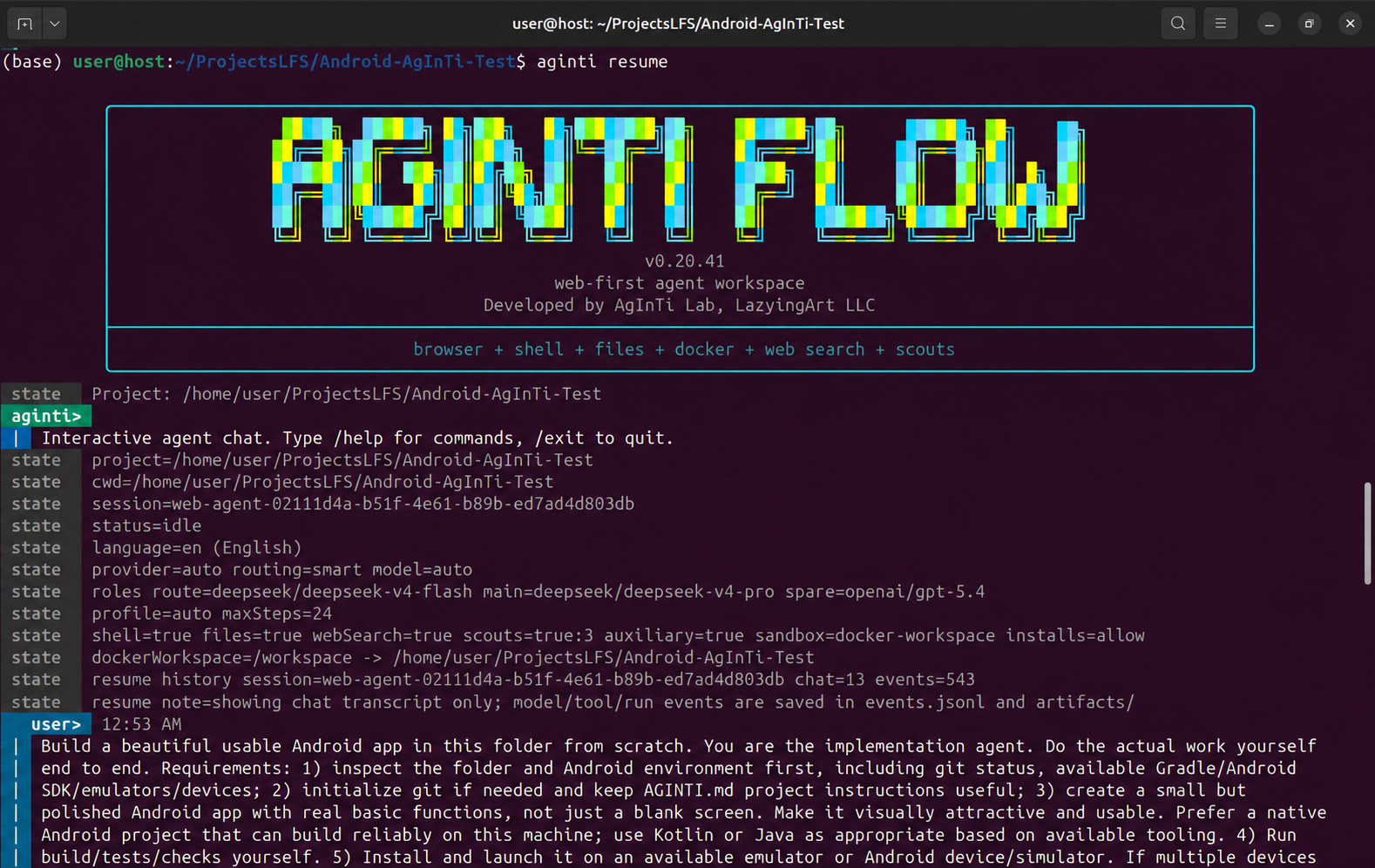
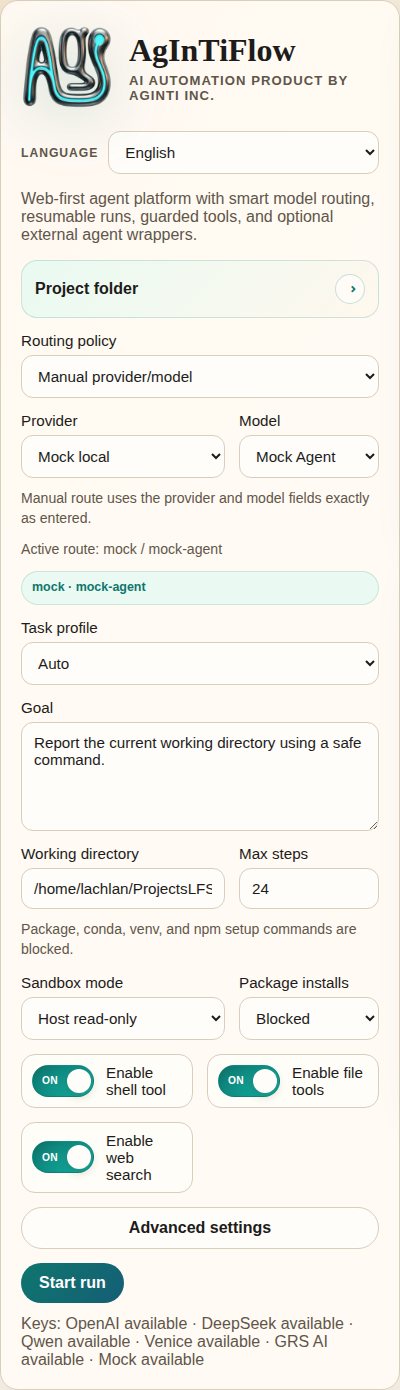
## Echte Screenshots
| CLI-Start | Web-App-Überblick |
| --- | --- |
| |  |
| Task-Steuerung | Runtime-Ausgabe |
| --- | --- |
|
|
| Task-Steuerung | Runtime-Ausgabe |
| --- | --- |
|  |
|  |
| Gesprächsverlauf | Sandbox-Status |
| --- | --- |
|
|
| Gesprächsverlauf | Sandbox-Status |
| --- | --- |
|  |
|  |
| Mobile Übersicht |
| --- |
|
|
| Mobile Übersicht |
| --- |
|  |
Ältere Launch-Screenshots liegen im Source-Repository unter [demos/archive/](https://github.com/lazyingart/AgInTiFlow/tree/main/demos/archive).
## Kernfähigkeiten
| Fähigkeit | Was AgInTiFlow bietet |
| --- | --- |
| CLI-Agenten-Workspace | Persistenter Terminal-Chat mit Projekt-cwd, Session-Resume, sichtbarem Modell/Tool-Status und klaren Command-Hints. |
| Lokaler Web-Workspace | Browser-UI für Sessions, Runtime-Logs, Artefakte, Modellsettings, Projektkontrollen, Canvas-Previews und Sandbox-Status. |
| File tools | `inspect_project`, `list_files`, `read_file`, `search_files`, `write_file`, `apply_patch`, `open_workspace_file`, `preview_workspace`. |
| Shell tools | Geschützte Host- oder Docker-workspace-Shell mit Package-Install-Policy und Command-Safety-Checks. |
| Browser tools | Playwright-Aktionen mit Lazy Startup und optionalen Domain-Allowlists. |
| Model routing | LocalLLM Fast/Deep sind Standard. DeepSeek, OpenAI, OpenRouter, Qwen, Venice und mock sind explizite Routen; Umgebungs-Keys lösen keinen Hosted-Fallback aus. |
| Patch workflow | Codex-style Patch-Envelopes, unified diffs, exakte Ersetzungen, Hashes, kompakte Diffs und Pfad-Guardrails. |
| Parallel scouts | Optionale Scout-Calls für Architektur, Implementierung, Review, Tests, Git-Flow, Research, Symbol-Tracing und Dependency-Risiken. |
| SCS mode | Optionales Student-Committee-Supervisor Quality Gate für komplizierte oder riskante Aufgaben. |
| AAPS adapter | Optionale `@lazyingart/aaps` Integration für `.aaps` workflow init, validate, parse, compile, dry-run und run. |
| Image generation | GRS AI und Venice sind standardmäßig ausgeschaltet und müssen ausdrücklich aktiviert werden; gespeicherte Keys aktivieren sie nicht und wählen keinen Ersatzprovider. |
| Skill library | Eingebaute Markdown-Skills für Code, Websites, Android/iOS, Python, Rust, Java, LaTeX, Writing, Reviews, GitHub, AAPS und mehr. |
| Skill Mesh | Optionales striktes Recording/Sharing geprüfter wiederverwendbarer Skill-Packs. Ohne Nutzung läuft AgInTiFlow normal ohne Hintergrund-Sharing. |
| Mehrsprachige UI | CLI und Docs für Englisch, Japanisch, vereinfachtes/traditionelles Chinesisch, Koreanisch, Französisch, Spanisch, Arabisch, Vietnamesisch, Deutsch und Russisch. |
## Modelle und Rollen
AgInTiFlow behandelt “das Modell” nicht als eine globale Einstellung. Es gibt Rollen:
| Rolle | Default | Zweck |
| --- | --- | --- |
| Route | `localllm/localllm-fast` | Lokaler Planner, Triage, kurze Tasks und Routing-Entscheidungen. |
| Main | `localllm/localllm-deep` | Lokaler Executor für komplexes Coding, Debugging, Writing, Research und lange Tasks. |
| Spare | `localllm/localllm-deep` medium | Lokale Cross-Check-Lane; ein Hosted-Spare muss ausdrücklich gewählt werden. |
| Wrapper | `codex/gpt-5.5` medium | Optionaler externer Coding-Agent-Berater. |
| Auxiliary | `grsai/nano-banana-2` (off) | Nur ausdrücklich aktivierte Bilderzeugung und Non-Text-Tools; kein Key-gesteuertes Provider-Failover. |
Nützliche Selector-Kommandos:
```text
/models
/route
/model
/spare
/wrapper
/auxiliary model
/venice
```
Venice kann optional für uncensored oder weniger eingeschränkte kreative Arbeit genutzt werden. LocalLLM bleibt die lokale Baseline; DeepSeek und andere Hosted-Provider sind ausschließlich explizite Upgrades. Siehe [../docs/model-selection.md](../docs/model-selection.md), [../docs/local-first-agent-runtime.md](../docs/local-first-agent-runtime.md) und [../references/venice-model-reference.md](../references/venice-model-reference.md).
## AAPS und große Workflows
AAPS ist die Pipeline-Script-Schicht; AgInTiFlow ist das interaktive Agent/Tool-Backend.
```bash
aginti aaps status
aginti aaps init "Project Workflow"
aginti aaps validate
aginti aaps compile check
```
Im Chat:
```text
/aaps on
/aaps validate
/aaps dry-run workflows/main.aaps
```
Nutze AAPS, wenn die Aufgabe größer als ein einzelner Chat ist: App-Entwicklung mit Stages, Paper/Book-Workflows, Validation Gates, Recovery Steps, Artifact-Produktion oder top-down agentic scripts. Siehe [../docs/aaps.md](../docs/aaps.md) und das Paket [https://www.npmjs.com/package/@lazyingart/aaps](https://www.npmjs.com/package/@lazyingart/aaps).
## Lokale API-Kurzreferenz
Die Web-App stellt lokale APIs für UI und Automation bereit. Diese Endpoints melden Status, ohne rohe API-Keys oder npm tokens offenzulegen:
```bash
curl http://127.0.0.1:3210/api/config
curl http://127.0.0.1:3210/api/capabilities
curl http://127.0.0.1:3210/api/sandbox/status
curl -X POST http://127.0.0.1:3210/api/sandbox/preflight \
-H 'Content-Type: application/json' \
-d '{"sandboxMode":"docker-workspace","buildImage":true}'
curl http://127.0.0.1:3210/api/workspace/changes
curl "http://127.0.0.1:3210/api/sessions//artifacts"
curl "http://127.0.0.1:3210/api/sessions//inbox"
```
Credential-freien API-Smoke-Test ausführen:
```bash
npm run smoke:web-api
```
## Storage, Sicherheit und Resume
AgInTiFlow speichert kanonische Sessions zentral und hält projektlokal nur Pointer:
| Ort | Zweck |
| --- | --- |
| `~/.agintiflow/sessions//` | Kanonischer Zustand, Events, Browser-State, Artefakte, Snapshots, Canvas-Dateien. |
| `/.aginti-sessions/` | Projektlokale Session-Pointer und Web-UI-Datenbank. Git-ignored. |
| `/.aginti/.env` | Optionale projektlokale API-Keys mit eingeschränkten Rechten. Git-ignored. |
| `/AGINTI.md` | Editierbare Projektinstruktionen und dauerhafte lokale Präferenzen. Commit-sicher, wenn keine Secrets enthalten sind. |
Sicherheitsdefaults:
- Docker workspace mode ist der normale CLI/Web-Default für praktisches Coding und Artifact-Erzeugung.
- File tools blockieren secret-artige Pfade, `.env`, `.git`, `node_modules` writes, absolute escapes, riesige Dateien und Binary Edits.
- Shell-Kommandos werden policy-geprüft; npm publish, npm token commands, sudo, destruktives git und Credential Reads werden blockiert.
- Dateiänderungen protokollieren Hashes und kompakte Diffs.
- Tool-Calls und Ergebnisse werden in strukturierten Session-Events geloggt.
- Web und CLI nutzen denselben Session Store, sodass Runs später geprüft und fortgesetzt werden können.
Details: [../docs/runtime-modes-and-autonomy.md](../docs/runtime-modes-and-autonomy.md), [../docs/patch-tools.md](../docs/patch-tools.md), [../docs/agent-runtime-pipe.md](../docs/agent-runtime-pipe.md).
## Konfiguration
Häufige Umgebungsvariablen:
```bash
AGENT_PROVIDER=localllm
LOCALLLM_BASE_URL=http://127.0.0.1:8008/v1
LOCALLLM_API_KEY=local-dev-key
AGINTI_LOCALLLM_ROUTE_MODEL=localllm-fast
AGINTI_LOCALLLM_MAIN_MODEL=localllm-deep
# Optionale, explizite Hosted-Upgrades; niemals automatische LocalLLM-Fallbacks.
DEEPSEEK_API_KEY=...
OPENAI_API_KEY=...
OPENROUTER_API_KEY=...
QWEN_API_KEY=...
VENICE_API_KEY=...
GRSAI_API_KEY=...
AGENT_ROUTING_MODE=smart
AGINTI_TASK_PROFILE=auto
AGINTI_LANGUAGE=en
SANDBOX_MODE=docker-workspace
PACKAGE_INSTALL_POLICY=allow
COMMAND_CWD=/path/to/project
```
Projektlokale Keys:
```bash
aginti init
printf '%s' "$DEEPSEEK_API_KEY" | aginti keys set deepseek --stdin
printf '%s' "$VENICE_API_KEY" | aginti keys set venice --stdin
```
Mehr Details:
- [../docs/model-selection.md](../docs/model-selection.md)
- [../docs/auxiliary-image-generation.md](../docs/auxiliary-image-generation.md)
- [../docs/cli-i18n.md](../docs/cli-i18n.md)
- [../docs/skillmesh.md](../docs/skillmesh.md)
## Dokumentationskarte
| Thema | Link |
| --- | --- |
| AAPS adapter | [../docs/aaps.md](../docs/aaps.md) |
| Modellwahl und Rollen | [../docs/model-selection.md](../docs/model-selection.md) |
| SCS mode | [../docs/student-committee-supervisor.md](../docs/student-committee-supervisor.md) |
| Large-codebase engineering | [../docs/large-codebase-engineering.md](../docs/large-codebase-engineering.md) |
| Runtime modes and autonomy | [../docs/runtime-modes-and-autonomy.md](../docs/runtime-modes-and-autonomy.md) |
| Skills and tools | [../docs/skills-and-tools.md](../docs/skills-and-tools.md) |
| Skill Mesh | [../docs/skillmesh.md](../docs/skillmesh.md) |
| Housekeeping logs | [../docs/housekeeping.md](../docs/housekeeping.md) |
| npm publishing | [../docs/npm-publishing.md](../docs/npm-publishing.md) |
| Product roadmap | [../docs/productive-agent-roadmap.md](../docs/productive-agent-roadmap.md) |
| Supervised capability curriculum | [../docs/supervised-capability-curriculum.md](../docs/supervised-capability-curriculum.md) |
| Vollständige ältere README | [../references/notes/readme-full-reference-2026-05-05.md](../references/notes/readme-full-reference-2026-05-05.md) |
## Entwicklung
Aus dem Source ausführen:
```bash
git clone https://github.com/lazyingart/AgInTiFlow.git
cd AgInTiFlow
npm install
npx playwright install chromium
npm run check
npm test
```
Lokales Web aus dem Source starten:
```bash
npm run web
# open http://127.0.0.1:3210
```
Nützliche Smoke-Checks:
```bash
npm run smoke:web-api
npm run smoke:coding-tools
npm run smoke:aaps-adapter
npm run smoke:cli-chat
npm run smoke:toolchain-docker
```
Smoke-Skripte nutzen den lokalen Mock-Provider, sofern sie nicht explizit als Real-Provider-Tests markiert sind.
## Release Notes
AgInTiFlow wird als `@lazyingart/agintiflow` veröffentlicht. Bevorzugt ist GitHub Actions Trusted Publishing mit npm provenance. Lokales Token-Publishing ist nur Bootstrap-Fallback und darf niemals `.env`, `.npmrc`, npm tokens, OTPs oder debug logs committen.
Siehe [../docs/npm-publishing.md](../docs/npm-publishing.md) für den vollständigen Release-Workflow.
## Support
Wenn dieses Projekt nützlich ist, kannst du die Entwicklung hier unterstützen:
| Support | URL |
| --- | --- |
| GitHub Sponsors: LazyingArt | [https://github.com/sponsors/lazyingart](https://github.com/sponsors/lazyingart) |
| GitHub Sponsors: Lachlan Chen | [https://github.com/sponsors/lachlanchen](https://github.com/sponsors/lachlanchen) |
| LazyingArt | [https://lazying.art](https://lazying.art) |
| Chat | [https://chat.lazying.art](https://chat.lazying.art) |
| OnlyIdeas | [https://onlyideas.art](https://onlyideas.art) |
AgInTiFlow wird von AgInTi Lab, LazyingArt LLC entwickelt.
|
Ältere Launch-Screenshots liegen im Source-Repository unter [demos/archive/](https://github.com/lazyingart/AgInTiFlow/tree/main/demos/archive).
## Kernfähigkeiten
| Fähigkeit | Was AgInTiFlow bietet |
| --- | --- |
| CLI-Agenten-Workspace | Persistenter Terminal-Chat mit Projekt-cwd, Session-Resume, sichtbarem Modell/Tool-Status und klaren Command-Hints. |
| Lokaler Web-Workspace | Browser-UI für Sessions, Runtime-Logs, Artefakte, Modellsettings, Projektkontrollen, Canvas-Previews und Sandbox-Status. |
| File tools | `inspect_project`, `list_files`, `read_file`, `search_files`, `write_file`, `apply_patch`, `open_workspace_file`, `preview_workspace`. |
| Shell tools | Geschützte Host- oder Docker-workspace-Shell mit Package-Install-Policy und Command-Safety-Checks. |
| Browser tools | Playwright-Aktionen mit Lazy Startup und optionalen Domain-Allowlists. |
| Model routing | LocalLLM Fast/Deep sind Standard. DeepSeek, OpenAI, OpenRouter, Qwen, Venice und mock sind explizite Routen; Umgebungs-Keys lösen keinen Hosted-Fallback aus. |
| Patch workflow | Codex-style Patch-Envelopes, unified diffs, exakte Ersetzungen, Hashes, kompakte Diffs und Pfad-Guardrails. |
| Parallel scouts | Optionale Scout-Calls für Architektur, Implementierung, Review, Tests, Git-Flow, Research, Symbol-Tracing und Dependency-Risiken. |
| SCS mode | Optionales Student-Committee-Supervisor Quality Gate für komplizierte oder riskante Aufgaben. |
| AAPS adapter | Optionale `@lazyingart/aaps` Integration für `.aaps` workflow init, validate, parse, compile, dry-run und run. |
| Image generation | GRS AI und Venice sind standardmäßig ausgeschaltet und müssen ausdrücklich aktiviert werden; gespeicherte Keys aktivieren sie nicht und wählen keinen Ersatzprovider. |
| Skill library | Eingebaute Markdown-Skills für Code, Websites, Android/iOS, Python, Rust, Java, LaTeX, Writing, Reviews, GitHub, AAPS und mehr. |
| Skill Mesh | Optionales striktes Recording/Sharing geprüfter wiederverwendbarer Skill-Packs. Ohne Nutzung läuft AgInTiFlow normal ohne Hintergrund-Sharing. |
| Mehrsprachige UI | CLI und Docs für Englisch, Japanisch, vereinfachtes/traditionelles Chinesisch, Koreanisch, Französisch, Spanisch, Arabisch, Vietnamesisch, Deutsch und Russisch. |
## Modelle und Rollen
AgInTiFlow behandelt “das Modell” nicht als eine globale Einstellung. Es gibt Rollen:
| Rolle | Default | Zweck |
| --- | --- | --- |
| Route | `localllm/localllm-fast` | Lokaler Planner, Triage, kurze Tasks und Routing-Entscheidungen. |
| Main | `localllm/localllm-deep` | Lokaler Executor für komplexes Coding, Debugging, Writing, Research und lange Tasks. |
| Spare | `localllm/localllm-deep` medium | Lokale Cross-Check-Lane; ein Hosted-Spare muss ausdrücklich gewählt werden. |
| Wrapper | `codex/gpt-5.5` medium | Optionaler externer Coding-Agent-Berater. |
| Auxiliary | `grsai/nano-banana-2` (off) | Nur ausdrücklich aktivierte Bilderzeugung und Non-Text-Tools; kein Key-gesteuertes Provider-Failover. |
Nützliche Selector-Kommandos:
```text
/models
/route
/model
/spare
/wrapper
/auxiliary model
/venice
```
Venice kann optional für uncensored oder weniger eingeschränkte kreative Arbeit genutzt werden. LocalLLM bleibt die lokale Baseline; DeepSeek und andere Hosted-Provider sind ausschließlich explizite Upgrades. Siehe [../docs/model-selection.md](../docs/model-selection.md), [../docs/local-first-agent-runtime.md](../docs/local-first-agent-runtime.md) und [../references/venice-model-reference.md](../references/venice-model-reference.md).
## AAPS und große Workflows
AAPS ist die Pipeline-Script-Schicht; AgInTiFlow ist das interaktive Agent/Tool-Backend.
```bash
aginti aaps status
aginti aaps init "Project Workflow"
aginti aaps validate
aginti aaps compile check
```
Im Chat:
```text
/aaps on
/aaps validate
/aaps dry-run workflows/main.aaps
```
Nutze AAPS, wenn die Aufgabe größer als ein einzelner Chat ist: App-Entwicklung mit Stages, Paper/Book-Workflows, Validation Gates, Recovery Steps, Artifact-Produktion oder top-down agentic scripts. Siehe [../docs/aaps.md](../docs/aaps.md) und das Paket [https://www.npmjs.com/package/@lazyingart/aaps](https://www.npmjs.com/package/@lazyingart/aaps).
## Lokale API-Kurzreferenz
Die Web-App stellt lokale APIs für UI und Automation bereit. Diese Endpoints melden Status, ohne rohe API-Keys oder npm tokens offenzulegen:
```bash
curl http://127.0.0.1:3210/api/config
curl http://127.0.0.1:3210/api/capabilities
curl http://127.0.0.1:3210/api/sandbox/status
curl -X POST http://127.0.0.1:3210/api/sandbox/preflight \
-H 'Content-Type: application/json' \
-d '{"sandboxMode":"docker-workspace","buildImage":true}'
curl http://127.0.0.1:3210/api/workspace/changes
curl "http://127.0.0.1:3210/api/sessions//artifacts"
curl "http://127.0.0.1:3210/api/sessions//inbox"
```
Credential-freien API-Smoke-Test ausführen:
```bash
npm run smoke:web-api
```
## Storage, Sicherheit und Resume
AgInTiFlow speichert kanonische Sessions zentral und hält projektlokal nur Pointer:
| Ort | Zweck |
| --- | --- |
| `~/.agintiflow/sessions//` | Kanonischer Zustand, Events, Browser-State, Artefakte, Snapshots, Canvas-Dateien. |
| `/.aginti-sessions/` | Projektlokale Session-Pointer und Web-UI-Datenbank. Git-ignored. |
| `/.aginti/.env` | Optionale projektlokale API-Keys mit eingeschränkten Rechten. Git-ignored. |
| `/AGINTI.md` | Editierbare Projektinstruktionen und dauerhafte lokale Präferenzen. Commit-sicher, wenn keine Secrets enthalten sind. |
Sicherheitsdefaults:
- Docker workspace mode ist der normale CLI/Web-Default für praktisches Coding und Artifact-Erzeugung.
- File tools blockieren secret-artige Pfade, `.env`, `.git`, `node_modules` writes, absolute escapes, riesige Dateien und Binary Edits.
- Shell-Kommandos werden policy-geprüft; npm publish, npm token commands, sudo, destruktives git und Credential Reads werden blockiert.
- Dateiänderungen protokollieren Hashes und kompakte Diffs.
- Tool-Calls und Ergebnisse werden in strukturierten Session-Events geloggt.
- Web und CLI nutzen denselben Session Store, sodass Runs später geprüft und fortgesetzt werden können.
Details: [../docs/runtime-modes-and-autonomy.md](../docs/runtime-modes-and-autonomy.md), [../docs/patch-tools.md](../docs/patch-tools.md), [../docs/agent-runtime-pipe.md](../docs/agent-runtime-pipe.md).
## Konfiguration
Häufige Umgebungsvariablen:
```bash
AGENT_PROVIDER=localllm
LOCALLLM_BASE_URL=http://127.0.0.1:8008/v1
LOCALLLM_API_KEY=local-dev-key
AGINTI_LOCALLLM_ROUTE_MODEL=localllm-fast
AGINTI_LOCALLLM_MAIN_MODEL=localllm-deep
# Optionale, explizite Hosted-Upgrades; niemals automatische LocalLLM-Fallbacks.
DEEPSEEK_API_KEY=...
OPENAI_API_KEY=...
OPENROUTER_API_KEY=...
QWEN_API_KEY=...
VENICE_API_KEY=...
GRSAI_API_KEY=...
AGENT_ROUTING_MODE=smart
AGINTI_TASK_PROFILE=auto
AGINTI_LANGUAGE=en
SANDBOX_MODE=docker-workspace
PACKAGE_INSTALL_POLICY=allow
COMMAND_CWD=/path/to/project
```
Projektlokale Keys:
```bash
aginti init
printf '%s' "$DEEPSEEK_API_KEY" | aginti keys set deepseek --stdin
printf '%s' "$VENICE_API_KEY" | aginti keys set venice --stdin
```
Mehr Details:
- [../docs/model-selection.md](../docs/model-selection.md)
- [../docs/auxiliary-image-generation.md](../docs/auxiliary-image-generation.md)
- [../docs/cli-i18n.md](../docs/cli-i18n.md)
- [../docs/skillmesh.md](../docs/skillmesh.md)
## Dokumentationskarte
| Thema | Link |
| --- | --- |
| AAPS adapter | [../docs/aaps.md](../docs/aaps.md) |
| Modellwahl und Rollen | [../docs/model-selection.md](../docs/model-selection.md) |
| SCS mode | [../docs/student-committee-supervisor.md](../docs/student-committee-supervisor.md) |
| Large-codebase engineering | [../docs/large-codebase-engineering.md](../docs/large-codebase-engineering.md) |
| Runtime modes and autonomy | [../docs/runtime-modes-and-autonomy.md](../docs/runtime-modes-and-autonomy.md) |
| Skills and tools | [../docs/skills-and-tools.md](../docs/skills-and-tools.md) |
| Skill Mesh | [../docs/skillmesh.md](../docs/skillmesh.md) |
| Housekeeping logs | [../docs/housekeeping.md](../docs/housekeeping.md) |
| npm publishing | [../docs/npm-publishing.md](../docs/npm-publishing.md) |
| Product roadmap | [../docs/productive-agent-roadmap.md](../docs/productive-agent-roadmap.md) |
| Supervised capability curriculum | [../docs/supervised-capability-curriculum.md](../docs/supervised-capability-curriculum.md) |
| Vollständige ältere README | [../references/notes/readme-full-reference-2026-05-05.md](../references/notes/readme-full-reference-2026-05-05.md) |
## Entwicklung
Aus dem Source ausführen:
```bash
git clone https://github.com/lazyingart/AgInTiFlow.git
cd AgInTiFlow
npm install
npx playwright install chromium
npm run check
npm test
```
Lokales Web aus dem Source starten:
```bash
npm run web
# open http://127.0.0.1:3210
```
Nützliche Smoke-Checks:
```bash
npm run smoke:web-api
npm run smoke:coding-tools
npm run smoke:aaps-adapter
npm run smoke:cli-chat
npm run smoke:toolchain-docker
```
Smoke-Skripte nutzen den lokalen Mock-Provider, sofern sie nicht explizit als Real-Provider-Tests markiert sind.
## Release Notes
AgInTiFlow wird als `@lazyingart/agintiflow` veröffentlicht. Bevorzugt ist GitHub Actions Trusted Publishing mit npm provenance. Lokales Token-Publishing ist nur Bootstrap-Fallback und darf niemals `.env`, `.npmrc`, npm tokens, OTPs oder debug logs committen.
Siehe [../docs/npm-publishing.md](../docs/npm-publishing.md) für den vollständigen Release-Workflow.
## Support
Wenn dieses Projekt nützlich ist, kannst du die Entwicklung hier unterstützen:
| Support | URL |
| --- | --- |
| GitHub Sponsors: LazyingArt | [https://github.com/sponsors/lazyingart](https://github.com/sponsors/lazyingart) |
| GitHub Sponsors: Lachlan Chen | [https://github.com/sponsors/lachlanchen](https://github.com/sponsors/lachlanchen) |
| LazyingArt | [https://lazying.art](https://lazying.art) |
| Chat | [https://chat.lazying.art](https://chat.lazying.art) |
| OnlyIdeas | [https://onlyideas.art](https://onlyideas.art) |
AgInTiFlow wird von AgInTi Lab, LazyingArt LLC entwickelt.