> [!WARNING]
> **This repository is sunsetting.** All components have been moved into the [design system](https://github.com/kestra-io/kestra/tree/develop/ui/packages) of the Kestra OSS repository. No new versions will be released under normal circumstances. The repository will **not** be archived, as new versions may still be published if required to support previous Kestra LTS releases.
>
> **We are no longer accepting pull requests from external contributors.** Please open any issues or feature requests in the [main Kestra repository](https://github.com/kestra-io/kestra/issues) instead.

Event-driven declarative orchestrator to simplify data operations
[](https://www.npmjs.com/package/@kestra-io/ui-libs)
Kestra UI library implemented in both the website and the application UI.
Install with npm: `npm install @kestra/ui-library`
Website •
Twitter •
Linked In •
Slack •
Documentation
## Live Demo
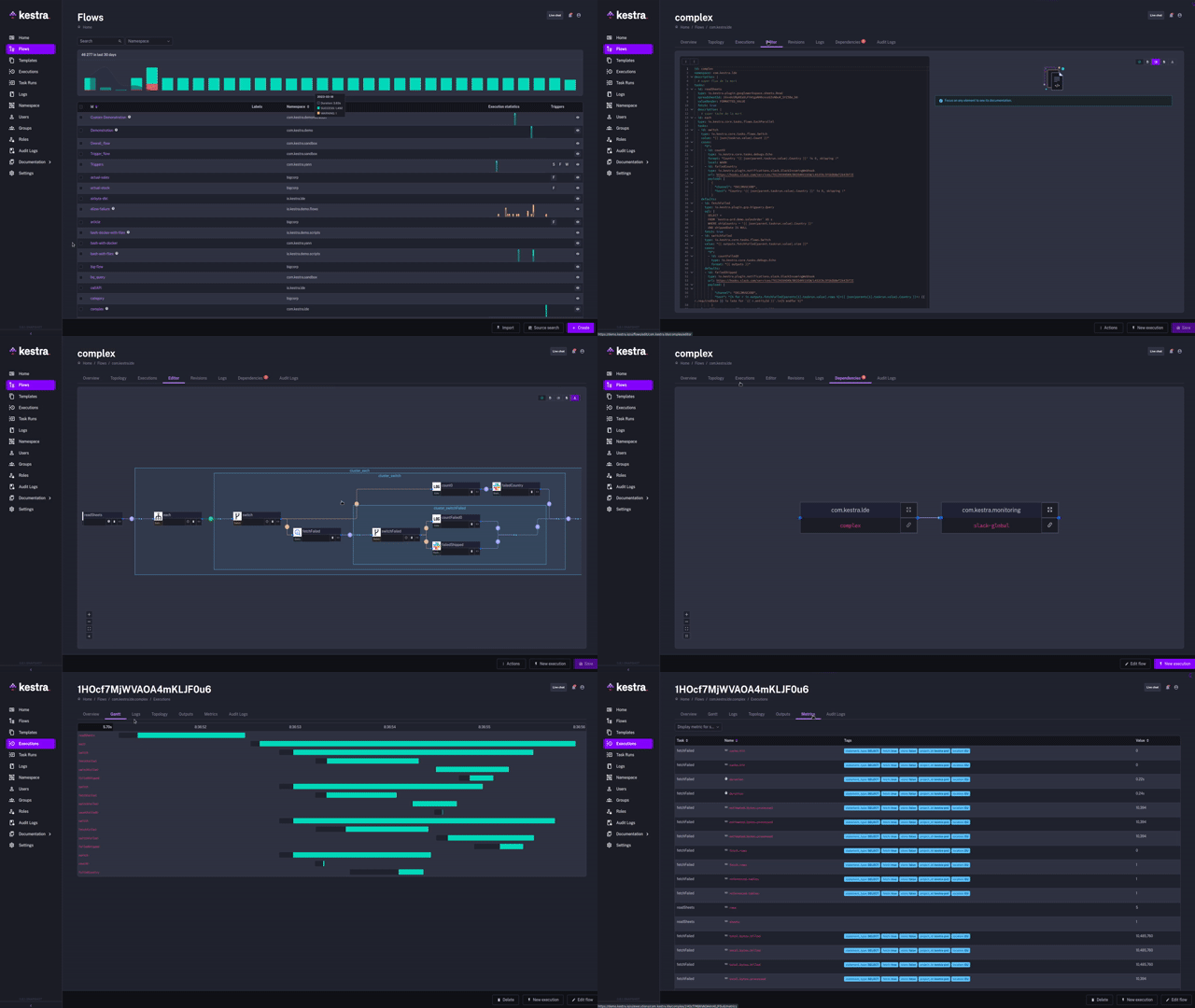
Try Kestra using our [live demo](https://demo.kestra.io).
## What is Kestra
Kestra is an open-source, **event-driven** orchestrator that simplifies data operations and improves collaboration between engineers and business users. By bringing **Infrastructure as Code** best practices to data pipelines, Kestra allows you to build reliable workflows and manage them with confidence.
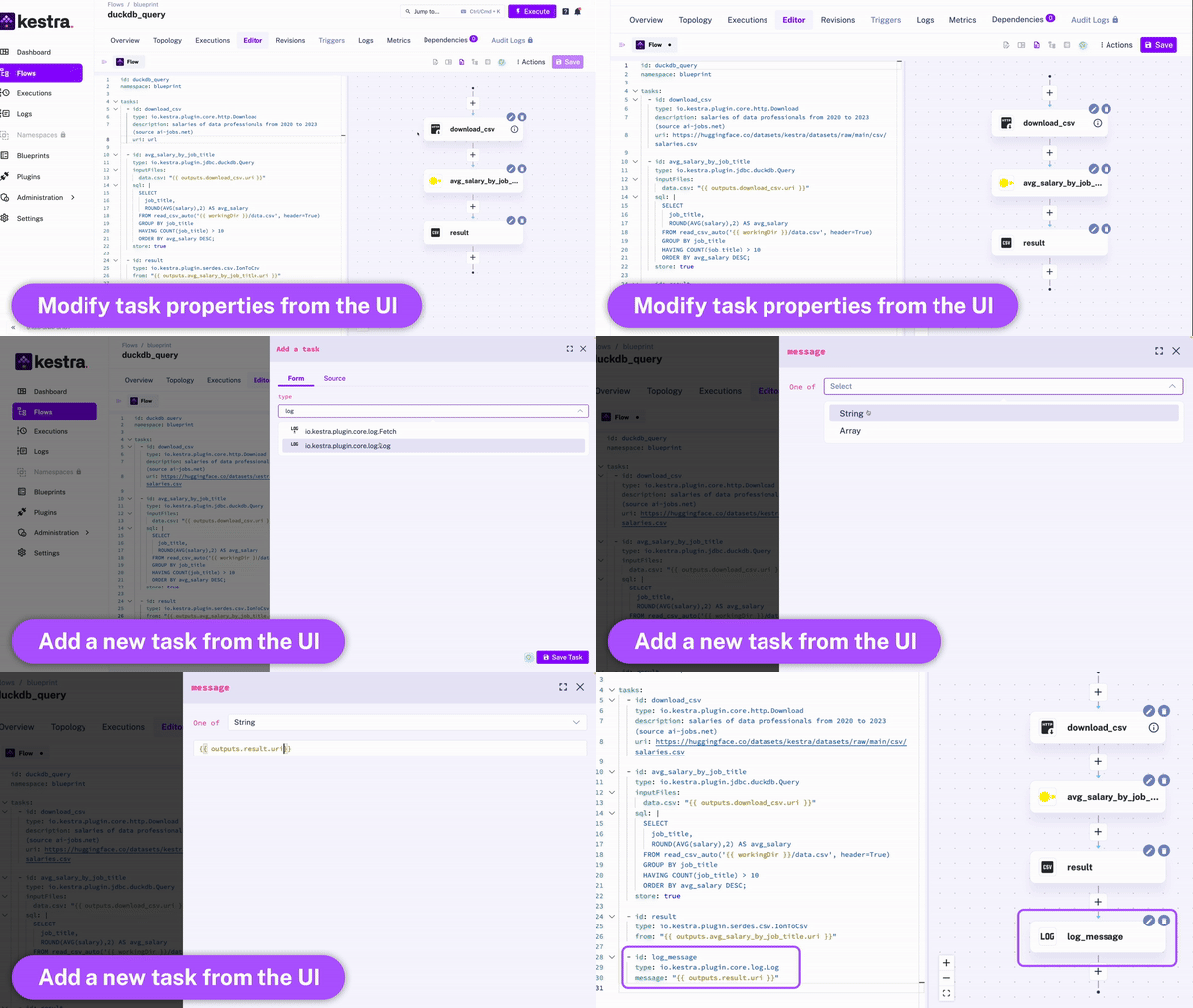
Thanks to the **declarative YAML interface** for defining orchestration logic, everyone who benefits from analytics can participate in the data pipeline creation process. The UI automatically adjusts the YAML definition any time you make changes to a workflow from the UI or via an API call. Therefore, the orchestration logic is defined declaratively in code, even if some workflow components are modified in other ways.
## How to use the library for local development
Since the library is packaged and intended to be used in a production-ready way (dist), you're required to build the library and link it to your project for changes to be visibled. For easier debugging, source maps are included in the build.
To build the library, `npm run build` should be enough. However it's not ideal for local development when you're doing a lot of changes.
A better alternative is to use `npm run watch` on ui-libs which will rebuild everytime you make a change. Next up is to link your local build to your project. There is two ways to do that:
- Replicate the behaviour of a true install by using `npm link` in ui-libs then in your implementing project use `npm link @kestra-io/ui-libs`. To sum up the npm link behaviour, without argument it creates a symlink to your current project in a local repository, then you reference a symlink in your implementing project by adding the package name as argument. While it has some advantages, in the current setup (no workspace) the npm link will be amended by any npm install or basically anything that impacts node_modules
- Reference ui-libs folder using relative / absolute path from your implementing project as an argument to npm install: `npm install ../../../ui-libs`. Contrarily to the above method, it will be kept even after npm installs. However beware that it can have side effect as the library is a direct access and not handled the same way as a true npm install (you may have accesses to thing that are not in the final package upon npm release)
## Key concepts
1. `Flow` is the main component in Kestra. It's a container for your tasks and orchestration logic.
2. `Namespace` is used to provide logical isolation, e.g., to separate development and production environments. Namespaces are like folders on your file system — they organize flows into logical categories and can be nested to provide a hierarchical structure.
3. `Tasks` are atomic actions in a flow. By default, all tasks in the list will be executed sequentially, with additional customization options, a.o. to run tasks in parallel or allow a failure of specific tasks when needed.
4. `Triggers` define when a flow should run. In Kestra, flows are triggered based on events. Examples of such events include:
- a regular time-based **schedule**
- an **API** call (*webhook trigger*)
- ad-hoc execution from the **UI**
- a **flow trigger** - flows can be triggered from other flows using a [flow trigger](https://kestra.io/docs/developer-guide/triggers/flow) or a [subflow](https://kestra.io/docs/flow-examples/subflow), enabling highly modular workflows.
- **custom events**, including a new file arrival (*file detection event*), a new message in a message bus, query completion, and more.
5. `Inputs` allow you to pass runtime-specific variables to a flow. They are strongly typed, and allow additional [validation rules](https://kestra.io/docs/developer-guide/inputs#input-validation).
## Extensible platform via plugins
Most tasks in Kestra are available as [plugins](https://kestra.io/plugins), but many type of tasks are available in the core library, including a.o. script tasks supporting various programming languages (e.g., Python, Node, Bash) and the ability to orchestrate your business logic packaged into Docker container images.
To create your own plugins, check the [plugin developer guide](https://kestra.io/docs/plugin-developer-guide).
## Rich orchestration capabilities
Kestra provides a variety of tasks to handle both simple and complex business logic, including:
- retries
- timeout
- error handling
- conditional branching
- dynamic tasks
- sequential and parallel tasks
- skipping tasks or triggers when needed by setting the flag `disabled` to `true`.
- configuring dependencies between tasks, flows and triggers
- advanced scheduling and trigger conditions
- backfills
- documenting your flows, tasks and triggers by adding a markdown description to any component
- adding labels to add additional metadata to your flows such as the flow owner or team:
```yaml
id: hello
namespace: prod
description: Hi from `Kestra` and a **markdown** description.
labels:
owner: john-doe
team: data-engineering
tasks:
- id: hello
type: io.kestra.core.tasks.log.Log
message: Hello world!
description: a *very* important task
disabled: false
timeout: 10M
retry:
type: constant # type: string
interval: PT15M # type: Duration
maxDuration: PT1H # type: Duration
maxAttempt: 5 # type: int
warningOnRetry: true # type: boolean, default is false
- id: parallel
type: io.kestra.core.tasks.flows.Parallel
concurrent: 3
tasks:
- id: task1
type: io.kestra.plugin.scripts.shell.Commands
commands:
- 'echo "running {{task.id}}"'
- 'sleep 10'
- id: task2
type: io.kestra.plugin.scripts.shell.Commands
commands:
- 'echo "running {{task.id}}"'
- 'sleep 10'
- id: task3
type: io.kestra.plugin.scripts.shell.Commands
commands:
- 'echo "running {{task.id}}"'
- 'sleep 10'
triggers:
- id: schedule
type: io.kestra.core.models.triggers.types.Schedule
cron: "*/15 * * * *"
backfill:
start: 2023-06-25T14:00:00Z
```
## Built-in code editor
You can write workflows directly from the UI. When writing your workflows, the UI provides:
- autocompletion
- syntax validation
- embedded plugin documentation
- topology view (view of your dependencies in a Directed Acyclic Graph) that get updated live as you modify and add new tasks.
## Getting Started
To get a local copy up and running, follow the steps below.
### Prerequisites
Make sure that Docker is installed and running on your system. The default installation requires the following:
- [Docker](https://docs.docker.com/engine/install/)
- [Docker Compose](https://docs.docker.com/compose/install/)
### Launch Kestra
Download the Docker Compose file:
```sh
curl -o docker-compose.yml https://raw.githubusercontent.com/kestra-io/kestra/develop/docker-compose.yml
```
Alternatively, you can use `wget https://raw.githubusercontent.com/kestra-io/kestra/develop/docker-compose.yml`.
Start Kestra:
```sh
docker-compose up
```
Open `http://localhost:8080` in your browser and create your first flow.
### Hello-World flow
Here is a simple example logging hello world message to the terminal:
```yaml
id: hello
namespace: prod
tasks:
- id: hello-world
type: io.kestra.core.tasks.log.Log
message: Hello world!
```
For more information:
- Follow the [getting started tutorial](https://kestra.io/docs/getting-started/).
- Read the [documentation](https://kestra.io/docs/) to understand how to:
- [Develop your flows](https://kestra.io/docs/developer-guide/)
- [Deploy Kestra](https://kestra.io/docs/administrator-guide/)
- Use our [Terraform provider](https://kestra.io/docs/terraform/) to deploy your flows
- Develop your [own plugins](https://kestra.io/docs/plugin-developer-guide/).
## Plugins
Kestra is built on a [plugin system](https://kestra.io/plugins/). You can find your plugin to interact with your provider; alternatively, you can follow [these steps](https://kestra.io/docs/plugin-developer-guide/) to develop your own plugin.
For a full list of plugins, check the [plugins page](https://kestra.io/plugins/).
Here are some examples of the available plugins:
This list is growing quickly and we welcome contributions.
## Community Support
If you need help or have any questions, reach out using one of the following channels:
- [GitHub discussions](https://github.com/kestra-io/kestra/discussions) - useful to start a conversation that is not a bug or feature request.
- [Slack](https://kestra.io/slack) - join the community and get the latest updates.
- [Twitter](https://twitter.com/kestra_io) - to follow up with the latest updates.
## Roadmap
See the [open issues](https://github.com/kestra-io/kestra/issues) for a list of proposed features (and known issues) or look at the [project board](https://github.com/orgs/kestra-io/projects/2).
## Contributing
We love contributions, big or small. Check out [our contributor guide](https://github.com/kestra-io/kestra/blob/develop/.github/CONTRIBUTING.md) for details on how to contribute to Kestra.
See our [Plugin Developer Guide](https://kestra.io/docs/plugin-developer-guide/) for details on developing and publishing Kestra plugins.
## License
Apache 2.0 © [Kestra Technologies](https://kestra.io)