# @karim04/dropdown-menu
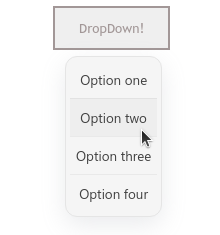
a Javascript module that creates ready-to-go dropdown menus
## installation
```
npm install --save @karim04/dropdown-menu
```
## Usage
##### import the module in your code
```javascript
import Dropdown from '@karim04/dropdown-menu';
```
##### and create a dropdown menu using:
```javascript
const menuName = Dropdown.create(triggeringElement);
```
pass any element to the create method and it will create a dropdown menu for that element that will be toggled by clicking on that triggering element, and it returns you the dropdown menu object
#### disabling default styling
if you want to disable default styling to add your own, pass false to the second paramater in the create method
```javascript
const menuName = Dropdown.create(triggeringElement, false);
```
### Returned Object Methods and properties
###### Add Menu Item
```javascript
menuName.add(itemElement, onClickFunc);
```
first arguement takes an element or a string and adds it to the menu as an item, and the second argument takes a function that is trigged when the item is clicked
###### menu property
```javascript
menuName.menu;
```
returns the menu element that contains the items
###### element property
```javascript
menuName.element;
```
returns the parent element that triggers the menu
## License
This project is licensed under the MIT license.