 English | [简体中文](./README.zh-CN.md) | [日本語](./README.ja-JP.md)
# Graphic Walker



[](https://twitter.com/kanaries_data)
[](https://discord.gg/WWHraZ8SeV)
[](https://www.youtube.com/@kanaries_data)
[](https://www.linkedin.com/company/kanaries-data/)
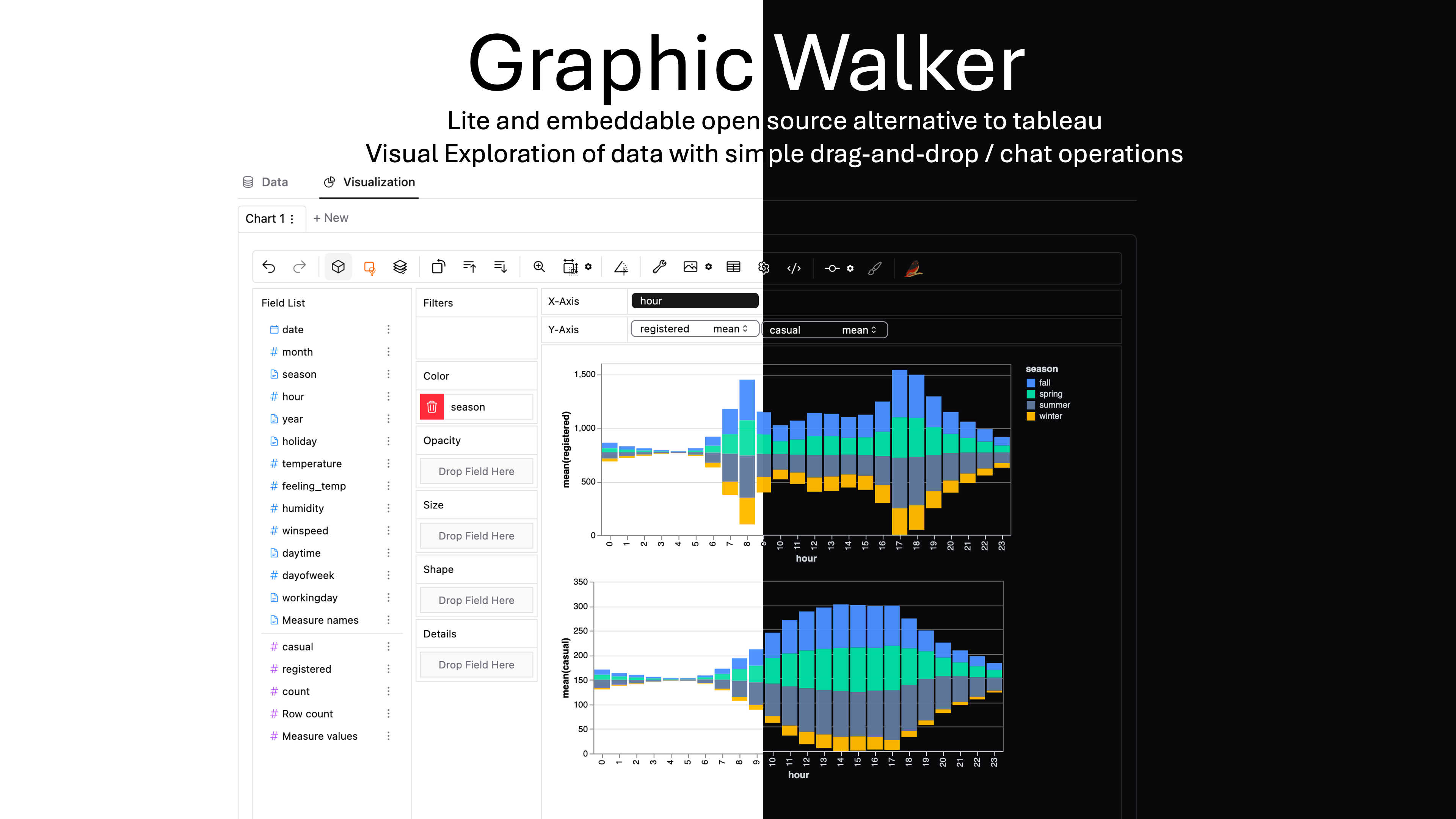
Graphic Walker is a different open-source alternative to Tableau. It allows data scientists to analyze data and visualize patterns with simple drag-and-drop / natural language query operations.
### Why is it different?
It is extremely easy to embed in your apps just as a React component 🎉! The original purpose of graphic-walker is not to be a heavy BI platform, but a easy to embed, lite, plugin.
### Main features
+ A user friendly drag and drop based interaction for exploratory data analysis with visualizations.
+ A Data Explainer which explains why some patterns occur / what may cause them (like salesforce einstein).
+ Using web workers to handle computational tasks which allow you to use it as a pure front-end app.
+ A general query interface for submit data queries to your own computation service. You can have a look at how we using DuckDB to handle data queries in [PyGWalker](https://github.com/kanaries/pygwalker)
+ Light Theme / Dark Theme! 🤩
+ Spatial visualization. (supports GeoJSON, TopoJSON)
+ Natural language / Chat interface. Ask question about your data!
+ A grammar of graphics based visual analytic user interface where users can build visualizations from low-level visual channel encodings. (based on [vega-lite](https://vega.github.io/vega-lite/))
+ A hand-writable chart spec (TerseSpec): describe charts with field names and `agg(field)` shorthand, then expand with `normalize()`. See [TerseSpec](#tersespec-write-charts-by-hand-). 🆕
https://github.com/Kanaries/graphic-walker/assets/22167673/15d34bed-9ccc-42da-a2f4-9859ea36fa65
> [!TIP]
> If you want more AI features, we also build [runcell](https://runcell.dev), an AI Code Agent in Jupyter that understands your code/data/cells and generate code, execute cells and take actions for you. It can be used in jupyter lab with `pip install runcell`
https://github.com/user-attachments/assets/9ec64252-864d-4bd1-8755-83f9b0396d38
## Usage for End Users
First, upload your Data(csv/json) file, preview your data, and define the analytic type of columns (dimension or measure).
> We are developing more types of data sources. You are welcome to raise an issue telling us the types of sources you are using. If you are a developer, graphic-walker can be used as an embedding component, and you can pass your parsed data source to it. For example, [Rath](https://github.com/Kanaries/Rath) uses graphic-walker as an embedded component, and it supports many common data sources. You can load your data in [Rath](https://github.com/Kanaries/Rath) and bring the data into graphic-walker. In this way, users can also benefit from data cleaning and transformation features in [Rath](https://github.com/Kanaries/Rath).
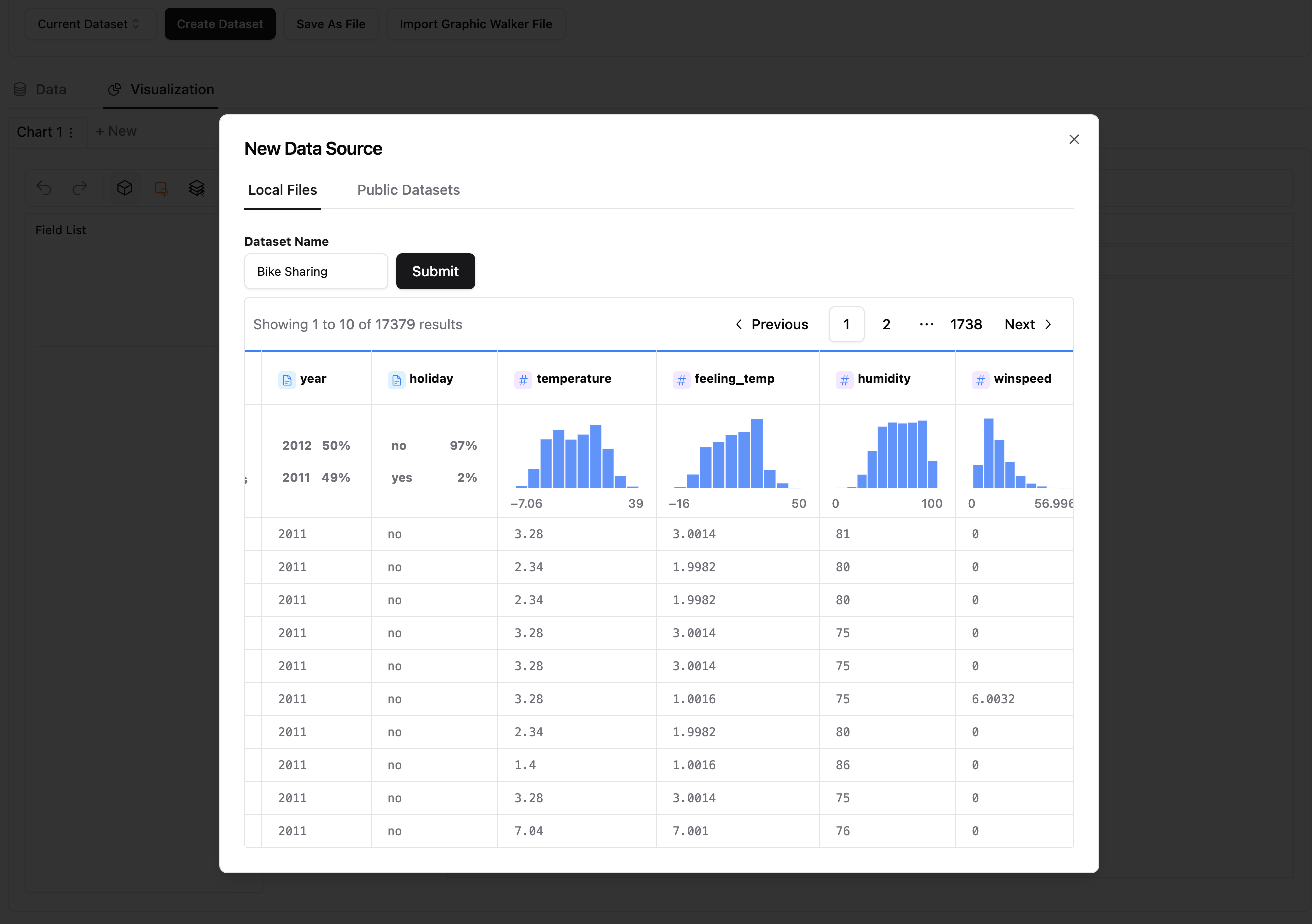
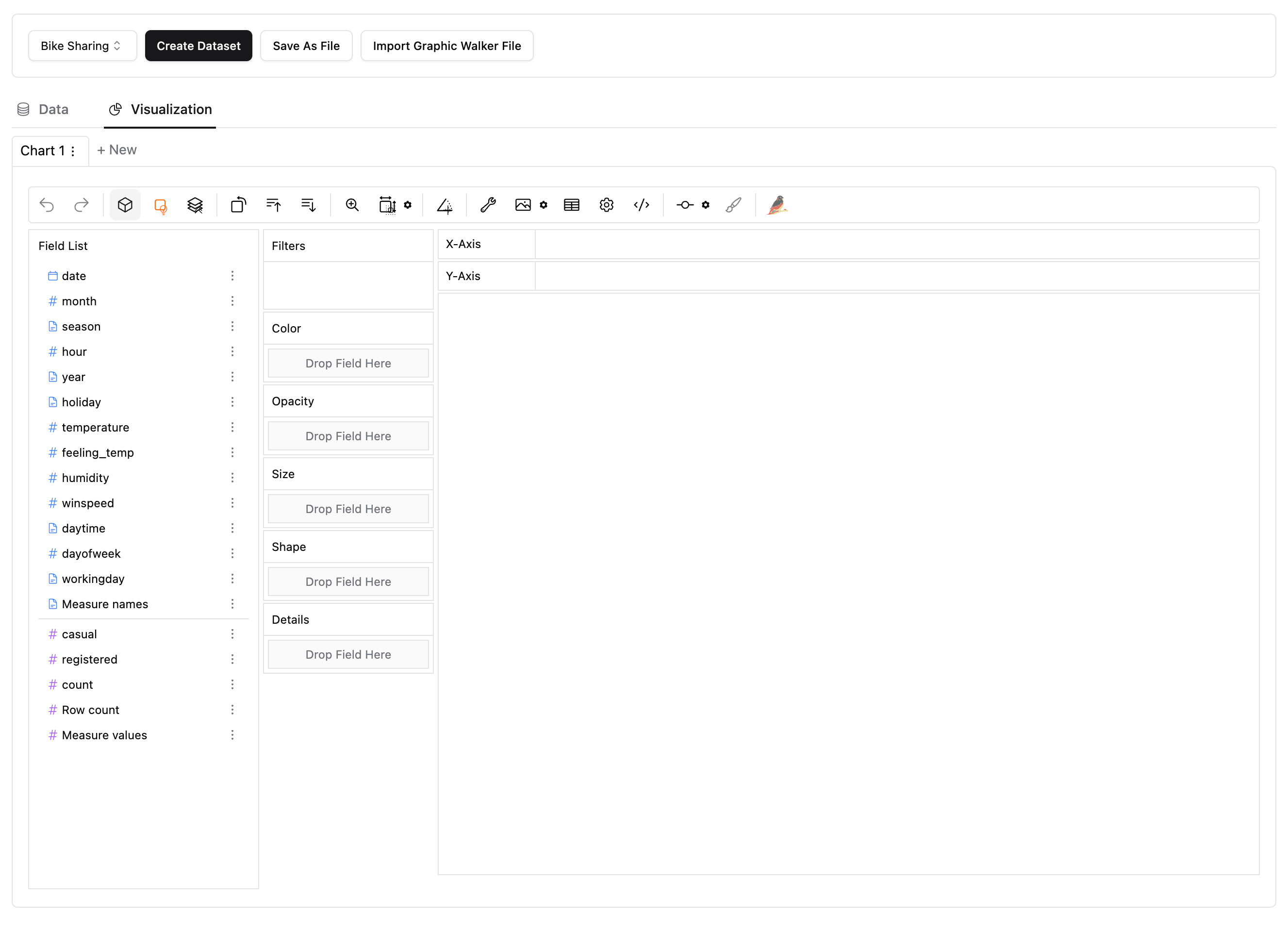
When the data is ready, click the 'Submit' button to use the data. On the left-hand side, `Field List` is all of your original columns in the table. You can drag them into visual channels (rows, columns, color, opacity, etc.) and make visualizations.
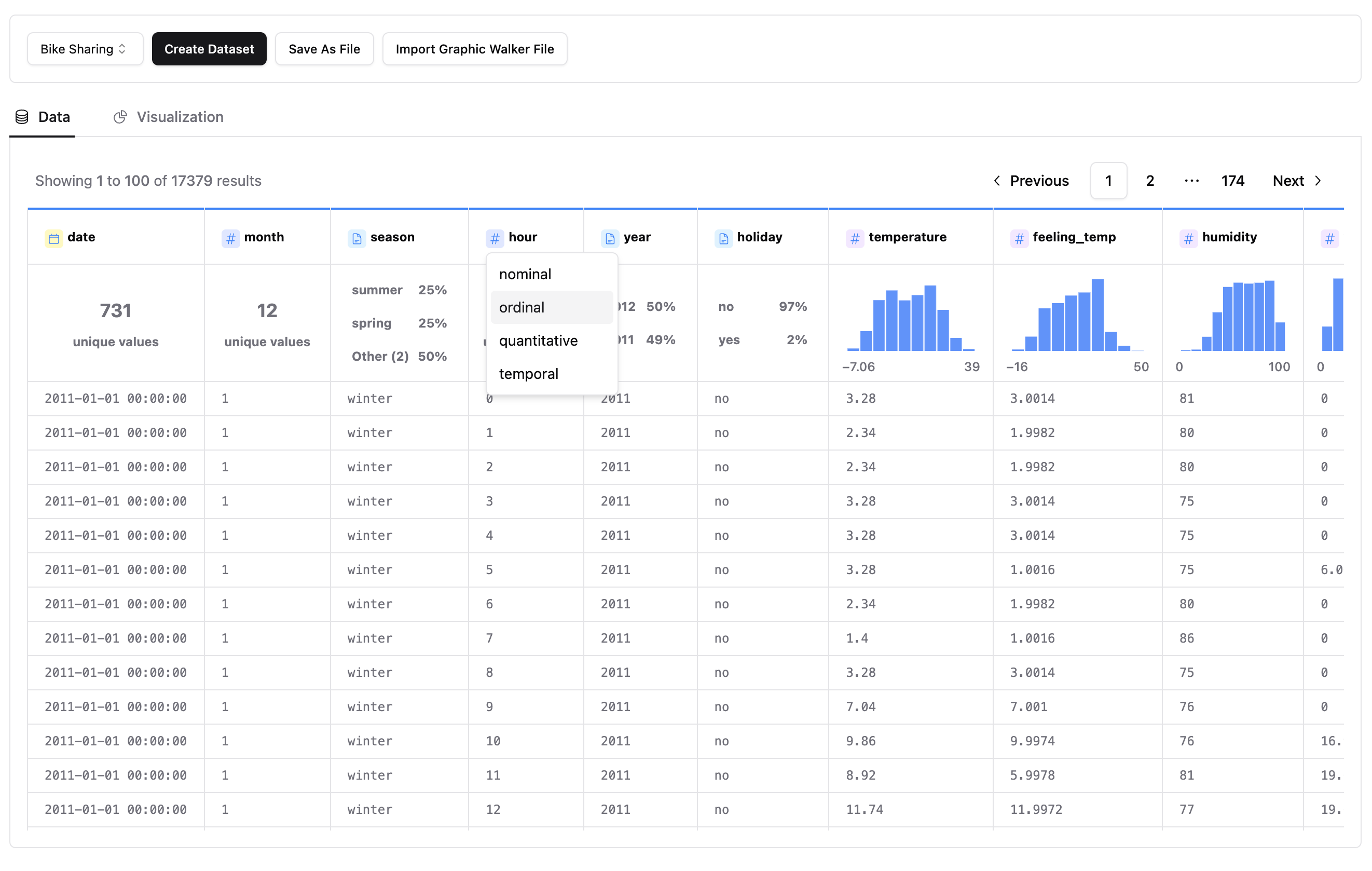
You can also view raw data any time or edit the meta data.
Visualize your data with drag and drop operation. For measures, you can define the aggregation methods (sum, mean, count etc.)
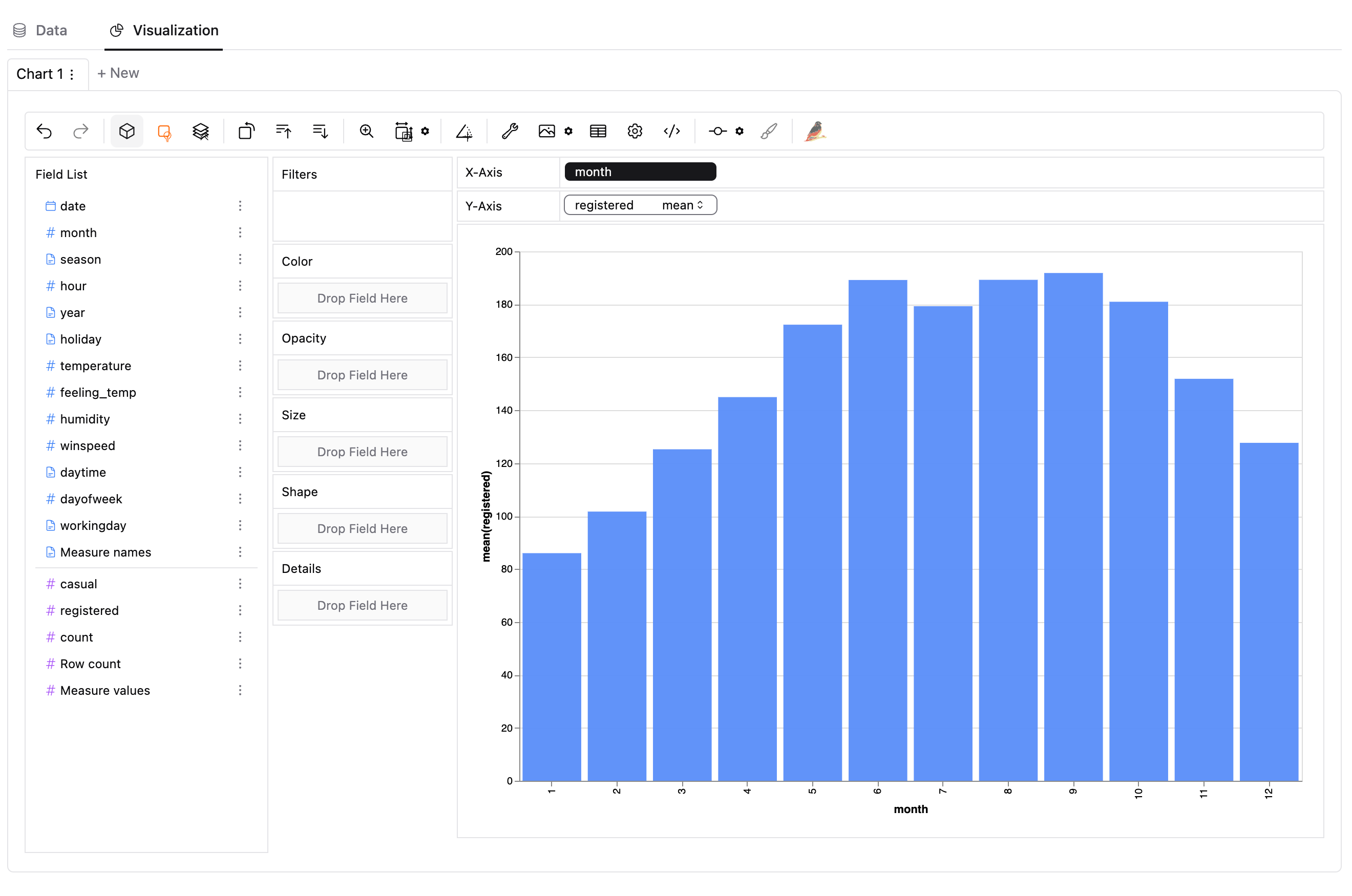
You can change the mark type into others to make different charts, for example a line chart.
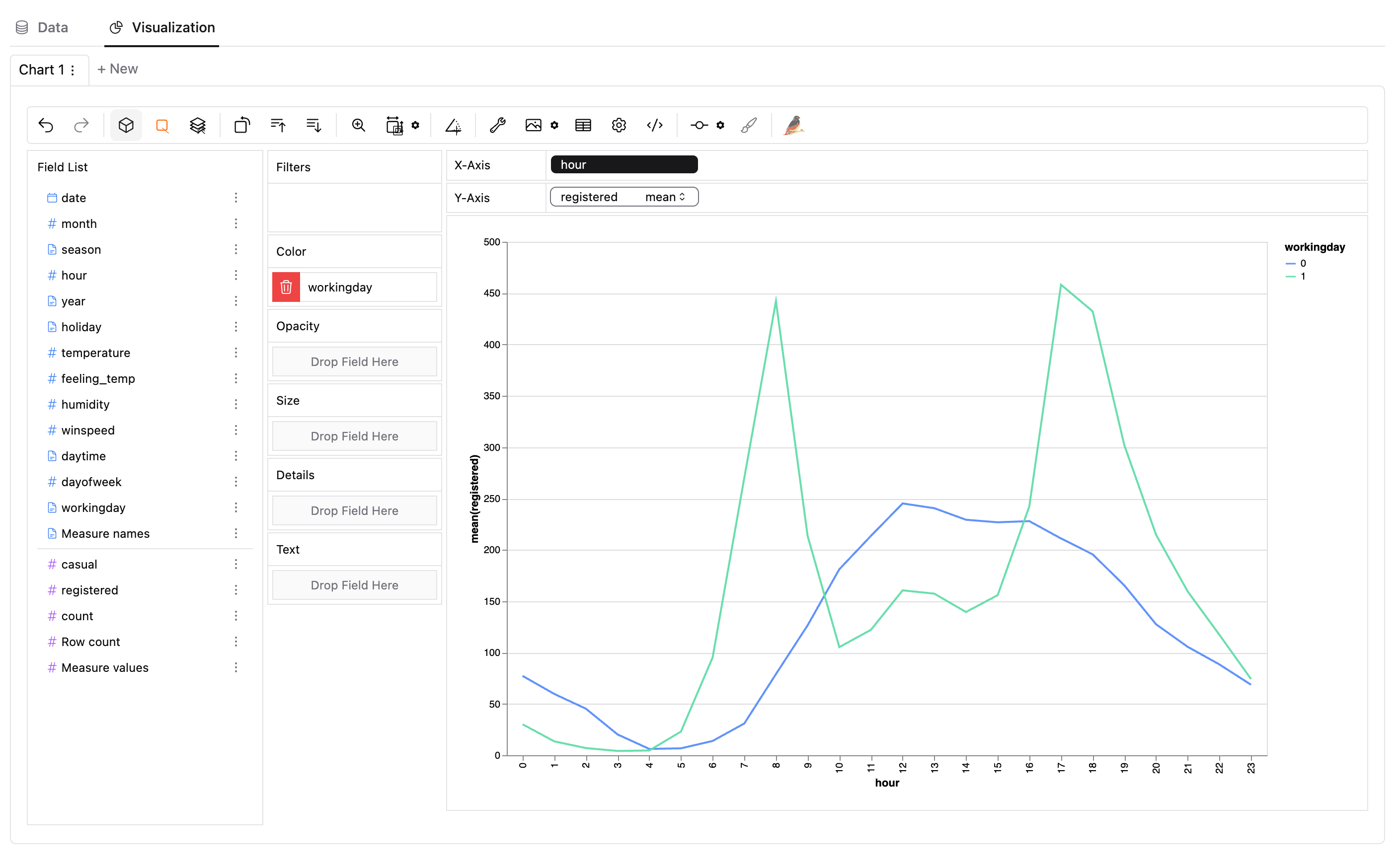
To compare different measures, you can create a concat view by adding more than one measure into rows/columns.
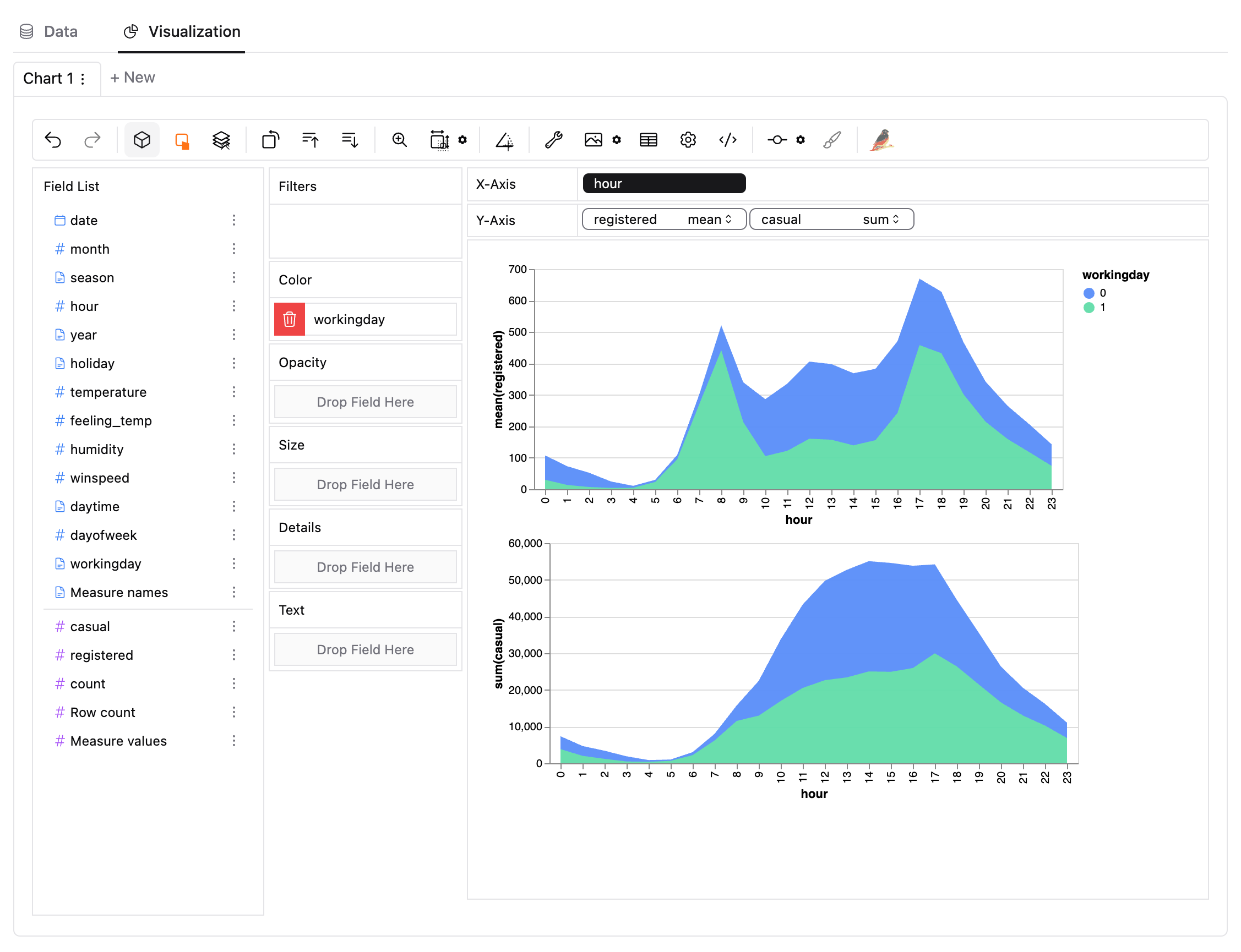
To make a facet view of several subviews divided by the value in dimension, put dimensions into rows or columns to make a facets view. The rules are similar to Tableau.
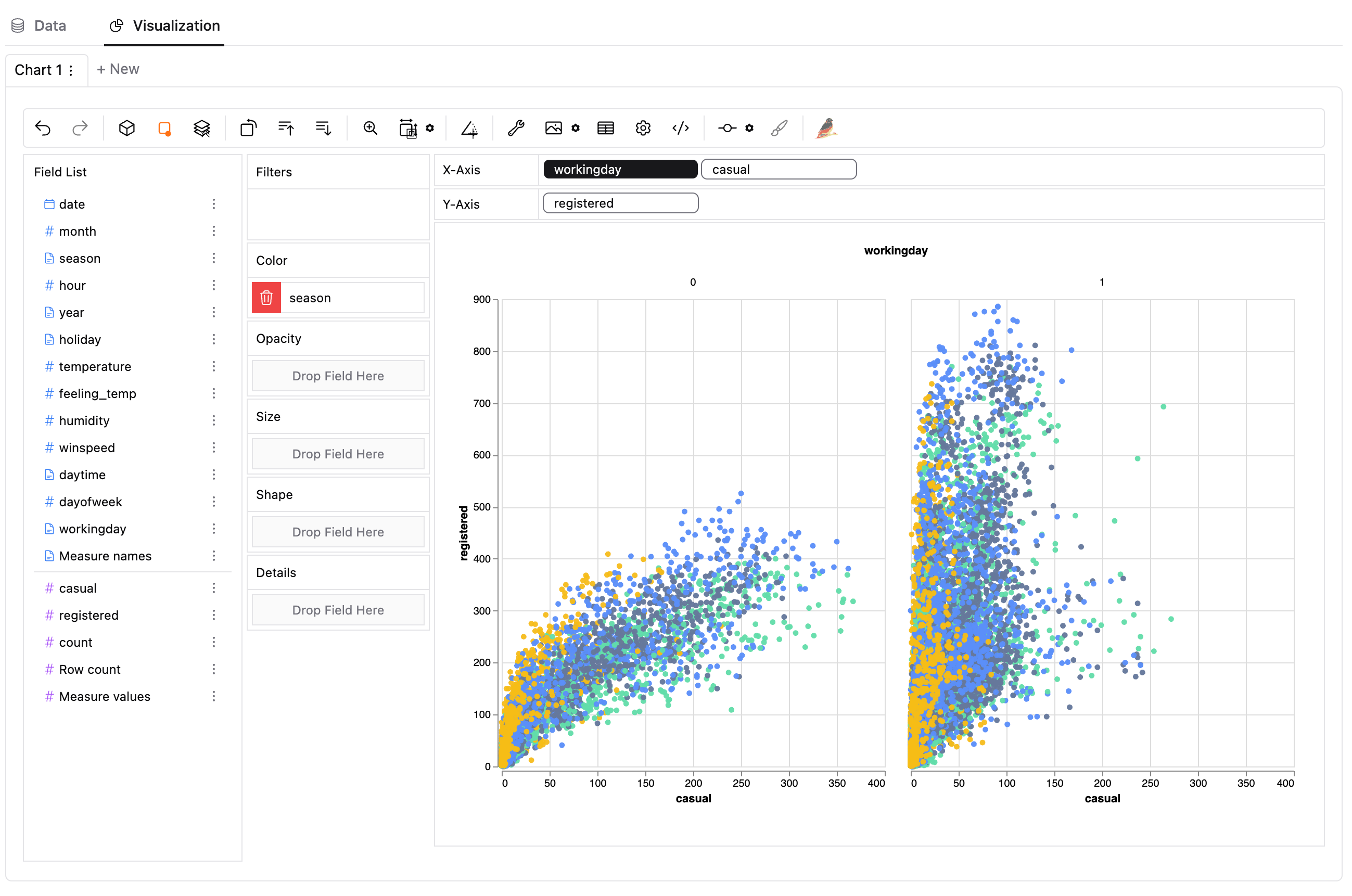
When you finish exploration, you can save the result into a local file, which can be imported next time.
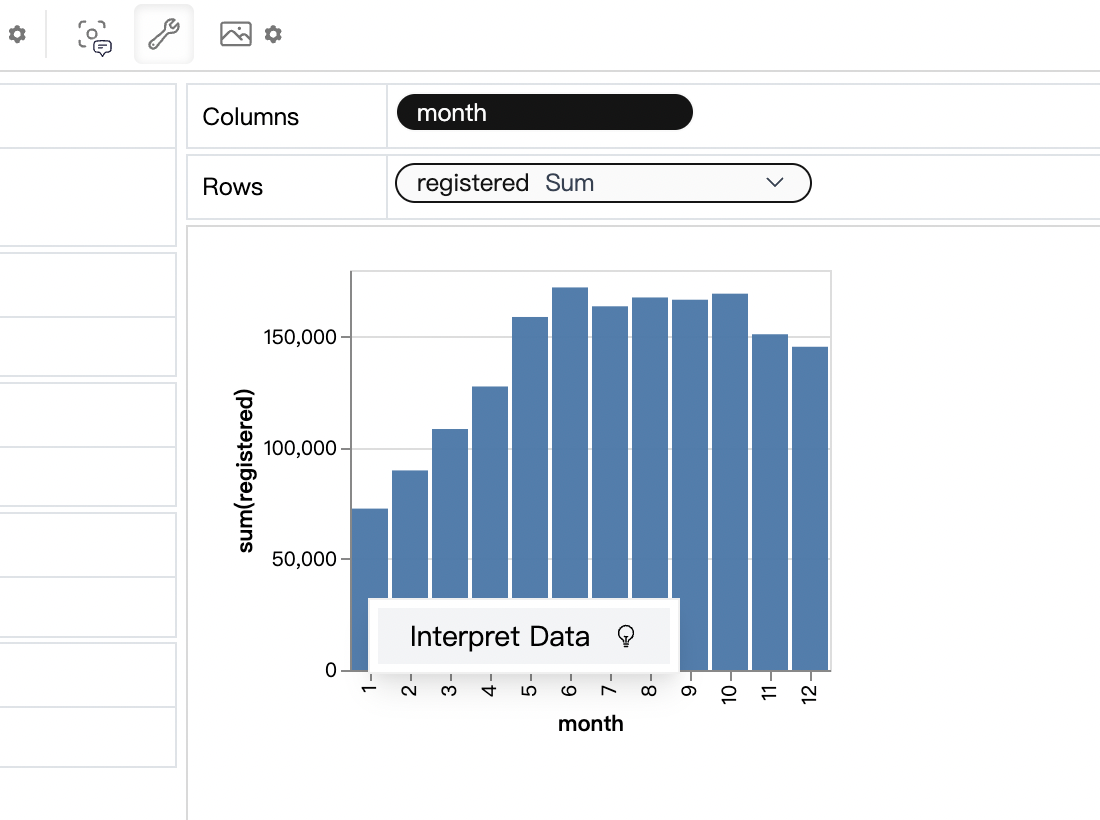
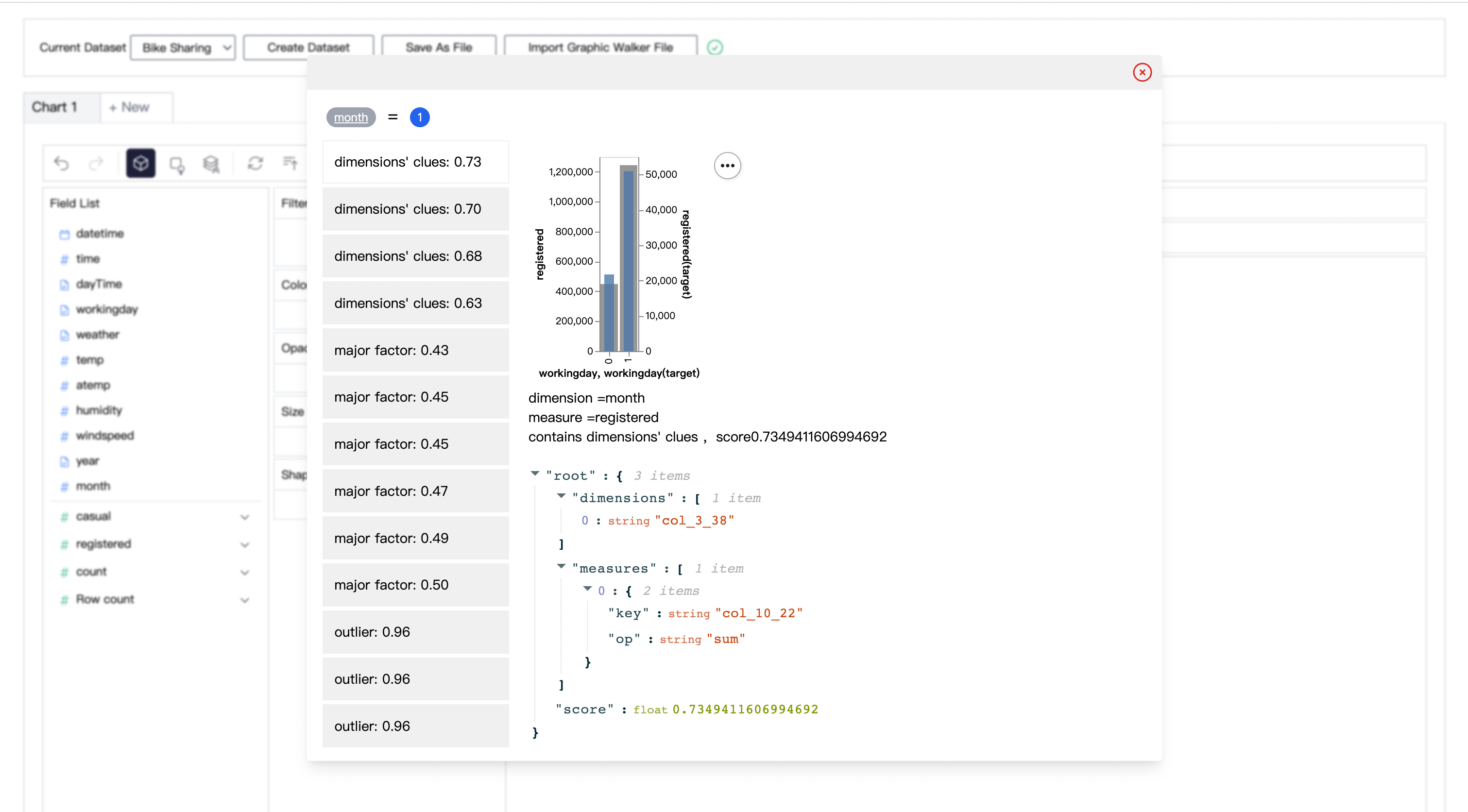
Sometimes you may have further questions, such as why sales in Dec. is high. Graphic Walker provides a data explainer for these cases.
For example, in bike sharing dataset, ask why registered rents in Jan. is lower than expectation, the explainer will try to find some potential explanations:
(percent of number of working days is less than average)
## Deploy, Usage for Developers
If you want to use Graphic Walker as a data exploration tool without thinking about deployment details, you can use our online out-of-the-box version.
Use it here: [Graphic Walker Online](https://graphic-walker.kanaries.net)
Examples here: [Graphic Walker Examples](https://graphic-walker.kanaries.net/examples/)
### Method 1: use as an independent app.
```bash
yarn install
yarn workspace @kanaries/graphic-walker build
```
### Method 2: Use as an embedding component module 🔥
Using graphic walker can be extremely easy. It provides a single React component which allows you to easily embed it in your app.
```bash
yarn add @kanaries/graphic-walker
# or
npm i --save @kanaries/graphic-walker
```
In your app:
```typescript
import { GraphicWalker } from '@kanaries/graphic-walker';
const YourEmbeddingApp: React.FC = props => {
const { data, fields } = props;
return ;
}
export default YourEmbeddingApp;
```
If you have a configuration of GraphicWalker chart, you can use the `PureRenderer` or `GraphicRenderer` component to make a single chart without controls UI.
```typescript
import { PureRenderer } from '@kanaries/graphic-walker';
const YourChart: React.FC = props => {
const { rawData, visualState, visualConfig, visualLayout } = props;
return ;
}
export default YourChart;
```
The `GraphicRenderer` component accepts same props as `GraphicWalker`, and would display the chart and the filters of the chart to change.
```typescript
import { GraphicRenderer } from '@kanaries/graphic-walker';
const YourChart: React.FC = props => {
const { data, fields, spec } = props;
return ;
}
export default YourChart;
```
You can use `TableWalker` component to make a single table view with your data. it accepts same props as `GraphicWalker`, but you don't need to pass the chart prop, and you can control the page size by pageSize prop(default value is 20).
```typescript
import { TableWalker } from '@kanaries/graphic-walker';
const YourChart: React.FC = props => {
const { data, fields, spec } = props;
return ;
}
export default YourChart;
```
### TerseSpec: write charts by hand 🆕
Charts in Graphic Walker are stored in a canonical spec format (`IChart`) that is verbose and machine-oriented: fields carry generated ids, and every channel, pool and layout knob is explicit. **TerseSpec** is a hand-writable authoring grammar on top of it — you reference fields by *name*, and `normalize()` expands the terse spec into a full canonical chart that any component accepts:
```typescript
import { GraphicRenderer, normalize } from '@kanaries/graphic-walker';
const YourChart = ({ data, fields }) => {
const chart = normalize(
{
mark: 'bar',
x: 'Manufacturer',
y: 'mean(Price_in_thousands)',
color: 'Vehicle_type',
},
fields
);
return ;
};
```
The grammar at a glance:
| Syntax | Meaning |
| --- | --- |
| `"x": "Manufacturer"` | reference a field by name |
| `"y": "mean(Price_in_thousands)"` | aggregation shorthand: `sum` / `mean` / `count` / `median` / `min` / `max` / `variance` / `stdev` |
| `"x": "fid:col_0_64"` | `fid:` prefix bypasses name resolution |
| `{ "field", "aggregate", "sort", "timeUnit" }` | object form for per-channel options; `timeUnit` performs a real query-level date drill |
| `"computed": [{ "name", "expr" \| "bin" \| "log" }]` | inline computed fields; quote refs inside `expr` like `'"Horsepower" / "Curb_weight"'` |
| `"filters": [{ "field", "oneOf" \| "notIn" \| "range" \| "timeRange" }]` | row filters; `timeRange` takes epoch milliseconds |
| `"aggregate": false` / `"stack"` / `"limit"` / `"sort"` | chart-level knobs |
| `"config"` / `"layout"` | canonical escape hatches, merged last with the highest priority |
`normalize(input, fields)` is a unified entry: besides TerseSpec it also accepts canonical charts, partial charts, legacy persisted specs and Vega-Lite-like specs, always returning a complete canonical `IChart` (stamped with `$schema`) and validating computed-field references along the way — an unknown field name fails fast with nearest-candidate suggestions.
TerseSpec is authoring-only. Persistence and export/import keep using the canonical format, so nothing changes for previously saved charts.
👉 Try the interactive grammar lessons in the [playground](https://graphic-walker.kanaries.net/examples/TerseSpec), read the full contract in [docs/terse-spec-design.md](./docs/terse-spec-design.md), or validate against the JSON Schema at `https://graphic-walker.kanaries.net/tersespec_v1.json`.
### try local (dev mode)
```bash
# packages/graphic-walker
npm run dev
```
## Share with Open Source Community
> Please consider sharing your experience or thoughts about [graphic walker](https://github.com/Kanaries/graphic-walker) with the border Open Source community If you like this project.
[](https://twitter.com/share?url=https://github.com/Kanaries/graphic-walker&text=Graphic-Walker:%20A%20different%20type%20of%20open-source%20alternative%20to%20Tableau)
[](https://www.facebook.com/sharer/sharer.php?u=https://github.com/Kanaries/graphic-walker)
[](https://www.linkedin.com/shareArticle?url=https://github.com/Kanaries/graphic-walker&title=Graphic-Walker:%20A%20different%20type%20of%20open-source%20alternative%20to%20Tableau)
[](https://news.ycombinator.com/submitlink?u=https://github.com/Kanaries/graphic-walker)
[](https://reddit.com/submit?url=https://github.com/Kanaries/graphic-walker&title=Graphic-Walker:%20A%20different%20type%20of%20open-source%20alternative%20to%20Tableau)
## I18n Support
Graphic Walker now support _English_ (as `"en"` or `"en-US"`) , _Japanese_ (as `"ja"` or `"ja-JP"`) , _Chinese_ (as `"zh"` or `"zh-CN"`) with built-in locale resources. You can simply provide a valid string value (enumerated above) as `props.i18nLang` to set a language or synchronize your global i18n language with the component like the following example:
```typescript
const YourApp = props => {
// ...
const curLang = /* get your i18n language */;
return
}
```
### Customize I18n
If you need i18n support to cover languages not supported currently, or to totally rewrite the content of any built-in resource(s), you can also provide your resource(s) as [`props.i18nResources`](#propsi18nresources) to Graphic Walker like this.
```typescript
const yourResources = {
'de-DE': {
'key': 'value',
...
},
'fr-FR': {
...
},
};
const YourApp = props => {
// ...
const curLang = /* get your i18n language */;
return
}
```
Graphic Walker uses `react-i18next` to support i18n, which is based on `i18next`, so your translation resources should follow [this format](https://www.i18next.com/misc/json-format). You can simply fork and edit `/locales/en-US.json` to start your translation.
It is recommended to use [chatGPT-i18n](https://github.com/ObservedObserver/chatgpt-i18n) to translate to your target languages.
## API
Graphic Walker Props & Ref interface
### Props
```ts
export interface IGWProps {
data?: IRow[];
fields?: IMutField[];
spec?: Specification;
i18nLang?: string;
i18nResources?: { [lang: string]: Record };
keepAlive?: boolean | string;
fieldKeyGuard?: boolean;
vizThemeConfig?: IThemeKey;
apperence?: IDarkMode;
storeRef?: React.RefObject;
computation?: IComputationConfig;
toolbar?: {
extra?: ToolbarItemProps[];
exclude?: string[];
};
uiTheme?: IUIThemeConfig;
}
```
#### `data`: optional _{ `Array<{[key: string]: any}>` }_
Array of key-value object data. Provide this prop with `fields` prop together.
#### `fields`: optional _{ [`IMutField`](./packages/graphic-walker/src/interfaces.ts) }_
Array of fields(columns) of the data. Provide this prop with `data` prop together.
#### ~~`spec`: optional _{ [`Specification`](./packages/graphic-walker/src/interfaces.ts) }_~~
Visualization specification. This is an internal prop, you should not provide this prop directly. If you want to control the visualization specification, you can use [`storeRef`](#storeref) prop. To describe charts programmatically, prefer [TerseSpec + `normalize()`](#tersespec-write-charts-by-hand-) with the `chart` prop.
#### `i18nLang`: optional _{ `string = 'en-US'` }_
Graphic Walker support i18n, you can set the language of the component by this prop. Currently, we support `en-US`, `zh-CN`, `ja-JP` with built-in locale resources. If you want to use other languages, you can provide your own locale resources by [`i18nResources` prop](#i18nresources).
#### `i18nResources`: optional _{ `{ [lang: string]: Record }` }_
Customize locale resources. See [Customize I18n](#customize-i18n) for more details.
#### `keepAlive`: optional _{ `boolean | string = false` }_
Whether to keep the component state when it is unmounted. If provided, after you unmount the graphic-walker component, the state will still be stored, and will be restored when the component is mount again. If you need to enable `keepAlive` for multiple graphic-walker components, you can provide a unique string value for each component to distinguish them.
#### `vizThemeConfig`: optional _{ `IThemeKey = "vega"` }_
Specify the chart theme to use.
#### `appearance`: optional _{ `IDarkMode = "media"` }_
Specify the dark mode preference. There're three valid values:
+ `"media"`: Use the system dark mode preference.
+ `"dark"`: Always use dark mode.
+ `"light"`: Always use light mode.
#### `storeRef`: optional _{ `React.RefObject` }_
If you want to control the visualization specification, you can provide a `React.RefObject` to this prop. The `IGlobalStore` is the combined store context of Graphic Walker, you can use it to control the visualization specification.
#### `computation`: optional _{ [`IComputationFunction`](./packages/graphic-walker/src/interfaces.ts) }_
Specify the computation configuration. See [Computation](./computation.md) for more details.
1. Client-side computation (default)
Provide noting to use client-side computation. In this mode, the computation will be done in the browser (mainly use WebWorker).
2. Server-side computation
Graphic Walker will call given computation function with [`IDataQueryPayload`](./packages/graphic-walker/src/interfaces.ts) as parameter.
The function should returns a [`IRow[]`](./packages/graphic-walker/src/interfaces.ts) as result.
When you are using Server-side computation, you should provide `fields` together.
#### `toolbar`: optional _{ `ToolbarProps` }_
Customize the toolbar.
#### `scales`: optional _{ [`IChannelScales`](./packages/graphic-walker/src/interfaces.ts) }_
Customize the scale of color, opacity, and size channel.
see [Vega Docs](https://vega.github.io/vega/docs/schemes/#reference) for available color schemes.
Here are some examples:
```ts
// use a another color pattren
const channelScales = {
color: {
scheme: "tableau10"
}
}
// use a diffrent color pattren in dark mode and light mode
const channelScales = {
color({theme}) {
if(theme === 'dark') {
return {
scheme: 'darkblue'
}
}else {
return {
scheme: 'lightmulti'
}
}
}
}
// use a custom color palette
const channelScales = {
color: {
range: ['red', 'blue', '#000000']
}
}
// customing opacity
const channelScales = {
// map value of 0 - 255 to opacity 0 - 1
opacity: {
range: [0, 1],
domain: [0, 255],
}
}
// set min radius for arc chart
const channelScales = {
radius: {
rangeMin: 20
}
}
```
#### `uiTheme`: optional _{ `IUIThemeConfig` }_ (beta stage)
Specify the color that graphic walker use, so the background of Graphic Walker will match to your website.
> currently in beta stage, the parameter may change in the future.
You can pass either css color name (such as cyan), tailwind color name (such as zinc-900), hex color (e.g. #ff0000), hsl color (e.g. hsl(217.2 91.2% 59.8%)), or hwb color(e.g. hwb(60, 3%, 60%)).
you can also use helpers to help you create a color config.
Here are some examples:
```tsx
import { getColorConfigFromPalette, getPaletteFromColor } from '@kanaries/graphic-walker'
const uiTheme: IUIThemeConfig = {
light: {
background: 'amber-100',
foreground: 'amber-950',
primary: 'amber-950',
'primary-foreground': 'amber-50',
muted: 'amber-200',
'muted-foreground': 'amber-500',
border: 'amber-300',
ring: 'amber-950',
},
dark: {
background: 'amber-900',
foreground: 'amber-50',
primary: 'amber-50',
'primary-foreground': 'amber-800',
muted: 'amber-700',
'muted-foreground': 'amber-400',
border: 'amber-700',
ring: 'amber-300',
},
};
import colors from 'tailwindcss/colors';
const uiTheme = getColorConfigFromPalette(colors.zinc);
const uiTheme = getColorConfigFromPalette(getPaletteFromColor('#6366f1'));
```
### Ref
```ts
export interface IGWHandler {
chartCount: number;
chartIndex: number;
openChart: (index: number) => void;
get renderStatus(): IRenderStatus;
onRenderStatusChange: (cb: (renderStatus: IRenderStatus) => void) => (() => void);
exportChart: IExportChart;
exportChartList: IExportChartList;
}
```
#### `chartCount`: _{ `number` }_
Length of the "chart" tab list.
#### `chartIndex`: _{ `number` }_
Current selected chart index.
#### `openChart`: _{ `(index: number) => void` }_
Switches to the specified chart.
#### `renderStatus`: _{ `IRenderStatus` }_
Returns the status of the current chart. It may be one of the following values:
* `"computing"`: _GraphicWalker_ is computing the data view.
* `"rendering"`: _GraphicWalker_ is rendering the chart.
* `"idle"`: Rendering is finished.
* `"error"`: An error occurs during the process above.
#### `onRenderStatusChange`: _{ `(cb: (renderStatus: IRenderStatus) => void) => (() => void)` }_
Registers a callback function to listen to the status change of the current chart. It returns a dispose function to remove this callback.
#### `exportChart`: _{ `IExportChart` }_
Exports the current chart.
#### `exportChartList`: _{ `IExportChartList` }_
Exports all charts. It returns an async generator to iterate over all charts. For example:
```ts
for await (const chart of gwRef.current.exportChartList()) {
console.log(chart);
}
```
## Server integration
For those who need to integrate graphic-walker with their own databases/OLAP, you can develop based on our SDK [gw-dsl-parser](https://github.com/Kanaries/gw-dsl-parser)
which translate graphic-walker specification to SQL
## What's next
Graphic Walker is basically manual data exploration software. When facing more complex datasets, manual exploration can cost a lot of time, [Rath](https://github.com/Kanaries/Rath) is software providing a different data analysis experience with automation enhancement.
## LICENSE
Please refer to [LICENSE](./LICENSE) and [LICENSE2 for Kanaries logos](./LICENSE2) file.
English | [简体中文](./README.zh-CN.md) | [日本語](./README.ja-JP.md)

# Graphic Walker



[](https://twitter.com/kanaries_data)
[](https://discord.gg/WWHraZ8SeV)
[](https://www.youtube.com/@kanaries_data)
[](https://www.linkedin.com/company/kanaries-data/)
Graphic Walker is a different open-source alternative to Tableau. It allows data scientists to analyze data and visualize patterns with simple drag-and-drop / natural language query operations.
### Why is it different?
It is extremely easy to embed in your apps just as a React component 🎉! The original purpose of graphic-walker is not to be a heavy BI platform, but a easy to embed, lite, plugin.
### Main features
+ A user friendly drag and drop based interaction for exploratory data analysis with visualizations.
+ A Data Explainer which explains why some patterns occur / what may cause them (like salesforce einstein).
+ Using web workers to handle computational tasks which allow you to use it as a pure front-end app.
+ A general query interface for submit data queries to your own computation service. You can have a look at how we using DuckDB to handle data queries in [PyGWalker](https://github.com/kanaries/pygwalker)
+ Light Theme / Dark Theme! 🤩
+ Spatial visualization. (supports GeoJSON, TopoJSON)
+ Natural language / Chat interface. Ask question about your data!
+ A grammar of graphics based visual analytic user interface where users can build visualizations from low-level visual channel encodings. (based on [vega-lite](https://vega.github.io/vega-lite/))
+ A hand-writable chart spec (TerseSpec): describe charts with field names and `agg(field)` shorthand, then expand with `normalize()`. See [TerseSpec](#tersespec-write-charts-by-hand-). 🆕
https://github.com/Kanaries/graphic-walker/assets/22167673/15d34bed-9ccc-42da-a2f4-9859ea36fa65
> [!TIP]
> If you want more AI features, we also build [runcell](https://runcell.dev), an AI Code Agent in Jupyter that understands your code/data/cells and generate code, execute cells and take actions for you. It can be used in jupyter lab with `pip install runcell`
https://github.com/user-attachments/assets/9ec64252-864d-4bd1-8755-83f9b0396d38
## Usage for End Users
First, upload your Data(csv/json) file, preview your data, and define the analytic type of columns (dimension or measure).
> We are developing more types of data sources. You are welcome to raise an issue telling us the types of sources you are using. If you are a developer, graphic-walker can be used as an embedding component, and you can pass your parsed data source to it. For example, [Rath](https://github.com/Kanaries/Rath) uses graphic-walker as an embedded component, and it supports many common data sources. You can load your data in [Rath](https://github.com/Kanaries/Rath) and bring the data into graphic-walker. In this way, users can also benefit from data cleaning and transformation features in [Rath](https://github.com/Kanaries/Rath).

When the data is ready, click the 'Submit' button to use the data. On the left-hand side, `Field List` is all of your original columns in the table. You can drag them into visual channels (rows, columns, color, opacity, etc.) and make visualizations.

You can also view raw data any time or edit the meta data.

Visualize your data with drag and drop operation. For measures, you can define the aggregation methods (sum, mean, count etc.)

You can change the mark type into others to make different charts, for example a line chart.

To compare different measures, you can create a concat view by adding more than one measure into rows/columns.

To make a facet view of several subviews divided by the value in dimension, put dimensions into rows or columns to make a facets view. The rules are similar to Tableau.

When you finish exploration, you can save the result into a local file, which can be imported next time.
Sometimes you may have further questions, such as why sales in Dec. is high. Graphic Walker provides a data explainer for these cases.
For example, in bike sharing dataset, ask why registered rents in Jan. is lower than expectation, the explainer will try to find some potential explanations:

(percent of number of working days is less than average)

## Deploy, Usage for Developers
If you want to use Graphic Walker as a data exploration tool without thinking about deployment details, you can use our online out-of-the-box version.
Use it here: [Graphic Walker Online](https://graphic-walker.kanaries.net)
Examples here: [Graphic Walker Examples](https://graphic-walker.kanaries.net/examples/)
### Method 1: use as an independent app.
```bash
yarn install
yarn workspace @kanaries/graphic-walker build
```
### Method 2: Use as an embedding component module 🔥
Using graphic walker can be extremely easy. It provides a single React component which allows you to easily embed it in your app.
```bash
yarn add @kanaries/graphic-walker
# or
npm i --save @kanaries/graphic-walker
```
In your app:
```typescript
import { GraphicWalker } from '@kanaries/graphic-walker';
const YourEmbeddingApp: React.FC = props => {
const { data, fields } = props;
return ;
}
export default YourEmbeddingApp;
```
If you have a configuration of GraphicWalker chart, you can use the `PureRenderer` or `GraphicRenderer` component to make a single chart without controls UI.
```typescript
import { PureRenderer } from '@kanaries/graphic-walker';
const YourChart: React.FC = props => {
const { rawData, visualState, visualConfig, visualLayout } = props;
return ;
}
export default YourChart;
```
The `GraphicRenderer` component accepts same props as `GraphicWalker`, and would display the chart and the filters of the chart to change.
```typescript
import { GraphicRenderer } from '@kanaries/graphic-walker';
const YourChart: React.FC = props => {
const { data, fields, spec } = props;
return ;
}
export default YourChart;
```
You can use `TableWalker` component to make a single table view with your data. it accepts same props as `GraphicWalker`, but you don't need to pass the chart prop, and you can control the page size by pageSize prop(default value is 20).
```typescript
import { TableWalker } from '@kanaries/graphic-walker';
const YourChart: React.FC = props => {
const { data, fields, spec } = props;
return ;
}
export default YourChart;
```
### TerseSpec: write charts by hand 🆕
Charts in Graphic Walker are stored in a canonical spec format (`IChart`) that is verbose and machine-oriented: fields carry generated ids, and every channel, pool and layout knob is explicit. **TerseSpec** is a hand-writable authoring grammar on top of it — you reference fields by *name*, and `normalize()` expands the terse spec into a full canonical chart that any component accepts:
```typescript
import { GraphicRenderer, normalize } from '@kanaries/graphic-walker';
const YourChart = ({ data, fields }) => {
const chart = normalize(
{
mark: 'bar',
x: 'Manufacturer',
y: 'mean(Price_in_thousands)',
color: 'Vehicle_type',
},
fields
);
return ;
};
```
The grammar at a glance:
| Syntax | Meaning |
| --- | --- |
| `"x": "Manufacturer"` | reference a field by name |
| `"y": "mean(Price_in_thousands)"` | aggregation shorthand: `sum` / `mean` / `count` / `median` / `min` / `max` / `variance` / `stdev` |
| `"x": "fid:col_0_64"` | `fid:` prefix bypasses name resolution |
| `{ "field", "aggregate", "sort", "timeUnit" }` | object form for per-channel options; `timeUnit` performs a real query-level date drill |
| `"computed": [{ "name", "expr" \| "bin" \| "log" }]` | inline computed fields; quote refs inside `expr` like `'"Horsepower" / "Curb_weight"'` |
| `"filters": [{ "field", "oneOf" \| "notIn" \| "range" \| "timeRange" }]` | row filters; `timeRange` takes epoch milliseconds |
| `"aggregate": false` / `"stack"` / `"limit"` / `"sort"` | chart-level knobs |
| `"config"` / `"layout"` | canonical escape hatches, merged last with the highest priority |
`normalize(input, fields)` is a unified entry: besides TerseSpec it also accepts canonical charts, partial charts, legacy persisted specs and Vega-Lite-like specs, always returning a complete canonical `IChart` (stamped with `$schema`) and validating computed-field references along the way — an unknown field name fails fast with nearest-candidate suggestions.
TerseSpec is authoring-only. Persistence and export/import keep using the canonical format, so nothing changes for previously saved charts.
👉 Try the interactive grammar lessons in the [playground](https://graphic-walker.kanaries.net/examples/TerseSpec), read the full contract in [docs/terse-spec-design.md](./docs/terse-spec-design.md), or validate against the JSON Schema at `https://graphic-walker.kanaries.net/tersespec_v1.json`.
### try local (dev mode)
```bash
# packages/graphic-walker
npm run dev
```
## Share with Open Source Community
> Please consider sharing your experience or thoughts about [graphic walker](https://github.com/Kanaries/graphic-walker) with the border Open Source community If you like this project.
[](https://twitter.com/share?url=https://github.com/Kanaries/graphic-walker&text=Graphic-Walker:%20A%20different%20type%20of%20open-source%20alternative%20to%20Tableau)
[](https://www.facebook.com/sharer/sharer.php?u=https://github.com/Kanaries/graphic-walker)
[](https://www.linkedin.com/shareArticle?url=https://github.com/Kanaries/graphic-walker&title=Graphic-Walker:%20A%20different%20type%20of%20open-source%20alternative%20to%20Tableau)
[](https://news.ycombinator.com/submitlink?u=https://github.com/Kanaries/graphic-walker)
[](https://reddit.com/submit?url=https://github.com/Kanaries/graphic-walker&title=Graphic-Walker:%20A%20different%20type%20of%20open-source%20alternative%20to%20Tableau)
## I18n Support
Graphic Walker now support _English_ (as `"en"` or `"en-US"`) , _Japanese_ (as `"ja"` or `"ja-JP"`) , _Chinese_ (as `"zh"` or `"zh-CN"`) with built-in locale resources. You can simply provide a valid string value (enumerated above) as `props.i18nLang` to set a language or synchronize your global i18n language with the component like the following example:
```typescript
const YourApp = props => {
// ...
const curLang = /* get your i18n language */;
return
}
```
### Customize I18n
If you need i18n support to cover languages not supported currently, or to totally rewrite the content of any built-in resource(s), you can also provide your resource(s) as [`props.i18nResources`](#propsi18nresources) to Graphic Walker like this.
```typescript
const yourResources = {
'de-DE': {
'key': 'value',
...
},
'fr-FR': {
...
},
};
const YourApp = props => {
// ...
const curLang = /* get your i18n language */;
return
}
```
Graphic Walker uses `react-i18next` to support i18n, which is based on `i18next`, so your translation resources should follow [this format](https://www.i18next.com/misc/json-format). You can simply fork and edit `/locales/en-US.json` to start your translation.
It is recommended to use [chatGPT-i18n](https://github.com/ObservedObserver/chatgpt-i18n) to translate to your target languages.
## API
Graphic Walker Props & Ref interface
### Props
```ts
export interface IGWProps {
data?: IRow[];
fields?: IMutField[];
spec?: Specification;
i18nLang?: string;
i18nResources?: { [lang: string]: Record };
keepAlive?: boolean | string;
fieldKeyGuard?: boolean;
vizThemeConfig?: IThemeKey;
apperence?: IDarkMode;
storeRef?: React.RefObject;
computation?: IComputationConfig;
toolbar?: {
extra?: ToolbarItemProps[];
exclude?: string[];
};
uiTheme?: IUIThemeConfig;
}
```
#### `data`: optional _{ `Array<{[key: string]: any}>` }_
Array of key-value object data. Provide this prop with `fields` prop together.
#### `fields`: optional _{ [`IMutField`](./packages/graphic-walker/src/interfaces.ts) }_
Array of fields(columns) of the data. Provide this prop with `data` prop together.
#### ~~`spec`: optional _{ [`Specification`](./packages/graphic-walker/src/interfaces.ts) }_~~
Visualization specification. This is an internal prop, you should not provide this prop directly. If you want to control the visualization specification, you can use [`storeRef`](#storeref) prop. To describe charts programmatically, prefer [TerseSpec + `normalize()`](#tersespec-write-charts-by-hand-) with the `chart` prop.
#### `i18nLang`: optional _{ `string = 'en-US'` }_
Graphic Walker support i18n, you can set the language of the component by this prop. Currently, we support `en-US`, `zh-CN`, `ja-JP` with built-in locale resources. If you want to use other languages, you can provide your own locale resources by [`i18nResources` prop](#i18nresources).
#### `i18nResources`: optional _{ `{ [lang: string]: Record }` }_
Customize locale resources. See [Customize I18n](#customize-i18n) for more details.
#### `keepAlive`: optional _{ `boolean | string = false` }_
Whether to keep the component state when it is unmounted. If provided, after you unmount the graphic-walker component, the state will still be stored, and will be restored when the component is mount again. If you need to enable `keepAlive` for multiple graphic-walker components, you can provide a unique string value for each component to distinguish them.
#### `vizThemeConfig`: optional _{ `IThemeKey = "vega"` }_
Specify the chart theme to use.
#### `appearance`: optional _{ `IDarkMode = "media"` }_
Specify the dark mode preference. There're three valid values:
+ `"media"`: Use the system dark mode preference.
+ `"dark"`: Always use dark mode.
+ `"light"`: Always use light mode.
#### `storeRef`: optional _{ `React.RefObject` }_
If you want to control the visualization specification, you can provide a `React.RefObject` to this prop. The `IGlobalStore` is the combined store context of Graphic Walker, you can use it to control the visualization specification.
#### `computation`: optional _{ [`IComputationFunction`](./packages/graphic-walker/src/interfaces.ts) }_
Specify the computation configuration. See [Computation](./computation.md) for more details.
1. Client-side computation (default)
Provide noting to use client-side computation. In this mode, the computation will be done in the browser (mainly use WebWorker).
2. Server-side computation
Graphic Walker will call given computation function with [`IDataQueryPayload`](./packages/graphic-walker/src/interfaces.ts) as parameter.
The function should returns a [`IRow[]`](./packages/graphic-walker/src/interfaces.ts) as result.
When you are using Server-side computation, you should provide `fields` together.
#### `toolbar`: optional _{ `ToolbarProps` }_
Customize the toolbar.
#### `scales`: optional _{ [`IChannelScales`](./packages/graphic-walker/src/interfaces.ts) }_
Customize the scale of color, opacity, and size channel.
see [Vega Docs](https://vega.github.io/vega/docs/schemes/#reference) for available color schemes.
Here are some examples:
```ts
// use a another color pattren
const channelScales = {
color: {
scheme: "tableau10"
}
}
// use a diffrent color pattren in dark mode and light mode
const channelScales = {
color({theme}) {
if(theme === 'dark') {
return {
scheme: 'darkblue'
}
}else {
return {
scheme: 'lightmulti'
}
}
}
}
// use a custom color palette
const channelScales = {
color: {
range: ['red', 'blue', '#000000']
}
}
// customing opacity
const channelScales = {
// map value of 0 - 255 to opacity 0 - 1
opacity: {
range: [0, 1],
domain: [0, 255],
}
}
// set min radius for arc chart
const channelScales = {
radius: {
rangeMin: 20
}
}
```
#### `uiTheme`: optional _{ `IUIThemeConfig` }_ (beta stage)
Specify the color that graphic walker use, so the background of Graphic Walker will match to your website.
> currently in beta stage, the parameter may change in the future.
You can pass either css color name (such as cyan), tailwind color name (such as zinc-900), hex color (e.g. #ff0000), hsl color (e.g. hsl(217.2 91.2% 59.8%)), or hwb color(e.g. hwb(60, 3%, 60%)).
you can also use helpers to help you create a color config.
Here are some examples:
```tsx
import { getColorConfigFromPalette, getPaletteFromColor } from '@kanaries/graphic-walker'
const uiTheme: IUIThemeConfig = {
light: {
background: 'amber-100',
foreground: 'amber-950',
primary: 'amber-950',
'primary-foreground': 'amber-50',
muted: 'amber-200',
'muted-foreground': 'amber-500',
border: 'amber-300',
ring: 'amber-950',
},
dark: {
background: 'amber-900',
foreground: 'amber-50',
primary: 'amber-50',
'primary-foreground': 'amber-800',
muted: 'amber-700',
'muted-foreground': 'amber-400',
border: 'amber-700',
ring: 'amber-300',
},
};
import colors from 'tailwindcss/colors';
const uiTheme = getColorConfigFromPalette(colors.zinc);
const uiTheme = getColorConfigFromPalette(getPaletteFromColor('#6366f1'));
```
### Ref
```ts
export interface IGWHandler {
chartCount: number;
chartIndex: number;
openChart: (index: number) => void;
get renderStatus(): IRenderStatus;
onRenderStatusChange: (cb: (renderStatus: IRenderStatus) => void) => (() => void);
exportChart: IExportChart;
exportChartList: IExportChartList;
}
```
#### `chartCount`: _{ `number` }_
Length of the "chart" tab list.
#### `chartIndex`: _{ `number` }_
Current selected chart index.
#### `openChart`: _{ `(index: number) => void` }_
Switches to the specified chart.
#### `renderStatus`: _{ `IRenderStatus` }_
Returns the status of the current chart. It may be one of the following values:
* `"computing"`: _GraphicWalker_ is computing the data view.
* `"rendering"`: _GraphicWalker_ is rendering the chart.
* `"idle"`: Rendering is finished.
* `"error"`: An error occurs during the process above.
#### `onRenderStatusChange`: _{ `(cb: (renderStatus: IRenderStatus) => void) => (() => void)` }_
Registers a callback function to listen to the status change of the current chart. It returns a dispose function to remove this callback.
#### `exportChart`: _{ `IExportChart` }_
Exports the current chart.
#### `exportChartList`: _{ `IExportChartList` }_
Exports all charts. It returns an async generator to iterate over all charts. For example:
```ts
for await (const chart of gwRef.current.exportChartList()) {
console.log(chart);
}
```
## Server integration
For those who need to integrate graphic-walker with their own databases/OLAP, you can develop based on our SDK [gw-dsl-parser](https://github.com/Kanaries/gw-dsl-parser)
which translate graphic-walker specification to SQL
## What's next
Graphic Walker is basically manual data exploration software. When facing more complex datasets, manual exploration can cost a lot of time, [Rath](https://github.com/Kanaries/Rath) is software providing a different data analysis experience with automation enhancement.
## LICENSE
Please refer to [LICENSE](./LICENSE) and [LICENSE2 for Kanaries logos](./LICENSE2) file.