# @juicesharp/rpiv-i18n
[](https://www.npmjs.com/package/@juicesharp/rpiv-i18n)
[](https://opensource.org/licenses/MIT)
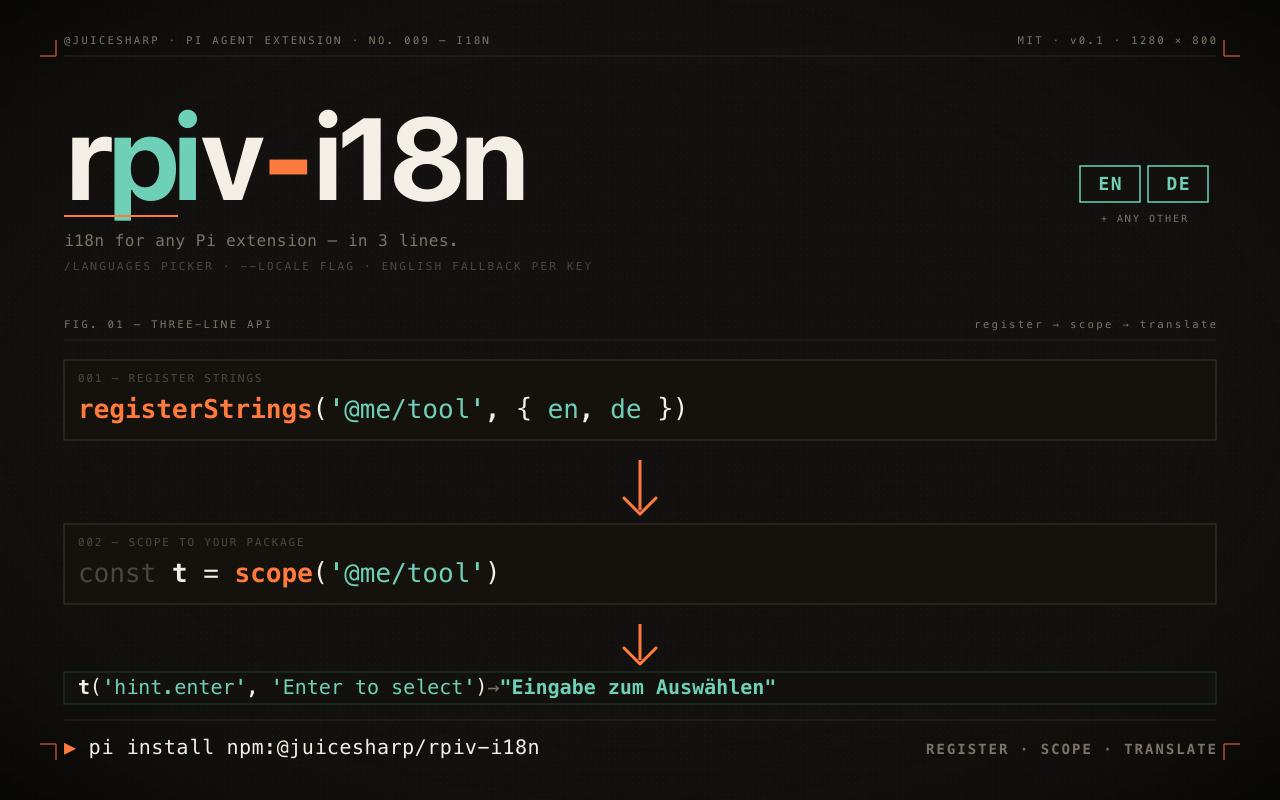
Pick the language every rpiv-\* extension speaks in your [Pi Agent](https://github.com/badlogic/pi-mono)
terminal. It adds a `/languages` picker and a `--locale` flag, and remembers your
choice between sessions. It is also the SDK any Pi extension author calls to make
their own TUI strings translatable — three lines, with English fallback per key.
## Install
```sh
pi install npm:@juicesharp/rpiv-i18n
```
Restart your Pi session.
## Quick start
Run the picker and choose a language:
```
/languages
```
Arrow keys move, `Enter` selects, `Esc` cancels. A `✓` marks your current choice,
and a **System default** row hands control back to your environment. The moment
you select, every installed extension that uses the SDK renders in the new
language — no restart.
To set it for one launch instead, pass the flag:
```sh
pi --locale uk
```
| Code | Language |
| --- | --- |
| `de` | Deutsch |
| `en` | English |
| `es` | Español |
| `fr` | Français |
| `pt` | Português |
| `pt-BR` | Português (Brasil) |
| `ru` | Русский |
| `uk` | Українська |
| `zh` | 中文 |
To localize your own extension, add `@juicesharp/rpiv-i18n` to your
`peerDependencies` (marked optional), then at extension load:
```ts
import { scope } from "@juicesharp/rpiv-i18n";
import { registerLocalesFromDir } from "@juicesharp/rpiv-i18n/loader";
registerLocalesFromDir("@my-org/cool-tool", import.meta.url);
export const t = scope("@my-org/cool-tool");
// then t("welcome.title", "Welcome") at every render site
```
Wrap both imports in the dynamic-import shim from the integration guide below to
stay online in English when the SDK is absent.
## What you get
- **One dial for every extension** — `/languages` writes a single preference and
rebuilds the strings of every registered package at once, not one setting per
tool.
- **Nine languages, no file editing** — every locale in the table above ships
with the extension; nothing to download, compile, or configure.
- **A localized UI with zero setup on most Unix systems** — `LANG` and `LC_ALL`
are read at startup, so `uk_UA.UTF-8` gives you Ukrainian chrome before you
touch anything.
- **Your selection cannot silently revert** — the picker writes to disk *before*
applying in memory; if the write fails you get
`Failed to save locale preference — selection not persisted` and the old
locale stays put.
- **Localize your own extension in one call** — `registerLocalesFromDir` reads
your package's `locales/*.json`; `scope(ns)` gives you `t(key, fallback)`.
- **A broken translation never takes an extension down** — an unparseable locale
file warns and is skipped, a missing key falls back to English, and a key
missing everywhere returns the inline English literal you passed at the call
site.
- **Only the TUI is translated** — system prompts, tool descriptions, and other
LLM-facing copy stay English on purpose, so model behavior does not change
with your locale.
## Configuration
Your choice is stored at `$XDG_CONFIG_HOME/rpiv-i18n/locale.json`, defaulting to
`~/.config/rpiv-i18n/locale.json`. The file is created with mode `0600` and holds
exactly one key:
| Key | What it does | Default |
| --- | --- | --- |
| `locale` | UI locale code, e.g. `"uk"`. Omitted from the file entirely when you pick **System default**. | absent — falls through to environment detection, then English |
```json
{ "locale": "uk" }
```
Surfaces and environment inputs:
| Surface | Effect |
| --- | --- |
| `/languages` | Opens the picker. Requires an interactive session; otherwise it reports `/languages requires interactive mode`. |
| `--locale ` | Sets the locale for that session, ahead of the config file. |
| `LANG`, `LC_ALL` | Used when no locale is configured. The language segment is taken from `_.`; `C` and `POSIX` are ignored. |
| `XDG_CONFIG_HOME` | Relocates the config directory. Must be an absolute path or `~`-prefixed, per the XDG spec. |
Resolution order: `--locale` → config file → `LANG` → `LC_ALL` → English.
## Reference
- [SDK reference](https://github.com/juicesharp/rpiv-mono/blob/main/packages/rpiv-i18n/docs/sdk-reference.md)
— every export from `@juicesharp/rpiv-i18n` and `/loader`, the fallback
contract, the detection chain, and the `globalThis` escape hatch.
- [Integration guide](https://github.com/juicesharp/rpiv-mono/blob/main/packages/rpiv-i18n/docs/integration-guide.md)
— step-by-step guide to localizing your own Pi extension, from optional peer
dependency to a live smoke test.
- [Contributing translations](https://github.com/juicesharp/rpiv-mono/blob/main/packages/rpiv-i18n/docs/translating.md)
— what to translate, key naming, file shape, PR checklist.
## Requirements
An interactive terminal is needed for `/languages`; the flag, the config file,
and environment detection all work without one. No API keys, no network access,
no native dependencies. The `0600` permission bit and `LANG`/`LC_ALL` detection
are Unix conventions and are not exercised on Windows.
## Related
- [@juicesharp/rpiv-pi](https://www.npmjs.com/package/@juicesharp/rpiv-pi) — the
umbrella package; its `/rpiv-setup` installs this one for you.
- [@juicesharp/rpiv-todo](https://www.npmjs.com/package/@juicesharp/rpiv-todo),
[@juicesharp/rpiv-ask-user-question](https://www.npmjs.com/package/@juicesharp/rpiv-ask-user-question),
and [@juicesharp/rpiv-voice](https://www.npmjs.com/package/@juicesharp/rpiv-voice)
— extensions that follow your `/languages` choice today. Each treats this
package as an optional peer and stays online in English without it.
## License
MIT — see [LICENSE](LICENSE).