# CCS - Claude Code Switch

### The universal AI profile manager for Claude Code.
Run Claude, Gemini, GLM, and any Anthropic-compatible API - concurrently, without conflicts.
[](LICENSE)
[](https://www.npmjs.com/package/@kaitranntt/ccs)
[](https://claudekit.cc?ref=HMNKXOHN)
**[Features & Pricing](https://ccs.kaitran.ca)** | **[Documentation](https://docs.ccs.kaitran.ca)**
## The Three Pillars
| Capability | What It Does | Manage Via |
|------------|--------------|------------|
| **Multiple Claude Accounts** | Run work + personal Claude subs simultaneously | Dashboard |
| **OAuth Providers** | Gemini, Codex, Antigravity - zero API keys needed | Dashboard |
| **API Profiles** | GLM, Kimi, or any Anthropic-compatible API | Dashboard |
## Quick Start
### 1. Install
```bash
npm install -g @kaitranntt/ccs
```
Alternative package managers
```bash
yarn global add @kaitranntt/ccs # yarn
pnpm add -g @kaitranntt/ccs # pnpm (70% less disk space)
bun add -g @kaitranntt/ccs # bun (30x faster)
```
### 2. Open Dashboard
```bash
ccs config
# Opens http://localhost:3000
```
Want to run the dashboard in Docker? See `docker/README.md`.
### 3. Configure Your Accounts
The dashboard provides visual management for all account types:
- **Claude Accounts**: Create isolated instances (work, personal, client)
- **OAuth Providers**: One-click auth for Gemini, Codex, Antigravity
- **API Profiles**: Configure GLM, Kimi with your keys
- **Health Monitor**: Real-time status across all profiles
**Analytics Dashboard**

**Live Auth Monitor**

**CLI Proxy API & Copilot Integration**


**WebSearch Fallback**

## Built-in Providers
| Provider | Auth Type | Command | Best For |
|----------|-----------|---------|----------|
| **Claude** | Subscription | `ccs` | Default, strategic planning |
| **Gemini** | OAuth | `ccs gemini` | Zero-config, fast iteration |
| **Codex** | OAuth | `ccs codex` | Code generation |
| **Copilot** | OAuth | `ccs copilot` or `ccs ghcp` | GitHub Copilot models |
| **Kiro** | OAuth | `ccs kiro` | AWS CodeWhisperer (Claude-powered) |
| **Antigravity** | OAuth | `ccs agy` | Alternative routing |
| **OpenRouter** | API Key | `ccs openrouter` | 300+ models, unified API |
| **Ollama** | Local | `ccs ollama` | Local open-source models, privacy |
| **Ollama Cloud** | API Key | `ccs ollama-cloud` | Cloud-hosted open-source models |
| **GLM** | API Key | `ccs glm` | Cost-optimized execution |
| **Kimi** | API Key | `ccs kimi` | Long-context, thinking mode |
| **Azure Foundry** | API Key | `ccs foundry` | Claude via Microsoft Azure |
| **Minimax** | API Key | `ccs mm` | M2 series, 1M context |
| **DeepSeek** | API Key | `ccs deepseek` | V3.2 and R1 reasoning |
| **Qwen** | API Key | `ccs qwen` | Alibaba Cloud, qwen3-coder |
**OpenRouter Integration** (v7.0.0): CCS v7.0.0 adds OpenRouter with interactive model picker, dynamic discovery, and tier mapping (opus/sonnet/haiku). Create via `ccs api create --preset openrouter` or dashboard.
**Ollama Integration**: Run local open-source models (qwen3-coder, gpt-oss:20b) with full privacy. Use `ccs api create --preset ollama` - requires [Ollama v0.14.0+](https://ollama.com) installed. For cloud models, use `ccs api create --preset ollama-cloud`.
**Azure Foundry**: Use `ccs api create --preset foundry` to set up Claude via Microsoft Azure AI Foundry. Requires Azure resource and API key from [ai.azure.com](https://ai.azure.com).

> **OAuth providers** authenticate via browser on first run. Tokens are cached in `~/.ccs/cliproxy/auth/`.
**Powered by:**
- [CLIProxyAPIPlus](https://github.com/router-for-me/CLIProxyAPIPlus) - Extended OAuth proxy with Kiro ([@fuko2935](https://github.com/fuko2935), [@Ravens2121](https://github.com/Ravens2121)) and Copilot ([@em4go](https://github.com/em4go)) support
- [CLIProxyAPI](https://github.com/router-for-me/CLIProxyAPI) - Core OAuth proxy for Gemini, Codex, Antigravity
- [copilot-api](https://github.com/ericc-ch/copilot-api) - GitHub Copilot API integration
> [!TIP]
> **Need more?** CCS supports **any Anthropic-compatible API**. Create custom profiles for self-hosted LLMs, enterprise gateways, or alternative providers. See [API Profiles documentation](https://docs.ccs.kaitran.ca/providers/api-profiles).
## Usage
### Basic Commands
```bash
ccs # Default Claude session
ccs gemini # Gemini (OAuth)
ccs codex # OpenAI Codex (OAuth)
ccs kiro # Kiro/AWS CodeWhisperer (OAuth)
ccs ghcp # GitHub Copilot (OAuth device flow)
ccs agy # Antigravity (OAuth)
ccs ollama # Local Ollama (no API key needed)
ccs glm # GLM (API key)
```
### Parallel Workflows
Run multiple terminals with different providers:
```bash
# Terminal 1: Planning (Claude Pro)
ccs work "design the authentication system"
# Terminal 2: Execution (GLM - cost optimized)
ccs glm "implement the user service from the plan"
# Terminal 3: Local testing (Ollama - offline, privacy)
ccs ollama "run tests and generate coverage report"
# Terminal 4: Review (Gemini)
ccs gemini "review the implementation for security issues"
```
### Multi-Account Claude
Create isolated Claude instances for work/personal separation:
```bash
ccs auth create work
# Run concurrently in separate terminals
ccs work "implement feature" # Terminal 1
ccs "review code" # Terminal 2 (personal account)
```
## Maintenance
### Health Check
```bash
ccs doctor
```
Verifies: Claude CLI, config files, symlinks, permissions.
### Update
```bash
ccs update # Update to latest
ccs update --force # Force reinstall
ccs update --beta # Install dev channel
```
### Sync Shared Items
```bash
ccs sync
```
Re-creates symlinks for shared commands, skills, and settings.
### Antigravity Quota Management
```bash
ccs cliproxy doctor # Check quota status for all agy accounts
```
**Auto-Failover**: When an Antigravity account runs out of quota, CCS automatically switches to another account with remaining capacity. Shared GCP project accounts are excluded (pooled quota).
## Configuration
CCS auto-creates config on install. Dashboard is the recommended way to manage settings.
**Config location**: `~/.ccs/config.yaml`
Custom Claude CLI path
If Claude CLI is installed in a non-standard location:
```bash
export CCS_CLAUDE_PATH="/path/to/claude" # Unix
$env:CCS_CLAUDE_PATH = "D:\Tools\Claude\claude.exe" # Windows
```
Windows symlink support
Enable Developer Mode for true symlinks:
1. **Settings** → **Privacy & Security** → **For developers**
2. Enable **Developer Mode**
3. Reinstall: `npm install -g @kaitranntt/ccs`
Without Developer Mode, CCS falls back to copying directories.
## WebSearch
Third-party profiles (Gemini, Codex, GLM, etc.) cannot use Anthropic's native WebSearch. CCS automatically provides web search via CLI tools with automatic fallback.
### How It Works
| Profile Type | WebSearch Method |
|--------------|------------------|
| Claude (native) | Anthropic WebSearch API |
| Third-party profiles | CLI Tool Fallback Chain |
### CLI Tool Fallback Chain
CCS intercepts WebSearch requests and routes them through available CLI tools:
| Priority | Tool | Auth | Install |
|----------|------|------|---------|
| 1st | Gemini CLI | OAuth (free) | `npm install -g @google/gemini-cli` |
| 2nd | OpenCode | OAuth (free) | `curl -fsSL https://opencode.ai/install \| bash` |
| 3rd | Grok CLI | API Key | `npm install -g @vibe-kit/grok-cli` |
### Configuration
Configure via dashboard (**Settings** page) or `~/.ccs/config.yaml`:
```yaml
websearch:
enabled: true # Enable/disable (default: true)
gemini:
enabled: true # Use Gemini CLI (default: true)
model: gemini-2.5-flash # Model to use
opencode:
enabled: true # Use OpenCode as fallback
grok:
enabled: false # Requires XAI_API_KEY
```
> [!TIP]
> **Gemini CLI** is recommended - free OAuth authentication with 1000 requests/day. Just run `gemini` once to authenticate via browser.
See [docs/websearch.md](./docs/websearch.md) for detailed configuration and troubleshooting.
## Remote CLIProxy
CCS v7.x supports connecting to remote CLIProxyAPI instances, enabling:
- **Team sharing**: One CLIProxyAPI server for multiple developers
- **Cost optimization**: Centralized API key management
- **Network isolation**: Keep API credentials on a secure server
### Quick Setup
Configure via dashboard (**Settings > CLIProxy Server**) or CLI flags:
```bash
ccs gemini --proxy-host 192.168.1.100 --proxy-port 8317
ccs codex --proxy-host proxy.example.com --proxy-protocol https
```
### CLI Flags
| Flag | Description |
|------|-------------|
| `--proxy-host` | Remote proxy hostname or IP |
| `--proxy-port` | Remote proxy port (default: 8317 for HTTP, 443 for HTTPS) |
| `--proxy-protocol` | `http` or `https` (default: http) |
| `--proxy-auth-token` | Bearer token for authentication |
| `--local-proxy` | Force local mode, ignore remote config |
| `--remote-only` | Fail if remote unreachable (no fallback) |
See [Remote Proxy documentation](https://docs.ccs.kaitran.ca/features/remote-proxy) for detailed setup.
## Documentation
| Topic | Link |
|-------|------|
| Installation | [docs.ccs.kaitran.ca/getting-started/installation](https://docs.ccs.kaitran.ca/getting-started/installation) |
| Configuration | [docs.ccs.kaitran.ca/getting-started/configuration](https://docs.ccs.kaitran.ca/getting-started/configuration) |
| OAuth Providers | [docs.ccs.kaitran.ca/providers/oauth-providers](https://docs.ccs.kaitran.ca/providers/oauth-providers) |
| Multi-Account Claude | [docs.ccs.kaitran.ca/providers/claude-accounts](https://docs.ccs.kaitran.ca/providers/claude-accounts) |
| API Profiles | [docs.ccs.kaitran.ca/providers/api-profiles](https://docs.ccs.kaitran.ca/providers/api-profiles) |
| Remote Proxy | [docs.ccs.kaitran.ca/features/remote-proxy](https://docs.ccs.kaitran.ca/features/remote-proxy) |
| CLI Reference | [docs.ccs.kaitran.ca/reference/cli-commands](https://docs.ccs.kaitran.ca/reference/cli-commands) |
| Architecture | [docs.ccs.kaitran.ca/reference/architecture](https://docs.ccs.kaitran.ca/reference/architecture) |
| Troubleshooting | [docs.ccs.kaitran.ca/reference/troubleshooting](https://docs.ccs.kaitran.ca/reference/troubleshooting) |
## Uninstall
```bash
npm uninstall -g @kaitranntt/ccs
```
Alternative package managers
```bash
yarn global remove @kaitranntt/ccs
pnpm remove -g @kaitranntt/ccs
bun remove -g @kaitranntt/ccs
```
## Philosophy
- **YAGNI**: No features "just in case"
- **KISS**: Simple, focused implementation
- **DRY**: One source of truth (config)
## Contributing
See [CONTRIBUTING.md](./CONTRIBUTING.md).
## License
MIT License - see [LICENSE](LICENSE).
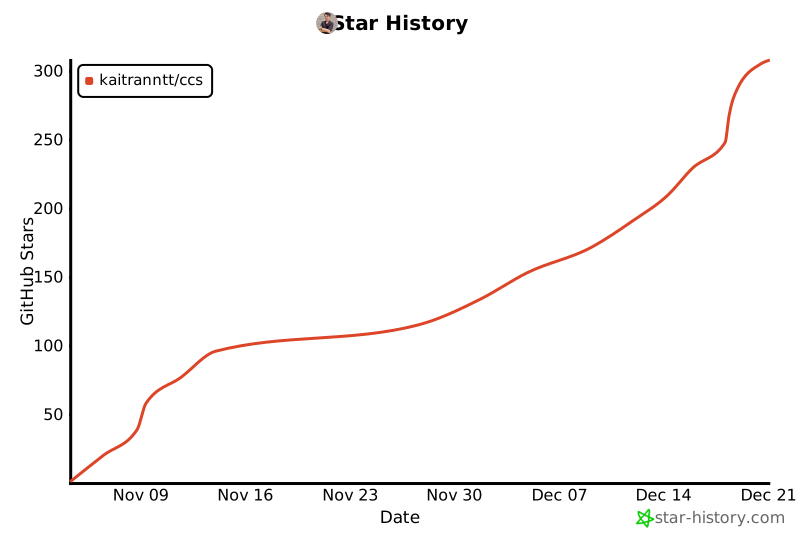
## Star History
[](https://www.star-history.com/#kaitranntt/ccs&type=date&legend=top-left)
---
**[ccs.kaitran.ca](https://ccs.kaitran.ca)** | [Report Issues](https://github.com/kaitranntt/ccs/issues) | [Star on GitHub](https://github.com/kaitranntt/ccs)