# @jmcombs/pi-prompt-enhancer
> Codebase-aware prompt rewriting for the [Pi coding agent](https://pi.dev).
> It turns a rough request into a precise one, then puts that rewrite back in
> the editor for you to review. Nothing is submitted until you say so.
The enhancer looks at your project tree, git status, and any files the draft
names, then **rewrites the request** instead of answering it. The original
stays one keystroke away.
## Install
```bash
pi install npm:@jmcombs/pi-prompt-enhancer
```
See the [Pi packages documentation](https://pi.dev/docs/packages) for git, local
path, project-scoped install, and filtering options.
No extra API keys. It uses the model already active in your session, or one
you pick with `/prompt_enhance_model`.
## Quick start
1. Type a rough request.
2. Press `Ctrl+Shift+E`.
3. Read the rewrite. Nothing has been sent.
4. Press Enter to send, or `Ctrl+Shift+Z` for the original.
## Commands
| Command | What it does |
| --- | --- |
| `/prompt_enhance [text]` | Rewrite the text you pass, or whatever is already in the editor. |
| `/prompt_enhance_model` | Pick the enhancer model for the current session. Resets when Pi restarts. |
| `/prompt_enhance_revert` | Put the pre-enhance text back. Once only; also clears when you send a prompt. |
| `/prompt_enhance_auto` | Turn auto-enhance on or off for the current session. Off until you do. |
**Shortcuts** (also listed in `/hotkeys`):
- `Ctrl+Shift+E`: enhance what is in the editor. Always works, even when auto-enhance would skip.
- `Ctrl+Shift+Z`: revert the last enhance.
After an enhance, the footer reminds you how to revert. With auto-enhance on it
also says `Enter to send`. Press **Esc** to cancel an enhance that is still
running.
## The status bar
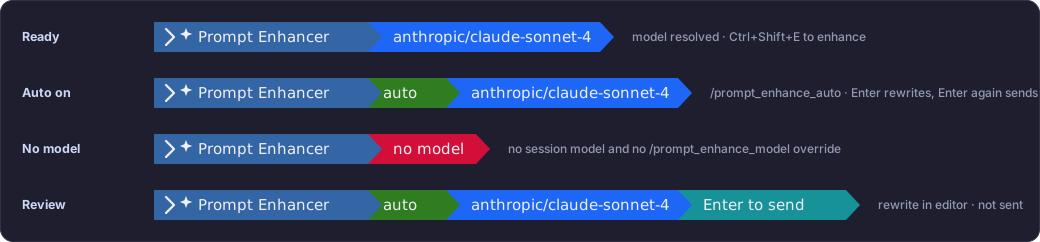
Prompt Enhancer displays in the Pi status bar with the enhancer model, when
auto-enhance is enabled, and a short status after an action is taken. Here are
the elements of the status bar:
- **Ready**: a model is resolved. Enhance with `Ctrl+Shift+E`.
- **Auto on**: `/prompt_enhance_auto` is armed. Enter rewrites; Enter again sends.
- **No model**: pick one with `/model` or `/prompt_enhance_model`.
- **Review**: a rewrite is in the editor and has not been sent. `Ctrl+Shift+Z` restores the original.
A [Nerd Font](https://www.nerdfonts.com/) is required for the mark and
separators to render.
## Auto-enhance on Enter
Off by default. Run `/prompt_enhance_auto` to turn it on for the current session. A
green `auto` block on the status bar means it is on.
```mermaid
flowchart TD
A[Type a request] --> B[Enter]
B --> C[Rewrite appears in the editor]
C --> D{Keep it?}
D -->|Enter| E[Send to the model]
D -->|Ctrl+Shift+Z| F[Original comes back]
```
Short replies like `ok`, `yes`, `approved`, or a brief answer to a question
are skipped. To enhance those anyway, use `Ctrl+Shift+E`.
## Requirements
| | |
| --- | --- |
| **Node** | ≥ 22.19.0 |
| **[Pi](https://pi.dev)** | any recent version |
| **A [Nerd Font](https://www.nerdfonts.com)** | for the status bar mark and separators |
| **A configured model** | at least one Pi model with an API key |
## Development
This package lives in the [pi-extensions monorepo](https://github.com/jmcombs/pi-extensions).
See `CONTRIBUTING.md` at the repo root for project conventions.
```bash
# From the repo root
npm ci
npm run check
npm run test -- packages/prompt-enhancer
# Try local changes (skip globally installed extensions so they do not collide)
pi --no-extensions -e ./packages/prompt-enhancer
```
## License
[MIT](./LICENSE) © Jeremy Combs