# pi-skin
**Pi terminal UI customization: frames, clean copying, weather, timers, quota and mouse interactions.**
[中文](README.md) · [Linux configuration](linux/README.en.md) · [npm](https://www.npmjs.com/package/@jiuliyear/pi-skin) · [Pi package gallery](https://pi.dev/packages/@jiuliyear/pi-skin) · [MIT](LICENSE)
## Preview
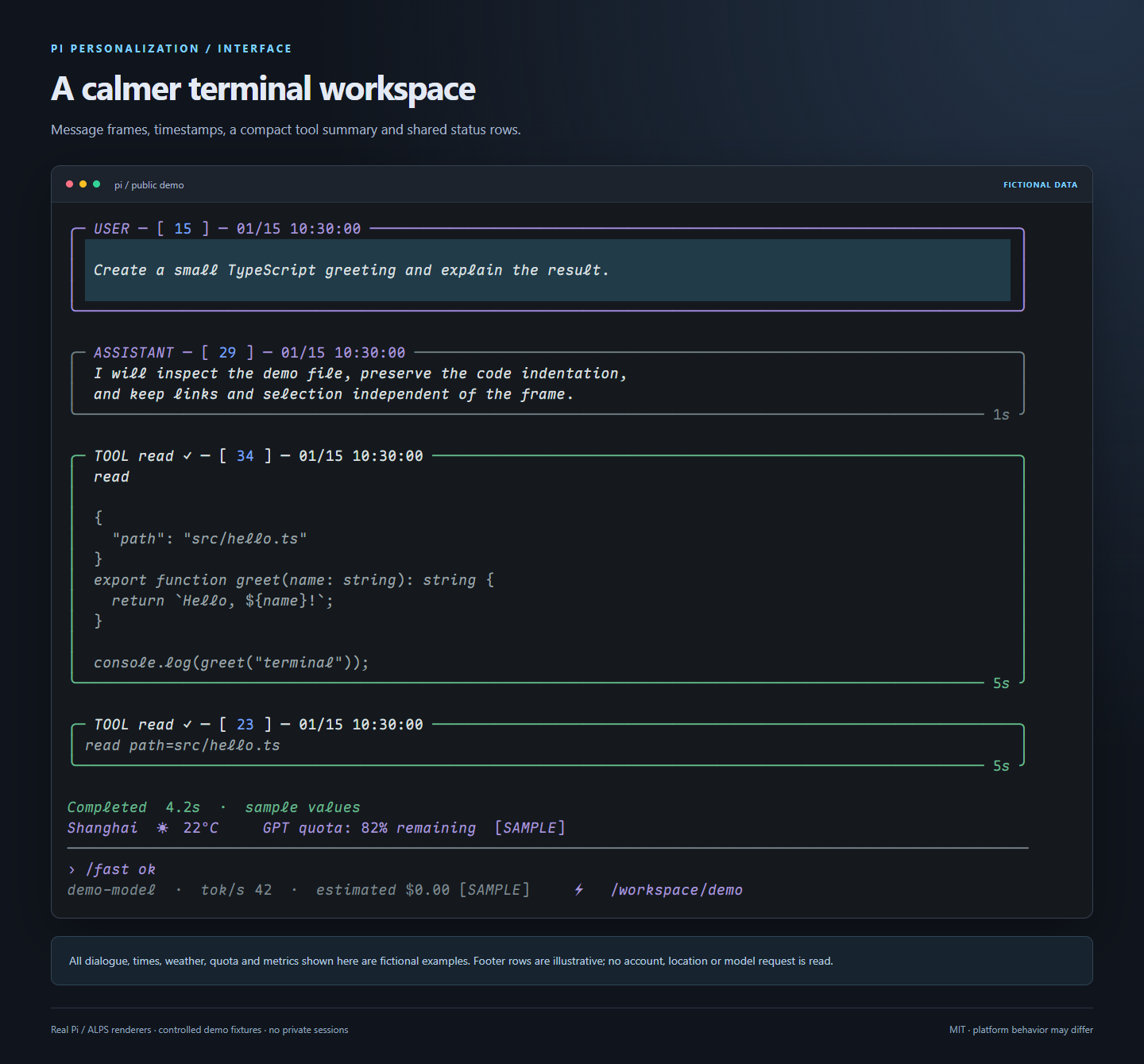
> A demo render of the original package with fictional conversations and values—not a Linux terminal capture. See the [Linux guide](linux/README.en.md) for its layout and settings.
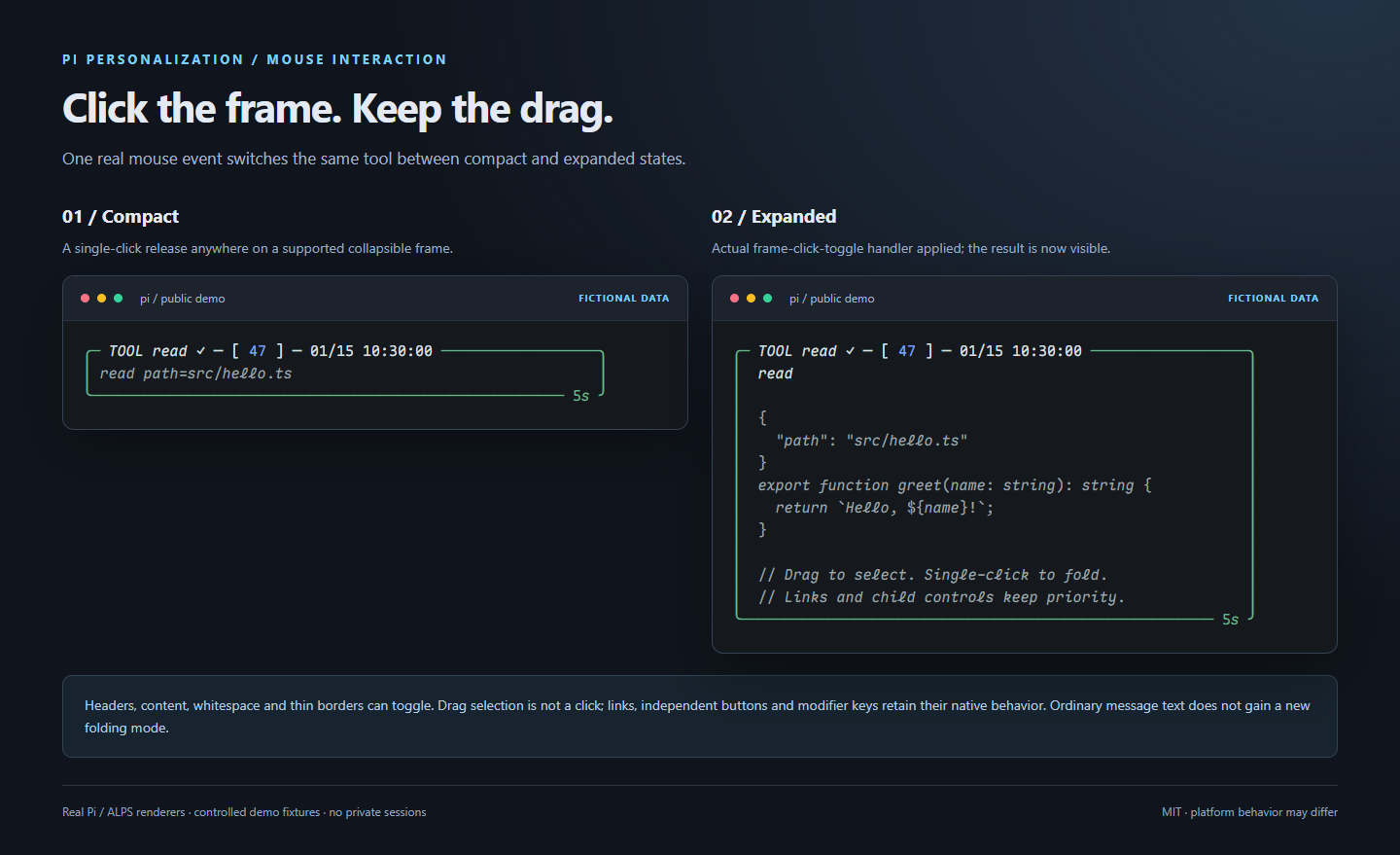
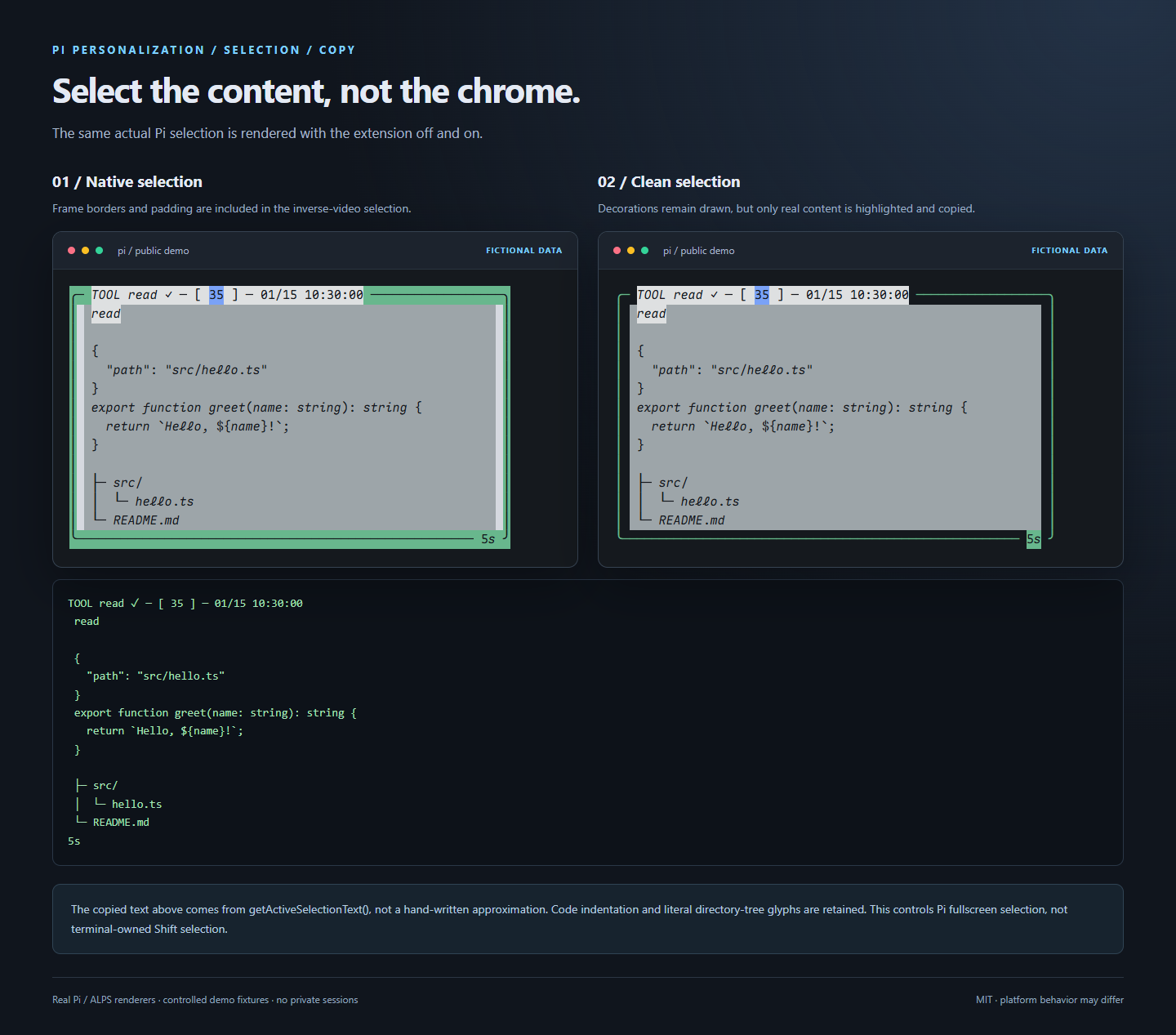
| Click anywhere to expand / collapse | Copy text without decorative borders |
|:---:|:---:|
|  |  |
Actual Windows Terminal screenshot
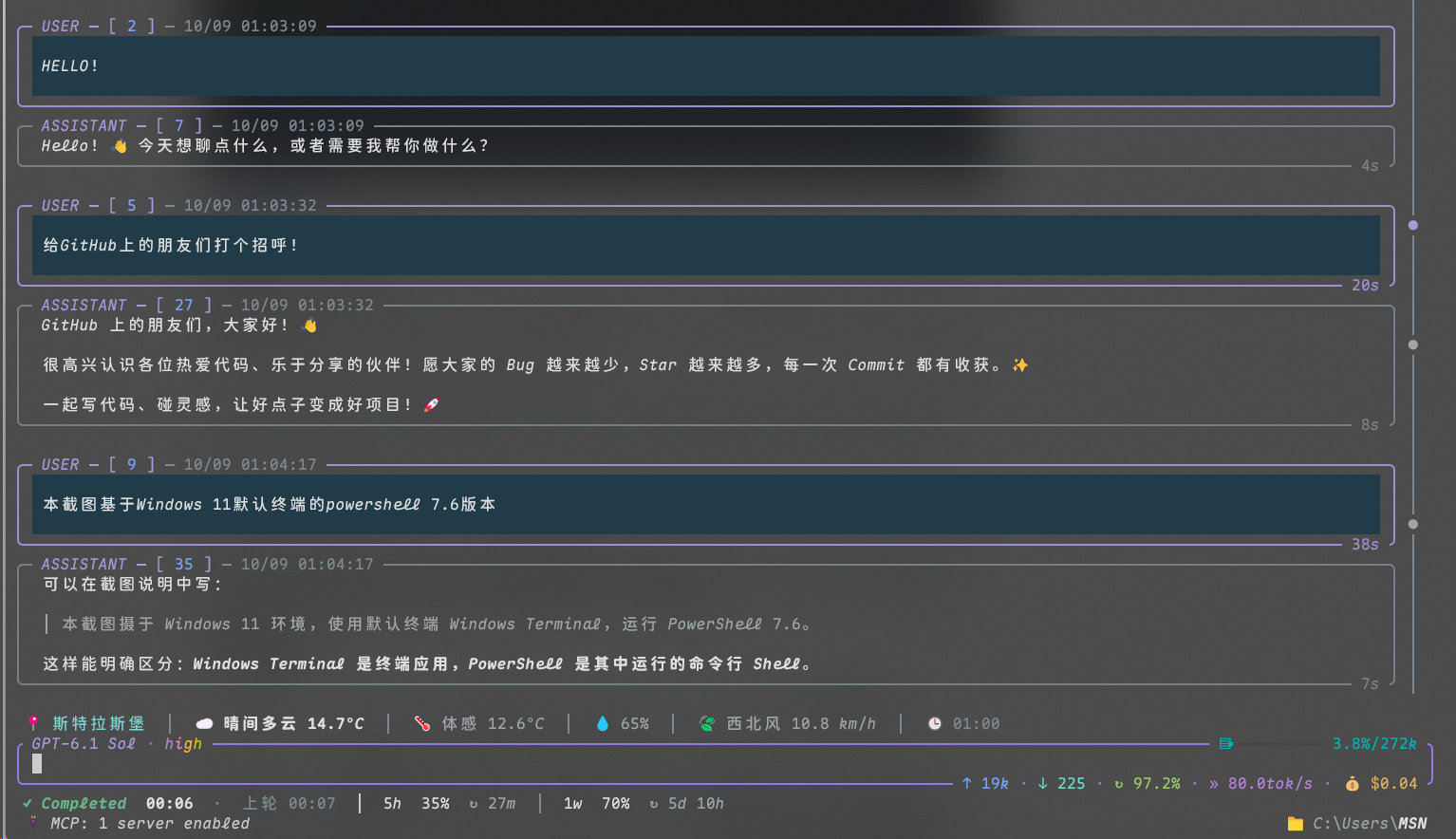
Original terminal capture published with the author's permission. Other previews are demo renders: [image provenance](docs/previews/README.md).
## Choose a profile
| | **Linux profile** | **Original package / Windows profile** |
|---|---|---|
| Entry | [`linux/`](linux/README.en.md) | Root `extensions/` and `patches/` |
| Verified environment | CachyOS + Kitty, Pi **1.3.0** | Pi **1.2.0** full-suite baseline; selection / click adapters also verified on **1.5.0** |
| Install | Clone, then `pi install ./linux` | npm or Git—choose one |
| Highlights | 7 components, colored weather icons, green/red tool frames, PipeWire audio | 8 components, Fast toggle, `no-tool-bg` theme, Windows audio |
| Reference | [English](linux/README.en.md) / [中文](linux/README.md) | [Features below](#features-and-commands) |
**Do not load both profiles.** The repository is `pi-skin`; the npm package name is now `@jiuliyear/pi-skin`.
> **Package migration:** `@jiuliyear/pi-personalization` is the old npm package; renaming GitHub does not migrate it automatically. Use the Git installation below until the new package is first published. After publication, pi.dev can discover it through the npm `pi-package` keyword; indexing may be delayed. Existing npm users should run `pi remove npm:@jiuliyear/pi-personalization` first, then install either the new npm package or the Git source, not both.
## Install
### Linux · CachyOS / Kitty
```sh
git clone https://github.com/Pasitearko/pi-skin.git
cd pi-skin
pi install npm:alps-pi@0.3.4
pi install npm:@specode/pi-subscription-usage@1.3.1
pi install ./linux
```
Merge the [Linux settings](linux/README.en.md#configuration); explicitly apply the Linux patches if you want the advanced bottom layout. Disable existing same-name local components first. Do not move the clone after installing a local package.
### Original package / Windows
Node **22.19.0+**; Pi **1.2.0** full-suite baseline, with selection / click adapters verified on Pi **1.5.0**. Mouse enhancements require fullscreen and SGR mouse support.
```sh
# New npm package (available after its first publication)
pi install npm:@jiuliyear/pi-skin
# OR latest Git source; do not install alongside the npm version
pi install git:github.com/Pasitearko/pi-skin
```
Restart or `/reload`; optionally select `no-tool-bg` in Pi settings. Base installation does not patch ALPS or replace your settings. The old npm package `@jiuliyear/pi-personalization@0.1.1` lacks the latest multiline input-selection fix; use Git until the new package is published.
## Features and commands
| Feature | Linux | Original package | Usage |
|---|:---:|:---:|---|
| Weather | ✓ | ✓ | `/weather` refreshes; `/weather next` switches cached cities |
| Round timer / outcome | ✓ | ✓ | Working → Completed / Failed / Cancelled; `/sound-test` checks audio |
| Subscription quota | Shared timer row; wraps when narrow | Shared timer row; wraps when narrow | Requires `@specode/pi-subscription-usage` and your own sign-in |
| Message timestamps | ✓ | ✓ | Local message time, displayed automatically |
| Prompt navigation | `/rail` | `/timeline` | `on` / `off` / `status` / `list` |
| Whole-frame click | ✓ | ✓ | `/frame-clicks on`, `off`, `status` |
| Clean selection / copy | ✓ | ✓ | `/clean-copy on`, `off`, `status` |
| Fixed green/red tool frames | ✓ | — | Normal `#4ADE80`; error `#F87171`; diff colors unchanged |
| OpenAI Fast | — | ✓ | `/fast`, `/fast ok`, `/fast no`; off in new sessions |
| Minimal theme | Keep Pi's theme | `no-tool-bg` | Reduce large tool background blocks |
- **Click:** an unmodified left-button release toggles an already-collapsible frame. Dragging, links and child buttons take priority.
- **Copy:** preserves indentation, blank lines, Chinese, emoji and literal box glyphs; excludes only verified decorations. Terminal-owned Shift selection is unchanged.
- **Input-frame copying:** the original package requires the extension and matching ALPS `bottom-input/editor.ts` patch; Linux uses a separate editor adapter without that patch.
- **Fast:** requests `service_tier=priority`; it does not prove server acceptance and may affect usage. Estimated cost is not a bill.
## Configuration
| Setting | Linux file | Original package file |
|---|---|---|
| Pi / ALPS appearance | [`settings.example.json`](linux/config/settings.example.json) | [`examples/settings.json`](examples/settings.json) |
| Pi shortcuts | [`keybindings.example.json`](linux/config/keybindings.example.json) | [Extension commands and guides](extensions/) |
| Plugin versions | [`packages.example.json`](linux/config/packages.example.json) | Pinned dependencies below |
| Terminal fonts / input | [Kitty fonts](linux/config/kitty-fonts.example.conf) · [Input](linux/config/kitty-input.example.conf) | [Windows Terminal](examples/windows-terminal.json) |
| MCP templates | [GitHub](linux/config/mcp-github.example.json) · [Playwright](linux/config/mcp-playwright.example.json) | Configure your chosen MCP plugin |
Merge individual fields; keep existing authentication, models and packages. Install fonts separately: [font build recipe](fonts/README.md).
### Weather locations
`PI_WEATHER_LOCATIONS`: a JSON array of 1–5 cities with `id`, `name`, `latitude`, `longitude`.
```sh
export PI_WEATHER_LOCATIONS='[{"id":"london","name":"London","latitude":51.5074,"longitude":-0.1278}]'
```
```powershell
$env:PI_WEATHER_LOCATIONS = '[{"id":"london","name":"London","latitude":51.5074,"longitude":-0.1278}]'
```
Defaults: Shanghai / Strasbourg / Tokyo. No geolocation or API key. Updates every 15 minutes; data timestamps use Asia/Shanghai. Coordinates and source IP reach [Open-Meteo](https://open-meteo.com/); follow its [terms](https://open-meteo.com/en/terms). Restart Pi after changing the variable.
## Advanced patches
Pinned dependencies: **ALPS 0.3.4**, **subscription-usage 1.3.1**. Exit Pi first; run the appropriate tool from the repository root.
Installing the npm/Git package does not create a checkout in your working directory. If you have not cloned it, obtain the patch tools first; do not install the original package again:
```sh
git clone https://github.com/Pasitearko/pi-skin.git
cd pi-skin
```
| Action | Linux | Original package |
|---|---|---|
| Check only | `node linux/tools/patches.mjs` | `node tools/setup.mjs` |
| Apply with backup | Add `--apply` to the command above | Add `--apply` to the command above |
| Undo | `node linux/tools/patches.mjs --undo --apply` | `node tools/setup.mjs --undo --apply` |
| Optional MCP UI noise filter | [Separate patch and options](linux/compat/mcp-ui-filter/README.md) | — |
For the original package, install the pinned dependencies first. Its settings helper also offers `--settings --apply` to fill missing appearance fields, and `--settings --replace-settings --apply` to replace example appearance fields. **These settings flags are not available in the Linux CLI.**
Both tools accept `--agent-dir ` and `--modules `. The default agent is `PI_CODING_AGENT_DIR` or `~/.pi/agent`. Version and SHA-256 guards reject unknown edits and symlink paths. Undo uses the printed receipt; it does not replace the entire settings file.
## Compatibility and development
| Scope | Support boundary |
|---|---|
| Linux | Verified on Pi 1.3.0 + Kitty; retest other versions / terminals |
| Original package | Frame adapters: Pi 1.0.4 / 1.1.0 / 1.2.0 / 1.5.0; clean selection additionally supports 1.3.0. All 56 real selection / click cases pass on Pi 1.5.0. Unknown patch / prerelease versions still fall back; this does not certify every component or terminal |
| Audio | Linux profile: PipeWire + your own file; original package: Windows MCI, silent fallback on macOS/Linux |
| Privacy | No bundled authentication, sessions or real quota; weather and optional plugins use their configured network services |
```sh
# Linux tests; for the original package, run the same commands at repository root
cd linux
npm ci --ignore-scripts
npm test
npm run check:privacy
```
Uninstall Linux with `pi remove `. For the original package, use `pi remove npm:@jiuliyear/pi-skin` or `pi remove git:github.com/Pasitearko/pi-skin`, matching the installed source. If installed via the old address, follow `pi list`. Undo advanced patches before removing extensions.
[Security](SECURITY.md) · [Linux inventory](linux/INVENTORY.md) · [Skills / MCP recommendations](docs/RECOMMENDATIONS.md) · [Third-party licenses](THIRD_PARTY_NOTICES.md)