[中文](./README.md)

<h1 align="center">Bezier Curve Extension</h1>

<p align="center">
    <a href="https://travis-ci.com/jiaming743/bezierCurve"><img src="https://img.shields.io/travis/com/jiaming743/bezierCurve.svg" alt="Travis CI"></a>
    <a href="https://github.com/jiaming743/BezierCurve/blob/master/LICENSE"><img src="https://img.shields.io/github/license/jiaming743/bezierCurve.svg" alt="LICENSE" /> </a>
    <a href="https://www.npmjs.com/package/@jiaminghi/bezier-curve"><img src="https://img.shields.io/npm/v/@jiaminghi/bezier-curve.svg" alt="LICENSE" /> </a>
</p>

### This plugin provides three extension methods for Bezier curves.

- **[bezierCurveToPolyline](#bezierCurveToPolyline)**

  Ability to abstract a Bezier curve into a polyline consisting of N **uniformly distributed** points.

- **[getBezierCurveLength](#getBezierCurveLength)**

  Get the length of bezier curve.

- **[polylineToBezierCurve](#polylineToBezierCurve)**

  Abstracting a polyline consisting of N points into a Bezier curve.

### Install with npm

```shell
$ npm install @jiaminghi/bezier-curve
```

### Use

```javascript
import { bezierCurveToPolyline } from '@jiaminghi/bezier-curve'

// do something
```

### Quick experience

```html
<!--Resources are located on personal servers for experience and testing only, do not use in production environments-->
<!--Debug version-->
<script src="http://lib.jiaminghi.com/bezierCurve/bezierCurve.map.js"></script>
<!--Compression version-->
<script src="http://lib.jiaminghi.com/bezierCurve/bezierCurve.min.js"></script>
<script>
    const { bezierCurveToPolyline, getBezierCurveLength, polylineToBezierCurve } = window.bezierCurve
    // do something
</script>
```

------

<h3 align="center">Examples</h3>

#### bezierCurve

```javascript
// Bezier curve data structure
const bezierCurve = [
    // Start point
	[20, 20],
    // Multiple sets of bezier curve
    [
        // controlPoint1,controlPoint2,endPoint
        [100, 20],[100, 80],[180,80]
    ],
    // The starting point of the next bezier curve is the end point of the previous bezier curve
    // [...],[...]
]
```

<p align="center">
    <img width="200px" src="./exampleImgs/bezierCurve.png" />
</p>

<p align="center"><i>bezierCurve</i> in <b>SVG</b></p>

#### bezierCurveToPolyline

```javascript
/**
 * @description Get the polyline corresponding to the Bezier curve
 * @param {Array} bezierCurve BezierCurve data
 * @param {Number} precision  Calculation accuracy. Recommended for 5-10. Default = 5
 * @return {Array|Boolean} Point data that constitutes a polyline after calculation (Invalid input will return false)
 */
function bezierCurveToPolyline (bezierCurve, precision = 5) {
  // ...
}

const precision = 5

const polyline = bezierCurveToPolyline(bezierCurve, precision)
// polyline = [
// [[20,20],
// [25.998752507628243,20.11632023466343],[31.698106846035834,20.457189096242345],
// [37.11424670004552,21.010468821119716],[42.263355754480024,21.764021645678454],
// ...]
```


<p align="center">
    <img width="200px" src="./exampleImgs/bezierCurveToPolyline.png" />
</p>

<p align="center"><i>polyline</i> in <b>SVG</b></p>

#### Notice

- The calculation result of *bezierCurveToPolyline* consists of N points, and N depends on the precision you set.
- Ideally, the distance between two adjacent points in the calculation result is equal to the set accuracy (unit px).
- Recommended precision is 5-10.
- If the setting precision is less than 1 or too large, the calculation result may be abnormal.
- Sometimes it is **impossible** to achieve precision.


#### getBezierCurveLength

```js
/**
 * @description Get the bezier curve length
 * @param {Array} bezierCurve bezierCurve data
 * @param {Number} precision  calculation accuracy. Recommended for 5-10. Default = 5
 * @return {Number|Boolean} BezierCurve length (Invalid input will return false)
 */
export function getBezierCurveLength (bezierCurve, precision = 5) {
  // ...
}

// Normally the default precision can achieve better visual effects.
const length = bezierCurveToPolyline(bezierCurve)
```


#### polyline

```javascript
// polyline data structure
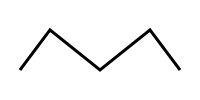
const polyline = [
    [20, 70],
    [50, 30],
    [100, 70],
    [150, 30],
    [180, 70]
]
```

<p align="center">
    <img width="200px" src="./exampleImgs/polyline.png" />
</p>

<p align="center"><i>polyline</i> in <b>SVG</b></p>


#### polylineToBezierCurve

```javascript
/**
 * @description Abstract the polyline formed by N points into a set of bezier curve
 * @param {Array} polyline A set of points that make up a polyline
 * @param {Boolean} close  Closed curve
 * @param {Number} offsetA Smoothness
 * @param {Number} offsetB Smoothness
 * @return {Array|Boolean} A set of bezier curve (Invalid input will return false)
 */
function polylineToBezierCurve (polyline, close = false, offsetA = 0.25, offsetB = 0.25) {
	// ...
}

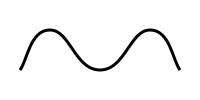
const bezierCurve = polylineToBezierCurve(polyline)
// bezierCurve = [
// [
// 	[20,70],
// 	[[27.5,60],[30,30],[50,30]],
// 	[[70,30],[75,70],[100,70]],
// 	[[125,70],[130,30],[150,30]],
// 	[[170,30],[172.5,60],[180,70]]]
//]

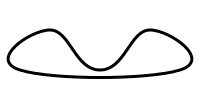
const closedBezierCurve = polylineToBezierCurve(polyline, true)
// closedBezerCurve = [
// 	[20,70],
// 	[[-12.5,60],[30,30],[50,30]],
// 	[[70,30],[75,70],[100,70]],
// 	[[125,70],[130,30],[150,30]],
// 	[[170,30],[212.5,60],[180,70]],
// 	[[147.5,80],[52.5,80],[20,70]]
// ]
```

<p align="center">
    <img width="200px" src="./exampleImgs/polylineToBezierCurve.png" />
</p>

<p align="center"><i>bezierCurve</i> in <b>SVG</b></p>

<p align="center">
    <img width="200px" src="./exampleImgs/polylineToClosedBezierCurve.png" />
</p>

<p align="center"><i>closedBezierCurve</i> in <b>SVG</b></p>