Simple utilities for icon-font generation, automation and presentation. Includes preview web server.
[](https://www.npmjs.com/package/@itsib/icon-font)
[](https://github.com/itsib/icon-font/actions/workflows/main.yaml)
---
> :question: Why do I even need to generate an icon font instead of using svg images or svg sprites?
>
> :bulb: SVG contours rarely fall exactly on a pixel grid. The browser smoothes (anti-aliases) each edge, so a small SVG image (which are icons) gives a noticeable "soap effect". Fonts have hinting for grid alignment at small sizes, but this does not happen when rendering SVG icons in the browser. Therefore, with small sizes, the contours "float".
## Features
- Formatting of svg icons. The contour will be adjusted to the size of 512px and placed in the center.
- Tune icon size and position if necessary.
- Optimization. Extra points that do not affect the contour curves will be removed.
- Configuration support as in package.json, and in a separate file. It can also be transmitted via the command line interface.
- The input file format is svg.
- The output file format is `TTF`, `EOT`, `SVG`, `WOFF`, `WOFF2`
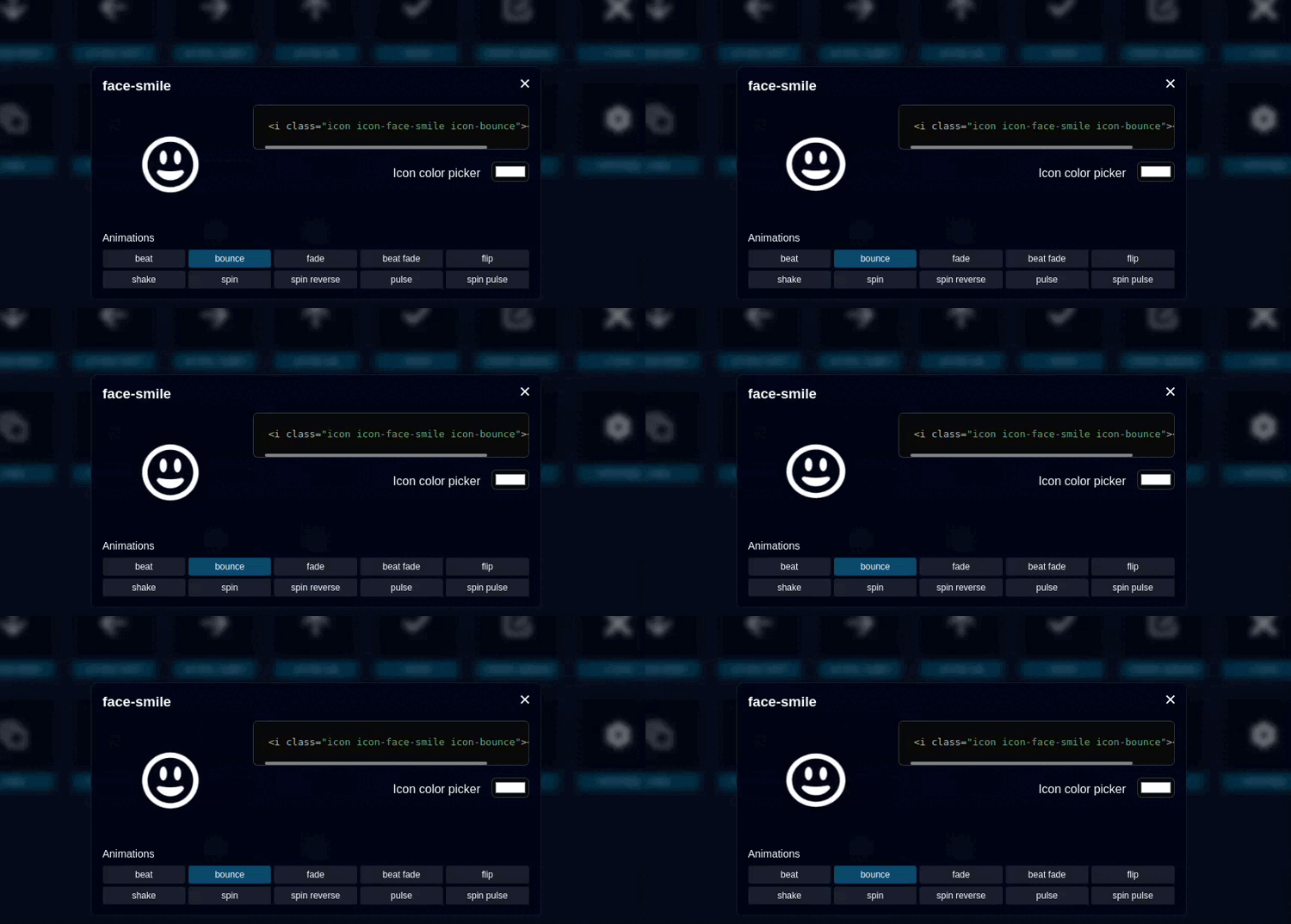
- A web server to demonstrate the result. The server will watch the changes in the input files and instantly display the result.
---
## Usage
Install:
```shell
npm install --save-dev @itsib/icon-font
```
Or global installation:
```shell
npm install -g @itsib/icon-font
```
Show help:
```shell
icon-font --help
```
Run demo server:
```shell
icon-font demo --input icons/dir
```
Generate fonts files:
```shell
icon-font generate --input icons/dir --output fonts/dir
```
## Configuration
You need to create an `icon-font.json` file with json format in the root of your project. Or add field `icon-font` in package.json file.
```json
{
"input": "svg-icons",
"output": "dist/fonts",
"name": "IconFont",
"prefix": "icon",
"types": [ "woff2", "woff", "ttf", "eot"],
"port": 9000,
"fontUrl": "./",
"fontUrlHash": false,
"iconsTune": {},
"shapeSizeAdjust": 0.9375,
"startUnicode": 59905
}
```
### Options description
> Configuration parameters passed through the CLI have a higher priority than the configuration file.
| Option | Type | Required | Description |
|:------------------|:--------------------------------:|:--------:|----------------------------------------------------------------------------------------------------------------------------------------------------------------------------------------------------------------------------------------------|
| `input` | `string` | ✔ | The directory containing the SVG icon files that will be included in the font being created |
| `output` | `string` | ✔ | The directory where the generated files will be placed, if it does not exist, it will be created. |
| `name` | `string` | | The name of the new font, by default `IconFont` |
| `prefix` | `string` | | Class name prefix. Default `icon` |
| `types` | `string[]` | | Output font types, to be generated. Default: `[ "woff2", "woff", "ttf", "eot"]` |
| `port` | `number` | | Demo server port. Default `9000` (http://localhost:9000). |
| `fontUrl` | `string` | | The URL where the font files will be available. Used in the css file @font-fase. Default `/` |
| `fontUrlHash` | `string` \| false \| `"random"` | | Adds the GET parameter 'hash=${HASH}' at the end of the URL to reset the browser cache. Set to 'random' for random number. Or use yur own value. False is disabled. |
| `iconsTune` | `{[name: string]: IconTune}` | | Adjust the positioning and size for each icon. See below. Default `{}` |
| `shapeSizeAdjust` | `number` | | The standard character block size is 512. The size of the character in the block is 480. With these default parameters, `shapeSizeAdjust = 480 / 512 = 0.9375` In fact, this number means changing the size of characters. Default: `0.9375` |
| `startUnicode` | `number` | | The number of the unicode character that the font will be filled with icons from. Default: `0xea01` (`59905`) |
### Icons Tune
The icon is sized and aligned automatically. But you can also configure each individual icon. To do this, use the `iconsTune` field, which contains an object whose keys
are the names of icon files without an extension. For example:
```json5
{
"iconsTune": {
"helicopter": {
"x": 0.2,
"y": -0.5,
"size": 1.5,
"code": 59906
}
}
}
```
This means that the icon with the file name helicopter.svg will be shifted to the right by 20%, down by 50%, and enlarged by one and a half times.
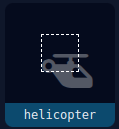
> Do not forget that for screens, the Y-axis begins (point 0) at the top, but in the OpenType and TrueType specifications, Y has a beginning at the bottom.
| Option | Type | Description |
|--------|--------------------------------------|--------------------------------------------------------------------------------------------------------------------------------------------------------------------------------------------------------------------------------------------------------------------------------------------------------------------------------------------------|
| `x` | `number` | The x-axis displacement of the icon. In basis point (percent / 100) |
| `y` | `number` | The y-axis displacement of the icon. In basis point (percent / 100) |
| `size` | `number` \| `'cover'` \| `'contain'` | Tune the icon size. If a `number` is passed, the size will be multiplied by it. For example, the icon is 300x500, size = 1.2, then the result will be 360x600. If `cover` is passed, the icon will fill the entire 512x512 square. If `contain` is passed, the icon will be inscribed in a 512x512 square. This is default behavior. |
| `code` | `number` | Specify Unicode number for this symbol |
## References
- [ots-sanitize](https://manpages.ubuntu.com/manpages/jammy/man1/ots-sanitize.1.html) - is a program which validates and/or transcodes a font file using the OTS library. Installation:
```shell
sudo apt install opentype-sanitizer
```
Usage:
```shell
ots-sanitize dist/fonts/icon-font.ttf
```
- [ttfdump](https://manpages.ubuntu.com/manpages/focal/en/man1/ttfdump.1.html) - dumps the contents of a TrueType font file in ASCII form. A TrueType font file is consist of various tables. Installation:
```shell
sudo apt install texlive-binaries
```
Usage
```shell
ttfdump -t head dist/fonts/icon-font.ttf
ttfdump -t OS/2 dist/fonts/icon-font.ttf
```
- [TrueFont spec](https://learn.microsoft.com/en-us/typography/opentype/spec/) - documentation for the TrueFont tables.
