# File Transfer
## Table of Contents
* [Overview](#overview)
* [Features](#features)
* [Requirements](#requirements)
* [Supported Device Types](#supported-device-types)
* [Known Limitations](#known-limitations)
* [How to Install](#how-to-install)
* [How to Run](#how-to-run)
* [Test environment](#test-environment)
* [Test cases](#test-cases)
* [Additional Information](#additional-information)
## Overview
This artifact contains a set of workflows designed to transfer files to Cisco devices running IOS, IOS XR or NX-OS software. Each workflow iterates through a list of devices and issues the `copy` command to download the file from a remote file server using SCP.
### Workflows
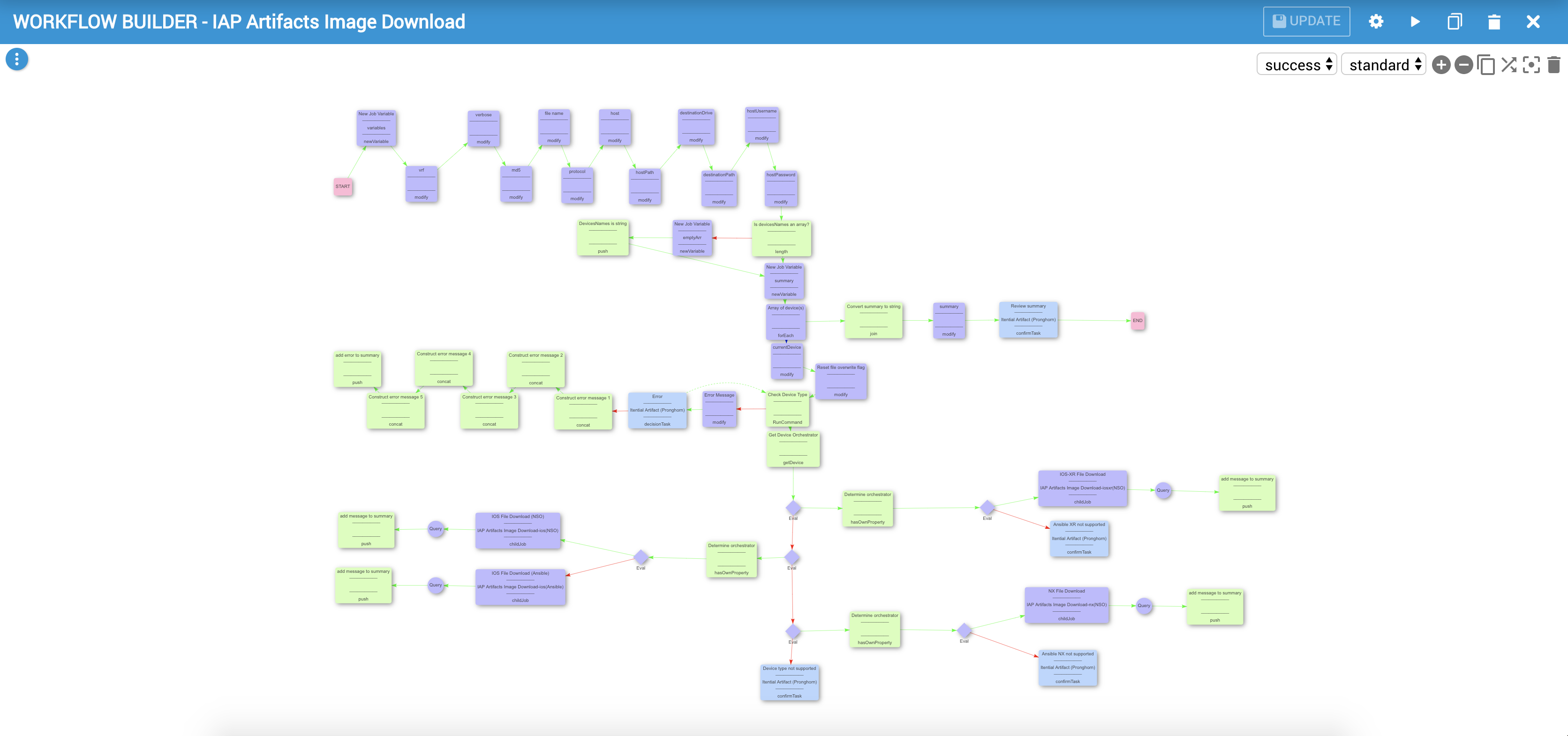
#### IAP Artifacts Image Download
This is the primary parent workflow which performs the following tasks:
1. Collect all job variables
1. Test device availability and type
1. Call the appropriate child-workflow (per device)
1. Display full summary of devices and their file copy/verification outcome
#### Device Specific Workflows
The logic for the file transfer is offloaded to a child workflow, dependent upon the device type:
1. Issue the copy command
1. Perform file integrity check using md5
1. Handle errors including missing folders on the device, duplicate file names and integrity check failures
## Features
* Auto-check for device compatibility and type
* Iterate through list a of devices and download a specified file from the remote server using the selected protocol
* Supports secured protocols for file transfer
* MD5 file verification to confirm integrity of the downloaded file
* Skips the download process if the file already exists, and will perform integrity check
* Offers to copy-overwrite files that failed integrity test, and will try to download again
* Shows a conclusive report with a summary report of all devices, and their download status (or error)
* Verbose mode allows enhanced log messages
* Creates folder structure recursively on device if it doesn't exist
## Requirements
In order to use this artifact, users will have to satisfy the following pre-requisites:
* Itential Automation Platform
* `^2021.2.x`
### Supported Device Types
* Cisco IOS
* Cisco IOS-XR
* Cisco NX-OS
All 3 device types have been tested in a setup with Cisco's NSO. We also tested devices running Cisco IOS with Ansible.
## Known Limitations
* This pre-built automation has only been tested with the SCP protocol
* The necessary folder structure can only be created for devices running Cisco NX-OS
## How to Install
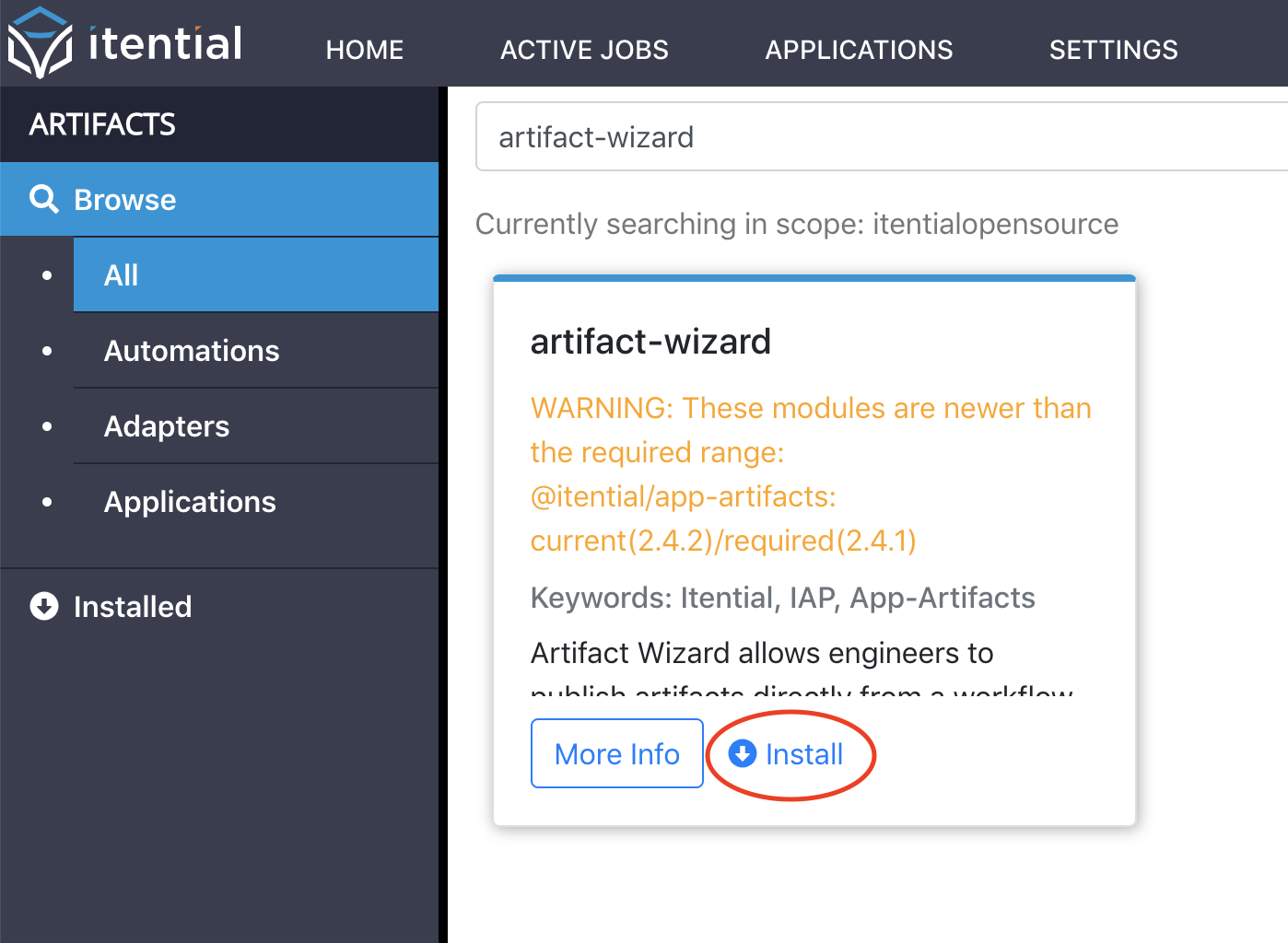
Please ensure that you are running a supported version of the Itential Automation Platform (IAP) as listed above in the [Requirements](#requirements) section in order to install the artifact. If you do not currently have App-Artifacts installed on your server, please download the installer from your Nexus repository. Please refer to the instructions included in the App-Artifacts README to install it.
The artifact can be installed from within App-Artifacts. Simply search for the name of your desired artifact and click the install button as shown below:
## How to Run
In order to run the file transfer artifact, please make an HTTP POST request to `http://$IAP_HOST:$IAP_PORT/workflow_engine/startJobWithOptions/IAP%20Artifacts%20Image%20Download` where IAP_HOST is an IP address and IAP_PORT is the port. Postman and cURL are both good tools which can be used to perform this request.
### Required Job Variables
The following variables are required in the body of the request:
* `fileName`: name of the downloaded file to transfer
* `md5`: md5 signature of the downloaded file
* `host`: hostname or IP address of file server
* `protocol`: protocol to be used for transfer
* `hostPath`: the host's path to the downloaded file
* `destinationDrive`: the destination drive for the file to be transferred onto
* `destinationPath`: the destination path for the file to be transferred onto
* `hostUsername`: the username for the file server
* `hostPassword`: the password for the file server
* `devicesNames`: a string (of one device hostname) or array (of many device hostnames)
* `verbose`: a Boolean to enable or disable verbose mode during workflow
* `vrf`: select a vrf to be used in copy command (for NX devices)
### Example Payloads
If using Postman to make the call, you may use the following example JSON objects as reference for the post call body:
#### IOS
```json
{
"description": "ios device file download workflow from postMan",
"variables": {
"md5":"c9c4419a70c685a52fcsb85620420f09",
"fileName": "file.name",
"protocol": "scp",
"host": "192.168.1.211",
"hostPath": "//path/to/directory/",
"destinationDrive": "bootflash",
"destinationPath": "",
"hostUsername": "user1",
"hostPassword": "user!@Password",
"devicesNames": ["csr1kv1-ESXi","csr1kv2-ESXi"],
"verbose": true,
"vrf": ""
}
```
#### IOS XR
```json
{
"description": "xr device file download workflow from postMan",
"variables": {
"md5": "c9c4419a70c685a52fcsb85620420f09",
"fileName": "file.name",
"protocol": "scp",
"host": "192.168.1.211",
"hostPath": "/root/",
"destinationDrive": "harddisk",
"destinationPath": "",
"hostUsername": "user1",
"hostPassword": "user1.Password",
"devicesNames": ["ESXi-IOS-XRv9k"],
"verbose": true
}
}
```
#### NX-OS
```json
{
"description": "nx device file download workflow from postMan",
"variables": {
"md5": "c9c4419a70c685a52fcsb85620420f09",
"fileName": "file.name",
"protocol": "scp",
"host": "192.168.1.211",
"hostPath": "/root/",
"destinationDrive": "bootflash",
"destinationPath": "/new/folder/path/",
"hostUsername": "user1",
"hostPassword": "user1.Password",
"devicesNames": ["cisco-nx"],
"verbose": true,
"vrf": "management"
}
}
```
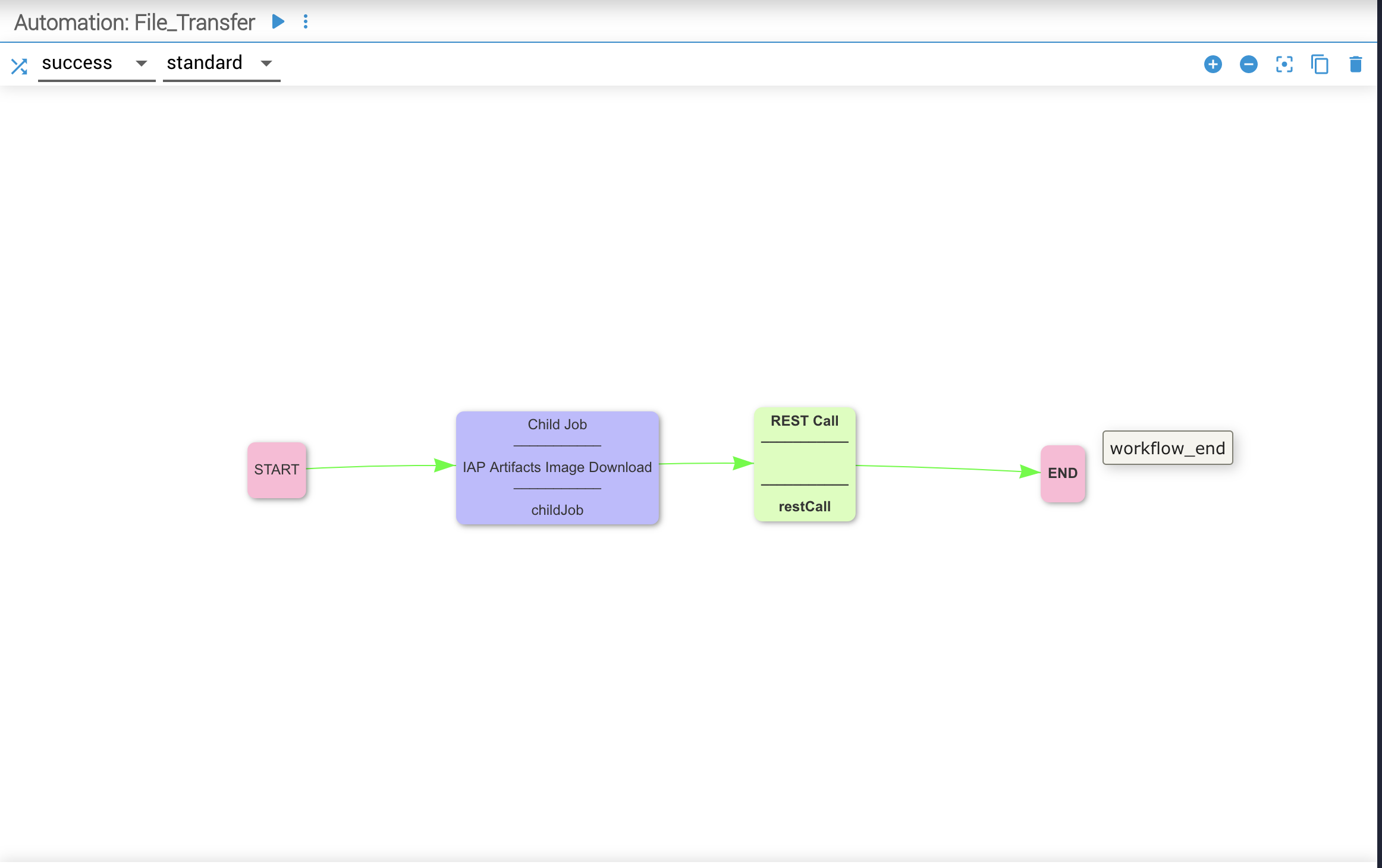
You can also run it as a child job via Parent workflow as depicted below when using IAP Instance.
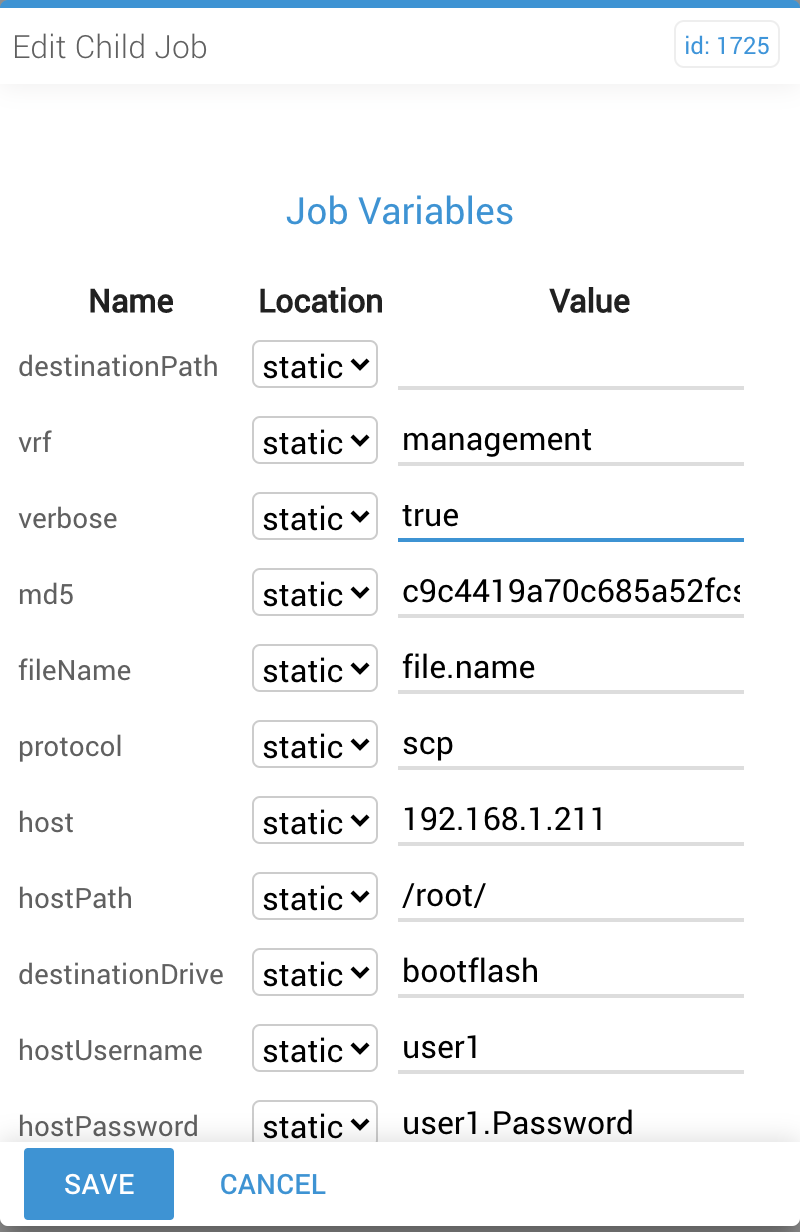
You can use the following example as reference when providing values for the job Variables in the child job.
## Test Environment
* NSO Ver: 4.7.1
* NEDs Ver:
* cisco-ios: 5.8.3
* cisco-xr: 7.0.10
* cisco-nx: 5.7.5
* itential-tools: 1.14.2
* Devices Ver:
* ios: 16.03.07
* xr: 6.3.3
* nx: 9.2(2)
* IAP version 2020.1
### Test Cases
1. device name is string ios-✅ xr-✅ nx-✅
2. device names are strings within array ios-✅ xr-✅ nx-✅
3. device name does not exist ios-✅ xr-✅ nx-✅
4. no available space on device ios-❌ xr-❌ nx-❌
5. target folder does not exist on device ios-❌ xr-❌ nx-✅
6. multiple target folders do not exist on device: ios-❌ xr-❌ nx-✅
7. file already exist ios-✅ xr-✅ nx-✅
8. file failed md5 checksum (corrupted file) ios-✅ xr-✅ nx-✅
9. copy command timeout ios-❌ xr-❌ nx-❌
10. md5 checksum timeout ios-❌ xr-❌ nx-❌
11. download protocol: scp ios-✅ xr-✅ nx-✅
12. download protocol: ftp ios-❌ xr-❌ nx-❌
13. wrong file server ip / hostname ios-✅ xr-✅ nx-✅
14. file server is ip address / hostname ios-✅ xr-✅ nx-✅
15. wrong file server credentials ios-✅ xr-✅ nx-✅
16. file does not exist on file server ios-✅ xr-✅ nx-✅
17. wrong vrf name ios-❌ xr-❌ nx-❌
18. Devices managed by Cisco NSO ios-✅ xr-✅ nx-✅
19. Devices managed by Ansible manager ios-✅ xr-❌ nx-❌
## Additional Information
Please use your Itential Customer Success account if you need support when using this artifact.