# react-google-flight-datepicker
[![dependency status][deps-svg]][deps-url]
[![dev dependency status][dev-deps-svg]][dev-deps-url]
[](https://opensource.org/licenses/MIT)
[![Downloads][downloads-image]][downloads-url]
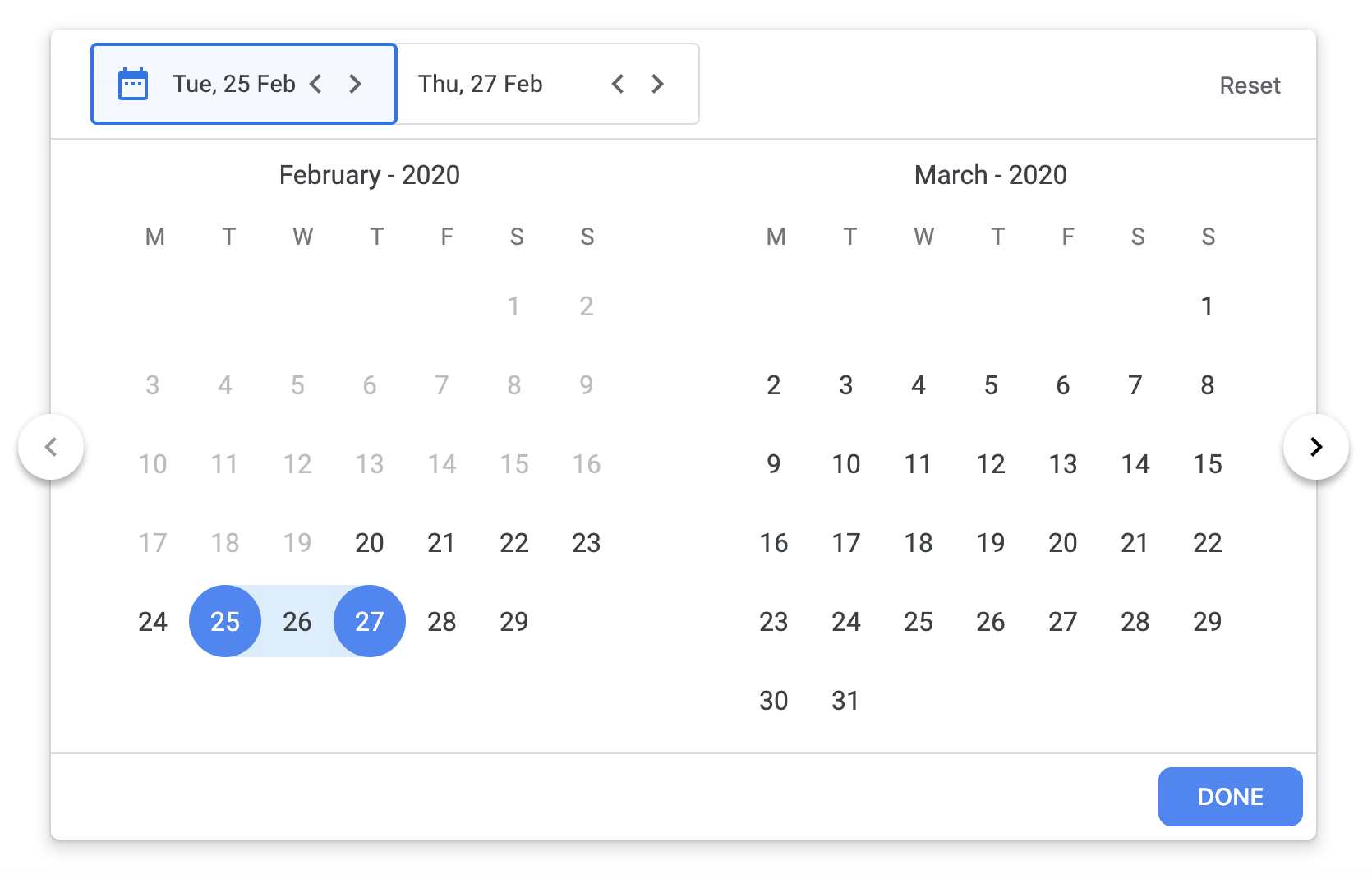
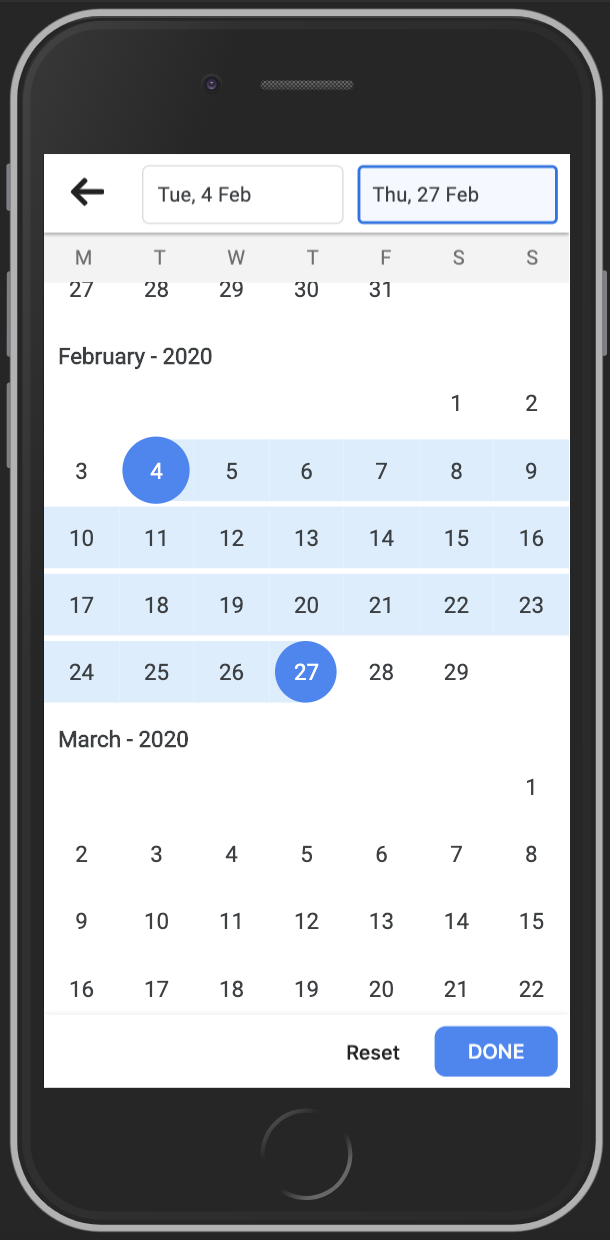
Google flight date picker implemented in ReactJS
### Demo
- Live demo: https://codesandbox.io/s/react-google-flight-datepicker-zultp
- To run demo on your computer:
- Clone this repository
- `yarn install`
- `yarn run dev`
### Screenshot
 ### Usage
##### RangeDatePicker
```jsx
import { RangeDatePicker } from 'react-google-flight-datepicker`;
import 'react-google-flight-datepicker/dist/main.css';
onDateChange(startDate, endDate)}
minDate={new Date(1900, 0, 1)}
maxDate={new Date(2100, 0, 1)}
dateFormat="D"
monthFormat="MMM YYYY"
startDatePlaceholder="Start Date"
endDatePlaceholder="End Date"
disabled={false}
className="my-own-class-name"
startWeekDay="monday"
/>
```
##### SingleDatePicker
```jsx
import { SingleDatePicker } from 'react-google-flight-datepicker`;
import 'react-google-flight-datepicker/dist/main.css';
onDateChange(startDate)}
minDate={new Date(1900, 0, 1)}
maxDate={new Date(2100, 0, 1)}
dateFormat="D"
monthFormat="MMM YYYY"
startDatePlaceholder="Date"
disabled={false}
className="my-own-class-name"
startWeekDay="monday"
/>
```
##### Props
|Prop name |Prop type|Default value|Description|
|---------|---------|-------------|-----------|
startDate | Date | null | Selected start date |
endDate | Date | null | Selected end date |
dateFormat | String | D | Display format for date. Check momentjs doc for information (https://momentjs.com/docs/#/displaying/) |
monthFormat | String | MMM YYYY | Display format for month. Check momentjs doc for information (https://momentjs.com/docs/#/displaying/) |
onChange | Function | null | Event handler that is called when startDate and endDate are changed |
onFocus | Function | null | Return a string (START_DATE, END_DATE) which indicate which text input is focused |
minDate | Date | 1900 Jan 01 | Minimum date that user can select |
maxDate | Date | 2100 Jan 01 | Maximum date that user can select |
className | String | | Custom CSS className for datepicker |
disabled | String | false | Disable the datepicker |
startDatePlaceholder | String | Start Date | Placeholder text for startDate text input |
endDatePlaceholder | String | End Date | Placeholder text for endDate text input |
startWeekDay | String (monday or sunday) | monday | Determine the start day for a week (monday or sunday) |
highlightToday | Bool | false | Hightlight "today" date
### Author
- David Tran - david@jslancer.com
- Leo Phan - leo.phan@jslancer.com
### License
MIT
[package-url]: https://npmjs.org/package/react-google-flight-datepicker
[npm-version-svg]: http://versionbadg.es/jslancerteam/react-google-flight-datepicker.svg
[deps-svg]: https://david-dm.org/jslancerteam/react-google-flight-datepicker.svg
[deps-url]: https://david-dm.org/jslancerteam/react-google-flight-datepicker
[dev-deps-svg]: https://david-dm.org/jslancerteam/react-google-flight-datepicker/dev-status.svg
[dev-deps-url]: https://david-dm.org/jslancerteam/react-google-flight-datepicker#info=devDependencies
[downloads-image]: http://img.shields.io/npm/dm/react-google-flight-datepicker.svg
[downloads-url]: http://npm-stat.com/charts.html?package=react-google-flight-datepicker
### Usage
##### RangeDatePicker
```jsx
import { RangeDatePicker } from 'react-google-flight-datepicker`;
import 'react-google-flight-datepicker/dist/main.css';
onDateChange(startDate, endDate)}
minDate={new Date(1900, 0, 1)}
maxDate={new Date(2100, 0, 1)}
dateFormat="D"
monthFormat="MMM YYYY"
startDatePlaceholder="Start Date"
endDatePlaceholder="End Date"
disabled={false}
className="my-own-class-name"
startWeekDay="monday"
/>
```
##### SingleDatePicker
```jsx
import { SingleDatePicker } from 'react-google-flight-datepicker`;
import 'react-google-flight-datepicker/dist/main.css';
onDateChange(startDate)}
minDate={new Date(1900, 0, 1)}
maxDate={new Date(2100, 0, 1)}
dateFormat="D"
monthFormat="MMM YYYY"
startDatePlaceholder="Date"
disabled={false}
className="my-own-class-name"
startWeekDay="monday"
/>
```
##### Props
|Prop name |Prop type|Default value|Description|
|---------|---------|-------------|-----------|
startDate | Date | null | Selected start date |
endDate | Date | null | Selected end date |
dateFormat | String | D | Display format for date. Check momentjs doc for information (https://momentjs.com/docs/#/displaying/) |
monthFormat | String | MMM YYYY | Display format for month. Check momentjs doc for information (https://momentjs.com/docs/#/displaying/) |
onChange | Function | null | Event handler that is called when startDate and endDate are changed |
onFocus | Function | null | Return a string (START_DATE, END_DATE) which indicate which text input is focused |
minDate | Date | 1900 Jan 01 | Minimum date that user can select |
maxDate | Date | 2100 Jan 01 | Maximum date that user can select |
className | String | | Custom CSS className for datepicker |
disabled | String | false | Disable the datepicker |
startDatePlaceholder | String | Start Date | Placeholder text for startDate text input |
endDatePlaceholder | String | End Date | Placeholder text for endDate text input |
startWeekDay | String (monday or sunday) | monday | Determine the start day for a week (monday or sunday) |
highlightToday | Bool | false | Hightlight "today" date
### Author
- David Tran - david@jslancer.com
- Leo Phan - leo.phan@jslancer.com
### License
MIT
[package-url]: https://npmjs.org/package/react-google-flight-datepicker
[npm-version-svg]: http://versionbadg.es/jslancerteam/react-google-flight-datepicker.svg
[deps-svg]: https://david-dm.org/jslancerteam/react-google-flight-datepicker.svg
[deps-url]: https://david-dm.org/jslancerteam/react-google-flight-datepicker
[dev-deps-svg]: https://david-dm.org/jslancerteam/react-google-flight-datepicker/dev-status.svg
[dev-deps-url]: https://david-dm.org/jslancerteam/react-google-flight-datepicker#info=devDependencies
[downloads-image]: http://img.shields.io/npm/dm/react-google-flight-datepicker.svg
[downloads-url]: http://npm-stat.com/charts.html?package=react-google-flight-datepicker