## Table of Contents
- [ReactDataGrid Community Edition](#reactdatagrid-community-edition)
- [Installation & Getting Started](#installation--getting-started)
- [TypeScript support](#typescript-support)
- [Features](#features)
- [Documentation](#documentation)
- [Examples](#examples)
- [Client stories](#client-stories)
- [License](#license)
## ReactDataGrid Community Edition
This is the **Community Edition** of **`ReactDataGrid`**.
The **Community Edition** is licensed under the [MIT license](https://github.com/inovua/reactdatagrid/blob/master/community-edition/LICENSE.md).
For the **Enterprise Edition** please see [this page](https://github.com/inovua/reactdatagrid/blob/master/enterprise-edition/README.md).
## Installation & Getting Started
Installing the **`ReactDataGrid` Community Edition** is as easy as:
```sh
$ npm install @inovua/reactdatagrid-community --save
```
See the [documentation getting started page](https://reactdatagrid.io/docs) for more details.
## TypeScript support
**`ReactDataGrid`** ships with `TypeScript` definition files so it's fully integrated with your preferred editor to help with autocompletion and type-safety.
## Features
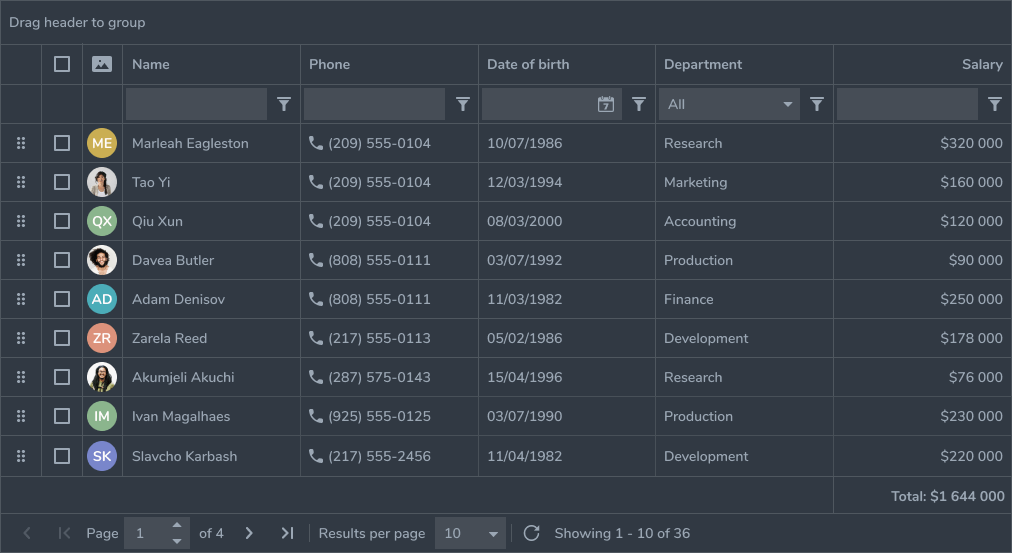
**`ReactDataGrid`** is packed with all the functionality you would expect from an enterprise-grade grid.
As stated before, **`ReactDataGrid`** is built with **`React`** in mind, so it supports popular patterns in the **`React`** world: controlled/uncontrolled props, render props, built with immutability in mind etc.
Here's a list of the features that we support in the **Community Edition**:
- [Remote data source](https://reactdatagrid.io/docs/getting-started#using-async-or-remote-data)
- [Sorting](https://reactdatagrid.io/docs/sorting)
- [Pagination](https://reactdatagrid.io/docs/pagination)
- [Inline edit with custom editor support](https://reactdatagrid.io/docs/inline-edit)
- [Filtering with built in filters](https://reactdatagrid.io/docs/filtering)
- [Stacked columns](https://reactdatagrid.io/docs/stacking-columns)
- [Context menu integration](https://reactdatagrid.io/docs/context-menu-integration)
- [Rowspan and colspan](https://reactdatagrid.io/docs/cell-rowspan-and-colspan)
- [Row selection](https://reactdatagrid.io/docs/row-selection)
- [Cell selection](https://reactdatagrid.io/docs/cell-selection)
- [Keyboard navigation](https://reactdatagrid.io/docs/keyboard-navigation)
- [Customizing rows, cells and headers](https://reactdatagrid.io/docs/customizing-cells-rows-headers)
- [Scroll customization](https://reactdatagrid.io/docs/scrolling-and-scroll-customization)
- [RTL support](https://reactdatagrid.io/docs/rtl-support)
- [Beautiful themes](https://reactdatagrid.io/docs/styling-and-theming#themes)
- [Column reorder](https://reactdatagrid.io/docs/api-reference#props-reorderColumns)
- [Column resize](https://reactdatagrid.io/docs/api-reference#props-resizable)
Besides the above, there's a lot more backed into the **Enterprise Edition**, so make sure you explore [our documentation](https://reactdatagrid.io/docs).
## Documentation
We're heavily invested into our [documentation](https://reactdatagrid.io/docs) - it ships with full working examples and a live editor. Each prop **`ReactDataGrid`** supports has it's own description and usage example.
Additionally, each feature is clearly presented and has a dedicated page that explains the feature and shows examples of real-life usage. See for example [sorting](https://reactdatagrid.io/docs/sorting), [filtering](https://reactdatagrid.io/docs/filtering), [pagination](https://reactdatagrid.io/docs/pagination) etc.
## Examples
```tsx
import React from 'react';
import ReactDataGrid from '@inovua/reactdatagrid-community';
import '@inovua/reactdatagrid-community/index.css';
const columns = [
{ name: 'name', header: 'Name', minWidth: 50, defaultFlex: 2 },
{ name: 'age', header: 'Age', maxWidth: 1000, defaultFlex: 1 },
];
const gridStyle = { minHeight: 550 };
const dataSource = [
{ id: 1, name: 'John McQueen', age: 35 },
{ id: 2, name: 'Mary Stones', age: 25 },
{ id: 3, name: 'Robert Fil', age: 27 },
{ id: 4, name: 'Roger Robson', age: 81 },
{ id: 5, name: 'Billary Konwik', age: 18 },
{ id: 6, name: 'Bob Martin', age: 18 },
{ id: 7, name: 'Matthew Richardson', age: 54 },
{ id: 8, name: 'Ritchie Peterson', age: 54 },
{ id: 9, name: 'Bryan Martin', age: 40 },
{ id: 10, name: 'Mark Martin', age: 44 },
{ id: 11, name: 'Michelle Sebastian', age: 24 },
{ id: 12, name: 'Michelle Sullivan', age: 61 },
{ id: 13, name: 'Jordan Bike', age: 16 },
{ id: 14, name: 'Nelson Ford', age: 34 },
{ id: 15, name: 'Tim Cheap', age: 3 },
{ id: 16, name: 'Robert Carlson', age: 31 },
{ id: 17, name: 'Johny Perterson', age: 40 },
];
export default () => (
);
```
[Our documentation](https://reactdatagrid.io/docs) contains hundreds of running examples, so please make sure you check that out.
## Client stories
It’s already been used by thousands of users in business-critical apps, so you can trust it from the get-go. Our clients are building their apps with the **`ReactDataGrid`** at the core of their products.
> With the help of the ReactDataGrid, provided by Inovua Trading S.R.L., we have been able to offer our customers the perfect support for state-of-the-art data management in our fleet management solution WEBFLEET.
--Thomas Boehm, Senior Engineering Manager at Webfleet Solutions, a Bridgestone Company
> Enterprise-grade Datagrid component with outstanding feature coverage and second-to-none performance made it a straightforward decision to include it in our cloud-centric on-demand solutions.
--Yuri Genin, Lead UI Architect at PROS
## License
**[Community Edition - MIT License](https://github.com/inovua/reactdatagrid/blob/master/community-edition/LICENSE.md)**