English | [한국어](README.ko.md) | [中文](README.zh.md) | [日本語](README.ja.md) | [Español](README.es.md) | [Tiếng Việt](README.vi.md) | [Português](README.pt.md)

# oh-my-claudecode

[![npm version](https://img.shields.io/npm/v/oh-my-claude-sisyphus?color=cb3837)](https://www.npmjs.com/package/oh-my-claude-sisyphus)
[![npm downloads](https://img.shields.io/npm/dm/oh-my-claude-sisyphus?color=blue)](https://www.npmjs.com/package/oh-my-claude-sisyphus)
[![GitHub stars](https://img.shields.io/github/stars/Yeachan-Heo/oh-my-claudecode?style=flat&color=yellow)](https://github.com/Yeachan-Heo/oh-my-claudecode/stargazers)
[![License: MIT](https://img.shields.io/badge/License-MIT-green.svg)](https://opensource.org/licenses/MIT)
[![Sponsor](https://img.shields.io/badge/Sponsor-❤️-red?style=flat&logo=github)](https://github.com/sponsors/Yeachan-Heo)
[![Discord](https://img.shields.io/discord/1452487457085063218?color=5865F2&logo=discord&logoColor=white&label=Discord)](https://discord.gg/PUwSMR9XNk)

> **For Codex users:** Check out [oh-my-codex](https://github.com/Yeachan-Heo/oh-my-codex) — the same orchestration experience for OpenAI Codex CLI.

**Multi-agent orchestration for Claude Code. Zero learning curve.**

_Don't learn Claude Code. Just use OMC._

[Get Started](#quick-start) • [Documentation](https://yeachan-heo.github.io/oh-my-claudecode-website) • [CLI Reference](https://yeachan-heo.github.io/oh-my-claudecode-website/docs.html#cli-reference) • [Workflows](https://yeachan-heo.github.io/oh-my-claudecode-website/docs.html#workflows) • [Migration Guide](docs/MIGRATION.md) • [Discord](https://discord.gg/PUwSMR9XNk)

---

## Quick Start

**Step 1: Install**

Marketplace/plugin install (recommended for most Claude Code users):

```bash
/plugin marketplace add https://github.com/Yeachan-Heo/oh-my-claudecode
/plugin install oh-my-claudecode
```

If you prefer the npm CLI/runtime path instead of the marketplace flow:

```bash
npm i -g oh-my-claude-sisyphus@latest
```

**Step 2: Setup**

```bash
/setup
/omc-setup
```

**Step 3: Build something**

```
autopilot: build a REST API for managing tasks
```

That's it. Everything else is automatic.

### Not Sure Where to Start?

If you're uncertain about requirements, have a vague idea, or want to micromanage the design:

```
/deep-interview "I want to build a task management app"
```

The deep interview uses Socratic questioning to clarify your thinking before any code is written. It exposes hidden assumptions and measures clarity across weighted dimensions, ensuring you know exactly what to build before execution begins.

## Team Mode (Recommended)

Starting in **v4.1.7**, **Team** is the canonical orchestration surface in OMC. The legacy `swarm` keyword/skill has been removed; use `team` directly.

```bash
/team 3:executor "fix all TypeScript errors"
```

Team runs as a staged pipeline:

`team-plan → team-prd → team-exec → team-verify → team-fix (loop)`

Enable Claude Code native teams in `~/.claude/settings.json`:

```json
{
  "env": {
    "CLAUDE_CODE_EXPERIMENTAL_AGENT_TEAMS": "1"
  }
}
```

> If teams are disabled, OMC will warn you and fall back to non-team execution where possible.

### tmux CLI Workers — Codex & Gemini (v4.4.0+)

**v4.4.0 removes the Codex/Gemini MCP servers** (`x`, `g` providers). Use the CLI-first Team runtime (`omc team ...`) to spawn real tmux worker panes:

```bash
omc team 2:codex "review auth module for security issues"
omc team 2:gemini "redesign UI components for accessibility"
omc team 1:claude "implement the payment flow"
omc team status auth-review
omc team shutdown auth-review
```

`/omc-teams` remains as a legacy compatibility skill and now routes to `omc team ...`.

For mixed Codex + Gemini work in one command, use the **`/ccg`** skill (routes via `/ask codex` + `/ask gemini`, then Claude synthesizes):

```bash
/ccg Review this PR — architecture (Codex) and UI components (Gemini)
```

| Surface                   | Workers            | Best For                                     |
| ------------------------- | ------------------ | -------------------------------------------- |
| `omc team N:codex "..."`  | N Codex CLI panes  | Code review, security analysis, architecture |
| `omc team N:gemini "..."` | N Gemini CLI panes | UI/UX design, docs, large-context tasks      |
| `omc team N:claude "..."` | N Claude CLI panes | General tasks via Claude CLI in tmux         |
| `/ccg`                    | /ask codex + /ask gemini | Tri-model advisor synthesis           |

Workers spawn on-demand and die when their task completes — no idle resource usage. Requires `codex` / `gemini` CLIs installed and an active tmux session.

> **Note: Package naming** — The project is branded as **oh-my-claudecode** (repo, plugin, commands), but the npm package is published as [`oh-my-claude-sisyphus`](https://www.npmjs.com/package/oh-my-claude-sisyphus). If you install or upgrade the CLI tools via npm/bun, use `npm i -g oh-my-claude-sisyphus@latest`.

### Updating

If you installed OMC via npm, upgrade with the published package name:

```bash
npm i -g oh-my-claude-sisyphus@latest
```

> **Package naming note:** the repo, plugin, and commands are branded **oh-my-claudecode**, but the published npm package name remains `oh-my-claude-sisyphus`.

If you installed OMC via the Claude Code marketplace/plugin flow, update with:

```bash
# 1. Update the marketplace clone
/plugin marketplace update omc

# 2. Re-run setup to refresh configuration
/setup
```

If you are developing from a local checkout or git worktree, update the checkout first, then re-run setup from that worktree so the active runtime matches the code you are testing.

> **Note:** If marketplace auto-update is not enabled, you must manually run `/plugin marketplace update omc` to sync the latest version before running setup.

If you experience issues after updating, clear the old plugin cache:

```bash
/omc-doctor
```

<h1 align="center">Your Claude Just Have been Steroided.</h1>

<p align="center">
  <img src="assets/omc-character.jpg" alt="oh-my-claudecode" width="400" />
</p>

---

## Why oh-my-claudecode?

- **Zero configuration required** - Works out of the box with intelligent defaults
- **Team-first orchestration** - Team is the canonical multi-agent surface
- **Natural language interface** - No commands to memorize, just describe what you want
- **Automatic parallelization** - Complex tasks distributed across specialized agents
- **Persistent execution** - Won't give up until the job is verified complete
- **Cost optimization** - Smart model routing saves 30-50% on tokens
- **Learn from experience** - Automatically extracts and reuses problem-solving patterns
- **Real-time visibility** - HUD statusline shows what's happening under the hood

---

## Features

### Orchestration Modes

Multiple strategies for different use cases — from Team-backed orchestration to token-efficient refactoring. [Learn more →](https://yeachan-heo.github.io/oh-my-claudecode-website/docs.html#execution-modes)

| Mode                    | What it is                                                                              | Use For                                                |
| ----------------------- | --------------------------------------------------------------------------------------- | ------------------------------------------------------ |
| **Team (recommended)**  | Canonical staged pipeline (`team-plan → team-prd → team-exec → team-verify → team-fix`) | Coordinated Claude agents on a shared task list        |
| **omc team (CLI)**      | tmux CLI workers — real `claude`/`codex`/`gemini` processes in split-panes              | Codex/Gemini CLI tasks; on-demand spawn, die when done |
| **ccg**                 | Tri-model advisors via `/ask codex` + `/ask gemini`, Claude synthesizes                   | Mixed backend+UI work needing both Codex and Gemini    |
| **Autopilot**           | Autonomous execution (single lead agent)                                                | End-to-end feature work with minimal ceremony          |
| **Ultrawork**           | Maximum parallelism (non-team)                                                          | Burst parallel fixes/refactors where Team isn't needed |
| **Ralph**               | Persistent mode with verify/fix loops                                                   | Tasks that must complete fully (no silent partials)    |
| **Pipeline**            | Sequential, staged processing                                                           | Multi-step transformations with strict ordering        |
| **Ultrapilot (legacy)** | Deprecated compatibility mode (autopilot pipeline alias)                                | Existing workflows and older docs                      |

### Intelligent Orchestration

- **32 specialized agents** for architecture, research, design, testing, data science
- **Smart model routing** - Haiku for simple tasks, Opus for complex reasoning
- **Automatic delegation** - Right agent for the job, every time

### Developer Experience

- **Magic keywords** - `ralph`, `ulw`, `ralplan`; Team stays explicit via `/team`
- **HUD statusline** - Real-time orchestration metrics in your status bar
- **Skill learning** - Extract reusable patterns from your sessions
- **Analytics & cost tracking** - Understand token usage across all sessions

### Custom Skills

Learn once, reuse forever. OMC extracts hard-won debugging knowledge into portable skill files that auto-inject when relevant.

| | Project Scope | User Scope |
|---|---|---|
| **Path** | `.omc/skills/` | `~/.omc/skills/` |
| **Shared with** | Team (version-controlled) | All your projects |
| **Priority** | Higher (overrides user) | Lower (fallback) |

```yaml
# .omc/skills/fix-proxy-crash.md
---
name: Fix Proxy Crash
description: aiohttp proxy crashes on ClientDisconnectedError
triggers: ["proxy", "aiohttp", "disconnected"]
source: extracted
---
Wrap handler at server.py:42 in try/except ClientDisconnectedError...
```

**Manage skills:** `/skill list | add | remove | edit | search`
**Auto-learn:** `/learner` extracts reusable patterns with strict quality gates
**Auto-inject:** Matching skills load into context automatically — no manual recall needed

[Full feature list →](docs/REFERENCE.md)

---

## Magic Keywords

Optional shortcuts for power users. Natural language works fine without them. Team mode is explicit: use `/team ...` or `omc team ...` rather than a keyword trigger.

| Keyword                | Effect                                 | Example                                        |
| ---------------------- | -------------------------------------- | ---------------------------------------------- |
| `team`                 | Canonical Team orchestration           | `/team 3:executor "fix all TypeScript errors"` |
| `omc team`             | tmux CLI workers (codex/gemini/claude) | `omc team 2:codex "security review"`           |
| `ccg`                  | `/ask codex` + `/ask gemini` synthesis | `/ccg review this PR`                          |
| `autopilot`            | Full autonomous execution              | `autopilot: build a todo app`                  |
| `ralph`                | Persistence mode                       | `ralph: refactor auth`                         |
| `ulw`                  | Maximum parallelism                    | `ulw fix all errors`                           |
| `ralplan`              | Iterative planning consensus           | `ralplan this feature`                         |
| `deep-interview`       | Socratic requirements clarification    | `deep-interview "vague idea"`                  |
| `deepsearch`           | Codebase-focused search routing        | `deepsearch for auth middleware`               |
| `ultrathink`           | Deep reasoning mode                    | `ultrathink about this architecture`           |
| `cancelomc`, `stopomc` | Stop active OMC modes                  | `stopomc`                                      |

**Notes:**

- **ralph includes ultrawork**: when you activate ralph mode, it automatically includes ultrawork's parallel execution.
- `swarm` compatibility alias has been removed; migrate existing prompts to `/team` syntax.
- `plan this` / `plan the` keyword triggers were removed; use `ralplan` or explicit `/oh-my-claudecode:omc-plan`.

## Utilities

### Provider Advisor (`omc ask`)

Run local provider CLIs and save a markdown artifact under `.omc/artifacts/ask/`:

```bash
omc ask claude "review this migration plan"
omc ask codex --prompt "identify architecture risks"
omc ask gemini --prompt "propose UI polish ideas"
omc ask claude --agent-prompt executor --prompt "draft implementation steps"
```

Canonical env vars:

- `OMC_ASK_ADVISOR_SCRIPT`
- `OMC_ASK_ORIGINAL_TASK`

Phase-1 aliases `OMX_ASK_ADVISOR_SCRIPT` and `OMX_ASK_ORIGINAL_TASK` are accepted with deprecation warnings.

### Rate Limit Wait

Auto-resume Claude Code sessions when rate limits reset.

```bash
omc wait          # Check status, get guidance
omc wait --start  # Enable auto-resume daemon
omc wait --stop   # Disable daemon
```

**Requires:** tmux (for session detection)

### Monitoring & Observability

Use the HUD for live observability and the current session/replay artifacts for post-session inspection:

- HUD preset: `/oh-my-claudecode:hud setup` then use a supported preset such as `"omcHud": { "preset": "focused" }`
- Session summaries: `.omc/sessions/*.json`
- Replay logs: `.omc/state/agent-replay-*.jsonl`
- Live HUD rendering: `omc hud`

### Notification Tags (Telegram/Discord/Slack)

You can configure who gets tagged when stop callbacks send session summaries.

```bash
# Set/replace tag list
omc config-stop-callback telegram --enable --token <bot_token> --chat <chat_id> --tag-list "@alice,bob"
omc config-stop-callback discord --enable --webhook <url> --tag-list "@here,123456789012345678,role:987654321098765432"
omc config-stop-callback slack --enable --webhook <url> --tag-list "<!here>,<@U1234567890>"

# Incremental updates
omc config-stop-callback telegram --add-tag charlie
omc config-stop-callback discord --remove-tag @here
omc config-stop-callback discord --clear-tags
```

Tag behavior:

- Telegram: `alice` becomes `@alice`
- Discord: supports `@here`, `@everyone`, numeric user IDs, and `role:<id>`
- Slack: supports `<@MEMBER_ID>`, `<!channel>`, `<!here>`, `<!everyone>`, `<!subteam^GROUP_ID>`
- `file` callbacks ignore tag options

### OpenClaw Integration

Forward Claude Code session events to an [OpenClaw](https://openclaw.ai/) gateway to enable automated responses and workflows via your OpenClaw agent.

**Quick setup (recommended):**

```bash
/oh-my-claudecode:configure-notifications
# → When prompted, type "openclaw" → choose "OpenClaw Gateway"
```

**Manual setup:** create `~/.claude/omc_config.openclaw.json`:

```json
{
  "enabled": true,
  "gateways": {
    "my-gateway": {
      "url": "https://your-gateway.example.com/wake",
      "headers": { "Authorization": "Bearer YOUR_TOKEN" },
      "method": "POST",
      "timeout": 10000
    }
  },
  "hooks": {
    "session-start": { "gateway": "my-gateway", "instruction": "Session started for {{projectName}}", "enabled": true },
    "stop":          { "gateway": "my-gateway", "instruction": "Session stopping for {{projectName}}", "enabled": true }
  }
}
```

**Environment variables:**

| Variable | Description |
|----------|-------------|
| `OMC_OPENCLAW=1` | Enable OpenClaw |
| `OMC_OPENCLAW_DEBUG=1` | Enable debug logging |
| `OMC_OPENCLAW_CONFIG=/path/to/config.json` | Override config file path |

**Supported hook events (6 active in bridge.ts):**

| Event | Trigger | Key template variables |
|-------|---------|----------------------|
| `session-start` | Session begins | `{{sessionId}}`, `{{projectName}}`, `{{projectPath}}` |
| `stop` | Claude response completes | `{{sessionId}}`, `{{projectName}}` |
| `keyword-detector` | Every prompt submission | `{{prompt}}`, `{{sessionId}}` |
| `ask-user-question` | Claude requests user input | `{{question}}`, `{{sessionId}}` |
| `pre-tool-use` | Before tool invocation (high frequency) | `{{toolName}}`, `{{sessionId}}` |
| `post-tool-use` | After tool invocation (high frequency) | `{{toolName}}`, `{{sessionId}}` |

**Reply channel environment variables:**

| Variable | Description |
|----------|-------------|
| `OPENCLAW_REPLY_CHANNEL` | Reply channel (e.g. `discord`) |
| `OPENCLAW_REPLY_TARGET` | Channel ID |
| `OPENCLAW_REPLY_THREAD` | Thread ID |

See `scripts/openclaw-gateway-demo.mjs` for a reference gateway that relays OpenClaw payloads to Discord via ClawdBot.

---

## Documentation

- **[Full Reference](docs/REFERENCE.md)** - Complete feature documentation
- **[CLI Reference](https://yeachan-heo.github.io/oh-my-claudecode-website/docs.html#cli-reference)** - All `omc` commands, flags, and tools
- **[Notifications Guide](https://yeachan-heo.github.io/oh-my-claudecode-website/docs.html#notifications)** - Discord, Telegram, Slack, and webhook setup
- **[Recommended Workflows](https://yeachan-heo.github.io/oh-my-claudecode-website/docs.html#workflows)** - Battle-tested skill chains for common tasks
- **[Release Notes](https://yeachan-heo.github.io/oh-my-claudecode-website/docs.html#release-notes)** - What's new in each version
- **[Website](https://yeachan-heo.github.io/oh-my-claudecode-website)** - Interactive guides and examples
- **[Migration Guide](docs/MIGRATION.md)** - Upgrade from v2.x
- **[Architecture](docs/ARCHITECTURE.md)** - How it works under the hood
- **[Performance Monitoring](docs/PERFORMANCE-MONITORING.md)** - Agent tracking, debugging, and optimization

---

## Requirements

- [Claude Code](https://docs.anthropic.com/claude-code) CLI
- Claude Max/Pro subscription OR Anthropic API key

### Platform & tmux

OMC features like `omc team` and rate-limit detection require **tmux**:

| Platform       | tmux provider                                            | Install                |
| -------------- | -------------------------------------------------------- | ---------------------- |
| macOS          | [tmux](https://github.com/tmux/tmux)                    | `brew install tmux`    |
| Ubuntu/Debian  | tmux                                                     | `sudo apt install tmux`|
| Fedora         | tmux                                                     | `sudo dnf install tmux`|
| Arch           | tmux                                                     | `sudo pacman -S tmux`  |
| Windows        | [psmux](https://github.com/marlocarlo/psmux) (native)   | `winget install psmux` |
| Windows (WSL2) | tmux (inside WSL)                                        | `sudo apt install tmux`|

> **Windows users:** [psmux](https://github.com/marlocarlo/psmux) provides a native `tmux` binary for Windows with 76 tmux-compatible commands. No WSL required.

### Optional: Multi-AI Orchestration

OMC can optionally orchestrate external AI providers for cross-validation and design consistency. These are **not required** — OMC works fully without them.

| Provider                                                  | Install                             | What it enables                                  |
| --------------------------------------------------------- | ----------------------------------- | ------------------------------------------------ |
| [Gemini CLI](https://github.com/google-gemini/gemini-cli) | `npm install -g @google/gemini-cli` | Design review, UI consistency (1M token context) |
| [Codex CLI](https://github.com/openai/codex)              | `npm install -g @openai/codex`      | Architecture validation, code review cross-check |

**Cost:** 3 Pro plans (Claude + Gemini + ChatGPT) cover everything for ~$60/month.

---

## License

MIT

---

<div align="center">

**Inspired by:** [oh-my-opencode](https://github.com/code-yeongyu/oh-my-opencode) • [claude-hud](https://github.com/ryanjoachim/claude-hud) • [Superpowers](https://github.com/obra/superpowers) • [everything-claude-code](https://github.com/affaan-m/everything-claude-code) • [Ouroboros](https://github.com/Q00/ouroboros)

**Zero learning curve. Maximum power.**

</div>

<!-- OMC:FEATURED-CONTRIBUTORS:START -->
## Featured by OmC Contributors

Top personal non-fork, non-archived repos from all-time OMC contributors (100+ GitHub stars).

- [@Yeachan-Heo](https://github.com/Yeachan-Heo) — [oh-my-claudecode](https://github.com/Yeachan-Heo/oh-my-claudecode) (⭐ 11k)
- [@junhoyeo](https://github.com/junhoyeo) — [tokscale](https://github.com/junhoyeo/tokscale) (⭐ 1.3k)
- [@psmux](https://github.com/psmux) — [psmux](https://github.com/psmux/psmux) (⭐ 695)
- [@BowTiedSwan](https://github.com/BowTiedSwan) — [buildflow](https://github.com/BowTiedSwan/buildflow) (⭐ 284)
- [@alohays](https://github.com/alohays) — [awesome-visual-representation-learning-with-transformers](https://github.com/alohays/awesome-visual-representation-learning-with-transformers) (⭐ 268)
- [@jcwleo](https://github.com/jcwleo) — [random-network-distillation-pytorch](https://github.com/jcwleo/random-network-distillation-pytorch) (⭐ 260)
- [@emgeee](https://github.com/emgeee) — [mean-tutorial](https://github.com/emgeee/mean-tutorial) (⭐ 200)
- [@anduinnn](https://github.com/anduinnn) — [HiFiNi-Auto-CheckIn](https://github.com/anduinnn/HiFiNi-Auto-CheckIn) (⭐ 172)
- [@Znuff](https://github.com/Znuff) — [consolas-powerline](https://github.com/Znuff/consolas-powerline) (⭐ 145)
- [@shaun0927](https://github.com/shaun0927) — [openchrome](https://github.com/shaun0927/openchrome) (⭐ 144)

<!-- OMC:FEATURED-CONTRIBUTORS:END -->

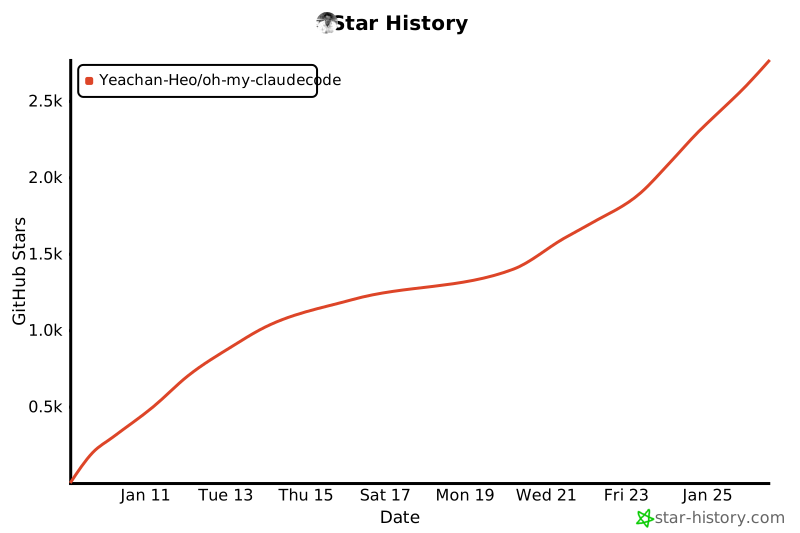
## Star History

[![Star History Chart](https://api.star-history.com/svg?repos=Yeachan-Heo/oh-my-claudecode&type=date&legend=top-left)](https://www.star-history.com/#Yeachan-Heo/oh-my-claudecode&type=date&legend=top-left)

## 💖 Support This Project

If Oh-My-ClaudeCode helps your workflow, consider sponsoring:

[![Sponsor on GitHub](https://img.shields.io/badge/Sponsor-❤️-red?style=for-the-badge&logo=github)](https://github.com/sponsors/Yeachan-Heo)

### Why sponsor?

- Keep development active
- Priority support for sponsors
- Influence roadmap & features
- Help maintain free & open source

### Other ways to help

- ⭐ Star the repo
- 🐛 Report bugs
- 💡 Suggest features
- 📝 Contribute code