# web-perf-cli
[](https://www.npmjs.com/package/@hugoer/web-perf-cli)
[](https://www.npmjs.com/package/@hugoer/web-perf-cli)
[](https://nodejs.org)
[](https://github.com/Hugoer/web-perf-cli/blob/main/LICENSE)
[](https://github.com/Hugoer/web-perf-cli/actions/workflows/test.yml)
[](https://github.com/Hugoer/web-perf-cli/actions/workflows/lint.yml)
[](https://github.com/Hugoer/web-perf-cli/actions/workflows/codeql.yml)
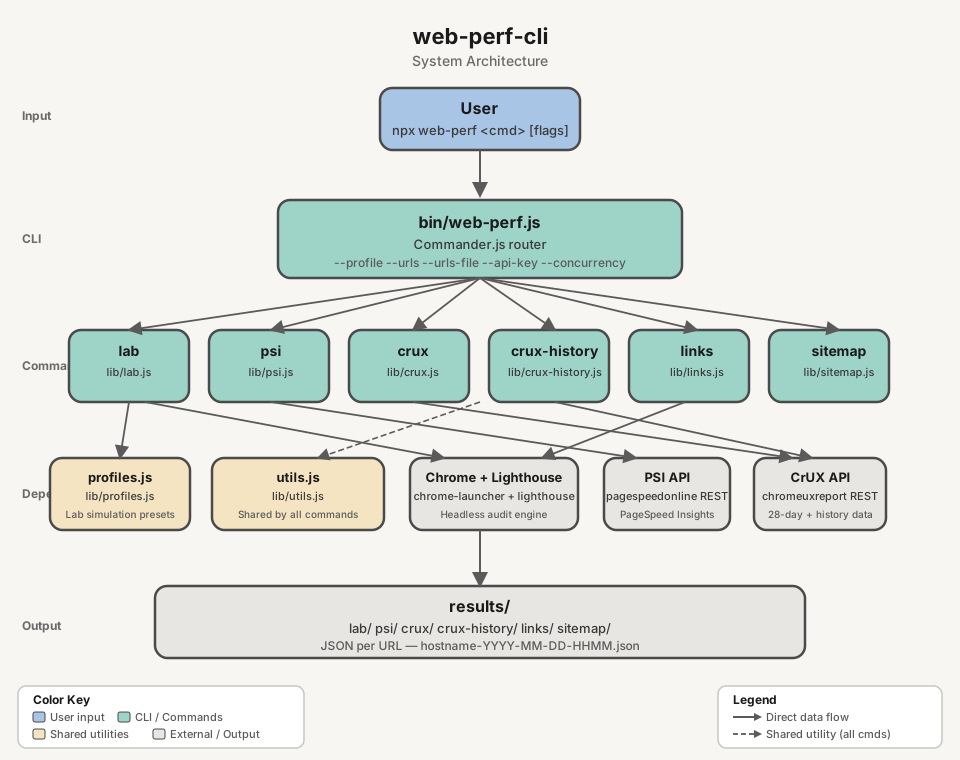
Node.js CLI and library for automated web performance data collection. Gather raw performance signals from local Lighthouse audits, PageSpeed Insights (PSI), and the CrUX API. Features built-in utilities to extract URLs from sitemaps and rendered pages, streamlining the data acquisition process for further analysis.
 ## Requirements
- **Node.js** >= 22.19
- **Google Chrome** installed locally (required for `lab` and `links`)
- **Google Cloud API key** with PageSpeed Insights API and/or CrUX API enabled (required for `psi`, `crux`, `crux-history`) — pass inline with `--api-key`, via a file with `--api-key-path`, or set `WEB_PERF_PSI_API_KEY` (key) or `WEB_PERF_PSI_API_KEY_PATH` (file path) environment variable
## Quick Start
```bash
# Local Lighthouse audit
web-perf lab https://example.com
# PageSpeed Insights (real-user data)
web-perf psi --api-key= https://example.com
# CrUX data (28-day rolling average)
web-perf crux --api-key= https://example.com
# Historical CrUX trends (~6 months)
web-perf crux-history --api-key= https://example.com
```
### Google Cloud API key (for `psi`, `crux`, `crux-history`)
Create an API key in the [Google Cloud Console](https://console.cloud.google.com/) under **APIs & Services > Credentials**, with the following APIs enabled:
- **PageSpeed Insights API** — required for `psi`
- **Chrome UX Report API** — required for `crux` and `crux-history`
> **Note:** After enabling the Chrome UX Report API, it may take a few minutes for the API key to become effective.
```bash
# Inline
web-perf psi --api-key=
web-perf crux --api-key=
# From file (plain text, key only)
web-perf psi --api-key-path=
# Via environment variable (inline key)
export WEB_PERF_PSI_API_KEY=
web-perf psi
# Via environment variable (file path)
export WEB_PERF_PSI_API_KEY_PATH=
web-perf crux
```
## CLI Usage
```bash
web-perf [options]
```
Available commands: `lab`, `psi`, `crux`, `crux-history`, `links`, `sitemap`, `clean`, `list-profiles`, `list-networks`, `list-devices`.
| Command | Source | Result | Options |
|---------|--------|--------|---------|
| `lab` | Local Lighthouse audit (headless Chrome) | JSON report with performance scores and Web Vitals | `--profile`, `--network`, `--device`, `--category`, `--clean`, `--urls`, `--urls-file`, `--runs`, `--reuse-browser`, `--skip-audits`, `--blocked-url-patterns`, `--no-strip-json-props` |
| `psi` | PageSpeed Insights API (real-user data + Lighthouse) | JSON with field metrics and lab scores | `--api-key`, `--api-key-path`, `--urls`, `--urls-file`, `--strategy`, `--category`, `--clean`, `--concurrency`, `--delay` |
| `crux` | CrUX API (origin or page, 28-day rolling average) | JSON with p75 Web Vitals and metric distributions | `--scope`, `--form-factor`, `--api-key`, `--api-key-path`, `--urls`, `--urls-file`, `--concurrency`, `--delay` |
| `crux-history` | CrUX History API (~6 months of weekly data points) | JSON with historical Web Vitals over time | `--scope`, `--form-factor`, `--api-key`, `--api-key-path`, `--urls`, `--urls-file`, `--concurrency`, `--delay` |
| `sitemap` | Domain's `sitemap.xml` (recursive, auto-detects sitemap URLs) | JSON list of all URLs found | `--depth`, `--delay`, `--output-ai` |
| `links` | Rendered DOM via headless Chrome (SPA-compatible) | JSON list of internal links | `--output-ai` |
| `clean` | Existing `lab` or `psi` JSON on disk | AI-friendly `.clean.json` (>=70% smaller) | — |
| `list-profiles` | — | Prints available simulation profiles | — |
| `list-networks` | — | Prints available network presets | — |
| `list-devices` | — | Prints available device presets | — |
## Commands
### `lab` — Local Lighthouse audit
Runs a full Lighthouse audit in headless Chrome and saves the JSON report. Supports simulation profiles to test under different device and network conditions.
```bash
# Default (Lighthouse defaults: Moto G Power on Slow 4G)
web-perf lab
# Single profile
web-perf lab --profile=low
web-perf lab --profile=high
# Multiple profiles (comma-separated)
web-perf lab --profile=low,high
# All profiles (low, medium, high, native)
web-perf lab --profile=all
# Granular control
web-perf lab --network=3g --device=iphone-12
# Profile with partial override (low device + wifi network)
web-perf lab --profile=low --network=wifi
# Skip specific audits
web-perf lab --skip-audits=full-page-screenshot,screenshot-thumbnails
# Block URL patterns (prevent asset downloads during audit, e.g. analytics, ads)
web-perf lab --blocked-url-patterns='*.google-analytics.com,*.facebook.net'
web-perf lab --profile=low --blocked-url-patterns='*.ads.example.com'
# Strip unneeded properties (i18n, timing) from JSON output (default: enabled)
web-perf lab --profile=low # JSON excludes i18n, timing
web-perf lab --no-strip-json-props # JSON includes all properties (raw Lighthouse output)
# Multiple URLs ( argument is ignored when --urls or --urls-file is provided)
web-perf lab --urls=, --profile=low
web-perf lab --urls-file= --profile=all
# Repeat runs — audits each (URL x profile) pair N times and writes a variance summary
web-perf lab --runs=5 --profile=medium
web-perf lab --runs=3 --profile=low,high --urls-file=
# Share one Chrome across all runs (faster, but results become order-dependent)
web-perf lab --urls-file= --profile=low --reuse-browser
```
| Parameter | Required | Description |
|-----------|----------|-------------|
| `` | Yes* | Full URL to audit (e.g. `https://example.com`). Ignored when `--urls` or `--urls-file` is provided |
| `--profile ` | No | Simulation profile(s): `low`, `medium`, `high`, `native`, `all` (comma-separated) |
| `--network ` | No | Network throttling: `3g-slow`, `3g`, `4g`, `4g-fast`, `wifi`, `none` |
| `--device ` | No | Device emulation: `moto-g-power`, `iphone-12`, `iphone-14`, `ipad`, `desktop`, `desktop-large` |
| `--urls ` | No | Comma-separated list of URLs to audit |
| `--urls-file ` | No | Path to a file with one URL per line |
| `--category
## Requirements
- **Node.js** >= 22.19
- **Google Chrome** installed locally (required for `lab` and `links`)
- **Google Cloud API key** with PageSpeed Insights API and/or CrUX API enabled (required for `psi`, `crux`, `crux-history`) — pass inline with `--api-key`, via a file with `--api-key-path`, or set `WEB_PERF_PSI_API_KEY` (key) or `WEB_PERF_PSI_API_KEY_PATH` (file path) environment variable
## Quick Start
```bash
# Local Lighthouse audit
web-perf lab https://example.com
# PageSpeed Insights (real-user data)
web-perf psi --api-key= https://example.com
# CrUX data (28-day rolling average)
web-perf crux --api-key= https://example.com
# Historical CrUX trends (~6 months)
web-perf crux-history --api-key= https://example.com
```
### Google Cloud API key (for `psi`, `crux`, `crux-history`)
Create an API key in the [Google Cloud Console](https://console.cloud.google.com/) under **APIs & Services > Credentials**, with the following APIs enabled:
- **PageSpeed Insights API** — required for `psi`
- **Chrome UX Report API** — required for `crux` and `crux-history`
> **Note:** After enabling the Chrome UX Report API, it may take a few minutes for the API key to become effective.
```bash
# Inline
web-perf psi --api-key=
web-perf crux --api-key=
# From file (plain text, key only)
web-perf psi --api-key-path=
# Via environment variable (inline key)
export WEB_PERF_PSI_API_KEY=
web-perf psi
# Via environment variable (file path)
export WEB_PERF_PSI_API_KEY_PATH=
web-perf crux
```
## CLI Usage
```bash
web-perf [options]
```
Available commands: `lab`, `psi`, `crux`, `crux-history`, `links`, `sitemap`, `clean`, `list-profiles`, `list-networks`, `list-devices`.
| Command | Source | Result | Options |
|---------|--------|--------|---------|
| `lab` | Local Lighthouse audit (headless Chrome) | JSON report with performance scores and Web Vitals | `--profile`, `--network`, `--device`, `--category`, `--clean`, `--urls`, `--urls-file`, `--runs`, `--reuse-browser`, `--skip-audits`, `--blocked-url-patterns`, `--no-strip-json-props` |
| `psi` | PageSpeed Insights API (real-user data + Lighthouse) | JSON with field metrics and lab scores | `--api-key`, `--api-key-path`, `--urls`, `--urls-file`, `--strategy`, `--category`, `--clean`, `--concurrency`, `--delay` |
| `crux` | CrUX API (origin or page, 28-day rolling average) | JSON with p75 Web Vitals and metric distributions | `--scope`, `--form-factor`, `--api-key`, `--api-key-path`, `--urls`, `--urls-file`, `--concurrency`, `--delay` |
| `crux-history` | CrUX History API (~6 months of weekly data points) | JSON with historical Web Vitals over time | `--scope`, `--form-factor`, `--api-key`, `--api-key-path`, `--urls`, `--urls-file`, `--concurrency`, `--delay` |
| `sitemap` | Domain's `sitemap.xml` (recursive, auto-detects sitemap URLs) | JSON list of all URLs found | `--depth`, `--delay`, `--output-ai` |
| `links` | Rendered DOM via headless Chrome (SPA-compatible) | JSON list of internal links | `--output-ai` |
| `clean` | Existing `lab` or `psi` JSON on disk | AI-friendly `.clean.json` (>=70% smaller) | — |
| `list-profiles` | — | Prints available simulation profiles | — |
| `list-networks` | — | Prints available network presets | — |
| `list-devices` | — | Prints available device presets | — |
## Commands
### `lab` — Local Lighthouse audit
Runs a full Lighthouse audit in headless Chrome and saves the JSON report. Supports simulation profiles to test under different device and network conditions.
```bash
# Default (Lighthouse defaults: Moto G Power on Slow 4G)
web-perf lab
# Single profile
web-perf lab --profile=low
web-perf lab --profile=high
# Multiple profiles (comma-separated)
web-perf lab --profile=low,high
# All profiles (low, medium, high, native)
web-perf lab --profile=all
# Granular control
web-perf lab --network=3g --device=iphone-12
# Profile with partial override (low device + wifi network)
web-perf lab --profile=low --network=wifi
# Skip specific audits
web-perf lab --skip-audits=full-page-screenshot,screenshot-thumbnails
# Block URL patterns (prevent asset downloads during audit, e.g. analytics, ads)
web-perf lab --blocked-url-patterns='*.google-analytics.com,*.facebook.net'
web-perf lab --profile=low --blocked-url-patterns='*.ads.example.com'
# Strip unneeded properties (i18n, timing) from JSON output (default: enabled)
web-perf lab --profile=low # JSON excludes i18n, timing
web-perf lab --no-strip-json-props # JSON includes all properties (raw Lighthouse output)
# Multiple URLs ( argument is ignored when --urls or --urls-file is provided)
web-perf lab --urls=, --profile=low
web-perf lab --urls-file= --profile=all
# Repeat runs — audits each (URL x profile) pair N times and writes a variance summary
web-perf lab --runs=5 --profile=medium
web-perf lab --runs=3 --profile=low,high --urls-file=
# Share one Chrome across all runs (faster, but results become order-dependent)
web-perf lab --urls-file= --profile=low --reuse-browser
```
| Parameter | Required | Description |
|-----------|----------|-------------|
| `` | Yes* | Full URL to audit (e.g. `https://example.com`). Ignored when `--urls` or `--urls-file` is provided |
| `--profile ` | No | Simulation profile(s): `low`, `medium`, `high`, `native`, `all` (comma-separated) |
| `--network ` | No | Network throttling: `3g-slow`, `3g`, `4g`, `4g-fast`, `wifi`, `none` |
| `--device ` | No | Device emulation: `moto-g-power`, `iphone-12`, `iphone-14`, `ipad`, `desktop`, `desktop-large` |
| `--urls ` | No | Comma-separated list of URLs to audit |
| `--urls-file ` | No | Path to a file with one URL per line |
| `--category ` | No | Comma-separated Lighthouse categories to run. Values: `performance`, `accessibility`, `best-practices`, `seo`, `agentic-browsing`. Default: all |
| `--skip-audits ` | No | Comma-separated Lighthouse audits to skip. Default: `full-page-screenshot,screenshot-thumbnails,final-screenshot,valid-source-maps` |
| `--blocked-url-patterns ` | No | Comma-separated URL patterns to block during the audit (e.g. `*.google-analytics.com,*.facebook.net`). Uses Chrome DevTools Protocol to prevent matching assets from being downloaded |
| `--clean` | No | Write an AI-friendly `.clean.json` alongside the raw output |
| `--runs ` | No | Audits per URL per profile (default: `1`). Above 1, each run is written with a `-runNN` suffix and a `.summary.json` records the median, spread and `benchmarkIndex` range. Cannot be combined with `--reuse-browser` |
| `--reuse-browser` | No | Share one Chrome across all runs instead of launching a fresh one per run. ~1s/run faster, but Lighthouse does not clear DNS caches or socket pools between runs, so later runs score better purely by position in the run order |
| `--no-strip-json-props` | No | Disable stripping of unneeded properties (`i18n`, `timing`) from JSON output. Omit or leave blank to strip (default). See [ADR-001](docs/decisions/ADR-001-strip-json-props.md) for rationale |
Run `list-profiles`, `list-networks`, or `list-devices` to see all available presets:
Chrome must be installed on the machine.
#### Profiles
| Profile | Device | Network | Description |
|---------|--------|---------|-------------|
| `low` | Moto G Power | Regular 3G | Budget phone on 3G |
| `medium` | Moto G Power | Slow 4G | Lighthouse default |
| `high` | Desktop 1350x940 | WiFi | Desktop on broadband |
| `native` | No emulation | No throttling | Actual device (no emulation, no throttling) |
When `--network` or `--device` are used together with `--profile`, the granular flags override the corresponding part of the profile. For example, `--profile=low --network=wifi` keeps the Moto G Power device but switches the network to WiFi.
```bash
web-perf list-profiles
web-perf list-networks
web-perf list-devices
```
#### Run-to-run variance
Lighthouse's Lantern engine does not measure a throttled page load. It records an
**unthrottled** trace and re-times it, and two parts of that model leak the host machine into
the score:
- **CPU** — observed task durations are multiplied by the profile's `cpuSlowdownMultiplier`
with no correction for how fast the machine was at the time. A busy host produces longer
observed tasks, and therefore a worse score, for the same page.
- **Network** — each origin's *observed* server latency is added on top of the simulated RTT.
A cold DNS/TLS/socket pool inflates it; a warm one does not.
Lighthouse records a per-run CPU benchmark in `environment.benchmarkIndex` but does not act on
it. Two mitigations are built in.
**Every run gets its own browser.** Lighthouse clears storage between runs but not DNS caches,
TCP/TLS sessions or HTTP/2 connections, so a shared browser makes each run faster than the last
purely by position in the run order. `--reuse-browser` opts back into sharing (~1s/run faster)
and is rejected alongside `--runs`, where it would measure the warm-up curve rather than the page.
**`--runs=N` samples instead of guessing.** Each (URL x profile) pair is audited N times. Every
run is kept, and a `.summary.json` records the median, the spread and the `benchmarkIndex` range:
```jsonc
{
"url": "https://example.com/",
"profile": "medium",
"runs": 5,
"medianRun": 5,
"medianOutputPath": "results/lab/lab-example.com-...-medium-run05.json",
"scores": [0.56, 0.71, 0.68, 0.70, 0.69],
"median": 0.69,
"spread": { "min": 0.56, "max": 0.71 },
"benchmarkIndex": { "min": 1799, "max": 3010, "values": [1799, 2950, 2880, 3010, 2940] },
"metrics": { "total-blocking-time": [275, 92, 96, 88, 90] },
"stability": {
"stable": false,
"warnings": ["benchmarkIndex varied 1.67x across runs (1799-3010) - host was not idle"]
}
}
```
For an even N the **lower** median is chosen, so `medianRun` always names a run that actually
happened. Warnings fire when `benchmarkIndex` varies more than **1.5x** across runs (host was
not idle) or falls below **1000** (host too slow to compare against reference hardware). Runs
that fail are excluded from the statistics and listed under `errors`.
Scores are never rescaled after the fact: the variance is reported, not corrected.
**Output:** `results/lab/lab--YYYY-MM-DD-HHMMSS-.json`
With `--runs=N`, each run is written as `...--runNN.json` plus one
`...-.summary.json` per (URL x profile) pair, named after the group's first run.
---
### `psi` — PageSpeed Insights (real-user data)
Fetches real-user metrics and Lighthouse results from the PageSpeed Insights API.
```bash
# Single URL with inline API key
web-perf psi --api-key=
# Single URL with API key from file (plain text, key only)
web-perf psi --api-key-path=
# Multiple URLs (comma-separated) — argument is ignored if present
web-perf psi --urls=,, --api-key=
# Multiple URLs from file (one URL per line) — argument is ignored if present
web-perf psi --urls-file= --api-key=
# Parallel processing (10 concurrent requests, 100ms delay between each)
web-perf psi --urls-file= --api-key= --concurrency=10 --delay=100
# Strategy selection — default runs both mobile + desktop (two API requests per URL)
web-perf psi --strategy=mobile --api-key=
web-perf psi --strategy=desktop --api-key=
web-perf psi --strategy=mobile,desktop --api-key=
```
| Parameter | Required | Description |
|-----------|----------|-------------|
| `` | Yes\* | Full URL to analyze (e.g. `https://example.com`) |
| `--api-key ` | No\*\* | PageSpeed Insights API key passed inline |
| `--api-key-path ` | No\*\* | Path to a plain text file containing only the API key |
| `--urls ` | No | Comma-separated list of URLs. When provided, `` argument is ignored |
| `--urls-file ` | No | Path to a file with one URL per line. When provided, `` argument is ignored |
| `--strategy ` | No | Comma-separated PSI strategies. Values: `mobile`, `desktop`. Default: `mobile,desktop` (both run per URL → two API requests and two output files per URL) |
| `--category ` | No | Comma-separated Lighthouse categories to include. Values: `performance`, `accessibility`, `best-practices`, `seo`. Default: all four |
| `--clean` | No | Write an AI-friendly `.clean.json` alongside the raw output |
| `--concurrency ` | No | Max parallel API requests when processing multiple URLs. Default: `5` |
| `--delay ` | No | Delay in ms between requests per worker. Default: `0` (no delay) |
Built-in quota protection: PSI request starts are capped at 4 requests/second globally during batch runs, regardless of `--concurrency`. Total API calls = `urls × strategies`; the PSI free quota is 25,000 queries/day and 240/min — pin `--strategy=mobile` (or `desktop`) when you need to halve consumption.
\* Not required when `--urls` or `--urls-file` is provided.
\*\* A PSI API key is required. Provide it via `--api-key`, `--api-key-path`, or the `WEB_PERF_PSI_API_KEY` / `WEB_PERF_PSI_API_KEY_PATH` environment variables. CLI flags take precedence.
```bash
# Only performance
web-perf psi --category=performance --api-key-path=
# Performance and SEO only
web-perf psi --category=performance,seo --api-key-path=
```
#### Credential resolution order
1. `--api-key` flag (inline key)
2. `--api-key-path` flag (file path)
3. `WEB_PERF_PSI_API_KEY` env var (inline key)
4. `WEB_PERF_PSI_API_KEY_PATH` env var (file path)
5. Interactive prompt
**Output:** `results/psi/psi--YYYY-MM-DD-HHMMSS-.json` (one file per URL per strategy — default produces both `-mobile.json` and `-desktop.json`)
---
### `crux` — CrUX data (28-day rolling average)
Queries Chrome UX Report data via the CrUX REST API. Returns a 28-day rolling average of Web Vitals metrics. Supports both origin-level and page-level queries via `--scope`. Pages need ~300+ monthly visits to have data.
```bash
# Origin-level (default)
web-perf crux --api-key=
# Page-level
web-perf crux --scope=page --api-key=
# Multiple URLs (page scope)
web-perf crux --urls=, --api-key=
web-perf crux --urls-file= --api-key= --concurrency=10 --delay=100
```
| Parameter | Required | Description |
|-----------|----------|-------------|
| `` | Yes\* | URL or origin to query |
| `--scope ` | No | Query scope: `origin` or `page`. Default is `origin` for single URL input, and `page` when using `--urls` or `--urls-file` |
| `--form-factor ` | No | Comma-separated form factors to query. Values: `phone`, `desktop`, `tablet`. Default: `phone,desktop` (two API requests and two output files per URL) |
| `--api-key ` | No\*\* | CrUX API key |
| `--api-key-path ` | No\*\* | Path to plain text file containing the API key |
| `--urls ` | No | Comma-separated URLs (page scope) |
| `--urls-file ` | No | Path to file with one URL per line (page scope) |
| `--concurrency ` | No | Max parallel requests. Default: `5` |
| `--delay ` | No | Delay between requests in ms. Default: `0` |
Built-in quota protection: CrUX request starts are capped at 2.5 requests/second globally during batch runs, regardless of `--concurrency`.
\* Not required when `--urls` or `--urls-file` is provided.
\*\* A CrUX API key is required. Provide via `--api-key`, `--api-key-path`, or the `WEB_PERF_PSI_API_KEY` / `WEB_PERF_PSI_API_KEY_PATH` environment variables.
**Output:** `results/crux/crux--YYYY-MM-DD-HHMMSS-.json` (one file per form factor — default produces both `-phone.json` and `-desktop.json`)
---
### `crux-history` — Historical CrUX data
Queries the CrUX History API for ~6 months of weekly data points. Each data point represents a 28-day rolling average. Supports both origin-level and page-level queries.
```bash
# Origin-level (default)
web-perf crux-history --api-key=
# Page-level
web-perf crux-history --scope=page --api-key=
# Multiple URLs (page scope)
web-perf crux-history --urls=, --api-key=
web-perf crux-history --urls-file= --api-key= --concurrency=10 --delay=100
```
| Parameter | Required | Description |
|-----------|----------|-------------|
| `` | Yes\* | URL or origin to query (e.g. `https://example.com`) |
| `--scope ` | No | Query scope: `origin` or `page`. Default is `origin` for single URL input, and `page` when using `--urls` or `--urls-file` |
| `--form-factor ` | No | Comma-separated form factors to query. Values: `phone`, `desktop`, `tablet`. Default: `phone,desktop` (two API requests and two output files per URL) |
| `--api-key ` | No\*\* | CrUX API key |
| `--api-key-path ` | No\*\* | Path to plain text file containing the API key |
| `--urls ` | No | Comma-separated URLs (page scope) |
| `--urls-file ` | No | Path to file with one URL per line (page scope) |
| `--concurrency ` | No | Max parallel requests. Default: `5` |
| `--delay ` | No | Delay between requests in ms. Default: `0` |
Built-in quota protection: CrUX History request starts are capped at 2.5 requests/second globally during batch runs, regardless of `--concurrency`.
\* Not required when `--urls` or `--urls-file` is provided.
\*\* A CrUX API key is required. Credential resolution is identical to `crux` (see above).
**Output:** `results/crux-history/crux-history--YYYY-MM-DD-HHMMSS-.json` (one file per form factor — default produces both `-phone.json` and `-desktop.json`)
---
### `sitemap` — Sitemap URL extraction
Parses a domain's `sitemap.xml` (including sitemap indexes) and extracts all URLs. Auto-detects if the URL points to a sitemap (`.xml` extension) or uses `/sitemap.xml` by default.
```bash
web-perf sitemap
web-perf sitemap --depth=3
web-perf sitemap https://example.com/custom-sitemap.xml
web-perf sitemap --output-ai
```
| Parameter | Required | Description |
|-----------|----------|-------------|
| `` | Yes | Domain or sitemap URL (e.g. `example.com` or `example.com/sitemap-pages.xml`) |
| `--depth ` | No | Max recursion depth for sitemap indexes. Default: `3` |
| `--delay ` | No | Delay between requests in ms (randomized ±50ms). Default: `0` |
| `--output-ai` | No | Generate AI-friendly `.txt` output (one URL per line, normalized) |
**Child sitemaps must be on the same origin.** When an index lists a child sitemap, it is
followed only if its scheme, host and port all match the URL the crawl started from.
Anything else is skipped with a warning — including a `www.` variant of the same domain,
which is a different origin. The sitemaps protocol already scopes a sitemap to its own host
and requires verification for cross-host submission, so this also stops an untrusted sitemap
from pointing the crawler at an unrelated address.
**URLs are XML-entity decoded.** The sitemaps protocol requires `&` to be escaped inside
``, so a location written as `https://example.com/p?a=1&b=2` is extracted as
`https://example.com/p?a=1&b=2` — the URL the site actually meant. Without this, every
sitemap URL carrying a query string would be unusable when piped into `--urls-file`.
**Output:** `results/sitemap/sitemap--YYYY-MM-DD-HHMMSS.json`
---
### `links` — Internal link extraction
Extracts internal links from the rendered DOM using headless Chrome. SPA-compatible (waits for JavaScript rendering).
```bash
web-perf links
web-perf links --output-ai
```
| Parameter | Required | Description |
|-----------|----------|-------------|
| `` | Yes | URL to extract links from |
| `--output-ai` | No | Generate AI-friendly `.txt` output (one URL per line, normalized) |
**Output:** `results/links/links--YYYY-MM-DD-HHMMSS.json`
### `clean` — AI-friendly output
Strips a Lighthouse or PSI JSON report down to the information an AI needs: failing audits with details, category scores, and CrUX data. Clean files are ≥70% smaller than the raw output, making them practical for pasting into AI prompts.
```bash
# Generate clean file alongside raw output at run time
web-perf lab --clean https://example.com
web-perf psi --clean --api-key= https://example.com
# Post-process existing raw files
web-perf clean results/lab/lab-example.com-2026-09-02-094255-medium.json
web-perf clean results/lab/
web-perf clean 'results/**/*.json'
```
Clean files are written to a `clean/` subfolder next to the raw output:
- `results/lab/clean/lab--YYYY-MM-DD-HHMMSS-.clean.json`
- `results/psi/clean/psi--YYYY-MM-DD-HHMMSS-.clean.json`
The clean file is self-describing: `JSON.parse(cleanFile)._clean === true`.
## Environment variables
| Variable | Command | Description |
|---|---|---|
| `WEB_PERF_PSI_API_KEY` | `psi`, `crux`, `crux-history` | API key for PageSpeed Insights / CrUX API |
| `WEB_PERF_PSI_API_KEY_PATH` | `psi`, `crux`, `crux-history` | Path to file containing the API key |
CLI flags (`--api-key`, `--api-key-path`) always take precedence over environment variables.
## Output structure
All results are saved as JSON files under the `results/` directory, organized by command:
```
results/
├── lab/
│ ├── lab-example.com-2026-09-02-094255-medium.json
│ ├── lab-example.com-2026-09-02-094255-medium-run01.json (with --runs=N)
│ ├── lab-example.com-2026-09-02-094255-medium.summary.json (with --runs=N)
│ └── clean/
│ └── lab-example.com-2026-09-02-094255-medium.clean.json (with --clean)
├── psi/
│ ├── psi-example.com-2026-09-02-094255-mobile.json (one per strategy)
│ ├── psi-example.com-2026-09-02-094255-desktop.json
│ └── clean/
│ └── psi-example.com-2026-09-02-094255-mobile.clean.json (with --clean)
├── crux/
│ ├── crux-www.example.com-2026-09-02-094255-phone.json (one per form factor)
│ └── crux-www.example.com-2026-09-02-094255-desktop.json
├── crux-history/
│ └── crux-history-www.example.com-2026-09-02-094255-phone.json
├── links/
│ └── links-www.example.com-2026-09-02-094255.json
└── sitemap/
└── sitemap-www.example.com-2026-09-02-094255.json
```
## Library API
`web-perf` can be used as a Node.js library. The pure audit functions return data directly — no files written, no disk I/O — making them safe for use in servers and backends.
```js
// CommonJS
const { runCruxAudit, runPsiAudit, runLabAudit } = require('@hugoer/web-perf-cli');
// Subpath imports (load only what you need)
const { runCruxAudit, runCruxAuditBatch } = require('@hugoer/web-perf-cli/crux');
const { runPsiAudit, runPsiAuditBatch } = require('@hugoer/web-perf-cli/psi');
const { runLabAudit, runLabPlan } = require('@hugoer/web-perf-cli/lab');
const { buildRunSummary } = require('@hugoer/web-perf-cli/variance');
```
### Available functions
| Function | Module | Returns |
|----------|--------|---------|
| `runLabAudit(url, { port?, profile?, network?, device?, categories?, skipAudits?, blockedUrlPatterns?, stripJsonProps?, silent? }?)` | `web-perf-cli/lab` | `Promise` |
| `runPsiAudit(url, apiKey, categories?, strategy?)` | `web-perf-cli/psi` | `Promise` |
| `runPsiAuditBatch(urls, apiKey, categories, options?)` | `web-perf-cli/psi` | `Promise` |
| `runCruxAudit(url, apiKey, options?)` | `web-perf-cli/crux` | `Promise` |
| `runCruxAuditBatch(urls, apiKey, options?)` | `web-perf-cli/crux` | `Promise` |
| `runCruxHistoryAudit(url, apiKey, options?)` | `web-perf-cli/crux-history` | `Promise` |
| `runCruxHistoryAuditBatch(urls, apiKey, options?)` | `web-perf-cli/crux-history` | `Promise` |
| `selectMedianRun(scores)` | `web-perf-cli/variance` | `number` (index; lower median, `-1` if empty) |
| `assessStability(benchmarkIndexes)` | `web-perf-cli/variance` | `{ stable: boolean, warnings: string[] }` |
| `buildRunSummary(runs, context?)` | `web-perf-cli/variance` | `RunSummary` |
The `variance` helpers are pure too — they take report-shaped plain objects and do no I/O,
so they can summarise runs collected by any means, not just this CLI's.
```js
// Single URL
const report = await runCruxAudit('https://example.com', apiKey, { scope: 'origin' });
console.log(report.metrics);
// Batch with progress
const results = await runCruxAuditBatch(urls, apiKey, {
scope: 'page',
concurrency: 5,
onProgress: (done, total, url) => console.log(`${done}/${total}: ${url}`),
});
```
The CLI wrapper functions (`runLab`, `runPsi`, `runCrux`, `runCruxHistory`, …) are also exported and behave identically to the CLI commands — they write JSON to disk and return the output file path.
`runLabPlan(urls, runs, options?, hooks?)` (from `web-perf-cli/lab`) is the orchestrator behind
`web-perf lab`: it walks every (URL x profile x repeat) combination, owns the browser lifecycle,
writes each report plus any `.summary.json`, and reports progress through `onRunStart` /
`onRunComplete` / `onRunError` / `onSummary` callbacks rather than logging. It returns
`Promise`.
## TypeScript
TypeScript type declarations are included and resolve automatically when you install the package. No `@types/` package needed.
```ts
import { runCruxAudit, runPsiAudit } from '@hugoer/web-perf-cli';
import type { CruxReport, PsiReport, LabReport } from '@hugoer/web-perf-cli';
// Subpath imports also carry types
import { runCruxHistoryAudit } from '@hugoer/web-perf-cli/crux-history';
import type { CruxHistoryReport } from '@hugoer/web-perf-cli/crux-history';
```
Key exported types:
| Type | Description |
|------|-------------|
| `LabReport` | Lighthouse JSON with `i18n` and `timing` stripped (categories, audits, environment, configSettings). Pass `--no-strip-json-props` / `stripJsonProps: false` to keep them |
| `PsiReport` | PageSpeed Insights API response (loadingExperience, lighthouseResult) |
| `CruxReport` | CrUX 28-day snapshot (metrics, collectionPeriod, scope, key) |
| `CruxHistoryReport` | CrUX historical snapshot (metrics, collectionPeriods array) |
| `CruxMetric` | Single CrUX metric (histogram bins, p75 percentile) |
| `PsiBatchResult` | `{ url, data: PsiReport \| null, error: string \| null }` |
| `CruxBatchResult` | `{ url, data: CruxReport \| null, error: string \| null }` |
| `CruxHistoryBatchResult` | `{ url, data: CruxHistoryReport \| null, error: string \| null }` |
| `LabPlanResult` | `{ url, profile, outputPath?, error? }` — one per run in a `runLabPlan` plan |
| `RunSummary` | Variance record for one repeated (URL x profile) pair: median, spread, `benchmarkIndex` range, per-metric arrays, stability warnings |
## Development
```bash
# Clone and install dependencies
git clone https://github.com/Hugoer/web-perf-cli.git
cd web-perf-cli
npm install
# Run the CLI locally
node bin/web-perf.js lab https://example.com
```
### Scripts
| Script | Description |
|--------|-------------|
| `npm run lint` | Lint and auto-fix with ESLint |
| `npm test` | Run all tests (vitest) |
| `npm run generate-types` | Regenerate `types/lib/*.d.ts` from JSDoc annotations |
Run them in that order at the end of every change — `lint` must pass before `test`, and
`generate-types` last so the regenerated `.d.ts` reflects the final JSDoc.
### Regenerating types
Type declarations in `types/lib/` are generated from JSDoc `@typedef` annotations in `lib/`. Run `npm run generate-types` after changing any return shape in a `run*Audit` function, then commit the updated `types/` alongside the code change.
```bash
npm run generate-types
git add types/ lib/
git commit -m "feat: update CruxReport shape"
```
## License
MIT