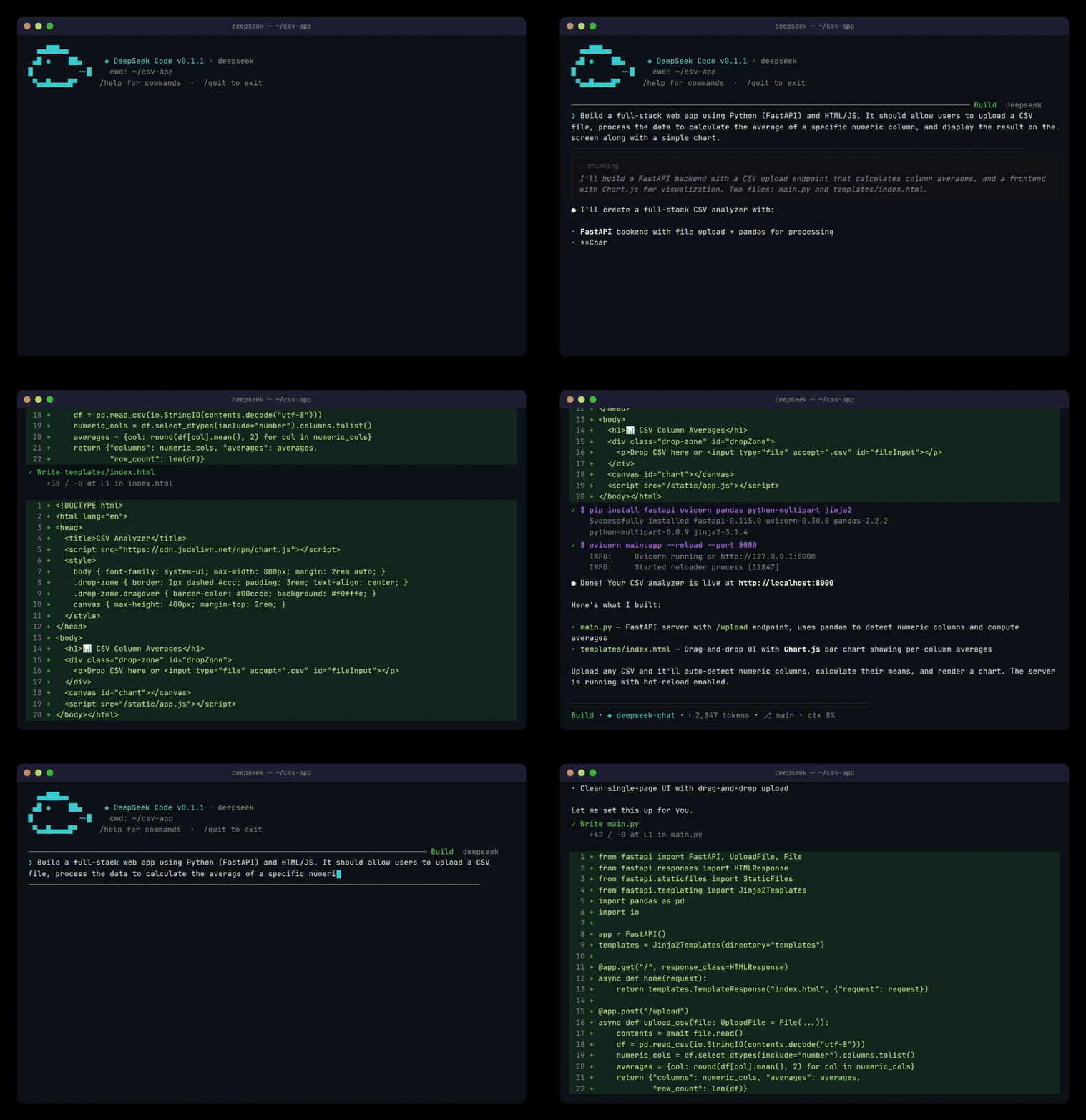
An open-source, DeepSeek-powered coding assistant that lives in your terminal.
---
Simulated output for demonstration purposes.
---
## Features
- **Agentic coding** — reads/writes files, runs shell commands, searches code, manages git
- **Multi-provider** — DeepSeek API, Amazon Bedrock, Google Vertex AI, or any local model (Ollama, LM Studio)
- **Full TUI** — alternate-screen interface with streamed thinking, rich markdown, and vim mode
- **Unified agents** — scoped primary agents and sub-agents with editable base prompts
- **Settings center** — fullscreen, searchable User/Project/Local configuration with visible origins
- **MCP support** — connect to any Model Context Protocol server for extended tooling
- **Project guidance** — loads a root `AGENTS.md` alongside `DEEPSEEK.md`
- **Optional LSP navigation** — user-configured language servers expose definitions, references, hover, and symbols to the agent
- **Extensible** — slash commands, custom tools, memory, sessions, themes
## Quick start
```bash
bun add -g @hermenics/deepseek-code
```
Then run `deepseek` inside any project. On first run you'll pick a **provider** and configure authentication.
For automation, use headless pipe mode:
```bash
echo "explain this project" | deepseek --pipe
cat src/index.tsx | deepseek --pipe --json "summarize"
```
### Requirements
- [Bun](https://bun.sh) 1.1+
- A supported LLM provider (see below)
## Providers & authentication
| Provider | How to authenticate | Env / config keys |
|----------|--------------------|--------------------|
| **DeepSeek API** (default) | API key from [platform.deepseek.com](https://platform.deepseek.com/api_keys) | `DEEPSEEK_API_KEY`, `DEEPSEEK_BASE_URL` |
| **Amazon Bedrock** | AWS IAM credentials via `~/.aws/credentials` | `AWS_REGION`, `AWS_PROFILE` |
| **Google Vertex AI** | GCP service account JSON key | `GCP_PROJECT`, `GCP_LOCATION`, `GCP_CREDENTIALS` |
| **Local (Ollama / LM Studio)** | No auth — point to your local endpoint | `LOCAL_BASE_URL`, `LOCAL_MODEL` |
Secrets are saved only to `~/.deepseek/config.json`. Non-secret preferences use `settings.json` with `User < Project < Local` precedence; legacy values remain readable for compatibility. Project MCP servers are off by default and require the User-scoped **Enable project MCP servers** setting; restart DeepSeek Code after changing it. See [docs/settings.md](docs/settings.md).
## Models
Switch models at any time with `/model`:
| Model ID | Description | Context |
|----------|-------------|---------|
| `deepseek-flash` | Native visual understanding; fast, general purpose (default) | 1M |
| `deepseek-v4-pro` | Advanced reasoning | 1M |
Each provider also exposes provider-specific models (Bedrock, Vertex, local).
## Slash commands
| Command | Description |
|---------|-------------|
| `/model` | Switch model |
| `/agent` | Spawn a sub-agent |
| `/memory` | Manage persistent memory |
| `/plan` | Enter plan mode |
| `/review` | Code review |
| `/vim` | Toggle vim keybindings |
| `/theme` | Change color theme |
| `/tools` | List available tools |
| `/doctor` | Check runtime, workspace, credentials, settings, and MCP configuration |
| `/verify` | Run the detected project test command |
| `/sessions export [json\|md]` | Export a sanitized session transcript |
| `/catalog`, `/marketplace` | Browse curated MCP, plugin, and skill integrations |
| `/permissions` | Explain mode, allow/deny rules, risk checks, and session approvals |
| `/config`, `/settings` | Open the fullscreen settings center |
| `/help` | Show all commands |
## Built-in tools
The agent has access to these tools out of the box:
`ReadFile` · `WriteFile` · `EditFile` · `PatchFile` · `Shell` · `Glob` · `Grep` · `Lsp` · `Git` · `ReadFolder` · `WebFetch` · `SubAgent` · `AskAgent` · `Workflow` · `Memory` · `Todo` · `Introspect` · `MoA` · `AskUserQuestions`
## TUI behavior
- Uses the terminal **alternate screen** by default; it can be disabled for the next session in `/settings`
- Settings adapt from three panes to a sequential category → list → detail flow on narrow terminals
- Thinking output is streamed as full multiline blocks and persisted after each response
- Build, Plan, Review and Auto are real interaction modes. Review is read-only; Plan can only write its designated plan.
---
## Development
### Prerequisites
- [Bun](https://bun.sh) >= 1.1
- Node.js >= 18 (for npm publishing)
### Setup
```bash
git clone https://github.com/Hermenics/deepseek-code.git
cd deepseek-code
bun install
```
### Commands
```bash
bun run dev # Start in dev mode (watch)
bun run start # Run from source
bun run build # Production build
bun run typecheck # Type check (tsc --noEmit)
bun test # Run tests
```
### Project structure
```
src/
├── agent/ # Core agent loop, providers (DeepSeek, Bedrock, Vertex)
├── commands/ # Slash command definitions
├── ui/ # React TUI components and app state
├── ink/ # Local Ink-compatible terminal renderer
├── tools/ # Agent tools (file ops, shell, git, search, etc.)
├── services/ # Cross-cutting services such as compaction
├── hooks/ # Pre/post tool execution hooks
└── index.tsx # Entry point
tests/ # Test suite
```
---
## Contributing
Contributions are welcome! Here's how to get started:
1. **Fork** the repo and create a branch from `main`
2. **Install** dependencies with `bun install`
3. **Make your changes** — keep files under 500 lines
4. **Run checks** before submitting:
```bash
bun run typecheck && bun test
```
5. **Open a PR** with a clear description of what changed and why
### Guidelines
- Follow existing code style (TypeScript, functional where possible)
- Write tests for new features — tests live in `tests/`, never in `src/`
- One concern per PR — don't bundle unrelated changes
- Commit messages should explain the "why", not just the "what"
### Reporting bugs
File a [GitHub issue](https://github.com/Hermenics/deepseek-code/issues) with steps to reproduce, or use `/help` inside the TUI.
---
## License
[Apache 2.0](./LICENSE)
---