[size-image]: https://img.shields.io/github/size/henrygd/queue/dist/index.min.js?style=flat
[license-image]: https://img.shields.io/github/license/henrygd/queue?style=flat&color=%2349ac0c
[license-url]: /LICENSE
# @henrygd/queue
[![File Size][size-image]](https://github.com/henrygd/queue/blob/main/dist/index.min.js) [![MIT license][license-image]][license-url] [](https://jsr.io/@henrygd/queue)
Tiny async queue with concurrency control. Like `p-limit` or `fastq`, but smaller and faster. Optional [time-based rate limiting](#time-based-rate-limiting) also available. See [comparisons and benchmarks](#comparisons-and-benchmarks) below.
Works with: 



 ## Usage
Create a queue with the `newQueue` function. Then add async functions - or promise returning functions - to your queue with the `add` method.
You can use `queue.done()` to wait for the queue to be empty.
```ts
import { newQueue } from '@henrygd/queue'
// create a new queue with a concurrency of 2
const queue = newQueue(2)
const pokemon = ['ditto', 'hitmonlee', 'pidgeot', 'poliwhirl', 'golem', 'charizard']
for (const name of pokemon) {
queue.add(async () => {
const res = await fetch(`https://pokeapi.co/api/v2/pokemon/${name}`)
const json = await res.json()
console.log(`${json.name}: ${json.height * 10}cm | ${json.weight / 10}kg`)
})
}
console.log('running')
await queue.done()
console.log('done')
```
The return value of `queue.add` is the same as the return value of the supplied function.
```ts
const response = await queue.add(() =>
fetch("https://pokeapi.co/api/v2/pokemon")
);
console.log(response.ok, response.status, response.headers);
```
`queue.all` is like `Promise.all` with concurrency control:
```ts
import { newQueue } from "@henrygd/queue";
const queue = newQueue(2);
const tasks = ["ditto", "hitmonlee", "pidgeot", "poliwhirl"].map(
(name) => async () => {
const res = await fetch(`https://pokeapi.co/api/v2/pokemon/${name}`);
return await res.json();
}
);
// Process all tasks concurrently (limited by queue concurrency) and wait for all to complete
const results = await queue.all(tasks);
console.log(results); // [{ name: 'ditto', ... }, { name: 'hitmonlee', ... }, ...]
```
You can also mix existing promises and function wrappers.
```ts
const existingPromise = fetch("https://pokeapi.co/api/v2/pokemon/ditto").then(
(r) => r.json()
);
const results = await queue.all([
existingPromise,
() =>
fetch("https://pokeapi.co/api/v2/pokemon/pidgeot").then((r) => r.json()),
]);
```
Note that only the wrapper functions are queued, since existing promises start running as soon as you create them.
## Time-based rate limiting
If you need to limit not just concurrency (how many tasks run simultaneously) but also **rate** (how many tasks can start within a time window), use `@henrygd/queue/rl`.
This is useful when working with APIs that have rate limits.
```ts
import { newQueue } from '@henrygd/queue/rl'
// max 10 concurrent requests, but only 3 can start per second
const queue = newQueue(10, 3, 1000)
const start = Date.now()
for (let i = 1; i <= 10; i++) {
queue.add(async () => console.log(`Task ${i} started at ${Date.now() - start}ms`))
}
await queue.done()
```
The signature is: `newQueue(concurrency, rate?, interval?)`.
- **`concurrency`** - Maximum number of tasks running simultaneously
- **`rate`** - Maximum number of tasks that can start within the `interval` (optional)
- **`interval`** - Time window in milliseconds for rate limiting (optional)
If you omit `rate` and `interval`, it works exactly like the main package (just concurrency limiting).
> [!TIP]
> If you need support for Node's [AsyncLocalStorage](https://nodejs.org/api/async_context.html#introduction), import `@henrygd/queue/async-storage` instead.
## Queue interface
```ts
/** Add an async function / promise wrapper to the queue */
queue.add(promiseFunction: () => PromiseLike): Promise
/** Adds promises (or wrappers) to the queue and resolves like Promise.all */
queue.all(promiseFunctions: Array | (() => PromiseLike)>): Promise
/** Returns a promise that resolves when the queue is empty */
queue.done(): Promise
/** Empties the queue - pending promises are rejected, active promises continue */
queue.clear(): void
/** Returns the number of promises currently running */
queue.active(): number
/** Returns the total number of promises in the queue */
queue.size(): number
```
## Comparisons and benchmarks
| Library | Version | Bundle size (B) | Weekly downloads |
| :-------------------------------------------------------------- | :------ | :-------------- | :--------------- |
| @henrygd/queue | 1.2.0 | 472 | hundreds :) |
| @henrygd/queue/rl | 1.2.0 | 685 | - |
| [p-limit](https://github.com/sindresorhus/p-limit) | 5.0.0 | 1,763 | 118,953,973 |
| [async.queue](https://github.com/caolan/async) | 3.2.5 | 6,873 | 53,645,627 |
| [fastq](https://github.com/mcollina/fastq) | 1.17.1 | 3,050 | 39,257,355 |
| [queue](https://github.com/jessetane/queue) | 7.0.0 | 2,840 | 4,259,101 |
| [promise-queue](https://github.com/promise-queue/promise-queue) | 2.2.5 | 2,200 | 1,092,431 |
### Note on benchmarks
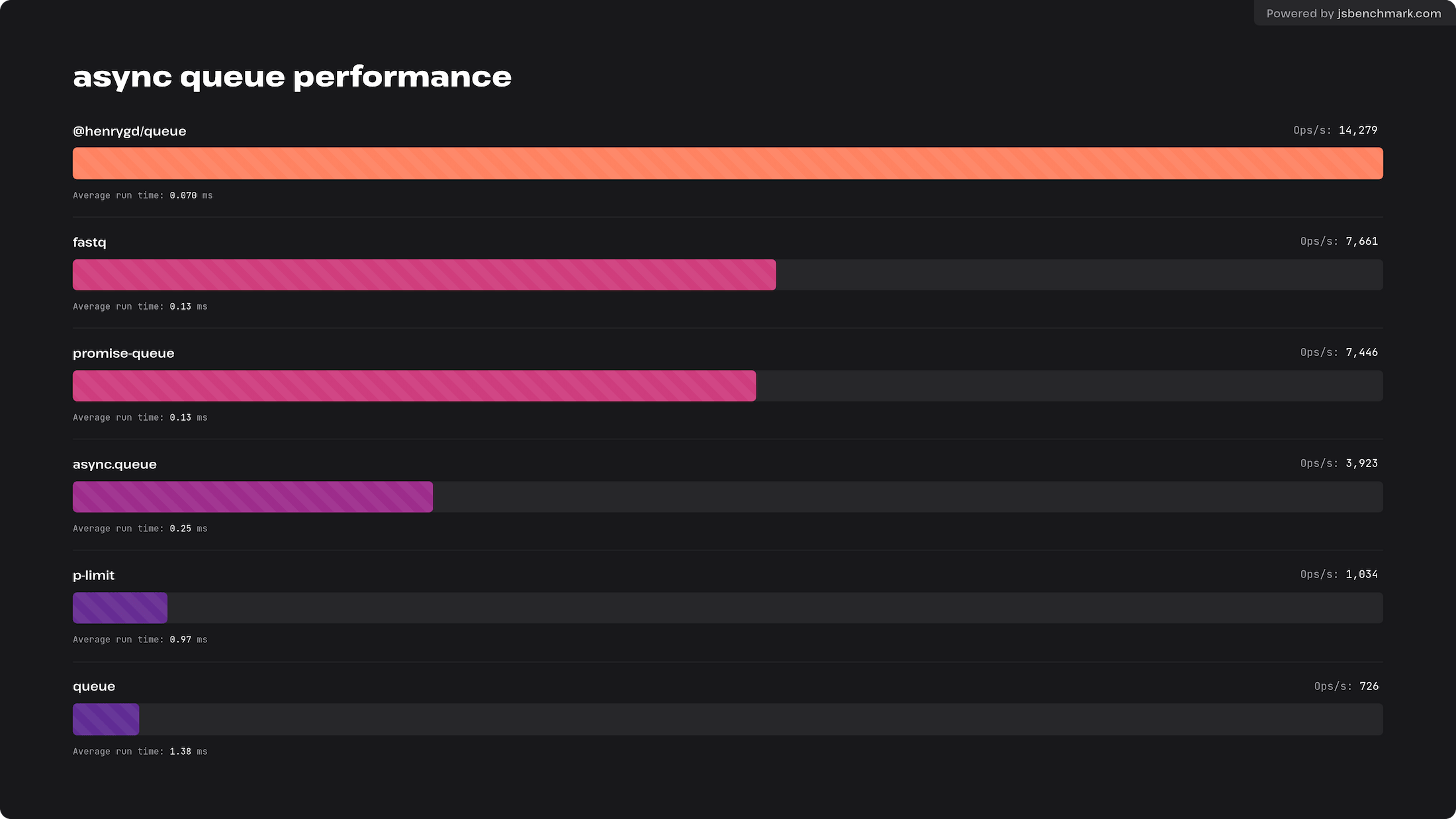
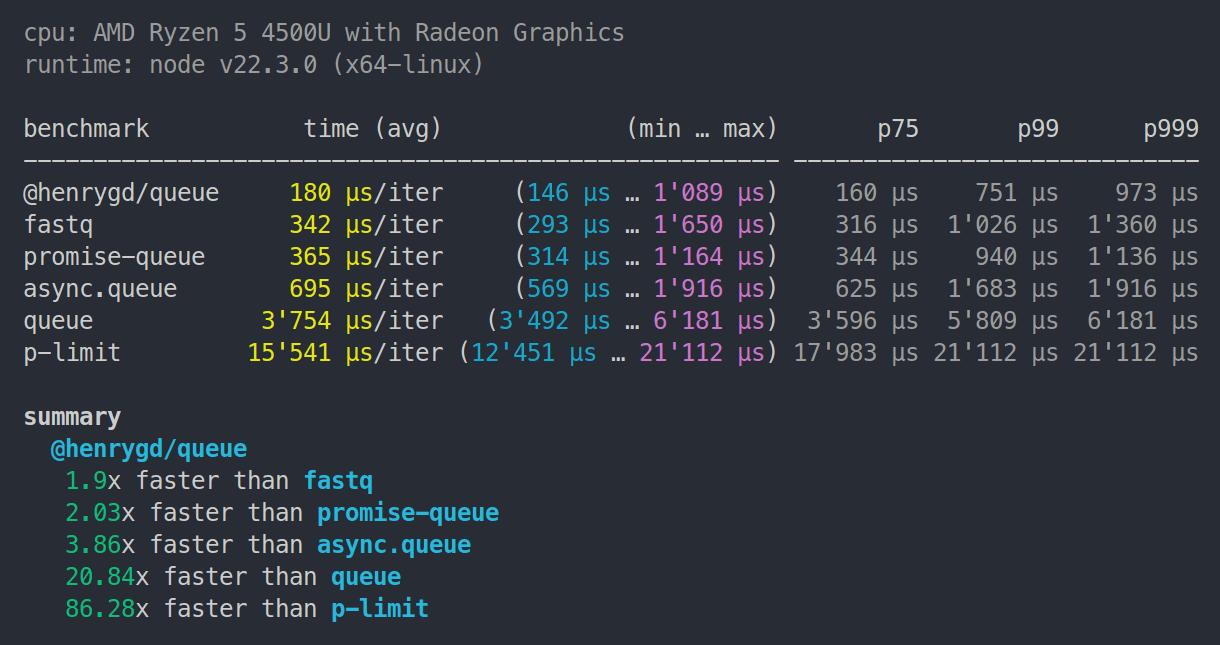
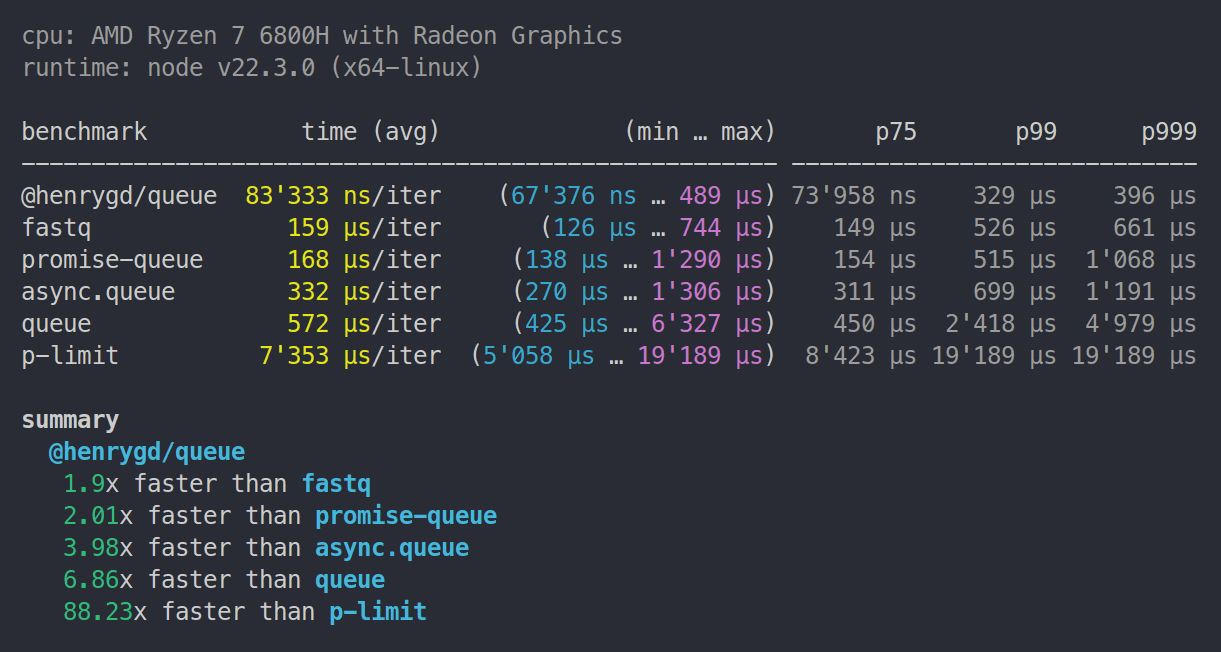
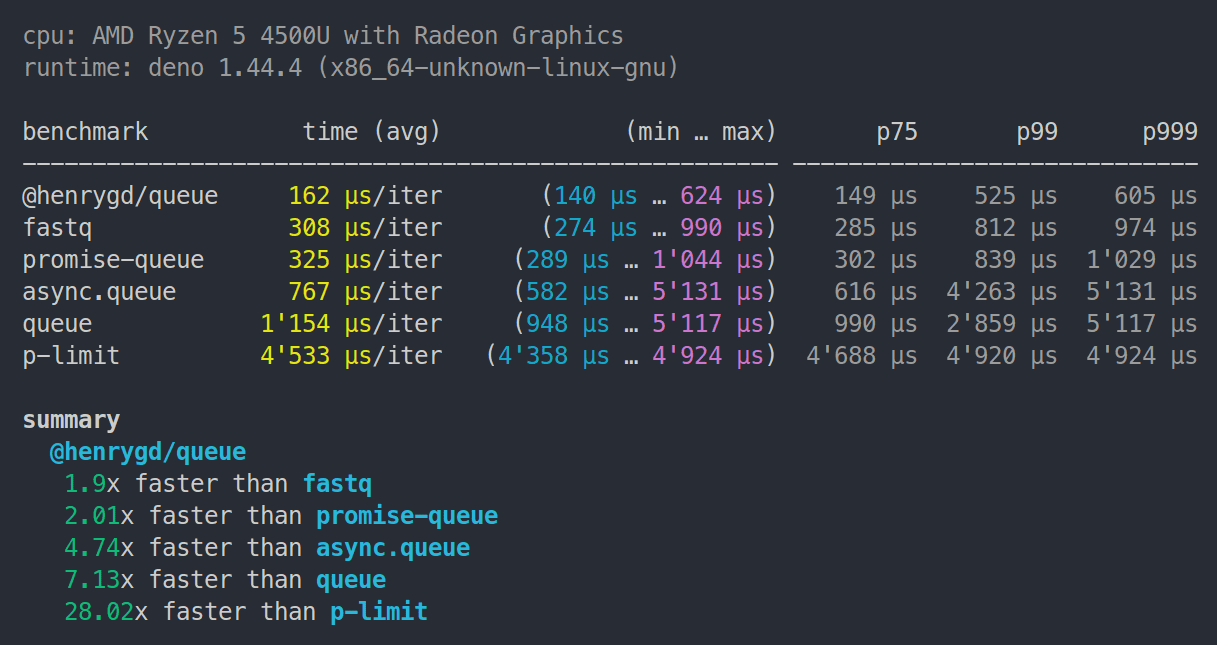
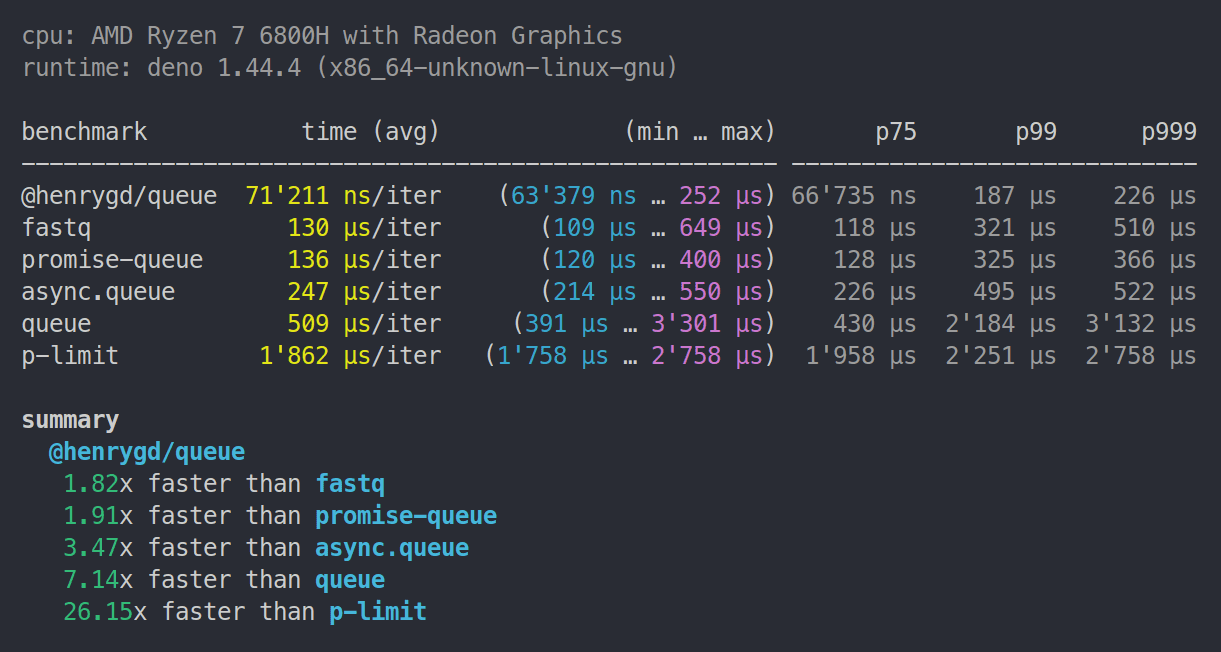
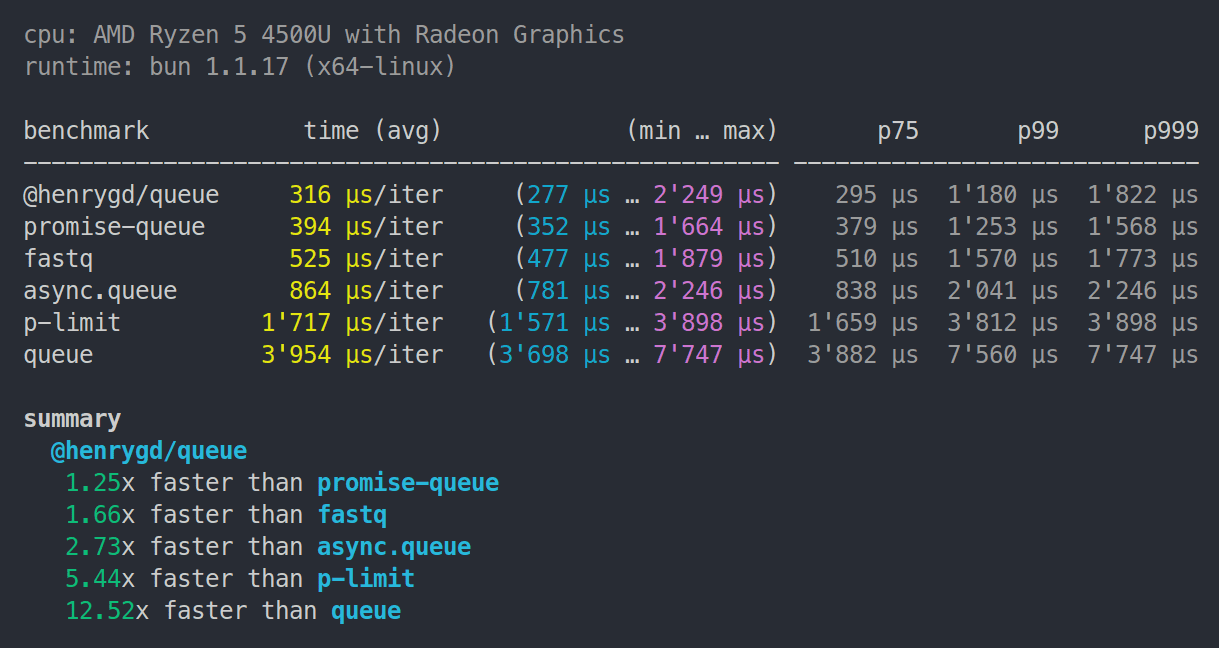
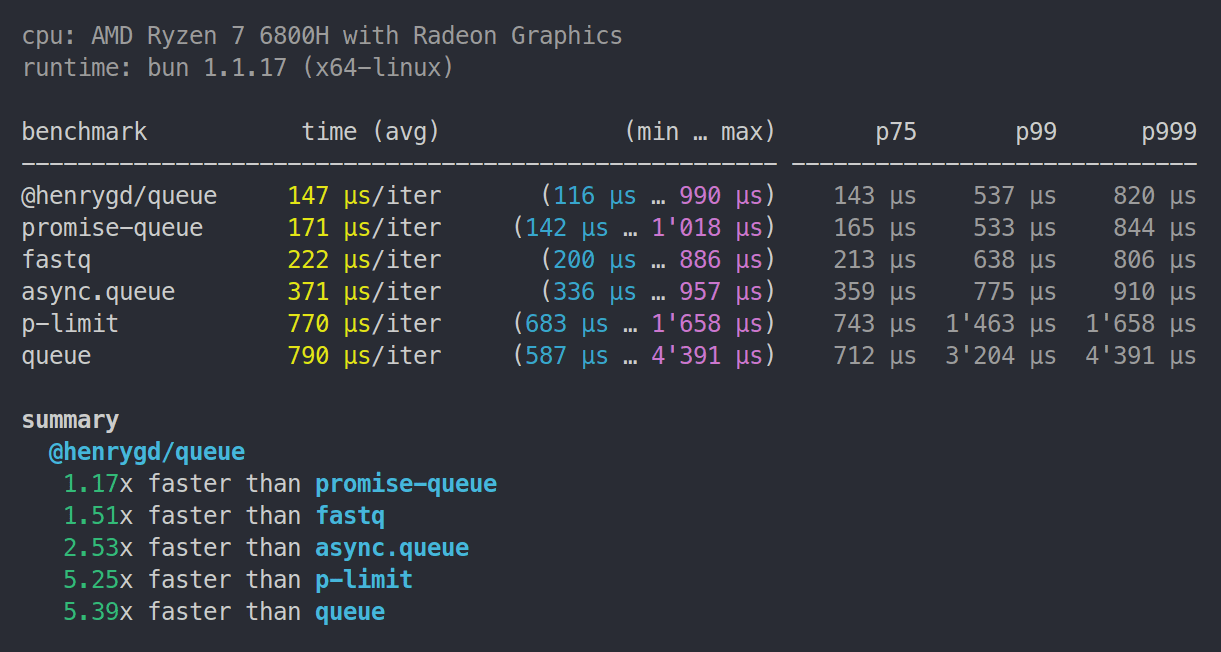
All libraries run the exact same test. Each operation measures how quickly the queue can resolve 1,000 async functions. The function just increments a counter and checks if it has reached 1,000.[^benchmark]
We check for completion inside the function so that `promise-queue` and `p-limit` are not penalized by having to use `Promise.all` (they don't provide a promise that resolves when the queue is empty).
## Browser benchmark
This test was run in Chromium. Chrome and Edge are the same. Firefox and Safari are slower and closer, with `@henrygd/queue` just edging out `promise-queue`. I think both are hitting the upper limit of what those browsers will allow.
You can run or tweak for yourself here: https://jsbm.dev/TKyOdie0sbpOh
## Node.js benchmarks
> Note: `p-limit` 6.1.0 now places between `async.queue` and `queue` in Node and Deno.
Ryzen 5 4500U | 8GB RAM | Node 22.3.0
Ryzen 7 6800H | 32GB RAM | Node 22.3.0
## Deno benchmarks
> Note: `p-limit` 6.1.0 now places between `async.queue` and `queue` in Node and Deno.
Ryzen 5 4500U | 8GB RAM | Deno 1.44.4
Ryzen 7 6800H | 32GB RAM | Deno 1.44.4
## Bun benchmarks
Ryzen 5 4500U | 8GB RAM | Bun 1.1.17
Ryzen 7 6800H | 32GB RAM | Bun 1.1.17
## Cloudflare Workers benchmark
Uses [oha](https://github.com/hatoo/oha) to make 1,000 requests to each worker. Each request creates a queue and resolves 5,000 functions.
This was run locally using [Wrangler](https://developers.cloudflare.com/workers/get-started/guide/) on a Ryzen 7 6800H laptop. Wrangler uses the same [workerd](https://github.com/cloudflare/workerd) runtime as workers deployed to Cloudflare, so the relative difference should be accurate. Here's the [repository for this benchmark](https://github.com/henrygd/async-queue-wrangler-benchmark).
| Library | Requests/sec | Total (sec) | Average | Slowest |
| :------------- | :----------- | :---------- | :------ | :------ |
| @henrygd/queue | 816.1074 | 1.2253 | 0.0602 | 0.0864 |
| promise-queue | 647.2809 | 1.5449 | 0.0759 | 0.1149 |
| fastq | 336.7031 | 3.0877 | 0.1459 | 0.2080 |
| async.queue | 198.9986 | 5.0252 | 0.2468 | 0.3544 |
| queue | 85.6483 | 11.6757 | 0.5732 | 0.7629 |
| p-limit | 77.7434 | 12.8628 | 0.6316 | 0.9585 |
## Related
[`@henrygd/semaphore`](https://github.com/henrygd/semaphore) - Fastest javascript inline semaphores and mutexes using async / await.
## License
[MIT license](/LICENSE)
[^benchmark]: In real applications, you may not be running so many jobs at once, and your jobs will take much longer to resolve. So performance will depend more on the jobs themselves.
## Usage
Create a queue with the `newQueue` function. Then add async functions - or promise returning functions - to your queue with the `add` method.
You can use `queue.done()` to wait for the queue to be empty.
```ts
import { newQueue } from '@henrygd/queue'
// create a new queue with a concurrency of 2
const queue = newQueue(2)
const pokemon = ['ditto', 'hitmonlee', 'pidgeot', 'poliwhirl', 'golem', 'charizard']
for (const name of pokemon) {
queue.add(async () => {
const res = await fetch(`https://pokeapi.co/api/v2/pokemon/${name}`)
const json = await res.json()
console.log(`${json.name}: ${json.height * 10}cm | ${json.weight / 10}kg`)
})
}
console.log('running')
await queue.done()
console.log('done')
```
The return value of `queue.add` is the same as the return value of the supplied function.
```ts
const response = await queue.add(() =>
fetch("https://pokeapi.co/api/v2/pokemon")
);
console.log(response.ok, response.status, response.headers);
```
`queue.all` is like `Promise.all` with concurrency control:
```ts
import { newQueue } from "@henrygd/queue";
const queue = newQueue(2);
const tasks = ["ditto", "hitmonlee", "pidgeot", "poliwhirl"].map(
(name) => async () => {
const res = await fetch(`https://pokeapi.co/api/v2/pokemon/${name}`);
return await res.json();
}
);
// Process all tasks concurrently (limited by queue concurrency) and wait for all to complete
const results = await queue.all(tasks);
console.log(results); // [{ name: 'ditto', ... }, { name: 'hitmonlee', ... }, ...]
```
You can also mix existing promises and function wrappers.
```ts
const existingPromise = fetch("https://pokeapi.co/api/v2/pokemon/ditto").then(
(r) => r.json()
);
const results = await queue.all([
existingPromise,
() =>
fetch("https://pokeapi.co/api/v2/pokemon/pidgeot").then((r) => r.json()),
]);
```
Note that only the wrapper functions are queued, since existing promises start running as soon as you create them.
## Time-based rate limiting
If you need to limit not just concurrency (how many tasks run simultaneously) but also **rate** (how many tasks can start within a time window), use `@henrygd/queue/rl`.
This is useful when working with APIs that have rate limits.
```ts
import { newQueue } from '@henrygd/queue/rl'
// max 10 concurrent requests, but only 3 can start per second
const queue = newQueue(10, 3, 1000)
const start = Date.now()
for (let i = 1; i <= 10; i++) {
queue.add(async () => console.log(`Task ${i} started at ${Date.now() - start}ms`))
}
await queue.done()
```
The signature is: `newQueue(concurrency, rate?, interval?)`.
- **`concurrency`** - Maximum number of tasks running simultaneously
- **`rate`** - Maximum number of tasks that can start within the `interval` (optional)
- **`interval`** - Time window in milliseconds for rate limiting (optional)
If you omit `rate` and `interval`, it works exactly like the main package (just concurrency limiting).
> [!TIP]
> If you need support for Node's [AsyncLocalStorage](https://nodejs.org/api/async_context.html#introduction), import `@henrygd/queue/async-storage` instead.
## Queue interface
```ts
/** Add an async function / promise wrapper to the queue */
queue.add(promiseFunction: () => PromiseLike): Promise
/** Adds promises (or wrappers) to the queue and resolves like Promise.all */
queue.all(promiseFunctions: Array | (() => PromiseLike)>): Promise
/** Returns a promise that resolves when the queue is empty */
queue.done(): Promise
/** Empties the queue - pending promises are rejected, active promises continue */
queue.clear(): void
/** Returns the number of promises currently running */
queue.active(): number
/** Returns the total number of promises in the queue */
queue.size(): number
```
## Comparisons and benchmarks
| Library | Version | Bundle size (B) | Weekly downloads |
| :-------------------------------------------------------------- | :------ | :-------------- | :--------------- |
| @henrygd/queue | 1.2.0 | 472 | hundreds :) |
| @henrygd/queue/rl | 1.2.0 | 685 | - |
| [p-limit](https://github.com/sindresorhus/p-limit) | 5.0.0 | 1,763 | 118,953,973 |
| [async.queue](https://github.com/caolan/async) | 3.2.5 | 6,873 | 53,645,627 |
| [fastq](https://github.com/mcollina/fastq) | 1.17.1 | 3,050 | 39,257,355 |
| [queue](https://github.com/jessetane/queue) | 7.0.0 | 2,840 | 4,259,101 |
| [promise-queue](https://github.com/promise-queue/promise-queue) | 2.2.5 | 2,200 | 1,092,431 |
### Note on benchmarks
All libraries run the exact same test. Each operation measures how quickly the queue can resolve 1,000 async functions. The function just increments a counter and checks if it has reached 1,000.[^benchmark]
We check for completion inside the function so that `promise-queue` and `p-limit` are not penalized by having to use `Promise.all` (they don't provide a promise that resolves when the queue is empty).
## Browser benchmark
This test was run in Chromium. Chrome and Edge are the same. Firefox and Safari are slower and closer, with `@henrygd/queue` just edging out `promise-queue`. I think both are hitting the upper limit of what those browsers will allow.
You can run or tweak for yourself here: https://jsbm.dev/TKyOdie0sbpOh

## Node.js benchmarks
> Note: `p-limit` 6.1.0 now places between `async.queue` and `queue` in Node and Deno.
Ryzen 5 4500U | 8GB RAM | Node 22.3.0

Ryzen 7 6800H | 32GB RAM | Node 22.3.0

## Deno benchmarks
> Note: `p-limit` 6.1.0 now places between `async.queue` and `queue` in Node and Deno.
Ryzen 5 4500U | 8GB RAM | Deno 1.44.4

Ryzen 7 6800H | 32GB RAM | Deno 1.44.4

## Bun benchmarks
Ryzen 5 4500U | 8GB RAM | Bun 1.1.17

Ryzen 7 6800H | 32GB RAM | Bun 1.1.17

## Cloudflare Workers benchmark
Uses [oha](https://github.com/hatoo/oha) to make 1,000 requests to each worker. Each request creates a queue and resolves 5,000 functions.
This was run locally using [Wrangler](https://developers.cloudflare.com/workers/get-started/guide/) on a Ryzen 7 6800H laptop. Wrangler uses the same [workerd](https://github.com/cloudflare/workerd) runtime as workers deployed to Cloudflare, so the relative difference should be accurate. Here's the [repository for this benchmark](https://github.com/henrygd/async-queue-wrangler-benchmark).
| Library | Requests/sec | Total (sec) | Average | Slowest |
| :------------- | :----------- | :---------- | :------ | :------ |
| @henrygd/queue | 816.1074 | 1.2253 | 0.0602 | 0.0864 |
| promise-queue | 647.2809 | 1.5449 | 0.0759 | 0.1149 |
| fastq | 336.7031 | 3.0877 | 0.1459 | 0.2080 |
| async.queue | 198.9986 | 5.0252 | 0.2468 | 0.3544 |
| queue | 85.6483 | 11.6757 | 0.5732 | 0.7629 |
| p-limit | 77.7434 | 12.8628 | 0.6316 | 0.9585 |
## Related
[`@henrygd/semaphore`](https://github.com/henrygd/semaphore) - Fastest javascript inline semaphores and mutexes using async / await.
## License
[MIT license](/LICENSE)
[^benchmark]: In real applications, you may not be running so many jobs at once, and your jobs will take much longer to resolve. So performance will depend more on the jobs themselves.