# Beacon DevTools

> DevTools for Help Scout's Beacon Embed
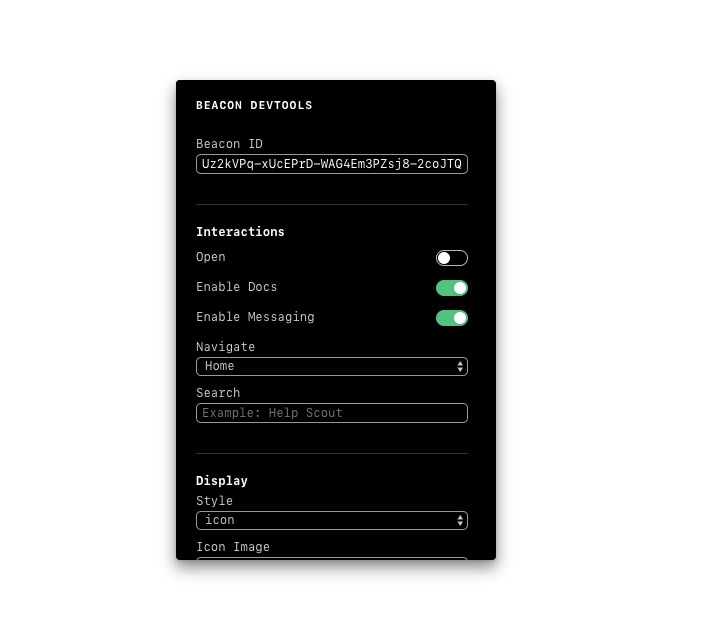
![Beacon DevTools](https://raw.githubusercontent.com/helpscout/beacon-devtools/master/images/beacon-devtools-prev.jpg)

## Table of contents

<!-- START doctoc generated TOC please keep comment here to allow auto update -->
<!-- DON'T EDIT THIS SECTION, INSTEAD RE-RUN doctoc TO UPDATE -->

- [Installation](#installation)
- [Usage](#usage)
  - [Development](#development)
  - [In Browser](#in-browser)
- [Demo](#demo)
- [Props](#props)
  - [beaconIds example](#beaconids-example)
- [Check out Beacon](#check-out-beacon)

<!-- END doctoc generated TOC please keep comment here to allow auto update -->

## Installation

```
npm install --save-dev @helpscout/beacon-devtools
```

## Usage

### Development

```jsx
import React from 'react'
import BeaconDevTools from '@helpscout/beacon-devtools'

class MyApp extends React.Component {
  render() {
    return (
      <div>
        ...
        <BeaconDevTools />
      </div>
    )
  }
}
```

### In Browser

To add Beacon DevTools to your page, copy/paste the following snippet into your HTML:

```html
<script
  crossorigin
  src="https://unpkg.com/@helpscout/beacon-devtools/dist/beacon-devtools.umd.js"
></script>
```

Alternatively, you can add this snippet:

```html
<script>
  ;(function() {
    var u =
      'https://unpkg.com/@helpscout/beacon-devtools/dist/beacon-devtools.umd.js'
    var s = document.createElement('script')
    s.type = 'text/javascript'
    s.charset = 'utf-8'
    s.src = u
    document.body.appendChild(s)
  })()
</script>
```

## Demo

Check out the demo on [Netlify](https://beacon-devtools.netlify.com/)!

## Props

```jsx
<BeaconDevTools />
```

| Prop       | Type            | Default | Description                                         |
| ---------- | --------------- | ------- | --------------------------------------------------- |
| isAutoOpen | `boolean`       | `false` | Automatically opens Beacon on load.                 |
| beaconIds  | `Array<Object>` | `[]`    | A collection of Beacon IDs to load into a `select`. |

### beaconIds example

```jsx
const beaconIds = [
  { id: '...', label: 'My Test Beacon 1' },
  { id: '...', label: 'Production Beacon' },
  { id: '...', label: 'Marketing Beacon' },
]

// ...

<BeaconDevTools beaconIds={beaconId} />
```

## Check out Beacon

**Beacon is way more than chat.**

Say farewell to overwhelming chat volume, staffing nightmares, and frustrated customers abandoned in chat windows. Ready to make your website more helpful?

👉 [Check it out](https://www.helpscout.net/live-chat/)
