
🔨 Harness Forge
Your AI coding agent is only as good as its harness.
One command to scan, equip, and continuously improve any AI coding agent in your repository.




🚀 Get Started •
🔄 Living Loop •
🛡️ Sentinel (preview) •
🔷 Double Diamond •
📊 Dashboard •
🧭 Decisions •
⌨️ Commands •
💡 Scenarios •
🎯 Targets •
❓ FAQ
---
|
### 🔍 Scans & Equips
Your AI agent gets your repo's languages,
frameworks, and patterns **from the first prompt**
|
### 🔄 Self-Improves
A closed feedback loop **learns** what works,
**tunes** itself, and gets smarter every session
|
### 📊 Full Visibility
Real-time dashboard shows every decision,
token spend, and compaction — **no black boxes**
|
| | Without Harness Forge | With Harness Forge |
|---|---|---|
| 🧠 **Context** | Agent guesses at project structure | Agent knows your languages, frameworks, boundaries |
| ⚡ **Performance** | Starts fresh every session | Self-improves over time via the Living Loop |
| 📊 **Visibility** | Black box — no idea what the agent decided | Real-time dashboard with 20 live panels |
| 🧭 **Decisions** | ADRs get buried or forgotten | Chronological decision timeline with stale-decision checks |
| 🧩 **Complex tasks** | Agent wanders or over-delegates without clear thresholds | Automatic complex-task protocol keeps simple work light, bounds sidecars, verifies results, and captures durable learning |
| 💰 **Cost** | Wasted tokens on retries and wrong paths | Compaction + auto-tuning saves 20-40% |
| 📤 **Portability** | Stuck on one machine, one setup | Export & import learned patterns as `.hfb` bundles |








---
## 🔄 The Living Loop — Your Harness Gets Smarter
> Most tools configure once and forget. Harness Forge **keeps learning.**
```
┌──────────┐ ┌──────────┐ ┌──────────┐ ┌──────────┐ ┌──────────┐
│ 🔍 │ │ 🧠 │ │ ⚡ │ │ 📤 │ │ 📥 │
│ OBSERVE │───▶│ LEARN │───▶│ ADAPT │───▶│ SHARE │───▶│ IMPORT │
│ │ │ │ │ │ │ │ │ │
│ Tracks │ │ Finds │ │ Auto- │ │ Export │ │ Bootstrap│
│ sessions │ │ patterns │ │ tunes │ │ bundles │ │ anywhere │
└──────────┘ └──────────┘ └──────────┘ └──────────┘ └──────────┘
▲ │
└──────────────────────────────────────────────────────────────┘
```
|
#### 📅 Day 1 — You install
```bash
npx @harness-forge/cli
```
Scans your repo. Installs skills, rules, knowledge packs.
Default settings. Everything works out of the box.
|
#### 📅 Day 3 — After ~10 sessions
```
🧠 Pattern found: "Summarize" saves 40% more tokens
than "Trim" in this repo (confidence: 82%)
⚡ Auto-tuned: compaction threshold 75% → 65%
Result: 20% fewer budget warnings
```
|
|
#### 📅 Day 5 — Share with your team
```bash
hforge export --bundle my-team.hfb
# Send to a teammate →
hforge import my-team.hfb
# They get your learned patterns instantly
```
|
#### 📅 Ongoing — Dashboard shows it all
```bash
hforge dashboard
```
Loop health ring, effectiveness scores,
pattern list, tuning log — live in your browser.
|
> **The more you use it, the better it gets.** After ~10 sessions, Harness Forge has learned your repo's patterns and tuned itself for optimal performance. No manual configuration needed.
🛡️ Guardrails — auto-tuning is safe
- Every tunable parameter has **hard min/max bounds** — the tuner can't go wild
- Every change is logged with **before/after values** and the pattern that triggered it
- If the next 3 sessions score worse, the tuning is **automatically reverted**
- Your manual config overrides are **sacred** — the tuner won't touch them
- The dashboard shows every tuning with a **one-click revert** button
---
## 📊 Real-Time Dashboard
> `hforge dashboard` — see everything, live in your browser.




|
#### 🔄 Loop Ring
Live status of each loop
stage with health score
|
#### 📈 Effectiveness
Session score trend —
are things getting better?
|
#### 🧠 Insights
Discovered patterns with
confidence bars
|
#### ⚡ Tuning Log
Policy changes with
one-click revert
|
📋 All 20 dashboard panels
| Panel | What it shows |
|-------|-------------|
| 🔢 **KPI Cards** | Total events, tokens, enforcement level, budget gauge |
| 📈 **Event Timeline** | Scatter plot of all events over time, color-coded by category |
| 💾 **Memory Pressure** | Token usage line chart with threshold marklines |
| 📊 **Budget Breakdown** | Donut chart of budget allocation (hot-path, output, tools, safety) |
| 📋 **Live Event Feed** | Searchable, expandable table of every harness decision |
| 🤖 **Subagent Briefs** | Delegated tasks, their context, and outcomes |
| 📊 **Brief Metrics** | Subagent activity summary and success rates |
| 🔇 **Suppression Gauge** | How many duplicate context items were removed |
| 🚪 **Expansion Gate** | History access requests — granted vs denied |
| ⚙️ **Config Editor** | Edit memory-policy, context-budget, load-order live |
| 🔄 **Loop Health Ring** | Self-improvement cycle status with stage counts |
| 📈 **Effectiveness Trend** | Session score sparkline (last 20 sessions) |
| 🧠 **Insights Panel** | Discovered patterns with confidence and "NEW" badges |
| ⚡ **Tuning Log** | Policy changes with before/after and revert button |
| 📊 **Event Distribution** | Bar chart of top event types |
| ⏱️ **Event Rate** | Events per minute over time |
| 🗺️ **Event Heatmap** | Category × time heatmap |
| 💰 **Tokens Saved** | Running counter of tokens saved by compaction |
| 📊 **Profile Distribution** | Output profile selection breakdown |
| ℹ️ **Session Info** | Session ID, uptime, version, connection status |
> 🔔 **Desktop notifications** for critical events — budget exceeded, memory rotation, tuning applied, pattern discovered.
> 🏢 **Multi-project support** — switch between projects in one dashboard. Your project list is saved in the browser.
---
## 🛡️ Sentinel — always-on watcher (preview)
> Sentinel watches your project for you. It notices when key files change, when the build is wrong, or when an AI agent gets stuck — and writes it down. It never spends AI tokens on its own (default daily budget is **0**), and it never changes anything without your approval.




```
┌──────────┐ ┌──────────────┐ ┌──────────┐ ┌──────────────┐ ┌──────────┐
│ 👁️ WATCH │──▶│ 📋 OBSERVE │──▶│ 🚦 SIGNAL │──▶│ ✋ APPROVE │──▶│ 🔧 ACT │
│ drift / │ │ dedup + log │ │ classify │ │ authority │ │ sandbox │
│ deps / │ │ by severity │ │ + route │ │ A0..A5 chain │ │ worktree │
│ ADR mons │ │ │ │ │ │ + denylist │ │ +rollback│
└──────────┘ └──────────────┘ └──────────┘ └──────────────┘ └──────────┘
▲ │
└────────────── side-effect ledger · panic-stop ────────────────────┘
```
|
### 👁️ Watches deterministically
Repo / dependency / ADR-drift monitors —
**0 LLM tokens** by default, fully offline
|
### ✋ Never acts unasked
Tamper-evident SHA-256 approval chain,
denied paths & commands, instant panic-stop
|
### 🔧 Reversible by design
Approved actions run in isolated git
worktrees with a full side-effect ledger
|
```bash
hforge monitor init-defaults # one-time setup
hforge monitor once # run all watchers one tick
hforge observe # see what changed
hforge monitor status # check the cost meter
```
📋 What you get today (early preview) — full capability checklist
- ✅ **Repo Drift Monitor** — flags when `package.json`, lockfile, `tsconfig.json`, or your harness manifest change
- ✅ **Deduplicated observations** — no duplicate noise across runs
- ✅ **Hard cost ceiling** — `cadence.yaml` and `budget.yaml` cap how often watchers run and how much they may spend
- ✅ **Per-hour run cap enforced** — `maxMonitorRunsPerHour` blocks new ticks once exhausted
- ✅ **Severity rules in YAML** — each watcher maps `default` plus named rules (e.g. `manifest_changed: warning`)
- ✅ **Concurrent-safe** — in-process mutex protects hot files (`fingerprints.json`, ledgers)
- ✅ **Hardened PID file** — structured `{pid, startedAt, hostname, workspaceRoot}`, foreign-host detection, stale-PID recovery
- ✅ **Panic stop** — set `panicStop: true` and Sentinel halts immediately
- ✅ **Signal correlation** — `hforge signals` groups observations into prioritized signals with category routing (`maintenance`, `agent-health`, `regression`, etc.)
- ✅ **Suppression + resolution** — `hforge signals suppress --until 7d`, `--forever`, `resolve`
- ✅ **Action queue** — `hforge actions` shows proposed plans with risk + verification + rollback declared
- ✅ **First action template** — `refresh-harness-runtime` (drift signal → `hforge refresh` action plan)
- ✅ **Full autonomy CLI** — `hforge autonomy status | policy | explain | set-profile | set-level | panic-stop`
- ✅ **5 profiles** (observe → cautious → assisted → active → maintainer) with per-profile approval requirements
- ✅ **Tamper-evident approval chain** — `hforge actions approve --authority A3 --expires 2h` writes a SHA-256-chained record; tamper detected on next read
- ✅ **Denied paths + denied commands** enforced in the policy gate (defaults block `.env`, `**/secrets/**`, `npm publish`, `git push --force`, …)
- ✅ **Approved actions actually execute** in an isolated git worktree at `.hforge/runtime/actions/runs//worktree/`
- ✅ **Cross-platform safe executor** — `child_process.spawn({shell: false})`, AbortController timeouts, POSIX process-group + Windows `taskkill /F /T` killtree
- ✅ **Sandboxed env** — `HOME`/`USERPROFILE` redirected, only PATH + small allowlist passed through; secrets never leak
- ✅ **Verification** — 4 of 5 check types (`command`, `file_exists`, `no_diff_outside`, `schema_valid`); `agent_review` correctly skipped while LLM budget=0
- ✅ **Side-effect ledger** + **`actions diff/logs/rollback`** for forensic review and reversal
- ✅ **`actions rollback delete_worktree`** removes the worktree and flips status to `reverted`
- ✅ **World monitor** — `hforge world watch add npm:` / `runtime:nodejs:lts` + `hforge world sync` fetches real npm + Node.js Release schedule with ETag caching
- ✅ **Relevance scoring** against `package.json` drops events for unused packages and downgrades borderline ones to `info`
- ✅ **Network policy** baked in (`none` / `package-registry-only` / `github-only` / `allowlist`) — no surprise outbound calls
- ✅ **Long-running daemon** — `hforge monitor run` schedules each watcher on its own interval with jitter, polls panic-stop, exits cleanly on Ctrl+C / `hforge monitor stop`
- ✅ **Crash-recovery checkpoint** — orphan runs from a killed daemon get flipped to `failed` on the next boot
- ✅ **Panic-stop broadcast** — `autonomy panic-stop on` halts the daemon AND aborts every in-flight executor within one tick
- ✅ **Dashboard panels (8 of 8)** — `hforge dashboard` now serves the full Sentinel section: Status, World Feed, Signals, Approval Inbox, Action Queue, Verification Results, Autonomy Posture, Agent Watchdog, Side-Effect Ledger — backed by REST endpoints with a 5s page-visibility-gated React poll
- ✅ **Watchdog primitives** — intervention ladder (`observe → warn → constrain → pause → require_approval → terminate → rollback`), `hforge watchdog status / events / pause / resume / explain` CLI, persisted intervention ledger
- ✅ **`validate:sentinel` runtime gate** wired into `validate:runtime-gates` (now 7 gates) — Zod-validates default monitor + policy YAMLs and scans for inline comments across all sentinel paths
- ✅ **Dependency Risk Monitor** — flags deprecated direct/indirect dependencies and major-version-available upgrades; reads `package.json` + `node_modules` + the world-monitor cache, fully offline
- ✅ **ADR Drift Monitor** — walks `docs/adrs/`, `docs/adr/`, and `.hforge/runtime/decisions/`; emits a signal when an ADR references files that no longer exist, escalates to warning when 3+ refs are broken
- ✅ **300 unit + integration tests** including full daemon lifecycle, watchdog state machine, validate-sentinel gate, and both new monitors
- 🚧 **Coming next**: agent step types (`invoke_agent`, `write_file`, `apply_patch`, `open_pr`), GitHub releases + advisories adapter, CI Failure Monitor (needs the GitHub adapter), click-to-approve UI
📖 **New here?** Read [docs/sentinel/README.md](docs/sentinel/README.md) and [docs/sentinel/getting-started.md](docs/sentinel/getting-started.md) — both written in plain English with no jargon.
---
## 🔷 Double Diamond — feature & bug workflows
> Most agents code the **first idea they have**. Double Diamond makes your agent *explore the problem before committing* and *compare options before delivering* — with just enough structure, never ceremony.




```
DISCOVER DEVELOP
◆ ◆
╱ ╲ ╱ ╲
╱ ╲ defined ╱ ╲ shipped
──────▶ ◆─────────────────▶ ◆──────▶
request ╲ ╱ problem ╲ ╱ change
╲ ╱ ╲ ╱
◆ ◆
DEFINE DELIVER
└──── PROBLEM SPACE ───┘ └─── SOLUTION SPACE ───┘
diverge → converge diverge → converge
```
|
#### 🔷 `/hforge-double-diamond`
For **meaningful feature work**. Discover evidence →
Define the smallest correct problem → Develop **≥2 options**
→ Deliver with validation, acceptance mapping & rollback.
Auto-reframes to the bug flow if the task is really a defect.
|
#### 🐞 `/hforge-bug-diamond`
For **defects, regressions, flaky tests, incidents**.
Triage & contain → reproduce → ranked hypothesis table →
smallest confirmed fix → verify → prevent recurrence.
**No root-cause claims without evidence.**
|





> **Lite** keeps small changes one-liner-light · **Standard** is the default for real features · **Deep** adds option matrices and human checkpoints for risky, ambiguous, or architecture-significant work. Host-agnostic and honest about parity: native slash skill in Claude Code, `/skills` or `$skill` in Codex — no overstated capabilities.
---
## 🧭 Decision Timeline
> `hforge review --root . --json` — see what your team decided, when it changed, and what needs attention.



AI work moves fast. The hard part is remembering **why** the team chose a path
three weeks later. Harness Forge now turns ASR and ADR records into a simple
timeline:
|
#### 🕒 What happened?
Decisions are sorted by creation time,
so the newest architecture choices are easy to find.
|
#### 🔎 What changed?
Superseded ADRs point to the newer decision,
so old notes do not fight new direction.
|
#### 🚦 What needs review?
Stale proposals, broken links, and missing
decision coverage show up in review output.
|
```bash
# Review decision health, lineage, and architecture coverage
hforge review --root . --json
# Generate a readable decision log for handoff or onboarding
hforge runtime decision-log --root . --json
```
In plain words: if a task is architecture-significant, Harness Forge helps the
team answer:
- **Do we have a decision for this?**
- **Is it still current?**
- **Did another ADR replace it?**
- **Are we shipping with an uncovered architecture change?**
That makes ADRs useful day to day, not just documents people write once and
forget.
---
## 🚀 Get Started in 60 Seconds
|
```bash
npx @harness-forge/cli
```
The CLI walks you through:
1. 🎯 Which AI targets (Codex, Claude Code, or both)
2. 📊 How deep (`quick` / `recommended` / `advanced`)
3. 👀 Preview of exactly what gets created
4. ✅ One confirmation and you're done
Then make `hforge` available on your PATH:
```bash
npx @harness-forge/cli shell setup --yes
```
|
**One-liner for CI / scripts:**
```bash
hforge init \
--root . \
--agent codex \
--agent claude-code \
--setup-profile recommended \
--yes
```
**Verify everything is healthy:**
```bash
hforge doctor --root . --json
```
|
---
## ⌨️ Your Daily Workflow
> Commands organized by **when** you use them — not alphabetically.
### 🌅 Starting a session
| | Command | What it does |
|---|---|---|
| 🧭 | `/hforge-init` | Ask the agent to read the compact Harness Forge brief and orient itself |
| 💡 | `hforge next` | Recommends the single most useful action right now |
| 🏥 | `hforge doctor` | Full health check with evidence |
| 🔄 | `hforge refresh` | Regenerate runtime after code changes |
| 📋 | `hforge status` | Review what's installed |
### 🔄 While working
| | Command | What it does |
|---|---|---|
| 📊 | `hforge dashboard` | Open the real-time browser dashboard |
| 🧭 | `hforge review --root . --json` | Check decision health, lineage, and coverage |
| 📝 | `hforge runtime decision-log --root . --json` | Generate a readable decision timeline |
| 📈 | `hforge score` | Show recent session effectiveness scores |
| 🧠 | `hforge insights` | Browse learned patterns with confidence |
| ⚡ | `hforge adapt` | View/manage auto-tunings |
| 🔍 | `hforge trace` | View recent session traces |
| 🔄 | `hforge loop` | Living Loop health summary |
### 📤 Sharing & maintenance
| | Command | What it does |
|---|---|---|
| 📦 | `hforge export --bundle team.hfb` | Export tuned harness as portable bundle |
| 📥 | `hforge import team.hfb` | Bootstrap from a shared bundle |
| 🔧 | `hforge update` | Update harness to latest version in place |
| 🔬 | `hforge audit` | Verify install integrity |
| 🔎 | `hforge diff-install` | Check what drifted since last install |
| 🧹 | `hforge prune` | Clean up unused artifacts |
### 🧬 Advanced
| | Command | What it does |
|---|---|---|
| 🗺️ | `hforge cartograph` | Map repo structure and boundaries |
| 🔍 | `hforge recommend` | Evidence-backed setup recommendations |
| 🧬 | `hforge recursive plan "..."` | Structured recursive analysis for hard problems |
| 🎯 | `hforge target compare codex claude-code` | Side-by-side target comparison |
---
## 💡 Real-World Scenarios
|
#### 📂 "Just cloned a repo, want AI help"
```bash
cd my-project
npx @harness-forge/cli
# Done — AI assistant understands this project
```
|
#### 🤝 "I use both Codex and Claude Code"
```bash
hforge init --agent codex --agent claude-code --yes
hforge target compare codex claude-code
```
Both agents share `.hforge/` but get their own config bridges.
|
|
#### 🔙 "Coming back to a project after a break"
```bash
hforge next
# Tells you: refresh runtime, review stale artifacts
```
|
#### 👥 "Standardize AI setup across my team"
```bash
hforge export --bundle our-team.hfb
# Teammate runs:
hforge import our-team.hfb
# Same learned patterns, instant bootstrap
```
|
---
## 🎯 Supported Targets




|
| | Codex | Claude Code |
|---|---|---|
| Runtime | ✅ Full | ✅ Full |
| Maintenance | ✅ Full | ✅ Full |
| Hooks | 📄 Docs-driven | ✅ Native |
| Plugins | 📄 Manual | ✅ Native |
| Shared `.hforge/` | ✅ Yes | ✅ Yes |
|
**Use both together** — they share the same `.hforge/` runtime.
```bash
hforge target compare codex claude-code
```
|
---
## 📦 What's Included
🌐 14 Language packs
TypeScript, Python, Java, Go, Kotlin, Rust, C++, .NET, PHP, Perl, Swift, Shell, Lua, PowerShell
🏗️ 12 Framework packs
React, Next.js, Vite, Express, FastAPI, Django, ASP.NET Core, Spring Boot, Laravel, Symfony, Gin, Ktor
🛠️ 45+ Skills
Language engineering, workflow orchestration, operational helpers, and specialized skills like incident triage, dependency upgrades, API contract review, database migration review, release readiness, and token-budget-optimizer for context-aware compaction.
---
## ⚙️ How It Works Under the Hood
🗂️ What gets created in your repo
```
Your Repo
│
├── AGENTS.md ← AI agents read this first
├── .agents/skills/ ← Discoverable skills
├── .codex/ or .claude/ ← Target-specific config
└── .hforge/ ← Hidden canonical runtime
├── library/ ← Skills, rules, knowledge packs
├── runtime/ ← State, indexes, traces, insights
├── generated/ ← Command catalog, launchers
└── templates/ ← Workflow templates
```
**Visible bridges** where AI agents need discovery. **Hidden canonical layer** where runtime content stays authoritative.
---
## ❓ FAQ
Do I need to install anything globally?
No. `npx @harness-forge/cli` runs directly. For the shorter `hforge` command, run `hforge shell setup --yes` once.
Does it change my source code?
Never. Harness Forge only creates its own files (`AGENTS.md`, `.agents/`, `.hforge/`, `.codex/`, `.claude/`). Your application code is untouched.
Can I use it in CI/CD?
Yes. Add `--yes` for non-interactive and `--json` for machine-readable output:
```bash
hforge init --root . --agent codex --setup-profile recommended --yes
hforge doctor --root . --json
```
How do I remove it?
Delete: `.hforge/`, `.agents/`, `.codex/`, `.claude/`, `AGENTS.md`. Your project is back to normal.
Does it send data anywhere?
No. Everything stays local under `.hforge/`. Nothing is ever sent to the internet. Inspect, delete, or back up anytime.
What Node.js version?
Node.js 22 or newer. Check with `node --version`.
---
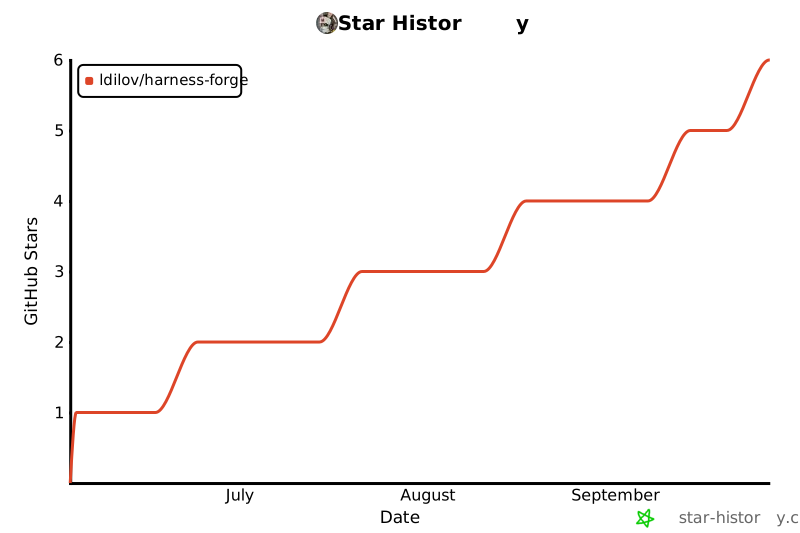
## 📈 Project Activity
---
## 🤝 Contributing
See [CONTRIBUTING.md](./CONTRIBUTING.md) for development setup and guidelines.
## 🙌 Acknowledgements
Harness Forge was inspired by [github/spec-kit](https://github.com/github/spec-kit). Credit to the GitHub team for shaping cleaner workflow models.
## 📄 License
GPL-3.0 — see [LICENSE](./LICENSE).
---
Your AI agent deserves a better harness.
npx @harness-forge/cli