Pi Wishcraft
Your operator cockpit for Pi.
See what the session is doing, park ideas without interrupting it, search skills, switch into Bash, and keep the important controls one keypress away.




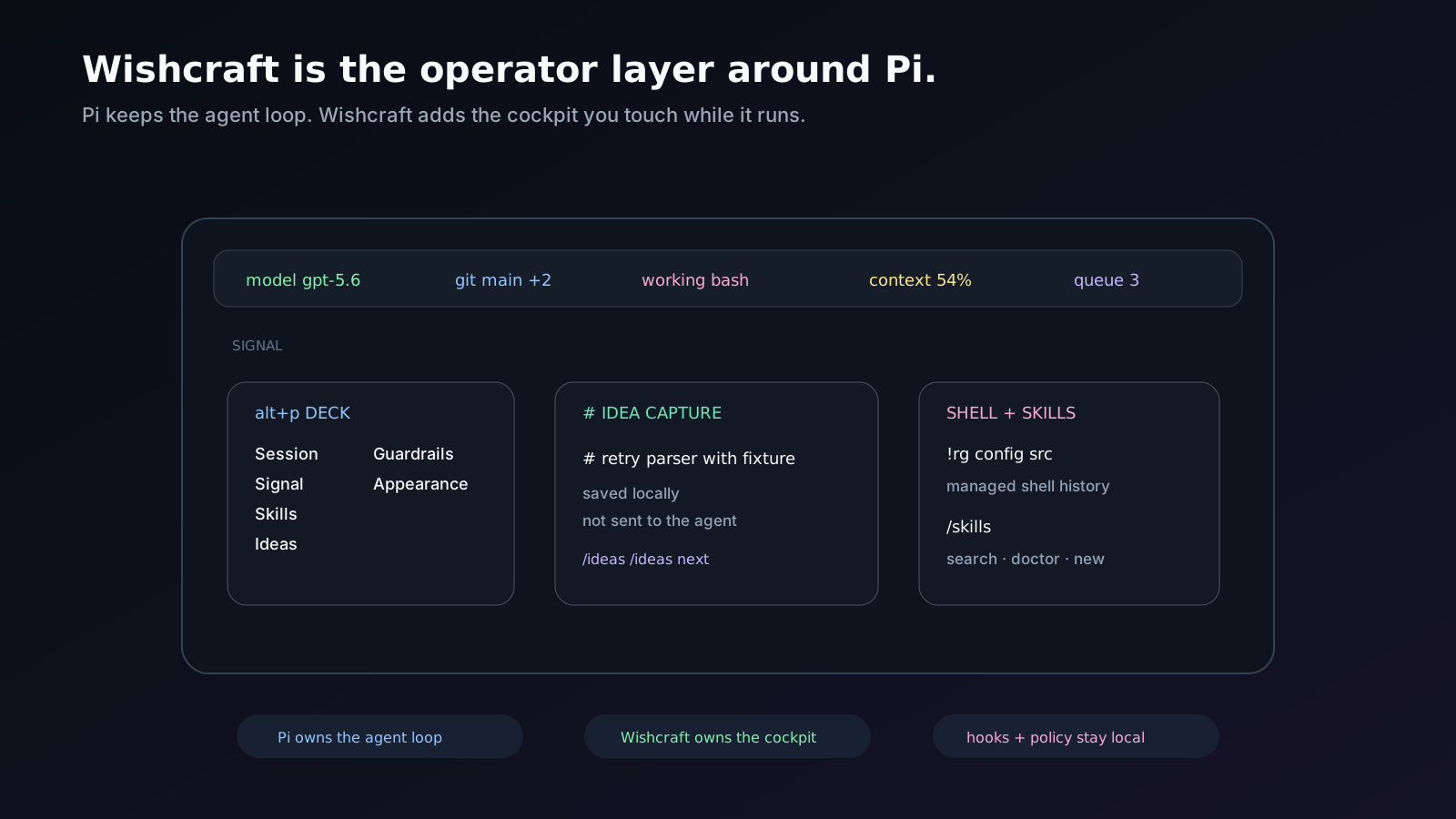
A map of the shipped operator surfaces. Pi remains the agent runtime.
## Start in 10 seconds
```bash
pi install npm:@groeponline/pi-wishcraft
```
Reload Pi, then press `alt+p` to open the Deck.
Try the two flows that make Wishcraft click fastest:
```text
# remember to benchmark the new provider path
/ideas
```
The `#` line is captured as an idea instead of being sent as a prompt. Your active run keeps going.
Then open the skill picker:
```text
/skills
```
Search, inspect and insert a skill without leaving the session.
## Why Wishcraft
Pi stays the engine. Wishcraft adds the operator layer around it: live status, overlays, idea capture, skill search, sticky Bash, hooks, policy controls and session UX.
Kongming lanterns started as battlefield signals and later carried wishes. Wishcraft keeps both ideas in one place: telemetry while the work is moving, and thoughts you can park until you are ready for them.
**Portfolio boundary:** Wishcraft owns the operator cockpit and lightweight idea capture. Promote durable work to [`pi-missions`](https://github.com/GroepOnline/pi-missions), then use [`pi-agent-orchestrator`](https://github.com/GroepOnline/pi-agent-orchestrator) when parallel or isolated execution adds value: `idea -> mission -> orchestration run`.
Guides live in [`docs/`](docs/index.md).
## What you get
| Surface | What it does |
| --- | --- |
| Signal | Motion-aware three-lane operator status: model/Git, live activity/tool state, and context/queue. Default placement is the editor top border; `/signal placement below` moves it. |
| `alt+p` | Wishcraft Deck: session, Signal, skills, ideas, guardrails, appearance. `g` + jump. `/wishcraft settings` is the flat list. `/signal menu` is Navigate / Configure / Status. |
| `# ` | File-backed inbox. Does not send the prompt. `/ideas` reviews status, tags, and skill insert. `/ideas next` feeds the oldest active idea into the session. |
| `alt+s` | Stash the draft, ask something else, get it back when the run finishes. |
| `/skills` | Overlay search on name, description, and path. Enter inserts. `/skills doctor` is the health table. `/skills new` writes a SKILL.md from a template. |
| `!cmd` / bash mode | Managed shell with ghost suggestions from project history. No shell-native completion probes. |
| Hooks + repairs | Command hooks on pi events. Custom-tool input repairs before execution. Kill-switch: `wishcraft.hooksEnabled`. |
| Read hints | Appends a one-line continuation hint after a partial `read`, so the model knows the next offset. Opt-out: `wishcraft.readHints: false`. |
| Policy | In-process deny/inject rules in global settings. No spawn. Kill-switch: `wishcraft.policyEnabled`. |
| Working indicator | Four deterministic styles (`dots`, `pulse`, `bar`, `ascii`) with accessibility-aware static fallbacks. |
| Welcome art | `lantern`, `balloon`, and `normal` opening artwork, each with a different silhouette and narrow-terminal fallback. |
Pi owns the footer chrome, feed scrolling, and input. Wishcraft supplies widgets, overlays, and the bash/stash/editor integrations. The bar is not clickable; actions are commands and overlays.
## Daily commands
Activates on load. `/signal` toggles it. `/signal ` switches the information layout. `/signal menu` opens Navigate / Configure / Status. `/wishcraft` opens the Deck. Tab completes presets and `placement above|below|toggle`. `/powerline` remains a compatibility alias.
```text
/signal doctor settings, queue, git, bash, fonts
/signal export current preset + layout as JSON
/tps live in/out overlay (same ring as the segment)
/tps 40 override POWERLINE_TPS
/usage session / today / week from ~/.pi/agent/wishcraft-usage.json
/repairs tool-input repair counters
/skills skill manager
/skills doctor health table (broken frontmatter, dupes, unused, budget)
/skills new [name] write a SKILL.md from a template
/ideas idea review overlay (status, tags, skill insert)
/wishcraft Deck overlay (operator surface)
/wishcraft settings flat settings TUI
/open-ports listening sockets
/cd continue this conversation in another directory
/bash-mode sticky shell (also ctrl+shift+b)
/vibe star trek themed working messages
```
Keybinds (`powerlineShortcuts`, applied after `/reload`; `null` disables):
```json
{
"powerlineShortcuts": {
"menu": "alt+p",
"info": "alt+i"
}
}
```
## Minimal config
`~/.pi/agent/settings.json` (or `PI_CODING_AGENT_DIR`):
```json
{
"powerline": {
"preset": "chef",
"placement": "above",
"welcome": true,
"appearance": { "base": "lanternwake" }
}
}
```
`chef` is muted colors, slash separators, live TPS in/out, and TCP port count. Built-in presets: `default`, `minimal`, `compact`, `full`, `nerd`, `ascii`, `chef`. Custom segments, labels, layout, and presets are documented in [docs/configuration.md](docs/configuration.md). For every setting at its default, see [`examples/settings.example.json`](examples/settings.example.json).
Daily token budget (never blocks a turn):
```json
{
"wishcraft": {
"tokenBudget": { "daily": 500000 }
}
}
```
At 80% the cost segment warns; at 100% it goes red and welcome notifies. `/usage` shows the ledger.
## Hooks
Hooks are commands that read JSON on stdin. See [docs/configuration.md](docs/configuration.md) for examples.
Definitions come from the **global** agent settings file only. Project `.pi/settings.json` cannot install new hook commands. `wishcraft.hooksEnabled: false` disables every hook without deleting the config.
```json
{
"wishcraft": {
"hooksEnabled": true,
"hooks": {
"preToolUse": [
{ "matcher": "bash", "hooks": [{ "command": "~/.pi/agent/hooks/bash-guard.sh", "timeout": 5 }] }
],
"postToolUse": [
{ "matcher": "write", "hooks": [{ "command": "~/.pi/agent/hooks/write-audit.sh", "timeout": 5 }] }
],
"sessionStart": [
{ "hooks": [{ "command": "~/.pi/agent/hooks/session-git-status.sh", "timeout": 10 }] }
]
}
}
}
```
**Example hook** (exit 2 = deny):
```bash
#!/usr/bin/env bash
payload=$(cat)
cmd=$(printf '%s' "$payload" | python3 -c 'import json,sys; print(json.load(sys.stdin).get("tool_input",{}).get("command",""))')
if printf '%s' "$cmd" | grep -Eq '(^|[[:space:]])rm[[:space:]]+(-[a-zA-Z]*[[:space:]]+)*-r[a-zA-Z]*f|-fr[a-zA-Z]*|[[:space:]]/[[:space:]]*$'; then
printf '%s\n' '{"hookSpecificOutput":{"permissionDecision":"deny","permissionDecisionReason":"blocked destructive rm"}}'
echo "blocked destructive rm" >&2
exit 2
fi
exit 0
```
**Another example** (append-only, never blocks):
```bash
#!/usr/bin/env bash
mkdir -p "$HOME/.pi/agent/logs"
cat >> "$HOME/.pi/agent/logs/write-audit.jsonl"
```
**SessionStart example** (extra context, never blocks):
```bash
#!/usr/bin/env bash
status=$(git status --short 2>/dev/null | head -n 40)
CTX="$status" python3 - <<'PY'
import json, os
print(json.dumps({
"hookSpecificOutput": {
"additionalContext": "git status:\n" + os.environ.get("CTX", "")
}
}))
PY
```
Repairs run on custom/extension tools only, before hooks: drop null optionals, parse JSON-string arrays before wrapping, turn `{}` into `[]` on array keys, wrap bare strings, alias `filePath` / `absolutePath` / `target_file` to `path`, unwrap degenerate markdown auto-links. Core tools (`bash`, `read`, `edit`, `write`, `grep`, `find`, `ls`) are never rewritten. `/repairs` prints the counters.
## Policy
Declarative deny/inject rules live in the global settings file; see [docs/configuration.md](docs/configuration.md).
No shell commands — pure in-process regex. Evaluated before command hooks. `wishcraft.policyEnabled: false` disables policy without deleting rules.
```json
{
"wishcraft": {
"policy": [
{
"action": "deny",
"tool": "bash",
"match": "sudo\\s+rm",
"reason": "destructive sudo rm"
},
{
"action": "inject",
"tool": "read",
"pathMatch": "\\.env",
"context": "Do not leak secrets from .env files into the conversation."
}
]
}
}
```
Privacy/network boundary: ideas, settings, usage ledgers, and normal cockpit state stay local; there is no package-owned telemetry backend. Optional exchange-rate/DeepWiki features and operator-defined hooks cross the network/process boundary only when used.
## Limits
- No mouse on the live footer. Pi core owns that surface.
- No second `alt+i` product. Ports stay on `alt+i`; other detail is `→` in the navigator.
- Compatibility status keys (`powerline.preset`, `powerline.tps`, `powerline.ports`) are available to peer extensions; normal Wishcraft use does not require them.
- The legacy `@groeponline/pi-powerline-footer` package is deprecated in favor of `@groeponline/pi-wishcraft`.
- Tags are not rewritten. 0.19.x through current stay on the timeline.
## vNext Direction
Wishcraft is Pi's animated operator layer. See the [release plan](docs/design/vnext-release-plan.md) and [design corpus](docs/index.md#design-system--vnext-specifications).
## Docs
- [Commands](docs/commands.md)
- [Configuration](docs/configuration.md)
- [Bash mode](docs/bash-mode.md)
- [Stash and shortcuts](docs/stash-and-shortcuts.md)
- [Skill manager](docs/skill-manager.md)
- [Working vibes](docs/working-vibes.md)
- [Segments and theming](docs/segments.md)
- [ROADMAP](ROADMAP.md)
MIT. Issues: [GroepOnline/pi-wishcraft](https://github.com/GroepOnline/pi-wishcraft/issues).