
@groeponline/pi-agent-orchestrator
Observable multi-agent orchestration inside Pi.
Run bounded subagents, isolated implementation work, swarms, schedules and structured handoffs without introducing a hosted control plane.




## What it is
Pi Agent Orchestrator is the execution layer for workflows that need more than one agent. It runs inside the Pi host process and adds lifecycle control, permission inheritance, optional worktree isolation, scheduling, handoffs, orchestration modes and an interactive operator surface.
It does **not** require a package-owned backend. Optional telemetry is inert until an operator explicitly configures it.
| Need | Orchestrator capability |
| --- | --- |
| Explore a codebase in parallel | Bounded read-only Explore agents |
| Plan before changing code | Read-only Plan agents |
| Implement without colliding with other work | General-purpose agents with optional git worktrees |
| Coordinate several agents | Groups, crews, swarms and structured handoffs |
| Keep recurring work visible | Persistent schedules plus daemon view |
| Intervene while work is running | `/agents` dashboard, steering, selection and termination |
| Carry evidence between agents | Machine-readable handoff payloads |
## Install
Global Pi install:
```bash
pi install npm:@groeponline/pi-agent-orchestrator
```
Try it for one session without changing your Pi settings:
```bash
pi -e npm:@groeponline/pi-agent-orchestrator
```
Project-local install:
```bash
pi install npm:@groeponline/pi-agent-orchestrator -l
```
The extension runs inside the Pi host process and does not require a package-owned hosted control plane or data service. In-process telemetry stays local (`src/telemetry.ts`); there is no package-owned PostHog or OpenTelemetry backend.
For installation, the first-run mental model and safe operating patterns, see [Getting started](docs/getting-started.md). (chore(release): v0.19.1)
## First useful run
Start with the packaged audit workflow:
```text
/orchestra-audit src
```
Then open the live control surface:
```text
/agents
```
The audit fans out read-only work, collects evidence and synthesizes the result. The dashboard lets you inspect running and queued agents while that work is active.
Common dashboard controls:
| Key | Action |
| --- | --- |
| `j` / `k` or arrows | Navigate |
| `Space` | Multi-select |
| `t` | Resource top view |
| `z` | Daemon schedules |
| `Shift+K` | Terminate selected agents |
| `?` | Help |
| `/perf` | Performance metrics |
For installation, the first-run mental model and safe operating patterns, see [Getting started](docs/getting-started.md).
## How orchestration works
```text
operator / workflow
│
▼
orchestration dispatch
│
├── Explore / Plan ───── read-only evidence
├── Analysis ─────────── optional ctx_* sandbox
└── general-purpose ─── bounded implementation
│
▼
permissions + budgets
+ optional worktree
│
▼
structured handoff
│
┌────────┴────────┐
▼ ▼
next agent parent/operator
│ │
└────────┬────────┘
▼
`/agents` view
```
The default orchestration mode is `single`; multi-agent dispatch is opt-in. Internally the dispatcher supports `single`, `crew`, `swarm` and `auto` strategies. Child agents can only become more restricted than their parent: inherited tool restrictions, partition filters, explicit disallow rules, budgets and depth limits are resolved before execution.
See [Architecture](docs/architecture.md), [Execution strategies](docs/execution-strategies.md) and [Tool calling](docs/tool-calling.md) for the detailed contracts.
## Core capabilities
- **Interactive TUI dashboard** — agent list, resource top, daemon schedules, performance metrics, help, and settings.
- **Subagent lifecycle** — spawn, queue, steer, stop, inspect, and collect structured results.
- **Permission inheritance** — children cannot silently regain tools or scopes removed by a parent.
- **Worktree isolation** — optional branch and filesystem isolation for implementation agents.
- **Prompt compression profiles** — static system-prompt guidance with global defaults and per-agent overrides; this does not compact conversation history.
- **Persistent scheduling** — cron, interval, and one-shot jobs with a daemon schedule view.
- **Structured handoffs** — machine-readable transfer between agents and chained workflows.
- **Swarm coordination** — dynamic membership and coordinated completion.
- **Cross-extension RPC** — per-process capability-token authentication for peer extensions, mutation rate limits, and a strict spawn-option allowlist. See [Cross-extension RPC](docs/api-reference.md#-cross-extension-rpc).
## Built-in agent types
| Type | Mode | Use when |
| --- | --- | --- |
| Explore | read-only | Parallel codebase discovery and evidence collection |
| Plan | read-only | Architecture and implementation planning before edits |
| Analysis | read-only + `ctx_*` | Sandboxed data or compute through optional `@groeponline/context-mode` |
| general-purpose | full tools | Bounded implementation and multi-step execution |
Project-specific agents live in `.pi/agents/*.md`. Their frontmatter can define tools, models, limits and behavior. See [Custom agents](docs/custom-agents.md).
## Isolation and safety model
The orchestrator treats execution boundaries as data, not prompt convention:
- parent tool restrictions are inherited by children;
- partition filters and explicit disallow rules reduce the available toolset;
- depth, turn and budget limits bound autonomous execution;
- implementation agents can use git worktrees for filesystem and branch isolation;
- structured handoffs keep transfer state explicit instead of relying on hidden conversation context;
- interactive logging stays quiet by default so terminal UI is not corrupted;
- cross-extension RPC uses capability-token authentication, a strict spawn-option allowlist and mutation rate limits.
The package does not automatically merge, publish, tag or deploy unless such actions are explicitly part of the requested workflow.
## Operator surface
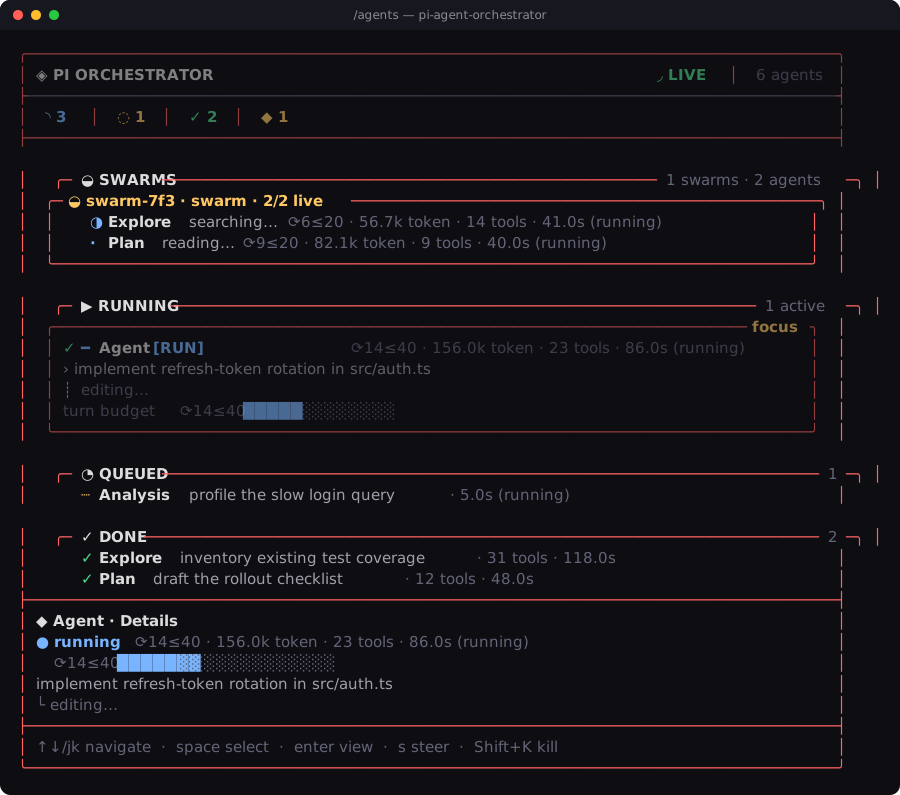
`/agents` is the live control plane for the current Pi process. It exposes agent state, queue state, resource usage, schedules, health information and lifecycle actions. The footer status slot can also show running and queued counts without opening the full dashboard.
The visual showcase is rendered from real product renderers rather than a mock UI:
[](https://orchestrator.chefgroep.online/assets/dashboard_preview.mp4)
- [Product film](https://raw.githubusercontent.com/GroepOnline/pi-agent-orchestrator/main/docs/images/product_film.mp4)
- [Dashboard preview](https://orchestrator.chefgroep.online/assets/dashboard_preview.mp4)
- [Agent-readable project site](https://orchestrator.chefgroep.online/)
- [Showcase media layout](docs/assets-layout.md)
## Packaged skills and workflows
The npm package includes progressive-disclosure skills and ready-made orchestration templates.
| Entry point | Purpose |
| --- | --- |
| `/skill:pi-orchestra` | Evidence-first orchestration operating model |
| `/skill:pi-typescript-extension-engineering` | Strict Pi extension engineering and review |
| `/skill:real-product-showcase` | Real terminal/browser/app capture and media verification |
| `/orchestra-audit [scope]` | Parallel read-only audit and ranked synthesis |
| `/orchestra-plan ` | Evidence gathering followed by a mechanically verifiable plan |
| `/orchestra-implement ` | Discover, plan, implement in one isolated writer and independently verify |
Install individual Agent Skills into another compatible client:
```bash
npx skills add https://github.com/GroepOnline/pi-agent-orchestrator --skill real-product-showcase
npx skills add https://github.com/GroepOnline/pi-agent-orchestrator --skill pi-typescript-extension-engineering
```
## Where it fits
The GroepOnline Pi stack deliberately separates capture, durable state and execution:
| Stage | Package | Owns |
| --- | --- | --- |
| Capture | [`pi-wishcraft`](https://github.com/GroepOnline/pi-wishcraft) | Operator cockpit and lightweight ideas |
| Persist | [`pi-missions`](https://github.com/GroepOnline/pi-missions) | Durable plan, queue, evidence, recovery and mission handoff state |
| Execute | **pi-agent-orchestrator** | Agents, worktrees, swarms, schedules and execution handoffs |
A common flow is `idea → mission → orchestration run`, but the Orchestrator also works standalone.
## Documentation
Start at the [documentation index](docs/index.md). The main paths are:
- [Getting started](docs/getting-started.md) — installation, first run and operating model.
- [Architecture](docs/architecture.md) — topology, permission flow, lifecycle and module map.
- [Tool calling](docs/tool-calling.md) — execution lifecycle, cancellation, concurrency and result ownership.
- [API reference](docs/api-reference.md) — tools, settings, handoffs and scheduler.
- [Custom agents](docs/custom-agents.md) — agent frontmatter and examples.
- [Execution strategies](docs/execution-strategies.md) — single, crew, swarm and auto dispatch.
- [Prompt compression](docs/prompt-compression.md) — prompt profile scope and behavior.
- [Performance](docs/PERFORMANCE.md) — budgets, benchmarks and profiling.
- [Troubleshooting](docs/troubleshooting.md) — diagnostics and common operator fixes.
- [v0.19.1 release notes](docs/releases/v0.19.1.md) — exact patch scope and demo hardening.
Contributor and policy references: [AGENTS.md](AGENTS.md), [CONTRIBUTING.md](CONTRIBUTING.md), [SECURITY.md](SECURITY.md), [ROADMAP.md](ROADMAP.md) and [CHANGELOG.md](CHANGELOG.md).
## v0.19.1
v0.19.1 publishes the reviewed 0.19 runtime state and adds the bounded Explore handoff demo path, deterministic handoff parsing checks and hardened recording preflight. The demo verifies its live model route before capture and does not mutate global Pi trust. See the [full release note](docs/releases/v0.19.1.md).
## Development
```bash
npm ci
npm run setup:hooks # optional local hooks
npm run typecheck
npm run lint
npm test
npm run build
npm run verify:package
```
Cursor Cloud users can run the canonical repository gate:
```bash
npm run verify:cloud
npm run cloud:smoke
```
The deterministic cloud environment pins the repository Node version and includes Chrome plus the Pi host CLI for smoke testing without a model API key.
## License
MIT © GroepOnline