# @gramex/network
A force-directed network or graph visualization.
[See the workshop](workshop.md) for a step-by-step tutorial.
## Example
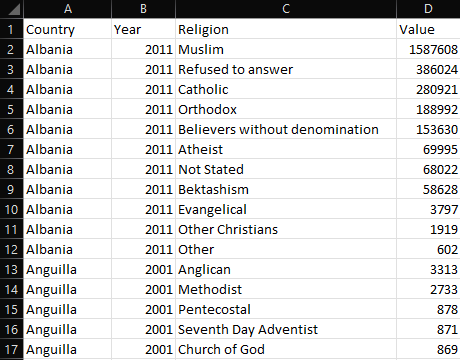
Given this [table of countries and religions](docs/country-religion.json ":ignore"):
[](docs/country-religion.json ":ignore")
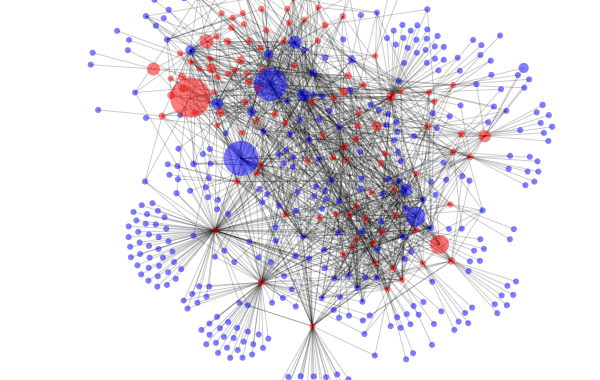
... we can render the following network:
[](docs/religion.html ":include")
[Here is the source code for the network above](docs/religion.html ":include :type=code")
## Installation
Install via `npm`:
```bash
npm install @gramex/network@2
```
Use locally as an ES module:
```html
```
Use locally as a script:
```html
```
Use via CDN as an ES Module:
```html
```
Use via CDN as a script:
```html
```
## Use a node-link dataset
The `network()` function accepts a `{ nodes, links }` object.
- `nodes` is an array of objects.
- `links` is an array of `{ source, target }` objects that to the node by index number or by reference.
```json
{
"nodes": [{ "name": "Alice" }, { "name": "Bob" }, { "name": "Carol" }],
"links": [
{ "source": 0, "target": 1 },
{ "source": 1, "target": 2 }
]
}
```
If `nodes` has an `id` key, you can specify the links using `id`:
```json
{
"nodes": [{ "id": "Alice" }, { "id": "Bob" }, { "id": "Carol" }],
"links": [
{ "source": "Alice", "target": "Bob" },
{ "source": "Bob", "target": "Carol" }
]
}
```
Here is a simple network that draws the above dataset:
```js
const graph = network("#network", data);
```
[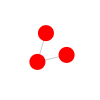](docs/simple.html ":include height=120px")
[See how to use network()](docs/simple.html ":include :type=code")
## Style nodes and links
Update the attributes and styles of the returned `.nodes` and `.links` joins to style the nodes and links.
By default, the nodes are rendered as `` elements and links as `` elements.
You can apply the D3 [`.attr`](https://github.com/d3/d3-selection#selection_attr),
[`.classed`](https://github.com/d3/d3-selection#selection_classed),
[`.style`](https://github.com/d3/d3-selection#selection_style),
[`.text`](https://github.com/d3/d3-selection#selection_text),
and any other [selection methods](https://github.com/d3/d3-selection) to style the elements.
You can use any node/link keys in the styles. For example:
```js
const graph = network("#network", data);
graph.nodes.attr("r", (d) => d.depth);
```
[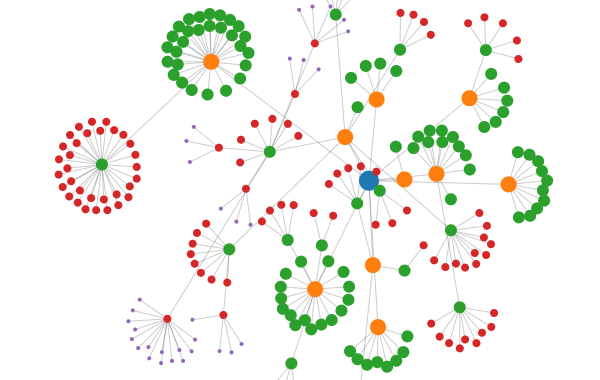](docs/style.html ":include")
[See how to style nodes and links](docs/style.html ":include :type=code")
## Add tooltips
You can use [Bootstrap tooltips](https://getbootstrap.com/docs/5.3/components/tooltips/).
1. Add a `data-bs-toggle="tooltip" title="..."` attribute to each feature using `update`
2. Call `new bootstrap.Tooltip(element, {selector: '[data-bs-toggle="tooltip"]'})` to initialize tooltips
[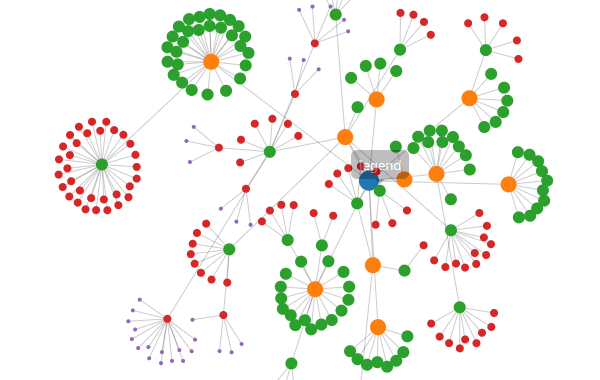](docs/tooltip.html ":include")
[See how to add tooltips](docs/tooltip.html ":include :type=code")
## Dragging and pinning
Dragging a node pins it where you release it. Double-click a pinned node to unpin. To unpin all nodes, double-click on the background.
When dragging, the node gets a `dragging` class. When pinned, it gets a `pinned` class. You can use this to style nodes that are dragged or pinned. For example:
```css
.dragging {
stroke: black;
stroke-width: 5;
}
.pinned {
stroke: black;
stroke-width: 3;
}
```
[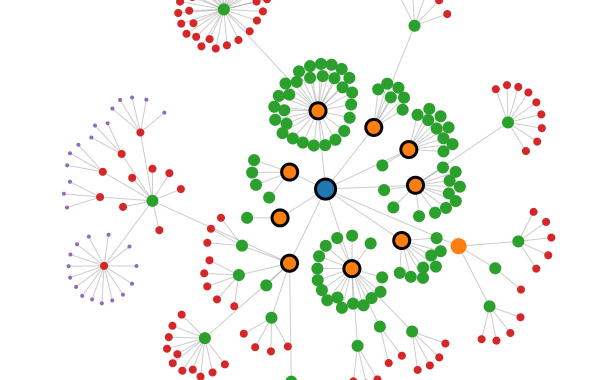](docs/drag.html ":include")
[See how to highlight dragged and pinned nodes](docs/drag.html ":include :type=code")
## Filter nodes and links
To dynamically filter nodes and links, pass a subset of the **SAME** `nodes` and `links`.
Make sure the nodes and links are the same objects as the original nodes and links. This ensures that the simulation is not restarted.
In this example, when you move the slider, the country - religion links are filtered based on population. Any isolated nodes are also removed.
[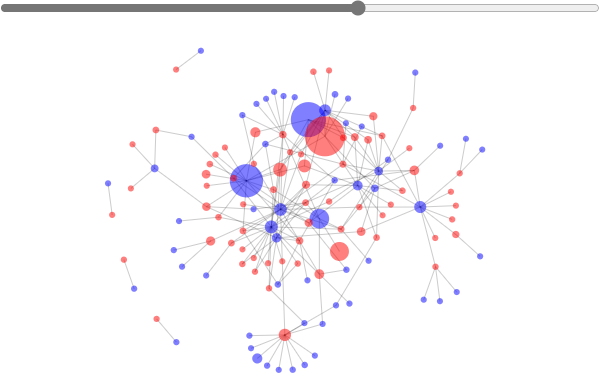](docs/filter.html ":include")
[See how to filter nodes and links](docs/filter.html ":include :type=code")
## Tabular data
Any tabular data can be converted into a node-link structure. For example, take this [table of countries and religions](docs/country-religion.csv ":ignore"):
[](docs/country-religion.csv ":ignore")
Convert this into a flat array of objects like this:
```js
const data = [
{ Country: "USA", Religion: "Christian", Population: 100 },
{ Country: "UK", Religion: "Christian", Population: 90 },
{ Country: "Iran", Religion: "Muslim", Population: 80 },
];
```
Now you can convert it to a node-link dataset using `{ nodes, links } = kpartite(data, keys, values)`. It accepts 3 parameters:
1. `data` - array of objects containing the data.
2. `keys` - object of `{key: column}` pairs or an array of `[key, column]` pairs.
- `key` is a string node type
- `column` is the string name of a field in data, or a function(object) that returns the field, or a static value.
3. `values` - object of accessor functions for link values that are aggregated across links and nodes
For example:
```js
const { nodes, links } = kpartite(
data,
{
Country: "Country", // Create a node for each country
Religion: (d) => d.Religion, // Create a node for each religion
},
{
count: 1, // Count the number of links between countries and religions
Population: "Population", // Sum the population of countries and religions
},
);
```
This creates the following `nodes`:
```js
[
{
key: "Country",
value: "USA",
id: '["Country","USA"]',
count: 1,
Population: 100,
},
{
key: "Religion",
value: "Christian",
id: '["Religion","Christian"]',
count: 2,
Population: 190,
},
// ... etc.
];
```
... and the following `links`:
```js
[
{
source: {}, // link to USA source node
target: {}, // link to Christian target node
id: '["[\\"Country\\",\\"USA\\"]","[\\"Religion\\",\\"Christian\\"]"]',
count: 1,
Population: 100,
},
// ... etc.
];
```
## Tabular unipartite data
If you have a relationships between the same entity (e.g. people connected with people, countries trading with countries),
use `kpartite()` as follows:
```js
// Create nodes and links, mapping the "name" key with both "Column A" and "Column B"
const { nodes, links } = kpartite(
data,
[
["name", "Column A"],
["name", "Column B"],
],
{ count: 1 },
);
```
Here is an example with the [Friends sexual partners](https://www.reddit.com/r/entertainment/comments/1628b4/people_demand_to_know_full_list_of_friends_sexual/)
[`data`](docs/friends-sexual-partners.csv ":ignore").
(Interestingly, Rachel is the only one who doesn't share a sexual partner with any of the others.)
[](docs/friends.html ":include")
[See how to generate unipartite data](docs/friends.html ":include :type=code")
Here is an example with the [Arxiv paper coauthors](https://www.kaggle.com/datasets/Cornell-University/arxiv/)
[`data`](docs/coauthors.csv ":ignore") of Computational Lingustics papers that have "LLM" in their title, and authored 2+ papers together.
[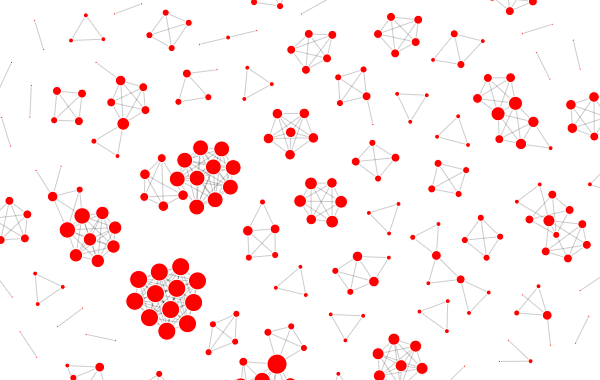](docs/coauthors.html ":include")
[See how to generate unipartite data](docs/coauthors.html ":include :type=code")
## Forces
By default, the network uses the following forces:
- `link`: a `d3.forceLink(links)` that links the nodes and links
- `charge`: a `d3.forceManyBody()` that pushes nodes apart
- `x`: a `d3.forceX(width / 2)` that centers the nodes horizontally
- `y`: a `d3.forceY(height / 2)` that centers the nodes vertically
To disable these or modify the forces, pass a `force` object with the required forces. For example,
this network uses a `d3.forceCenter()` force instead of `x` and `y`:
```js
forces: {
x: false,
y: false,
center: ({ width, height }) => d3.forceCenter(width / 2, height / 2),
}
```
This network uses a `d3.forceCollide()` to prevent nodes from overlapping, and a stronger
`d3.forceManyBody()` replacing the default `charge` force to push nodes apart:
```js
forces: {
charge: () => d3.forceManyBody().strength(-20),
collide: () => d3.forceCollide().radius(d => 22 - d.depth * 4).iterations(3),
},
```
Each force is a `function({ nodes, links, width, height })` where `width` and `height` are the size of the SVG. It should **return** a D3 force.
[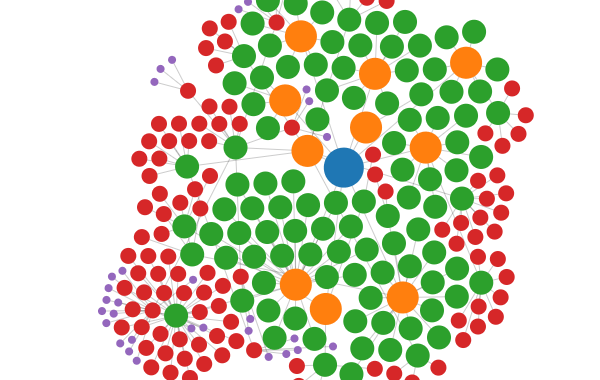](docs/forces.html ":include")
[See how to modify forces](docs/forces.html ":include :type=code")
## Brushing
Passing a `brush` function enables brushing. The `brush` function is called with the selected nodes as parameters. You can use this to update other visualizations.
[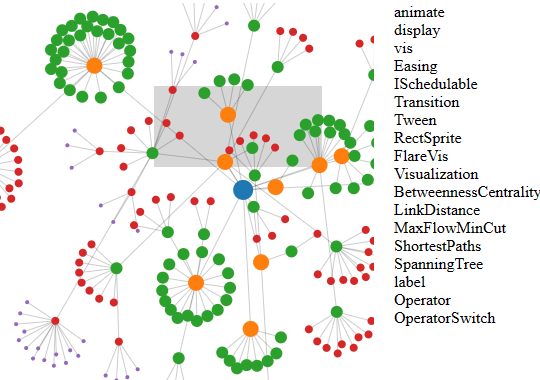](docs/brush.html ":include")
[See how to handle brushing](docs/brush.html ":include :type=code")
## Node shapes and labels
By default, nodes are `` elements. Change `nodeTag` for a different shape. For example, to use `` elements:
```js
const graph = network("#network", { nodes, links, nodeTag: "text" });
graph.nodes.text((d) => d.id);
```
Here is a detailed example on how to draw labels with text and a rectangle background:
[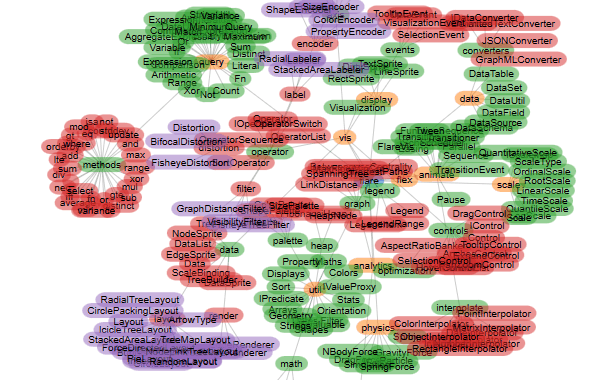](docs/shapes.html ":include")
[See how to use different node shapes](docs/shapes.html ":include :type=code")
## Arrows
To add arrows, add a triangle `` to your SVG's `` like below:
```html
```
Here:
- `refX` is the distance from the end of the line to the tip of the arrow
- `refY` is the distance from the center of the line to the center of the arrow
- `markerWidth` and `markerHeight` are the size of the arrow
- `orient` is the direction of the arrow. `auto` means the arrow points in the direction of the line
Then add `graph.links.attr("marker-end", "url(#triangle)")` to your code.
[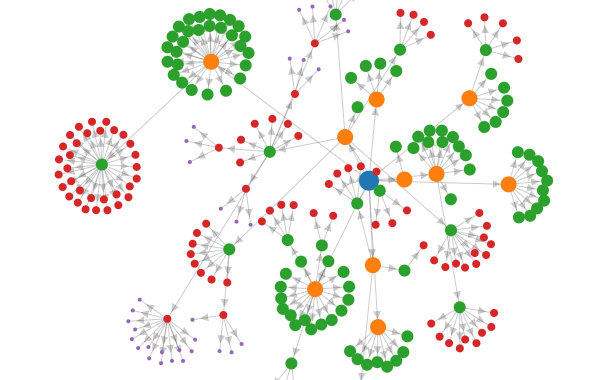](docs/arrows.html ":include")
[See how to draw arrows on links](docs/arrows.html ":include :type=code")
## Curved links
To draw curved links, set `linkCurvature` to a number between -1 and 1. 0 is a straight line. 1 is a half-circle. -1 is a half-circle in the opposite direction.
[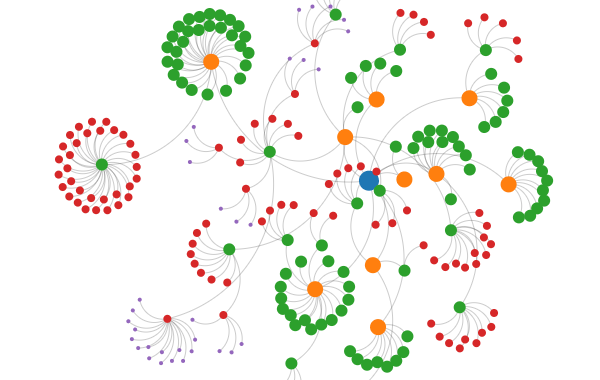](docs/curved.html ":include")
[See how to draw curved links](docs/curved.html ":include :type=code")
## Stop and restart simulation
To stop or restart the simulation, call `graph.simulation.stop()` or `graph.simulation.alphaTarget(0.3).restart()`.
[](docs/stop-start.html ":include")
## Bring your own D3
If you already have D3 loaded, or want to use a specific version / instance of D3, pass it to `network(el, { d3 })`:
[](docs/d3.html ":include height=120")
[See how to use your own D3 version](docs/d3.html ":include :type=code")
## React usage
Use the following pattern when using `network()`` with React:
```js
const { useEffect } = React;
function App() {
useEffect(() => network("#network", { ... }), []);
return React.createElement("svg", { id: "network", width: 600, height: 380 });
}
const root = ReactDOM.createRoot(document.querySelector("#root"));
root.render(React.createElement(React.StrictMode, null, React.createElement(App)));
```
[](docs/religion-react.html ":include height=400")
[See how to use network with React](docs/religion-react.html ":include :type=code")
Here are instructions to create a React Component:
```shell
npx create-react-app network-react
cd network-react
npm install d3 @gramex/network
```
Create `src/NetworkComponent.js` with this code:
[See NetworkComponent.js code](docs/network-react/src/NetworkComponent.js ":include :type=code")
Modify `src/App.js` as follows:
[See App.js code](docs/network-react/src/App.js ":include :type=code")
Then run `npm start` or `npm run build`.
[Explore the code](https://github.com/gramener/gramex-network/tree/main/docs/network-react ":ignore").
## API
[See API documentation](docs/api.md ":include :type=markdown")
## Release notes
- 2.1.0: 31 May 2024. Support [stop and restart](#stop-and-restart-simulation)
- 2.0.0: 24 Nov 2023. Synchronous API. Bring your own D3. To migrate from v1:
- Replace `await network(...)` with `network(...)`
- Pass `d3` as a param, e.g. `network(el, { d3 })`
- 1.0.8: 14 Sep 2023. Stop past simulations on re-run. Use MIT license
- 1.0.7: 7 Sep 2023. Support any node shape.
- 1.0.6: 6 Sep 2023. Enable styles on pinned nodes
- 1.0.5: 6 Sep 2023. Initial release
## Authors
- Anand S
- Aayush Thakur
- Chandana Sagar
## License
[MIT](https://spdx.org/licenses/MIT.html)