# job — run long commands in the background
A build, a test suite, a dev server, a watcher: `job` starts it in the background
and keeps the turn free. The command keeps running across tool calls — poll it,
read its log, wait for it, or kill it.
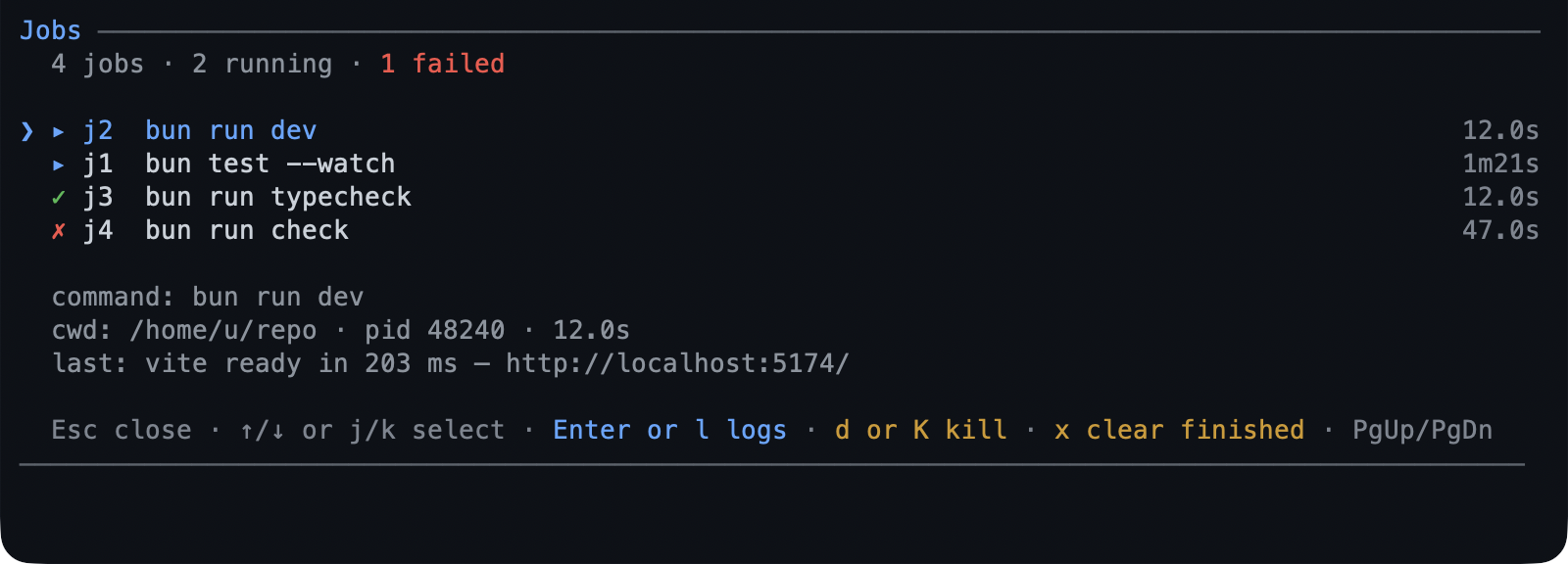 - **Started immediately, in the background**, with stdout and stderr streamed to
a log that rotates instead of filling the disk.
- **`/jobs` is the one screen**: running jobs first, then recent ones, each row
showing its id, a command label, and how long it has run, with the focused row
adding the directory, outcome, and last output line.
- **A finish can reach you**: reported at the next turn, or — with `wake` — it
raises a turn as soon as the agent is idle.
- **`detached` survives the session** on POSIX; Windows refuses it rather than
pretending.
## What you can do
| What you want | What to do |
|---|---|
| Run something in the background | ask for it: "run the test suite in the background" |
| See what is running | `/jobs` |
| Read a job's output | `Enter` on the screen, or ask for the log tail |
| Wait for one to finish | ask it to wait, with a timeout if you care |
| Kill one | `d` on the screen (it asks), or ask for a kill |
| Feed a running program | a job started with stdin; `send` writes a line or a keystroke |
| Get told when it finishes | ask for a wake, or set `wakeOnFinish` |
| Clear finished jobs | `x` on the screen |
| Keep it after the session ends | start it detached (POSIX) |
## Try it
```text
Run the full test suite in the background and tell me when it fails.
```
Then:
```text
/jobs
```
`↑`/`↓` or `j`/`k` select, `Enter`/`l` opens the log (`g`/`G` jump, `Esc`
returns), `d` kills after a `y`/`N` prompt, `x` clears finished jobs after one,
and `Esc` closes the list.
[Run long work in the background](../tutorials/first-background.md) walks a job,
its screen, and the watcher that reads the same log.
## Reference
**Actions.** One tool, shaped by action: `start`, `list`, `status`, `logs`,
`wait`, `send`, `kill`, `clear`. `start` takes the command, a `timeoutMs` to cap
its wall clock, `stdin: true` to drive it later, `wake` to wake the agent when it
finishes, and `detached` to outlive the session. `kill` sends `SIGTERM`, then
`SIGKILL` after `killGraceMs`.
**The screen.** Running jobs first, then recent ones, with a summary line counting
running, failed, and peer jobs. Another session's job is shown tagged `peer` and
its log opens, but it cannot be killed or cleared from here.
**Exit codes.** A job is wrapped in a shell `EXIT` trap that records `$?`, so a job
reattached after its session died still reports its real code. `exec`-style
commands and Windows jobs settle as `unknown` instead.
**Where they live.** `~/.pi/agent/jobs//` holds the registry and one log
per job, which is also why a job reattached after a session restart still has its
output.
**Logs.** `maxLogLines` bounds what `logs` returns; `maxLogBytes` rotates a
segment to `.log.1`. A detached job's own redirection cannot be rotated, so
its log grows until you clear it.
## Limits
- stdin is a pipe, not a terminal: line-oriented programs work, full-screen ones
do not; a reattached or peer job cannot be fed.
- Output splits on newlines only, so a progress bar that rewrites one line stays
one line.
- A peer session's finished job waits for that session to clear it.
- Windows cannot detach a job, and a job there may settle as `unknown`.
- The registry keeps `maxJobs` finished records; older ones are dropped.
## Settings
| Key | Default | What it does |
|---|---|---|
| `showStatus` | `true` | Show the `▸ N` / `✗ N` footer chips. |
| `wakeOnFinish` | `false` | Wake the agent when any job finishes. |
| `maxJobs` | `20` | Finished records kept before the oldest go. |
| `maxLogBytes` | `8388608` | Bytes per log segment before it rotates. |
| `killGraceMs` | `5000` | Grace before `SIGTERM` escalates to `SIGKILL`. |
The rest — `enabled`, `detachedByDefault`, `maxLogLines`, `repaintMs`,
`sessionTtlMs`, and `registryDir` — are in
[configuration](../configuration-reference.md#job--background-jobs). To switch the
extension off, toggle `job` in `/bytefly`.
## Learn more
- [Run long work in the background](../tutorials/first-background.md) — the
walkthrough.
- [`watch`](../extensions/watch.md) — react to a line, not a whole job.
- [`subagent`](../extensions/subagent.md) — hand a long task to another agent.