<div align="center">

<a href="https://winter.fluri.xyz/">
  <img src="https://winter.fluri.xyz/readme/banner.png" alt="Winter by Fluri Themes — Change the forecast." width="100%" />
</a>

# Winter by Fluri ❄️

**Interactive snowfall that feels at home on your website.**

DOM-aware snow accumulation, playful physics, and optional Christmas effects.<br />
Built with TypeScript. Made for your interface.

<a href="https://winter.fluri.xyz/license/"><img src="https://winter.fluri.xyz/readme/badges/mit.svg" alt="License: MIT" height="24" /></a>
<img src="https://winter.fluri.xyz/readme/badges/typescript.svg" alt="TypeScript: typed API" height="24" />
<img src="https://winter.fluri.xyz/readme/badges/frameworks.svg" alt="Framework independent" height="24" />
<img src="https://winter.fluri.xyz/readme/badges/canvas.svg" alt="Renderer: Canvas 2D" height="24" />

<a href="https://www.npmjs.com/package/@fluritheme/fluri"><img src="https://winter.fluri.xyz/readme/npm-downloads.svg" alt="npm downloads for @fluritheme/fluri over the last 30 days" height="24" /></a>

**[Live playground](https://winter.fluri.xyz/playground/) · [Explore the presets](https://winter.fluri.xyz/showcase/) · [Documentation](https://winter.fluri.xyz/docs/)**

[Quick start](#quick-start) · [Features](#why-fluri) · [React & Next.js](#react-and-nextjs) · [API](#runtime-controls) · [Contributing](https://winter.fluri.xyz/reference/CONTRIBUTING.md)
</div>

---

Fluri is a JavaScript and TypeScript **snow animation library** for the web. Snow gathers on supported DOM edges, follows moving elements, and falls onto surfaces below. Visitors can brush it away, gather snowballs, or watch a tiny snowplough clear a path.

Use a light dusting on a portfolio, a playful snowfall on a landing page, or warm Christmas lights on the surfaces you choose. Your content stays in ordinary HTML; Fluri draws the winter around it.

## Why Fluri?

<img src="https://winter.fluri.xyz/readme/features.png" alt="Three Fluri features: snow follows a card’s edges, a pointer brushes snow into powder, and sliders customize snowfall and wind." width="100%" />

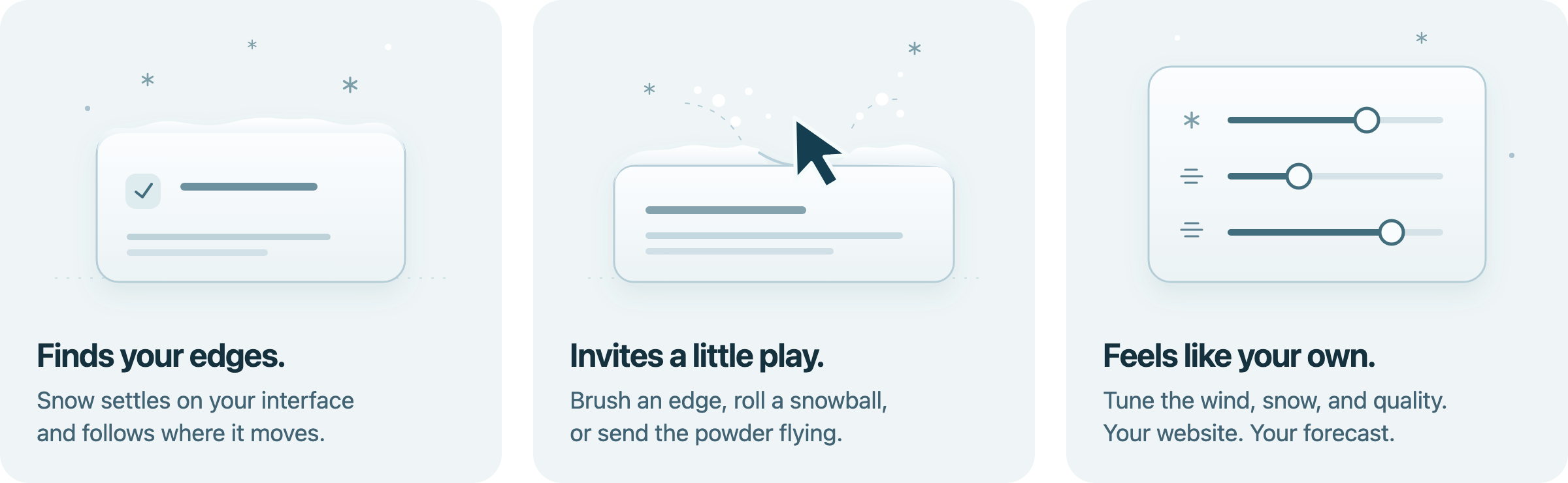
- **Snow with somewhere to land.** Surface-local accumulation follows supported DOM geometry, scrolling, and responsive layouts. Uneven packing and rounded shoulders give each pile its own shape.
- **A little room to play.** Brush deposits, gather and throw snowballs, build a snowman, or run a snowplough along a designated shelf.
- **Your website, your forecast.** Ten presets, typed overrides, adjustable wind, flake styles, snow depth, and live configuration export.
- **A good guest.** Pointer-transparent canvases, reduced-motion support, hidden-tab suspension, adaptive quality, and explicit cleanup.
- **Local by default.** The engine needs no account, API key, geolocation, analytics, cookies, or external weather service.
- **Christmas, on purpose.** Optional lights, garlands, ornaments, gifts, frost, icicles, wreaths, candy canes, and sparkles on explicitly marked elements.
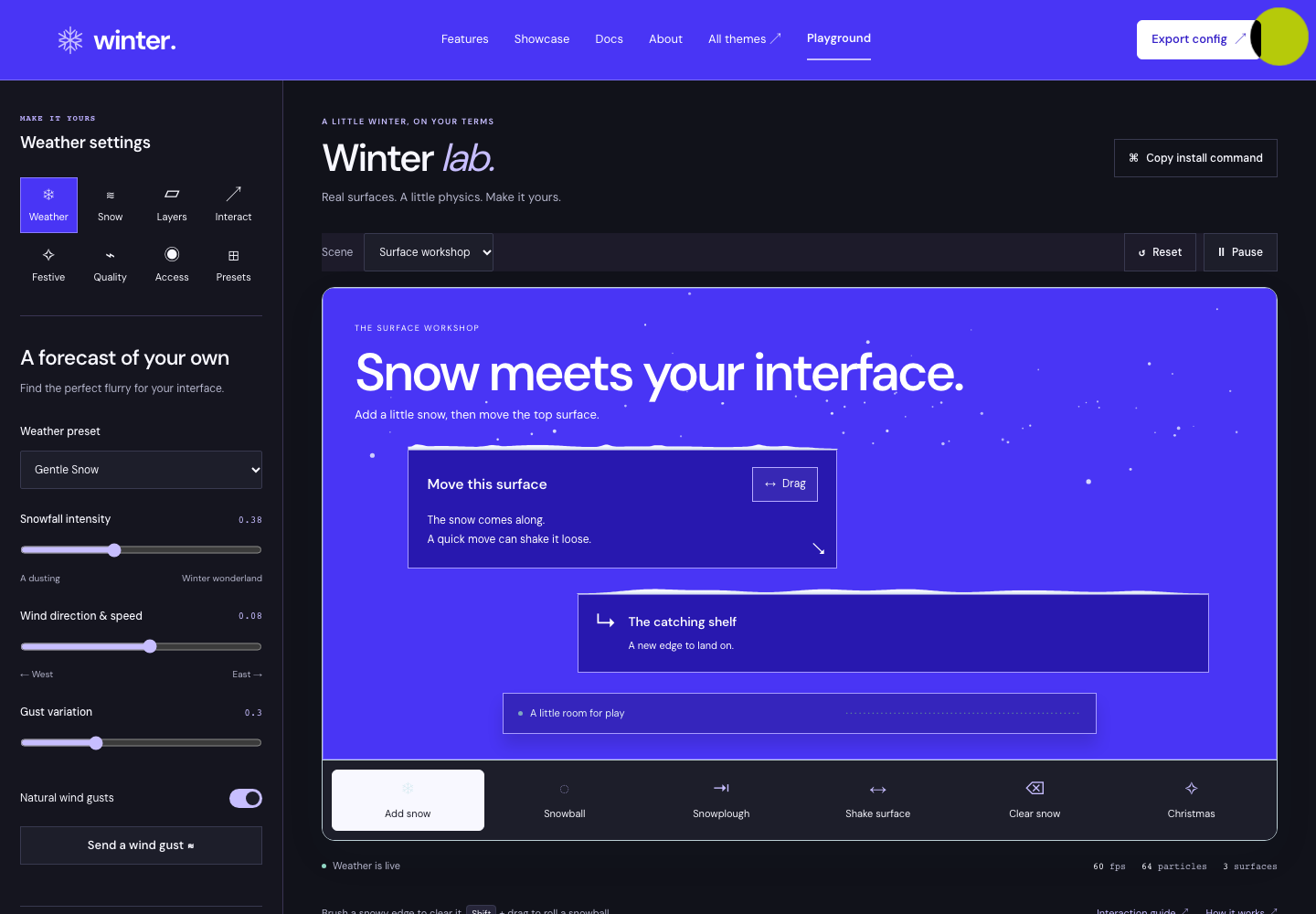
<a href="https://winter.fluri.xyz/playground/"><img src="https://winter.fluri.xyz/readme/playground.png" alt="The Winter playground: purple live snow scene, draggable surfaces and a panel of snowfall, wind and interaction controls." width="100%" /></a>

[Try the live engine →](https://winter.fluri.xyz/playground/)

## Quick start

```sh
npm install @fluritheme/fluri
```

Also available on [jsDelivr](https://www.jsdelivr.com/package/npm/@fluritheme/fluri) and [UNPKG](https://unpkg.com/@fluritheme/fluri@0.1.1/). npm is the recommended way to integrate Fluri with your build tool; raw CDN files require an import map or an ESM transformation service to resolve dependencies.

Mark the elements that should collect snow:

```html
<article data-weather-surface>Your existing content.</article>
<section data-weather-ignore>Keep important controls clear.</section>
```

Start after the DOM is ready:

```ts
import { createWeather } from '@fluritheme/fluri';

const weather = createWeather({
  preset: 'gentle-snow',
  dom: { detection: 'explicit' },
});

weather.start();

// Release the effect when the page leaves.
window.addEventListener('pagehide', () => weather.destroy(), { once: true });
```

Importing the core and creating an idle controller are safe during server rendering. Call `start()` in the browser after mount; `autoStart` defaults to `false`. In a component, call `destroy()` in its unmount cleanup.

[Complete getting-started guide →](https://winter.fluri.xyz/reference/getting-started.md)

## Make the forecast yours

```ts
weather.setIntensity(0.65);
weather.updateConfig({
  snow: {
    wind: { base: 0.12, gusts: true },
    accumulation: { maxDepth: 16 },
  },
  performance: { adaptive: true, maxDPR: 1.5 },
});
```

Choose explicit surfaces for predictable integration. Use attributes or `registerSurface()` to control material, accumulation, depth, clipping, and layer. Automatic discovery is also available.

```html
<nav data-weather-surface data-weather-snow-depth="12">Your navigation</nav>
<article data-weather-surface data-weather-material="sticky">Your card</article>
```

```ts
const element = document.querySelector('article');
if (element) {
  const unregister = weather.registerSurface(element, {
    material: 'sticky',
    maxSnowDepth: 12,
    layer: 'content',
  });

  // Remove this registration when the element is no longer needed.
  unregister();
}
```

### Ten ways to start

| Quiet & considered                       | A little atmosphere                    | Seasonal & playful                                  |
| ---------------------------------------- | -------------------------------------- | --------------------------------------------------- |
| `gentle-snow` — a soft dusting           | `winter-magic` — glow and deeper piles | `christmas-classic` — a familiar flurry             |
| `minimal` — a restrained particle budget | `cinematic` — depth and larger flakes  | `christmas-night` — cool, glowing snow              |
| `frosted-glass` — sparse crystals        | `snowstorm` — wind and denser snowfall | `north-pole` — deeper snow and snowballs            |
|                                          |                                        | `playful` — snowballs, snowmen, and pointer airflow |

[Preview every preset →](https://winter.fluri.xyz/showcase/)

Presets configure the weather. Attach the optional Christmas module to add decorations.

## React and Next.js

The core is framework independent. **`@fluritheme/fluri-react`** adds a component and hook that own the controller through mount, updates, and cleanup, including React Strict Mode.

```sh
npm install @fluritheme/fluri @fluritheme/fluri-react
```

```tsx
'use client';

import { useFluri } from '@fluritheme/fluri-react';

export function WinterCard() {
  const weather = useFluri({
    preset: 'gentle-snow',
    dom: { detection: 'explicit' },
  });

  return (
    <article data-weather-surface>
      <h1>A little winter.</h1>
      <button onClick={() => weather.current?.pause()}>Pause snow</button>
    </article>
  );
}
```

Prefer a decorative component? Use `<Fluri options={{ preset: 'gentle-snow' }} />`. It renders no React DOM and starts the effect after mount. In Next.js, keep it inside a client component.

Vanilla JavaScript, Vue, and Svelte can use the core with their own mount and cleanup hooks. [Framework integrations →](https://winter.fluri.xyz/reference/getting-started.md)

## A little Christmas ✨

Add the separate Christmas export and label the surfaces to decorate:

```ts
import { christmasPack } from '@fluritheme/fluri/christmas';

const removeChristmas = weather.use(
  christmasPack({
    lights: { warmth: 0.9 },
    garlands: true,
    frost: true,
  }),
);
```

```html
<nav data-weather-surface data-holiday-lights data-holiday-garland>A warmer welcome.</nav>
```

Remove it independently with `removeChristmas()`. Decorations use original procedural artwork; they do not fetch images or fonts. [Seasonal configuration →](https://winter.fluri.xyz/reference/customization.md)

## Make it interactive

```ts
weather.updateConfig({
  interactions: {
    snowballs: { enabled: true, activation: 'press-and-drag' },
    snowman: { enabled: true },
  },
});

weather.trigger('gust');
weather.trigger('plough', { selector: '[data-plough-route]', speed: 90 });
```

Brush a snowy edge with the pointer. Hold **Shift** and drag near deposits to gather a snowball, then release to throw. Stack three compatible resting balls on one support to make a snowman. For a plough, mark its chosen shelf with `data-plough-route`.

Touch behavior preserves ordinary page scrolling. Provide accessible buttons for intentional actions; the playground includes keyboard and touch controls. Gathering, transfer, and ploughing account for stored snow mass.

## Runtime controls

| Method                                                       | Purpose                                                            |
| ------------------------------------------------------------ | ------------------------------------------------------------------ |
| `start()` · `pause()` · `resume()`                           | Control the animation lifecycle                                    |
| `stop()`                                                     | Clear visuals while keeping the instance                           |
| `destroy()`                                                  | Release canvases, observers, listeners, actors, and plugins        |
| `setPreset(name, overrides?)` · `setIntensity(value)`        | Change the forecast                                                |
| `updateConfig(patch)` · `getConfig()`                        | Apply validated changes or read a configuration snapshot           |
| `addSnow(depth, selector?)` · `clearAccumulation(selector?)` | Manage deposits                                                    |
| `registerSurface(element, options?)`                         | Register an element; returns an unregister function                |
| `trigger(type, options?)`                                    | Trigger a gust, burst, snowball, snowman, or plough                |
| `use(plugin)` · `on(event, callback)`                        | Add a plugin or subscribe to events; both return cleanup functions |
| `getMetrics()`                                               | Inspect actual timing, budgets, counts, and state                  |

[Full API reference →](https://winter.fluri.xyz/reference/api-reference.md)

## Considerate by default

Fluri respects `prefers-reduced-motion` by default and suspends animation in hidden tabs. Enable its optional accessible pause button with `accessibility: { controls: true }`, or connect your own controls. Pale snow gains subtle cool edges on light solid-color backgrounds, while custom snow colors stay yours.

Adaptive quality bounds snowfall density and reacts to slow frames. Configure particle and surface counts, pixel ratio, and FPS to fit your page. **Test on your target devices:** layout complexity and effects affect the cost.

Fluri is a stylized 2D simulation. Geometry and paint order approximate supported browser behavior; complex masks, perspective transforms, closed shadow-root internals, and cross-origin iframe contents have limits.

[Accessibility](https://winter.fluri.xyz/reference/accessibility.md) · [Performance](https://winter.fluri.xyz/reference/performance.md) · [Browser support](https://winter.fluri.xyz/reference/browser-support.md) · [Known limits](https://winter.fluri.xyz/reference/limitations.md)

## Run the playground locally

Requires **Node.js 22.12+** and **pnpm 10.33.2**.

```sh
pnpm install --frozen-lockfile
pnpm dev
```

Open **http://127.0.0.1:5173**. Explore the surface workshop, layers, real snow interactions, presets, seasonal decorations, and the 1,000-node stress scene. Export your forecast as validated JSON.

For the complete website and playground production layout:

```sh
pnpm build
pnpm preview
```

Open **http://127.0.0.1:4173**. [Development and deployment →](https://winter.fluri.xyz/reference/website.md)

<details>
<summary><strong>Build and verification commands</strong></summary>

```sh
pnpm exec playwright install chromium firefox webkit
pnpm check
pnpm test:browser
pnpm build:examples
pnpm test:frameworks
pnpm format:check
pnpm audit --audit-level high
pnpm release:check
```

`pnpm build` produces ESM and declarations in `packages/*/dist`, plus the website and playground in root `dist/`. `pnpm measure` records bundle sizes; `pnpm benchmark` runs the documented local DOM benchmark.

</details>

## Keep exploring

[Website](https://winter.fluri.xyz/) · [Showcase](https://winter.fluri.xyz/showcase/) · [Playground](https://winter.fluri.xyz/playground/) · [Docs](https://winter.fluri.xyz/docs/) · [GitHub](https://github.com/fluritheme/fluri)

[Customization](https://winter.fluri.xyz/reference/customization.md) · [Physics & layers](https://winter.fluri.xyz/reference/physics-and-layers.md) · [Troubleshooting](https://winter.fluri.xyz/reference/troubleshooting.md) · [Changelog](https://winter.fluri.xyz/reference/CHANGELOG.md)

## Website participation

Owners can [register a website](https://winter.fluri.xyz/participate/), verify their domain, and independently choose a public community listing or private aggregate reporting. The library has no automatic telemetry. [Read the participation and privacy guide](https://winter.fluri.xyz/reference/participation.md).

## Contribute & share

Found a rough edge or made something snowy? Read the [contribution guide](https://winter.fluri.xyz/reference/CONTRIBUTING.md), [open an issue](https://github.com/fluritheme/fluri/issues) with a useful reproduction, or share Fluri with someone building a seasonal website. Project questions: [fluritheme@gmail.com](mailto:fluritheme@gmail.com). See the [security policy](https://winter.fluri.xyz/reference/SECURITY.md) for private vulnerability reports.

## License

**[MIT](https://winter.fluri.xyz/license/)** — free to use, modify, and redistribute, including commercially, with the required notices. Original Fluri artwork and procedural decorations use the same license.

<div align="center">

**A little winter. Your kind of wonder.** ☃️

</div>

Full Markdown reference files and artwork are also included in the installed package.



