<!doctype html><html lang=en dir=ltr class=scroll-smooth data-default-appearance=light data-auto-appearance=true><head><meta charset=utf-8><meta name=viewport content="width=device-width,initial-scale=1"><meta name=theme-color content="#FFFFFF"><title>小记 | 那些奇奇怪怪的图床 &#183; FloatSheep's Blog</title>
<meta name=title content="小记 | 那些奇奇怪怪的图床 &#183; FloatSheep's Blog"><script type=text/javascript src=/js/appearance.min.8a082f81b27f3cb2ee528df0b0bdc39787034cf2cc34d4669fbc9977c929023c.js integrity="sha256-iggvgbJ/PLLuUo3wsL3Dl4cDTPLMNNRmn7yZd8kpAjw="></script><link type=text/css rel=stylesheet href=/css/main.bundle.min.5175b55751112ca802889fe1f86d954335179c7770d85c064aa8b00042fe2868.css integrity="sha256-UXW1V1ERLKgCiJ/h+G2VQzUXnHdw2FwGSqiwAEL+KGg="><script defer type=text/javascript id=script-bundle src=/js/main.bundle.min.e2f23ac92b690a4e99ab2dffef9aa96a95f7ec39636fb9fa7eeb70d55ba347ae.js integrity="sha256-4vI6yStpCk6Zqy3/75qpapX37Dljb7n6futw1VujR64=" data-copy=Copy data-copied=Copied></script><meta name=description content="
      
        图床盘点
      
    "><link rel=canonical href=https://blog.hesiy.cn/posts/pictures-bed/><link rel=apple-touch-icon sizes=180x180 href=/apple-touch-icon.png><link rel=icon type=image/png sizes=32x32 href=/favicon-32x32.png><link rel=icon type=image/png sizes=16x16 href=/favicon-16x16.png><link rel=manifest href=/site.webmanifest><meta property="og:url" content="https://blog.hesiy.cn/posts/pictures-bed/"><meta property="og:site_name" content="FloatSheep's Blog"><meta property="og:title" content="小记 | 那些奇奇怪怪的图床"><meta property="og:description" content="图床盘点"><meta property="og:locale" content="en"><meta property="og:type" content="article"><meta property="article:section" content="posts"><meta property="article:published_time" content="2022-05-15T11:17:12+00:00"><meta property="article:modified_time" content="2022-05-15T11:17:12+00:00"><meta property="article:tag" content="Picgo"><meta property="og:image" content="https://blog.hesiy.cn/posts/pictures-bed/cover.svg"><meta name=twitter:card content="summary_large_image"><meta name=twitter:image content="https://blog.hesiy.cn/posts/pictures-bed/cover.svg"><meta name=twitter:title content="小记 | 那些奇奇怪怪的图床"><meta name=twitter:description content="图床盘点"><script type=application/ld+json>{"@context":"https://schema.org","@type":"Article","articleSection":"所有文章","name":"小记 | 那些奇奇怪怪的图床","headline":"小记 | 那些奇奇怪怪的图床","abstract":"图床盘点","inLanguage":"en","url":"https:\/\/blog.hesiy.cn\/posts\/pictures-bed\/","author":{"@type":"Person","name":"FloatSheep"},"copyrightYear":"2022","dateCreated":"2022-05-15T11:17:12\u002b00:00","datePublished":"2022-05-15T11:17:12\u002b00:00","dateModified":"2022-05-15T11:17:12\u002b00:00","keywords":["picgo"],"mainEntityOfPage":"true","wordCount":"1837"}</script><script type=application/ld+json>{"@context":"https://schema.org","@type":"BreadcrumbList","itemListElement":[{"@type":"ListItem","item":"https://blog.hesiy.cn/","name":"","position":1},{"@type":"ListItem","item":"https://blog.hesiy.cn/posts/","name":"所有文章","position":2},{"@type":"ListItem","item":"https://blog.hesiy.cn/categories/picgo/","name":"Picgo","position":3},{"@type":"ListItem","name":"小记 那些奇奇怪怪的图床","position":4}]}</script><meta name=author content="FloatSheep"><link href=mailto:admin@hesiy.cn rel=me><link href=https://hesiy.cn/ rel=me><link href=https://github.com/FloatSheep rel=me><link href="https://music.163.com/#/user/home?id=1431228228" rel=me><link href=https://last.fm/user/FloatSheep rel=me><link href=https://space.bilibili.com/384597455 rel=me><script async src=https://umami.yurl.eu.org/script.js data-website-id=c4ab2812-12c5-44d6-9de3-cd6975a7967b></script><script>document.addEventListener("DOMContentLoaded",e=>{if("serviceWorker"in navigator&&navigator.serviceWorker.register("/sw.js?t="+(new Date).getTime(),{type:"module"}).then(function(e){console.log("Service Worker 注册成功:",e)}).catch(function(e){console.log("Service Worker 注册失败:",e)}),navigator.serviceWorker.addEventListener("message",e=>{e.data==="sw-updated"&&window.location.reload()}),window.fm||(window.fm={}),window.fm.refresh=()=>{navigator.serviceWorker.getRegistrations().then(e=>{e.forEach(e=>e.unregister())})},document.querySelector("#pagemap")){document.querySelector("#pagemap").addEventListener("mouseover",()=>{document.querySelector("#pagemap").classList.remove("fadeout"),document.querySelector("#pagemap").classList.add("fadein")}),document.querySelector("#pagemap").addEventListener("mouseout",()=>{document.querySelector("#pagemap").classList.remove("fadein"),document.querySelector("#pagemap").classList.add("fadeout")});let e=document.querySelector("#pagemap"),t=null;document.addEventListener("scroll",()=>{e.classList.remove("fadeout"),e.classList.add("fadein"),t&&clearTimeout(t),t=setTimeout(()=>{e.classList.remove("fadein"),e.classList.add("fadeout")},1e3)})}})</script><script src=/js/modules/mokerConsole.js></script><script src=/js/modules/messageBar.js></script><script src=/js/moduleEnable.js></script><script src=/js/snackbar/snackbar.min.js></script><script src=/js/disableKeyDown.js></script><link rel=stylesheet href=/js/snackbar/snackbar.min.css><script src=/js/switch-day-night.js></script><script src=/js/pagemap.js></script><link rel=preload href=https://mirrors.sustech.edu.cn/cdnjs/ajax/libs/lxgw-wenkai-screen-webfont/1.7.0/lxgwwenkaiscreen.css as=style onload='this.rel="stylesheet"'></head><body class="m-auto flex h-screen max-w-7xl flex-col bg-neutral px-6 text-lg leading-7 text-neutral-900 dark:bg-neutral-800 dark:text-neutral sm:px-14 md:px-24 lg:px-32"><div id=the-top class="absolute flex self-center"><a class="-translate-y-8 rounded-b-lg bg-primary-200 px-3 py-1 text-sm focus:translate-y-0 dark:bg-neutral-600" href=#main-content><span class="pe-2 font-bold text-primary-600 dark:text-primary-400">&darr;</span>Skip to main content</a></div><header id=order-header class="py-6 font-semibold text-neutral-900 dark:text-neutral print:hidden sm:py-10"><nav class="flex items-start justify-between sm:items-center"><div class="flex flex-row items-center"><a class="decoration-primary-500 hover:underline hover:decoration-2 hover:underline-offset-2" rel=me href=/>FloatSheep&rsquo;s Blog</a></div><ul class="flex list-none flex-col ltr:text-right rtl:text-left sm:flex-row"><li class="group mb-1 sm:mb-0 sm:me-7 sm:last:me-0.5"><a href=/posts/ title><span class="decoration-primary-500 group-hover:underline group-hover:decoration-2 group-hover:underline-offset-2">文章</span></a></li><li class="group mb-1 sm:mb-0 sm:me-7 sm:last:me-0.5"><a href=/categories/ title><span class="decoration-primary-500 group-hover:underline group-hover:decoration-2 group-hover:underline-offset-2">分类</span></a></li><li class="group mb-1 sm:mb-0 sm:me-7 sm:last:me-0.5"><a href=/circle/ title><span class="decoration-primary-500 group-hover:underline group-hover:decoration-2 group-hover:underline-offset-2">友圈</span></a></li><li class="group mb-1 sm:mb-0 sm:me-7 sm:last:me-0.5"><a href=/friends/ title><span class="decoration-primary-500 group-hover:underline group-hover:decoration-2 group-hover:underline-offset-2">友链</span></a></li><li class="group mb-1 sm:mb-0 sm:me-7 sm:last:me-0.5"><a href=/speak/ title><span class="decoration-primary-500 group-hover:underline group-hover:decoration-2 group-hover:underline-offset-2">说说</span></a></li><li class="group mb-1 sm:mb-0 sm:me-7 sm:last:me-0.5"><a href=/about/ title><span class="decoration-primary-500 group-hover:underline group-hover:decoration-2 group-hover:underline-offset-2">关于</span></a></li><li class="group mb-1 sm:mb-0 sm:me-7 sm:last:me-0.5"><a href=https://www.travellings.cn/go.html title><span class="decoration-primary-500 group-hover:underline group-hover:decoration-2 group-hover:underline-offset-2">开往</span></a></li><li class="group mb-1 sm:mb-0 sm:me-7 sm:last:me-0.5"><button id=search-button-1 title="Search (/)">
<span class="group-dark:hover:text-primary-400 transition-colors group-hover:text-primary-600"><span class="icon relative inline-block px-1 align-text-bottom"><svg aria-hidden="true" focusable="false" data-prefix="fas" data-icon="search" class="svg-inline--fa fa-search fa-w-16" role="img" viewBox="0 0 512 512"><path fill="currentcolor" d="M505 442.7 405.3 343c-4.5-4.5-10.6-7-17-7H372c27.6-35.3 44-79.7 44-128C416 93.1 322.9.0 208 0S0 93.1.0 208s93.1 208 208 208c48.3.0 92.7-16.4 128-44v16.3c0 6.4 2.5 12.5 7 17l99.7 99.7c9.4 9.4 24.6 9.4 33.9.0l28.3-28.3c9.4-9.4 9.4-24.6.1-34zM208 336c-70.7.0-128-57.2-128-128 0-70.7 57.2-128 128-128 70.7.0 128 57.2 128 128 0 70.7-57.2 128-128 128z"/></svg>
</span></span><span class="decoration-primary-500 group-hover:underline group-hover:decoration-2 group-hover:underline-offset-2"></span></button></li></ul></nav></header><canvas id=pagemap></canvas><div class="relative flex grow flex-col"><main id=main-content class=grow><article><header class=max-w-prose><ol class="text-sm text-neutral-500 dark:text-neutral-400 print:hidden"><li class="hidden inline"><a class="dark:underline-neutral-600 decoration-neutral-300 hover:underline" href=/></a><span class="px-1 text-primary-500">/</span></li><li class=inline><a class="dark:underline-neutral-600 decoration-neutral-300 hover:underline" href=/posts/>所有文章</a><span class="px-1 text-primary-500">/</span></li><li class="hidden inline"><a class="dark:underline-neutral-600 decoration-neutral-300 hover:underline" href=/posts/pictures-bed/>小记 | 那些奇奇怪怪的图床</a><span class="px-1 text-primary-500">/</span></li></ol><h1 id=title class="mb-8 mt-0 text-4xl font-extrabold text-neutral-900 dark:text-neutral">小记 | 那些奇奇怪怪的图床</h1><div class="mb-10 text-base text-neutral-500 dark:text-neutral-400 print:hidden"><div class="flex flex-row flex-wrap items-center"><time datetime="2022-05-15 11:17:12 +0000 UTC">2022 年 05 月 15 日</time><span class="px-2 text-primary-500">&#183;</span><span>1837 words</span><span class="px-2 text-primary-500">&#183;</span><span title="Reading time">4 mins</span></div><div class="my-1 flex flex-wrap text-xs leading-relaxed text-neutral-500 dark:text-neutral-400"><a href=/categories/picgo/ class="mx-1 my-1 rounded-md border border-neutral-200 px-1 py-[1px] hover:border-primary-300 hover:text-primary-700 dark:border-neutral-600 dark:hover:border-primary-600 dark:hover:text-primary-400">Picgo</a>
<a href=/tags/picgo/ class="mx-1 my-1 rounded-md border border-neutral-200 px-1 py-[1px] hover:border-primary-300 hover:text-primary-700 dark:border-neutral-600 dark:hover:border-primary-600 dark:hover:text-primary-400">Picgo</a></div></div><div class=prose><img class="mb-6 rounded-md" src=/posts/pictures-bed/cover.svg alt loading=lazy></div></header><div id=summary-wrapper><div id=title><span id=summary-post class=name><span class=icon-robot><span class="icon relative inline-block px-1 align-text-bottom"><!doctype html><svg viewBox="0 0 1024 1024" p-id="6281" xmlns:xlink="http://www.w3.org/1999/xlink" width="200" height="200"><path d="M924 422.5h-56a4 4 0 00-4 4v248a4 4 0 004 4h56a4 4 0 004-4v-248a4 4 0 00-4-4zm-768 0h-56a4 4 0 00-4 4v248a4 4 0 004 4h56a4 4 0 004-4v-248a4 4 0 00-4-4zM792 288H544v-97.3a60 60 0 10-64 0V288H232a40 40 0 00-40 40v528a40 40 0 0040 40h560a40 40 0 0040-40V328a40 40 0 00-40-40zM378.7 566.7c-23.6.0-42.7-23.9-42.7-53.3s19.1-53.4 42.7-53.4 42.6 23.9 42.6 53.4-19.1 53.3-42.6 53.3zM605 748a4 4 0 01-4 4H424a4 4 0 01-4-4v-56a4 4 0 014-4h177a4 4 0 014 4zm40.3-181.3c-23.5.0-42.6-23.9-42.6-53.3s19.1-53.4 42.6-53.4 42.7 23.9 42.7 53.4-19.1 53.3-42.7 53.3z" fill="currentcolor"/></svg></span> </span><span class=text>文章摘要 </span><span class=icon-up><span class="icon relative inline-block px-1 align-text-bottom"><!doctype html><svg viewBox="0 0 1024 1024" xmlns:xlink="http://www.w3.org/1999/xlink" width="200" height="200"><path d="M874.965333 621.696l-60.330666 60.352-301.696-301.717333L211.2 682.048l-60.330667-60.352 331.861334-331.861333L512.938667 320 482.752 289.834667 512.938667 259.648l362.026666 362.048z" p-id="7270" fill="currentcolor"/></svg></span></span>
</span><span id=ai-logo class=logo>QwenGPT</span></div><div id=post-ai-result class=post-ai-result><span id=post-ai-result-text lass=text><span id=result-loading>加载中...</span></span></div><div id=meta><span class=tip>此内容根据文章生成，并经过人工审核，仅用于文章内容的解释与总结</span>
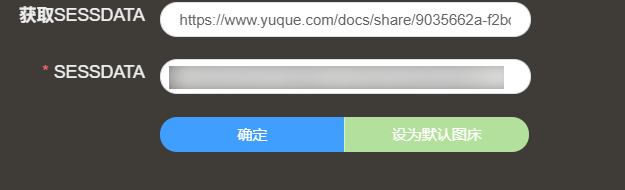
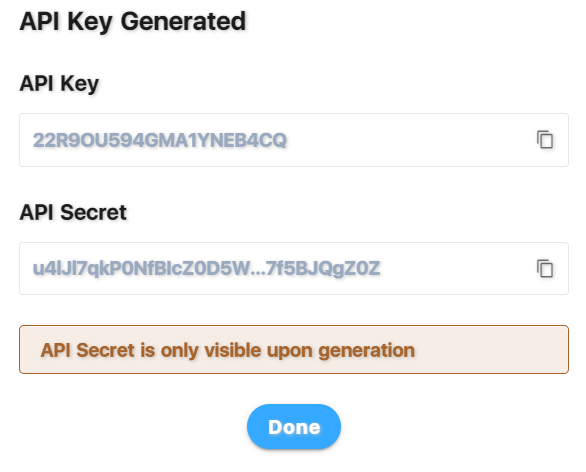
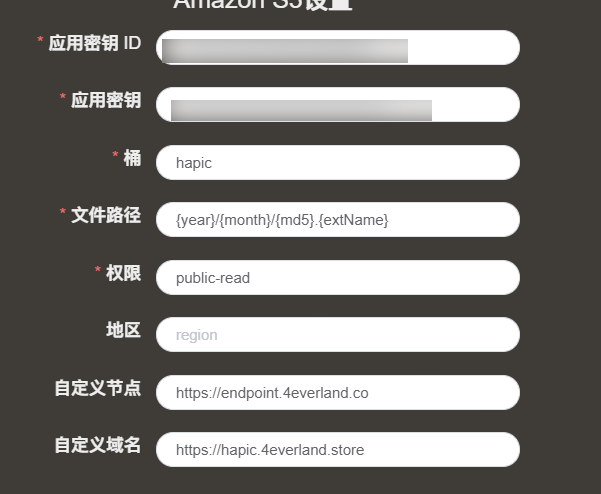
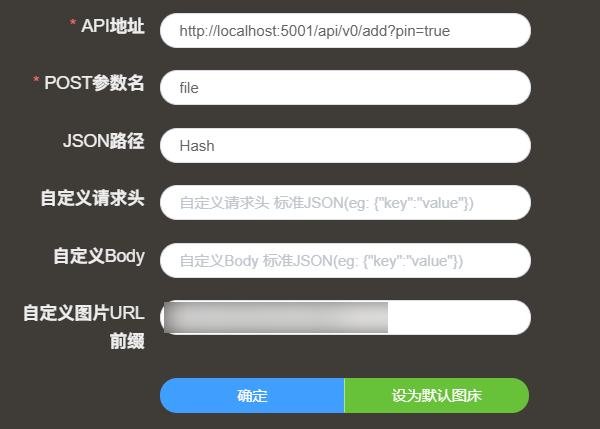
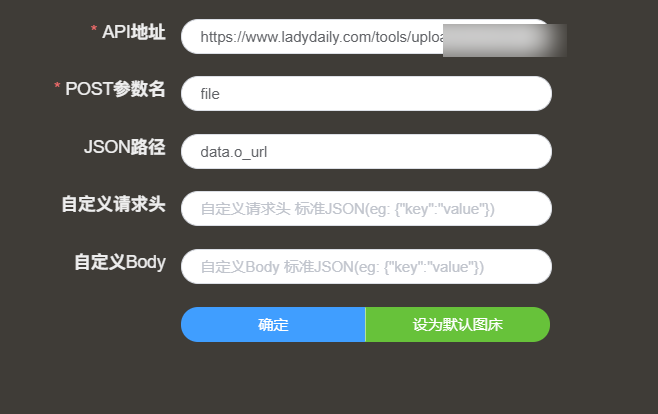
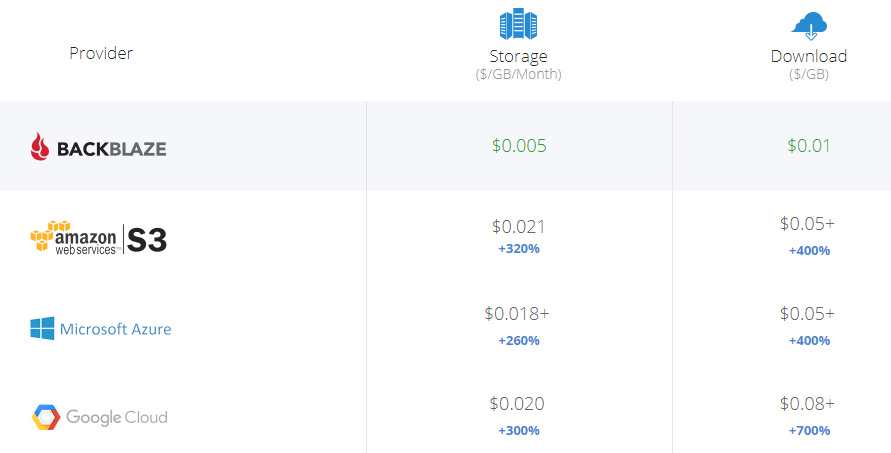
<a class=report href=mailto:admin@hesiy.cn>投诉</a></div></div><script>addEventListener("DOMContentLoaded",()=>{const c="https://fake-gpt.hesiy.cn",g=document.getElementById("posts-content"),e=document.getElementById("post-ai-result-text"),u=document.getElementById("result-loading"),o=document.getElementById("ai-logo"),p=document.getElementById("summary-post"),b=new URL(location.href),h=b.pathname.split("/").filter(e=>e!=="").pop(),f=g.textContent,d=c.endsWith("/")?`${c}api/summary`:`${c}/api/summary`,m={postId:h,content:f},l=()=>{const t=document.createElement("span");t.className="ai-cursor",e.appendChild(t)};l();let n,t=!1;const i=(e,s)=>{if(u&&u.remove(),o.classList.add("typing"),e<s.length){const t=document.querySelector(".ai-cursor");t.insertAdjacentText("beforebegin",s.charAt(e)),e++,n=setTimeout(()=>i(e,s),80)}else o.classList.remove("typing"),document.querySelector(".ai-cursor")?.remove(),t=!1},r=s=>{const r=e,o=s;let a=0;t=!0,clearTimeout(n),i(a,o)};let s=void 0;const v=()=>{fetch(`${d}?postId=${h}`,{method:"GET"}).then(e=>e.json()).then(t=>{t.isSave?(s=t.data,r(t.data)):fetch(d,{method:"POST",headers:{"Content-Type":"application/json"},body:JSON.stringify(m)}).then(e=>e.json()).then(e=>{e.code===1?(s=e.data,r(e.data)):console.error("Error:",e)}).catch(t=>{e.textContent=`${t}`,console.error("Fetch error:",t)})}).catch(t=>{e.textContent=`${t}`,console.error("Fetch error:",t)})};v();let a=!1;o.addEventListener("click",()=>{if(!t)if(a)s!==void 0&&(t=!0,a=!1,clearTimeout(n),e.textContent=``,l(),r(s));else{let s=0;const o="我是浮杨开发的摘要生成助理 QwenGPT，如你所见，这是一个使用 Qwen 14B 作为生成模型的工具。我在这里只负责显示，并仿照 GPT 的形式输出，如果你像我一样讨厌 Cloudflare Worker 的速度，又囊中羞涩，你也可以像我这样做，当然，你也可以使用 Tianli 开发的 TianliGPT 来更简单的实现 AI 摘要。当然，我的样式与代码很大一部分来自于無名大佬，感谢他的帮助！";t=!0,a=!0,clearTimeout(n),e.textContent=``,l(),setTimeout(()=>{i(s,o)},1e3)}}),p.addEventListener("click",()=>{location.href=`/posts/qwen-summary`})}),document.currentScript.remove()</script><section class="flex flex-col max-w-full mt-0 prose dark:prose-invert lg:flex-row"><div class="order-first px-0 lg:order-last lg:max-w-xs lg:ps-8"><div class="toc pe-5 lg:sticky lg:top-10 print:hidden"><details open class="-ms-5 mt-0 overflow-hidden rounded-lg ps-5"><summary class="block cursor-pointer bg-neutral-100 py-1 ps-5 text-lg font-semibold text-neutral-800 dark:bg-neutral-700 dark:text-neutral-100 lg:hidden">Table of Contents</summary><div class="border-s border-dotted border-neutral-300 py-2 ps-5 dark:border-neutral-600"><nav id=TableOfContents><ul><li><a href=#bilibili-图床>Bilibili 图床</a><ul><li><ul><li><a href=#良心的处理参数>良心的处理参数</a></li><li><a href=#自定义-cdn>自定义 CDN</a></li><li><a href=#配套食用>配套食用</a></li></ul></li></ul></li><li><a href=#npm--unpkg-镜像>NPM + UNPKG 镜像</a></li><li><a href=#4everland-bucket>4EVERLAND BUCKET</a><ul><li><ul><li><a href=#picgo-插件安装>PicGo 插件安装</a></li><li><a href=#生成-api-token>生成 API TOKEN</a></li></ul></li></ul></li><li><a href=#ipfsupload真正意义上的-ipfs-图床>IPFSUPLOAD(真正意义上的 IPFS 图床)</a></li><li><a href=#dogedoge-图床>DogeDoge 图床</a></li><li><a href=#backblaze-b2--cloudflare>BACKBLAZE B2 + Cloudflare</a></li><li><a href=#云存储做图床>云存储做图床</a><ul><li><ul><li><a href=#onedrive>OneDrive</a></li><li><a href=#google-drive>Google Drive</a></li></ul></li></ul></li><li><a href=#大厂的对象储存>大厂的对象储存</a><ul><li><ul><li><a href=#阿里云-oss>阿里云 OSS</a></li><li><a href=#腾讯云-cos>腾讯云 COS</a></li><li><a href=#又拍云-uos>又拍云 UOS</a></li></ul></li></ul></li><li><a href=#总结>总结</a></li></ul></nav></div></details></div></div><div id=posts-content class="min-w-0 min-h-0 max-w-prose grow"><blockquote><p>文章迁移计划，样式可能出错</p></blockquote><p>最近想用 IPFS 做图床但是发现的一堆奇奇怪怪的图床</p><p>(PS: 不会介绍传统的 GitHub + JSdelivr / SM.MS / 路过图床)</p><h2 id=bilibili-图床 class="relative group">Bilibili 图床 <span class="absolute top-0 w-6 transition-opacity opacity-0 -start-6 not-prose group-hover:opacity-100"><a class="group-hover:text-primary-300 dark:group-hover:text-neutral-700" style=text-decoration-line:none!important href=#bilibili-%e5%9b%be%e5%ba%8a aria-label=Anchor>#</a></span></h2><p>十分简单</p><p>PicGO 搜索 bilibili</p><p><figure><img src="https://api.hesiy.cn/api/cross?fetch=https://i0.hdslb.com/bfs/album/cf1ae1497dece72e055eb53e76ab22cce8edbd7f.png" alt=img class="mx-auto my-0 rounded-md"></figure></p><p>接着配置 Bilibili 图床</p><p><figure><img src="https://api.hesiy.cn/api/cross?fetch=https://i0.hdslb.com/bfs/album/cdfe3d7b91a9e90d70b5b98f73cc210c3e3818af.png" alt=image-20220515095616065 class="mx-auto my-0 rounded-md"></figure></p><p>SESSDATA 可以登录哔哩哔哩后查看</p><p>进入哔哩哔哩,按下 F12</p><p>定位到应用 -> COOKIE</p><p><figure><img src="https://api.hesiy.cn/api/cross?fetch=https://i0.hdslb.com/bfs/album/b9641807e390e3cb6400dfde505d355fed04efe7.png" alt=image-20220515095718144 class="mx-auto my-0 rounded-md"></figure></p><p>选择 <code>https://www.bilibili.com</code></p><p><figure><img src="https://api.hesiy.cn/api/cross?fetch=https://i0.hdslb.com/bfs/album/414a2c8e5ac3a5468149e9ba127d0ee4a13567fc.png" alt=image-20220515095812119 class="mx-auto my-0 rounded-md"></figure></p><p>在名称内找到 SESSDATA</p><p>点击它</p><p><figure><img src="https://api.hesiy.cn/api/cross?fetch=https://i0.hdslb.com/bfs/album/acf7ca1d8eb1dd61ad279ba9d0d261ea46e67052.png" alt=image-20220515100404765 class="mx-auto my-0 rounded-md"></figure></p><p>然后在 Cookie Value 中复制值,粘贴进去</p><p>之后确定,设置默认图床即可</p><h4 id=良心的处理参数 class="relative group">良心的处理参数 <span class="absolute top-0 w-6 transition-opacity opacity-0 -start-6 not-prose group-hover:opacity-100"><a class="group-hover:text-primary-300 dark:group-hover:text-neutral-700" style=text-decoration-line:none!important href=#%e8%89%af%e5%bf%83%e7%9a%84%e5%a4%84%e7%90%86%e5%8f%82%e6%95%b0 aria-label=Anchor>#</a></span></h4><p>哔哩哔哩图床有十分良心的处理参数</p><table><thead><tr><th>Type</th><th>URL</th></tr></thead><tbody><tr><td>原图</td><td>不做更改</td></tr><tr><td>原分辨率, 质量压缩</td><td>原链接 + @1e_1c.jpg</td></tr><tr><td>原分辨率, 质量压缩(WEBP)</td><td>原链接 + @1e_1c.webp</td></tr><tr><td>规定宽, 高度自适应, 质量压缩(可变 WEBP)</td><td>原链接 + @104w_1e_1c.jpg</td></tr><tr><td>规定高, 宽度自适应, 质量压缩(可变 WEBP)</td><td>原链接 + @104h_1e_1c.jpg</td></tr><tr><td>规定高宽, 质量压缩(可变 WEBP)</td><td>@104w_104h_1e_1c.jpg</td></tr><tr><td>原分辨率(WEBP)</td><td>@104w_104h_1e_1c.webp</td></tr></tbody></table><p>这是 哔哩哔哩 的处理参数</p><p>哔哩哔哩还有许多节点可以选择</p><h4 id=自定义-cdn class="relative group">自定义 CDN <span class="absolute top-0 w-6 transition-opacity opacity-0 -start-6 not-prose group-hover:opacity-100"><a class="group-hover:text-primary-300 dark:group-hover:text-neutral-700" style=text-decoration-line:none!important href=#%e8%87%aa%e5%ae%9a%e4%b9%89-cdn aria-label=Anchor>#</a></span></h4><p>金山 CDN 路线:</p><ul><li>i0.hdslb.com</li><li>i2.hdslb.com</li></ul><p>阿里 CDN 路线:</p><ul><li>i1.hdslb.com</li><li>i4.hdslb.com</li><li>s1.hdslb.com</li><li>s3.hdslb.com</li></ul><p>未知 CDN 路线:</p><ul><li>s2.hdslb.com</li></ul><blockquote><p><del>Bilibili 图床有防盗链,如果你要在你自己的网站中用 Bilibili 图床,得先配置头</del></p></blockquote><div class=highlight><pre tabindex=0 class=chroma><code class=language-html data-lang=html><span class=line><span class=cl><span class=p>&lt;</span><span class=nt>meta</span> <span class=na>name</span><span class=o>=</span><span class=s>&#34;referrer&#34;</span> <span class=na>content</span><span class=o>=</span><span class=s>&#34;no-referrer&#34;</span><span class=p>&gt;</span>
</span></span></code></pre></div><blockquote><p><del>如果你用的 Hexo - Butterfly 则可以在配置文件中这样配置</del></p></blockquote><div class=highlight><pre tabindex=0 class=chroma><code class=language-yaml data-lang=yaml><span class=line><span class=cl><span class=nt>inject</span><span class=p>:</span><span class=w>
</span></span></span><span class=line><span class=cl><span class=w>  </span><span class=nt>head</span><span class=p>:</span><span class=w>
</span></span></span><span class=line><span class=cl><span class=w>      </span>- <span class=l>&lt;meta name=&#34;referrer&#34; content=&#34;no-referrer&#34;&gt;</span><span class=w>
</span></span></span></code></pre></div><p>2024 年 1 月 30 日更新：叔叔已经设置了禁止空头，目前哔哩哔哩图床使用有一些门槛了，如果你和我一样部分文章用了叔叔做图床，可以写一个跨域脚本</p><div class=highlight><pre tabindex=0 class=chroma><code class=language-javascript data-lang=javascript><span class=line><span class=cl><span class=kr>import</span> <span class=nx>https</span> <span class=nx>from</span> <span class=s1>&#39;https&#39;</span><span class=p>;</span>
</span></span><span class=line><span class=cl>
</span></span><span class=line><span class=cl><span class=kr>export</span> <span class=k>default</span> <span class=kr>async</span> <span class=kd>function</span> <span class=nx>handler</span><span class=p>(</span><span class=nx>request</span><span class=p>,</span> <span class=nx>response</span><span class=p>)</span> <span class=p>{</span>
</span></span><span class=line><span class=cl>  <span class=kr>const</span> <span class=p>{</span> <span class=nx>fetch</span><span class=o>:</span> <span class=nx>imageUrl</span> <span class=p>}</span> <span class=o>=</span> <span class=nx>request</span><span class=p>.</span><span class=nx>query</span><span class=p>;</span>
</span></span><span class=line><span class=cl>
</span></span><span class=line><span class=cl>  <span class=k>if</span> <span class=p>(</span><span class=o>!</span><span class=nx>imageUrl</span><span class=p>)</span> <span class=p>{</span>
</span></span><span class=line><span class=cl>    <span class=k>return</span> <span class=nx>response</span><span class=p>.</span><span class=nx>status</span><span class=p>(</span><span class=mi>400</span><span class=p>).</span><span class=nx>json</span><span class=p>({</span> <span class=nx>error</span><span class=o>:</span> <span class=s1>&#39;No image URL provided&#39;</span> <span class=p>});</span>
</span></span><span class=line><span class=cl>  <span class=p>}</span>
</span></span><span class=line><span class=cl>
</span></span><span class=line><span class=cl>  <span class=kr>const</span> <span class=nx>options</span> <span class=o>=</span> <span class=p>{</span>
</span></span><span class=line><span class=cl>    <span class=nx>headers</span><span class=o>:</span> <span class=p>{</span>
</span></span><span class=line><span class=cl>      <span class=s1>&#39;Referer&#39;</span><span class=o>:</span> <span class=s1>&#39;https://www.bilibili.com&#39;</span>
</span></span><span class=line><span class=cl>    <span class=p>}</span>
</span></span><span class=line><span class=cl>  <span class=p>};</span>
</span></span><span class=line><span class=cl>
</span></span><span class=line><span class=cl>  <span class=k>try</span> <span class=p>{</span>
</span></span><span class=line><span class=cl>    <span class=nx>https</span><span class=p>.</span><span class=nx>get</span><span class=p>(</span><span class=nx>imageUrl</span><span class=p>,</span> <span class=nx>options</span><span class=p>,</span> <span class=p>(</span><span class=nx>res</span><span class=p>)</span> <span class=p>=&gt;</span> <span class=p>{</span>
</span></span><span class=line><span class=cl>      <span class=k>if</span> <span class=p>(</span><span class=o>!</span><span class=nx>res</span><span class=p>.</span><span class=nx>statusCode</span> <span class=o>||</span> <span class=nx>res</span><span class=p>.</span><span class=nx>statusCode</span> <span class=o>&lt;</span> <span class=mi>200</span> <span class=o>||</span> <span class=nx>res</span><span class=p>.</span><span class=nx>statusCode</span> <span class=o>&gt;=</span> <span class=mi>300</span><span class=p>)</span> <span class=p>{</span>
</span></span><span class=line><span class=cl>        <span class=k>return</span> <span class=nx>response</span><span class=p>.</span><span class=nx>status</span><span class=p>(</span><span class=nx>res</span><span class=p>.</span><span class=nx>statusCode</span><span class=p>).</span><span class=nx>json</span><span class=p>({</span> <span class=nx>error</span><span class=o>:</span> <span class=s1>&#39;Failed to fetch image&#39;</span> <span class=p>});</span>
</span></span><span class=line><span class=cl>      <span class=p>}</span>
</span></span><span class=line><span class=cl>
</span></span><span class=line><span class=cl>      <span class=nx>response</span><span class=p>.</span><span class=nx>setHeader</span><span class=p>(</span><span class=s1>&#39;Content-Type&#39;</span><span class=p>,</span> <span class=nx>res</span><span class=p>.</span><span class=nx>headers</span><span class=p>[</span><span class=s1>&#39;content-type&#39;</span><span class=p>]);</span>
</span></span><span class=line><span class=cl>
</span></span><span class=line><span class=cl>      <span class=nx>res</span><span class=p>.</span><span class=nx>pipe</span><span class=p>(</span><span class=nx>response</span><span class=p>);</span>
</span></span><span class=line><span class=cl>    <span class=p>}).</span><span class=nx>on</span><span class=p>(</span><span class=s1>&#39;error&#39;</span><span class=p>,</span> <span class=p>(</span><span class=nx>error</span><span class=p>)</span> <span class=p>=&gt;</span> <span class=p>{</span>
</span></span><span class=line><span class=cl>      <span class=nx>response</span><span class=p>.</span><span class=nx>status</span><span class=p>(</span><span class=mi>500</span><span class=p>).</span><span class=nx>json</span><span class=p>({</span> <span class=nx>error</span><span class=o>:</span> <span class=nx>error</span><span class=p>.</span><span class=nx>message</span> <span class=p>});</span>
</span></span><span class=line><span class=cl>    <span class=p>});</span>
</span></span><span class=line><span class=cl>  <span class=p>}</span> <span class=k>catch</span> <span class=p>(</span><span class=nx>error</span><span class=p>)</span> <span class=p>{</span>
</span></span><span class=line><span class=cl>    <span class=nx>response</span><span class=p>.</span><span class=nx>status</span><span class=p>(</span><span class=mi>500</span><span class=p>).</span><span class=nx>json</span><span class=p>({</span> <span class=nx>error</span><span class=o>:</span> <span class=nx>error</span><span class=p>.</span><span class=nx>message</span> <span class=p>});</span>
</span></span><span class=line><span class=cl>  <span class=p>}</span>
</span></span><span class=line><span class=cl><span class=p>}</span>
</span></span></code></pre></div><p>接着你可以写一个 Powershell 脚本进行替换</p><div class=highlight><pre tabindex=0 class=chroma><code class=language-powershell data-lang=powershell><span class=line><span class=cl><span class=nv>$rootPath</span> <span class=p>=</span> <span class=s2>&#34;./&#34;</span>  <span class=c># 替换成你想要搜索的目录</span>
</span></span><span class=line><span class=cl><span class=nv>$matchPattern</span> <span class=p>=</span> <span class=s1>&#39;https://i0\.hdslb\.com/&#39;</span>  <span class=c># 来匹配的URL</span>
</span></span><span class=line><span class=cl><span class=nv>$replaceWith</span> <span class=p>=</span> <span class=s1>&#39;https://api.hesiy.cn/api/cross?fetch=https://i0.hdslb.com/&#39;</span>  <span class=c># 替换为新的URL</span>
</span></span><span class=line><span class=cl>
</span></span><span class=line><span class=cl><span class=nv>$markdownFiles</span> <span class=p>=</span> <span class=nb>Get-ChildItem</span> <span class=n>-Path</span> <span class=nv>$rootPath</span> <span class=n>-Recurse</span> <span class=n>-Filter</span> <span class=p>*.</span><span class=nb>md
</span></span></span><span class=line><span class=cl><span class=nb></span>
</span></span><span class=line><span class=cl><span class=k>foreach</span> <span class=p>(</span><span class=nv>$file</span> <span class=k>in</span> <span class=nv>$markdownFiles</span><span class=p>)</span> <span class=p>{</span>
</span></span><span class=line><span class=cl>    <span class=nv>$content</span> <span class=p>=</span> <span class=nb>Get-Content</span> <span class=n>-Path</span> <span class=nv>$file</span><span class=p>.</span><span class=py>FullName</span> <span class=n>-Raw</span>
</span></span><span class=line><span class=cl>    <span class=nv>$newContent</span> <span class=p>=</span> <span class=nv>$content</span> <span class=o>-replace</span> <span class=nv>$matchPattern</span><span class=p>,</span> <span class=nv>$replaceWith</span>
</span></span><span class=line><span class=cl>
</span></span><span class=line><span class=cl>    <span class=nb>Set-Content</span> <span class=n>-Path</span> <span class=nv>$file</span><span class=p>.</span><span class=py>FullName</span> <span class=n>-Value</span> <span class=nv>$newContent</span>
</span></span><span class=line><span class=cl><span class=p>}</span>
</span></span><span class=line><span class=cl>
</span></span><span class=line><span class=cl><span class=nb>Write-Host</span> <span class=s2>&#34;所有Markdown文件中的URL已经更新完成。&#34;</span>
</span></span></code></pre></div><blockquote><p>注意：如果你使用了早期的哔哩哔哩图床或者自定义了 CDN，你也要跟着进行修改</p></blockquote><h4 id=配套食用 class="relative group">配套食用 <span class="absolute top-0 w-6 transition-opacity opacity-0 -start-6 not-prose group-hover:opacity-100"><a class="group-hover:text-primary-300 dark:group-hover:text-neutral-700" style=text-decoration-line:none!important href=#%e9%85%8d%e5%a5%97%e9%a3%9f%e7%94%a8 aria-label=Anchor>#</a></span></h4><p><a href=https://github.com/xlzy520/bilibili-img-uploader target=_blank rel=noreferrer>浏览器插件</a></p><p><a href=https://github.com/xlzy520/typora-plugin-bilibili target=_blank rel=noreferrer>Typora 插件</a></p><blockquote><p>配合 typora 食用更佳</p></blockquote><blockquote><p>如果用了很久之后,在上传时出现了错误,那就是 SESSDATA 过期了,重新去生成一个就好</p></blockquote><h2 id=npm--unpkg-镜像 class="relative group">NPM + UNPKG 镜像 <span class="absolute top-0 w-6 transition-opacity opacity-0 -start-6 not-prose group-hover:opacity-100"><a class="group-hover:text-primary-300 dark:group-hover:text-neutral-700" style=text-decoration-line:none!important href=#npm--unpkg-%e9%95%9c%e5%83%8f aria-label=Anchor>#</a></span></h2><blockquote><p>使用这个方法前记得切换回原来 NPM 的注册表.因为其他镜像没有发布这个功能</p></blockquote><p>十分简单</p><p>本地先登录,接着创建包,然后初始化版本,最后发布</p><p>指令:</p><div class=highlight><pre tabindex=0 class=chroma><code class=language-bash data-lang=bash><span class=line><span class=cl>$ npm login
</span></span><span class=line><span class=cl>$ npm init -y
</span></span><span class=line><span class=cl>$ npm version patch
</span></span><span class=line><span class=cl>$ npm publish
</span></span></code></pre></div><p>这样一个 npm 包就发布完了</p><p>接下来是收集的一些镜像</p><ul><li><a href=https://npm.elemecdn.com/ target=_blank rel=noreferrer>https://npm.elemecdn.com/</a> 饿了么(阿里 CDN)</li><li><a href=https://unpkg.zhimg.com/ target=_blank rel=noreferrer>https://unpkg.zhimg.com/</a> 知乎(阿里 CDN)</li><li><a href=https://shadow.elemecdn.com/ target=_blank rel=noreferrer>https://shadow.elemecdn.com/</a> 饿了么(阿里)(这个停止维护了)</li><li><a href=https://code.bdstatic.com/npm/ target=_blank rel=noreferrer>https://code.bdstatic.com/npm/</a> 百度(百度 CDN)</li><li><a href=https://cdn.jsdelivr.net/npm/ target=_blank rel=noreferrer>https://cdn.jsdelivr.net/npm/</a> Jsdelivr(备案没封前是网宿 CDN | 后来备案封后是 Cloudflare + Fastly + Gcore)(可以自定义节点)</li></ul><p>Jsdelivr 自定义节点只需要:</p><p>gcore.jsdelivr.net</p><p>fastly.jsdleivr.net</p><p>即可</p><h2 id=4everland-bucket class="relative group">4EVERLAND BUCKET <span class="absolute top-0 w-6 transition-opacity opacity-0 -start-6 not-prose group-hover:opacity-100"><a class="group-hover:text-primary-300 dark:group-hover:text-neutral-700" style=text-decoration-line:none!important href=#4everland-bucket aria-label=Anchor>#</a></span></h2><blockquote><p>这应该是 IPFS 的另一个方案(但是最多 1G)</p></blockquote><h4 id=picgo-插件安装 class="relative group">PicGo 插件安装 <span class="absolute top-0 w-6 transition-opacity opacity-0 -start-6 not-prose group-hover:opacity-100"><a class="group-hover:text-primary-300 dark:group-hover:text-neutral-700" style=text-decoration-line:none!important href=#picgo-%e6%8f%92%e4%bb%b6%e5%ae%89%e8%a3%85 aria-label=Anchor>#</a></span></h4><p><figure><img src="https://api.hesiy.cn/api/cross?fetch=https://i0.hdslb.com/bfs/album/a331f344fec5938cf88bb31b96eb617ca7aa912a.png" alt=image-20220515102843681 class="mx-auto my-0 rounded-md"></figure></p><p>搜索 s3 并安装</p><p>然后就去 4EVERLAND 注册一个账户</p><p><a href=https://4everland.org/ target=_blank rel=noreferrer>https://4everland.org/</a></p><p>这个网站似乎只能用以太坊钱包登录,GitHub 登录会提示不支持了(</p><p>我用的 MetaMask</p><p>注册之后创建一个桶<figure><img src="https://api.hesiy.cn/api/cross?fetch=https://i0.hdslb.com/bfs/album/18d86351cd8e59f2952403b87e6148a011a0c8b7.png" alt=image-20220515103035770 class="mx-auto my-0 rounded-md"></figure></p><h4 id=生成-api-token class="relative group">生成 API TOKEN <span class="absolute top-0 w-6 transition-opacity opacity-0 -start-6 not-prose group-hover:opacity-100"><a class="group-hover:text-primary-300 dark:group-hover:text-neutral-700" style=text-decoration-line:none!important href=#%e7%94%9f%e6%88%90-api-token aria-label=Anchor>#</a></span></h4><p>点击你账户, 选择设置</p><p>转到 Auth Token</p><p>选择 Bucket Auth Tokens</p><p>点击 Generate 即可</p><p><figure><img src="https://api.hesiy.cn/api/cross?fetch=https://i0.hdslb.com/bfs/album/6a6280b7d227e71f85fe3ac5d6c723a1624b10b2.png" alt=image-20220515103143196 class="mx-auto my-0 rounded-md"></figure></p><blockquote><p>本文章的 Key 在发布之前就删掉了,不要想着搞坏事</p></blockquote><p>之后进入 PicGo 配置下</p><p>转到 Amazon S3</p><p><figure><img src="https://api.hesiy.cn/api/cross?fetch=https://i0.hdslb.com/bfs/album/0c17cef3800acd7e24cb513332b581b7e533d734.png" alt=image-20220515103304436 class="mx-auto my-0 rounded-md"></figure></p><p>ID 和 密钥粘贴进去</p><p>桶写你创建桶的时候的名字</p><p>节点用 <a href=https://endpoint.4everland.co target=_blank rel=noreferrer>https://endpoint.4everland.co</a></p><p>自定义域名是 桶名.4everland.store</p><p>最后记得把这两个选项打开</p><p><figure><img src="https://api.hesiy.cn/api/cross?fetch=https://i0.hdslb.com/bfs/album/2cfae6b3b35c40363da4d245be35ddbe689c6a48.png" alt=image-20220515103434098 class="mx-auto my-0 rounded-md"></figure></p><h2 id=ipfsupload真正意义上的-ipfs-图床 class="relative group">IPFSUPLOAD(真正意义上的 IPFS 图床) <span class="absolute top-0 w-6 transition-opacity opacity-0 -start-6 not-prose group-hover:opacity-100"><a class="group-hover:text-primary-300 dark:group-hover:text-neutral-700" style=text-decoration-line:none!important href=#ipfsupload%e7%9c%9f%e6%ad%a3%e6%84%8f%e4%b9%89%e4%b8%8a%e7%9a%84-ipfs-%e5%9b%be%e5%ba%8a aria-label=Anchor>#</a></span></h2><p>本地装一个 IPFS DESKTOP</p><p>等他启动后先看端口</p><p><figure><img src="https://api.hesiy.cn/api/cross?fetch=https://i0.hdslb.com/bfs/album/4f632ddca72f5fd73c04b363a3bcc71c0ed32a46.png" alt=image-20220515103737939 class="mx-auto my-0 rounded-md"></figure></p><p>图中圈着的就是端口,然后去浏览器访问一下看看正不正常</p><p><code>http://localhost:5001/api/v0/add?pin=true</code></p><p>如果正常应该会提示 405 - Method Not Allowed</p><p>接着就是上传了</p><p>PicGo 安装一个 web-uploader</p><p><figure><img src="https://api.hesiy.cn/api/cross?fetch=https://i0.hdslb.com/bfs/album/900e4ad2f69eb49de3c2cc768a570d0a4d64e341.png" alt=image-20220515104103681 class="mx-auto my-0 rounded-md"></figure></p><p>然后配置如图</p><p><figure><img src="https://api.hesiy.cn/api/cross?fetch=https://i0.hdslb.com/bfs/album/f3964d51aa4ec7628e29561b436244322a9dc43d.png" alt=image-20220515104559575 class="mx-auto my-0 rounded-md"></figure></p><p>IPFS网关我是用的我自己的,所以打了马赛克,你们可以自己先用 workers 反代一次,然后再用 CDN 过墙</p><p>你也可以直接 CDN 我代理好的 worker (IPFS 官网)</p><p>PS :我没有反代 IPFS 网关</p><p>回源: <strong>dl2p.taiyu.workers.dev</strong></p><p>回源 HOST: <strong>dl2p.taiyu.workers.dev</strong></p><p>回源端口: 443</p><p>回源协议: HTTPS</p><p>速度测试:</p><p><figure><img src="https://dl2p.hesiy.cn/ipfs/QmeeNLDPcfC2SZnC5N2TZTSY19P4nRPHhVoqMrYJvuXVLX?filename=Genshin%20Impact.webp" alt class="mx-auto my-0 rounded-md"></figure></p><blockquote><p>不给滥用,我设置了防盗链</p></blockquote><h2 id=dogedoge-图床 class="relative group">DogeDoge 图床 <span class="absolute top-0 w-6 transition-opacity opacity-0 -start-6 not-prose group-hover:opacity-100"><a class="group-hover:text-primary-300 dark:group-hover:text-neutral-700" style=text-decoration-line:none!important href=#dogedoge-%e5%9b%be%e5%ba%8a aria-label=Anchor>#</a></span></h2><p>没有什么说的,速度炒鸡快,使用要申请,现在应该申请不到了</p><p>有的可以用</p><p><figure><img src="https://api.hesiy.cn/api/cross?fetch=https://i0.hdslb.com/bfs/album/14b08dccb38ff79f6935a6a764a65b20773bf724.png" alt=image-20220515104734675 class="mx-auto my-0 rounded-md"></figure></p><h2 id=backblaze-b2--cloudflare class="relative group">BACKBLAZE B2 + Cloudflare <span class="absolute top-0 w-6 transition-opacity opacity-0 -start-6 not-prose group-hover:opacity-100"><a class="group-hover:text-primary-300 dark:group-hover:text-neutral-700" style=text-decoration-line:none!important href=#backblaze-b2--cloudflare aria-label=Anchor>#</a></span></h2><p>首先猜到有人要提问: 为什么要加 Cloudflare?</p><p>因为 BACKBLAZE 有流量计费,但是他加入了带宽联盟,再加上 Cloudflare 超长缓存,≈ 完全免费</p><p>但是有10G空间</p><p>这是超出10G的价格</p><p><figure><img src="https://api.hesiy.cn/api/cross?fetch=https://i0.hdslb.com/bfs/album/6389ccc4522227dd936a8eedfeb6988ecd39616c.jpg" alt class="mx-auto my-0 rounded-md"></figure></p><p>注册方法 ChenYFan 大佬已经写过了,与其再写一篇问文章,不如直接用他的~~(其实就是懒)~~</p><p>直接贴:</p><p><a href=https://blog.cyfan.top/p/ce240368.html target=_blank rel=noreferrer>https://blog.cyfan.top/p/ce240368.html</a></p><h2 id=云存储做图床 class="relative group">云存储做图床 <span class="absolute top-0 w-6 transition-opacity opacity-0 -start-6 not-prose group-hover:opacity-100"><a class="group-hover:text-primary-300 dark:group-hover:text-neutral-700" style=text-decoration-line:none!important href=#%e4%ba%91%e5%ad%98%e5%82%a8%e5%81%9a%e5%9b%be%e5%ba%8a aria-label=Anchor>#</a></span></h2><blockquote><p>用 OneDrive Google Drive 做图床真的是闲</p></blockquote><h4 id=onedrive class="relative group">OneDrive <span class="absolute top-0 w-6 transition-opacity opacity-0 -start-6 not-prose group-hover:opacity-100"><a class="group-hover:text-primary-300 dark:group-hover:text-neutral-700" style=text-decoration-line:none!important href=#onedrive aria-label=Anchor>#</a></span></h4><p>参考 <a href=https://ovi.swo.moe/zh/docs/getting-started target=_blank rel=noreferrer>Spencer Woo</a> 去搭建一个 onedrive-vercel-index 就行</p><h4 id=google-drive class="relative group">Google Drive <span class="absolute top-0 w-6 transition-opacity opacity-0 -start-6 not-prose group-hover:opacity-100"><a class="group-hover:text-primary-300 dark:group-hover:text-neutral-700" style=text-decoration-line:none!important href=#google-drive aria-label=Anchor>#</a></span></h4><p>参考 <a href=https://blog.cyfan.top/p/74e90c90.html target=_blank rel=noreferrer>ChenYFan</a> 搭建一个 GDIndex 即可</p><h2 id=大厂的对象储存 class="relative group">大厂的对象储存 <span class="absolute top-0 w-6 transition-opacity opacity-0 -start-6 not-prose group-hover:opacity-100"><a class="group-hover:text-primary-300 dark:group-hover:text-neutral-700" style=text-decoration-line:none!important href=#%e5%a4%a7%e5%8e%82%e7%9a%84%e5%af%b9%e8%b1%a1%e5%82%a8%e5%ad%98 aria-label=Anchor>#</a></span></h2><h4 id=阿里云-oss class="relative group">阿里云 OSS <span class="absolute top-0 w-6 transition-opacity opacity-0 -start-6 not-prose group-hover:opacity-100"><a class="group-hover:text-primary-300 dark:group-hover:text-neutral-700" style=text-decoration-line:none!important href=#%e9%98%bf%e9%87%8c%e4%ba%91-oss aria-label=Anchor>#</a></span></h4><blockquote><p>有很多人写,自己谷歌,反正价格挺便宜的</p></blockquote><h4 id=腾讯云-cos class="relative group">腾讯云 COS <span class="absolute top-0 w-6 transition-opacity opacity-0 -start-6 not-prose group-hover:opacity-100"><a class="group-hover:text-primary-300 dark:group-hover:text-neutral-700" style=text-decoration-line:none!important href=#%e8%85%be%e8%ae%af%e4%ba%91-cos aria-label=Anchor>#</a></span></h4><blockquote><p>🤢 这东西不推荐,计费十分离谱,而且配置头超长缓存后 COS 会在用户请求时悄悄篡改 max-cache</p><p>新用户有 6 个月免费额度,之后就要开始付费了(</p><p>⚠ 流量包和储存包都很贵</p></blockquote><h4 id=又拍云-uos class="relative group">又拍云 UOS <span class="absolute top-0 w-6 transition-opacity opacity-0 -start-6 not-prose group-hover:opacity-100"><a class="group-hover:text-primary-300 dark:group-hover:text-neutral-700" style=text-decoration-line:none!important href=#%e5%8f%88%e6%8b%8d%e4%ba%91-uos aria-label=Anchor>#</a></span></h4><blockquote><p>又拍云似乎是没有免费额度的,但是又拍云有开发者联盟,只需要把他的 Logo 挂在你的网站页脚就行。</p></blockquote><div class=highlight><pre tabindex=0 class=chroma><code class=language-html data-lang=html><span class=line><span class=cl><span class=p>&lt;</span><span class=nt>img</span> <span class=na>src</span><span class=o>=</span><span class=s>&#34;本地位置.svg&#34;</span><span class=p>&gt;</span>
</span></span></code></pre></div><h2 id=总结 class="relative group">总结 <span class="absolute top-0 w-6 transition-opacity opacity-0 -start-6 not-prose group-hover:opacity-100"><a class="group-hover:text-primary-300 dark:group-hover:text-neutral-700" style=text-decoration-line:none!important href=#%e6%80%bb%e7%bb%93 aria-label=Anchor>#</a></span></h2><p>好用的图床千千万,你要自己去发现</p><p>我总结了 7 个免费图床,其中 DogeDoge 图床需要申请</p><p>如果细数的话,共有 8 个免费图床(每个云存储单独算一个)</p></div></section><footer class="pt-8 max-w-prose print:hidden"><div class=flex><picture class="!mb-0 !mt-0 me-4 w-24 h-auto rounded-full"><img width=4096 height=4096 class="!mb-0 !mt-0 me-4 w-24 h-auto rounded-full" alt=FloatSheep loading=lazy decoding=async src=/avatar_hu8c96a287a75bfd9f03af418858761485_108988_660x0_resize_q75_h2_box_2.webp srcset="/avatar_hu8c96a287a75bfd9f03af418858761485_108988_330x0_resize_q75_h2_box_2.webp 330w,/avatar_hu8c96a287a75bfd9f03af418858761485_108988_660x0_resize_q75_h2_box_2.webp 660w
,/avatar_hu8c96a287a75bfd9f03af418858761485_108988_1024x0_resize_q75_h2_box_2.webp 1024w
,/avatar_hu8c96a287a75bfd9f03af418858761485_108988_1320x0_resize_q75_h2_box_2.webp 1320w" sizes=100vw></picture><div class=place-self-center><div class="text-[0.6rem] uppercase leading-3 text-neutral-500 dark:text-neutral-400">Author</div><div class="font-semibold leading-6 text-neutral-800 dark:text-neutral-300">FloatSheep</div><div class="text-sm text-neutral-700 dark:text-neutral-400">On the other side of obstacles</div><div class="text-2xl sm:text-lg"><div class="flex flex-wrap text-neutral-400 dark:text-neutral-500"><a class="px-1 transition-transform hover:scale-125 hover:text-primary-700 dark:hover:text-primary-400" style=will-change:transform href=mailto:admin@hesiy.cn target=_blank aria-label=Email rel="me noopener noreferrer"><span class="icon relative inline-block px-1 align-text-bottom"><svg viewBox="0 0 512 512"><path fill="currentcolor" d="M207.8 20.73c-93.45 18.32-168.7 93.66-187 187.1-27.64 140.9 68.65 266.2 199.1 285.1 19.01 2.888 36.17-12.26 36.17-31.49l1e-4-.6631c0-15.74-11.44-28.88-26.84-31.24-84.35-12.98-149.2-86.13-149.2-174.2.0-102.9 88.61-185.5 193.4-175.4 91.54 8.869 158.6 91.25 158.6 183.2v16.16c0 22.09-17.94 40.05-40 40.05s-40.01-17.96-40.01-40.05v-120.1c0-8.847-7.161-16.02-16.01-16.02l-31.98.0036c-7.299.0-13.2 4.992-15.12 11.68-24.85-12.15-54.24-16.38-86.06-5.106-38.75 13.73-68.12 48.91-73.72 89.64-9.483 69.01 43.81 128 110.9 128 26.44.0 50.43-9.544 69.59-24.88 24 31.3 65.23 48.69 109.4 37.49C465.2 369.3 496 324.1 495.1 277.2V256.3c0-149.2-133.9-265.632-287.3-235.57zM239.1 304.3c-26.47.0-48-21.56-48-48.05s21.53-48.05 48-48.05 48 21.56 48 48.05-20.6 48.05-48 48.05z"/></svg>
</span></a><a class="px-1 transition-transform hover:scale-125 hover:text-primary-700 dark:hover:text-primary-400" style=will-change:transform href=https://hesiy.cn/ target=_blank aria-label=Link rel="me noopener noreferrer"><span class="icon relative inline-block px-1 align-text-bottom"><svg viewBox="0 0 640 512"><path fill="currentcolor" d="M172.5 131.1c55.6-55.59 148-55.59 203.6.0 50 50 57.4 129.7 16.3 187.2L391.3 319.9C381 334.2 361 337.6 346.7 327.3c-14.4-10.3-17.8-30.3-7.5-44.6L340.3 281.1C363.2 249 359.6 205.1 331.7 177.2c-31.4-31.4-82.5-31.4-114 0L105.5 289.5c-31.51 30.6-31.51 82.5.0 114C133.3 431.4 177.3 435 209.3 412.1L210.9 410.1C225.3 400.7 245.3 404 255.5 418.4 265.8 432.8 262.5 452.8 248.1 463.1L246.5 464.2c-58.4 41.1-136.3 34.5-186.29-15.4-56.469-56.5-56.469-148.1.0-204.5L172.5 131.1zM467.5 380c-56.5 56.5-148 56.5-204.5.0-50-50-56.5-128.8-15.4-186.3L248.7 192.1C258.1 177.8 278.1 174.4 293.3 184.7 307.7 194.1 311.1 214.1 300.8 229.3L299.7 230.9C276.8 262.1 280.4 306.9 308.3 334.8c31.4 31.4 82.5 31.4 114 0L534.5 222.5c31.5-31.5 31.5-83.4.0-114C506.7 80.63 462.7 76.99 430.7 99.9L429.1 101C414.7 111.3 394.7 107.1 384.5 93.58 374.2 79.2 377.5 59.21 391.9 48.94L393.5 47.82C451 6.731 529.8 13.25 579.8 63.24c56.5 56.46 56.5 148.06.0 204.46L467.5 380z"/></svg>
</span></a><a class="px-1 transition-transform hover:scale-125 hover:text-primary-700 dark:hover:text-primary-400" style=will-change:transform href=https://github.com/FloatSheep target=_blank aria-label=Github rel="me noopener noreferrer"><span class="icon relative inline-block px-1 align-text-bottom"><svg viewBox="0 0 496 512"><path fill="currentcolor" d="M165.9 397.4c0 2-2.3 3.6-5.2 3.6-3.3.3-5.6-1.3-5.6-3.6.0-2 2.3-3.6 5.2-3.6 3-.3 5.6 1.3 5.6 3.6zm-31.1-4.5c-.7 2 1.3 4.3 4.3 4.9 2.6 1 5.6.0 6.2-2s-1.3-4.3-4.3-5.2c-2.6-.7-5.5.3-6.2 2.3zm44.2-1.7c-2.9.7-4.9 2.6-4.6 4.9.3 2 2.9 3.3 5.9 2.6 2.9-.7 4.9-2.6 4.6-4.6-.3-1.9-3-3.2-5.9-2.9zM244.8 8C106.1 8 0 113.3.0 252c0 110.9 69.8 205.8 169.5 239.2 12.8 2.3 17.3-5.6 17.3-12.1.0-6.2-.3-40.4-.3-61.4.0.0-70 15-84.7-29.8.0.0-11.4-29.1-27.8-36.6.0.0-22.9-15.7 1.6-15.4.0.0 24.9 2 38.6 25.8 21.9 38.6 58.6 27.5 72.9 20.9 2.3-16 8.8-27.1 16-33.7-55.9-6.2-112.3-14.3-112.3-110.5.0-27.5 7.6-41.3 23.6-58.9-2.6-6.5-11.1-33.3 2.6-67.9 20.9-6.5 69 27 69 27 20-5.6 41.5-8.5 62.8-8.5s42.8 2.9 62.8 8.5c0 0 48.1-33.6 69-27 13.7 34.7 5.2 61.4 2.6 67.9 16 17.7 25.8 31.5 25.8 58.9.0 96.5-58.9 104.2-114.8 110.5 9.2 7.9 17 22.9 17 46.4.0 33.7-.3 75.4-.3 83.6.0 6.5 4.6 14.4 17.3 12.1C428.2 457.8 496 362.9 496 252 496 113.3 383.5 8 244.8 8zM97.2 352.9c-1.3 1-1 3.3.7 5.2 1.6 1.6 3.9 2.3 5.2 1 1.3-1 1-3.3-.7-5.2-1.6-1.6-3.9-2.3-5.2-1zm-10.8-8.1c-.7 1.3.3 2.9 2.3 3.9 1.6 1 3.6.7 4.3-.7.7-1.3-.3-2.9-2.3-3.9-2-.6-3.6-.3-4.3.7zm32.4 35.6c-1.6 1.3-1 4.3 1.3 6.2 2.3 2.3 5.2 2.6 6.5 1 1.3-1.3.7-4.3-1.3-6.2-2.2-2.3-5.2-2.6-6.5-1zm-11.4-14.7c-1.6 1-1.6 3.6.0 5.9 1.6 2.3 4.3 3.3 5.6 2.3 1.6-1.3 1.6-3.9.0-6.2-1.4-2.3-4-3.3-5.6-2z"/></svg>
</span></a><a class="px-1 transition-transform hover:scale-125 hover:text-primary-700 dark:hover:text-primary-400" style=will-change:transform href="https://music.163.com/#/user/home?id=1431228228" target=_blank aria-label=Neteasemusic rel="me noopener noreferrer"><span class="icon relative inline-block px-1 align-text-bottom"><!doctype html><svg viewBox="0 0 1024 1024" xmlns:xlink="http://www.w3.org/1999/xlink"><path d="M628.76 5.89Q671.27-5.3 714.9 4.77q49.22 12.3 90.6 43.62 14.55 10.07 22.38 27.97 5.59 12.31 3.91 26.29-1.68 13.98-8.39 26.29-15.66 21.25-40.27 25.72-21.25 2.24-38.03-7.83l-17.9-13.42q-12.3-7.83-26.85-13.42t-30.21-5.59q-10.07 1.12-19.57 6.16-9.5 5.03-17.34 12.86-14.54 15.66-10.07 35.8l21.25 79.42q36.92 2.23 73.84 12.3 36.91 10.07 69.36 30.2 63.76 39.16 110.74 98.44 38.03 50.34 55.93 110.75 19.02 65.99 14.54 134.23-4.47 57.05-23.49 109.62-24.61 64.88-68.24 118.58t-102.92 90.62q-42.5 27.96-90.6 44.18-48.1 16.22-98.44 21.81-69.36 10.07-139.83-1.68-70.47-11.75-134.23-45.31-63.76-33.56-114.66-84.45t-84.46-114.1q-33.56-63.2-48.1-132.56-20.13-102.91 2.24-204.71 14.54-62.64 44.75-119.13t73.82-103.47q72.71-77.18 171.15-116.34 10.07-4.47 20.14-6.71 24.61-3.35 43.62 10.07 13.43 8.95 19.58 23.49 6.15 14.54 3.92 30.2-2.24 15.66-11.75 27.97t-25.17 17.91q-49.22 19.01-91.17 50.34-41.95 31.32-73.27 73.82-27.96 36.92-45.86 79.99-17.9 43.06-24.05 89.49t-.56 92.29 22.37 88.37q23.49 63.76 68.24 114.65Q306.6 840.39 367 871.73q72.71 38.03 155.49 38.03 68.23-1.12 130.87-23.49 55.93-20.14 100.68-60.41 41.39-35.79 67.12-85.01 13.42-24.61 21.25-51.46 11.19-38.03 12.31-78.3 1.12-40.27-10.07-79.42-10.07-32.44-28.53-60.4-18.46-27.97-44.18-50.35-22.38-19.01-48.1-34.67-22.38-12.31-48.1-17.9l35.79 136.47 5.59 32.44q1.12 35.8-10.06 69.91-11.19 34.12-33.56 60.4-22.37 26.29-51.45 43.63-29.09 17.34-61.53 22.94-35.8 6.71-71.59.55-35.8-6.15-65.44-25.17-29.64-19.01-50.33-46.42t-31.88-59.85q-12.31-35.8-13.42-74.95-2.24-41.39 8.38-81.66 10.63-40.27 35.24-74.95 27.97-40.27 68.8-68.24 40.83-27.96 88.93-41.38l-14.55-52.57q-8.94-29.09-6.7-59.29 2.23-30.2 15.65-57.05 14.55-30.2 40.27-52.58 29.09-23.49 64.88-34.67zM478.87 419.78q-25.73 27.96-33.56 63.76-6.71 33.55.0 65.99 3.36 17.9 12.87 34.12 9.5 16.22 24.05 27.41 25.73 16.78 55.94 11.18 26.84-5.59 45.3-26.29 18.46-20.69 19.58-48.65-2.24-12.31-5.6-25.73L558.3 372.79q-45.86 13.43-79.42 46.99z" fill="currentcolor"/></svg></span></a>
<a class="px-1 transition-transform hover:scale-125 hover:text-primary-700 dark:hover:text-primary-400" style=will-change:transform href=https://last.fm/user/FloatSheep target=_blank aria-label=Lastfm rel="me noopener noreferrer"><span class="icon relative inline-block px-1 align-text-bottom"><svg viewBox="0 0 512 512"><path fill="currentcolor" d="M225.8 367.1l-18.8-51s-30.5 34-76.2 34c-40.5.0-69.2-35.2-69.2-91.5.0-72.1 36.4-97.9 72.1-97.9 66.5.0 74.8 53.3 100.9 134.9 18.8 56.9 54 102.6 155.4 102.6 72.7.0 122-22.3 122-80.9.0-72.9-62.7-80.6-115-92.1-25.8-5.9-33.4-16.4-33.4-34 0-19.9 15.8-31.7 41.6-31.7 28.2.0 43.4 10.6 45.7 35.8l58.6-7c-4.7-52.8-41.1-74.5-100.9-74.5-52.8.0-104.4 19.9-104.4 83.9.0 39.9 19.4 65.1 68 76.8 44.9 10.6 79.8 13.8 79.8 45.7.0 21.7-21.1 30.5-61 30.5-59.2.0-83.9-31.1-97.9-73.9-32-96.8-43.6-163-161.3-163C45.7 113.8.0 168.3.0 261c0 89.1 45.7 137.2 127.9 137.2 66.2.0 97.9-31.1 97.9-31.1z"/></svg>
</span></a><a class="px-1 transition-transform hover:scale-125 hover:text-primary-700 dark:hover:text-primary-400" style=will-change:transform href=https://space.bilibili.com/384597455 target=_blank aria-label=Bilibili rel="me noopener noreferrer"><span class="icon relative inline-block px-1 align-text-bottom"><!doctype html><svg t="1722428520489" class="icon" viewBox="0 0 1024 1024" p-id="4278" xmlns:xlink="http://www.w3.org/1999/xlink" width="200" height="200"><path d="M977.2 208.2c33.4 36.2 48.8 79.4 46.6 131.4v404.8c-.8 52.8-18.4 96.2-53 130.2-34.4 34-78.2 51.8-131 53.4H184.04c-52.9-1.6-96.42-19.6-130.56-54.4C19.364 838.8 1.534 793 0 736.4V339.6c1.534-52 19.364-95.2 53.48-131.4 34.14-32.7 77.66-50.66 130.56-52.2h58.76l-50.7-51.62c-11.5-11.46-17.26-26-17.26-43.58.0-17.6 5.76-32.12 17.26-43.594C203.6 5.736 218.2.0 235.8.0s32.2 5.736 43.8 17.206L426.2 156h176l149-138.794C763.4 5.736 778.4.0 796 0s32.2 5.736 43.8 17.206C851.2 28.68 857 43.2 857 60.8c0 17.58-5.8 32.12-17.2 43.58L789.2 156h58.6c52.8 1.54 96 19.5 129.4 52.2zm-77.6 139.4c-.8-19.2-7.4-34.8-21.4-47-10.4-12.2-28-18.8-45.4-19.6H192.1c-19.18.8-34.9 7.4-47.16 19.6-12.28 12.2-18.8 27.8-19.56 47v388.8c0 18.4 6.52 34 19.56 47S173.7 803 192.1 803H832.8c18.4.0 34-6.6 46.6-19.6s19.4-28.6 20.2-47V347.6zM371 433c12.6 12.6 19.4 28.2 20.2 46.4V546c-.8 18.4-7.4 33.8-19.6 46.4-12.4 12.6-28 19-47.2 19s-35-6.4-47.2-19-18.8-28-19.6-46.4v-66.6c.8-18.2 7.6-33.8 20.2-46.4 12.6-12.6 26.4-19.2 46.6-20 18.4.8 34 7.4 46.6 20zm383 0c12.6 12.6 19.4 28.2 20.2 46.4V546c-.8 18.4-7.4 33.8-19.6 46.4s-28 19-47.2 19-34.8-6.4-47.2-19c-14-12.6-18.8-28-19.4-46.4v-66.6c.6-18.2 7.4-33.8 20-46.4 12.6-12.6 28.2-19.2 46.6-20 18.4.8 34 7.4 46.6 20z" p-id="4279" fill="currentcolor"/></svg></span></a></div></div></div></div><div class=pt-8><hr class="border-dotted border-neutral-300 dark:border-neutral-600"><div class="flex justify-between pt-3"><span><a class="group flex" href=/posts/china-github/><span class="me-2 text-neutral-700 transition-transform group-hover:-translate-x-[2px] group-hover:text-primary-600 dark:text-neutral dark:group-hover:text-primary-400"><span class="ltr:inline rtl:hidden">&larr;</span><span class="ltr:hidden rtl:inline">&rarr;</span></span>
<span class="flex flex-col"><span class="mt-[0.1rem] leading-6 group-hover:underline group-hover:decoration-primary-500">小记 | GitHub 的多种访问方式</span>
<span class="mt-[0.1rem] text-xs text-neutral-500 dark:text-neutral-400"><time datetime="2022-05-14 07:53:12 +0000 UTC">2022 年 05 月 14 日</time>
</span></span></a></span><span><a class="group flex text-right" href=/posts/android-windows-subsystem/><span class="flex flex-col"><span class="mt-[0.1rem] leading-6 group-hover:underline group-hover:decoration-primary-500">介绍 | 适用于 Android™ 的 Windows 子系统 Magisk + LSPosed 指南</span>
<span class="mt-[0.1rem] text-xs text-neutral-500 dark:text-neutral-400"><time datetime="2022-06-25 19:10:05 +0000 UTC">2022 年 06 月 25 日</time>
</span></span><span class="ms-2 text-neutral-700 transition-transform group-hover:-translate-x-[-2px] group-hover:text-primary-600 dark:text-neutral dark:group-hover:text-primary-400"><span class="ltr:inline rtl:hidden">&rarr;</span><span class="ltr:hidden rtl:inline">&larr;</span></span></a></span></div></div><div class=pt-3><hr class="border-dotted border-neutral-300 dark:border-neutral-600"><div class=pt-3><link rel=stylesheet href=https://cdn.hesiy.cn/npm/@waline/client@latest/dist/waline.css><div id=comments-container><center><div class=loading></div></div></center></div><script type=module>
  import { init } from 'https://registry.npmmirror.com/@waline/client/latest/files/dist/waline.js';

  init({
    el: '#comments-container',
    serverURL: 'https://w-a.hesiy.cn',
    dark: 'html[class="scroll-smooth dark"]',
    search: false,
    reaction: [
      '//registry.npmmirror.com/@waline/emojis/1.2.0/files/tieba/tieba_agree.png',
      '//registry.npmmirror.com/@waline/emojis/1.2.0/files/tieba/tieba_look_down.png',
      '//registry.npmmirror.com/@waline/emojis/1.2.0/files/tieba/tieba_sunglasses.png',
      '//registry.npmmirror.com/@waline/emojis/1.2.0/files/tieba/tieba_pick_nose.png',
      '//registry.npmmirror.com/@waline/emojis/1.2.0/files/tieba/tieba_awkward.png',
    ],
    lang: 'zh-CN',
    emoji: [
      '//registry.npmmirror.com/@waline/emojis/1.2.0/files/bmoji',
    ],
  });
</script></div></div></footer></article></main><footer id=order-footer class="py-10 print:hidden"><nav class="pb-4 text-base font-medium text-neutral-500 dark:text-neutral-400"><ul class="flex list-none flex-col sm:flex-row"><li class="group mb-1 ltr:text-right rtl:text-left sm:mb-0 sm:me-7 sm:last:me-0"><a href=https://www.foreverblog.cn/ title><span class="decoration-primary-500 group-hover:underline group-hover:decoration-2 group-hover:underline-offset-2">十年之约</span></a></li><li class="group mb-1 ltr:text-right rtl:text-left sm:mb-0 sm:me-7 sm:last:me-0"><a href=/copyright/ title><span class="decoration-primary-500 group-hover:underline group-hover:decoration-2 group-hover:underline-offset-2">版权声明</span></a></li><li class="group mb-1 ltr:text-right rtl:text-left sm:mb-0 sm:me-7 sm:last:me-0"><a href=/sitemap.xml title><span class="decoration-primary-500 group-hover:underline group-hover:decoration-2 group-hover:underline-offset-2">网站地图</span></a></li><li class="group mb-1 ltr:text-right rtl:text-left sm:mb-0 sm:me-7 sm:last:me-0"><a href=/policy/ title><span class="decoration-primary-500 group-hover:underline group-hover:decoration-2 group-hover:underline-offset-2">隐私政策</span></a></li></ul></nav><div class="flex items-center justify-between"><div><p class="text-sm text-neutral-500 dark:text-neutral-400">© 2023 FloatSheep🤔<br>全站约
26,185 字 / 相当于《小王子》法文原版</p><p class="text-xs text-neutral-500 dark:text-neutral-400"><span>图床支持 </span><a class="hover:underline hover:decoration-primary-400 hover:text-primary-500" href=https://www.dogecast.com/ target=_blank rel="noopener noreferrer">DogeDoge</a><br><script>function checkStatus(){function e(){return localStorage.getItem("cachedFont")==="true"}e()}checkStatus()</script>Powered by <a class="hover:underline hover:decoration-primary-400 hover:text-primary-500" href=https://gohugo.io/ target=_blank rel="noopener noreferrer">Hugo</a> & <a class="hover:underline hover:decoration-primary-400 hover:text-primary-500" href=https://github.com/jpanther/congo target=_blank rel="noopener noreferrer">Congo</a></p><div class=timeContainer><span id=timeDate class="text-xs text-neutral-500 dark:text-neutral-400">锟斤拷</span><span id=times class="text-xs text-neutral-500 dark:text-neutral-400">锟斤拷</span>
<script>const now=new Date;function createtime(){const e=new Date("02/23/2020 15:46:12");now.setTime(now.getTime()+250),days=(now-e)/1e3/60/60/24,dnum=Math.floor(days),hours=(now-e)/1e3/60/60-24*dnum,hnum=Math.floor(hours),String(hnum).length==1&&(hnum="0"+hnum),minutes=(now-e)/1e3/60-24*60*dnum-60*hnum,mnum=Math.floor(minutes),String(mnum).length==1&&(mnum="0"+mnum),seconds=(now-e)/1e3-24*60*60*dnum-60*60*hnum-60*mnum,snum=Math.round(seconds),String(snum).length==1&&(snum="0"+snum),document.getElementById("timeDate").innerHTML="从初版博客起算，已运行 "+dnum+" 天 ",document.getElementById("times").innerHTML=hnum+" 小时 "+mnum+" 分 "+snum+" 秒"}setInterval("createtime()",250)</script></div></div><button id=refreshContainer onclick=window.fm.refresh() id=refresh-switcher type=button aria-label="Service Worker refresh controller"><div class="flex h-12 w-12 items-center justify-center dark:hidden" title="Refresh Service Worker"><span class="icon relative inline-block px-1 align-text-bottom"><svg viewBox="0 0 448 512"><path fill="currentcolor" d="M4e2 32H48C21.5 32 0 53.5.0 80v352c0 26.5 21.5 48 48 48h352c26.5.0 48-21.5 48-48V80c0-26.5-21.5-48-48-48zM144.5 319c-35.1.0-63.5-28.4-63.5-63.5s28.4-63.5 63.5-63.5 63.5 28.4 63.5 63.5-28.4 63.5-63.5 63.5zm159 0c-35.1.0-63.5-28.4-63.5-63.5s28.4-63.5 63.5-63.5 63.5 28.4 63.5 63.5-28.4 63.5-63.5 63.5z"/></svg></span></div><div class="hidden h-12 w-12 items-center justify-center dark:flex" title="Refresh Service Worker"><span class="icon relative inline-block px-1 align-text-bottom"><svg viewBox="0 0 448 512"><path fill="currentcolor" d="M4e2 32H48C21.5 32 0 53.5.0 80v352c0 26.5 21.5 48 48 48h352c26.5.0 48-21.5 48-48V80c0-26.5-21.5-48-48-48zM144.5 319c-35.1.0-63.5-28.4-63.5-63.5s28.4-63.5 63.5-63.5 63.5 28.4 63.5 63.5-28.4 63.5-63.5 63.5zm159 0c-35.1.0-63.5-28.4-63.5-63.5s28.4-63.5 63.5-63.5 63.5 28.4 63.5 63.5-28.4 63.5-63.5 63.5z"/></svg></span></div></button><div class="cursor-pointer text-sm text-neutral-700 hover:text-primary-600 dark:text-neutral dark:hover:text-primary-400"><button id=appearance-switcher-0 type=button aria-label="appearance switcher"><div class="flex h-12 w-12 items-center justify-center dark:flex" title="Switch to dark appearance"><theme-button value=light id=btn size=0.06></theme-button></div></button></div></div><script>function getCookie(e){const s=decodeURIComponent(document.cookie),t=s.split(";"),n=e+"=";for(let e=0;e<t.length;e++){const s=t[e].trim();if(s.indexOf(n)===0)return s.substring(n.length,s.length)}}document.addEventListener("DOMContentLoaded",e=>{document.mB&&typeof document.mB.show=="function"?getCookie("mbShow")!=="true"&&(document.mB.show("Service Worker 进行了重写！网页出现错误时，可以试试页面底部的两点按键！",!0,"我已知晓","#FFF","top-right",5e3),document.cookie="mbShow=true; path=/"):console.error("mB is not defined or show is not a function!"),pagemap(document.querySelector("#pagemap"),{viewport:null,styles:{"header,footer,section,article":"rgba(0,0,0,0.08)","h1,a":"rgba(0,0,0,0.10)","h2,h3,h4":"rgba(0,0,0,0.08)"},back:"rgba(0,0,0,0.02)",view:"rgba(0,0,0,0.05)",drag:"rgba(0,0,0,0.10)",interval:null})})</script></footer><div id=search-wrapper class="invisible fixed inset-0 z-50 flex h-screen w-screen cursor-default flex-col bg-neutral-500/50 p-4 backdrop-blur-sm dark:bg-neutral-900/50 sm:p-6 md:p-[10vh] lg:p-[12vh]" data-url=https://blog.hesiy.cn/><div id=search-modal class="top-20 mx-auto flex min-h-0 w-full max-w-3xl flex-col rounded-md border border-neutral-200 bg-neutral shadow-lg dark:border-neutral-700 dark:bg-neutral-800"><header class="relative z-10 flex flex-none items-center justify-between px-2"><form class="flex min-w-0 flex-auto items-center"><div class="flex h-8 w-8 items-center justify-center text-neutral-400"><span class="icon relative inline-block px-1 align-text-bottom"><svg aria-hidden="true" focusable="false" data-prefix="fas" data-icon="search" class="svg-inline--fa fa-search fa-w-16" role="img" viewBox="0 0 512 512"><path fill="currentcolor" d="M505 442.7 405.3 343c-4.5-4.5-10.6-7-17-7H372c27.6-35.3 44-79.7 44-128C416 93.1 322.9.0 208 0S0 93.1.0 208s93.1 208 208 208c48.3.0 92.7-16.4 128-44v16.3c0 6.4 2.5 12.5 7 17l99.7 99.7c9.4 9.4 24.6 9.4 33.9.0l28.3-28.3c9.4-9.4 9.4-24.6.1-34zM208 336c-70.7.0-128-57.2-128-128 0-70.7 57.2-128 128-128 70.7.0 128 57.2 128 128 0 70.7-57.2 128-128 128z"/></svg></span></div><input type=search id=search-query class="mx-1 flex h-12 flex-auto appearance-none bg-transparent focus:outline-dotted focus:outline-2 focus:outline-transparent" placeholder=Search tabindex=0></form><button id=close-search-button class="flex h-8 w-8 items-center justify-center text-neutral-700 hover:text-primary-600 dark:text-neutral dark:hover:text-primary-400" title="Close (Esc)">
<span class="icon relative inline-block px-1 align-text-bottom"><svg viewBox="0 0 320 512"><path fill="currentcolor" d="M310.6 361.4c12.5 12.5 12.5 32.75.0 45.25C304.4 412.9 296.2 416 288 416s-16.38-3.125-22.62-9.375L160 301.3 54.63 406.6C48.38 412.9 40.19 416 32 416S15.63 412.9 9.375 406.6c-12.5-12.5-12.5-32.75.0-45.25l105.4-105.4L9.375 150.6c-12.5-12.5-12.5-32.75.0-45.25s32.75-12.5 45.25.0L160 210.8l105.4-105.4c12.5-12.5 32.75-12.5 45.25.0s12.5 32.75.0 45.25l-105.4 105.4L310.6 361.4z"/></svg></span></button></header><section class="flex-auto overflow-auto px-2"><ul id=search-results></ul></section></div></div></div></body></html>