Fleetbase Customer Portal
An extendable customer workspace for Fleetbase with self-service orders, billing, documents, support, account settings, and dashboard widgets.





## Overview
Fleetbase Customer Portal is a first-party Fleetbase extension that gives customers a secure, self-service workspace connected to Fleetbase Console, FleetOps, and Ledger. It ships as an Ember engine for the frontend and a Laravel package for the backend API.
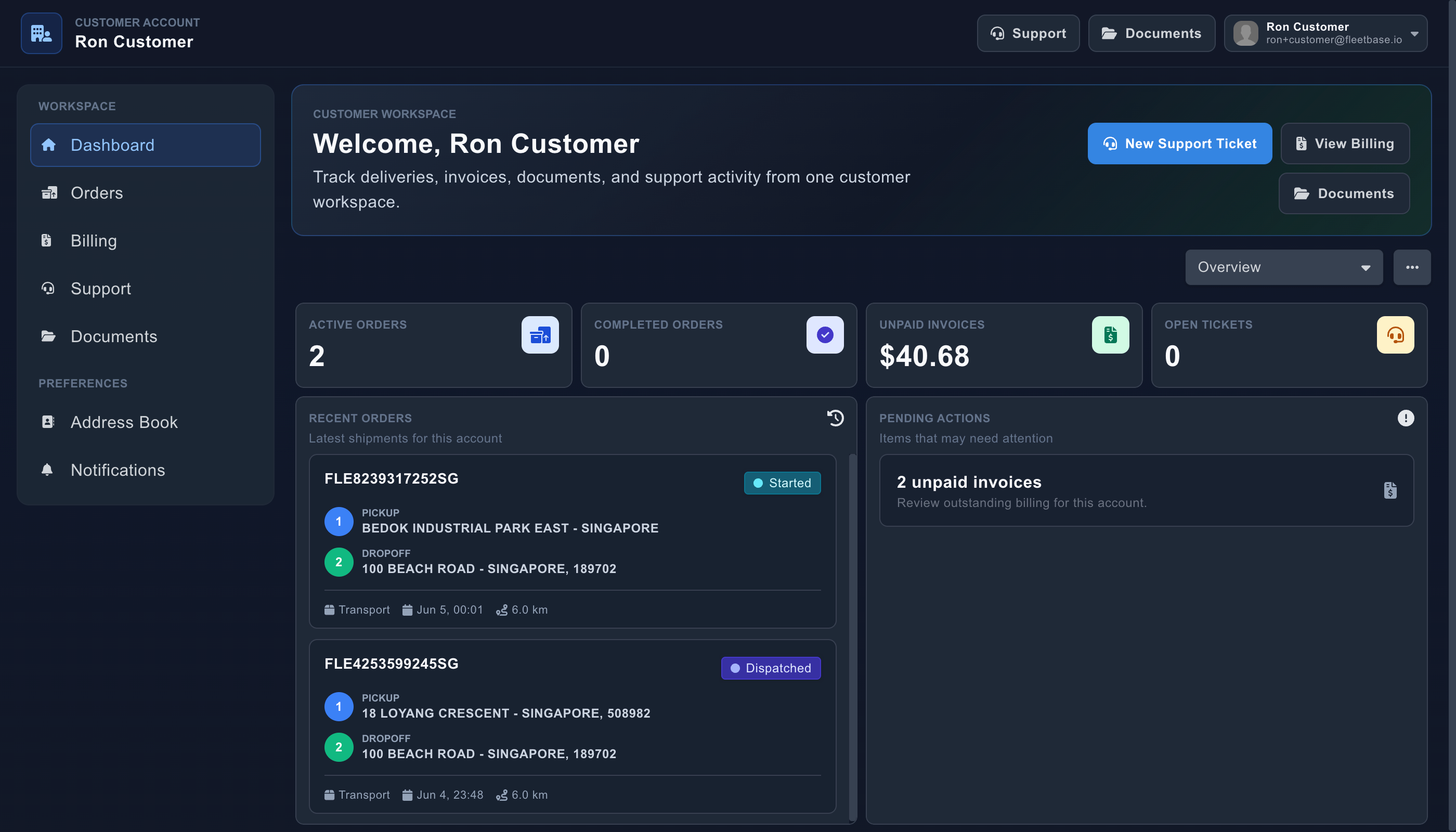
The portal is designed for customer-facing logistics workflows: customers can sign in, track orders, place new orders, view invoices, manage documents, open support tickets, update account preferences, and use dashboard widgets tailored to their account.
## Features
- **Customer authentication** - Customer login, two-factor verification, password recovery, customer session loading, and automatic redirects from customer access URLs.
- **Dashboard workspace** - Customer dashboard registration with widgets for active orders, completed orders, unpaid invoices, open support tickets, recent orders, and pending actions.
- **Order management** - Order listing, order details, order creation, route preview, place lookup, payload/entities, custom fields, notes, documents, cancel, reschedule, and file attachments.
- **Quotes and payments** - Preliminary service quote lookup, portal-scoped purchase rates, optional Stripe checkout sessions, payment status checks, and Ledger invoice reconciliation.
- **Billing** - Customer invoice lists, invoice details, and invoice summaries backed by Ledger when it is installed and available.
- **Support** - Customer support tickets backed by FleetOps Issues, including issue creation, summaries, comments, replies, editing, and deletion.
- **Documents and address book** - Customer-visible order documents plus account-scoped place search, lookup, creation, update, and deletion.
- **Account settings** - Account profile data, self-service password change, vendor conversion flows, personnel management, and notification preferences.
- **Admin configuration** - Console settings panel for portal configuration, access URL validation, enabled order configs, enabled service rates, and payment settings.
- **Extension points** - Sidebar and login registries, dashboard/widget registration, virtual routes, and menu integration for extending the portal from other Fleetbase packages.
## Architecture
This repository contains both sides of the extension:
```text
addon/ Ember engine source: routes, templates, components, services, widgets, and extension registration
app/ Re-exports that make addon modules available to the consuming Fleetbase Console app
server/ Laravel package source: routes, controllers, services, providers, notifications, and observers
tests/ Ember/QUnit tests and dummy app support
```
### Frontend package
```bash
@fleetbase/customer-portal-engine
```
The Ember engine mounts at the Fleetbase route configured in `package.json`:
```json
{
"fleetbase": {
"route": "customer-portal",
"mount": "root"
}
}
```
The engine registers customer portal routes for authentication, dashboard, orders, billing, support, documents, address book, notifications, settings, account management, and virtual extension pages.
### Backend package
```bash
fleetbase/customer-portal-api
```
The Laravel package registers portal APIs under the configurable prefix:
```text
customer-portal/int/v1
```
Backend controllers and services scope data to the authenticated customer account, integrate with FleetOps orders and issues, integrate with Ledger invoices and transactions, and expose portal configuration for Console admins.
## Installation
Install the backend package in the Fleetbase API:
```bash
composer require fleetbase/customer-portal-api
```
Install the Ember engine in Fleetbase Console:
```bash
pnpm install @fleetbase/customer-portal-engine
```
The package also depends on Fleetbase shared frontend packages and first-party backend packages, including Core API, FleetOps, and Ledger.
## Development Setup
For local Fleetbase extension development, use Fleetbase's package linker so Console and API resolve this checkout instead of published package versions. See the official [Fleetbase Development Setup guide](https://www.fleetbase.io/docs/platform/quickstart/development-setup) for the full workflow.
Clone Fleetbase with submodules:
```bash
git clone https://github.com/fleetbase/fleetbase.git
cd fleetbase
git submodule update --init --recursive
```
Install the package linker once from the Fleetbase repository root:
```bash
npm link
flb-package-linker --help
```
Enable the customer portal package:
```bash
flb-package-linker enable customer-portal
flb-package-linker install customer-portal
```
You can let the linker run install commands immediately:
```bash
flb-package-linker enable customer-portal --install
```
For backend package work in Docker, mount local source into the application container:
```yaml
services:
application:
environment:
ENVIRONMENT: "development"
APP_DEBUG: "true"
volumes:
- ./api:/fleetbase/api
- ./packages:/fleetbase/packages
```
Restart the stack after changing Docker mounts:
```bash
docker compose up -d
```
Fleetbase runs Laravel Octane, so reload the application worker after PHP changes:
```bash
docker compose exec application php artisan octane:reload
```
For frontend work, run the Fleetbase Console development server locally or in Docker. The local path is usually the fastest:
```bash
docker compose stop console
cd console
pnpm install
pnpm start:dev
```
Console will be available at:
```text
http://localhost:4200
```
## Configuration
The backend config lives in `server/config/customer-portal.php`:
```php
return [
'api' => [
'version' => '0.0.1',
'routing' => [
'prefix' => 'customer-portal',
'internal_prefix' => 'int',
],
],
];
```
Portal admins can configure customer portal behavior from Fleetbase Console settings. The package includes API support for:
- Portal configuration loading and saving
- Customer access URL slug validation
- Enabled order configurations
- Enabled service rates
- Payment availability and Stripe-backed checkout configuration
## Quality Checks
Install dependencies for this package:
```bash
pnpm install
composer install
```
Run frontend checks:
```bash
pnpm lint
pnpm test
```
Run backend checks:
```bash
composer test
```
Useful focused commands:
```bash
pnpm start
pnpm build
pnpm test:ember
pnpm test:ember-compatibility
composer test:lint
composer test:types
composer test:unit
```
## Contributing
Contributions are welcome. Keep changes scoped, include tests for behavior changes, and verify both the Ember engine and Laravel package paths when a feature crosses the frontend/backend boundary.
When developing inside the Fleetbase monorepo, prefer `flb-package-linker` over manual `package.json`, `composer.json`, or workspace edits so local development links remain reversible.
## License
Fleetbase Customer Portal is released under the GNU Affero General Public License v3.0 or later. See [LICENSE.md](LICENSE.md) for details.