# @firstpick/pi-package-webui
Local browser UI for [Pi coding agent](https://www.npmjs.com/package/@earendil-works/pi-coding-agent).
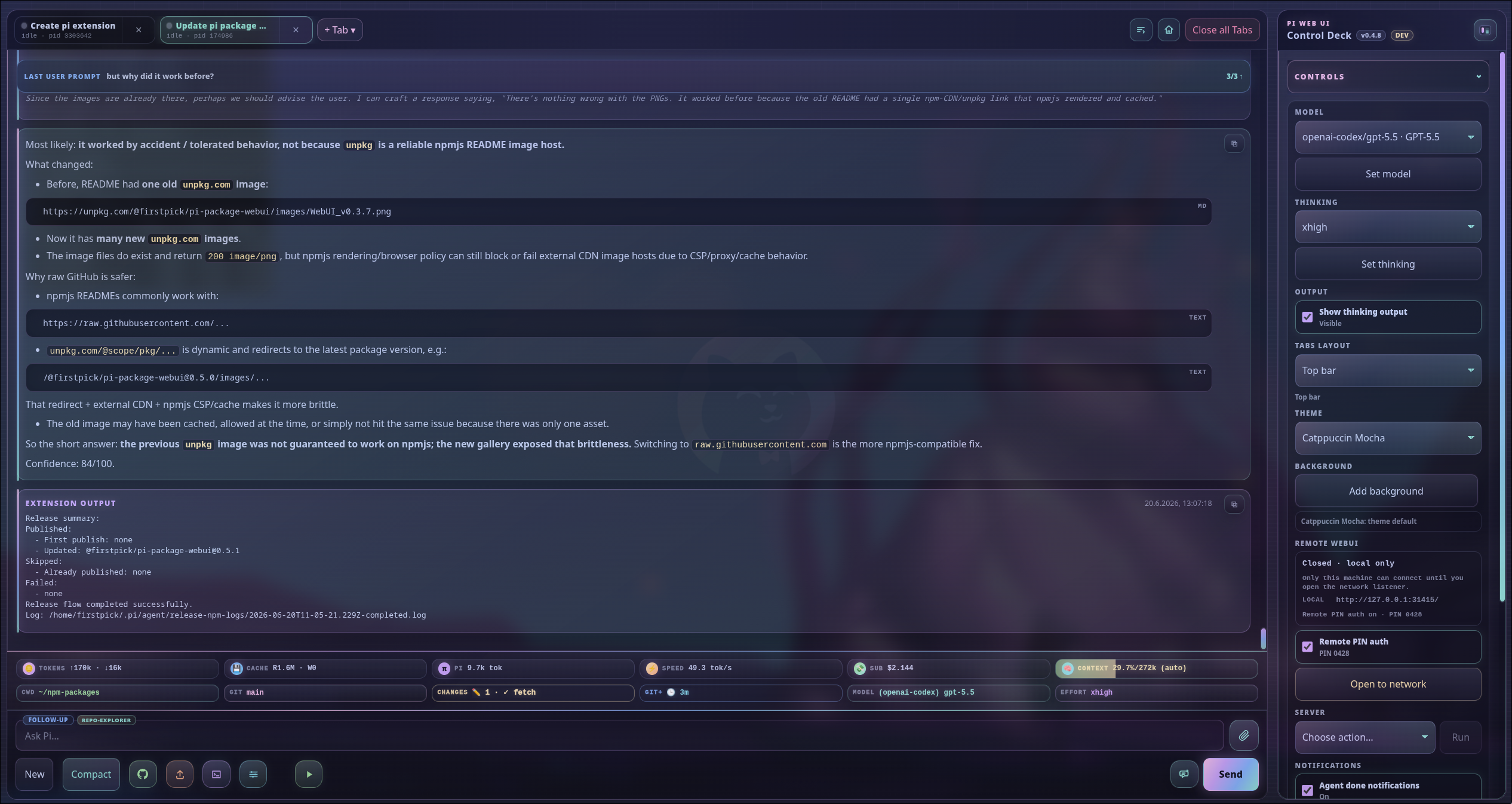
Pi Web UI gives you a local browser companion for Pi: multi-tab chat, streaming output, model controls, uploads, slash-command helpers, workspace navigation, and optional extension widgets.
> **Security:** Pi Web UI can control the spawned Pi session and run anything that session is allowed to run. It binds to `127.0.0.1` by default. Trusted-LAN opening/closing and Remote PIN auth controls are owned by the optional `@firstpick/pi-package-remote-webui` companion; when enabled, Remote PIN auth persists for later Web UI starts.
## Requirements
- Node.js `>=22.19.0`
- Pi installed and configured
- A modern browser with Server-Sent Events support
## Install
Install the package into Pi:
```bash
pi install npm:@firstpick/pi-package-webui
```
Restart Pi after installation so the Web UI commands are loaded.
## Start from Pi
Run this inside Pi:
```text
/webui-start
```
Open the printed URL, usually . The command opens your browser automatically unless you pass `--no-open`.
Check a running Web UI with:
```text
/webui-status
/webui-status detailed
```
### `/webui-start` options
```text
/webui-start [port] [options] [-- ]
```
```text
[port] Port shortcut
--host HTTP bind host (default: 127.0.0.1)
--port HTTP port (default: 31415)
--no-open Do not open the browser automatically
--no-session Start Pi RPC with --no-session
--name Initial Web UI tab name
--remote-auth Enable startup PIN authentication for non-local clients
--no-remote-auth Disable startup PIN authentication
-- Extra arguments forwarded to Pi RPC
```
Examples:
```text
/webui-start
/webui-start 31500
/webui-start --port 31500 --no-open
/webui-start --remote-auth --host 0.0.0.0
/webui-start --name browser -- --model anthropic/claude-sonnet-4-5:high
```
Running `/webui-start` again on the same URL restarts the HTTP server. By default, supervised Pi tabs—including an active model turn—continue in their original Pi processes and reconnect to the replacement server; session-file restoration remains the fallback when no managed tabs exist.
### `/webui-status` options
```text
/webui-status [detailed] [port] [--port N] [--host HOST]
```
`/webui-status` reports the URL, online state, network exposure, and Remote PIN auth state. `detailed` adds tabs, sessions, models/providers, and recent backend events.
## Standalone CLI
Use the CLI when you want to start the Web UI without first opening terminal Pi:
```bash
npm install -g @firstpick/pi-package-webui
pi-webui
```
```text
pi-webui [options] [-- ]
```
```text
--host HTTP bind host (default: 127.0.0.1)
--port HTTP port (default: 31415)
--cwd Start the first Pi terminal in this working directory
--pi Pi executable to spawn (default: bundled dependency, then "pi")
--no-session Start Pi RPC with --no-session
--name Initial Web UI tab name
--remote-auth Enable startup PIN authentication for non-local clients
--no-remote-auth Disable startup PIN authentication
--output-mode Web UI output default: normal or compact-v1
-h, --help Show help
-v, --version Print version
```
If `--cwd` is omitted, the server starts first and the browser asks for the first terminal CWD.
Examples:
```bash
pi-webui
pi-webui --cwd ~/src/my-project
pi-webui --host 0.0.0.0 --remote-auth --cwd ~/src/my-project
pi-webui --port 3000 -- --model anthropic/claude-sonnet-4-5:high
pi-webui --output-mode compact-v1
PI_WEBUI_PI_BIN=/path/to/pi pi-webui --no-session
```
Environment variables:
- `PI_WEBUI_HOST` and `PI_WEBUI_PORT` set the default bind address.
- `PI_WEBUI_PI_BIN=/path/to/pi` selects the Pi executable when `--pi` is not passed.
- `PI_WEBUI_REMOTE_AUTH=1` starts with Remote PIN authentication enabled.
- `PI_WEBUI_OUTPUT_MODE=normal|compact-v1` sets the server default for newly auto-negotiated browser connections.
- `PI_WEBUI_RPC_SUPERVISOR=0` opts out to the legacy server-owned Pi transport only when the current scope has no live managed tabs. Use explicit shutdown before disabling or downgrading; fallback startup refuses to create duplicate direct children for a live managed scope.
- Pi Web UI automatically injects a loopback `PI_WEBUI_RECOVERY_URL` and a bearer `PI_WEBUI_RECOVERY_TOKEN` into spawned Pi RPC processes. The authenticated endpoint can only create a separate plan-only recovery tab; keep any manually supplied token private.
- `PI_WEBUI_SETTINGS_FILE=/path/to/settings.json` overrides persisted Web UI settings such as Remote PIN auth, guided Git preferences, and global Tools/Skills defaults.
- `PI_WEBUI_OPTIONAL_FEATURE_INSTALL_ROOT=/path/to/package-root` overrides the npm prefix used for optional companion installs.
- `PI_WEBUI_FAST_PICKS_FILE=/path/to/paths.json` overrides saved cwd fast-pick storage.
- `PI_WEBUI_NPM_BIN=/path/to/npm` overrides the npm executable used by optional feature install/update actions. By default, Web UI resolves `npm-cli.js` beside the active Node executable (and on `PATH`) and runs it through Node, avoiding Windows `npm.cmd` spawn failures.
- `PI_BANG_AUTOCOMPLETE_INCLUDE_HISTORY=1` lets optional bang-command autocomplete include local fish/bash/zsh history executables.
- `PI_BANG_AUTOCOMPLETE_RUNTIME_STORE_PATH=/path/to/runtime.json` overrides the runtime store shared with `@firstpick/pi-extension-bang-command-autocomplete`.
### Durable Pi session continuity
Pi Web UI normally runs Pi RPC tabs under a narrow detached supervisor. Restarting only the HTTP Web UI—through `/webui-start` on the same URL, **Restart**, a successful **Update & restart**, `POST /api/restart`, or a restart-safe service-manager `SIGTERM`—preserves each managed Pi PID, tab identity, cwd, session file, running state, and active model turn. Output produced while the HTTP server is absent is replayed in supervisor order. The browser rejects duplicate or older replay records; if the bounded live buffer has a gap, it refreshes tabs, state, and the durable transcript from Pi and warns that buffered live output may be incomplete.
Continuity is scoped to the resolved private Pi agent/config root and Web UI port. A replacement server must use the same root and port; changing ports creates a different scope and does not migrate active tabs. The supervisor communicates only over per-user local IPC (an owner-private Unix-domain socket on POSIX or a local named pipe on Windows) with a private random credential and incarnation fencing. Runtime state and metadata are private (`0700` directory and `0600` files on POSIX), bounded, and secret-key sanitized. Supervisor credentials, IPC paths, and raw private state are not exposed to browser APIs, server diagnostics, logs, or Pi child environments.
Updates preserve already-running supervised Pi processes, so an active tab continues with the Pi/runtime code it already loaded. Newly created or explicitly reloaded tabs use the newly installed versions. Additive supervisor protocol-minor changes are compatible; a protocol-major mismatch with live children fails closed instead of replacing the supervisor or spawning duplicates. Roll forward to a compatible Web UI rather than killing a healthy supervisor that owns active work.
Continuity deliberately excludes app runners: restart and update stop their process trees, and they must be started again after reconnection. It also does not preserve browser drafts, SSE connections, arbitrary extension memory, or an active request across supervisor failure, OS reboot, power loss, or machine restart. Session files can still restore durable transcript history after those failures, but they cannot resume the same in-flight model request.
Operations and recovery:
- Use `/webui-status detailed`, `GET /api/health`, or `GET /api/webui-status?detailed=1` for diagnostics. Public supervisor diagnostics are limited to enabled/attached state and managed-tab count; private credentials and paths are intentionally omitted. A browser warning about incomplete buffered output means authoritative tabs/state/messages were requested, not that missing live deltas were reconstructed.
- Use the side-panel **Stop** action or localhost-only `POST /api/shutdown` for an explicit full stop. Explicit tab close terminates only that managed Pi child; explicit shutdown and `SIGINT` terminate the scope's managed Pi children. Do not use restart/update when the intent is to terminate active work.
- Normal authenticated shutdown removes the private scope state. Do not manually delete runtime files, sockets, pipes, journals, or PID records while managed tabs may be live. For cleanup, explicitly shut down first, verify the Web UI/scope has no managed tabs, and let normal startup clean stale empty state; removing private state for a live supervisor destroys the safe attachment path and can risk duplicate processes.
- To opt out or roll back, first perform explicit shutdown and verify no managed tabs remain. Then set `PI_WEBUI_RPC_SUPERVISOR=0` and restart, or install the previous Web UI package before restarting. Never disable, downgrade, change the continuity port, or remove private runtime state while a supervisor still owns live tabs. Re-enable by removing the opt-out and starting normally; continuity begins for newly supervised Pi tabs.
### Compact live output mode
Normal output is the default. In the sidebar, open **Controls → Output processing**, select **Fast**, and click **Apply**. The same persisted server default is also available under **Settings → Browser workflow → Output processing**. Alternatively, set `--output-mode compact-v1`, `PI_WEBUI_OUTPUT_MODE=compact-v1`, or `outputModeDefault` directly. Precedence is explicit CLI flag, then environment variable, then the persisted setting, then `normal`.
The browser negotiates compact-v1 per EventSource connection (`outputMode=auto&outputModeProtocol=1`), so normal and compact clients can share one Pi tab. A browser only enables compact handling after the protocol-1 acknowledgement; an older server gets one normal-mode reconnect instead. The server default applies only to `auto` clients, and active auto streams change representation at a semantic boundary.
Fast mode keeps live output lightweight, coalesces sustained live DOM/scroll flushes to at most once every 100 ms, preserves Markdown formatting for live and reconciled thinking, and displays only the current transient tool status as a compact labeled row with a state pill; each new tool or assistant delta replaces that status instead of retaining a tool-call history. Final reconciliation keeps visible thinking formatted and renders the final assistant response as Markdown while omitting intermediate tool calls, results, diffs, images, and raw details. The existing final `/api/messages` transcript remains authoritative. Fast mode does not change Pi generation, prompts, tools, models, providers, inference, stored transcript semantics, or the normal renderer.
The included fast-mode metric measures deterministic post-parse serialized JSON byte-work only (`R + 2×S`) and semantic parity; it does not claim wall-clock improvement, lower DOM CPU, reduced network latency, or higher model token/s.
Optional Natural Conversation server-side voice fallback variables:
- `PI_VOICE_STT_URL` enables a local STT endpoint for `POST /api/stt/transcribe`; Web UI forwards audio as multipart form data.
- `PI_VOICE_TTS_URL` enables a local TTS endpoint for `POST /api/tts/speech`; Web UI forwards `{ text, voice, format }` JSON.
- `PI_VOICE_STT_PROVIDER=groq|openai` selects hosted STT when no request provider is supplied; set `GROQ_API_KEY` or `OPENAI_API_KEY` server-side.
- `PI_VOICE_TTS_PROVIDER=openai` selects hosted OpenAI TTS when no request provider is supplied; set `OPENAI_API_KEY` server-side.
- `PI_VOICE_GROQ_STT_MODEL`, `PI_VOICE_OPENAI_STT_MODEL`, `PI_VOICE_OPENAI_TTS_MODEL`, `PI_VOICE_OPENAI_TTS_VOICE`, `PI_VOICE_OPENAI_TTS_FORMAT`, `PI_VOICE_TTS_VOICE`, and `PI_VOICE_TTS_FORMAT` tune fallback models/voices/formats.
- `PI_VOICE_PROVIDER_TIMEOUT_MS` controls outbound fallback-provider timeout. API keys are never sent from the browser; remote/LAN raw-audio STT uploads must include explicit per-request microphone-streaming consent.
## Main features
- Pathless `pi-webui` startup: the server opens first, then the browser prompts for the first terminal CWD.
- Multi-tab Pi sessions with isolated processes, working directories, prompt drafts, activity state, per-tab settings, and a workspace dashboard for common actions.
- The Subagents side panel includes a separate **Agent models** editor above the live monitor. It stores WebUI-owned launch slots for the eight builtin roles (`context-builder`, `delegate`, `oracle`, `planner`, `researcher`, `reviewer`, `scout`, and `worker`): every role keeps a non-removable base slot, while added same-role slots copy a model/thinking draft but retain independent stable IDs. Choose **User default** or **This project**; projects inherit user defaults until saved, and **Use user defaults** removes a project override. Select `Default / inherit` to inherit both values, or an active-tab provider-qualified model and its supported thinking levels. Saves are revision-checked and localhost-only; saved assignments guide only future delegation after **Reload active tab**, never running children. The configuration form has independent load/draft/error state, so its controls are not reset by live subagent monitoring.
- Tracked subagent output can open in the existing non-blocking overlay/widget or in a dedicated **Subagent** terminal tab, selected from the Subagents side-panel section and saved in the browser. Side-panel rows and both output views show the effective model and reasoning effort (or an explicit `unknown` for legacy metadata). Subagent tabs are view-only, reuse the bounded live transcript at the normal full terminal width, show the pulsing **Agent is running:** card with current child activity, and close without stopping or interrupting the child run; use the parent terminal for interaction. The package also registers a generic `subagent_gate` tool that launches task slots through pi-subagents RPC v1, enforces a required success quorum, and performs bounded reason-aware retries only when declared safe; the side panel retains gate quorum, attempt, provider, and failure-class history after children finish.
- Unified command palette (`Ctrl/Cmd+K`) for commands, tabs, models, sessions, settings, app controls, and frequent Web UI actions.
- Automatic tab naming from the first prompt, with `--name ` still available for an explicit initial tab name.
- Streaming chat transcript with Markdown, copy buttons for fenced code blocks, rendered Mermaid diagrams from fenced `mermaid`/`mmd` code blocks, thinking output, tool/bash cards, queue and compaction events, edit-and-retry from user prompts, transcript search, copy buttons, and guarded abort controls that require holding Esc or the Abort button for 3 seconds.
- Prompt composer with uploads, drag/drop/paste, inline image support, generated text attachments for long input or clipboard text, editable text attachments, slash-command autocomplete, and `@` file/path references with live suggestions.
- Leading `!` and `!!` user-bash commands from the composer, serialized per tab; `!` keeps output in the next model context and `!!` excludes it. When the optional `@firstpick/pi-extension-bang-command-autocomplete` companion is loaded, the browser composer also suggests `!`/`!!` shell commands through `GET /api/bang-suggestions?tab=&query=`. When the optional `@firstpick/pi-extension-fish-user-bash` companion is loaded, Web UI user-bash execution emits the Pi `user_bash` event so the companion can provide the selected shell backend.
- Optional Natural Conversation Mode shell for the standalone `@firstpick/pi-package-natural-conversation` package: when `/talk` (or `/voice`/`/conversation`) is loaded in the active Pi tab, Web UI shows per-tab Start/End controls, a read-only voice-mode chip, and backend guards that keep thinking `off` while blocking unsafe Web UI actions.
- Browser voice loop for Natural Conversation Mode (`public/voice-conversation.mjs`): while the mode is active in a tab, the browser's Web Speech APIs listen for speech, send final transcripts as normal prompts, and speak Pi's final answers. The microphone pauses while answers are spoken (echo prevention), speech during final-output streaming becomes a steering interruption, speech during tool execution is queued until the tool phase ends, and silence after a spoken question sends a single structured silence event. Remote (non-localhost) sessions keep the microphone off until the per-tab `Allow remote microphone streaming` consent is granted; only text transcripts ever reach the Pi host on the browser-default path. Opt-in server-side fallback routes are available for local/Groq/OpenAI STT and local/OpenAI TTS when configured with server-side env vars; remote/LAN raw-audio STT fallback uploads require explicit per-request consent.
- Browser-native Pi dialogs for `/model`, `/settings`, `/safety-guard-setup`, `/git-workflow-setup`, `/theme`, `/fork`, `/clone`, `/name`, `/resume`, `/tree`, `/login`, `/logout`, `/scoped-models`, `/tools`, and `/skills`, plus native-command adapter output for `/copy`, `/session`, `/new`, `/compact`, `/reload`, and `/export`.
- Runtime `/tools` and `/skills` selectors backed by the hidden Web UI RPC helper, with explicit **Session only** and **Global default** scopes. Session choices persist on the current branch and take precedence; global defaults are inherited by future sessions without rewriting existing branches. Disabled skills are removed from the system prompt, and tracked `SKILL.md` files can be opened/edited from skill tags.
- Session resume/switch, metadata rename, and localhost-only safe delete with active/open-tab/session-directory guards.
- Model, thinking, session, workspace, theme, optional-feature, Codex usage, optional Remote WebUI, update/restart/stop, event, notification, thinking-visibility, terminal-tab-layout, and custom-background controls in collapsible side-panel sections.
- A side-panel **Git** section mirrors the repositories represented by every open terminal tab/group. Repository cards are shown directly—without session-name parent disclosures—and always use the Git-root or cwd basename as their title. One repository can be expanded at a time. First/stale expansion refreshes local status after a five-minute cache window, while live filesystem updates use a debounced server watcher and SSE invalidation to refresh visible repositories without periodic Git polling or an automatic network `git fetch`. Its compact Changes tree groups conflicted, staged, modified, and untracked paths with additions/deletions; right-click a repository, folder, or file (or press Shift+F10/the Context Menu key) for View Diff, refresh, stage/unstage, and confirmed discard/delete actions. History lists the latest 30 commits and opens bounded read-only commit diffs.
- Persistent context-window meter with manual compact and auto-compaction controls near the composer; side-panel thinking changes made while a tab is busy are queued for the next prompt.
- Side-panel theme picker backed by optional `@firstpick/pi-themes-bundle` themes when loaded.
- Per-tab cwd changes, a clickable footer cwd picker, directory creation/search in the picker, saved path fast picks, server-persisted fast picks, and restart-safe restoration of open tabs. When the optional stats and git-footer companions are loaded, clicking the footer **PI** token metric dispatches `/calibrate` in the background and refreshes the metric after the isolated calibration sample is recorded.
- Detected app runner dropdown for the active tab cwd, including Cargo, Bun, npm/npx/pnpm, Python/uv, Go/Golang, Zig, C/C++, Docker Compose, root/dev/scripts shell scripts, and other common project runners with live output pinned at the top of the terminal. Running app runners expose line-oriented stdin in the widget for interactive scripts. Projects can add browseable custom runners in `.pi-webui-runners.json` with a command (default `./`) plus a relative path to the file to run. The same dialog also configures project discovery paths: project-relative directories that are scanned one level deep (no subdirectories) for `.sh`, `.bash`, `.zsh`, `.fish`, and `.py` files plus extensionless files with a bash/sh, zsh, fish, or Python shebang. Python candidates use `uv run` and/or the available `python3`/`python` interpreter. Discovered scripts extend the built-in root, `dev/`, `scripts/`, and `dev/scripts/` detection and run from the resolved project root.
- Guided Git workflow for existing repos and new repos with persistent model/reasoning preferences, review-first staging, an optional manual staged repository-review gate from `aur-review`, generated or typed commit messages, explicit push/PR confirmation, and optional PR worktrees. When the review extension is loaded/enabled, both `git add .` and accepting the current staged set send `/aur-review start --scope staged --origin guided-git` to the same tab. Only its matching approval advances to message generation. The browser and server recheck the approved domain-separated staged-content hash before message generation, commit, and PR-worktree transfer; drift, missing hashes, or hash-check errors return to Stage and require a new review. A decline returns to staging and rejects an unchanged declined staged hash until corrected content is restaged. Guided Git never stages, commits, or pushes remediation automatically. The extension remains the decision authority; direct API callers are not granted an approval by this browser workflow.
- Browser support for Pi extension UI prompts, widgets, status updates, `/btw` side-question output widgets with optional context transfer/live steering, browser notifications when a tab needs an extension UI response, and an optional side-panel toggle for agent-done notifications.
- Localhost-only Pi/Web UI update checks with a top-right update notification and confirmed restart actions: **Update Pi & restart** runs `pi update --self` for Pi-only updates, while **Update Pi + Packages & Restart** first checks the selected Pi executable's `pi update --help`. It uses `pi update --all` when advertised, otherwise falls back to `pi update --self` followed by `pi update --extensions`, then updates detected Web UI/Optional Feature package roots for configured, local agent, project, global npm, and global Bun installs.
- Feedback reactions (`👍`, `👎`, `?`) on final assistant output plus tool/bash action cards, which can ask Pi to create or update a LEARNING.
- Mobile-friendly layout, PWA install support where the browser allows it, backend-offline recovery, and a dedicated server-restart overlay while confirmed restart/update actions run.
## Native Pi command coverage
Web UI keeps a packaged parity matrix at `lib/WEBUI_TUI_NATIVE_PARITY.json` and exposes it at `GET /api/native-parity`.
| Status | Commands and behavior |
| --- | --- |
| Implemented | `/model`, `/settings`, `/safety-guard-setup`, `/git-workflow-setup`, `/tools`, `/skills`, `/copy`, `/name`, `/session`, `/clone`, `/logout`, `/new`, `/compact`, and `/reload` use browser-native dialogs or structured native-command cards. |
| Degraded / browser-specific | `/theme` changes the browser Web UI theme only; `/scoped-models` points to the footer scoped-model picker; `/export` supports no-path HTML downloads plus explicit new `.html`/`.jsonl` server paths; `/hotkeys` lists Web UI shortcuts; `/fork`, `/tree`, `/login`, and `/resume` have browser flows with documented gaps. |
| Unsupported in Web UI | `/import`, `/share`, `/changelog`, and `/quit` return structured unavailable output instead of raw HTTP errors. |
Sensitive native flows use shared trust-boundary guards: localhost-only APIs, trusted-context checks for LAN clients, confirmation-oriented dialogs, and session-directory confinement for session file operations.
## Keyboard shortcuts
| Shortcut | Action |
| --- | --- |
| `Ctrl/Cmd+K` | Open the command palette. |
| `Ctrl/Cmd+L` | Open the model selector. |
| `Ctrl/Cmd+P` / `Shift+Ctrl/Cmd+P` | Cycle scoped or available models forward/backward. |
| `Shift+Tab` | Cycle thinking effort. |
| `Ctrl/Cmd+T` | Toggle thinking-output visibility. |
| `Ctrl/Cmd+O` | Toggle global expansion for tool and bash output cards. |
| `Alt+Enter` | Queue the composer as a follow-up. |
| `Alt+Up` | Restore the latest observed steering/follow-up queue snapshot into the composer. |
| hold `Esc` | Abort active user bash first, then active agent work. |
| `Ctrl/Cmd+C` in an empty, focused composer | Clear the prompt. |
| `Ctrl/Cmd+F` | Search the transcript. |
## Feature gallery (screenshots from v0.4.8)
These screenshots show the v0.4.8 Web UI surfaces. Current implementations include the additional native-command, shortcut, attachment, Git, app-runner, server-control, and safety features documented above. Unless noted otherwise, actions apply to the active tab and its current working directory.
### Main window

- **What it is:** The primary Web UI workspace for Pi, with terminal tabs, chat transcript, live assistant output, footer metrics, prompt composer, attachments, and side-panel controls in one browser view.
- **What you can do:** Run multiple Pi sessions, send prompts or follow-ups, monitor tokens/cache/cost/context/git/model state, attach files, launch quick actions, and control the active session without returning to the terminal.
### Workspace dashboard

- **What it is:** The project home base for an active Web UI tab, combining cwd, model, context, git, queue, session, and activity status.
- **What you can do:** Start or resume work, verify the tab is pointed at the right project, jump into common session/workspace actions, and spot queued or active work before prompting.
### Control panel
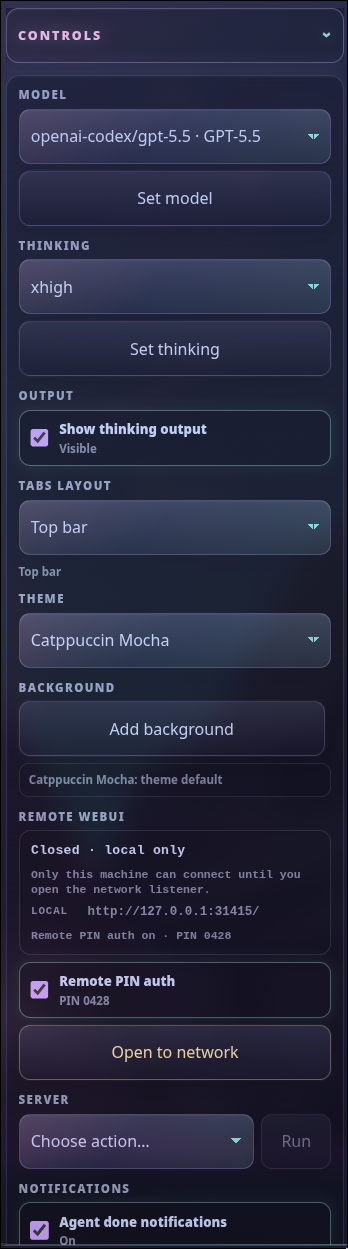
- **What it is:** The side rail for Web UI state and settings, including model, thinking effort, session/workspace controls, theme, optional companions, Remote WebUI, updates, notifications, and usage widgets.
- **What you can do:** Change model or effort, compact/manage sessions, toggle notifications, check or install optional packages, run confirmed updates/restarts, and manage remote/PIN controls when the remote companion is loaded.
### Working-directory picker
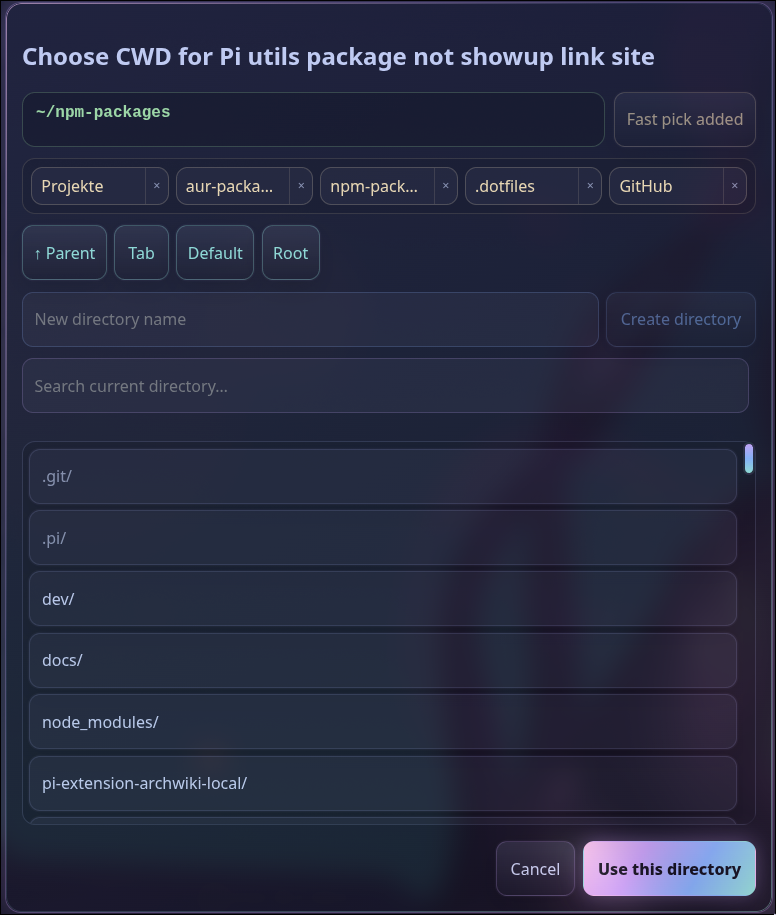
- **What it is:** A browser-native cwd chooser used at first launch and for per-tab working-directory changes.
- **What you can do:** Search and browse project paths, choose recent or saved directories, create a new directory, and start or move a Pi tab into the selected workspace.
### App runners
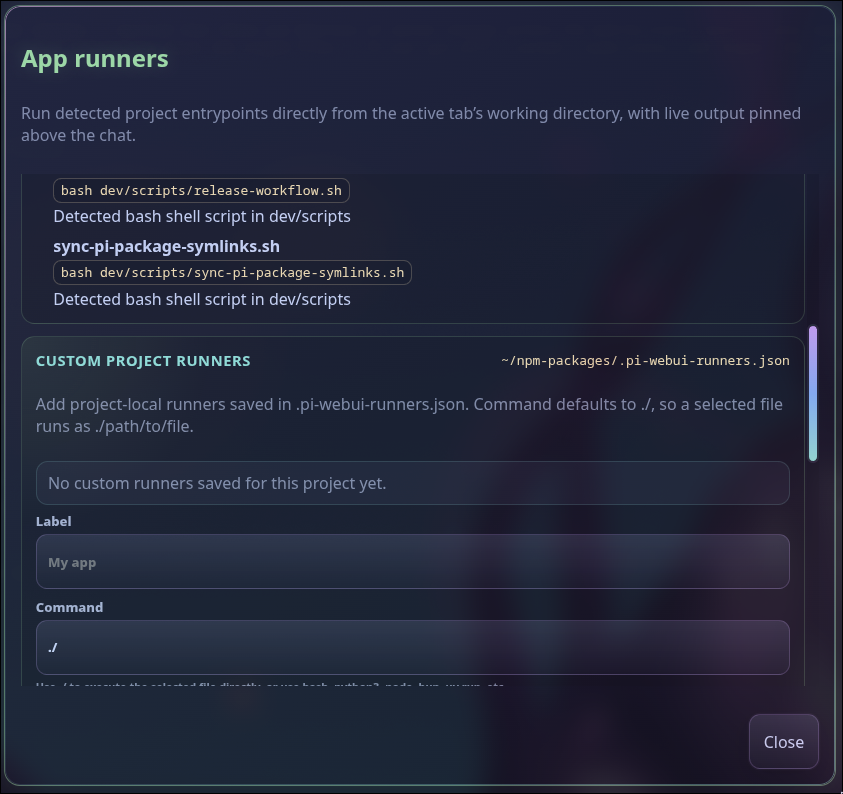
- **What it is:** A project runner detector for common stacks plus browseable custom runners and project discovery paths from `.pi-webui-runners.json`.
- **What you can do:** Launch dev servers, tests, builds, scripts, and custom commands from the active cwd, pass arguments, watch pinned live output, and send line-oriented stdin to interactive runners. Windows runners use ConPTY through the optional `node-pty` dependency so Bash/Node scripts receive a real TTY; set `PI_WEBUI_APP_RUNNER_PTY=off` to force the pipe fallback.
- **Project discovery paths:** The app-runner dialog stays reachable even when nothing is detected, so you can add extra directories to scan for shell and Python scripts. Paths are project-local and relative to the resolved project root (`.` means the project root itself), are browseable from the dialog, and are saved beside custom runners.
`.pi-webui-runners.json` uses a backward-compatible version 2 shape; a missing `searchPaths` array simply means no extra directories are scanned:
```json
{
"version": 2,
"searchPaths": ["tools", "ops/scripts"],
"runners": [
{ "id": "start-dev", "label": "Start dev", "command": "./", "path": "dev/scripts/start.sh", "args": [] }
]
}
```
Discovery-path rules: at most 24 paths and direct children only (no recursive walk). Shell discovery supports `.sh`, `.bash`, `.zsh`, `.fish`, and matching extensionless shebang files. Python discovery supports `.py` and extensionless Python-shebang files, exposing `uv run` and/or the available `python3`/`python` interpreter. Required interpreters must be installed locally; duplicates and built-in overlaps do not duplicate menu entries. Absolute, drive/UNC, `..`, null-byte, missing, non-directory, or symlinked-outside-the-project paths are rejected. Stale or invalid stored paths surface diagnostics in the dialog instead of being scanned. `POST /api/app-runner-config` accepts either `{ "runner": { ... } }` or `{ "searchPaths": [...] }` (not both in one request) and preserves the other field.
### Queue manager
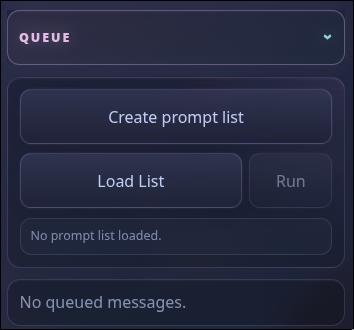
- **What it is:** The queue surface for follow-up prompts, steering messages, user bash work, and loaded prompt lists while a tab is busy or ready.
- **What you can do:** Create or load prompt lists, run batches when supported, see pending queued messages, and decide whether prompts sent during an active run should steer the current agent or wait as follow-ups.
### Thinking effort picker
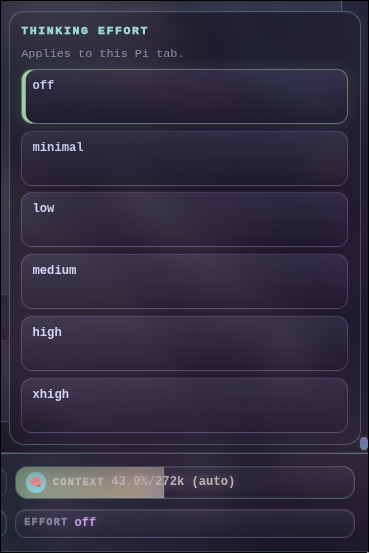
- **What it is:** A browser picker for Pi's model thinking/reasoning effort setting.
- **What you can do:** Switch between `off`, `minimal`, `low`, `medium`, `high`, `xhigh`, and `max`, confirm the effective effort in the footer, and tune speed/cost/quality before sending a prompt.
### Scoped models
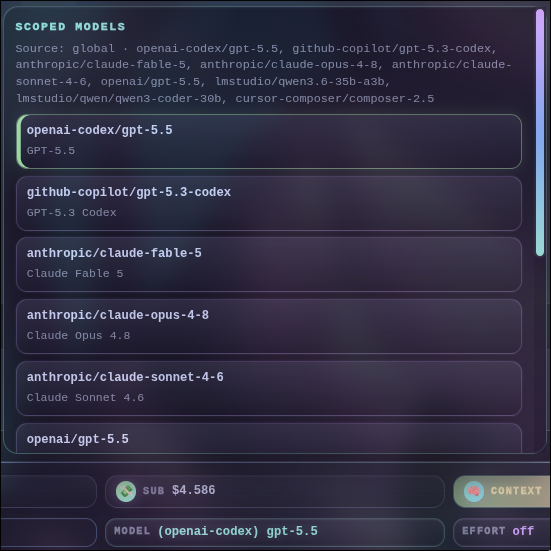
- **What it is:** A Web UI editor for `/scoped-models`, project/global model scope rules, and model cycling order.
- **What you can do:** Search available models, enable or disable scoped entries, inspect the effective model source, and save model choices so future prompts and tabs use the intended provider/model.
### Tools setup
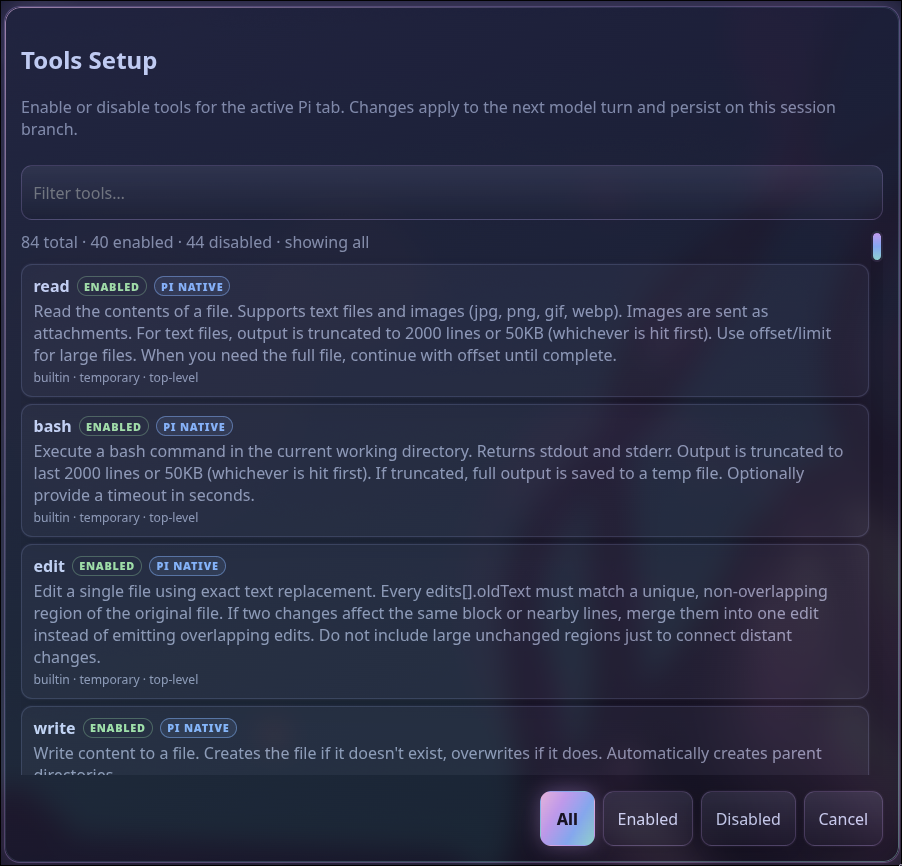
- **What it is:** A browser-native `/tools` setup dialog for active and available Pi tools.
- **What you can do:** Search tools, inspect descriptions and availability, then use **Session only** to change the current branch immediately or **Global default** to save the tool allowlist inherited by future sessions.
### Skills setup
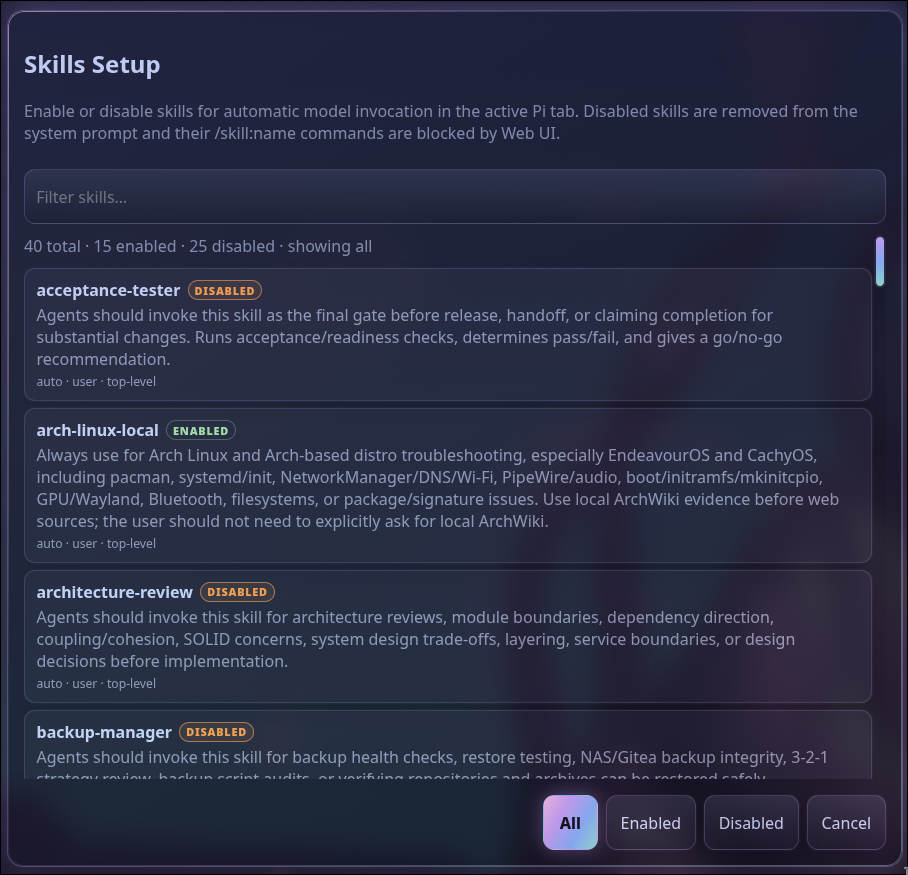
- **What it is:** A browser-native `/skills` setup dialog for skills available in the active Pi tab.
- **What you can do:** Find skills by name or description, then use **Session only** to change automatic invocation on the current branch or **Global default** to save the skill allowlist inherited by future sessions.
Session-specific choices always win when their branch is resumed or selected in `/tree`. Saving a global default does not mutate currently open sessions. Global defaults are stored in the Pi Web UI settings file (normally `~/.config/pi-webui/settings.json` or `$XDG_CONFIG_HOME/pi-webui/settings.json`).
### Optional features
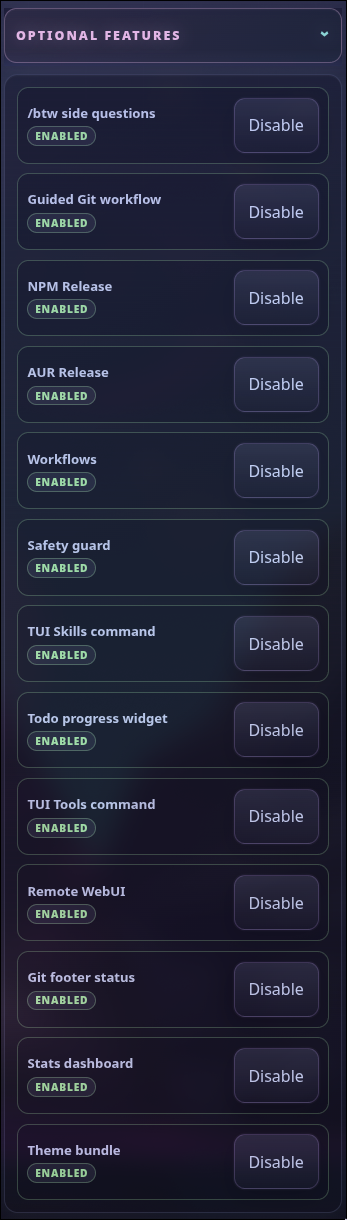
- **What it is:** A companion-package manager for Web UI-aware extensions, prompts, themes, and optional dashboards.
- **What you can do:** See whether each companion is enabled, disabled, installed-but-not-loaded, missing, or updateable; install/update known packages from localhost; and reload affected tabs when a feature becomes available.
### `/btw` side questions

- **What it is:** A Web UI widget for the optional `/btw` side-question extension, keeping quick questions separate from the main agent flow.
- **What you can do:** Ask short side questions without derailing the main chat, inspect live output, steer or stop the side thread, and transfer useful context back into the main prompt when needed.
### Guided Git workflow
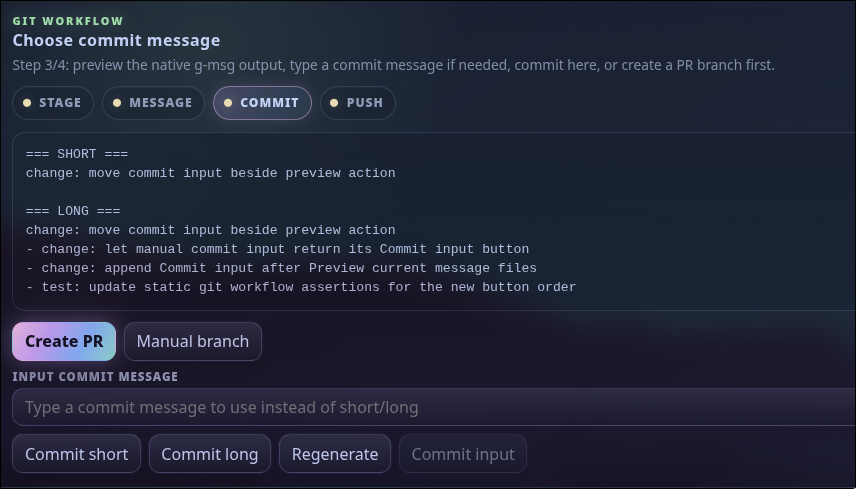
- **What it is:** A guided browser workflow for staging changes, generating commit messages, committing, pushing, and optionally creating a pull request.
- **What you can do:** Run the stage/message/commit/push steps, choose generated short or long commit messages, type a manual message, create or confirm PR branch names, review generated PR text, and push only after confirmation.
### Git branch picker
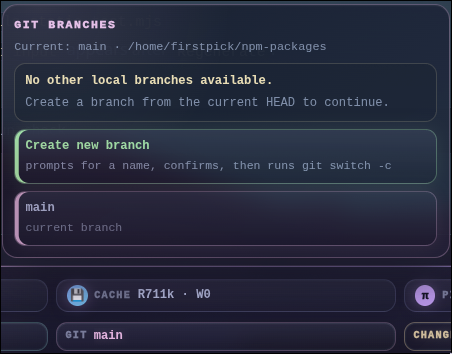
- **What it is:** A footer branch picker backed by the active tab's current Git repository.
- **What you can do:** View the current branch/repo, switch local branches, create and switch to a new branch, and get warnings when a branch change could affect active agent work.
### Git diff viewer
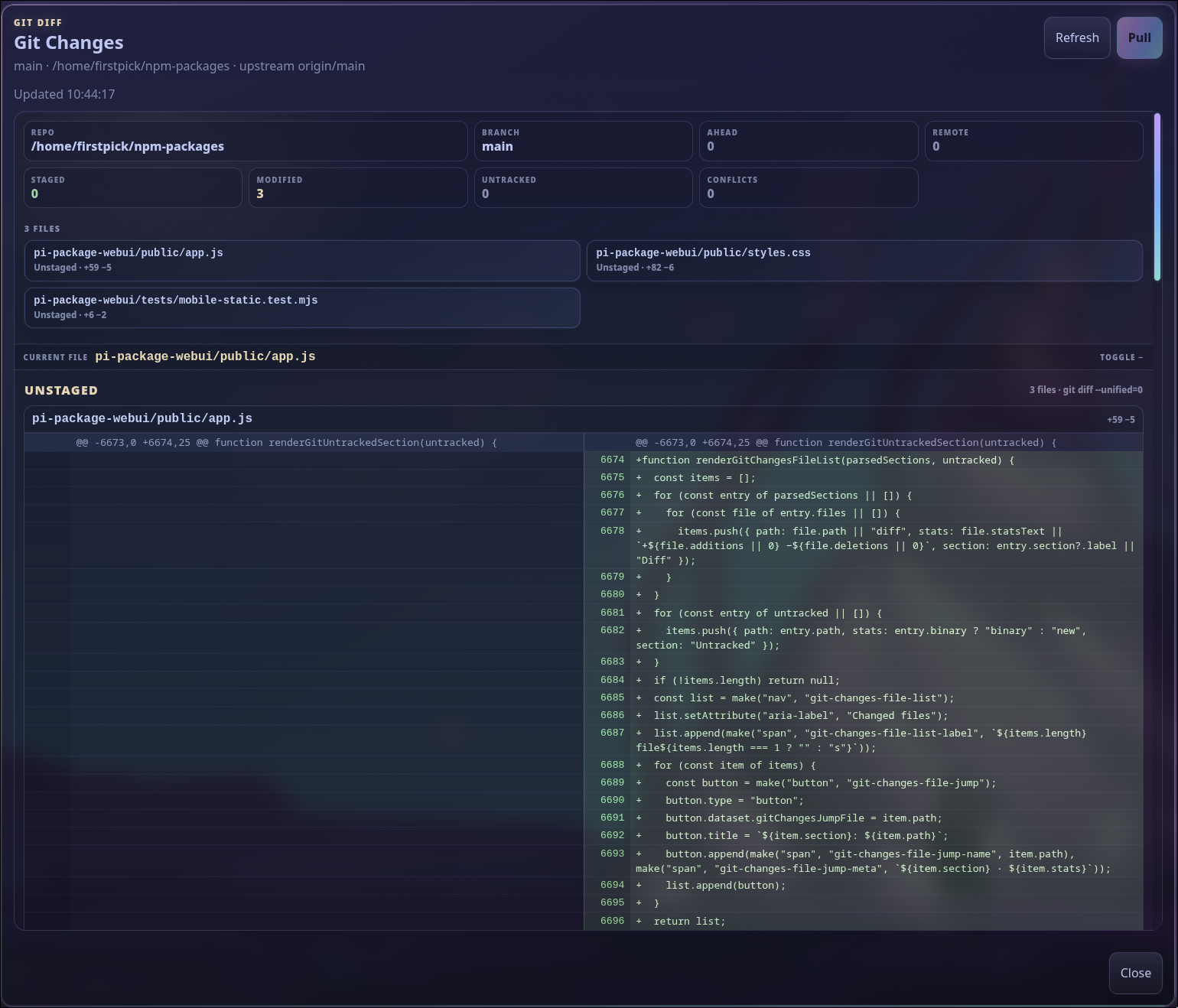
- **What it is:** A browser diff dialog for current Git changes in the active workspace.
- **What you can do:** Review staged, unstaged, untracked, and incoming changes; jump between files; see additions/deletions with line numbers; and inspect text previews before asking Pi to edit, commit, or create a PR.
### Codex usage
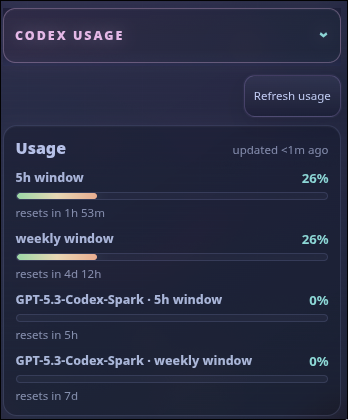
- **What it is:** A side-panel usage widget for Codex-family subscription-backed models.
- **What you can do:** Refresh usage, monitor short-window and weekly limits, see reset timing, and decide whether to switch models or delay large prompts.
### Pi stats dashboard
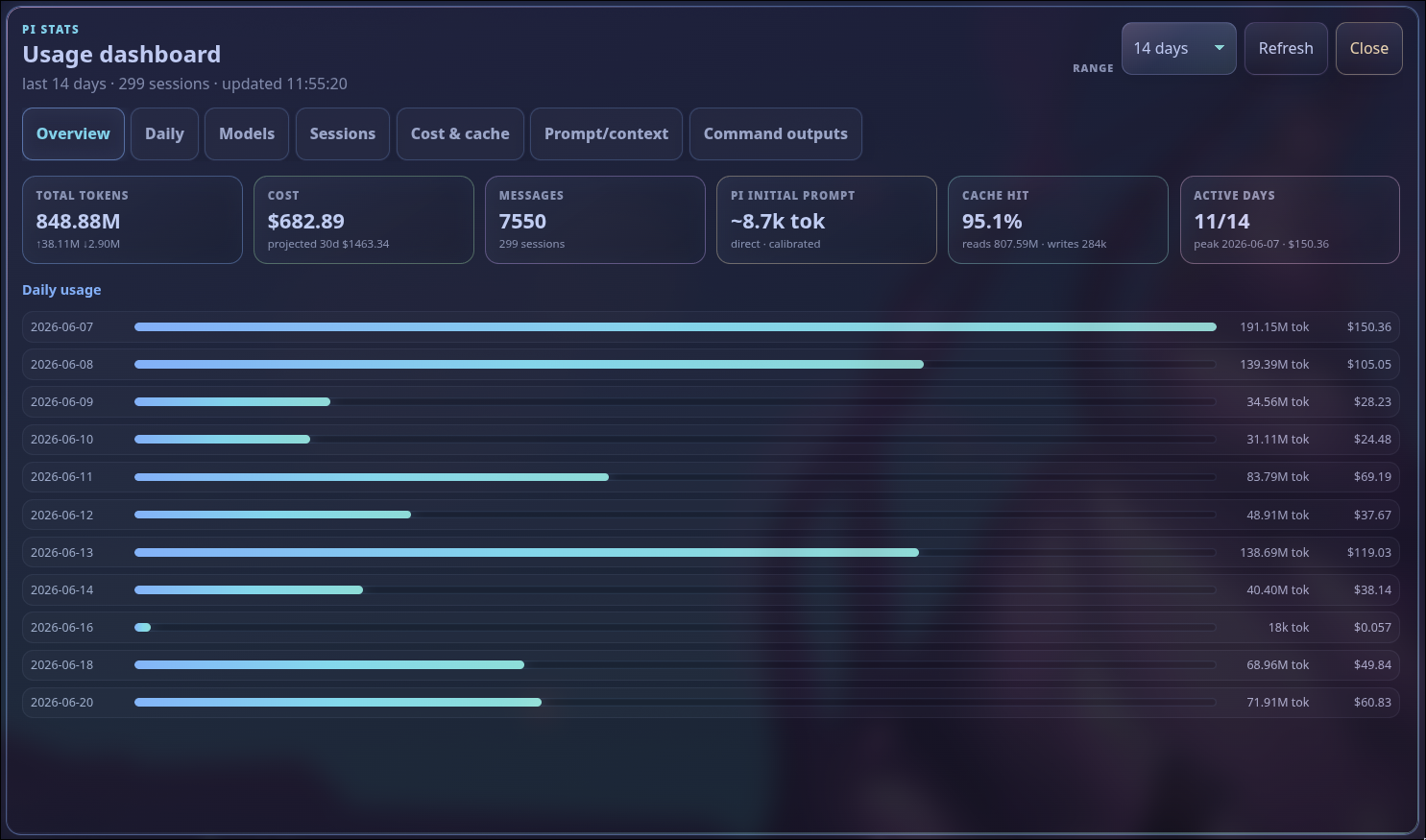
- **What it is:** The browser overlay from the optional stats companion, summarizing token, cost, cache, prompt/context, model, session, and command usage.
- **What you can do:** Filter by time range, refresh analytics, review daily/model/session breakdowns, inspect cost and cache behavior, and calibrate prompt estimates for more accurate local usage visibility.
Useful browser endpoints exposed by the local server include:
- `GET /api/health` and `GET /api/webui-status?detailed=1` for server health, network exposure, tabs, sessions, models/providers, update state, and recent events.
- `GET /api/tabs`, `POST /api/tabs`, `PATCH /api/tabs/`, and tab close/delete routes for multi-tab lifecycle management.
- `GET /api/messages?tab=&since=` for transcript snapshots or delta refreshes.
- `POST /api/prompt`, `POST /api/follow-up`, `POST /api/steer`, `POST /api/bash`, `POST /api/abort`, and `POST /api/abort-bash` for tab-scoped Pi interaction.
- `POST /api/attachments` for uploaded/generated prompt attachments and inline images.
- `GET /api/path-suggestions?tab=&query=` for `@` file/path references with live suggestions.
- `GET /api/bang-suggestions?tab=&query=` for optional `@firstpick/pi-extension-bang-command-autocomplete` `!`/`!!` command suggestions.
- `GET /api/path-fast-picks` and `POST /api/path-fast-picks` for server-persisted cwd fast picks.
- `GET /api/native-parity` for the packaged native TUI/Web UI parity matrix.
- `GET /api/settings`, `POST /api/settings`, `GET /api/tools`, `POST /api/tools`, `GET /api/skills`, and `POST /api/skills` for browser-native Pi settings/tool/skill selectors.
- `GET /api/safety-guard/config` and `POST /api/safety-guard/config` for browser-native persisted Safety Guard Setup.
- `GET /api/skill-file` and localhost-only `POST /api/skill-file` for guarded `SKILL.md` editing from tracked skill tags.
- `GET /api/sessions`, `GET /api/session-tree`, `POST /api/switch-session`, `POST /api/session-rename`, and localhost-only `POST /api/session-delete` for resume/tree/session metadata flows.
- `GET /api/auth-providers` and localhost-only `POST /api/auth-logout` for provider-auth status and stored-credential removal.
- `GET /api/app-runners`, `POST /api/app-runner`, `POST /api/app-runner/input`, `POST /api/app-runner/stop`, `GET/POST/DELETE /api/app-runner-config`, and `GET /api/app-runner-files` for detected and custom project runners. `POST /api/app-runner-config` replaces project discovery paths with `{ "searchPaths": [...] }` or saves a custom runner with `{ "runner": { ... } }`; invalid path submissions fail atomically and leave the stored configuration unchanged.
- `GET /api/git-root`, `GET /api/git-panel`, and `GET /api/git-commit?hash=` for compact per-terminal-group repository discovery, local status/history snapshots, and bounded read-only commit diffs. `POST /api/git-changes/stage-all` and `POST /api/git-changes/unstage-all` complement the guarded path-level staging routes.
- `GET /api/git-changes`, `POST /api/git-changes/pull`, `GET /api/git-branches`, `POST /api/git-branch`, and `/api/git-workflow/*` for browser Git status, diff, branch, init, commit, push, and PR helpers.
- `POST /api/action-feedback?tab=` for feedback on final assistant output and action cards.
- `GET /api/optional-features` for optional companion package install/update status.
- `POST /api/optional-feature-install` for installing or updating known optional companion packages from the side panel.
- `GET /api/git-workflow/staged-content?tab=` for the read-only bounded staged-content hash used by Guided Git approval binding.
- `GET /api/update-status`, localhost-only `POST /api/restart`, and localhost-only `POST /api/update` for checking Pi/Web UI updates and restarting the Web UI. `POST /api/update?all=1` probes the selected Pi executable for `pi update --all`, uses the split `pi update --self` plus `pi update --extensions` fallback when unavailable, and then updates detected Web UI/Optional Feature package roots for configured, local agent, project, global npm, and global Bun installs.
- `GET /api/network`, localhost-only `POST /api/network/open`, localhost-only `POST /api/network/close`, `GET /api/remote-auth`, `POST /api/remote-auth`, and localhost-only `POST /api/remote-auth/settings` for trusted-LAN exposure and optional 4-digit PIN authentication when serving non-local browser clients.
For local development, run the checkout helper directly, for example:
```bash
./dev/scripts/start-webui.sh --dev --cwd /path/to/project
```
The `--dev` helper checks this checkout's local npm dependencies before launch, applies available local updates, and force-refreshes `@earendil-works/pi-coding-agent` to the latest npm version so stale bundled Pi runtime packages do not break extension loading. Set `PI_WEBUI_DEV_SKIP_UPDATE=1` to skip this preflight for offline or intentionally pinned local testing.
Run `../dev/scripts/sync-pi-package-symlinks.sh` first when developing companion packages from this workspace. The Web UI manifest loads companions through `node_modules/` paths, and the sync script links those paths to the top-level dev packages so only one copy is loaded.
## Optional companion packages
A normal Pi/npm install includes the published optional companion packages unless optional dependencies are disabled. Each Web UI tab curates Pi resources from the Web UI package that started the server, while preserving unrelated user/project resources. Companion packages installed as global/npm-prefix siblings of the started Web UI package are reused when the Web UI package does not have its own nested optional dependency copy, avoiding duplicate loads while keeping global `pi-webui` launches working. Startup checks loaded Pi capabilities directly through RPC-visible commands and live widget events, then the side panel shows each optional feature as enabled, disabled, installed-but-not-loaded, update-available, or install-needed. Installing or updating a feature is an explicit, warned action with running/failure feedback in the row and activity log; it is localhost-only, limited to known packages, and requires reloading the active Pi tab after installation.
`@firstpick/pi-extension-aur-review` is intentionally not bundled with this WebUI release until it is published. From this workspace, install it locally with `pi install /home/firstpick/pi-coding-agent-forge/pi-extension-aur-review`, then reload the affected Pi/WebUI tab. `pi install npm:@firstpick/pi-extension-aur-review` becomes valid only after that package is published to npm.
When the standalone global `pi-webui` launcher is used, optional companion installs target the npm prefix containing the Web UI package when that prefix is safe, otherwise the Pi agent npm root if it contains Web UI. Override the target explicitly with `PI_WEBUI_OPTIONAL_FEATURE_INSTALL_ROOT=/path/to/package-root` when needed.
Optional companions:
- `@firstpick/pi-package-natural-conversation` — standalone `/talk` Natural Conversation Mode package. Web UI does not import or load it directly; it detects the package through RPC-visible `/talk`, `/voice`, or `/conversation` commands and renders the optional shell only for tabs where those commands are available.
- `@firstpick/pi-extension-bang-command-autocomplete` — `!`/`!!` shell-command autocomplete. Native Pi TUI autocomplete still uses the companion provider; Web UI uses its own browser endpoint because RPC autocomplete providers do not reach the browser composer.
- `@firstpick/pi-extension-fish-user-bash` — fish/user-shell backend for `!`/`!!` user bash. Web UI emits Pi `user_bash` from the RPC helper so the companion can supply shell operations before default bash execution.
- `@firstpick/pi-extension-btw` — ephemeral `/btw` side-question command with a TUI overlay, Web UI live output widget, and Transfer Context action.
- `@firstpick/pi-prompts-git-pr` — guided Git commit/push workflow.
- `@firstpick/pi-extension-release-npm` — NPM publish menu and release widgets.
- `@firstpick/pi-extension-release-aur` — AUR publish menu and release widgets.
- `@firstpick/pi-extension-aur-review` — Deterministic manual repository/Git review with working-tree standalone snapshots, staged Guided Git snapshots, and a specialized browser card. Install from `/home/firstpick/pi-coding-agent-forge/pi-extension-aur-review` locally for now; npm installation is valid only after publication.
- `@firstpick/pi-extension-workflows` — `/workflow` runtime with non-blocking Web UI subprocess-output widgets.
- `@firstpick/pi-extension-safety-guard` — configurable guardrails for dangerous bash commands and protected file edits, with native `/safety-guard-setup` controls.
- `@firstpick/pi-extension-setup-skills` — TUI `/skills` setup command alongside WebUI-native skill toggles.
- `@firstpick/pi-extension-todo-progress` — todo-progress rendering.
- `@firstpick/pi-extension-tools` — TUI `/tools` active-tool manager alongside WebUI-native tool toggles.
- `@firstpick/pi-package-remote-webui` — `/remote` trusted-LAN QR helper plus the optional browser controls for opening/closing LAN access and Remote PIN auth.
- `@firstpick/pi-extension-git-footer-status` — richer extension-owned git/footer status, including the structured Web UI footer payload.
- `@firstpick/pi-extension-stats` — stats commands and status data.
- `@firstpick/pi-themes-bundle` — Web UI and Pi theme resources.
## Guided Git workflow
The Git workflow button runs local git commands in the active Pi working directory. It covers both empty/new projects and existing repositories.
Before first use, run `/git-workflow-setup` in Pi or choose **Common Pi Options → Guided Git Setup** in the browser. Select an exact authenticated `provider/modelId`, a supported reasoning effort, and the workflow defaults described below. The browser preselects the active tab model when possible, but saving is always explicit. Preferences are stored globally in the Pi Web UI settings file (normally `~/.config/pi-webui/settings.json` or `$XDG_CONFIG_HOME/pi-webui/settings.json`), not in browser storage.
For a new project, the browser flow can:
1. Run `git init` when the active cwd is not yet a repository.
2. Check for `README.md` and `.gitignore`.
3. Create and stage starter `README.md`/`.gitignore` files without overwriting existing files.
4. Create an initial commit.
5. Rename the branch to `main`.
6. Add a GitHub remote from a confirmed `owner/repo`.
7. Push the initialized branch when you confirm the remote target.
For an existing repository, the workflow can:
1. Show staged, unstaged, untracked, and fetched incoming changes.
2. Fast-forward pull fetched incoming commits when the repository is safely behind.
3. Review/select files, preserve a non-empty staged set, or explicitly opt into `git add .`.
4. Generate `/git-staged-msg` with the configured model, supported reasoning effort, language, and scope policy, then restore the tab's prior model/effort. Each request is correlated to its originating tab and a before-generation snapshot of both message files; the browser advances only when both non-empty files are fresh and stable for that exact generation.
5. Use the preferred generated short/long message, a generated single-file default such as `updated file.txt`, or a manual **Commit input** message.
6. Show an optional pre-commit verification reminder, then require explicit confirmation before push and PR delivery actions.
The saved setup includes:
- one generation profile reused for commit messages, branch names, and PR descriptions;
- English or German output, short or long default commit choice, and automatic/never/required Conventional Commit scope;
- review/select (recommended), preserve-staged, or explicit stage-all behavior;
- ask/current-branch/PR-worktree delivery highlighting; and
- optional pre-commit verification reminders.
If the configured model or effort is unavailable, generation stops and asks you to update setup; it never silently substitutes another model. Guided Git never force-pushes automatically. Git hooks and signing configuration continue to run normally.
After the message is generated, **Create PR** asks Pi to generate `dev/COMMIT/staged-branch-name.txt`, lets you confirm or edit the `type/feature-name` branch, then switches with `git switch -c` before committing. In PR mode, choose **Commit short**, **Commit long**, or type a message and use **Commit input**, then **Push and Create PR** pushes the branch, sends `/pr`, shows the generated `dev/PR/.md` description for editing/confirmation, and creates the pull request with `gh pr create`. Use **Manual branch** to skip agent branch-name generation and type the branch directly.
Use the workflow process buttons to jump directly to **Initialize**, **Stage**, **Message**, **Commit**, **Push**, or PR steps when earlier work was already completed manually. Selecting **Message** lets you either run `/git-staged-msg` or type a commit message and use **Commit input** directly. Selecting **Commit** loads the current generated files from `dev/COMMIT/` before enabling the commit choices. Manual preview remains available for existing files, while an active generation uses bounded single-flight polling so duplicate timer, reconnect, and `agent_end` signals cannot race or surface a stale pair. A yellow dot means that process was selected or is available but its action has not completed in this workflow; green means the process action completed.
This requires `/git-staged-msg` and `/pr` from `@firstpick/pi-prompts-git-pr`; branch-name generation uses `/git-branch-name`. Creating the PR also requires an authenticated GitHub CLI (`gh`). Review the generated commit message, branch name, remote URL, and PR description before committing, pushing, or creating a PR.
## Open Issue bot
The **Open Issue** Control Deck action always keeps **Copy complete issue** available. Automated submission is intentionally disabled by default and sends no request unless a deployment supplies the public configuration below before `app.js` loads. These are public routing values only—never put a Cloudflare secret, OpenAI key, GitHub App credential, status capability, or repository-write token in this object.
```html
```
Replace the disabled object in the deployed `public/index.html`, or inject the same object in the hosting HTML before the package's default configuration block. The client accepts only an HTTPS gateway/base URL without credentials, query, or fragment; a syntactically invalid or incomplete configuration fails closed and leaves the button disabled. `turnstileSiteKey` and the private-report URL are public values. The configured intake must allow the exact WebUI `Origin`; do not use a wildcard CORS policy. If a Content Security Policy is present, permit `https://challenges.cloudflare.com` for the Turnstile script/frame requests as documented by Turnstile.
When enabled, each click obtains a fresh Turnstile token and UUID-v4, then posts only `{ schemaVersion, idempotencyKey, turnstileToken, issue }` to `POST /v1/submissions`. `issue` is the selected structured wizard state (`categoryId`, `componentId`, `templateId`, `summary`, and declared fields); editable canonical title/body, repository, labels, verdicts, callback URLs, and credentials are never sent. The returned status capability remains only in an opaque in-memory refresh handle for the open dialog. Nothing in this flow uses `localStorage`, `sessionStorage`, cookies, or draft persistence.
The dialog shows queued/checking/created/rejected/review/unavailable/unknown status in a persistent live region. It polls the capability endpoint with bounded exponential delays (initial server delay, capped at 10 seconds) for at most two minutes, then offers **Refresh status** rather than continuing in the background. Closing the dialog aborts Turnstile, admission, or polling. A created result must be a validated `https://github.com///issues/` link and opens with `noopener noreferrer`. Sensitive-content outcomes show only the configured private-report destination; the wizard never echoes the submitted security text. Rejection, review, unavailable, unknown, and polling-timeout paths retain the copy fallback.
Keep this browser configuration disabled until the gateway's exact-origin CORS policy, Turnstile hostname/action checks, private reporting URL, staging canary, quotas, and both gateway kill-switch decisions have passed review. Browser enablement does not bypass `ISSUE_BOT_ADMISSION_ENABLED` or `ISSUE_BOT_CREATE_ENABLED`; production creation remains a separate operator approval.
## Mobile and PWA notes
- The mobile composer starts as a compact `Ask Pi…` input and grows as you type.
- Installable PWA support, blocked-tab browser notifications, and optional agent-done notifications require browser service-worker/notification support and usually require `localhost` or HTTPS.
- Plain `http://` can show the app, but some browsers disable PWA install and notifications there.
## Network safety
- Default bind is localhost-only: `127.0.0.1:31415`.
- When `@firstpick/pi-package-remote-webui` is loaded and enabled, the side-panel **Remote WebUI** controls dispatch through `/remote`: opening rebinds the server to `0.0.0.0`, shows LAN URLs when available, and toggles to "Close for network".
- The optional **Remote PIN auth** toggle is off by default on first use. When enabled through `/remote auth on` or the Remote WebUI controls, the server saves that preference, generates a fresh random 4-digit PIN for each server start, shows it in the Remote WebUI controls and `/webui-status`, and requires it from non-local browser clients.
- Localhost clients stay frictionless and can toggle Remote PIN auth through the remote companion; changing the toggle persists the preference and disconnects existing event streams so remote clients must re-authenticate after enablement.
- `--host 0.0.0.0` also exposes the Web UI to the local network; pass `--remote-auth` to start with PIN auth already enabled.
- Any connected browser client with access (and the PIN, if enabled) can control Pi and run Web UI bash actions as the Web UI process user.
- Remote PIN auth is a simple trusted-LAN HTTP gate, not hardened multi-user authentication; do not expose it to untrusted networks.
- The Web UI update endpoint is restricted to localhost, because it runs package update commands and restarts the server.
- Treat Pi Web UI as a local companion, not a hardened multi-user web service.
## Troubleshooting
- **`/webui-start` is missing:** restart Pi after installing the package.
- **Wrong port or existing server:** use `/webui-status detailed`, or start on another port with `/webui-start --port 31500`.
- **Optional feature is disabled or missing:** check the side panel, install the companion package if needed, then run `/reload` in the active Pi tab.
- **`spawn npm ENOENT` on Windows during install/update:** use a Web UI release with bundled npm CLI resolution, or run the displayed `npm install` command manually and restart Web UI. Adding Node to `PATH` alone may not help because Windows `spawn()` does not execute the `npm.cmd` shim directly.
- **Remote browser asks for a PIN:** read it from the optional **Remote WebUI** side-panel controls, `/webui-status`, `/remote status`, or the local Web UI server log. Disable the toggle from localhost to remove the PIN gate.
- **PWA install or notifications are unavailable:** use `localhost` or HTTPS; browser support varies on LAN HTTP URLs.