#  Aerofly Startgerät
> The Auxiliary Power Unit for [Aerofly Flight Simulator 4](https://www.aerofly.com/): Improving the main menu with meaningful units and import functionality for weather and flight plans.
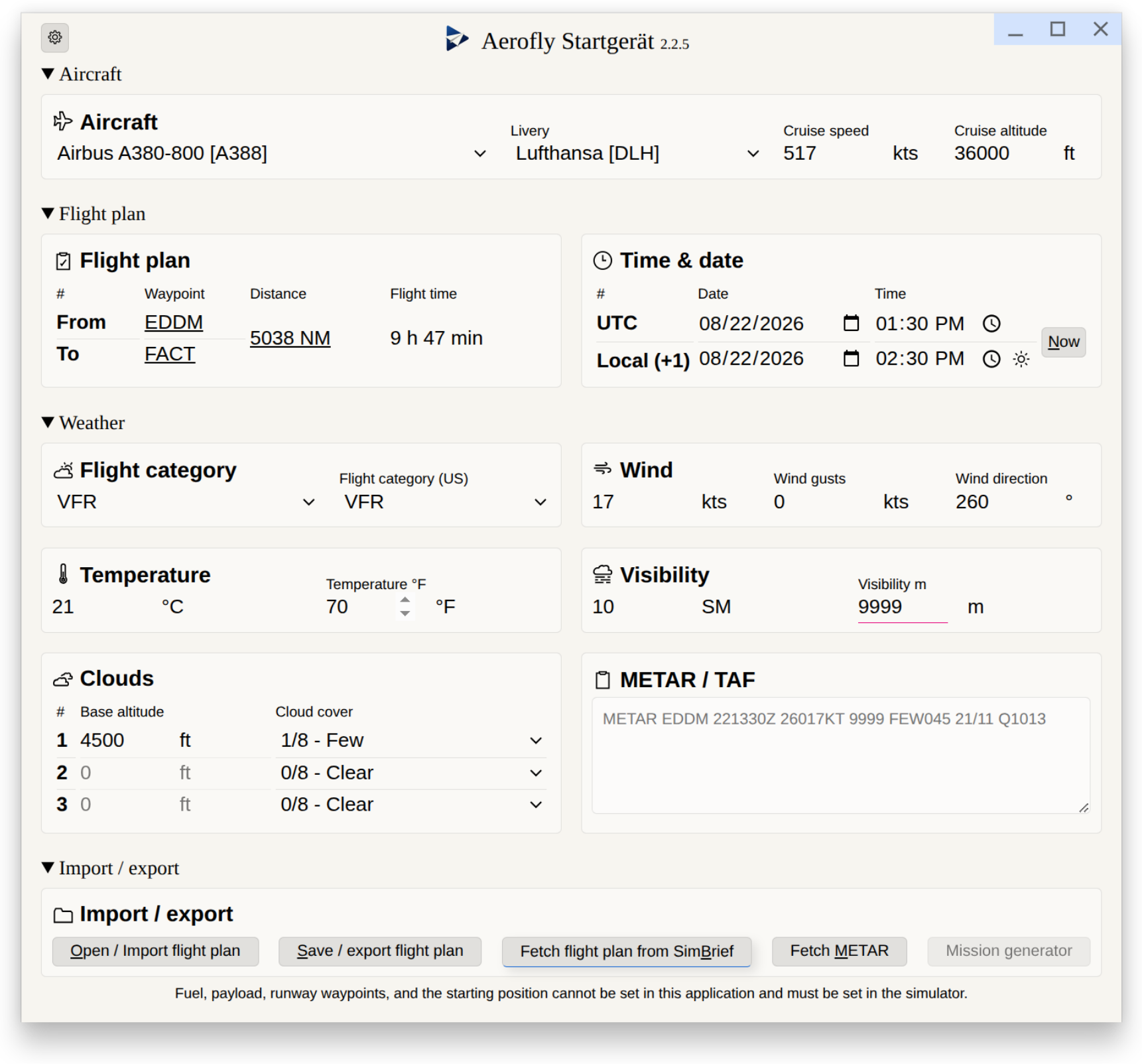
Introducing the Aerofly Startgerät for Microsoft Windows, Apple macOS and Linux, as an extended main menu for [Aerofly Flight Simulator 4](https://www.aerofly.com/). This adds multiple additional options to set-up your flight:
- Change aircraft, livery as well as set-up fuel and payload.
- Time & date
- Manually set time and date in UTC
- Manually set time and date for the current departure airport time zone
- Synchronize the time & date in Aerofly FS4 to to the current time & date.
- Weather
- Change weather with settings in feet, statute miles and other meaningful units.
- Import weather for given time, date and departure airport via [Aviation Weather Center API](https://aviationweather.gov/). Weather can be imported for up to two weeks in the past, for almost any bigger airport around the globe.
- Read weather from METAR string
- Flight plans
- Import flight plans as well as aircraft, airline, time, date and weather settings from [SimBrief](https://www.simbrief.com/) via API.
- Import a flight plan from local import directory. See below for supported flight plan file formats.
- Export a flight plan to a local export directory for later re-import. See below for supported flight plan file formats.
All off these changes are directly written to Aerofly's `main.mcf` main configuration file and are available on the next start-up of Aerofly FS 4.
In this manner the Aerofly Startgerät combines the capabilities of the [Aerofly Wettergerät](https://github.com/fboes/aerofly-wettergeraet) (but for multiple operating systems) and the [Aerofly Missionsgerät](https://github.com/fboes/aerofly-missions) (but directly injecting the new flight plan without any extra steps in-between).
The Aerofly Startgerät is a stand-alone application, and is not directly integrated into Aerofly FS 4.
Supported flight plan file formats:
| File Format / API | Import | Export |
| --------------------------------------------------------------------------------------------------------------------------------------- | :--------------- | :--------------- |
| Aerofly FS `main.mcf` | ✅ 1) | ✅ 1) |
| Aerofly FS 4 `tmc` custom missions | ✅ 1) | ✅ 1) |
| [Microsoft FS 2020 `pln`](https://docs.flightsimulator.com/html/Content_Configuration/Flights_And_Missions/Flight_Plan_Definitions.htm) | ✅ | |
| [Microsoft FS 2024 `pln`](https://docs.flightsimulator.com/html/Content_Configuration/Flights_And_Missions/Flight_Plan_Definitions.htm) | ✅ 2) | |
| [X-Plane 11 / 12 `fms`](https://developer.x-plane.com/article/flightplan-files-v11-fms-file-format/) | ✅ | |
| [Garmin / Infinite Flight `fpl`](https://www8.garmin.com/xmlschemas/FlightPlanv1.xsd) | ✅ | |
| [SimBrief API](./docs/importing-flightplans.md) | ✅ 1) | |
| [Aviation Weather Center METAR API](https://aviationweather.gov/) | ✅ 3) | |
| GeoJSON | | ✅ |
| Keyhole Markup Language (KML) | | ✅ |
| Markdown Text File (for mission briefing) | | ✅ 1) |
- 1) Marked file format import / export also includes aircraft and weather settings
- 2) Marked file format import may fail depending on exporting application due to missing information required by Aerofly FS
- 3) Marked file format import / export only contains weather data
## Installation & Instructions
The Aerofly Startgerät comes in multiple versions. Refer to the different instruction on how to install and use these:
- [**The Aerofly Startgerät Graphical User Interface (GUI) App**](./docs/instructions-gui.md):
A desktop app with a grahpical user interface (GUI).
- [**The Aerofly Startgerät Command Line Interface (CLI) Tool**](./docs/instructions-cli.md):
A terminal application for automatisations, e.g. importing SimBrief flight plans or importing weather information.
- [**The Aerofly Startgerät Model Context Protocol (MCP) Server**](./docs/instructions-mcp.md):
Allow an AI / LLM to create new flight plans & flight settings via this MCP server.
All application versions support computers running Microsoft Windows, Apple macOS and Linux.
### Caveats and notes
> [!WARNING]
> Aerofly FS 4 must not be started while using the Aerofly Startgerät. Settings generated by the Aerofly Startgerät will only be read by Aerofly FS 4 on start-up of the simulator.
- Importing flight plans almost certainly will require to set-up the starting location of you aircraft in Aerofly FS 4, as the parking positions of aircraft are unknown.
- Setting of fuel & payload is not yet possible.
- Importing flight plans almost certainly will require to set-up the runways you want to use in Aerofly FS 4, as the runway IDs are unknown.
- Importing of SIDs and STARs is not possible, so you will also need to add these manually in Aerofly FS 4.
- On importing take into account Aerofly's possibly outdated navigation database.
- The Aerofly Startgerät is able to alter the date and a third cloud layer, which both are not editable in Aerofly FS 4.
- The mapping of aircrafts & airlines from SimBrief import relies on the correct ICAO code of the aircraft being chosen.
See also [the instructions on how to import flight plans](./docs/flight-plan-import.md).
### The SimBrief API workflow
Enter your SimBrief username and click **Fetch**. Startgerät automatically injects your active/latest flight plan directly into Aerofly FS 4 in less then a second.
**Important Navigation Data Note:** SimBrief utilizes the modern AIRAC database 2503 for free users, whereas Aerofly FS 4 relies on a legacy internal database. This may cause a data gap. This is completely normal and rarely impacts standard routes. You may simply need to adjust your terminal procedures (SID/STAR) inside the native Aerofly menu before clicking "Fly".
**Oceanic Routing (NATs/PACOTs):** Aerofly cannot parse compressed track designators (e.g., NAT U). To fix this, take the expanded latitude/longitude coordinates manually from SimBrief's map above, write them by hand into the route text box, re-validate the entire route, generate the flightplan and then fetch the plan via Startgerät, which takes literally seconds to do.
Be aware that weather data imported from SimBrief reflects the weather settings at the time the flight plan was generated, and not the the weather settings at the actual start of flight. You might want to use the "Fetch METAR" functionality to obtain current weather.
> Instructions contributed by AeRodri from [RealFlightOps](https://www.youtube.com/@RealFlightOps)
### Other flight planning software workflow
Create your route on any flight planning software, and crucially, manually select a AIRAC Cycle matching with Aerofly's native database.
Be aware that most flight plan formats do not include aircraft and weather settings. They need to be setup using the Aerofly Startgerät.
## Technical stuff
This projects uses the public APIs of the [Aviation Weather Center](https://aviationweather.gov/) and [SimBrief](https://www.simbrief.com/). The usage of these APIs may be restricted or blocked on your local computer.
## Status
[](https://github.com/fboes/aerofly-startgeraet)
[](https://www.npmjs.com/package/@fboes/aerofly-startgeraet)

For a detailed history of changes, see [CHANGELOG.md](CHANGELOG.md).
## Legal stuff
Author: [Frank Boës](https://3960.org/) 2026
Copyright & license: See [LICENSE.txt](LICENSE.txt)
This tool is NOT affiliated with, endorsed, or sponsored by IPACS GbR. As stated in the [LICENSE.txt](LICENSE.txt), this tool comes with no warranty and might damage your files.
This software complies with the General Data Protection Regulation (GDPR) as it does not collect nor transmits any personal data to third parties. Exceptions are listed below. For these data protection statement you might want to check their terms of service.
- [Aviation Weather Center API](https://aviationweather.gov/): Used for fetching METAR data on demand in the CLI / GUI, or for METAR / NAVAID data in the MCP
- [SimBrief API](https://www.simbrief.com/): Used for fetching flight plans on demand in all application
- GitHub API: Used for cechking update status in the GUI